
Self Publishing Has Never Been More Accessible
The barrier to becoming a published author used to involve thousands of dollars, gatekeeping agents, and exclusive traditional publishing deals. Today, the only real barrier is knowledge. With the right self-publishing tools for beginners, anyone with a story to tell or expertise to share can publish a professional-grade book.
Building a customized toolkit is the first step toward publishing success. You do not need to spend a fortune; in fact, many of the best self-publishing tools for beginners are completely free or require only a modest one-time investment. Understanding how to leverage these resources will save you months of frustration.
In this guide, we break down the essential self-publishing tools for beginners across writing, editing, formatting, cover design, and distribution. Choosing the right combination ensures your final book rivals anything produced by traditional publishing houses.
Whether you are writing a massive non-fiction guide or a compelling romance novel, integrating proper self-publishing tools for beginners into your daily workflow is the secret to scaling your author career efficiently.
Category 1: Writing Tools
Your writing environment sets the tone for your entire project. Google Docs is excellent for collaborative editing and is completely free. ChatGPT’s free tier serves as an incredible brainstorming partner for outlining and idea generation.
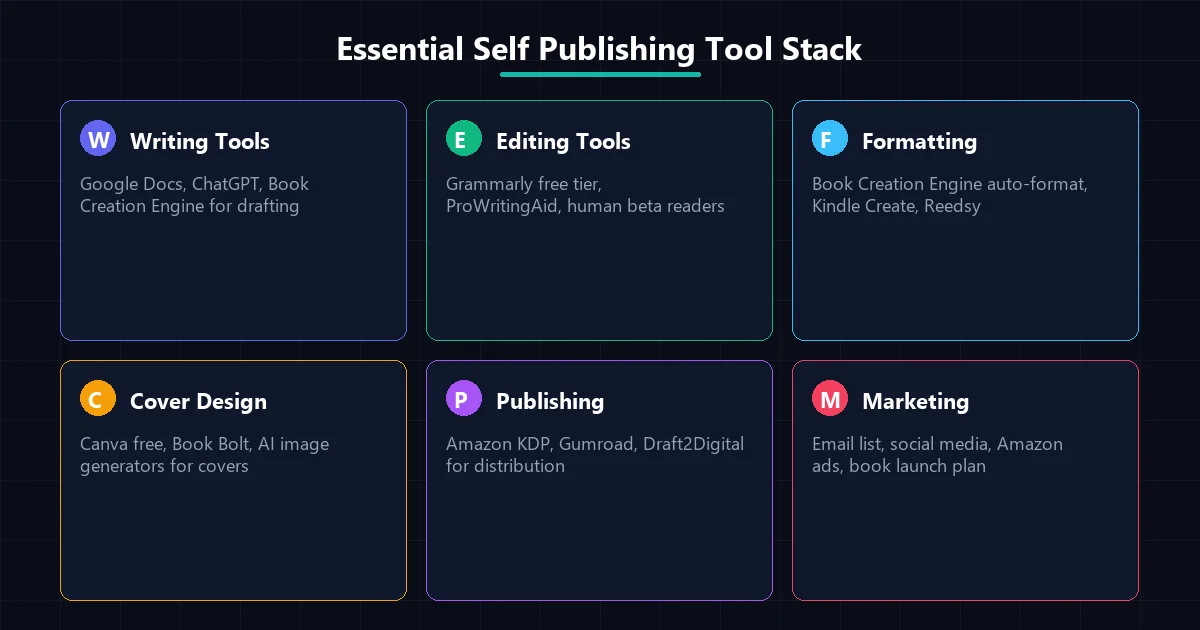
Essential self publishing tool stack showing 6 categories from writing to marketing.
However, if you want an all-in-one writing powerhouse, the Book Creation Engine (Rs 4,999) is unmatched. It integrates AI directly into your writing pipeline, making it one of the most powerful self-publishing tools for beginners available today.
Category 2: Editing and Proofreading
Editing is non-negotiable. Grammarly’s free tier catches basic typos and grammatical errors, while ProWritingAid offers deeper stylistic insights. LanguageTool is a fantastic open-source alternative.
Do not underestimate the power of human beta readers. Engaging with writing communities to find free beta readers is an essential practice when assembling your self-publishing tools for beginners.
Category 3: Formatting and Interior Design
Formatting used to be a nightmare for indie authors. Now, Kindle Create provides a free, Amazon-specific formatting solution, while Reedsy Studio offers a beautiful browser-based alternative.
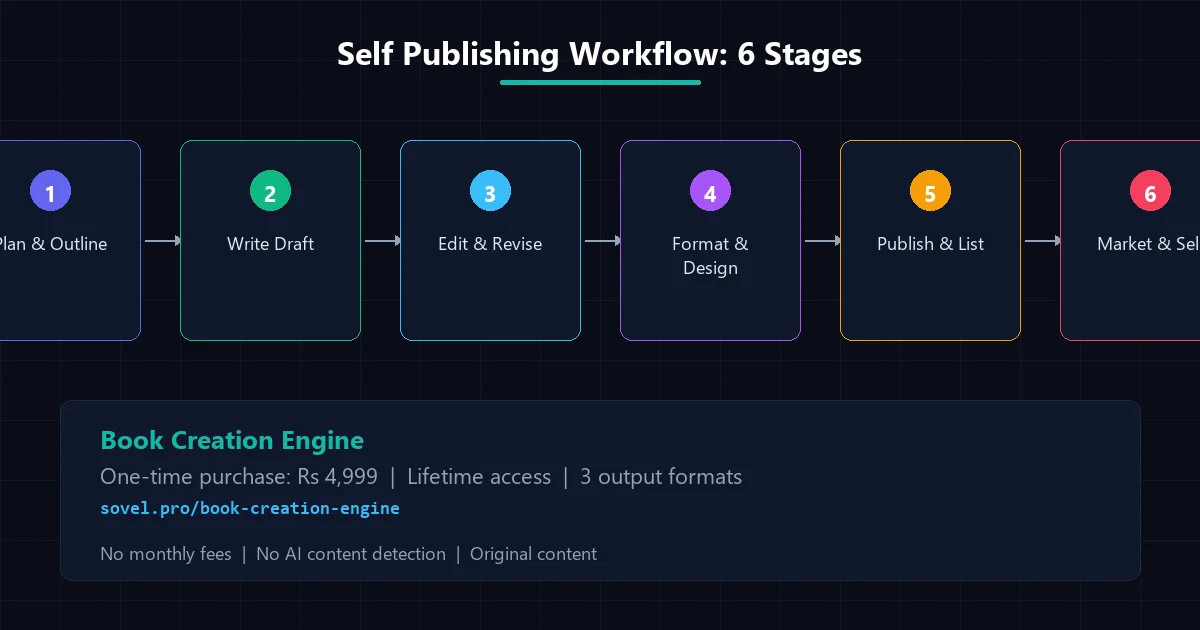
Self publishing workflow 6 stages from planning to marketing and selling.
For those using the Book Creation Engine, auto-formatting is built right in, outputting DOC, PDF, and EPUB files seamlessly. This eliminates the need for separate formatting software, consolidating your self-publishing tools for beginners.
Category 4: Cover Design
People absolutely judge books by their covers. Canva offers a robust free tier with excellent book cover templates. Book Bolt is highly specific for KDP low-content and no-content books.
Integrating AI image generators into your workflow is also becoming standard practice, providing high-quality custom artwork as part of modern self-publishing tools for beginners.
Category 5: Publishing and Distribution
Getting your book into the hands of readers is the final hurdle. Amazon KDP is the undisputed king and is free to join. Draft2Digital is perfect for wide distribution across Apple, Kobo, and Barnes & Noble.
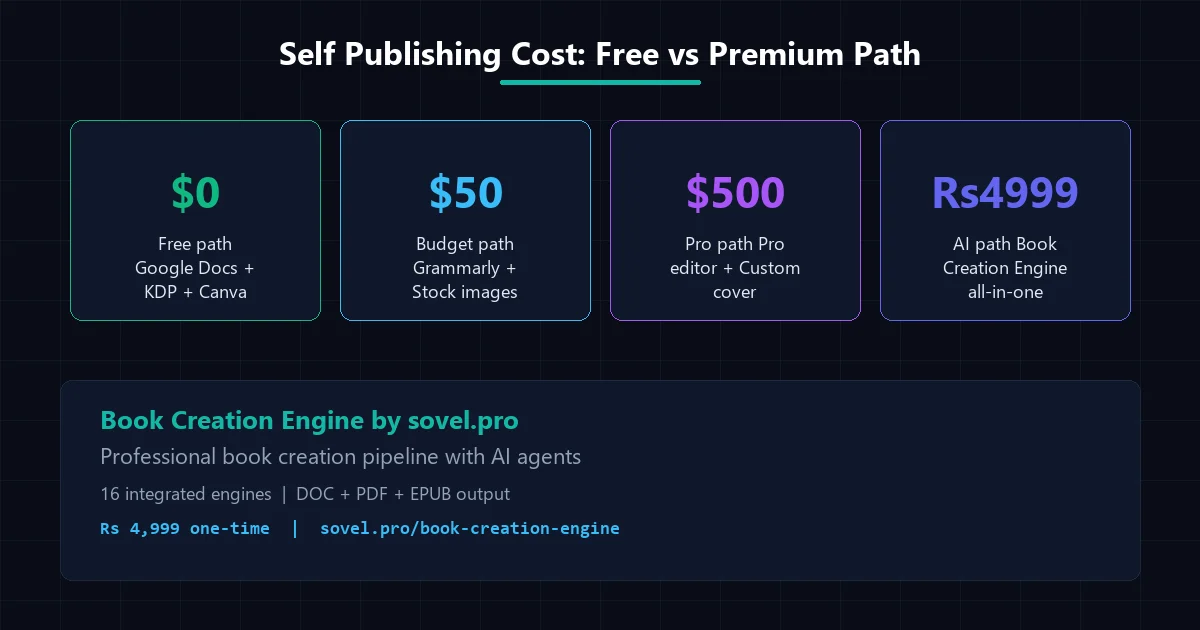
Self publishing cost breakdown comparing free budget pro and AI path options.
For authors looking to sell directly to their audience and keep maximum profits, Gumroad and Payhip are essential self-publishing tools for beginners.
Category 6: Marketing Basics
Writing the book is only half the battle; marketing is the other. Mailchimp’s free tier allows you to build an email list of up to 500 subscribers. Setting up an Amazon Author Central page is crucial for credibility.
A solid social media strategy, utilizing free scheduling tools, rounds out the marketing section of your self-publishing tools for beginners.
The All-in-One Option: Book Creation Engine
Instead of juggling ten different apps, the Book Creation Engine consolidates writing, formatting, and exporting into a single 16-stage pipeline. For a one-time fee of Rs 4,999, it replaces multiple expensive subscriptions.
By operating directly in VS Code with extensions like Cline or OpenCode, it offers a professional environment that remains highly accessible, making it the ultimate addition to your self-publishing tools for beginners.
Budget Roadmap: Free vs Premium Paths
| Path | Cost | Primary Tools | Pros & Cons |
|---|---|---|---|
| Free Path | $0 | Google Docs, Canva, Kindle Create | Cost-effective but highly manual and time-consuming. |
| Budget Path | ~$50 | Scrivener, ProWritingAid (Sale) | Better organization, requires moderate technical skill. |
| Premium Path | $500+ | Vellum, Professional Cover Designer, Premium Editors | High quality, but significant financial risk for beginners. |
| AI Path | Rs 4,999 | Book Creation Engine | Fastest production, automated formatting, high ROI. |
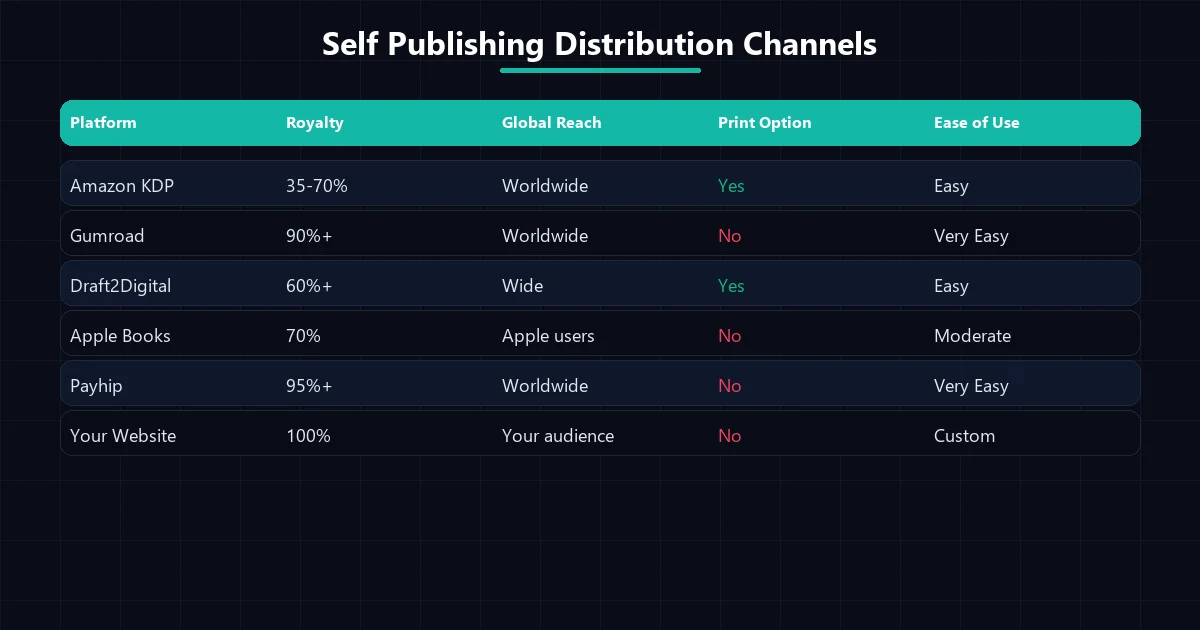
Self publishing distribution channels comparing royalties and global reach.
Deep Dive: Maximizing the Value of Your Software Stack
When selecting self-publishing tools for beginners, focus on interoperability. Tools that talk to each other save you hours of copying and pasting. The Book Creation Engine excels here because it manages the entire flow from initial research prompting to final EPUB generation.
It is important to remember that self-publishing tools for beginners should reduce friction, not add to it. Avoid downloading dozens of free apps that overcomplicate your workflow. Stick to the proven essentials: a solid word processor, a reliable grammar checker, and a straightforward formatting solution.
Additionally, protecting your manuscript is a critical aspect of using self-publishing tools for beginners. Always use cloud storage solutions like Google Drive or Dropbox to back up your drafts daily. A hardware failure should never result in a lost book.
As you gain experience, you can slowly upgrade your self-publishing tools for beginners to pro-level software. However, many authors find that tools like the Book Creation Engine scale perfectly alongside their growing business, providing lifetime value.
Marketing software often gets overlooked when discussing self-publishing tools for beginners. Establishing an author newsletter early on is critical. Free tools like Mailchimp or MailerLite give you a direct line to your fans, bypassing the unpredictable algorithms of Amazon and social media platforms.
Ultimately, the best self-publishing tools for beginners are the ones you actually use. Consistency in writing, editing, and publishing is far more important than owning the most expensive software on the market.
Take the time to master your chosen self-publishing tools for beginners. Run test documents through the formatting pipeline, experiment with cover design templates, and learn the intricacies of the KDP dashboard before your official launch date.
The Complete 4-Week Publishing Timetable for Novice Authors
Having access to great software is useless without an actionable timeline. Many first-time creators get stuck in endless revision cycles or tool configuration loops. Structuring your journey into four discrete weekly sprints provides momentum and clarity.
Week 1: Research, Topical Architecture, and Outlining
Dedicate your opening week entirely to market validation and conceptual framing. Identify target categories on Amazon, study competitive titles, and note frequent reader complaints in your niche. Construct your master chapter outline, establish character bibles if writing fiction, and compile factual reference folders for non-fiction projects.
Week 2: Manuscript Drafting and Chapter Assembly
Shift focus to continuous drafting. Resist the urge to edit while writing. Leverage AI drafting assistance or daily writing sprints in Google Docs to produce your initial chapter passes. Target consistent daily outputs of 2,000 to 4,000 words until the full rough draft is assembled in your local workspace.
Week 3: Editorial Passes, Proofreading, and Interior Layout
Perform three focused editorial passes: developmental continuity, line-level readability, and spelling/grammar verification. Once the prose is locked, import your draft into formatting software to generate synchronized table of contents, style headers, and embed chapter illustrations.
Week 4: Cover Assembly, Metadata Optimization, and Store Distribution
Finalize your cover graphics, ensuring thumbnail readability at small display sizes. Draft compelling promotional descriptions utilizing proven copywriting frameworks. Upload your formatted EPUB and print-ready PDF files to Kindle Direct Publishing and direct digital storefronts, verify digital proofs, and announce your release.
Free Marketing Assets: 3D Mockups and Author Platform Foundations
Publishing your book is only half the journey; you must present it attractively to generate sales. Fortunately, creating promotional visual assets no longer requires hiring an expensive creative agency.
You can generate photorealistic 3D book mockups using free online rendering tools such as DIYBookCovers or smart mockup generators in Canva. Displaying your title as a tangible paperback, a tablet screen, or an audiobook case dramatically improves conversion rates on landing pages and social media announcements.
Additionally, claim your official profile on Amazon Author Central as soon as your book appears in the store catalog. This free platform allows you to add an authoritative author biography, link your social media channels, display professional headshots, and monitor reader reviews across international Amazon marketplaces from a unified dashboard.
Avoiding the SaaS Subscription Trap in Independent Publishing
A major pitfall for newcomers is accumulating recurring software subscriptions. Subscribing to specialized outlining tools, proprietary proofreading services, dedicated book formatting software, and monthly graphic design suites can quickly drain $150 to $250 every single month before you earn your first royalty check.
Prioritize lifetime licenses and open-source utilities wherever possible. Tools that operate directly on your local computer using standard open formats protect you against unexpected price increases, vendor lock-in, and sudden platform closures.
Investing in unified, one-time purchase systems like the Book Creation Engine at Rs 4,999 provides permanent commercial capability without recurring financial drag, ensuring your publishing venture remains profitable from day one.
ISBN Strategy: Amazon Free ASIN vs Purchasing Custom Identifiers
Understanding book identifiers is a critical milestone for every indie author. For digital Kindle ebooks, an official ISBN is completely optional; Amazon automatically assigns an internal ten-character Amazon Standard Identification Number (ASIN) upon publication.
However, when producing physical paperback or hardcover editions, an ISBN becomes mandatory. Amazon provides free assigned ISBNs during the setup process. While cost-effective for beginners, using a free Amazon ISBN lists ‘Independently Published’ as your publisher of record and restricts expanded distribution outside the Amazon marketplace.
If you intend to distribute print copies to independent brick-and-mortar bookstores, universities, or public libraries through IngramSpark, purchasing your own block of ISBNs from Bowker (in the United States) or your respective national ISBN agency is recommended. For first-time authors testing their market niche, starting with Amazon free identifiers keeps initial overhead at zero.
Establishing an Automated Reader Magnet Funnel for Repeat Sales
The most successful self-publishers do not treat their books as one-off transactions; they view them as front-end invitations to an author platform. Including a compelling ‘reader magnet’ in your front matter or back matter transforms anonymous purchasers into direct email subscribers.
A reader magnet can be an exclusive bonus chapter, an actionable printable workbook, a cheat sheet, or a character backstory novella. Use free author distribution services like StoryOrigin or BookFunnel to securely deliver these digital bonuses in exchange for reader email addresses.
Connecting this gift delivery to an automated welcome sequence in Mailchimp or MailerLite builds an engaged community that eagerly awaits your subsequent releases, ensuring every new launch achieves immediate momentum.
Cultivating relationships with fellow authors in your genre provides long-term promotional leverage. Participating in mutual newsletter swaps, joint giveaway promotions, and anthology bundles introduces your work to established reader bases without spending thousands on paid ad campaigns.
Participating in indie author forums and attending virtual self-publishing conferences provides ongoing industry insights and keeps you informed on changing retailer algorithms.
Frequently Asked Questions
What are the most essential self-publishing tools for beginners?
The bare essentials include a reliable word processor (like Google Docs), a grammar checker (like Grammarly), a formatting tool (like Kindle Create), and a cover design platform (like Canva).
Can I self-publish a book completely for free?
Yes. By utilizing free tiers of software like Canva, Google Docs, and Reedsy Studio, and publishing through Amazon KDP, you can publish a book without spending a single dollar upfront.
Is the Book Creation Engine suitable for beginners?
Absolutely. While it uses advanced AI, the 16-stage pipeline is highly structured and guides beginners step-by-step through the entire writing and formatting process, making it one of the most effective self-publishing tools for beginners.
Do I need to buy expensive formatting software?
No. While premium formatting software like Vellum is excellent, tools like the Book Creation Engine offer automated formatting included in the writing pipeline, saving you money and time.
Where should a beginner publish their first book?
Amazon KDP is universally recommended for beginners due to its massive built-in audience, easy-to-use interface, and zero upfront costs for digital and print-on-demand publishing.
Ready to build your author toolkit? Get the Book Creation Engine and unify your entire workflow.
Explore more tools or check our blog for additional publishing tips.