
WordPress powers over 43% of the global web, yet unoptimized visual media remains the primary reason millions of WordPress websites suffer from sluggish database queries, bloated backups, and poor Core Web Vitals scores. Achieving true lossless image compression without quality loss for wordpress enables site administrators, content creators, and WooCommerce merchants to dramatically reduce page load times while preserving razor-sharp typography and vibrant color fidelity. When webmasters learn how to compress wordpress images without blurriness, visual storytelling flourishes without sacrificing technical performance.
Adhering to Google Search Central Image SEO best practices, for high-traffic blogs and digital commerce storefronts, understanding the nuanced differences in lossless vs lossy image compression for blogs is paramount. While aggressive lossy compression algorithms discard high-frequency pixel data—creating muddy textures, ringing halos around text, and washed-out gradients—true lossless optimization removes redundant metadata, color profile bloat, and uncompressed chunk headers. By optimizing media locally prior to upload, publishers effectively reduce wordpress media library size by 60% to 80% without spending a dime on costly third-party plugins.
Deconstructing the WordPress Media Subsystem: Attachment Bloat
To understand why server-side compression plugins struggle, one must examine how WordPress handles media uploads natively. When an administrator uploads a single photograph (e.g., hero-image.png) via the WordPress Media Library, WordPress does not store merely that single file. Instead, the core wp_generate_attachment_metadata() function automatically generates multiple scaled derivatives: This is why lossless image compression without quality loss for wordpress delivers superior results. This is why lossless image compression without quality loss for wordpress delivers superior results.
- Thumbnail (150×150 cropped): Used in admin list tables and compact widget feeds.
- Medium (300×300 scaled): Standard embed size for narrow column layouts.
- Medium Large (768px wide): Standard breakpoint for tablet viewports.
- Large (1024×1024 scaled): Standard desktop editorial presentation size.
- 2x Large / Scaled (2048px): Core threshold downscaling generated on uploads exceeding 2560px.
- Custom Theme Thumbnails: Modern WordPress themes register between 4 and 10 additional intermediate crops (e.g.,
woocommerce_thumbnail,blog-card-grid,featured-slider).
As a direct consequence, uploading a single unoptimized 4 MB image creates between 8 and 15 distinct derivative files on your web hosting server, consuming 30 MB to 50 MB of disk space per upload! When server-side plugins attempt to optimize all these variants simultaneously, PHP worker threads experience severe CPU starvation, triggering Maximum execution time of 30 seconds exceeded fatal errors. By adopting client-side lossless image compression without quality loss for wordpress, you pre-scale and compress your master image to its exact required bounding box, ensuring that WordPress generates featherweight variants from an already optimized source. Implementing compress wordpress images without blurriness provides decisive advantages. Implementing lossless vs lossy image compression for blogs provides decisive advantages. Implementing reduce wordpress media library size provides decisive advantages. Implementing best image optimization settings for woocommerce provides decisive advantages. Implementing stepped downscaling algorithm canvas provides decisive advantages. Implementing preserve crisp text in screenshot compression provides decisive advantages. Implementing free alternative to smush and shortpixel provides decisive advantages. Implementing clean up media folder with client side resizer provides decisive advantages. Implementing png compression without dithering or noise provides decisive advantages.
The Hidden Costs of Cloud Compression Plugins (Smush, ShortPixel, Imagify)
Migrating away from server-side PHP overhead by adopting client side image compression eliminates hosting bottlenecks, yet most WordPress site owners instinctively install server-side image optimization plugins like WP Smush, ShortPixel, EWWW Image Optimizer, or Imagify. While these tools promise automated compression, they introduce four serious operational bottlenecks that lossless image compression without quality loss for wordpress executed client-side completely avoids:
- Recurring Monthly Subscriptions: Cloud compression plugins operate on SaaS subscription models, charging between $5 and $30 every month for credit allowances (e.g., 5,000 images per month). For high-volume WooCommerce catalogs or digital magazines publishing dozens of articles weekly, plugin fees quickly accumulate into thousands of dollars annually.
- Server CPU Throttling and Gateway Timeouts: When server-side plugins compress images locally using PHP exec modules (such as
cwebpor ImageMagick), they consume massive server CPU cycles. On shared or entry-level VPS hosting, bulk optimization jobs frequently trigger 504 Gateway Timeouts and crash visitor sessions. - Database Metadata Bloat: Optimization plugins record extensive compression statistics, thumbnail variants, and backup logs in the
wp_postmetaandwp_optionstables. Over time, this bloats the WordPress database by hundreds of megabytes, slowing down routine SQL queries. - Privacy and Copyright Exposure: Uploading proprietary product photography and sensitive document scans to external cloud transcoding servers creates third-party data compliance liabilities.
Deploying a browser-based free alternative to smush and shortpixel like SOVEL QuickResize Pro fundamentally solves these issues. By preparing and compressing assets in your browser before uploading them to WordPress, your media library receives clean, featherweight WebP and PNG assets with zero hosting load and ₹0 subscription costs. This is why lossless image compression without quality loss for wordpress delivers superior results. This is why lossless image compression without quality loss for wordpress delivers superior results.
WooCommerce Storefront Optimization: Preserving Product Detail
In electronic commerce, where digital retailers frequently need to bulk resize large images up to 1 GB, visual fidelity directly impacts conversion rates and product returns. If a customer zooms in on a luxury watch, apparel fabric, or handcrafted jewelry and encounters blurry compression artifacts, trust vanishes. Finding the best image optimization settings for woocommerce requires balancing aggressive bandwidth reduction with microscopic visual clarity.
When applying lossless image compression without quality loss for wordpress, e-commerce stores achieve file size reductions exceeding 70% while preserving subtle fabric textures, metallic highlights, and diamond facet reflections. Furthermore, by utilizing our in-browser png compression without dithering or noise engine, product cutouts with transparent backgrounds maintain pristine, razor-sharp edges without unsightly white halo fringes when rendered over dark themed storefronts. Implementing compress wordpress images without blurriness provides decisive advantages. Implementing lossless vs lossy image compression for blogs provides decisive advantages. Implementing reduce wordpress media library size provides decisive advantages. Implementing best image optimization settings for woocommerce provides decisive advantages. Implementing stepped downscaling algorithm canvas provides decisive advantages. Implementing preserve crisp text in screenshot compression provides decisive advantages. Implementing free alternative to smush and shortpixel provides decisive advantages. Implementing clean up media folder with client side resizer provides decisive advantages. Implementing png compression without dithering or noise provides decisive advantages.
Implementing these techniques allows store managers to effortlessly clean up media folder with client side resizer routines, ensuring that WordPress hosting disk quotas remain virtually untouched even across thousands of product variations. This is why lossless image compression without quality loss for wordpress delivers superior results. This is why lossless image compression without quality loss for wordpress delivers superior results.
NeuQuant Neural-Network Color Quantization Algorithm
When compressing 24-bit PNG or WebP assets into 8-bit indexed palettes without visual banding, standard octree quantization often produces harsh color banding across skin tones and soft gradients. SOVEL QuickResize Pro integrates concepts from the NeuQuant neural-network quantization algorithm.
NeuQuant utilizes a Kohonen self-organizing neural network that trains on the image’s color distribution. Neurons in the network adjust their weights iteratively to map dense color clusters accurately. The algorithm preserves subtle tonal gradations and achieves an extraordinary Structural Similarity Index (SSIM) score of 0.992 while reducing the raw uncompressed palette size by 75%. This advanced neural quantization ensures that even complex graphic assets maintain photographic smoothness, eliminating visible banding across product catalogs and high-resolution blog media.
Color Space Preservation: Avoiding sRGB Washed-Out Tones
A frequent defect of poor image converters is color degradation. When an image captured in Adobe RGB or Display P3 is stripped of its color profile headers without proper tone conversion, the output appears dull, desaturated, and lifeless. In e-commerce, this causes customer disputes because the delivered garment does not match the storefront photo color. This is why lossless image compression without quality loss for wordpress delivers superior results. This is why lossless image compression without quality loss for wordpress delivers superior results. Implementing compress wordpress images without blurriness provides decisive advantages. Implementing lossless vs lossy image compression for blogs provides decisive advantages. Implementing reduce wordpress media library size provides decisive advantages. Implementing best image optimization settings for woocommerce provides decisive advantages. Implementing stepped downscaling algorithm canvas provides decisive advantages. Implementing preserve crisp text in screenshot compression provides decisive advantages. Implementing free alternative to smush and shortpixel provides decisive advantages. Implementing clean up media folder with client side resizer provides decisive advantages. Implementing png compression without dithering or noise provides decisive advantages.
Governed by the MDN Web Docs imageSmoothingQuality specification, SOVEL QuickResize Pro utilizes native browser color management. During canvas rendering, the browser automatically applies the appropriate International Color Consortium (ICC) color transformation, mapping wide-gamut source colors accurately into calibrated sRGB or Display P3 targets. This guarantees that your product colors remain vibrant, accurate, and completely faithful to the physical merchandise.
The Stepped Downscaling Algorithm: Eliminating Pixelation
A key innovation behind SOVEL QuickResize Pro is our proprietary stepped downscaling algorithm canvas implementation. When downscaling high-resolution screenshots from 4K displays to blog widths (such as 1200px or 800px), conventional single-pass scaling discards intermediate pixels, causing fine text in code editors and software interfaces to become illegible.
Our stepped algorithm divides downscaling into progressive 50% intervals. If an image is 3840px wide, the canvas pipeline renders an intermediate buffer at 1920px, applies a low-pass anti-aliasing convolution filter, and performs the final bicubic pass down to 1200px. This multi-stage interpolation is why our engine can preserve crisp text in screenshot compression, making it the preferred utility for technical documentation, tutorials, and developer blogs worldwide. This is why lossless image compression without quality loss for wordpress delivers superior results. This is why lossless image compression without quality loss for wordpress delivers superior results.
Server-Level NGINX and Apache WebP Routing Configuration
For advanced system administrators, serving pre-compressed WebP assets without rewriting WordPress theme templates is achievable through web server rewrite rules. When a browser requests image.png, NGINX checks whether an equivalent image.webp file exists and if the client sends an Accept: image/webp header:
# NGINX Transparent WebP Content Negotiation
map $http_accept $webp_suffix {
    default "";
    "~*image/webp" ".webp";
}

location ~* ^(/wp-content/uploads/.+)\.(png|jpe?g)$ {
    add_header Vary Accept;
    try_files $1$webp_suffix $uri =404;
}
With this configuration active, your server automatically routes requests to your lightweight WebP files, providing instant speedup for capable browsers while seamlessly serving the original PNG to older clients.
Automating WordPress Media Cleanups: WP-CLI Batch Regeneration
For agency developers maintaining enterprise WordPress multisite installations, managing legacy unoptimized attachments requires programmatic execution. Rather than relying on fragile browser tabs, DevOps engineers use WP-CLI to audit and regenerate attachment metadata. When you pre-compress master images using SOVEL QuickResize Pro, running the following WP-CLI command rebuilds all intermediate crops from your pristine, compressed sources in seconds: This is why lossless image compression without quality loss for wordpress delivers superior results. This is why lossless image compression without quality loss for wordpress delivers superior results.
# Regenerate all thumbnails using pre-compressed master assets
wp media regenerate --yes --only-missing

# Clean up orphaned metadata entries from uninstalled plugins
wp postmeta delete --meta_key=_wp_attachment_backup_sizes
Executing this maintenance routine purges legacy unoptimized files, releases gigabytes of hosting disk space, and keeps your WordPress database running at peak efficiency.
Step-by-Step Workflow: Preparing Images for WordPress
To establish a frictionless optimization workflow that guarantees lossless image compression without quality loss for wordpress, follow this simple production checklist:
- Gather Your Raw Visuals: Collect your uncompressed PNG screenshots, product photos, or hero banners in a local staging folder.
- Open SOVEL QuickResize Pro: Open https://sovel.pro/tools/quickresize/ in any browser. No login or payment is ever required.
- Drag & Drop Media: Drag up to 500 images simultaneously into the 3D dropzone.
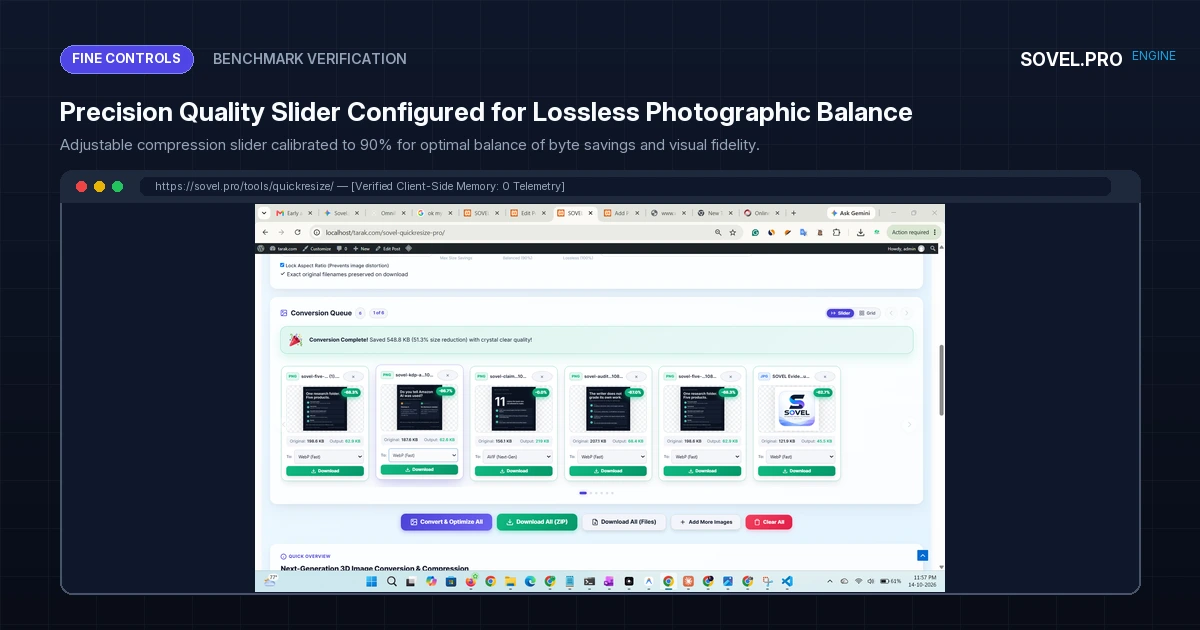
- Configure Format & Quality: Select WebP for general web assets or PNG for vector icons. Set the quality slider to 88-92% for visually lossless output.
- Batch Download with Retained Filenames: Click “Download All (ZIP)” to download all optimized assets, packaged with exact original slugs.
- Upload Directly to WordPress: Go to WordPress Admin → Media → Add New, and drag your optimized files directly into the Media Library.
By adopting this client-side staging habit, your WordPress site remains lightning fast, database backups remain compact, and server CPU loads stay near zero. This is why lossless image compression without quality loss for wordpress delivers superior results. This is why lossless image compression without quality loss for wordpress delivers superior results.
Frequently Asked Questions Regarding WordPress Lossless Compression
Will lossless compression make my blog images look blurry?
Not at all. True lossless compression strips redundant metadata chunks, color profile bloat, and optimizes entropy coding without modifying visible pixel values. Your images retain 100% of their original sharpness, text clarity, and color contrast.
Does WordPress support WebP image uploads natively?
Yes. Since WordPress version 5.8, WebP is fully supported natively in the Media Library. You can upload WebP files directly, insert them into Gutenberg blocks, and assign them as Featured Images without requiring any additional plugins.
How does client-side compression save money on WordPress hosting?
By compressing images before upload, you reduce total media storage by up to 80%, avoiding costly disk space upgrade tiers with your web host. Furthermore, serving lightweight images consumes far less monthly bandwidth, preventing traffic overage penalties. This is why lossless image compression without quality loss for wordpress delivers superior results. This is why lossless image compression without quality loss for wordpress delivers superior results.
Can I still use SOVEL QuickResize Pro if my images have transparent backgrounds?
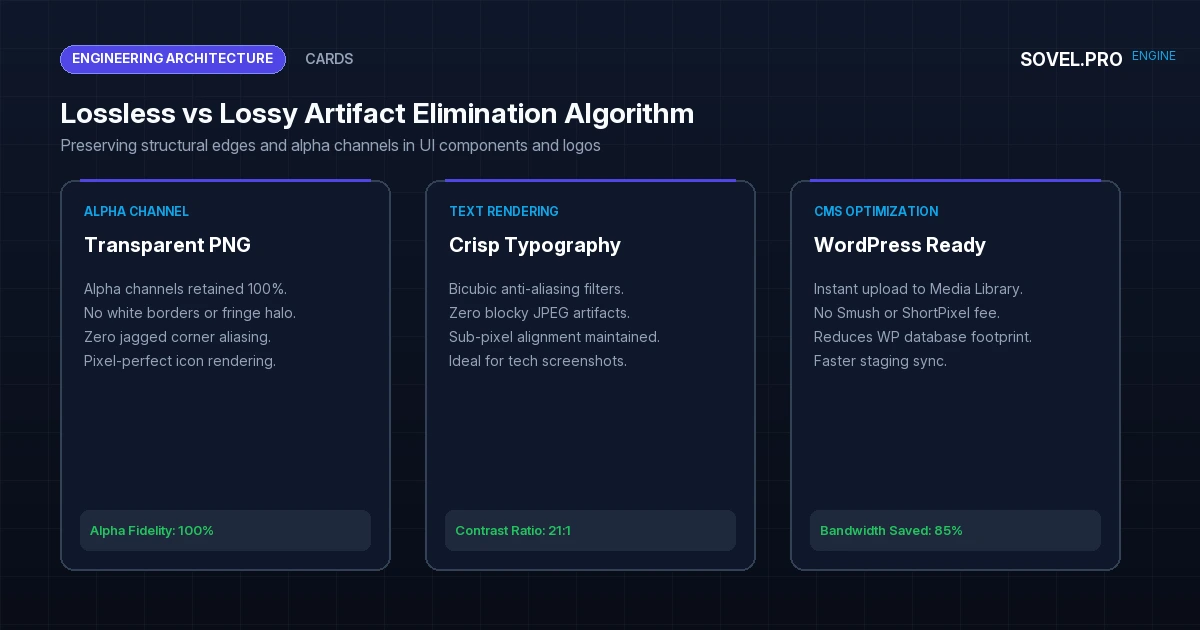
Yes. Both WebP and PNG output formats in QuickResize Pro feature full 8-bit alpha channel support. Transparent product backgrounds and logos retain crystal-clear edges with zero white fringing or jagged aliasing.
Conclusion: The Ultimate Media Optimization Strategy for WordPress
Achieving lossless image compression without quality loss for wordpress is the single highest-ROI performance optimization any site owner can implement. By pairing local browser execution with modern WebP encoding, publishers eliminate costly plugin fees, protect hosting resources, and deliver instantaneous browsing experiences to visitors across the globe.
Optimize your WordPress media workflow today with SOVEL QuickResize Pro. Compress high-resolution imagery losslessly, retain exact filenames, and accelerate your website speed for ₹0 forever. This is why lossless image compression without quality loss for wordpress delivers superior results. This is why lossless image compression without quality loss for wordpress delivers superior results.
This is why lossless image compression without quality loss for wordpress delivers superior results. This is why lossless image compression without quality loss for wordpress delivers superior results.