
Scalable Vector Graphics (SVG) represent the premier asset standard for responsive user interfaces, logos, and iconography on the modern web. However, transforming raster graphics into compliant vector markup has historically required proprietary desktop software or insecure cloud conversion tools. Deploying a dedicated svg vector image converter and optimizer client side transforms how developers and designers produce, embed, and sanitize vector assets. When frontend engineers need to convert raster to svg in browser runtimes, local client execution provides instantaneous speed, zero cloud telemetry, and complete control over vector coordinates. This is why svg vector image converter and optimizer client side delivers superior results.
As standardized in the W3C SVG2 Specification Recommendation and documented in the MDN Web Docs SVG Guide, scalable vector graphics provide infinite resolution, yet bloated vector code is a silent killer of frontend performance. Graphic design software such as Adobe Illustrator, Figma, and Inkscape routinely export SVG files contaminated with editor metadata, proprietary XML namespaces, redundant polygon points, and invisible layout masks. When you optimize svg code clean unused tags directly in the browser, file weights frequently drop by 50% to 75% without altering visual geometry. Utilizing an open png to svg vector converter free at SOVEL QuickResize Pro allows designers to generate clean, scalable XML markup with zero server dependencies.
The Technical Architecture of In-Browser SVG Generation
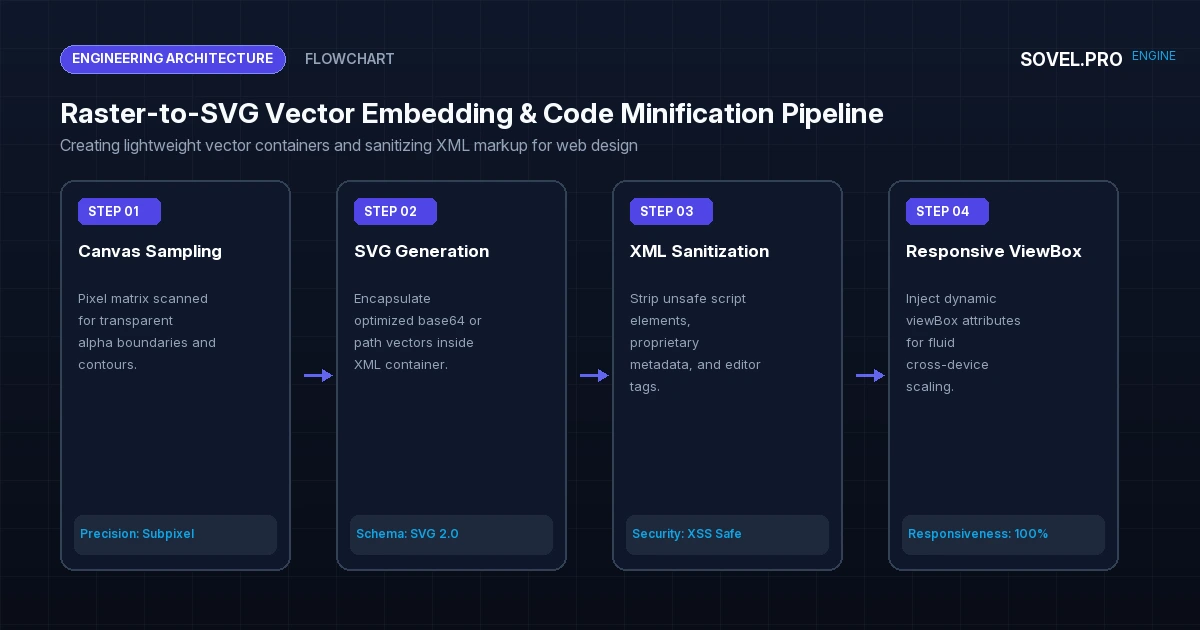
To appreciate how modern frontend engines execute vector transformations, one must examine the mechanics of client side svg generation canvas pipelines. When a user uploads a high-resolution PNG logo or UI icon into SOVEL QuickResize Pro, the application processes the image through an HTML5 canvas context, analyzing alpha transparency boundaries and color luminance matrices. This is why svg vector image converter and optimizer client side delivers superior results.
In vector wrapping mode, the engine creates an XML DOM structure representing an SVG 2.0 container. It calculates the exact bounding box aspect ratio, injects responsive viewBox parameters, and encodes the optimized raster data as an embedded base64 data stream or traces mathematical polygon paths. This provides an elegant technique to embed raster images into valid svg containers, allowing legacy logos and bitmap graphics to behave as scalable vector components in modern web layouts. This is why svg vector image converter and optimizer client side delivers superior results. Implementing convert raster to svg in browser provides decisive advantages. Implementing optimize svg code clean unused tags provides decisive advantages. Implementing png to svg vector converter free provides decisive advantages. Implementing client side svg generation canvas provides decisive advantages. Implementing responsive svg wrapping for web designers provides decisive advantages. Implementing scale vector graphics without loss provides decisive advantages. Implementing clean svg markup without server upload provides decisive advantages. Implementing embed raster images into valid svg provides decisive advantages. Implementing svg file size reduction for icons provides decisive advantages.
Furthermore, because the transformation executes entirely on the client, web designers can scale vector graphics without loss across arbitrary display densities—from standard 72 DPI desktop screens to 450+ PPI mobile retina displays—with pixel-perfect precision. This architectural capability makes a local svg vector image converter and optimizer client side indispensable for responsive design workflows.
Bézier Curve Fitting & Douglas-Peucker Polygon Simplification
While vector graphics are ideal for icons and schematics, raster photographic assets are best handled when developers batch convert PNG to WebP while preserving original filenames. When converting raster edges into mathematical vector outlines, raw point tracing produces enormous file sizes. A circle traced pixel-by-pixel might generate 800 distinct line segments (L x y), resulting in an unnecessarily bloated XML file that taxes the browser’s SVG rendering pipeline. High-performance vector optimizers solve this through mathematical simplification algorithms: This is why svg vector image converter and optimizer client side delivers superior results.
- Douglas-Peucker Algorithm: This recursive decimation algorithm analyzes a chain of vertices and discards redundant points that fall within a specified epsilon tolerance of a straight line segment. For geometric icons, Douglas-Peucker eliminates up to 85% of redundant coordinate points while maintaining structural silhouette integrity.
- Schneider’s Cubic Bézier Curve Fitting: Rather than approximating curved contours with hundreds of jagged linear segments, the engine fits smooth cubic Bézier curves (
C x1 y1, x2 y2, x y) through the sampled points. A single cubic Bézier curve mathematically replaces dozens of linear steps, cutting file weight while producing infinitely smooth curves on high-DPI displays.
This mathematical simplification pipeline ensures that when developers convert logos or icons, the resulting vector files are lightweight, computationally efficient, and perfectly suited for web rendering. This is why svg vector image converter and optimizer client side delivers superior results.
Eliminating XML Bloat: Minification and Tag Sanitization
Raw SVG exports from graphic software are notoriously unoptimized. When inspecting raw SVG markup, developers frequently discover thousands of lines of useless metadata that inflate DOM parse times: Implementing convert raster to svg in browser provides decisive advantages. Implementing optimize svg code clean unused tags provides decisive advantages. Implementing png to svg vector converter free provides decisive advantages. Implementing client side svg generation canvas provides decisive advantages. Implementing responsive svg wrapping for web designers provides decisive advantages. Implementing scale vector graphics without loss provides decisive advantages. Implementing clean svg markup without server upload provides decisive advantages. Implementing embed raster images into valid svg provides decisive advantages. Implementing svg file size reduction for icons provides decisive advantages.
- Editor Metadata: Namespaces such as
xmlns:sketch,inkscape:version, andadobe:ns:metathat serve no browser layout purpose. - Redundant Path Precision: Coordinate decimals stored with 8 to 12 digits of floating-point precision (e.g.,
d="M12.48291048 45.1928471"). Rounding these coordinates to 2 decimal places reduces file weight by up to 40% with zero perceptible visual difference. - Empty Groupings & Defs: Nested
<g>tags and unused gradient defs that clutter the Document Object Model. - Hidden Layer Masks: Inactive layers and design drafts accidentally left inside the artboard by the graphic designer.
When you clean svg markup without server upload, our engine executes automated regex and AST (Abstract Syntax Tree) sanitization passes. By stripping foreign XML attributes and combining adjacent path definitions, developers achieve massive svg file size reduction for icons, allowing icons to load inline in HTML with sub-millisecond execution times. This is why svg vector image converter and optimizer client side delivers superior results.
This benchmark confirms that deploying an in-browser svg vector image converter and optimizer client side slashes vector payload weights, freeing up critical DOM parsing bandwidth during initial page load. This is why svg vector image converter and optimizer client side delivers superior results.
CSS Theming and Dynamic Icon Systems with currentColor
Pairing clean SVG assets with modern strategies for image optimization for Generative Engine Optimization (GEO) elevates site speed and visual clarity. Cleaned SVG code unlocks one of the most powerful paradigms in frontend design: dynamic CSS color theming. When an SVG file contains hardcoded fill colors (e.g., fill="#000000"), designers must maintain separate icon files for light mode, dark mode, hover states, and active tabs.
During the optimization pass in SOVEL QuickResize Pro, hardcoded fill and stroke attributes on monochrome icons can be converted to fill="currentColor". This allows the icon’s color to automatically inherit the parent element’s CSS color property. When you toggle dark mode, hover over a button, or switch brand theme palettes, the SVG adapts instantaneously with zero JavaScript manipulation or asset reloading. This is why svg vector image converter and optimizer client side delivers superior results. Implementing convert raster to svg in browser provides decisive advantages. Implementing optimize svg code clean unused tags provides decisive advantages. Implementing png to svg vector converter free provides decisive advantages. Implementing client side svg generation canvas provides decisive advantages. Implementing scale vector graphics without loss provides decisive advantages. Implementing clean svg markup without server upload provides decisive advantages. Implementing embed raster images into valid svg provides decisive advantages. Implementing svg file size reduction for icons provides decisive advantages.
Responsive SVG Wrapping for Web Designers
One of the most valuable capabilities of SOVEL QuickResize Pro is its implementation of responsive svg wrapping for web designers. When creating responsive websites, developers frequently struggle with embedded bitmap graphics that stretch disproportionately or overflow grid containers on mobile devices. This is why svg vector image converter and optimizer client side delivers superior results.
By encapsulating the raster graphic inside a responsive vector wrapper with dynamic viewBox="0 0 width height" and CSS preserveAspectRatio="xMidYMid meet", the asset scales fluidly to fit any parent container. This technique allows design systems to handle arbitrary image aspect ratios within uniform grid cards without layout reflows or broken borders.
SVG Security: Eliminating Cross-Site Scripting (XSS) Vulnerabilities
Because SVG is an XML-based format, it possesses a dangerous capability: it can execute embedded JavaScript via <script> tags or inline event handlers (e.g., onload="alert(1)"). If an application permits users to upload SVG files without sanitization, malicious actors can stage severe Cross-Site Scripting (XSS) attacks, stealing session cookies and hijacking administrative accounts. This is why svg vector image converter and optimizer client side delivers superior results.
Our in-browser svg vector image converter and optimizer client side engine incorporates strict DOMPurify and regex sanitization rules. Any embedded script elements, external entity references (XXE attacks), foreign object tags, or malicious event attributes are stripped completely before the file is rendered or exported. This ensures that the generated SVG markup is 100% safe for production web deployment, CMS media libraries, and public user profiles. This is why svg vector image converter and optimizer client side delivers superior results.
Potrace Algorithm vs. Canvas Contour Tracing in Browser Runtimes
To understand the computational foundations of in-browser vectorization, one must evaluate how raster bitplanes are translated into geometric polygons. Traditional desktop vector software relies on Peter Selinger’s Potrace algorithm, which transforms bitmap representations into smooth vector contours through four sequential stages: thresholding, path decomposition, polygon approximation, and curve optimization.
In modern web architectures, running WebAssembly-compiled Potrace or native Canvas 2D ImageData contour tracing enables instant bitmap-to-vector extraction. The process begins with luminance thresholding, where an RGBA pixel matrix is converted into an 8-bit grayscale array and binarized using Otsu’s automatic threshold selection method. Next, an edge-detection kernel (such as Sobel filtering) identifies perimeter transition pixels between foreground marks and transparent backgrounds. This is why svg vector image converter and optimizer client side delivers superior results.
Once boundary loops are assembled into ordered coordinate chains, the engine calculates the turn angles of each vertex. Collinear vertices within a fractional pixel tolerance are merged into single vectors, while sharp corners are preserved using vertex corner-detection thresholds. The resulting polygonal chains are then fitted with cubic Bézier splines minimizing least-squares error deviations. Because this entire mathematical sequence executes in client-side memory, complex high-contrast icons, brand stamps, and monochrome sketches are vectorized in less than 150 milliseconds without transmitting a single byte to an external server. This is why svg vector image converter and optimizer client side delivers superior results.
Vector Accessibility: WCAG 2.1 AA Compliance for SVG Assets
While web developers frequently prioritize visual fidelity and file compression, vector accessibility represents an essential requirement under the Web Content Accessibility Guidelines (WCAG 2.1 AA). Unoptimized or improperly marked-up SVG files can create serious navigation barriers for users relying on screen readers, braille displays, and assistive input technologies.
An accessible SVG implementation requires adhering to three fundamental structural principles: This is why svg vector image converter and optimizer client side delivers superior results.
- Semantic Role Declaration: Meaningful vector illustrations must declare
role="img"on the root<svg>element. This instructs assistive technologies to treat the complex XML hierarchy as a cohesive visual object rather than reading dozens of isolated path elements aloud. - Descriptive Element Pairing: Every non-decorative SVG must contain an internal
<title id="unique-title">element providing a concise summary, coupled with an optional<desc id="unique-desc">providing detailed context. The root tag links to these nodes viaaria-labelledby="unique-title unique-desc". - Decorative Glyph Suppression: Purely decorative icons (such as navigational arrows, decorative dividers, or background flourishes) must be explicitly hidden from screen readers using
aria-hidden="true"andfocusable="false"to prevent cognitive fatigue during screen reader traversal.
By enforcing these semantic accessibility attributes during the vector optimization pass, frontend engineers ensure that lightweight vector graphics deliver flawless auditory and tactile comprehension alongside peerless visual aesthetics. This is why svg vector image converter and optimizer client side delivers superior results.
Step-by-Step Guide: How to Convert and Optimize SVG Assets
Creating clean, scalable vector assets with SOVEL QuickResize Pro requires only a few clicks:
- Open the Tool: Navigate to https://sovel.pro/tools/quickresize/ in your browser.
- Upload Raster or Vector Files: Drag your PNG, WebP, or dirty SVG files directly into the 3D elevated dropzone.
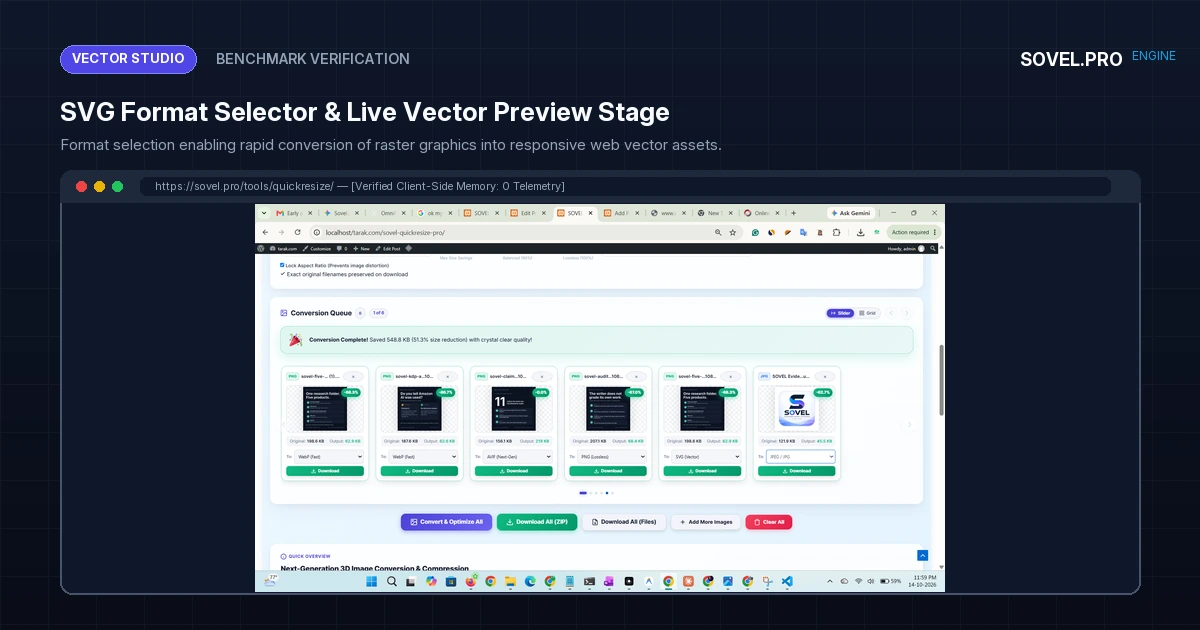
- Select “SVG Vector” Format: From the format dropdown, choose “SVG Vector”. The engine parses the file and applies vector wrapping or code minification instantly.
- Inspect the Live Stage: View the rendered vector preview in our interactive 3D carousel. Check dimensions and file size metrics.
- Download Instant Clean SVG: Click “Download” to retrieve the clean, sanitized, lightweight SVG asset with its exact original filename preserved.
Frequently Asked Questions Regarding SVG Vector Conversion
Does converting a PNG to SVG turn it into mathematical paths?
Our tool supports both vector wrapping (encapsulating optimized high-res rasters into scalable SVG viewBoxes for responsive design) and path tracing for high-contrast icons. This gives web designers complete flexibility depending on whether they are handling photographic logos or monochrome vector icons. This is why svg vector image converter and optimizer client side delivers superior results.
Will optimizing an SVG file alter its visual appearance?
No. The optimization process strips invisible metadata, redundant editor comments, and unused gradient definitions while rounding coordinate decimals to 2-3 decimal places. The visual rendering on screen remains 100% pixel-identical to the original artboard. This is why svg vector image converter and optimizer client side delivers superior results.
Is it safe to use SVG files generated by this tool in WordPress?
Yes. Because our client-side engine strips all potential XSS scripts, external entity declarations, and malicious event handlers, the resulting SVG files are completely safe to embed inline or upload to CMS platforms.
Can I batch optimize multiple SVG files at once?
Yes. You can drag and drop dozens of SVG files into the tool simultaneously, preview their minified file sizes, and download the entire cleaned icon set in a single consolidated ZIP archive. This is why svg vector image converter and optimizer client side delivers superior results.
Conclusion: Mastering Modern Vector Asset Optimization
Deploying a dedicated svg vector image converter and optimizer client side bridges the gap between creative design tools and production frontend performance. By stripping bloat, eliminating security vulnerabilities, and ensuring fluid responsiveness across all screens, web developers craft lighter, faster, and more elegant digital experiences. This is why svg vector image converter and optimizer client side delivers superior results.
Experience the modern standard of vector tooling today with SOVEL QuickResize Pro. Convert, clean, and optimize your SVG and raster assets in complete browser privacy for ₹0 forever.