
An ai coding workflow turns loose prompting into a repeatable build. You lock a plan, split work into small tasks, verify each output, and keep a ledger so nothing gets lost. I use this exact shape on real builds and it cuts rework hard.
Most failed AI builds share one trait. No written outcome, no locked plan, no evidence. The model guesses, files drift, and you debug for hours. An ai coding workflow fixes that with gates you can check.
Pick one narrow build for your first run. A single page, a small plugin, or a short script. Small scope keeps review cheap and lets the loop prove itself fast. Once the loop holds on a small job, larger jobs stop feeling risky.
Why ad-hoc prompting breaks real builds
An ai coding workflow starts by naming the failure. Ad-hoc chats feel fast and then cost you days. Three shapes show up again and again.
First, scope drift. You ask for a login form and get a new auth system. No boundary was written, so the model fills gaps with guesses. An ai coding workflow stops this by writing limits before code. Second, silent edits. A file changes in three places, only one was asked for, and tests still pass by luck. Third, lost state. A long chat hits a limit, context drops, and the next answer contradicts the last one. Each of these is normal without an ai coding workflow. Each is avoidable with one.
I keep a simple rule. When no plan is locked, every answer is a draft. When the plan is locked, every answer has a test. That shift alone removes half the chaos people blame on models. Builders who skip this gate often blame the model for what was really a missing contract.
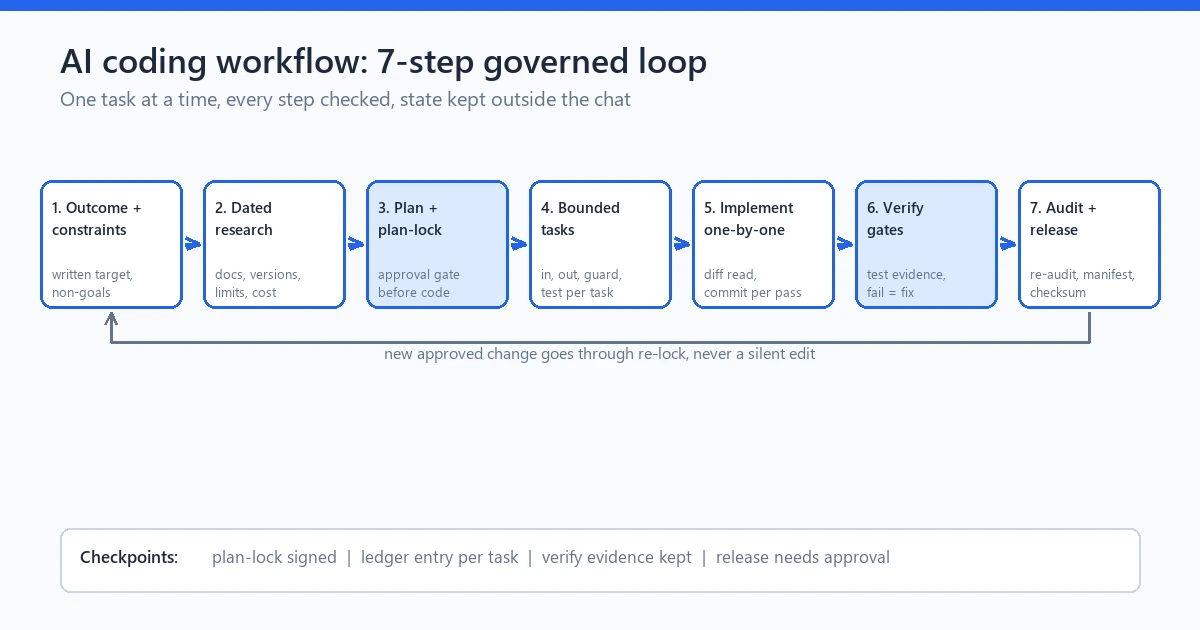
Step 1: Write the outcome and constraints
An ai coding workflow needs a written target before any code. State what done means, who it serves, and what is out of scope. Keep it short enough to read in one minute.
Write the outcome in plain lines. Name the user, the job, and the result. An ai coding workflow keeps this page visible during every later step. Then list hard limits: budget, timeline, stack, files you must not touch, and data you must not move. My read is that vague outcomes cause most rework. “Build a shop” fails. “Sell three digital files with card payment and email delivery” can be tested.
Add non-goals too. If a feature is not in this run, write it down. That list protects you when a model suggests extra work that sounds helpful and breaks your week. Review the outcome with one other person when you can. A second pair of eyes catches fuzzy lines you stop seeing after the third read.
Step 2: Collect requirements and dated research
An ai coding workflow runs on checked facts, not memory. Pull the exact docs, versions, limits, and prices you depend on, with dates. Models know a lot about the past and little about last month.
Check the stack first. Confirm the runtime version, package names, and API limits from primary docs. I checked Node.js 22.5.0 as the floor for the engine used here, from the official docs, on 18 Oct 2026. Small version gaps cause real install failures, so this step pays for itself.
Check model and provider facts next. Note which provider you will call, what auth it needs, what quota applies, and what it costs. Provider charges sit outside the engine license, so note them in your plan before you run anything large.
One fresh fact changed my boundary step this month. GitHub announced local sandboxing as generally available on 7 Oct 2026 for its CLI, app, and VS Code agent sessions, with filesystem, network, and credential controls per policy (source: GitHub Changelog, 7 Oct 2026). I now set tool-execution boundaries before autonomous runs, even on my own machine. That habit fits any ai coding workflow, whatever stack you use.
Step 3: Draft the plan, then lock it
An ai coding workflow treats the plan as a contract. Draft tasks, files, and checks, then get approval before code. An ai coding workflow never starts building on an unapproved draft. No approval, no build.
Break the job into small tasks. Each task names its input files, output files, limits, and one pass test. A task should fit in one sitting. Large tasks hide defects and waste quota. Small tasks make review cheap. Name the reviewer for each task too, even when that reviewer is you tomorrow morning with fresh eyes.
Then lock the plan. Write the version, date, and approver. After the lock, scope edits need a note and a fresh approval. This sounds strict and it saves hours. I have watched locked plans catch three “quick extras” that would have broken a release. Teams that skip the lock often pay for it during testing, when fixes cost far more than a short review. A locked plan also settles debates fast because the written scope wins over memory.
Step 4: Split work into bounded tasks
An ai coding workflow stays safe by keeping each task small and fenced. One task, one job, one check. That fence is what lets you trust model output.
Give every task four lines. What goes in, what comes out, what it must not touch, and how you will test it. Name exact paths. Name exact commands. If a task needs a secret, say where it lives and never paste the value into chat or logs. When a task touches paid APIs, note the expected calls and cost cap in the same four lines so quota stays visible.
Keep risky edits apart. Database moves, auth changes, and payment code each get their own task and their own review. When tasks stay apart, a bad edit stays small. Your governed loop holds because damage has nowhere to spread. Separation also keeps the ledger clean, since each checkpoint maps to one clear job.

Step 5: Implement one task at a time
An ai coding workflow builds in order, not all at once. Run a single task, read the diff, run its test, then move on. An ai coding workflow rewards this patience with fewer merges to untangle. Parallel edits feel quick and merge badly.
Read every diff yourself. Do not trust a “done” message. Open the changed files, check the lines you asked for, and look for extras you did not ask for. Models add helpful extras that break contracts. Your eyes are the gate here. I read diffs in small chunks with tests beside the code, so each claim has proof next to it.
Commit after each passing task. A small commit with a clear note beats a giant dump at midnight. When a later step fails, you return to the last good point in minutes. That habit makes the governed loop calm instead of tense. Short commits also make reviews faster because each change has one clear reason. Tag the commit with the task id so the ledger and repo tell the same story.
Step 6: Verify each output with gates
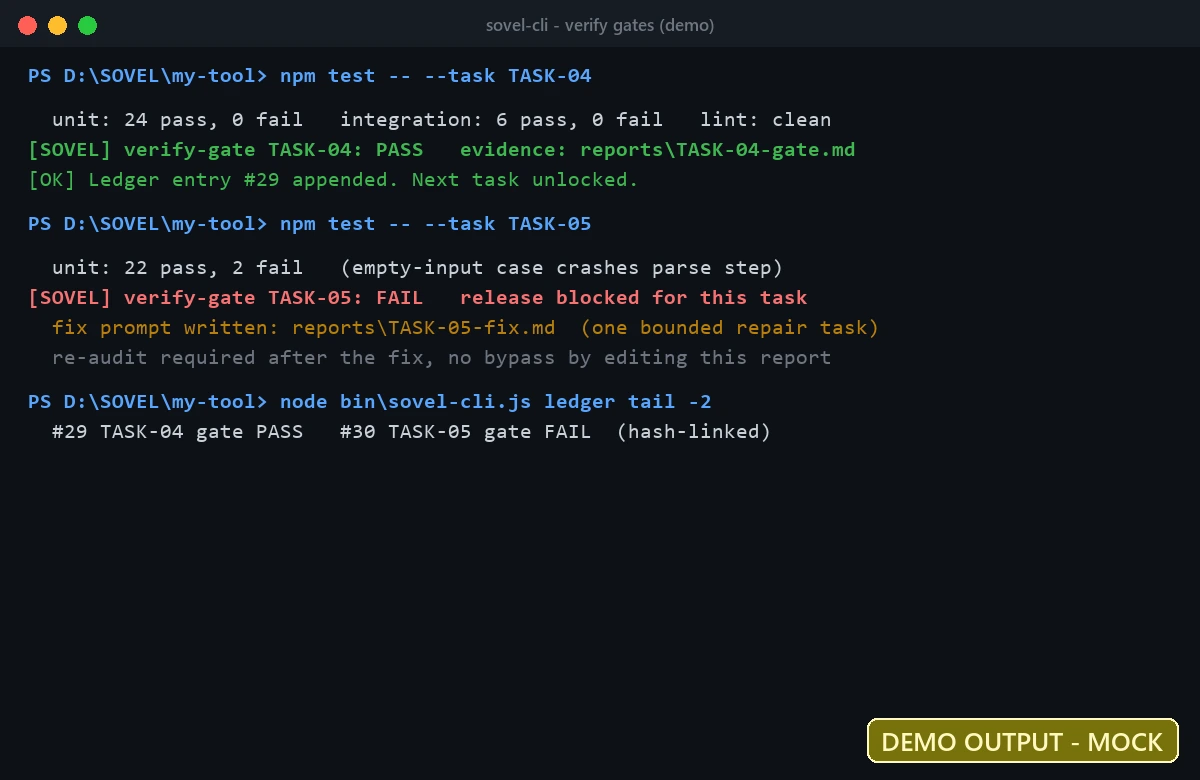
An ai coding workflow proves results with tests, not claims. Every task ends with a gate. An ai coding workflow moves forward only through that gate. Pass opens the next task. Fail sends one bounded fix.
Set the gate before the run. Name the command, the expected result, and where evidence goes. A gate can be unit tests, a build check, a lint pass, or a manual click path with a screenshot. The shape matters less than the record. Without a record, you will retest the same thing twice. Store the log path in the task file before you run, not after, so missing proof is easy to spot.
Treat model output as data to inspect. Read the code, run the suite, check edge inputs, and confirm no secret leaked into logs. The governed loop earns trust this way, one checked task at a time. Edge inputs deserve extra care because models often handle the happy path well and miss empty, large, or invalid values.
Step 7: Audit, fix, re-audit, then release
An ai coding workflow closes with an independent pass. Audit the build against the locked plan, fix only confirmed defects, re-audit the fix, then decide on release. An ai coding workflow treats this closing pass as mandatory, not optional.
Audit with the plan in hand. Check requirements, file list, tests, docs, versions, and packaging. Score each gap by harm, not by noise. A crash on install outranks a dull label. Write the verdict in plain words: pass, partial, or fail. Keep the audit apart from the build role, even in solo work, by reading as a reviewer with the plan beside the code.
Fix with care. One defect gets one small repair task with its own test. After the fix, re-audit that spot and its neighbors. Then export with a manifest and checksum so the release file matches what you tested. This closing loop is what makes the governed method safe to ship. A manifest with hashes turns “it worked here” into proof the shipped file is the tested file.
the token depletion resume protocol
How state and resume prevent lost work
An ai coding workflow keeps state outside the chat. A local ledger records tasks, checkpoints, and events with hashes. When a run stops, you resume from the last good point.
This matters because chats drop context. Limits hit, networks fail, quota runs out. Without saved state, you start over and pay twice. With saved state, you pick up the next task and keep evidence intact. I save the idea file, prompts, reports, and next-task note after each step.
Keep secrets out of that ledger. Store paths and results, never keys. The ledger proves what ran and what passed. An ai coding workflow uses that proof during review instead of memory. It does not need to hold anything sensitive to do that job well.
A fresh workspace starts empty, and that is normal. Doctor checks will note missing idea files or exports before the first run. Those notes are not failures. They clear once you create the idea file and run the first demo. Knowing this keeps beginners from chasing setup errors that are really just empty folders.
When quota runs out mid-task, save partial work at once. Keep the changed files, the task prompt, the last report, and a next-task note with exact resume lines. Then continue in another configured client against the same folder. Do not assume logins or quota move with you. The same folder plus clear notes is what makes handoffs work.

What this workflow cannot do
An ai coding workflow has honest limits. An ai coding workflow cannot turn guesses into guarantees. It cannot make a weak idea strong, remove provider costs, or replace your review. Saying this upfront saves trust.
It does not run fully offline when you use cloud models. Local state stays on your machine, model calls need keys and quota, and charges apply. Demo mode with mock output needs no key and proves nothing about live runs. Label mock work as mock.
It also does not add features by itself. Multi-model consensus and auto social collection are not part of v1.0.0 here. Human approval stays at plan lock and release. Those gates are the point, not overhead.
Cost control deserves its own line. Track tokens or minutes per task, not just monthly totals. A short task list with measured usage beats a large run with no record. Small quotas teach good habits. They force narrow tasks, clear tests, and honest stop points.
Provider choice matters too. Native adapters here cover OpenAI, Anthropic, and Gemini, each with its own key and billing. An external coding client with its own login is a separate path. You can use it for bounded manual tasks, but do not assume it inherits keys, quota, or write access. Name the executor in the plan so review stays honest.
A small idea-to-income example
An ai coding workflow helps solo builders turn one idea into one small product. An ai coding workflow suits a narrow tool with one clear buyer. Pick a narrow job, plan it, build it, check it, then publish or sell it. No team needed for step one.
Say you want a text tool for writers. You write the outcome, lock a three-task plan, build the page, add tests, and export the file. Then you host it on your site with clear pricing. Strong ideas still win on merit. The governed loop just keeps the path steady so rework stays low and release stays safe.
Start with free tiers and small quotas while you learn. Measure cost per finished task, not per month of tools. When one small product holds up, repeat the loop with the next idea. Builders in India, Pakistan, Bangladesh, and elsewhere follow the same path. One narrow tool, one clear buyer, one honest release at a time.
A working example already lives on this site. The Password Intelligence tool runs in the browser with local checks and clear limits, and anyone can open it from the tools section. That live page shows what a finished small product looks like after plan, build, and checks. Your first loop can aim for the same shape, not the same topic.
the password intelligence tool

FAQ
What is an ai coding workflow?
An ai coding workflow is a repeatable loop that locks a plan, splits code into small tasks, verifies each output, and keeps a ledger. It turns chat answers into checked builds you can release.
How do I lock a plan before ai implementation?
Write tasks, files, limits, and tests, then record version, date, and approver. After that point, scope edits need a note and fresh approval before code changes.
How does checkpoint resume save rework?
The ledger stores tasks, checkpoints, and events outside the chat. When a run stops, you resume from the last good point with evidence intact instead of starting over.
Do I need an API key for every run?
Mock demo runs need no key and are labeled NON_PRODUCTION_DEMO. Live model runs need valid credentials for a supported provider, and provider charges and quotas apply.
Can this workflow run fully offline?
Local state and checks run on your machine. Cloud model calls need network, keys, and quota. Do not call that setup fully offline when a cloud model does the reasoning.
How do verify gates catch bad output?
Each task names its test before the run. You read the diff, run the command, and record the result. Failed gates get one bounded fix and a re-audit before release.
When should I NOT use this workflow?
Skip it for one-line scripts and quick probes. Use the full governed loop when files, users, payments, or releases are on the line and rework would hurt.
The governed loop works when you respect the gates. Lock the plan, keep tasks small, check each output, and keep state outside the chat. Start with one narrow build this week and let evidence guide the next step.