
Why Book Formatting Is the Step Most Self Publishers Get Wrong
Many authors spend months writing their manuscript, only to rush through the final stages of production. Poor formatting leads to returned books, negative reviews, and an unprofessional perception that can ruin an author’s reputation. Finding the best book formatting software for self publishing is crucial because it ensures your interior layout meets industry standards without requiring a degree in graphic design.
The right software saves weeks of manual work. Instead of battling with Microsoft Word margins or trying to manually build a table of contents that breaks every time you add a chapter, dedicated tools handle the heavy lifting. Your choice of typesetting tools will depend heavily on your budget, your preferred operating system, and the specific output formats you require for your distribution channels.
In today’s competitive market, a poorly formatted interior is the fastest way to lose readers. Even if your story is incredible, jagged margins, weird line spacing, and broken chapter headings will pull readers out of the experience. Investing in the best book formatting software for self publishing guarantees that your final product rivals traditional publishing houses in quality and aesthetic appeal.
Moreover, time is money. As an indie author, every hour you spend manually formatting a manuscript is an hour you could spend writing your next book or marketing your current one. By utilizing modern automated formatting platforms, you automate tedious layout tasks, ensure compliance with major retailers, and secure your long-term success in the industry.
What to Look for in Book Formatting Software
Automatic Table of Contents Generation
A professional book requires a dynamic table of contents. The best book formatting software for self publishing will automatically scan your chapter headings and build a linked TOC for digital formats, while generating accurate page numbers for print versions. This feature alone eliminates the most common formatting errors authors face.
Additionally, automatic updates ensure that if you add or remove a chapter, your TOC adjusts instantly without requiring manual rebuilding.
Font Management and Pairing
Typography can make or break the reading experience. You need tools that offer professional font pairings, such as EB Garamond for body text and Inter for headings, ensuring high readability and a clean aesthetic. Professional typesetting suites include these premium fonts natively.
Good typography reduces eye strain and signals to the reader that they are holding a professionally produced volume.
Multiple Export Formats (DOC, PDF, EPUB, MOBI)
You cannot rely on a single format. The best book formatting software for self publishing must export to DOC for final edits, PDF for print-on-demand platforms, and EPUB for global digital distribution. Having all these options in one click is a massive time saver.
Being locked into a single format restricts your ability to distribute wide across Apple Books, Kobo, and direct website sales.
KDP Compliance (margins, trim sizes, bleed)
Amazon KDP has strict guidelines. Your software must automatically calculate gutter margins, trim sizes, and bleed settings based on your page count to ensure your PDF is accepted on the first upload without errors. Top-tier publishing software handles this mathematical headache for you.
Cover Design Integration
While formatting focuses on the interior, the ability to seamlessly integrate your front cover, spine, and back cover into the final export package is a feature found in the best book formatting software for self publishing. It allows for a unified production workflow.
AI Writing Assistance
Modern tools go beyond simple formatting. Integrating AI agents directly into the pipeline helps with continuity checks, chapter summaries, and fixing structural issues before the final render, pushing the boundaries of what the best book formatting software for self publishing can achieve.
Tool 1: Book Creation Engine (Rs 4,999, Lifetime)
The Book Creation Engine represents a massive shift in how authors approach self-publishing. Built by P. Adhil Khan, founder of sovel.pro, this tool uses a 16-stage automated book creation pipeline. It is widely considered the best book formatting software for self publishing because it handles both AI-assisted writing and automated formatting in a single workflow.
Operating on a dual-agent architecture (a planner agent and an executor agent), it allows authors to generate highly structured chapters ranging from 3,500 to over 5,000 words. The system exports directly to DOC, PDF, and EPUB in one run, utilizing professional fonts like EB Garamond and Inter.
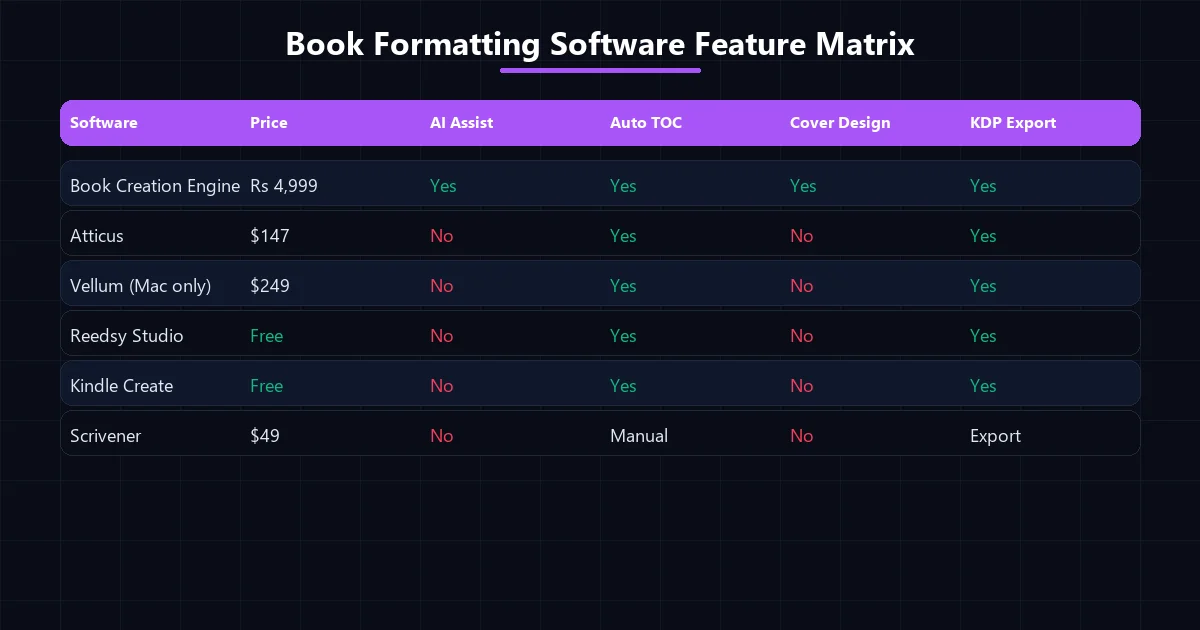
Book formatting software feature matrix comparing 6 tools for self publishing.
With lifetime access for just Rs 4,999, it offers incredible value, especially since it integrates with free LLMs like OpenRouter, Gemini, and DeepSeek, making it the premier choice for creators who want an all-in-one production house.
Tool 2: Atticus ($147, One-Time)
Atticus has quickly become a favorite in the indie author community. Priced at $147 for a one-time license, it works across Windows, Mac, Linux, and Chromebook, making it highly accessible.
While it lacks the AI writing capabilities of the Book Creation Engine, it is still a strong contender for the best book formatting software for self publishing due to its beautiful templates and reliable EPUB and PDF export features.
Authors appreciate its clean interface, though it focuses purely on formatting rather than the entire writing pipeline.
Tool 3: Vellum ($249, Mac Only)
For years, Vellum has been the industry standard for creating beautiful book interiors. However, its $249 price tag and strict Mac-only limitation make it inaccessible for many authors.
If you are in the Apple ecosystem and want pixel-perfect interiors without AI assistance, it remains a top choice for dedicated Apple ecosystem authors.
Tool 4: Reedsy Studio (Free)
Reedsy Studio is a free, browser-based tool perfect for authors on a strict budget. It requires no downloads and offers basic EPUB and PDF exports.
While its formatting options are limited compared to premium tools, it is undoubtedly the best book formatting software for self publishing for beginners who want a clean, simple interface without any upfront costs.
Tool 5: Kindle Create (Free from Amazon)
Amazon’s own Kindle Create is a functional tool designed specifically for KDP publishing. It is free and ensures your formatting meets Amazon’s technical specifications.
However, it locks you into Amazon’s ecosystem, making it less ideal if you plan to distribute wide. Still, for KDP-exclusive authors, it is a viable option for dedicated Amazon Kindle self-publishers.
Tool 6: Scrivener ($49, One-Time)
Scrivener is primarily a writing and organization tool, but it includes powerful compilation features for exporting to multiple formats. At $49, it is highly affordable.
The steep learning curve can be intimidating, but authors who master it often consider it the best book formatting software for self publishing due to its incredible flexibility and organizational power.
Head-to-Head Comparison Table
To help you choose the best book formatting software for self publishing, review this detailed comparison of features, pricing, and output capabilities.
| Tool Name | Pricing | Platform | AI Features | Best For |
|---|---|---|---|---|
| Book Creation Engine | Rs 4,999 (Lifetime) | Windows/VS Code | Yes (16-stage pipeline) | All-in-one AI writing & formatting |
| Atticus | $147 (One-time) | Cross-platform web | No | Template-driven design |
| Vellum | $249 (One-time) | Mac only | No | Premium Mac users |
| Reedsy Studio | Free | Browser | No | Budget beginners |
| Kindle Create | Free | Win/Mac | No | Amazon Exclusive Authors |
| Scrivener | $49 (One-time) | Win/Mac | No | Complex organizations |
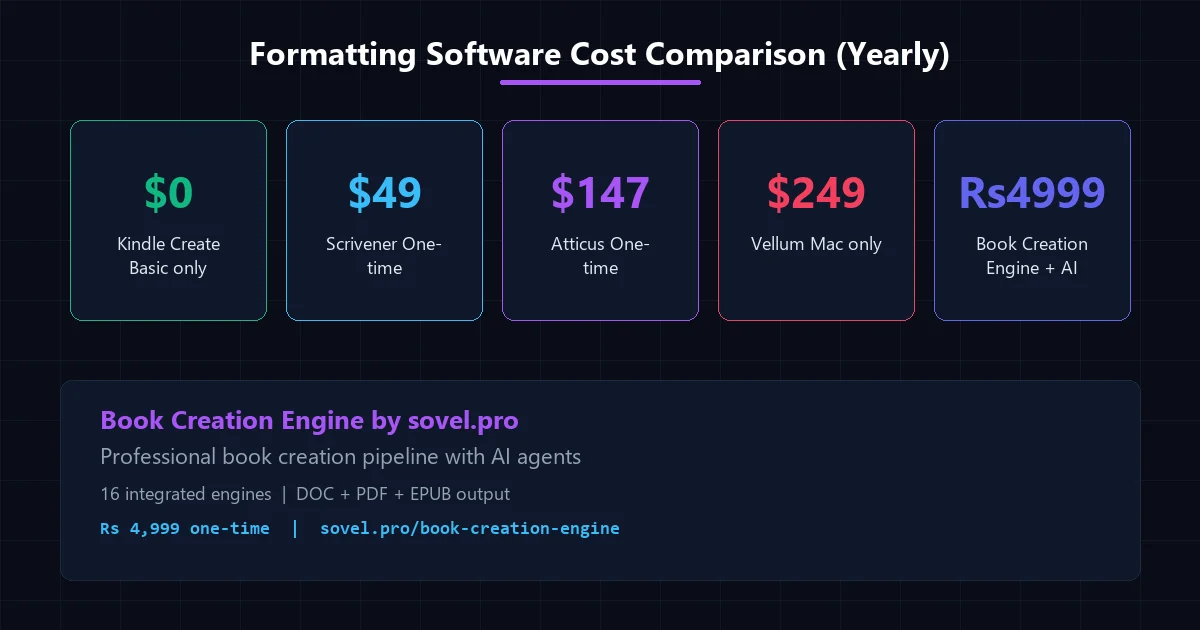
Formatting software cost comparison showing yearly prices for 5 tools.
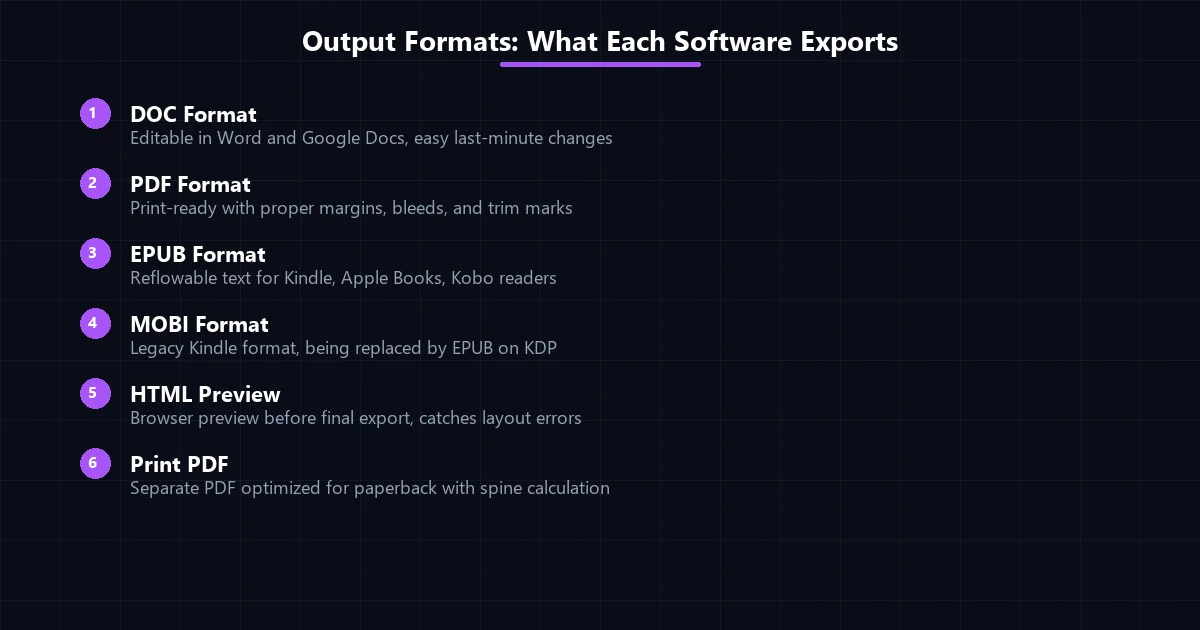
Output formats each book formatting software exports including DOC PDF and EPUB.
Professional Book Interior Elements
Regardless of which best book formatting software for self publishing you choose, your final product must include standard professional elements. These include a high-resolution cover, a properly formatted copyright page, a legal disclaimer, and a clean table of contents.
Additionally, you must have styled chapter headers, highly readable body text, an about the author page, and a dedicated references section. The Book Creation Engine automates the generation and placement of all these elements perfectly.
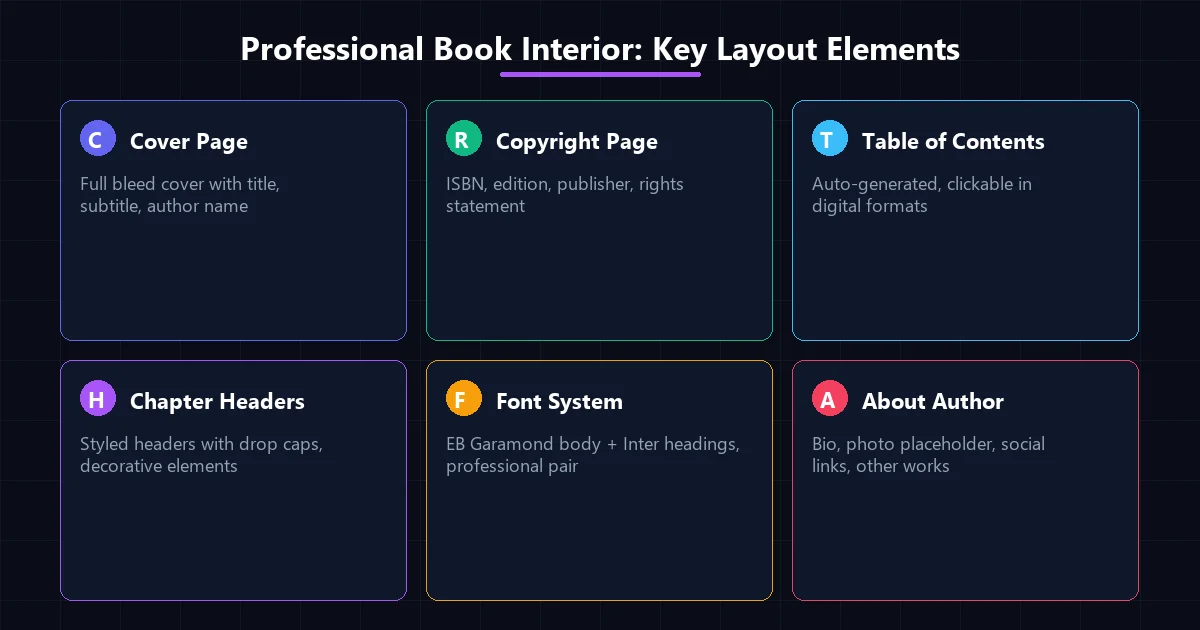
Professional book interior layout elements including cover copyright and chapters.
Which Tool Fits Your Workflow? (Decision Framework)
If you are on a strict budget, start with the free options like Reedsy Studio or Kindle Create. They offer the essential features needed to get your book published.
For mid-range budgets, Atticus and Scrivener provide excellent value. If you have a Mac and want the absolute best traditional templates, Vellum is worth the investment.
However, if you want a complete AI-powered production system, the Book Creation Engine is unmatched. It is the best book formatting software for self publishing for those who want to automate both writing and formatting, turning a month-long process into a 2-5 hour workflow.
Deep Dive: Ensuring Success with the Best Book Formatting Software for Self Publishing
When selecting your production toolchain, consider the longevity of your author career. A tool like the Book Creation Engine, designed with a 16-stage pipeline, allows you to continuously push out content across various genres. It supports high-level AI generation while handling all backend formatting.
Understanding how margins, bleed, and trim sizes affect your final print file is essential. The best book formatting software for self publishing automatically calculates these variables based on your selected trim size (e.g., 6×9 inches) and total page count. This prevents the dreaded “text outside margins” error when uploading to KDP.
Furthermore, maintaining consistency in typography across your digital and physical books strengthens your brand. Professional typesetting software embeds fonts directly into your PDF and EPUB files, ensuring readers experience your book exactly as you intended, regardless of the device they use.
Investing in the right software is an investment in your sanity. Avoid the endless cycle of manually adjusting Word documents. The best book formatting software for self publishing empowers you to focus on what you do best: creating incredible content for your readers.
Always test your files before widespread distribution. Even with top-rated layout engines, running your EPUB file through an independent validator or viewing your PDF on multiple devices ensures total quality control.
In conclusion, the right tool acts as an invisible partner in your publishing journey. Choosing the best book formatting software for self publishing accelerates your time to market, maximizes your royalties, and guarantees a stunning end product.
Whether you choose a free browser option or a comprehensive desktop application, your decision on publishing software will define your operational workflow for years to come.
Formatting Callout Boxes, Footnotes, and Complex Tables
Non-fiction titles, technical manuals, and educational guidebooks frequently require elements beyond plain paragraphs. Data tables, framed callout notes, key takeaways, and academic footnotes demand precise rendering to prevent awkward page splits in printed editions and broken reflow on e-readers.
Modern formatting software manages these complex components through specialized semantic containers. Rather than forcing rigid table dimensions that bleed off smartphone screens, advanced engines render responsive tables that adapt gracefully across varied device orientations.
Similarly, footnote references should convert into bidirectional hyperlinks in digital EPUB editions while appearing as neatly aligned page-bottom citations in paperback PDFs. Verifying that your software handles these non-standard elements seamlessly saves countless hours of post-export correction.
Always test your generated documents across multiple physical devices before setting your release live. Verifying how paragraph spacing, drop caps, and subheadings appear on an e-ink Kindle, an iPad, and an Android smartphone ensures zero surprises when readers download your title.
Frequently Asked Questions
What is the best book formatting software for self publishing for absolute beginners?
For absolute beginners, Reedsy Studio is highly recommended due to its simple interface. However, for those looking to automate the entire process, the Book Creation Engine offers a guided 16-stage pipeline that removes all technical formatting hurdles.
Can I format a professional book for free?
Yes, tools like Kindle Create and Reedsy allow you to format your manuscript for free. However, premium tools offer better templates, advanced export options, and significant time savings.
Do I need a Mac to use the best book formatting software for self publishing?
No. While Vellum requires a Mac, excellent alternatives like Atticus and the Book Creation Engine run flawlessly on Windows and cross-platform environments.
How does AI help in book formatting workflows?
AI can automate structural checks, generate cohesive chapter summaries, and ensure continuity across your manuscript before formatting it into precise DOC, PDF, and EPUB files.
Is the Book Creation Engine worth the Rs 4,999 investment?
Absolutely. It provides lifetime access to an entire production pipeline. For authors looking to publish multiple books a year, it pays for itself after the first published book.
Ready to automate your publishing workflow? Explore the Book Creation Engine today and discover the ultimate formatting solution.
Check out our other tools or read more on our blog.