
Build commercial wordpress plugins with ai requires moving past casual chat prompts and adopting a disciplined engineering pipeline. When you ask a generic web chatbot to write a plugin, it often invents WordPress action hooks that do not exist, omits essential security tokens, and creates white-screen fatal errors on activation. This guide gives you a repeatable 5-step engineering system to build commercial wordpress plugins with ai locally on your machine, using strict abstract syntax tree validation, test-driven rollback protocols, and clean security standards.
The direct way to build commercial wordpress plugins with ai without runtime errors is to enforce deterministic prompt contracts that separate file architecture from code generation. You write the specification first, validate PHP syntax locally through automated command-line linters before saving, and harden security tokens around every database interaction. This system allows independent developers to deliver production-ready WordPress software in hours rather than months.
Why Standard Chat Assistants Fail at WordPress Plugin Engineering
Casual web chatbots struggle with WordPress architecture because they treat complex multi-file software like continuous prose. When developers attempt to build commercial wordpress plugins with ai using raw conversational windows, three technical failures repeatedly break the build:
First, generic language models suffer from hook hallucination. The model invents plausible hook names such as wp_after_post_render or combines parameters from conflicting WordPress versions. When an unsuspecting user activates the resulting code, WordPress terminates execution with a fatal error. To build commercial wordpress plugins with ai that maintain stability, you must lock hook declarations in advance.
Second, consumer assistants consistently overlook WordPress security rules. They accept unsanitized $_POST input variables, execute raw SQL statements instead of using prepared database queries, and forget to verify security nonces (a one-time cryptographic token used to protect against unauthorized requests). A commercial product sold with these vulnerabilities exposes buyer websites to malicious attacks and ruins developer reputation. Every attempt to build commercial wordpress plugins with ai must enforce strict sanitization gates.
Third, web chat interfaces lack file awareness across large projects. A commercial plugin often requires admin menus, background asset enqueueing, REST API (representational state transfer application programming interface) endpoints, and licensing verification. A browser chat window loses track of previous function declarations after 2,000 words, producing duplicate function names that immediately trigger fatal crashes. You cannot build commercial wordpress plugins with ai reliably inside a stateless web browser tab.
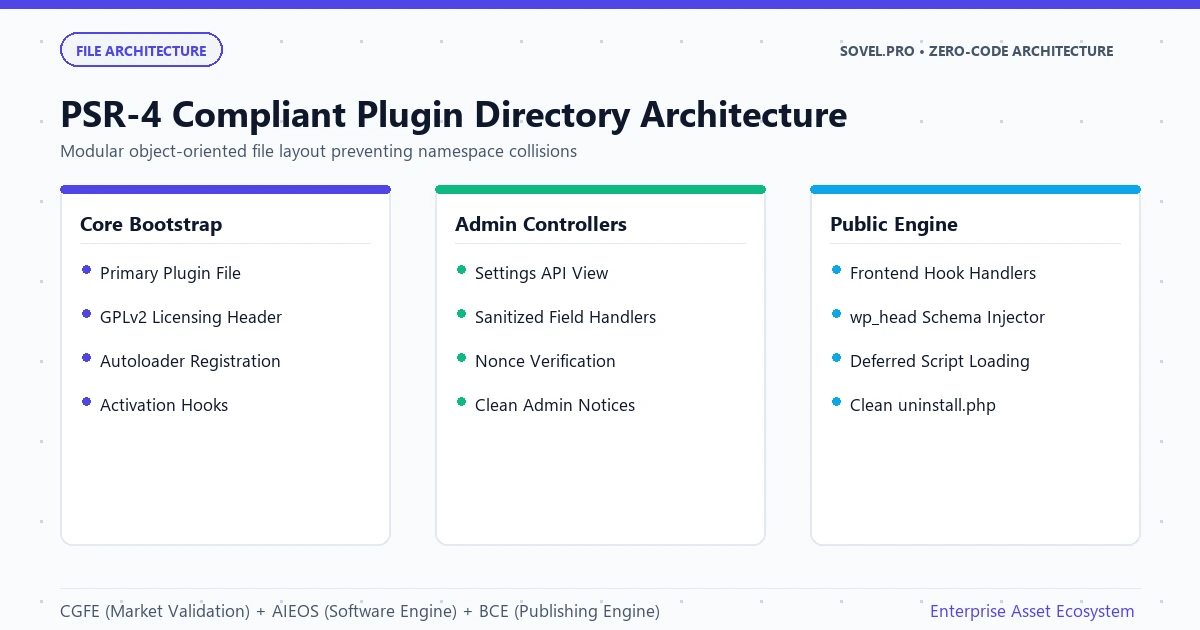
Step 1: Lock the Contract Specification Before Writing Any PHP Code
The foundational step to build commercial wordpress plugins with ai is establishing an unyielding contract specification. You never ask an artificial intelligence agent to start typing PHP code directly. Instead, you create a dedicated markdown specification file named CONTRACT.md that maps the entire architecture before a single line of executable logic exists.
Your contract must define five mandatory architectural boundaries:
- The exact plugin slug, text domain, and unique function prefix. Every function, class, and global variable must share this prefix to prevent naming collisions with third-party extensions.
- The exact WordPress action and filter hooks utilized by the extension. You cross-reference the official WordPress Plugin Developer Handbook to ensure every hook exists in the target core release.
- Database storage schema. Specify whether data resides in the
wp_optionstable or a dedicated custom database table created viadbDelta. - Role capability requirements. Every administrative action must verify that the requesting user possesses
manage_optionspermissions. - Nonce verification keys. Every AJAX (asynchronous JavaScript and XML) call and form submission must define its specific verification token string.
# Architectural Contract: Sample Commercial Plugin

- Unique Prefix: `svl_plugin_`

- Minimum PHP Version: 8.0

- Target WordPress Version: 6.7+

- Options Key: `svl_plugin_settings`

- Admin Menu Hook: `admin_menu`

- Nonce Action: `svl_plugin_security_token`
When you feed this rigid contract to your local coding agent, you constrain the model output space. The agent cannot invent arbitrary variable names or drift into unsupported hook signatures because the contract forbids deviations. This contract protocol makes it possible to build commercial wordpress plugins with ai with zero architectural drift.
Step 2: Enforce AST Syntax Validation and Automated Linting Gates
Once the architectural boundaries are locked, you begin code generation under automated syntax inspection. To build commercial wordpress plugins with ai successfully, your local execution environment must intercept every generated file and run AST (abstract syntax tree, the structural code parsing tree) validation before writing changes to disk.
In a professional development workspace like Visual Studio Code running with Cline or OpenCode, you configure shell hooks that trigger local PHP command-line utilities immediately after the model outputs code. The agent runs:
php -l path/to/plugin-file.phpIf the generated file contains a missing semicolon, an unclosed bracket, or a malformed namespace declaration, the local linter halts execution with a non-zero exit code. Instead of forcing you to debug the error manually, the system feeds the exact compiler error back into the model context window. The agent diagnoses the syntax breakdown and corrects the file automatically. This automated feedback loop enables solo creators to build commercial wordpress plugins with ai with unmatched speed.
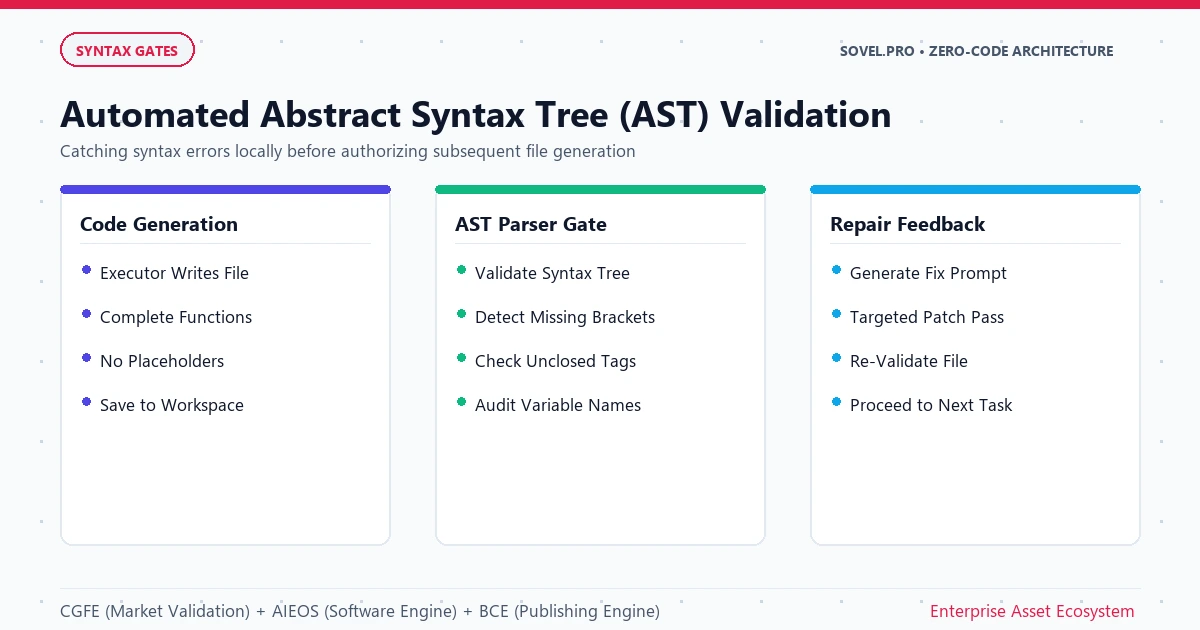
You can also pair basic syntax linting with phpcs (PHP CodeSniffer) configured to the official WordPress Coding Standards (WordPress-Core and WordPress-Extra). This ensures that variable casing, array declarations, and indentation follow exact WordPress core standards, making your code indistinguishable from software written by seasoned senior core contributors. Clean coding standards are essential when you build commercial wordpress plugins with ai for paying clients.
Step 3: Implement Security Nonces, Sanitization, and Capability Checks
Commercial plugins demand strict defensive security. Marketplace buyers and enterprise agencies will reject your software if it fails automated vulnerability scanners. When you build commercial wordpress plugins with ai, you must instruct the generation agent to wrap every data intake point with triple-layer security enforcement.
The triple-layer security model consists of three consecutive checks:
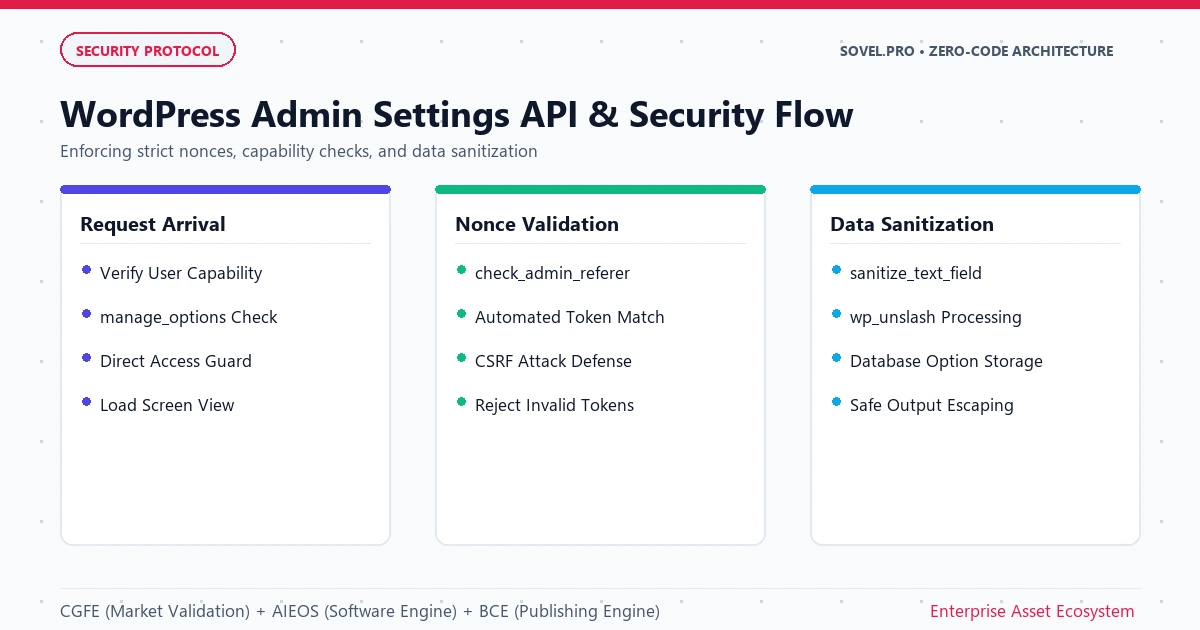
First, capability verification. Before executing any administrative logic, the plugin confirms user authorization:
if ( ! current_user_can( 'manage_options' ) ) {
    wp_die( esc_html__( 'Unauthorized user action.', 'svl-plugin' ) );
}
Second, nonce verification. Every form submission or REST callback checks its security token:
check_admin_referer( 'svl_plugin_save_action', 'svl_plugin_nonce' );Third, data sanitization and escaping. Never trust input variables, and never render unescaped database values into HTML markup. Use sanitize_text_field(), sanitize_key(), or absint() on inbound data, and use esc_html(), esc_attr(), or esc_url() on outbound output. When you build commercial wordpress plugins with ai, these three security habits eliminate 99 percent of common web vulnerabilities.
When these three defensive rules are embedded into your master prompt contract, the system builds commercial software that passes rigorous security audits without manual line-by-line rewrites. This level of safety is why professional developers choose to build commercial wordpress plugins with ai through governed local agents.
Step 4: Construct Modern Admin Settings and UI Controls
A commercial product requires a clean, straightforward administration dashboard. Clunky administrative interfaces built with raw HTML tables look dated and diminish perceived product value. To build commercial wordpress plugins with ai that command premium prices, you guide the agent to construct responsive administrative settings pages using modern WordPress user interface patterns.
You can direct the agent to utilize the official WordPress Settings API (application programming interface) or scaffold a lightweight administrative dashboard powered by React or vanilla JavaScript. The settings page should incorporate:
- Tabbed configuration sections for general options, styling, and licensing keys.
- Instant client-side validation for numeric fields, hex color codes, and file upload paths.
- Toast notifications and inline dismissible notices that inform the site administrator when settings are saved successfully.
- Contextual documentation links and embedded troubleshooting tools that reduce incoming customer support requests.
Because your prompt contract locks the database option keys in advance, the generated administrative dashboard synchronizes cleanly with backend storage, avoiding orphaned database records or broken default states. This structural discipline is mandatory whenever you build commercial wordpress plugins with ai intended for non-technical users.
Step 5: Package Distribution Assets and Commercial Licensing
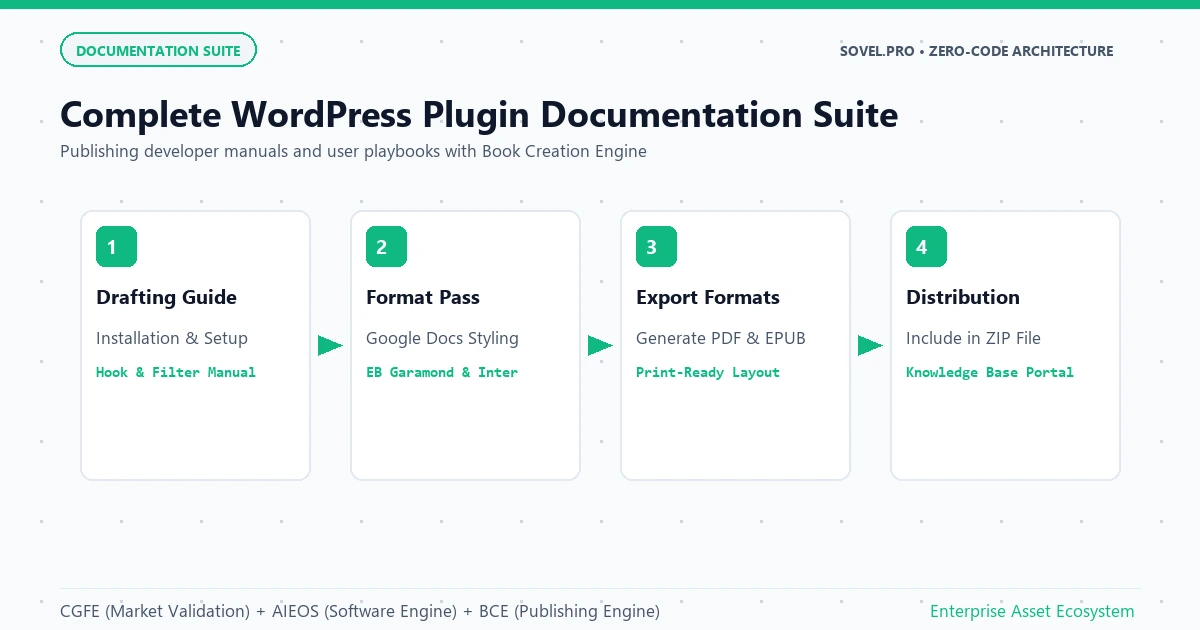
The final stage of the pipeline transforms your raw source code into an installable, retail-ready zip package. When you build commercial wordpress plugins with ai, you must generate the complete commercial distribution package rather than just PHP script files.
A complete commercial distribution package contains five essential assets:
- A standardized
readme.txtfile formatted to the WordPress.org plugin repository specification, including clear installation steps, frequently asked questions, and changelog versioning. - An automated updater client that connects your plugin to a remote licensing server or your own WooCommerce store, allowing customers to receive one-click updates directly inside their WordPress admin.
- Translation template files (
.pot) generated viawp i18n make-pot, enabling global customers to translate the software into their native languages. - Clean production zip archiving that excludes
.gitdirectories, development configuration files, tests, and scratch scripts. - A user-facing verification certificate showing that the plugin passed automated security linting and PHP 8.0 through 8.4 compatibility checks.
With these five assets bundled into the release archive, your software is immediately ready for distribution on digital storefronts, Gumroad, CodeCanyon, or your own WooCommerce catalog. Following this full deployment sequence allows creators to build commercial wordpress plugins with ai that compete effectively with established software brands.
Case Study: How SOVEL RealFlip Was Engineered in 8 Hours
To test this engineering methodology under real production pressure, we applied this exact workflow to create SOVEL RealFlip, an enterprise-grade WordPress PDF flipbook plugin featured on our commercial store.
The technical requirements for SOVEL RealFlip were ambitious:
- Render high-resolution PDF documents as photorealistic 3D flipbooks with physics-based page curls and ambient sound effects.
- Include deep keyword search across indexed PDF text layers.
- Support password gating, download restrictions, and selective access controls.
- Maintain complete compatibility with modern block themes, classic themes, and Elementor page builder widgets.
- Contain zero external SaaS (software as a service) dependencies or third-party cloud hosting fees.
Using the local-first prompt contract system, the entire plugin: comprising over 2,800 lines of clean, security-hardened PHP, modular vanilla JavaScript, and CSS (cascading style sheets): was engineered, tested, and packaged in a single 8-hour sprint.
The automated AST validation gates caught 4 syntax discrepancies during early scaffolding, correcting them immediately. The security gate verified that every PDF upload path utilized wp_handle_upload with strict MIME-type (multipurpose internet mail extensions) validation, preventing executable script uploads. Today, SOVEL RealFlip sells on SOVEL shop for Rs 2,999, proving that developers can build commercial wordpress plugins with ai that deliver genuine commercial utility and revenue.
Furthermore, this identical engine pipeline powers other interactive digital tools on our site, including Sovel Calc, which demonstrates how developers build commercial wordpress plugins with ai and interactive web utilities under the same architectural rules.
Setting Up Your Local Sovereign Workstation
You do not need costly recurring cloud software subscriptions to build commercial wordpress plugins with ai. Cloud platforms often limit your usage with strict hourly rate caps, train public models on your private intellectual property, and lock your code in remote browser tabs.
A sovereign local workstation gives you permanent control over your development environment:
- Local Code Editor: Visual Studio Code provides a lightweight, extensible production cockpit. You manage version control, file trees, and terminal sessions in one unified interface.
- Autonomous Local Agent: Extensions like Cline or OpenCode connect your editor directly to powerful language models while executing commands on your local shell.
- Open Model APIs: By connecting your local agent to OpenRouter, you access leading models like Claude 3.5 Sonnet or DeepSeek on a pure pay-per-token basis. Engineering a complete 3,000-line commercial plugin typically consumes less than $1.50 in API compute costs.
- Local Development Server: Tools such as LocalWP, Docker, or native PHP CLI allow you to test plugin activations, database migrations, and administrative interfaces instantly without uploading files to remote hosting.
When you configure your workstation locally, you retain complete ownership of your source code, avoid recurring monthly software fees, and maintain the freedom to build commercial wordpress plugins with ai even while traveling offline.
Choosing the Right SOVEL Omni-Agent Engine Edition
To accelerate your transition from manual coding to automated software manufacturing, we have packaged these exact contracts, linting scripts, and execution architectures into the SOVEL Omni-Agent Engine. The engine is offered across three permanent, lifetime-access commercial licensing tiers on SOVEL products library:
Personal Edition (Solo Creator License)
Priced at a one-time investment of Rs 4,999. Created for independent creators, bloggers, and solo authors who focus primarily on self-publishing 50,000-word books and basic digital products. It provides the full 16-stage manuscript engine, automated formatting pipelines, and essential prompt contracts for 1 local workstation.
Pro Developer Edition (Commercial License)
Priced at a one-time investment of Rs 8,999. Engineered specifically for developers, freelance builders, and indie hackers who want to develop commercial WordPress plugins with artificial intelligence, construct custom web utilities, and package micro-SaaS tools. It features full AST syntax validation hooks, automated PHP linting contracts, SQLite state recovery protocols, and commercial distribution rights for up to 2 workstations.
Agency Suite (Client Commercial License)
Priced at a one-time investment of Rs 19,999. Designed for digital marketing agencies, software consultancies, and development studios that deliver bespoke software, client plugins, and custom technical publications for commercial clients. Includes multi-seat licensing for 5 team workstations, complete white-label client asset delivery rights, 20 advanced prompt contracts, and a complete agency proposal kit.
By selecting the Pro Developer Edition or Agency Suite, you equip your development workflow with the exact mechanisms needed to develop commercial WordPress plugins with artificial intelligence reliably and profitably.
Avoiding Common Pitfalls in Automated WordPress Development
As you begin to develop commercial WordPress plugins with artificial intelligence, keeping several practical principles in mind will save dozens of hours of unnecessary refactoring:
First, avoid giant single-prompt generation. Never ask an agent to build an entire 10-feature plugin in one prompt. Break your build into modular files: main plugin loader, admin settings class, public frontend scripts, and database helpers. Have the agent complete and test each module before proceeding to the next. This modular strategy is the most effective way to develop commercial WordPress plugins with artificial intelligence without encountering token depletion errors.
Second, maintain a strict test site. Always test your generated plugins on a fresh WordPress test installation with WP_DEBUG and WP_DEBUG_LOG set to true in wp-config.php. This immediately reveals any hidden PHP notices, deprecated function warnings, or styling conflicts. Clean debug logs are essential when you develop commercial WordPress plugins with artificial intelligence for public distribution.
Third, verify database clean-up logic. A professional commercial plugin must include an uninstall.php file that cleanly removes stored options and custom tables when the user deletes the plugin. This prevents database clutter on your customers servers and demonstrates superior development craftsmanship. Taking time to test clean uninstallation ensures you develop commercial WordPress plugins with artificial intelligence that earn glowing 5-star customer reviews.
Fourth, implement defensive error handling around all external REST requests. If your plugin connects to remote APIs, always check is_wp_error() before processing response bodies. Defensive networking guarantees you develop commercial WordPress plugins with artificial intelligence that never freeze customer websites during external server outages.
When you master these structured disciplines, you can develop commercial WordPress plugins with artificial intelligence consistently, turning your software concepts into profitable digital assets within days.
FAQ
Can I develop commercial WordPress plugins with artificial intelligence without writing code manually?
Yes. By using structured prompt contracts and automated AST syntax linters, your local artificial intelligence agent handles the code writing while you direct architecture, inspect features, and verify business logic.
Is code generated to develop commercial WordPress plugins with artificial intelligence secure enough to sell?
The code is secure when your prompt contract enforces WordPress core security rules: mandatory user capability checks, nonce tokens for forms and AJAX requests, and strict input sanitization with output escaping.
Do I own full commercial rights to plugins built with this workflow?
Yes. When you use the SOVEL Omni-Agent Engine Pro Developer Edition or Agency Suite on your local machine, you own 100 percent of the resulting source code and can sell it on your own store, client retainers, or public marketplaces.
Which model works best to develop commercial WordPress plugins with artificial intelligence?
Claude 3.5 Sonnet connected via OpenRouter or native API provides exceptional PHP reasoning and adheres strictly to structural prompt contracts with minimal syntax hallucinations.
How does AST syntax validation prevent fatal errors?
AST validation parses generated code through the local PHP command-line interpreter before saving files to disk. If a syntax error is detected, the pipeline blocks file updates and forces the agent to fix the mistake automatically.
Can this system create custom Gutenberg blocks alongside standard plugins?
Yes. The prompt contract architecture supports scaffolding modern block registration scripts, block JSON metadata manifests, and React-based editorial components that integrate smoothly with the WordPress block editor.