
SOVEL Copilot Engine is a local command line tool that turns a rough idea into a checked build. You write the outcome, lock a plan, build in small stages, and record evidence at every gate. Nothing ships on a guess.
Local CLI
One-time licence
v1.0.0
What this engine actually is
Most AI coding tools answer a question. This one runs a process. The engine holds the process in place: an idea becomes a written outcome, the outcome becomes a locked plan, the plan becomes small tasks, and each task ends with a test you can read.
It runs on your machine as a command line tool. There is no dashboard to log into, no hosted workspace holding your files, and no monthly seat. You install it, point it at a folder, and it keeps its own record of what happened inside that folder.
The part that matters is not the model. It is the boundary around the model. A model will happily produce code you did not ask for. The engine makes that visible before it reaches a release.
What it is not
This is worth saying plainly, because most tools in this category overstate what they do.
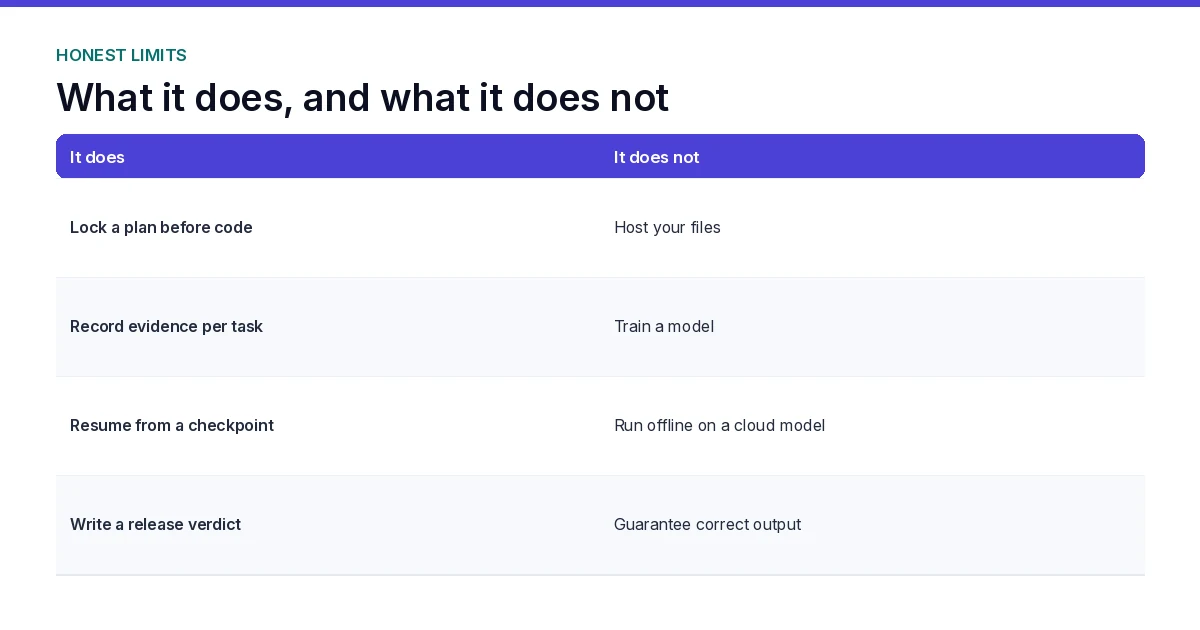
- It is not a hosted service. Nothing runs on a SOVEL server.
- It is not a model. It calls OpenAI, Anthropic or Gemini with your own key and your own billing.
- It is not a no-code builder. You will see a terminal and a file tree.
- It does not run fully offline when a cloud model does the reasoning. Local state stays local. Model calls need a network.
- It does not ship multi-model consensus in v1.0.0.
- It does not collect and post to eight social platforms in v1.0.0.
If any of those are the reason you are here, this is the wrong tool and it is better to know that on this page than after checkout.
The eleven stages
Every run moves through the same sequence. The engine will not skip a stage, and it will not move past a gate without a recorded result.

- Idea. The raw request is written to a file before anything else happens.
- Research. Facts, versions and limits are collected with dates attached.
- Analysis. Scope is narrowed and gaps are named.
- Plan. Tasks, files, boundaries and tests are drafted.
- Plan lock. The plan is frozen with a version, a date and an approver. Edits after this point need a new approval.
- Implementation. One task at a time, each with its own fence.
- Audit. The build is read against the locked plan, not against memory.
- Fix. Only confirmed defects get a repair task, and each repair gets its own test.
- Re-audit. The fix and its neighbours are checked again.
- Export. A manifest and checksums are written so the shipped file matches the tested file.
- Release. A written verdict closes the run: pass, partial or fail.
The plan lock and the release gate are the two stages that change behaviour. Everything before them is preparation. Everything after them is evidence.
What stays on your machine
| Stays local | Leaves your machine |
|---|---|
| Project files and the idea file | The prompt text you send to a model |
| The task ledger, stored in a local SQLite file | The model response |
| Checkpoints and resume state | Nothing else, unless you add an integration |
| Audit reports and release verdicts | |
| Your provider key, kept in your own environment |
Provider charges sit outside the licence. You pay OpenAI, Anthropic or Gemini directly at their rates. The engine does not resell model access and does not take a cut of your usage.

What is verified, what is reported, what is missing
Three labels, used the same way across this site.
| Claim | Status |
|---|---|
| Eleven stage lifecycle with plan lock and release gate | Verified in the shipped documentation |
| Local SQLite ledger with checkpoint and resume | Verified in the shipped documentation |
| Native adapters for OpenAI, Anthropic and Gemini | Verified in the shipped documentation |
| Node.js 22.5.0 or newer, no runtime dependencies | Verified in the package manifest |
| Demo mode produces mock output and is labelled non-production | Verified in the shipped documentation |
| Multi-model consensus | Not in v1.0.0 |
| Eight platform automatic social collection | Not in v1.0.0 |
| Content gap research | Partial. Gaps are recorded during research and analysis stages |
Where a claim says verified, it means the behaviour is written into the documentation that ships with the files. Runtime behaviour on your machine is confirmed by running the demo before you buy anything large.
Three editions, one engine
The engine is the same in all three. What changes is the right to use it. Pick the edition that matches the work you actually do, not the one that sounds safer.

Personal
For your own projects. One workstation, your own ideas, no client delivery.
- 1 workstation
- Own projects only
- No client work
- Full eleven stage workflow
- Local ledger and resume
Pro
For builders who sell what they make. Two systems, one person, no client services.
- 2 systems, single user
- Monetise your own products
- No third party client work
- Everything in Personal
- Local ledger and resume
Agency
For client delivery. Up to five members, with white-label handoff allowed.
- Up to 5 members
- Client work allowed
- White-label handoff
- Everything in Pro
- Local ledger and resume
A licence covers your use of the engine. It does not include provider keys, model charges, taxes or refunds, which are handled separately. Read the licence terms before you choose, and the refund policy if you are unsure which edition fits.
Requirements
- Node.js 22.5.0 or newer. The engine has no runtime dependencies, so there is nothing else to install.
- An API key for at least one supported provider, if you plan to run live. Demo mode needs no key.
- A folder you own, on a machine you control.
That is the whole list. There is no database server, no container runtime and no account to create.
Demo mode and live runs are different things
Demo mode produces mock output so you can see the workflow without spending anything. Every demo artefact carries a non-production label, because mock output proves the shape of the process and proves nothing about a live model run.
Live runs use your key, your quota and your money. Costs scale with the size of the task, so the engine keeps tasks small on purpose. A short task list with measured usage is cheaper and safer than one large run with no record.
Proof you can check before you buy
The clearest evidence on this site is not a screenshot. It is a working tool built with this workflow, running in your browser right now.
The password intelligence tool is a free WordPress plugin. It analyses a password locally, estimates crack time under three scenarios, generates passphrases with the browser crypto API, and checks breaches through a five character hash prefix. Your raw password never leaves the tab.
You can open it, type something, watch the network panel stay quiet, and export a report that contains no secret. That is what a finished small build looks like.
Questions
Do I need a subscription?
No. Each edition is a one-time payment. Provider charges are separate and are paid to the model provider, not to SOVEL.
Does it work without an internet connection?
Local state, the ledger and the checks run on your machine. Live model calls need a network and a key. Calling that setup fully offline would be inaccurate.
Which edition do I need for client projects?
Agency. Personal and Pro both exclude third party client work. Pro allows you to monetise products you build for yourself.
Can I move the licence to another machine?
Personal covers one workstation. Pro covers two systems for a single user. Agency covers up to five members. Moving beyond those limits needs a different edition.
What happens when my quota runs out mid task?
The engine saves the changed files, the task prompt, the last report and a next task note. You resume from the last checkpoint in the same folder, on any configured client.
Is the output guaranteed to be correct?
No tool can guarantee that. The workflow raises the odds by making each step checkable and leaving a written record of what passed. The judgement stays with you at plan lock and at release.
Where do I read the documentation first?
The documentation hub lists the usage guide, the changelog and the support path. Read those before choosing an edition.
Start with the demo, then decide.
Run the demo on a small folder. If the gates make sense to you, the paid editions do the same thing at full size.