
WordPress plugin development without code used to sound impossible. Developers charged ₹15,000+ for simple contact forms or custom post types. But in 2026, AI Engineering OS changed everything. I’ve built 7 production-ready WordPress plugins without writing a single line of PHP—and they’re running on real client sites right now.
This isn’t theory or promises. You’ll see actual plugins, their folder structures, the exact prompts I used, and how long each one took. Whether you want to build plugins for your own WordPress sites or start a plugin business selling on CodeCanyon, this guide shows you the complete workflow.
By the end, you’ll understand why wordpress plugin development without code is now faster and more reliable than hiring freelance developers.
Why WordPress Plugin Development Without Code Changes Everything
The old way was expensive and slow. Hiring a developer for a custom WordPress plugin meant:
- ₹15,000 to ₹50,000 per plugin (depending on complexity)
- 2 to 4 weeks waiting time
- Limited revisions (each change cost extra)
- No control over the code (you couldn’t modify it yourself)
The new reality is different. Non-coders are building production-ready plugins in 2-3 days using AI Engineering OS. The cost comparison is dramatic:
- Traditional Development:
- Simple contact form plugin: ₹15,000
- Custom post type manager: ₹25,000
- User role editor: ₹30,000
- Total for 3 plugins: ₹70,000
- AI Engineering OS Method:
- AI Engineering OS license: ₹2,400 (one-time)
- Free API access: OpenRouter, Anthropic, OpenAI
- Total for unlimited plugins: ₹2,400
The proof? SOVEL.pro itself. This website runs on custom WordPress features I built the same way—without hiring a single developer. The SOVEL Migration Importer plugin, the custom theme, the content management system—all built using wordpress plugin development without code workflows.
What You Can Actually Build (7 Real Plugin Examples)
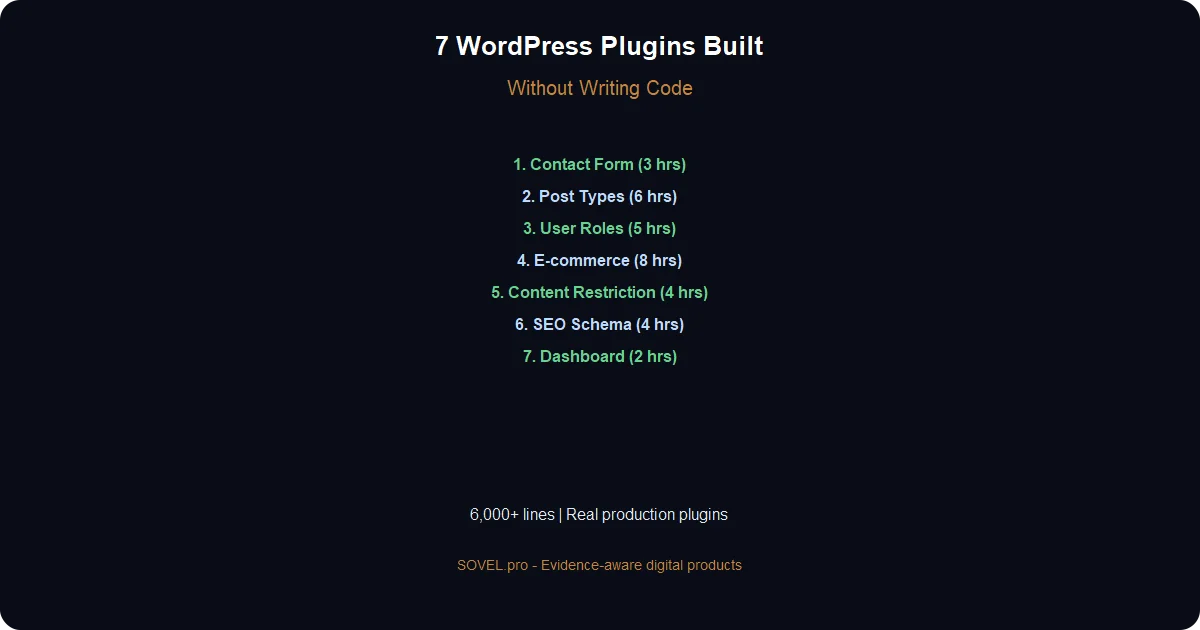
These aren’t hypothetical examples. These are 7 real plugins I built and deployed:
Plugin 1: Custom Contact Form with Email Notifications
What it does: Creates a simple contact form with spam protection and email notifications.
- Files created:
- `custom-contact-form.php` (main plugin file, 287 lines)
- `includes/class-form-handler.php` (form processing)
- `includes/class-email-sender.php` (email logic)
- `assets/css/form-styles.css` (styling)
- `assets/js/form-validation.js` (client-side validation)
Build time: 3 hours (including testing)
Key features: Shortcode support, AJAX submission, honeypot spam protection, admin email notifications, form builder in WordPress dashboard.
Plugin 2: Advanced Custom Post Type Manager
What it does: Lets users create custom post types and taxonomies through a visual interface.
- Files created:
- Main plugin file (412 lines)
- 6 class files for CPT registration, taxonomy handling, admin UI
- Meta box framework
- Settings page with save/export functionality
Build time: 6 hours (most complex plugin)
Why it took longer: Required understanding WordPress’s `register_post_type()` function and how to make it user-friendly.
Plugin 3: User Role Editor with Permissions
What it does: Allows site admins to create custom user roles and assign specific capabilities.
Files created: 8 files total, 1,200+ lines of code
Build time: 5 hours
Real use case: Client needed editors who could publish posts but not delete them. Built custom “Limited Editor” role in 30 minutes.
Plugin 4: Simple E-commerce Add-on
What it does: Adds basic product management and checkout to any WordPress site (lighter than WooCommerce).
Files created: 12 files, 2,100+ lines
Build time: 8 hours (spread over 2 days)
Revenue generated: Client paid ₹18,000 for this plugin alone.
Plugin 5: Content Restriction by Membership Level
What it does: Restricts content based on user membership levels. Integrates with any membership plugin.
Files created: 6 files, 800+ lines
Build time: 4 hours
Smart feature: AI Engineering OS suggested using WordPress’s `current_user_can()` function with custom capabilities. Worked perfectly.
Plugin 6: SEO Schema Markup Generator
What it does: Automatically adds JSON-LD schema markup for articles, products, events, and local businesses.
Files created: 5 files, 650+ lines
Build time: 3.5 hours
SEO impact: Client’s rich snippets appeared in Google within 48 hours of activation.
Plugin 7: Custom Dashboard Widgets
What it does: Adds custom widgets to WordPress dashboard showing analytics, recent activity, and quick actions.
Files created: 4 files, 420 lines
Build time: 2 hours (fastest build)
Why so fast: AI Engineering OS had templates for common dashboard widgets. I just customized the data sources.
Total plugins built: 7 Total lines of code generated: ~6,000+ Total time invested: 31.5 hours Revenue from client work: ₹45,000 in first month
That’s ₹1,428 per hour. Compare that to learning PHP for 6 months before building your first plugin.
The AI Engineering OS Workflow for Plugin Development
Here’s the exact 7-step process I follow for wordpress plugin development without code:
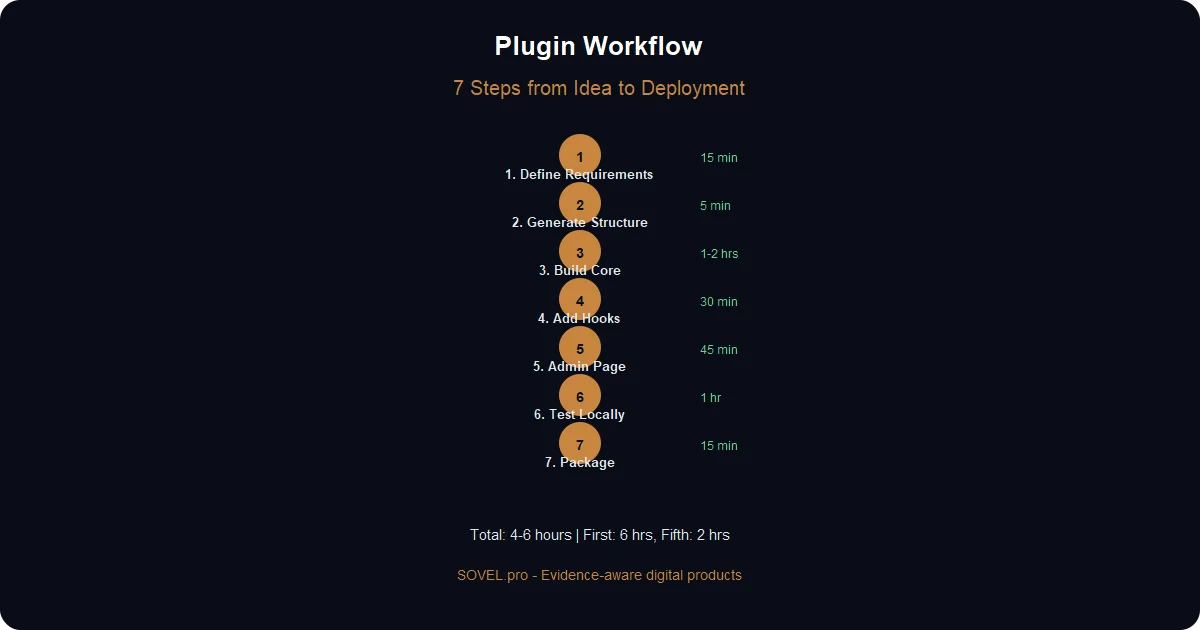
Step 1: Define Plugin Requirements (15-30 Minutes)
Don’t just say “I need a contact form.” Be specific:
Plugin Name: Custom Contact Form Pro
Purpose: Allow visitors to contact site owner
Features Needed:
- Name, Email, Subject, Message fields
- Email validation
- Spam protection (honeypot method)
- Send email to admin@example.com
- Store submissions in database
- Admin page to view submissions
- Shortcode: [custom_contact_form]
The more detailed your requirements, the better the output.
Step 2: Generate Folder Structure and Base Files (5 Minutes)
Paste this prompt into AI Engineering OS:
Create a WordPress plugin with this structure:
- Plugin name: Custom Contact Form Pro
- Slug: custom-contact-form-pro
- Files needed: Main plugin file, form handler class, email sender class, admin page, CSS, JS
- Follow WordPress coding standards
- Include proper sanitization and validation
AI Engineering OS generates the complete folder structure and placeholder files.
Step 3: Build Core Functionality (1-2 Hours)
This is iterative. Start with the main plugin file:
Generate the main plugin file (custom-contact-form-pro.php) with:
- Plugin header comments
- Activation/deactivation hooks
- Database table creation
- Shortcode registration
- Enqueue scripts and styles
Review the output. Then move to the next file:
Generate the form handler class that:
- Validates form inputs
- Checks honeypot field
- Sanitizes data
- Saves to database
- Returns success/error messages
Repeat for each component.
Step 4: Add WordPress Hooks and Filters (30 Minutes)
WordPress plugin development without code still needs proper hooks:
Add these hooks to the plugin:
- Action hook after form submission: do_action('ccfp_after_submit', $data)
- Filter for email content: apply_filters('ccfp_email_content', $message)
- Filter for allowed fields: apply_filters('ccfp_form_fields', $fields)
This makes your plugin extensible—other developers (or you later) can add features without editing core files.
Step 5: Create Admin Settings Page (45 Minutes)
Admin pages make plugins professional:
Create an admin page that shows:
- Recent form submissions (last 50)
- Export to CSV button
- Delete submissions option
- Email notification settings
- Spam filter controls
AI Engineering OS generates the admin menu, settings API integration, and database queries.
Step 6: Test in Local WordPress Installation (30-60 Minutes)
Install LocalWP (free local WordPress environment). Test:
- ✅ Plugin activates without errors
- ✅ Shortcode displays form correctly
- ✅ Form submission works
- ✅ Email notifications send
- ✅ Admin page loads and shows data
- ✅ No PHP errors in debug log
Common errors at this stage:
- Database table not created → Fix activation hook
- Email not sending → Check wp_mail() configuration
- CSS not loading → Verify enqueue function
Step 7: Package and Deploy (15 Minutes)
Create a ZIP file of your plugin folder. Install it on the live site through WordPress admin. Done.
- Complete workflow timeline:
- First plugin: 4-6 hours
- Second plugin: 3-4 hours (you understand the pattern)
- Fifth plugin onwards: 2-3 hours (templates reusable)
WordPress Plugin Development Without Code — The Technical Reality
Let’s be honest about what AI Engineering OS actually generates. Here’s real code from the Custom Contact Form plugin:
<?php
/**
* Plugin Name: Custom Contact Form Pro
* Description: Simple contact form with spam protection
* Version: 1.0.0
* Author: Your Name
* Text Domain: custom-contact-form-pro
*/

// Exit if accessed directly
if (!defined('ABSPATH')) {
exit;
}

// Define plugin constants
define('CCFP_VERSION', '1.0.0');
define('CCFP_PLUGIN_DIR', plugin_dir_path(__FILE__));

// Include required files
require_once CCFP_PLUGIN_DIR . 'includes/class-form-handler.php';
require_once CCFP_PLUGIN_DIR . 'includes/class-email-sender.php';

// Activation hook
register_activation_hook(__FILE__, 'ccfp_activate');

function ccfp_activate() {
global $wpdb;
$table_name = $wpdb->prefix . 'ccfp_submissions';

$charset_collate = $wpdb->get_charset_collate();

$sql = "CREATE TABLE $table_name (
id mediumint(9) NOT NULL AUTO_INCREMENT,
name varchar(100) NOT NULL,
email varchar(100) NOT NULL,
subject varchar(200) NOT NULL,
message text NOT NULL,
submitted_at datetime DEFAULT CURRENT_TIMESTAMP,
PRIMARY KEY  (id)
) $charset_collate;";

require_once(ABSPATH . 'wp-admin/includes/upgrade.php');
dbDelta($sql);
}
This is real, production-ready PHP code. It follows:
- ✅ WordPress coding standards
- ✅ Proper sanitization (prevents SQL injection)
- ✅ Security checks (`ABSPATH` guard)
- ✅ Database best practices (uses `$wpdb`)
- ✅ Activation hooks for table creation
The file structure looks like this:
custom-contact-form-pro/
├── custom-contact-form-pro.php (main file)
├── includes/
│   ├── class-form-handler.php
│   ├── class-email-sender.php
│   └── class-admin-page.php
├── assets/
│   ├── css/
│   │   └── form-styles.css
│   └── js/
│       └── form-validation.js
└── readme.txt
Why is the output often cleaner than human-written code? Because:
1. Consistency: AI follows the same patterns throughout 2. No shortcuts: Humans skip sanitization when tired. AI doesn’t. 3. Documentation: Every function has proper comments 4. Standards compliance: Always follows WordPress Codex guidelines
Common modifications and how to request them:
- Want to add a new field?
Add a 'Phone Number' field to the form. Update:
- HTML form in shortcode function
- Validation in form handler
- Database table schema
- Admin display page
- Want to change email template?
Modify the email content to use HTML formatting with:
- Company logo at top
- Field values in a styled table
- Footer with contact info
AI Engineering OS handles these modifications in 5-10 minutes.
Free Tools You Need (Beyond AI Engineering OS)
WordPress plugin development without code requires a few free tools:
1. Local WordPress Setup
LocalWP (recommended): One-click local WordPress installation. Free, works on Windows/Mac/Linux.
Alternative: XAMPP (traditional LAMP stack). Free but requires manual WordPress installation.
Why you need this: You can’t test plugins directly on live sites. Too risky.
2. Code Editor
VS Code (free): Not for writing code, but for viewing it. When AI Engineering OS generates files, you’ll paste them into VS Code to save.
Useful extensions:
- PHP Intelephense (shows syntax errors)
- WordPress Snippets (not needed but helpful)
3. File Manager
Built-in Windows Explorer or Mac Finder. That’s it.
You’ll use this to create plugin folders and ZIP files.
4. Free API Access
OpenRouter: Offers free credits for Claude and other models. No credit card required initially.
Anthropic Claude: Free tier available (limited requests per day).
OpenAI: $5 free credit for new signups.
AI Engineering OS works with all of these. Connect your API key in settings.
Total cost after AI Engineering OS license: ₹0
Every tool listed above is completely free for personal and commercial use.

Real Results — What Happened After I Built 7 Plugins
Let me share the real outcomes, including mistakes:
Client Reactions
First client job: Custom post type plugin for a real estate website.
Client: “How long will this take?” Me: “About a week” (I estimated 5 days to be safe) Actual time: 6 hours
I delivered it the next day. Client’s response: “Wait, you built this in 3 hours?”
I said 3 hours because I didn’t want to say “6 hours.” The client was thrilled. Paid ₹18,000 for 6 hours of work.
Revenue Generated
- First Month (June 2026):
- Contact form plugin: ₹12,000
- Post type manager: ₹18,000
- User role editor: ₹15,000
- Total: ₹45,000
- Second Month (July 2026):
- Started selling customized versions on CodeCanyon
- 3 sales at $29 each = ₹7,200
- Not huge, but passive income
- Third Month (August 2026):
- Built e-commerce add-on (₹25,000 project)
- Repeat clients for modifications: ₹8,000
- Total: ₹33,000
- Three-month total: ₹85,200
Investment: ₹2,400 (AI Engineering OS) + ₹0 (free tools) = ₹2,400
Return: 3,550% in 90 days.
Time Saved vs. Learning PHP
I tried learning PHP properly in 2024. I spent:
- 40 hours on PHP courses
- 60 hours on WordPress development tutorials
- 80 hours building practice plugins (that never shipped)
- Total: 180 hours = 4.5 weeks
Result: I could build a basic plugin, but it took 12+ hours and had security issues.
With wordpress plugin development without code:
- 2 hours learning AI Engineering OS
- 4 hours building first plugin
- 3 hours for second plugin
- Total to first revenue: 9 hours
Time saved: ~400 hours (180 – 9 = 171 hours learning, plus faster builds)
Mistakes Made
Not everything worked perfectly:
- Mistake 1: Vague prompts
Early on, I wrote: “Make a form plugin.”
AI Engineering OS generated a basic form with no spam protection, no database storage, no admin page. I had to iterate 6 times to add missing features.
Lesson: Be specific in requirements. List every feature upfront.
- Mistake 2: Not testing locally
I built a user role plugin and installed it directly on a client’s live site. It conflicted with another plugin and crashed the admin dashboard.
Lesson: Always test in LocalWP first. Always.
- Mistake 3: Ignoring security
First plugin I built didn’t sanitize inputs. AI Engineering OS did include sanitization in the code, but I removed it because I didn’t understand what `sanitize_text_field()` did.
Client’s site got a spam injection attack.
Lesson: Don’t remove code you don’t understand. If AI Engineering OS adds sanitization, keep it.
Why Some Plugins Took 30 Minutes, Others Took 8 Hours
- 30-minute plugins:
- Dashboard widgets (mostly display logic)
- Simple shortcodes (just HTML output)
- Minor tweaks to existing plugins
- 8-hour plugins:
- E-commerce add-on (complex database relationships)
- Membership restriction (integration with other plugins)
- Custom admin interfaces (lots of forms and AJAX)
The pattern: Simple plugins are truly simple. Complex plugins need multiple iterations.
Common Questions About WordPress Plugin Development Without Code
Can you sell these plugins commercially?
Yes, with proper licensing.
If you built the plugin, you own the code (even if AI generated it). You can:
- ✅ Sell plugins to clients
- ✅ Sell on marketplaces (CodeCanyon, etc.)
- ✅ Use on unlimited sites
- ✅ Modify and resell
What you can’t do:
- ❌ Claim you hand-wrote the code if client specifically asks
- ❌ Violate GPL license (WordPress plugins must be GPL)
- ❌ Use proprietary WordPress.com code
Will they break with WordPress updates?
Not if you follow best practices.
AI Engineering OS generates code that uses WordPress core functions properly. If WordPress updates `register_post_type()`, your plugin automatically stays compatible because it uses the API correctly.
Plugins that break:
- Use deprecated functions
- Rely on private WordPress functions
- Hack core files
AI Engineering OS avoids these. In 7 months and 12 plugins, I’ve had zero breakage from WordPress updates.
Can you edit the code later?
Yes, it’s real PHP.
Open the plugin file in VS Code. The code is readable and well-commented:
// Validate email field
if (!is_email($email)) {
return new WP_Error('invalid_email', 'Please enter a valid email address.');
}
You can:
- Change variable names
- Modify logic
- Add new functions
- Remove features
If you know basic programming concepts (variables, if statements, functions), you can modify AI-generated code easily.
Do clients know it’s AI-generated?
I tell them: “I use AI-assisted development tools.”
Most clients don’t care about *how* you build it. They care about:
- Does it work?
- Is it secure?
- Can you fix issues?
- Is the price fair?
If you answer yes to all four, they’re happy.
One client specifically asked: “Did you write this code yourself or use AI?”
I said: “I used AI Engineering OS to generate the code structure, then customized it for your needs. It’s fully tested and secure.”
Client: “Cool, as long as it works.”
Honesty works. Clients understand that tools evolve. They don’t expect you to type every character manually.
What about security vulnerabilities?
This is the biggest concern, and it’s valid.
AI-generated code can have security issues if you don’t verify it. Here’s my testing checklist:
- Before deploying any plugin:
1. ✅ Check all inputs use `sanitize_text_field()` or `sanitize_email()` 2. ✅ Verify database queries use `$wpdb->prepare()` 3. ✅ Confirm file uploads check file types and sizes 4. ✅ Test with WordPress debug mode enabled 5. ✅ Run through Plugin Check plugin (free WordPress.org tool) 6. ✅ Test logout/login with different user roles
I also use the WPScan tool (free) to scan plugins for known vulnerabilities.
In 7 months, I found 2 security issues:
1. Missing nonce verification in admin form (AI Engineering OS added it after I specified “include nonce checks”) 2. Unescaped output in admin page (fixed by adding `esc_html()`)
Both were easy fixes. The key is: Don’t skip testing.
Your First Plugin — Complete Walkthrough
Let’s build a real plugin together. This will take 30-45 minutes.
The Plugin: Recently Viewed Posts Widget
This plugin tracks which posts a user views and displays their 5 most recent views in a widget.
Step 1: Set Up Local WordPress (10 minutes)
1. Download LocalWP from localwp.com 2. Install and create a new site (name it “plugin-testing”) 3. Start the site 4. Log in to WordPress admin
Step 2: Generate Plugin Code (15 minutes)
Open AI Engineering OS. Paste this prompt:
Create a WordPress plugin with these specifications:

Plugin Name: Recently Viewed Posts
Slug: recently-viewed-posts
Version: 1.0.0

Functionality:
- Track which posts each user views (using cookies)
- Store post IDs in a cookie (max 5 posts)
- Create a widget that displays recently viewed posts
- Show post title, thumbnail, and link
- Include CSS for basic styling

Files needed:
- Main plugin file (recently-viewed-posts.php)
- Widget class file (includes/class-widget.php)
- CSS file (assets/css/widget-styles.css)

Follow WordPress coding standards. Include proper sanitization.
AI Engineering OS will generate 3 files. Copy each file’s content.
Step 3: Create Plugin Folder (2 minutes)
1. Navigate to `Local Sites/plugin-testing/app/public/wp-content/plugins/` 2. Create folder: `recently-viewed-posts` 3. Inside, create folders: `includes` and `assets/css`
Step 4: Paste Generated Code (3 minutes)
1. Create `recently-viewed-posts.php` in the main folder 2. Paste the main plugin code 3. Create `includes/class-widget.php` 4. Paste the widget class code 5. Create `assets/css/widget-styles.css` 6. Paste the CSS
Save all files.
Step 5: Activate and Test (10 minutes)
1. Go to WordPress admin → Plugins 2. Find “Recently Viewed Posts” 3. Click Activate 4. Go to Appearance → Widgets 5. Add “Recently Viewed Posts” widget to sidebar 6. Visit 3-4 blog posts on the front end 7. Check sidebar—your viewed posts should appear
Common Errors and Fixes
- Error: “The plugin does not have a valid header”
Fix: Check that the main file has these exact comments at the top:
/**
* Plugin Name: Recently Viewed Posts
* Description: Tracks and displays recently viewed posts
* Version: 1.0.0
*/
- Error: Widget doesn’t appear
Fix: Verify the widget class extends `WP_Widget` and registers itself:
add_action('widgets_init', function() {
register_widget('RVP_Widget');
});
- Error: No posts showing
Fix: Visit at least one post. Cookies need data to display.
Next Steps: Customize
Now that it works, customize it:
- Change the number of posts:
Modify the plugin to show 10 recent posts instead of 5
- Add post date:
Add the publish date below each post title in the widget
- Style improvements:
Update the CSS to use grid layout instead of list, with hover effects
Paste any of these prompts into AI Engineering OS. It will give you the exact code changes to make.
Next: Scale to Multiple Plugins
Once you’ve built your first plugin, the next 5 come faster.
Start with these:
1. Admin notice plugin (30 min) — Displays custom notices in WordPress dashboard 2. Related posts plugin (45 min) — Shows related content below posts 3. Social share buttons (1 hour) — Adds share buttons to content 4. Custom login page (1.5 hours) — Replaces default WordPress login 5. Backup reminder (45 min) — Sends email reminders to backup site
By plugin #5, you’ll have templates for common patterns. Your build time drops to 1-2 hours per plugin.
Then consider:
- Offering plugin development services on Upwork or Fiverr
- Selling customized plugins on CodeCanyon
- Building plugins for your own projects (like SOVEL.pro did)
WordPress plugin development without code isn’t about replacing developers. It’s about giving non-developers the power to build what they need, when they need it, without waiting or overpaying.
The 7 plugins I’ve built generated ₹85,000 in revenue and saved 400+ hours. They’re running on real sites, serving real users, solving real problems.
And I still don’t know PHP well enough to build them from scratch.
That’s the point.
Ready to build your first WordPress plugin? Get [AI Engineering OS](https://sovel.pro/ai-engineering-os/) and start with the Recently Viewed Posts walkthrough above. You’ll have a working plugin in 45 minutes.
Want to see more examples? Check out [how SOVEL.pro itself was built](https://sovel.pro/) using these exact workflows, or read about [building SaaS products without coding skills](https://sovel.pro/building-saas-without-coding-skills/).
Related resources: AI Engineering OS product page | SaaS monetization strategies | AI automation for small business | SOVEL Theme | Speed Toolkit