
Client discovery engine work starts with a simple shift. You stop guessing which companies might buy and start reading what they already publish. A page, a sitemap, a feed and a contact form are public statements about how a business operates. Read enough of them and a shortlist appears.
The short answer: a client discovery engine is software that turns public business pages into a scored, source-backed prospect list. It finds candidate companies, reads their own sites under the rules those sites publish, extracts contact details without inventing any, and writes a report you can send to a client or hand to a sales team. It does not log in anywhere, and it does not promise that anyone will reply.
This guide walks through the seven routes a client discovery engine can use, the evidence record behind each claim, the scoring formula, and where the honest boundary sits. The examples come from SOVEL CLIENT RADAR, the engine this site sells, because I can show its actual behaviour instead of describing a category in the abstract. If you are still working out how to find potential clients at all, read the channel sections first and come back to the machinery.
What does a client discovery engine actually do?
A client discovery engine answers four questions about every company it finds. Is this a real business? Does it match the service you sell? Can you reach a person there? Is there a reason to write this month rather than next year?
That is the whole job. Everything else is plumbing: fetching pages politely, caching what it read, deduplicating domains, and storing a timestamp. The value sits in the answers, not in the crawl. The method works from public business data alone, meaning the pages a company publishes to win customers, so no private database and no purchased list is involved.
The client discovery engine builds a query matrix from your niche, your ideal customer profile and your location. A service niche searches for agencies and studios. A shop niche searches for stores and product pages. A publisher niche searches for newsletters and article archives. The wording follows the intent instead of firing one generic phrase at every source, which is the most common reason a homemade list comes back full of companies that sell your service rather than buy it.
From there it fetches homepages, contact pages, sitemaps and machine-readable files. It records what it read and when. Only then does it score anything.
Which seven routes does a client discovery engine use?
The routes matter because each one answers a different question. A search result says the company exists and someone indexed it. A directory says it joined a trade body. A referral link says it works with that company. A developer registry says it builds software. No single route covers the market, and an engine that claims one source is enough is selling you a story.
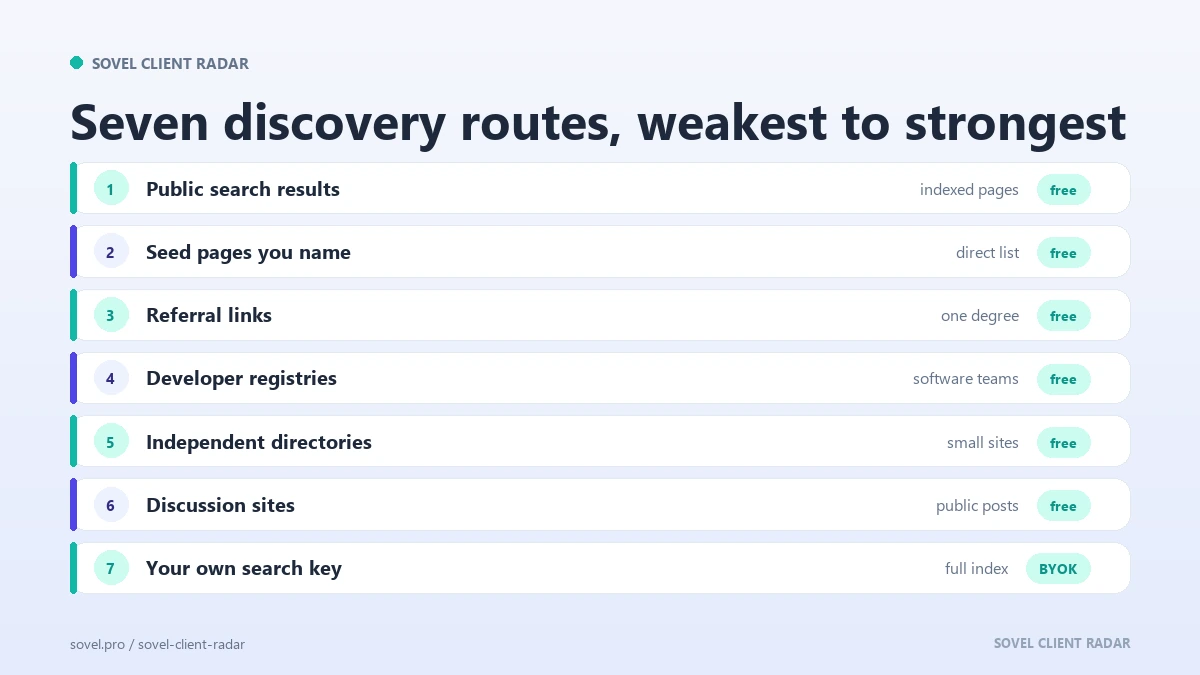
Here are the seven routes a client discovery engine can use in practice, with the honest status of each.
- Public search results. DuckDuckGo Lite answers with real organic rows on many networks. The HTML endpoint often returns an anti-bot page, and the adapter says which endpoint answered. When the network blocks it, the run reports the block instead of pretending the market is empty.
- Seed pages you name. You point the engine at a page that already lists the businesses you want: a chamber of commerce directory, a trade association member list, a supplier page, a “top ten” roundup. The engine reads that page, follows same-host profile pages, and takes the external links as candidate businesses. This route works without a key and without a wall.
- Referral links. While reading a candidate site, the engine notices the businesses that page links to. Client lists, case studies and partner pages become a second degree of discovery, and each new candidate carries the URL of the page that mentioned it.
- Developer and maker registries. GitHub organisations and npm packages expose company names, homepages and blog links. This route is strong for software teams and weak for corner shops, and the engine treats it that way.
- Independent web directories. wiby.me is a hand-indexed directory of small, independent sites. It is a useful source of shops and blogs that never appear in a commercial index.
- Discussion sites. Public stories and comments on Hacker News name companies that real people already talk about. The engine reads the public API, not the login-walled parts of the site.
- Your own search key. Brave Search and Google Programmable Search both answer a plain GET and both have a real index. This tier is optional, off by default, and paid by you at the provider. The client discovery engine ships no key and never asks for one.
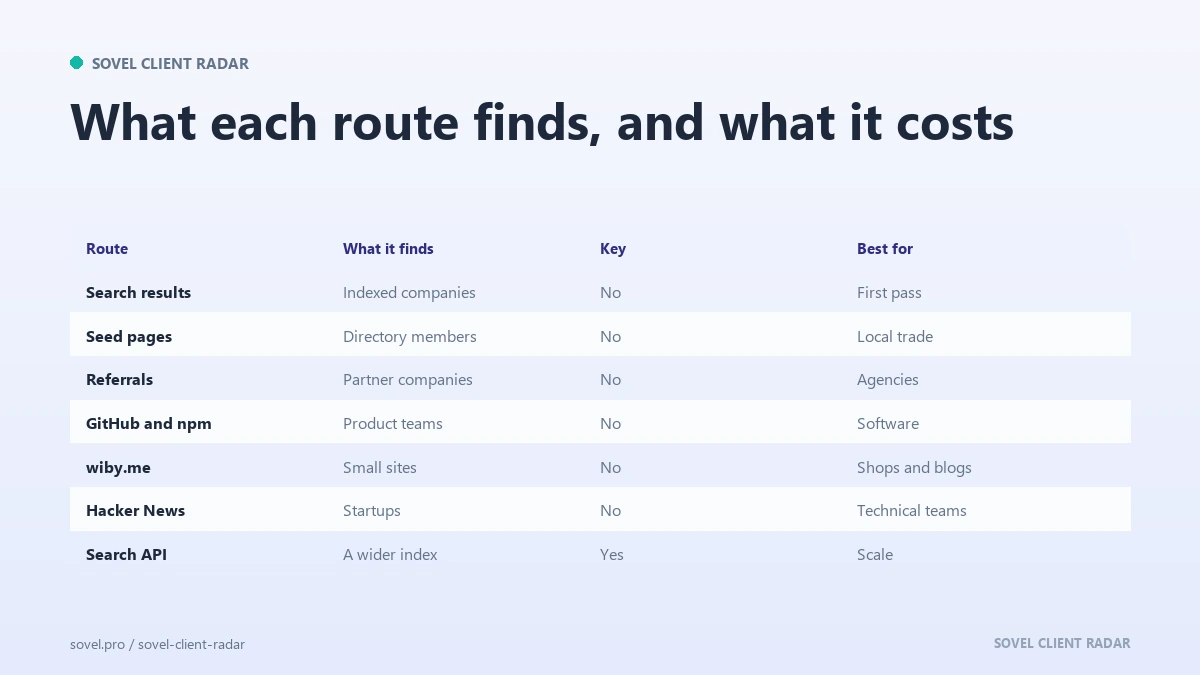
A practical run mixes three or four routes, because each one reaches a different corner of the market.
| Route | Key needed | Best for | Honest limit |
|---|---|---|---|
| Public search results | No | Broad first pass | The network may block the endpoint |
| Seed pages | No | Local and trade directories | Only as good as the page you name |
| Referral links | No | Agencies, studios, consultancies | Follows one degree, not the whole market |
| Developer registries | No | Software and product teams | Weak for shops and local services |
| Independent directories | No | Small sites and blogs | Small index, uneven coverage |
| Discussion sites | No | Startups and technical teams | Public posts only, no profiles |
| Your own search key | Yes, yours | A real web index at scale | Paid by you at the provider |
A client discovery engine is only as strong as the sources it reads.
What does the evidence record look like?
Every claim in a serious client discovery engine carries four fields: the value, the source URL, the retrieval time, and the evidence class. That record is buyer fit scoring at the level of a single fact, and it is what separates a prospect list from a pile of guesses.
Take a phone number. The report does not just print +44 20 7946 0958. It prints the number, the page it appeared on, the date it was read, and an evidence class such as page_contact. If the number appears on three pages, one value is kept with the strongest source, and a social link that looks like a share button is rejected before it reaches the report.
The same discipline applies to absence. A blog with no posts in fourteen months is a real signal, but only if the engine actually finished checking the feed. If the feed probe timed out, the report says the check did not finish instead of claiming the blog is dead. That distinction is the difference between a report you can defend and one you apologise for. A prospect list built this way survives an audit, because every row traces back to a public page and a retrieval date.
The same discipline is why the source traceability method used for articles applies to prospect data. A number without a URL is an opinion.
I learned this rule the hard way: a tool that guessed firstname@domain produced an address that bounced. If the page does not publish an address, the field stays empty and the report says so.
How does a client discovery engine score a lead?
The score has to be explainable, or it becomes a magic number that nobody trusts. A client discovery engine should show its arithmetic.
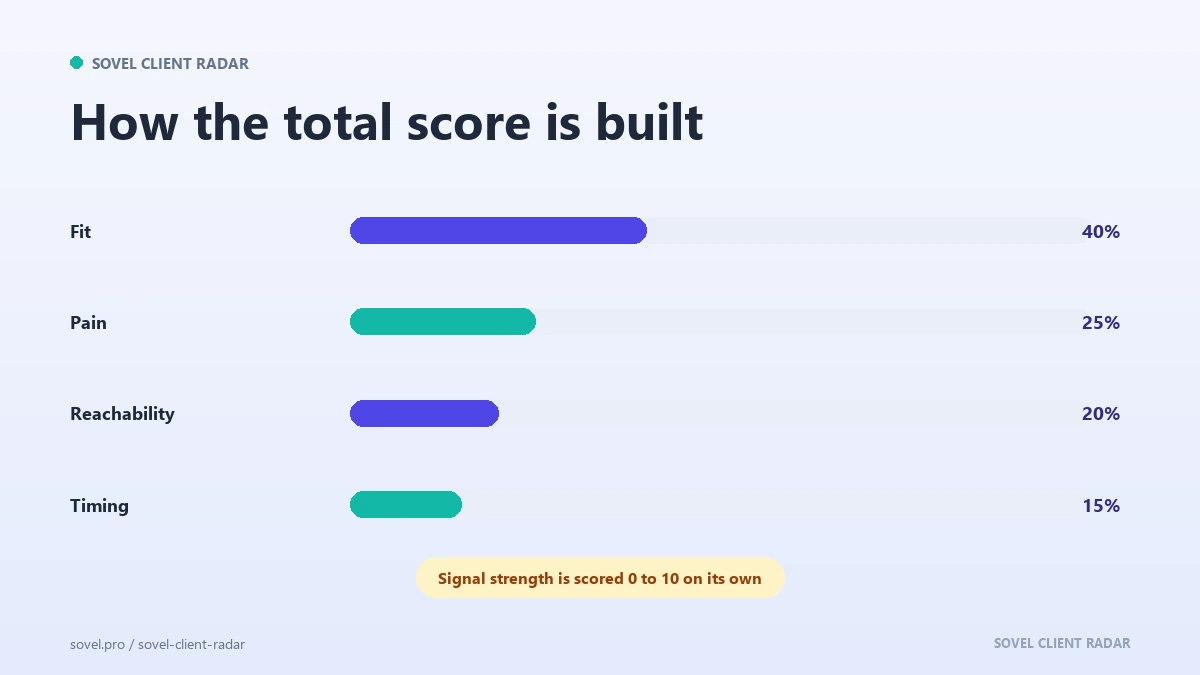
SOVEL CLIENT RADAR uses two related scores. The main ranking is:
total = 0.40 × fit + 0.25 × pain + 0.20 × reachability + 0.15 × timing
Fit measures niche matches, buyer language, company size and country. Pain measures missing essentials such as a blog, schema markup, a sitemap or an llms.txt file. Reachability counts the contact channels actually found: a personal address, a role inbox, a phone number, WhatsApp, a social profile. Timing uses real dates: the last post in a feed, a sitemap lastmod, or a repository push date.
The why-buy fit percentage shown at the top of each lead uses a slightly different weighting:
0.50 × fit + 0.28 × pain + 0.12 × buyer_signal + 0.10 × evidence
Both formulas live in the report. The inputs live in leads.json, so you can audit any score line by line. That matters when a colleague asks why one company ranks above another and the honest answer is “more contact channels and a blog that stopped in March”. This is buyer fit scoring in plain terms: a weighted opinion about how well a company matches the service you sell, and it is only as good as the evidence behind it.
A separate signal strength from 0 to 10 breaks ties. It is built from dated buying signals. A company with a live vacancy on its own careers page and a blog that stopped eight months ago can outrank a cleaner site with no timing evidence at all.
What happens on a first run?
You check the environment. The doctor command runs twelve checks, from Python version and folder permissions to the bundled certificate authority and the optional browser used for PDF rendering. A machine that fails gets a named failure, not a crash halfway through a list.
You describe the work. One command takes a topic, an optional location, a lead cap and a time limit. A dry run prints the queries and sources before any page is fetched.
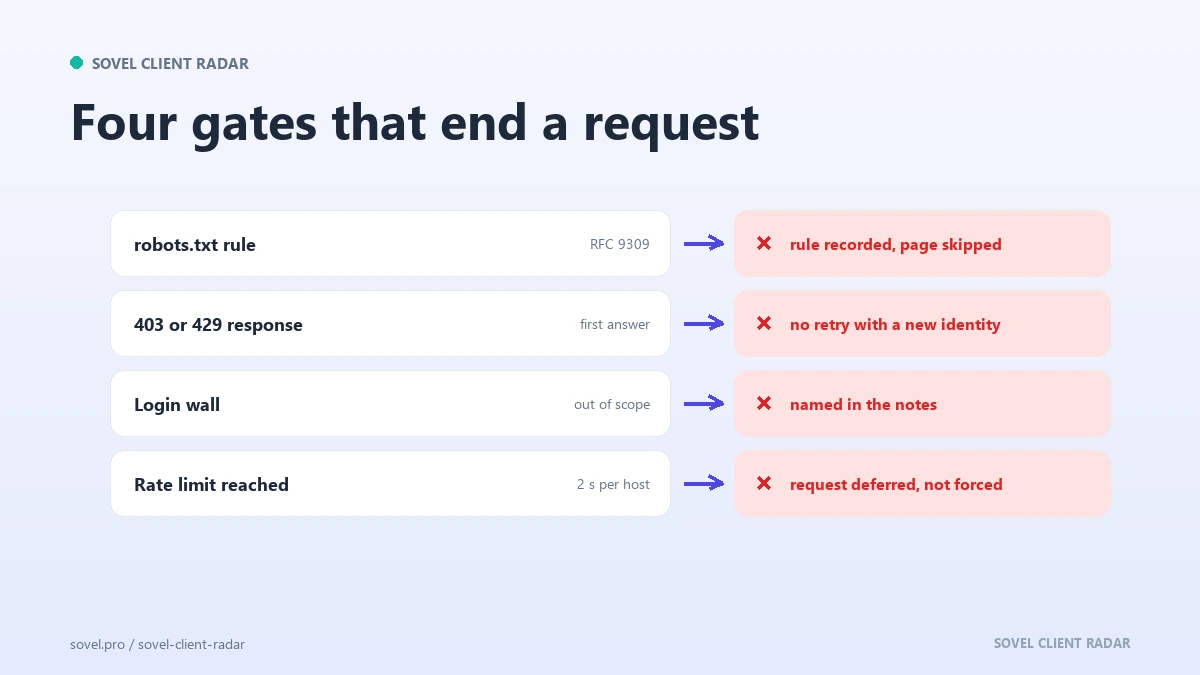
The client discovery engine fetches. Homepages first, then contact pages, sitemaps and machine-readable endpoints. It waits two seconds between requests to the same host, caches for twenty-four hours, and respects the robots rules it finds. Six sites are read at once by default, and each individual host is still read one page at a time.
The run writes a folder. Inside it you get a lead spreadsheet with 84 columns, a contacts file, a signals file, a six-sheet workbook, JSON records, a self-contained HTML report, Markdown, DOCX and, when a Chromium browser is available, a PDF. The same folder carries verification notes that name every blocked source and every check that did not finish.
The first run on a new topic usually takes two to six minutes. A repeat run is faster because the cache answers most requests, and it returns only names you have not already been given, which is what makes a weekly habit possible.
Where does a client discovery engine stop?
The boundary is the part most vendors skip. A client discovery engine that ignores it becomes a liability the first time a client asks how the data was collected.
The engine reads the Robots Exclusion Protocol before it reads a page. That standard is published as RFC 9309, and it is not optional. A disallowed path is logged as blocked, and the crawl continues only where the rules leave room. When a site answers with a 403 or a 429, that answer is honoured on the first response. There is no retry with a different user agent, no proxy rotation, and no attempt to look like a browser.
Login-walled networks stay out of scope. Behind those walls sit Google, LinkedIn, Facebook, Instagram, X, Quora and Reddit, and each of them either demands an account or rules out automated queries. The engine has no workaround for that. It says the source is out of scope by design.
Storage follows the same logic. Reports stay on your machine. The database is a local SQLite file. The optional AI layer uses your key, stores it owner-only, shows it only as a hash, and sends it to your provider and nowhere else. You can delete the whole dataset with one command.
What a client discovery engine will not do
It will not invent an email address to fill a blank cell. It will not claim a blog is abandoned when the feed check timed out. It will not promise that a high score means a sale. It will not send the outreach for you.
It also will not hand you a market that does not publish anything. A business with no website, no directory listing and no public mention is invisible to this method. That is a real limit, and the honest response is a different route, such as a phone call to a local trade body, not a fabricated record. The boundary is simple to state: the process reads public business data, and a company that publishes none of it cannot be found this way.
The score is a ranking aid, and the report says so. A heuristic that helps you choose the first ten names from a hundred is useful; one presented as a prediction is a trap.
How do you use a client discovery engine every week?
The weekly habit matters more than the client discovery engine itself. A short, repeated loop beats a heroic one-off export.
Monday, write the brief: the service you sell, the niche, the location, the disqualifiers. Tuesday, run the engine on one topic and read the report in order: strongest signal first, then the contact route, then the score breakdown. Wednesday, research a business before pitching: fifteen minutes on each of the top five, and one specific sentence about each company. Thursday, send the first emails. Friday, log replies, update the suppression list and queue the next topic.
That loop produces roughly twenty researched prospects a week without a single login. It also produces a record of what you checked, which is the part that compounds. After a month you can see which niche produces replies and which produces silence, and you can change the brief instead of changing your personality. If you skip the step to research a business before pitching, the score becomes an excuse rather than a reason.
Most advice about how to find potential clients starts with a platform you must join. This route starts with a page you can already read, which is why it works on the first afternoon and keeps working in the hundredth week.
If you want the full procedure, the client discovery workflow walks through each step with the exact fields to record. If you want to see how a list without a single wall looks in practice, the guide to finding clients without LinkedIn covers the keyless routes in plain language. And if you want the engine itself, the SOVEL Client Radar product page lists what each edition includes and what it costs.
Which edition fits your work?
One client discovery engine, three lifetime editions. Every edition has the full feature set. They differ in seats and in the leads-per-run cap.
- Personal / Freelancer (1 Machine Lifetime License) ₹5,999. Up to 50 leads per run, one seat. Built for a solo worker who runs one or two topics a week.
- Pro / Small Business (1 Machine Lifetime License) ₹12,999. Up to 200 leads per run, one seat. Built for a small team that needs a deeper list each week. The optional AI layer is included in every edition and stays off until you add your own provider key.
- Agency / Enterprise (5 Machines License + Team features) ₹39,999. Up to 500 leads per run, five seats. Built for a team that researches several client niches at once.
No daily or monthly run limit exists in any edition. Provider costs, if you add a search key, are billed by that provider and are not part of the licence.
Buy buttons go straight to checkout with the edition already in the cart. View overview opens the edition section on the product page.
FAQ
What is a client discovery engine?
A client discovery engine is software that finds potential business buyers from public pages and turns them into a scored list with a source for every claim. It reads company sites, directories and public registries, keeps only contact details that are actually published, and writes a report. It does not log in anywhere or guess missing data.
Does a client discovery engine need an API key?
No. The engine works with keyless sources such as seed pages, referral links, developer registries and independent directories. An optional search tier can use your own Brave or Google key for a real web index, but it is off by default, paid by you, and not required for a useful run.
Is this the same as web scraping?
No. Scraping usually means pulling pages at volume and ignoring the site’s rules. A client discovery engine fetches a small number of pages, reads the robots rules first, waits between requests, caches what it read, and stops when a site says no.
How many leads can I expect from one run?
That depends on the niche, the location and the routes you enable. The engine reports what it actually found, including blocked sources, so the number is honest rather than optimistic. The edition cap sets the ceiling.
Can it find local businesses without Google Maps?
Yes, through seed pages. You name a directory, a chamber list or a trade association page, and the engine reads the businesses that page links to.
What happens when a source is blocked?
The run records the source, the reason and the status code in the verification notes and in the report. It does not retry with evasion and it does not fill the gap with invented data. Other sources continue, and the final count reflects only what was actually read.
Does the AI layer send my data to a provider?
Only if you turn it on and add your own key. The key is stored on your machine with owner-only permissions, shown as a hash, and sent to the provider you chose.