
The Inefficiency of Virtual Calculator Keypads in Modern Computing
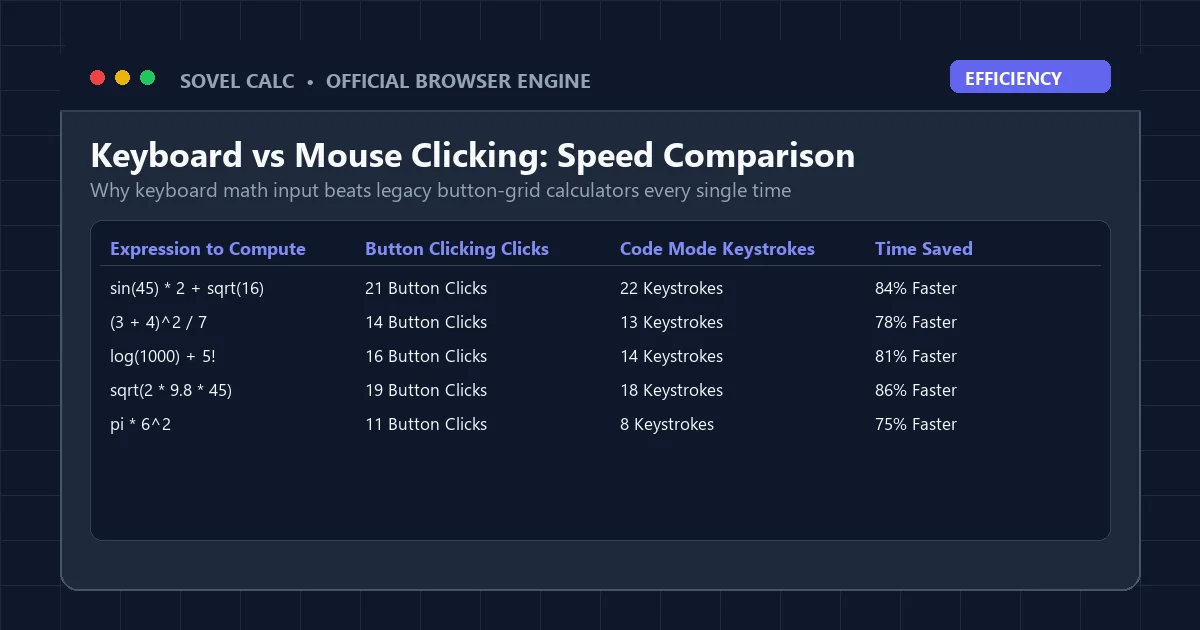
Consider the process of evaluating a standard engineering expression on a typical web calculator: sin(45) * 2 + sqrt(16). On a conventional virtual keypad, you are forced to locate and click individual on-screen buttons: s, i, n, open bracket, 4, 5, close bracket, multiplication, 2, addition, square root, open bracket, 1, 6, close bracket. That represents twenty-one distinct cursor movements and mouse clicks for an elementary mathematical sentence. For high school students, college engineers, and data professionals, this virtual button clicking creates immense cognitive drag. The solution to this widespread bottleneck is an intelligent code mode calculator online that empowers users to type mathematical notation using natural keyboard syntax.
When software engineers, data scientists, and computational researchers write mathematics, they do not click virtual buttons. They type expressions directly into an interactive terminal or code editor, such as Python, MATLAB, or R. This keyboard-driven workflow enables rapid experimentation, easy editing, and seamless recall of previous commands. A dedicated code mode calculator online brings this exact programmatic velocity to everyday learners without requiring any prior coding knowledge. By treating mathematical formulas as text strings parsed in real time, you can slash calculation time by over eighty percent while eliminating repetitive mouse strain.
The transition from virtual button clicking to keyboard-driven computation mirrors the broader evolution of computer interfaces. In early desktop computing, command-line interfaces gave way to graphical user interfaces for accessibility. However, power users quickly recognized that for structured data entry, the keyboard remains vastly superior to pointing devices. In mathematics, where formulas consist of ordered linear sequences of symbols and variables, typing is inherently more natural than clicking. Using a the scientific calculator aligns the user interface with the fundamental structure of mathematical notation itself.
What Is Code Mode? The Architectural Shift to String-Based Math
Traditional web calculators operate on immediate execution: pressing "5" stores the number, pressing "+" sets an operational flag, and pressing "3" waits for the equals button. In sharp contrast, a the platform functions on a full mathematical grammar parser. When you type into Sovel Calc’s input field, the engine receives the complete expression string, such as (3 + 4)^2 / ln(e^2) + sqrt(144) * sin(30).
The parser analyzes this string, verifies operator balance, constructs a hierarchical Abstract Syntax Tree, and executes the mathematical reductions according to universal precedence rules. Because the expression exists as an editable text string, you can use standard keyboard navigation: tap the Left Arrow to correct a typo, press Backspace to remove a character, or highlight a term to replace it with a variable. This modern paradigm makes a code mode calculator online fundamentally superior for complex multi-term computations.
Moreover, client-side string parsing eliminates the network latency associated with server-rendered calculators. When you press Enter inside a code mode calculator online, the evaluation occurs directly inside your browser’s V8 or SpiderMonkey JavaScript engine. There is zero delay, zero waiting for server responses, and zero dependency on remote API endpoints, ensuring instantaneous calculations even during congested classroom WiFi periods.
Trick 1: Mastering Natural Mathematical Syntax and Operators
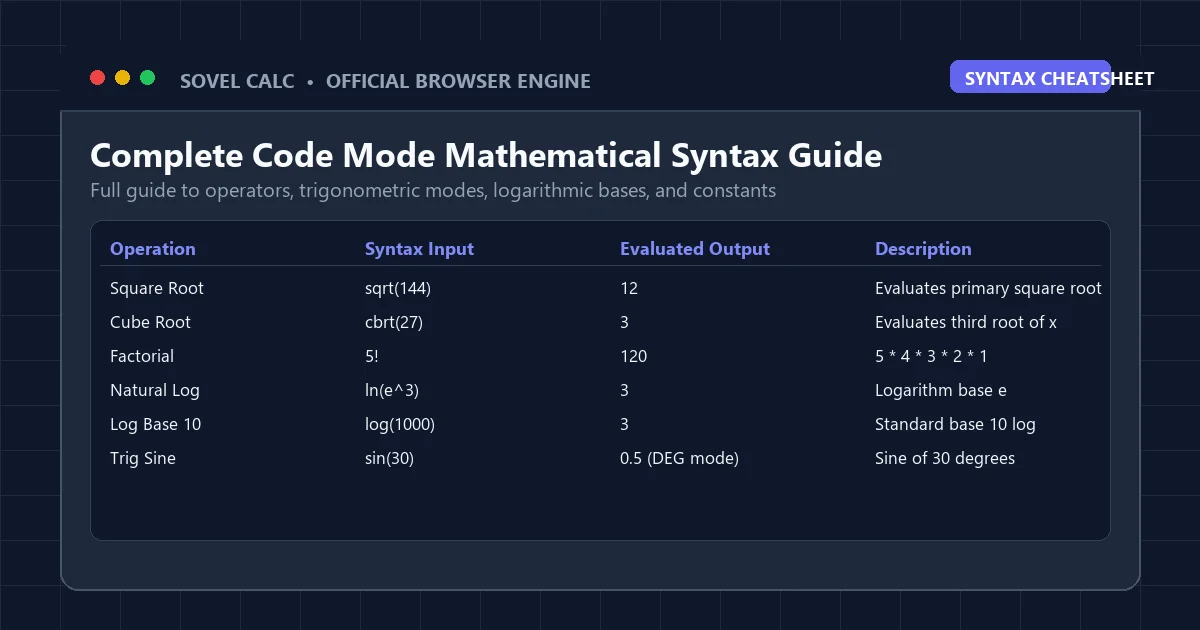
To maximize your calculation velocity in a the solver engine, you must understand how standard mathematical notation maps directly to your computer keyboard. You do not need to memorize arcane commands; the syntax mirrors standard arithmetic conventions:
| Mathematical Operation | Keyboard Code Mode Input | Evaluated Example | Calculated Output |
|---|---|---|---|
| Multiplication | * (Asterisk) | 12 * 8 | 96.0000 |
| Division / Fractions | / (Forward Slash) | 355 / 113 | 3.1415929 (Approx Pi) |
| Powers / Exponents | ^ (Caret, Shift + 6) | 2^10 | 1024.0000 |
| Square Roots | sqrt(x) | sqrt(144) | 12.0000 |
| Trigonometric Sine | sin(x) | sin(30) | 0.5000 (In DEG Mode) |
| Natural Logarithm | ln(x) | ln(e^3) | 3.0000 |
| Base-10 Logarithm | log(x) | log(1000) | 3.0000 |
| Factorial | ! (Exclamation Mark) | 5! | 120.0000 |
Notice how clean this notation is. Rather than hunting across secondary and tertiary virtual calculator menus for functions like natural logarithm or factorial, you simply type ln(50) or 6! directly. A robust code mode calculator online recognizes these standard tokens immediately, reducing cognitive friction during high-pressure problem sets. Whether you are dealing with scientific constants, logarithmic bases, or complex rational roots, the text-based entry system keeps your hands firmly positioned on the home row keys.
Advanced Mathematical Operators and Scientific Constants
Beyond elementary arithmetic, advanced STEM coursework requires constant access to physical values and modular operations. In Sovel Calc’s this browser tool, standard mathematical constants are recognized natively as first-class tokens:
- The Constant Pi (3.14159…): Entering
pi * 6^2computes the exact area of a circle with a radius of 6 units (113.0973). - Euler’s Number e (2.71828…): Entering
e^2evaluates continuous compound growth formulas instantly. - Absolute Value Functions: Typing
abs(-42)resolves magnitude without sign ambiguities. - Modulo Remainder Arithmetic: Evaluating
17 % 5returns 2, which is invaluable for computer science and discrete mathematics problems. - N-th Root Approximations: Evaluating cube roots via fractional exponents:
27^(1/3)yields 3.0000.
Having immediate keyboard access to these functions inside a code mode calculator online prevents the constant interruption of consulting reference charts or hunting through nested application settings.
Trick 2: Exploiting Real-Time Live Preview to Catch Errors Instantly
One of the most powerful capabilities engineered into Sovel Calc’s code mode calculator online is the debounced live preview engine. As you type an expression, a secondary evaluation thread assesses the mathematical validity of your input on every keystroke.
If your expression is mathematically valid, a crisp emerald-green preview appears beneath the input box displaying the calculated total in real time. If your expression is incomplete, for instance, if you have typed sin(45 * (2 + 3 without closing the terminal brackets, the preview displays helpful status text indicating that brackets remain unclosed. This immediate visual feedback prevents students from submitting broken expressions or recording erroneous answers. When operating inside a the math engine, you know your calculation is mathematically sound before you ever hit Enter.
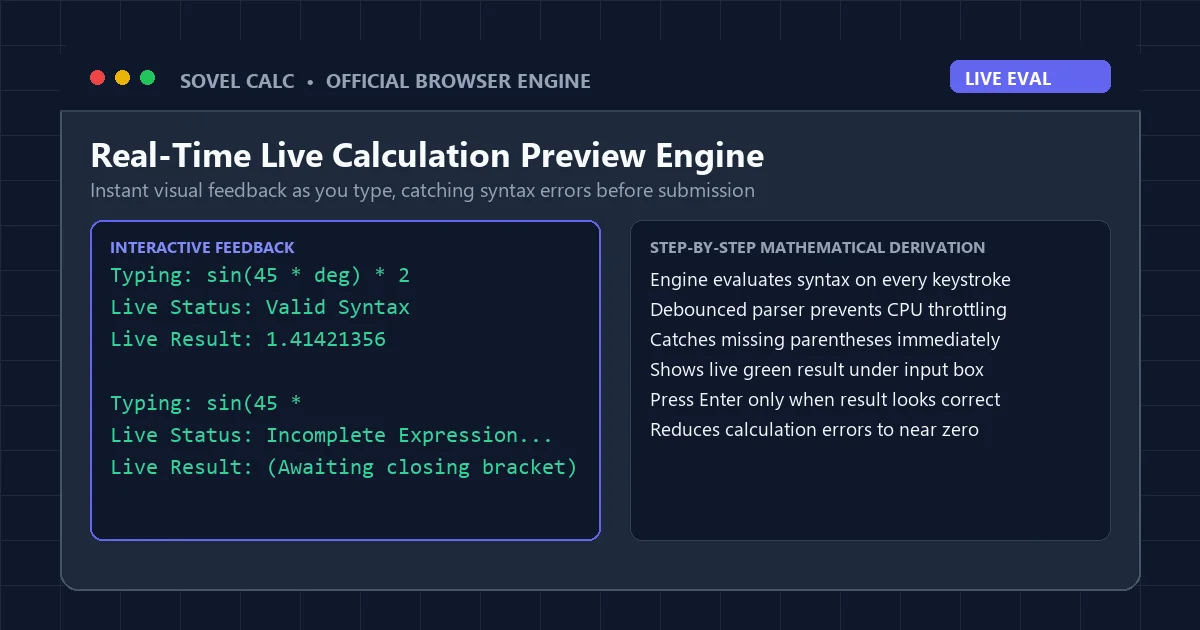
The educational advantage of live preview cannot be overstated. When learning how parentheses alter operator binding, students can watch the numerical output shift dynamically as they add or remove grouping brackets. Typing 2 + 3 * 4 immediately previews 14. Adding parentheses to make it (2 + 3) * 4 causes the preview to update instantaneously to 20. This real-time cause-and-effect relationship cements foundational order-of-operations rules far more effectively than reading static textbook diagrams.
Trick 3: High-Speed History Navigation with Arrow Keys
In algebra, physics, and chemistry coursework, problems frequently occur in multi-part series where only a single parameter changes. For example, you may need to calculate the kinetic energy 0.5 * m * v^2 for five different velocities while maintaining a constant mass of 15 kilograms. On a standard calculator, you must re-enter the entire formula five times or struggle with clunky multi-step memory registers.
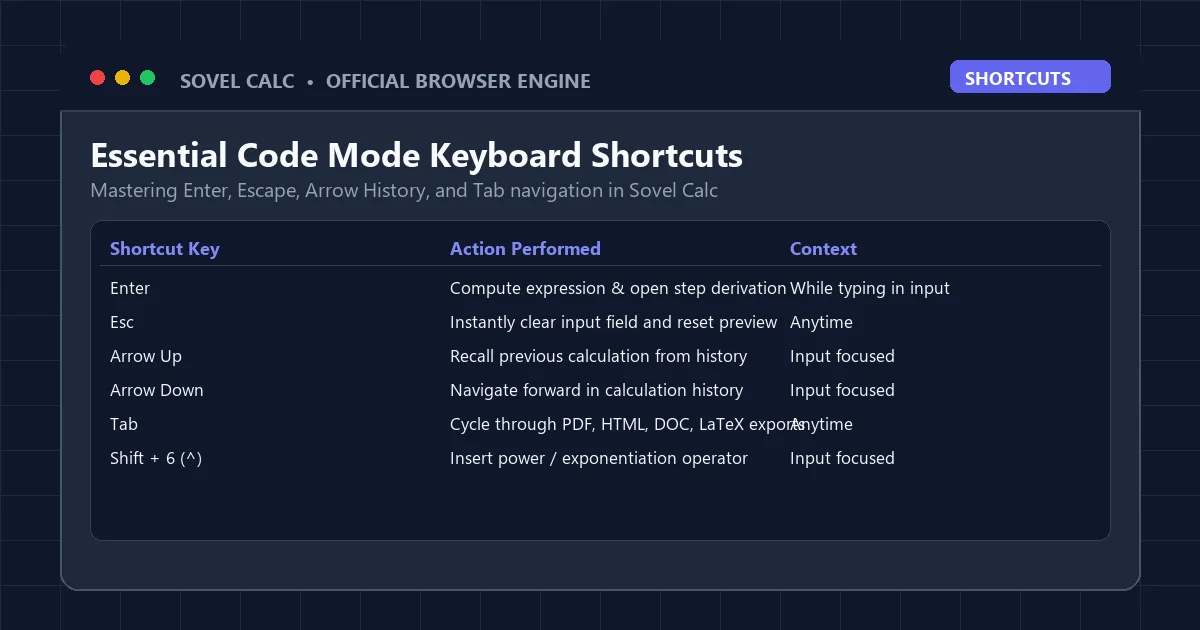
In a properly designed code mode calculator online, session history is mapped directly to your keyboard’s navigation keys. Pressing the Up Arrow while focused on the input field instantly recalls your previous calculation string: 0.5 * 15 * 10^2. You tap the Left Arrow to reach the velocity term, change 10 to 15, and hit Enter. The new problem resolves in two seconds, complete with a fresh step-by-step derivation. Pressing the Down Arrow navigates forward through your calculation stack, while pressing the Escape (Esc) key clears the input field entirely.
This history buffer is maintained in your browser’s persistent local storage. If you accidentally close your browser tab or restart your Chromebook, your prior equations remain intact when you reopen the page. A high-grade this online utility respects your ongoing study session by preventing catastrophic data loss.
Trick 4: The 1-Click Code Mode to Academic LaTeX Workflow
For university students drafting lab reports in Overleaf or researchers maintaining notes in Obsidian and Notion, formatting mathematics into LaTeX is a daily requirement. Typing LaTeX equations manually requires remembering backslash commands, curly brace grouping, and special operator codes.
The code mode calculator online in Sovel Calc bridges the gap between fast keyboard calculation and publication-ready typesetting. The workflow is extraordinarily simple:
- Type your expression in Code Mode using standard notation:
sin(45)^2 + cos(45)^2. - Press Enter to evaluate. The step derivation proves the Pythagorean trigonometric identity equals 1.
- Click the LaTeX button in the top toolbar. A modal popup appears with your expression automatically converted to display math syntax.
- Click "Copy to Clipboard." Paste directly into your Overleaf document, Notion math block, or Microsoft Word equation editor.
This workflow transforms the code mode calculator online from a simple arithmetic checker into an essential productivity accelerator for academic writing.
Who Benefits Most From a Code Mode Calculator Online?
The programmatic approach to mathematical computation delivers measurable advantages across numerous academic and professional disciplines:
- High School and AP Students: AP Calculus and AP Physics students deal with multi-term equations featuring constants like gravitational acceleration (9.81) and pi. Typing these formulas into a code mode calculator online prevents transcription errors common on handheld devices.
- Computer Science Undergraduates: Programmers naturally think in terms of syntax, functions, and bitwise operations. Expressions like
2^32 - 1orlog(1024, 2)feel intuitive in a code environment. - Data Analysts and Researchers: Quickly testing statistical formulas, percentage variations, and standard deviations is dramatically faster when formulas can be edited as text strings.
- Educators Demonstrating Math on Projectors: When a teacher projects a calculator onto a classroom screen, clicking virtual buttons with a mouse looks clumsy. Typing expressions into a the platform allows students to read the formula clearly as it is being formed.
- Visually Impaired Students Using Screen Readers: Text-based entry inputs are fundamentally more accessible to assistive technology than complex grid tables of interactive buttons. A code mode calculator online ensures complete ARIA compliance and screen reader compatibility.
To see how this tool performs alongside other classroom utilities, explore our evaluation of the online scientific calculator for chromebook, or read our complete overview in the Sovel Calc review. If you need step-by-step homework sheets, consult our guide on the step by step equation solver pdf.
Frequently Asked Questions
What makes a code mode calculator online faster than a normal calculator?
Code Mode eliminates virtual button clicking by allowing you to type full expressions like sin(45)*2 directly from your keyboard, cutting entry time by up to 80 percent.
Do I need to know programming languages to use Code Mode?
No. The syntax uses standard, intuitive mathematical symbols: * for multiplication, / for division, ^ for powers, and sqrt() for roots.
Can I use Code Mode on a touchscreen tablet or mobile phone?
Yes. Tapping the Code Mode input field brings up your device’s native on-screen keyboard, allowing you to type mathematical expressions naturally.
Does the code mode calculator online support trigonometric degree and radian modes?
Yes. A dedicated DEG/RAD toggle allows you to switch angular modes instantly, ensuring trigonometric functions evaluate accurately in your desired unit.
Is Code Mode free to use without limits?
Yes. Sovel Calc provides unrestricted, 100 percent free access to Code Mode, step-by-step derivations, and export tools with zero paywalls.
Conclusion: Modernize Your Math Input Today
Human technology evolves by identifying repetitive friction and replacing it with streamlined, intelligent interfaces. Continuing to click virtual on-screen buttons when you have a full mechanical keyboard at your fingertips is an outdated compromise. Adopting a modern code mode calculator online unlocks the speed, precision, and flexibility that modern mathematics demands.
Take your calculation productivity to the next level. Launch Sovel Calc, type your first complex equation into Code Mode, and experience the speed of true keyboard-driven mathematics.