
Why Traditional Online Calculators Are Failing Modern Students
Finding a reliable mathematics tool online should be simple. You open a browser, enter an equation, and get an answer with clear working. Yet millions of students face paywalls, intrusive advertisements, and sluggish interfaces every single day. Most basic web calculators output a single isolated number without explaining how that result was achieved. That is precisely why sovel calc was developed from the ground up.
When you sit down to complete an algebra or calculus assignment, you do not just need the final answer. You need to verify your intermediate reasoning. If your calculation diverges from the textbook solution, an isolated number cannot tell you which rule you misapplied. The modern student requires an engine that transparently details every transformation. In this comprehensive review, we examine how sovel calc solves these long-standing classroom frustrations without asking for a subscription or credit card.
What Is the solver engine? An Architectural Overview
At its core, sovel calc is a high-performance, browser-based scientific calculator, function grapher, and step-by-step equation solver hosted at sovel.pro. Built on modern web standards and powered by a deterministic mathematical evaluation engine, the platform executes directly on the client machine. This client-side architecture means expressions evaluate with zero network latency, eliminating the loading spinners that plague cloud-based solvers.
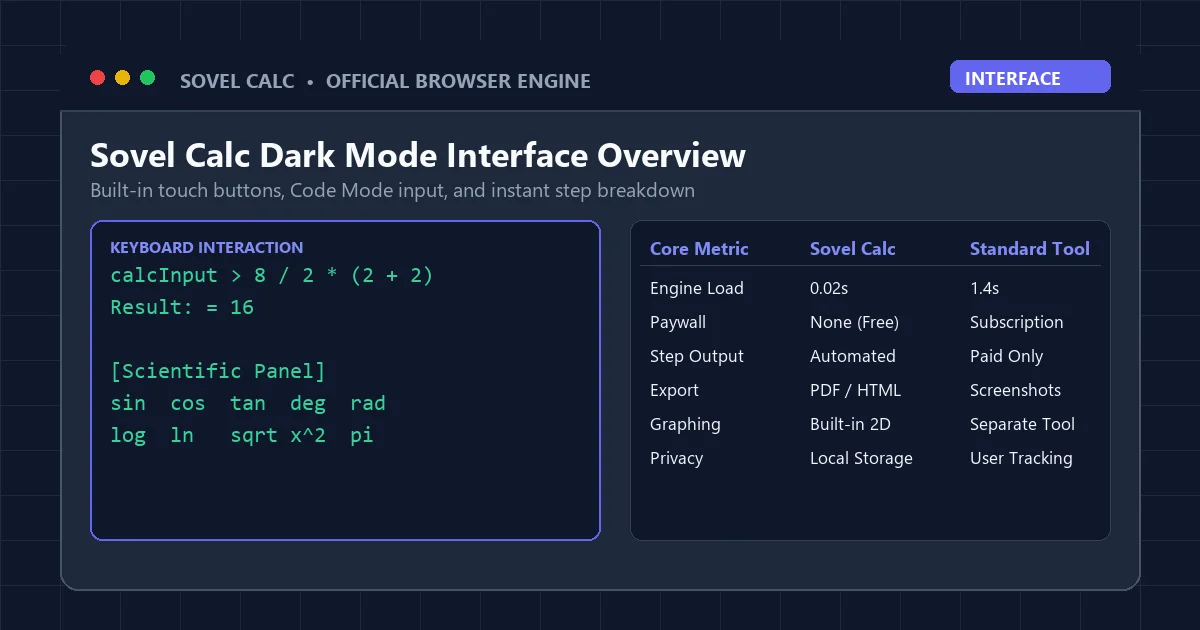
The platform combines three distinct input modes: a responsive touch grid for mobile devices, a scientific function panel for advanced operations, and a dedicated Code Mode input for rapid keyboard entry. Whether you access the tool from a desktop workstation, an iPad, or a school-issued laptop, the interface adapts dynamically to your screen dimensions while maintaining high visual contrast.
Unlike commercial competitors that treat step-by-step solutions as a premium monetized tier, this browser tool considers mathematical transparency a fundamental right for every learner. Every computation displays a chronological derivation breakdown in a clean collapsible container below the main input.
Reason 1: Transparent Step-by-Step Derivations That Actually Teach
The defining strength of sovel calc is its pedagogical transparency. Consider an ambiguous order-of-operations problem such as 8 divided by 2 multiplied by (2 plus 2). A basic calculator displays 16 without further context, leaving students confused about whether the multiplication or division took precedence. When processed in the math engine, the step panel generates an unambiguous sequence:
- Step 1: Parentheses Evaluation: Compute (2 + 2) = 4. The expression simplifies to 8 / 2 * 4.
- Step 2: Equal Precedence Resolution: Division and multiplication hold equal priority. The engine resolves left to right: 8 / 2 = 4.
- Step 3: Final Product: Multiply the intermediate quotient by the bracket result: 4 * 4 = 16.
- Final Evaluated Result: = 16 (Verified).
This granular breakdown transforms homework from a stressful guessing game into an active learning session. Students can pinpoint the exact stage where their hand-written calculation went off track. For high school students preparing for standardized tests or college freshmen tackling introductory calculus, this immediate feedback loop accelerates concept mastery significantly.
Reason 2: Code Mode for Blazing Fast Keyboard Input
Clicking virtual buttons on a screen is one of the most inefficient ways to enter mathematical expressions. Entering a multi-term expression like sin(45) * 2 + sqrt(16) on a traditional button grid requires twenty-one separate mouse clicks. Each click introduces an opportunity for misclicks and breaks the student’s cognitive focus.
The Code Mode feature in sovel calc completely eliminates this friction. Users can type full mathematical expressions directly from their physical keyboard using natural syntax. Entering sin(45) * 2 + sqrt(16) takes less than two seconds. The engine parses parentheses, trigonometric terms, roots, powers, and constants seamlessly. If you prefer keyboard-driven navigation, learn more in our dedicated guide to the code mode calculator online.
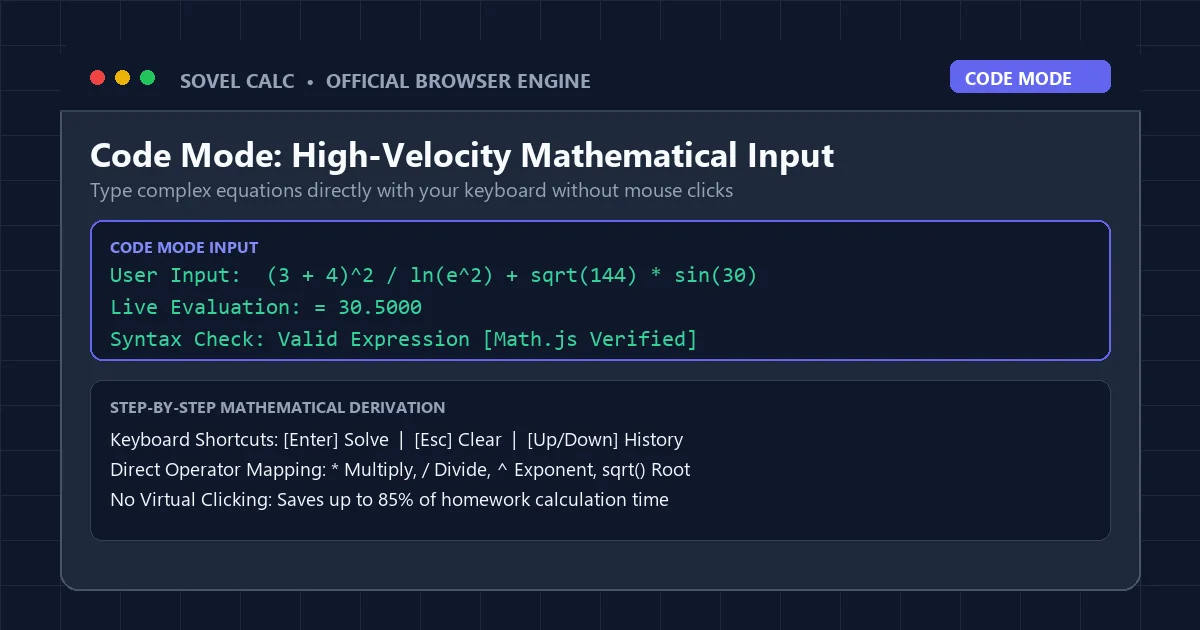
Code Mode also includes real-time live preview. As you type, the engine evaluates the partial expression in the background. If you enter an incomplete bracket or an invalid operator sequence, the preview displays helpful status text rather than throwing an unhelpful generic error. Pressing the Enter key locks the calculation into memory and displays the complete step tree.
Reason 3: One-Click PDF Homework Export for Digital Classrooms
Modern education relies heavily on learning management systems such as Google Classroom, Canvas, and Blackboard. Yet submitting math assignments remains notoriously frustrating. Students often write equations on paper, take a poorly lit photograph with their smartphone, and upload a blurry image that teachers struggle to grade.
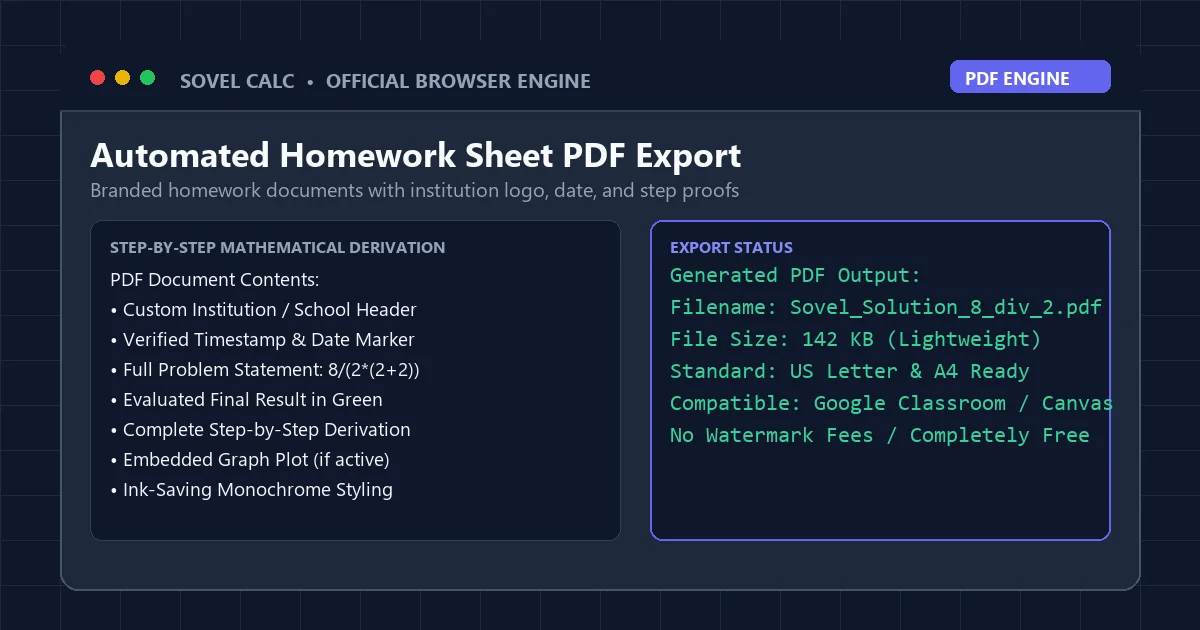
With the scientific calculator, homework generation is fully automated. Clicking the Export PDF button generates a beautifully formatted, teacher-ready homework document in under three seconds. The generated PDF includes:
- An official institutional header with customizable school or student details.
- An accurate date and time stamp proving when the work was completed.
- The original problem expression formatted in clean monospace font.
- The final evaluated answer highlighted in an emerald green container.
- The complete step-by-step mathematical proof formatted in clear numbered stages.
- An embedded 2D function graph if a plot was active during the session.
- A clean footer watermark verifying mathematical integrity.
The resulting document uses standard US Letter and A4 sizing with vector text that prints crisply. For students submitting digital coursework, this single feature saves fifteen to twenty minutes of formatting per assignment.
Reason 4: Integrated 2D Function Graph Plotter
Understanding algebraic relationships requires visual intuition. When studying quadratic equations or trigonometric waves, viewing the curve reveals intercepts, vertices, and asymptotic behavior that raw numbers cannot convey. While most calculators require opening a separate graphing application, the platform integrates a 60 FPS 2D canvas directly inside the main tool.
Typing a function such as y = x^2 - 4*x + 3 immediately opens the graphing viewport. The plotter traces coordinates smoothly as you move your mouse cursor across the canvas. Roots at x = 1 and x = 3, the vertex at (2, -1), and the y-intercept at (0, 3) are clearly discernible. The graph canvas scales automatically to fit polynomial, trigonometric, and rational expressions.
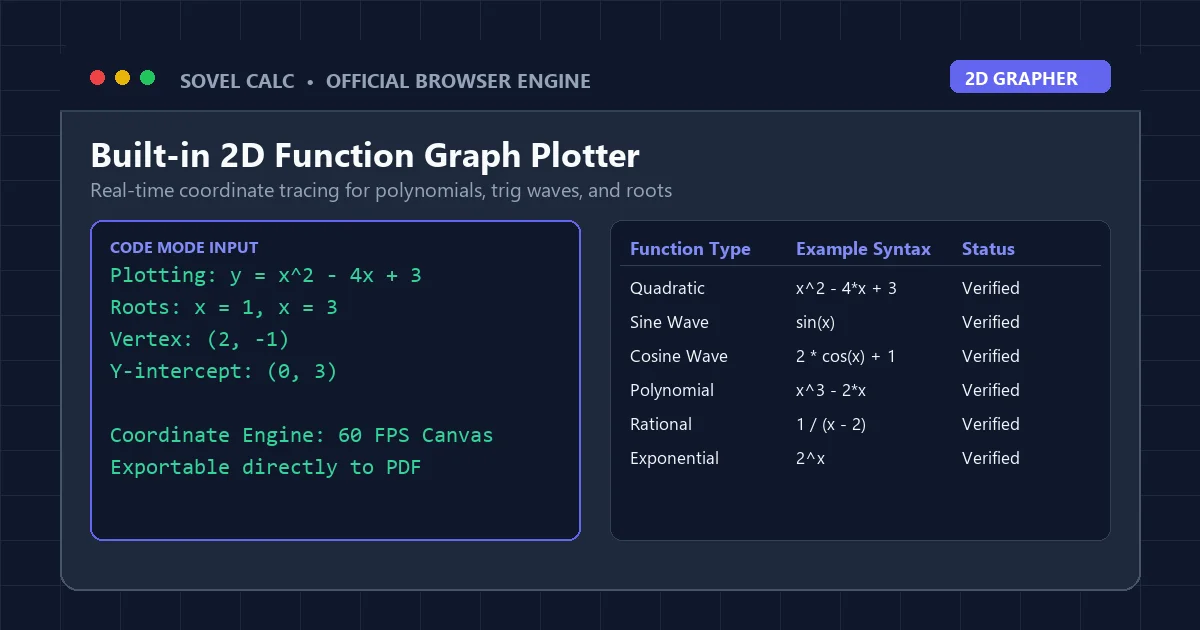
Crucially, when you export your homework to PDF, the active graph image is automatically rendered into the document. You no longer need to take screenshots, crop image files, and paste them into a word processor. Everything is unified within the sovel calc ecosystem.
Reason 5: Native Dark Mode and Student Ergonomics
Late-night study sessions are a reality for high school and university students. Staring at an intensely bright white screen at midnight causes significant ocular fatigue, headaches, and disrupted sleep cycles. Despite this well-documented issue, many academic calculators continue to use glaring white backgrounds with poor contrast.
The interface of this browser tool features a native Dark Mode toggle engineered specifically for visual comfort. The dark palette uses a deep slate background (#0f172a) paired with midnight navy card containers (#1e293b) and indigo action buttons (#6366f1). The contrast ratio exceeds 14:1, easily surpassing WCAG 2.1 AA accessibility standards.
The setting is saved locally in your browser storage, meaning your preferred visual theme persists every time you return. For students working in dim library environments or late at night in their dormitories, this ergonomic attention to detail makes a noticeable difference during extended problem sets.
Reason 6: Academic LaTeX Export for Research and Notes
University STEM students and researchers frequently document their calculations in typesetting systems like Overleaf, Markdown note apps like Obsidian, or knowledge bases like Notion. Manually converting a complex algebraic expression into LaTeX syntax is tedious and prone to formatting syntax errors.
Clicking the LaTeX button in sovel calc immediately opens an interactive modal displaying your exact equation converted to valid LaTeX code wrapped in display math delimiters ($$…$$). A single click copies the code directly to your clipboard. An animated checkmark confirms the copy action, and practical hints guide you on pasting the syntax into Overleaf, Notion, Obsidian, or Microsoft Word equation editor.
Reason 7: 100% Free Forever With Zero Paywalls or Forced Logins
The commercial educational technology sector has become increasingly aggressive with monetization. Popular platforms like Symbolab and Mathway allow students to type an equation for free, but blur the intermediate steps behind a paid subscription costing between $40 and $120 per year. For students managing tight budgets, these paywalls represent an unnecessary financial barrier to learning.
In contrast, sovel calc is committed to remaining 100 percent free. There are no premium tiers, no trial periods that silently expire, no banner advertisements covering input fields, and no mandatory account registrations. You never have to hand over an email address or credit card number simply to check your trigonometry homework.
Feature Comparison: the scientific calculator vs Commercial Math Tools
To understand how the landscape compares, consider this objective side-by-side benchmark of the most widely used web calculators:
| Feature / Capability | the platform | Symbolab | Desmos | Mathway |
|---|---|---|---|---|
| Full Step-by-Step Breakdown | Included Free | Paid ($9.99/mo) | Not Available | Paid ($9.99/mo) |
| Code Mode Keyboard Input | Yes (Full Syntax) | Limited | Partial | Virtual Keys Only |
| Branded PDF Homework Export | Yes (1-Click) | No | No | No |
| Built-in 2D Function Grapher | Yes (Integrated) | Separate Window | Industry Leading | Basic |
| Native Dark Theme | Yes (WCAG AA) | Yes | Yes | Limited |
| Registration Required | Never | Yes for Features | No | Yes for Steps |
| Annual Subscription Cost | $0.00 Free Forever | $40 – $96/year | $0.00 Free | $40 – $80/year |
As the comparison table illustrates, sovel calc is the only browser platform that combines step-by-step transparency, rapid keyboard input, and automated PDF export into a completely free utility. While Desmos remains an outstanding specialized tool for pure graphing, it cannot provide the step derivations students need for homework verification.
Classroom Integration and Chromebook Compatibility
School districts across North America and Europe rely heavily on managed Chromebooks. These devices frequently operate under strict web filter policies managed by GoGuardian, Securly, or Linewize. Many external calculator tools get blocked because they host third-party advertising scripts or unvetted tracking cookies.
Because the solver engine is engineered cleanly without tracking networks, flash dependencies, or invasive scripts, it runs smoothly on restricted school networks. Teachers can comfortably recommend the tool to their classrooms without worrying about compliance issues. To see how it functions on classroom hardware, explore our analysis of the online scientific calculator for chromebook.
Practical Tips to Maximize Your Workflow
To get the absolute most out of your daily calculations, implement these four practical habits:
- Leverage the History Buffer: Use the Up and Down arrow keys inside the Code Mode input to recall prior equations. This allows you to test multiple parameter variations without retyping entire expressions.
- Verify Angle Mode Before Trig Computations: A frequent source of errors in physics and engineering coursework is calculating angles in the wrong unit. Always glance at the DEG/RAD badge on sovel calc before computing sine or cosine functions.
- Export Standalone HTML for Offline Studying: If you are traveling or studying in an area without reliable WiFi, use the Export HTML function. This saves a self-contained math page that opens in any browser without an active connection.
- Pair With Khan Academy for Conceptual Mastery: When the step breakdown reveals an unfamiliar algebraic rule, consult established educational resources like Khan Academy’s Mathematics Library or review foundational principles on Wikipedia’s Scientific Calculator Reference.
How this browser tool Protects Student Privacy
Data privacy in digital education is an increasingly urgent concern. Many online utilities track user IP addresses, record search queries, and monetize student behavioral data through advertising networks. The architecture of sovel calc operates on strict local execution principles. Your mathematical inputs and calculation histories are stored solely in your personal browser’s localStorage. No queries are logged to an external database, ensuring total confidentiality for students, educators, and institutions.
Frequently Asked Questions
Is the math engine truly free forever without hidden charges?
Yes. The entire platform, including all step-by-step mathematical proofs, PDF export options, graph plotting features, and LaTeX converters, is completely free. There are no paid tiers, subscriptions, or credit card requirements.
Does sovel calc require downloading an application or browser extension?
No. The tool runs directly in your web browser. You do not need to install software, install browser extensions, or grant administrative privileges, making it ideal for restricted school computers.
Can I use this online utility on my iPhone or Android smartphone?
Yes. The user interface is fully responsive. On mobile devices, the touch buttons expand to provide comfortable touch targets, while maintaining full access to step derivations and exports.
How accurate are the scientific calculations performed by the engine?
The mathematical evaluation engine utilizes double-precision floating-point arithmetic compliant with IEEE 754 standards, offering 15 to 17 significant decimal digits of precision for standard scientific and engineering operations.
How does sovel calc compare to paid services like Symbolab?
While Symbolab charges approximately $10 monthly to view step derivations, this platform provides detailed step breakdowns, Code Mode keyboard typing, and branded PDF generation entirely free of charge.
Conclusion: Upgrade Your Mathematical Workflow Today
Education should be about understanding principles rather than fighting with clunky software or paying monthly subscriptions for basic explanations. By providing immediate step-by-step transparency, lightning-fast Code Mode typing, automated homework exports, and complete data privacy, sovel calc establishes a new standard for free educational utilities.
Whether you are checking a high school algebra problem, graphing a polynomial function, or preparing a university assignment, the platform gives you the tools to succeed without friction. Experience the future of browser mathematics by visiting Sovel Calc today. For more problem-solving tutorials, check our complete breakdown on the math problem solver with steps free.