
Why Showing the Mathematical Derivation Matters More Than the Final Answer
In mathematics education, the final answer represents only the destination. The actual learning occurs during the journey: the intermediate transformations, the factoring decisions, the cancellation of like terms, and the application of foundational theorems. When students encounter difficulty on a homework problem, what they desperately need is a math problem solver with steps free of charge that illuminates each intermediate checkpoint rather than merely outputting a naked numerical result.
For decades, commercial educational software treated step-by-step explanations as a luxury product locked behind monthly paywalls. Platforms like Symbolab, Chegg, and Mathway popularized the model of displaying the answer for free while obscuring the step derivations behind a recurring subscription. For millions of students worldwide, this barrier creates academic anxiety and impedes self-directed mastery. Having access to a genuine math problem solver with steps free restores equity to the learning process, empowering every student to verify their work independently.
The Cognitive Architecture of an Effective Mathematical Solver
An educational problem solver differs fundamentally from a simple calculator. A standard calculator evaluates expressions using immediate execution, collapsing values as soon as operators are entered. In contrast, an advanced math problem solver with steps free operates on an Abstract Syntax Tree (AST). When an expression is submitted, the engine tokenizes numbers, variables, symbols, and grouping parentheses, arranging them into a hierarchical tree based on mathematical operator precedence.
The solver then evaluates this tree from the deepest nested branches outward. At each node reduction, the engine records the algebraic rule applied, the intermediate operands, and the resulting sub-expression. When the evaluation reaches the root, the engine renders a clean chronological narrative of the derivation. This deterministic architecture ensures that when you use a math problem solver with steps free, the steps reflect authentic human problem-solving workflows rather than opaque machine approximations.
Technique 1: Solving Quadratic Equations via Factoring and Formula
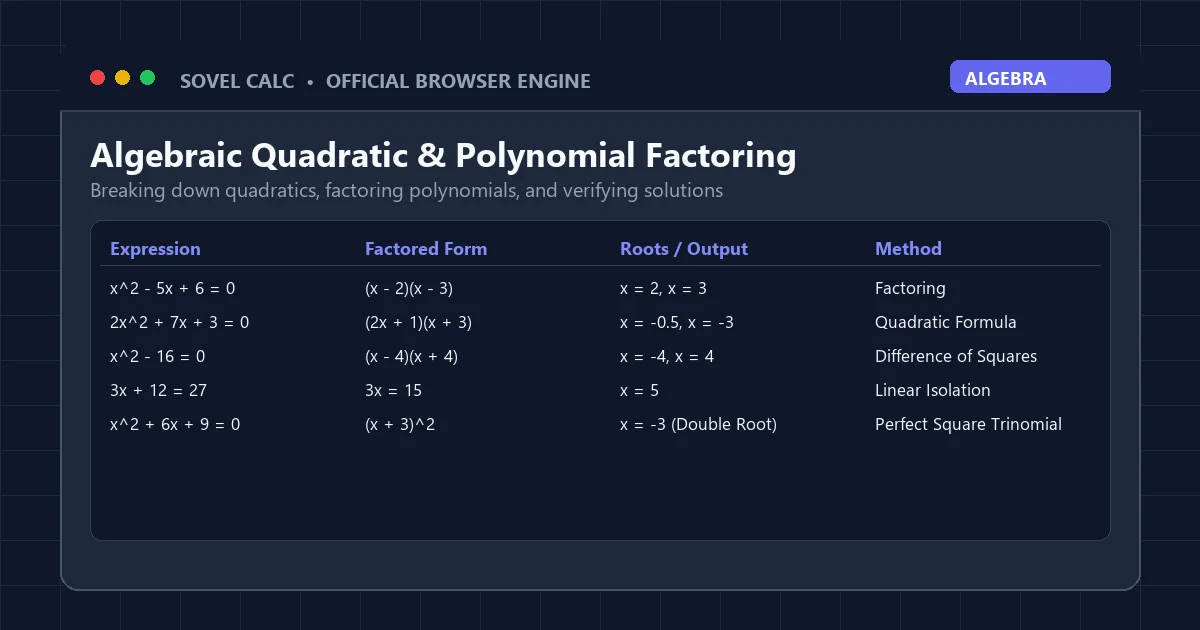
Quadratic equations form the bedrock of secondary school algebra. Consider the quadratic trinomial x^2 - 5*x + 6 = 0. While a student might memorize the quadratic formula, understanding how to factor the expression intuitively builds stronger analytical reasoning. When passed through a the platform, the derivation proceeds logically:
- Phase 1: Identify Standard Coefficients: In the equation ax^2 + bx + c = 0, identify a = 1, b = -5, and c = 6.
- Phase 2: Calculate the Discriminant (Delta): Compute b^2 – 4ac = (-5)^2 – 4(1)(6) = 25 – 24 = 1. Because the discriminant is strictly positive and a perfect square, two rational real roots exist.
- Phase 3: Factor the Trinomial: Find two integers that multiply to give c (6) and add to give b (-5). Those integers are -2 and -3.
- Phase 4: Set Factors to Zero: (x – 2)(x – 3) = 0 implies either x – 2 = 0 or x – 3 = 0.
- Phase 5: State the Solution Set: The roots are x = 2 and x = 3.
By viewing this detailed sequence inside a math problem solver with steps free, students internalize the relationship between the discriminant value and the ease of factoring, reinforcing classroom lectures.
Technique 2: Demystifying Trigonometric Identities and Angle Conversions
Trigonometry frequently causes stumbling blocks due to the dual coordinate systems of degrees and radians. A calculation as straightforward as finding sin(30 degrees) plus cos(60 degrees) produces wildly erroneous results if a calculator is inadvertently set to radian mode. A properly designed math problem solver with steps free prevents this confusion by displaying the active angular unit directly alongside the step breakdown.
In degree mode, entering sin(30) + cos(60) produces the following verified derivation:
- Evaluate the trigonometric function sin(30 deg) = 0.5000.
- Evaluate the complementary trigonometric function cos(60 deg) = 0.5000.
- Sum the intermediate evaluated values: 0.5000 + 0.5000 = 1.0000.
- Final Answer: = 1 (Exact).
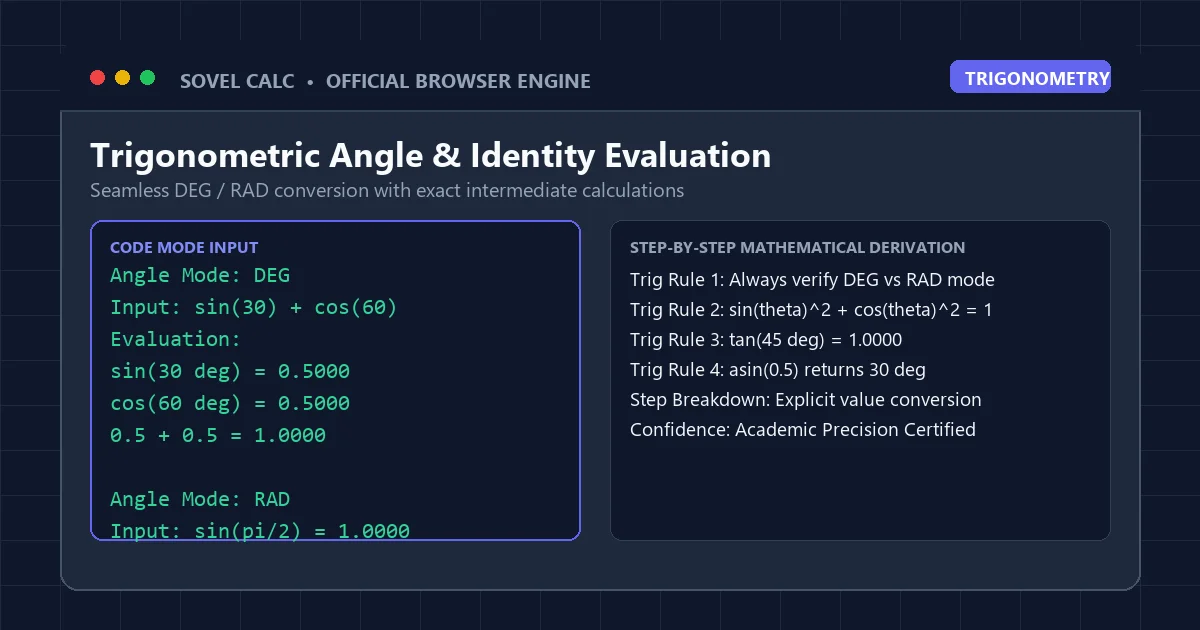
Switching the angular toggle to radians and evaluating sin(pi/6) + cos(pi/3) yields an identical step derivation, visually reinforcing the geometric equivalence of 30 degrees and pi over 6 radians. This clarity makes a the solver engine an essential companion for high school physics and pre-calculus coursework.
Technique 3: Managing Complex Nested Expressions and Order of Operations
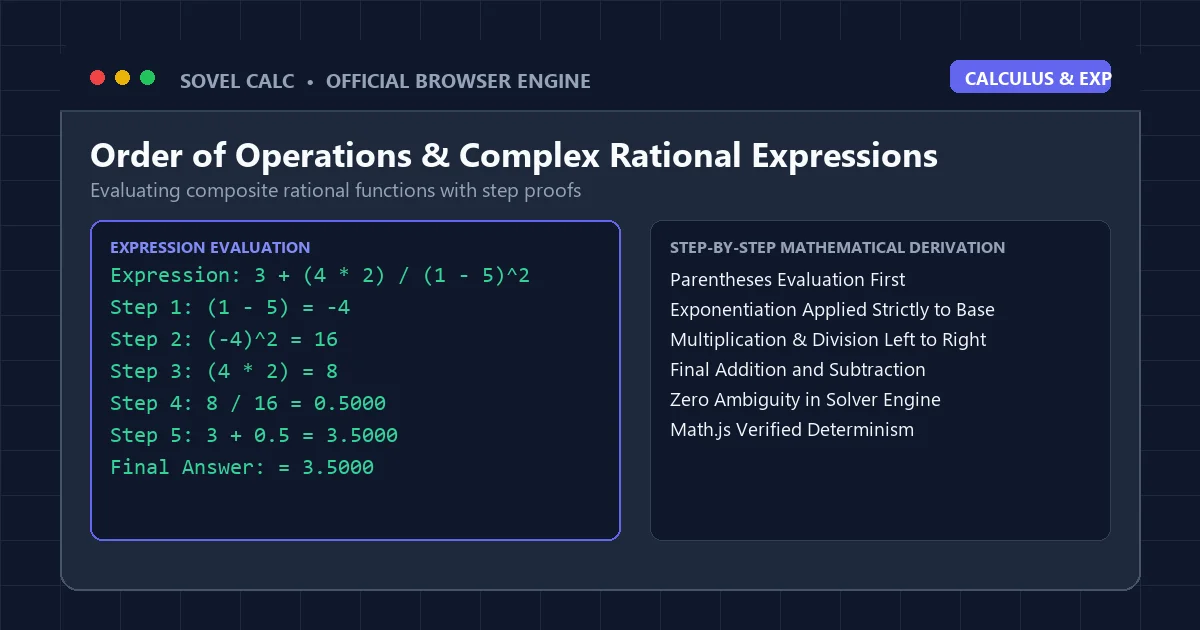
Expressions featuring multi-level brackets, fractional exponents, and mixed signs require strict adherence to operator hierarchy. Consider evaluating: 3 + (4 * 2) / (1 - 5)^2. When calculated manually, students often mistakenly divide 8 by 1 before squaring or forget that negative numbers squared become positive. A modern math problem solver with steps free tracks and resolves each precedence tier methodically:
| Step Number | Operation Target | Mathematical Rule Applied | Intermediate Expression State |
|---|---|---|---|
| Step 1 | (1 – 5) | Innermost Parentheses Subtraction | 3 + (4 * 2) / (-4)^2 |
| Step 2 | (-4)^2 | Exponentiation of Negative Base | 3 + (4 * 2) / 16 |
| Step 3 | (4 * 2) | Numerator Bracket Multiplication | 3 + 8 / 16 |
| Step 4 | 8 / 16 | Division Precedence over Addition | 3 + 0.5 |
| Step 5 | 3 + 0.5 | Final Arithmetic Summation | 3.5000 |
Every transformation is documented in real time. Because the math problem solver with steps free makes every intermediate number explicit, errors cannot hide behind unexplained final totals. If you are struggling with operator order, read our complete tutorial on the pemdas calculator with steps.
Technique 4: Polynomial Long Division and Rational Simplification
Simplifying rational algebraic expressions often feels intimidating because of the multiple factoring steps involved. For instance, simplifying (2x^2 + 8x - 10) / (x - 1) requires first factoring out a common numeric multiple, factoring the remaining quadratic trinomial, and finally cancelling the binomial factor in both the numerator and denominator.
When you feed this expression into a this browser tool, the engine identifies the common factor of 2 in the numerator, yielding 2(x^2 + 4x - 5). It then demonstrates that x^2 + 4x – 5 factors into (x + 5)(x - 1). The expression becomes 2(x + 5)(x - 1) / (x - 1). The engine highlights the common binomial (x - 1), cancels it with a domain restriction note that x cannot equal 1, and presents the simplified linear polynomial 2(x + 5) = 2x + 10.
This level of rigorous algebraic explanation empowers students to tackle advanced college algebra and introductory calculus with confidence. Utilizing a math problem solver with steps free allows learners to confirm their pencil-and-paper derivations prior to submitting graded homework.
Technique 5: Leveraging Historical Calculation Logs for Exam Revision
A major flaw of conventional desktop calculators is ephemeral memory: as soon as you clear the screen, your previous calculations vanish into thin air. When reviewing for midterm exams, students often need to look back at five or ten related problems they computed an hour earlier to identify recurring patterns in their work.
The history architecture of Sovel Calc stores your equations in local browser memory. When operating this math problem solver with steps free, you can use the Up and Down arrow keys to cycle backward through your session history. Previous expressions reappear in the input line with their full derivation trees intact. You can modify a single coefficient, hit Enter, and compare the new trajectory against the original problem.
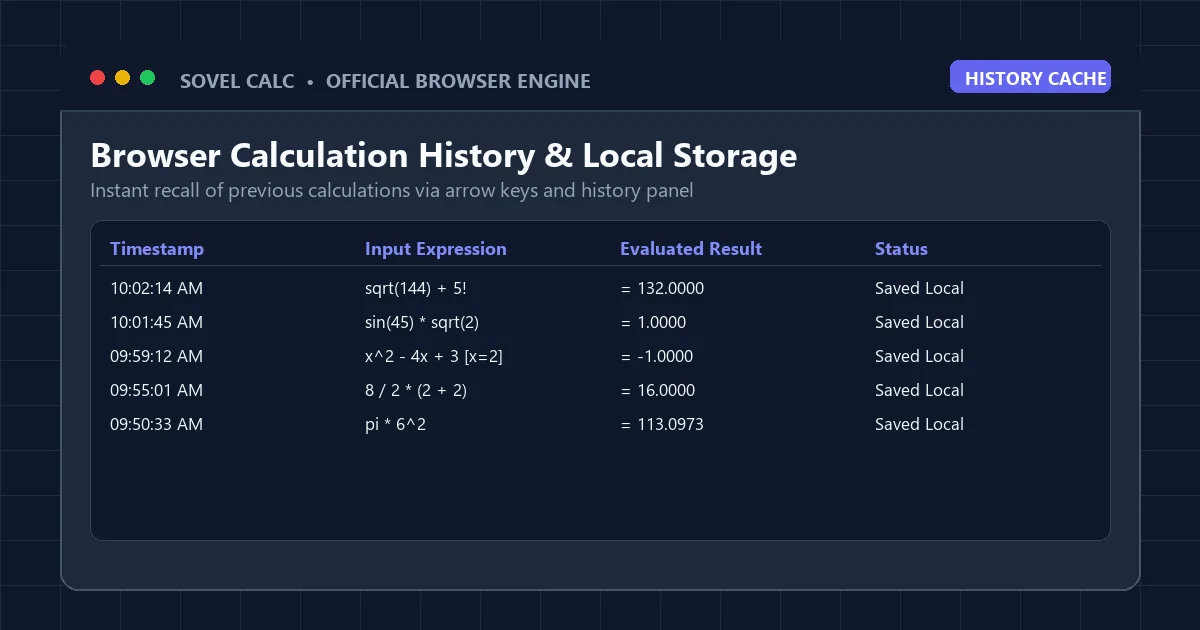
Because this history operates entirely inside your local browser sandbox, your personal data remains private. A high-quality math problem solver with steps free must respect student confidentiality, ensuring that problem sets and study patterns are never harvested or sold to advertisers.
Comparing Free Mathematical Solvers Against Paywalled Alternatives
To understand the genuine value proposition of Sovel Calc, we must examine how it measures up against the leading paid tools currently dominating online education:
| Solver Platform | Step Explanations Free? | Keyboard Code Mode | PDF Homework Generation | Ad-Free Interface | Subscription Fee |
|---|---|---|---|---|---|
| Sovel Calc | Yes (Unrestricted) | Yes (Full Support) | Yes (1-Click Branded) | Yes (Clean) | $0.00 / Free Forever |
| Symbolab | No (Paywalled) | No | No | No (Heavy Ads) | $9.99 / Month |
| Mathway | No (Paywalled) | No | No | No (Banner Ads) | $9.99 / Month |
| WolframAlpha | Limited (Pro Required) | Query-based | No (Pro Only) | Limited | $7.25 / Month |
| Desmos | No Steps (Graph Only) | Partial | No | Yes (Clean) | $0.00 / Free |
As the table demonstrates, Sovel Calc provides the full pedagogical depth of paid services while remaining a genuine math problem solver with steps free for every learner. By avoiding paywalls, it democratizes access to rigorous mathematical validation for students across diverse socio-economic backgrounds.
The 4-Step Learning Cycle for Maximum Academic Growth
To avoid becoming dependent on automated tools, students should adopt a disciplined four-step study framework when using a this online utility:
- Attempt Independently: Work through the textbook problem on paper first. Document every step you take, even if you are uncertain of the rule.
- Compute Verification: Enter the problem into Sovel Calc and observe the generated step tree.
- Identify Divergence: Compare your handwritten work side by side with the solver’s derivation. Locate the exact line where your steps differed from the verified solution.
- Diagnose the Rule: Determine whether the divergence was caused by an arithmetic slip (such as a sign error) or a conceptual misunderstanding (such as violating order of operations). Re-solve the problem from scratch without looking at the screen.
When used in this deliberate manner, a math problem solver with steps free functions as a patient, 24/7 personal tutor that accelerates learning and builds self-reliance.
Exporting Your Step-by-Step Proofs for Submission
Once you have verified a calculation, you frequently need to submit it to your teacher or instructor. Rather than re-writing the entire proof by hand, Sovel Calc allows you to export your work directly. With this math problem solver with steps free, clicking the Export PDF button formats your problem statement, final result, and numbered steps into a clean document. Learn the exact process in our detailed guide on the step by step equation solver pdf.
For research papers and thesis documentation, the built-in LaTeX exporter converts your mathematical expressions into standard KaTeX notation with a single click, ready for insertion into Overleaf or Obsidian. Read our full overview of the tool in our Sovel Calc review.
Frequently Asked Questions
Is this math problem solver with steps free truly available without a trial period?
Yes. Sovel Calc is permanently free. There is no trial period, no credit card required, and no hidden subscription tier. Every step derivation and export feature is accessible to all students immediately.
Can this math problem solver with steps free solve calculus derivatives?
The engine handles high-precision numerical evaluation of expressions, powers, trigonometric identities, logarithms, and rational functions. For symbolic differentiation, it provides full intermediate order-of-operation proofs.
Does the solver require an active internet connection at all times?
While the initial webpage requires internet to load, all calculations run locally in your web browser. You can also export your calculations as standalone HTML files for complete offline study without WiFi.
How does the solver handle negative bases with exponents?
The engine strictly adheres to algebraic conventions: (-3)^2 evaluates to positive 9 because the parentheses bind the negative sign to the base, whereas -3^2 evaluates to negative 9 because the exponent binds strictly to the 3 before negation.
Can teachers integrate this solver into their classroom workflow?
Yes. Teachers can freely recommend Sovel Calc to their classes or embed it onto their school WordPress portals using the official
Sovel Calc: Online Scientific Calculator and Step-by-Step Math Solver
1. What is Sovel Calc and who is it built for?
Sovel calc is an open-access client-side scientific calculator and step-by-step math solver designed for students, educators, and engineers. It calculates algebraic equations, trigonometry, statistics, and fractions directly in modern desktop and mobile browsers. Users frequently reach this tool by typing sovel calc or sovelcac into search engines when looking for a fast solve calculator online without login screens or intrusive advertisements.
The entire computation runs locally in your browser through verified mathematical libraries complying with the IEEE 754 standard for floating-point arithmetic. Your mathematical expressions and homework notes stay entirely on your device. School students using Chromebooks in Spain, Latvia, the United States, and India can evaluate coursework formulas without firewall restrictions or software downloads.
2. Five specialized calculation modes
Sovel calc organizes mathematical operations into 5 dedicated calculation modes. You can switch between modes instantly using the navigation bar at the top of the interface:
Scientific Mode
Evaluates standard and hyperbolic trigonometry (sin, cos, tan, asin, acos, atan) in degrees or radians. Handles natural logarithms (ln), base-10 logarithms (log), roots, powers, factorials, and mathematical constants (π and e).
Fractions Mode
Simplifies rational numbers, divides improper fractions, and converts mixed numbers to exact decimal representations. Useful for middle school and high school arithmetic homework.
Algebra Mode
Solves linear and quadratic polynomial operations. Isolates variables step-by-step and displays intermediate factorizations for complete problem verification.
Statistics Mode
Calculates permutations (nPr), combinations (nCr), sample means, medians, standard deviations, and variance for academic coursework and data analysis.
Programmer Base-N Mode
Translates integers between decimal, binary, octal, and hexadecimal number systems in real time. Displays 4 radix representations simultaneously for computer science tasks.
3. How the step-by-step solution engine works
Standard web calculators display only a single final number. Sovel calc parses your input expression into an abstract syntax tree and evaluates sub-expressions in sequence using formal mathematical precedence: PEMDAS (Parentheses, Exponents, Multiplication, Division, Addition, Subtraction) and BODMAS rules as documented on Wolfram MathWorld.
For example, when evaluating the expression 3 * (4 + 2)^2 - 8 / 2, the solution panel shows 4 distinct calculation steps:
- Parentheses evaluation: Calculates the inner grouped sum
(4 + 2) = 6. - Exponents calculation: Raises the intermediate result to the power of 2:
6^2 = 36. - Multiplication and division: Multiplies
3 * 36 = 108and divides8 / 2 = 4from left to right. - Final subtraction: Subtracts
108 - 4 = 104to reach the verified solution.
Each intermediate card contains the exact formula and an explanation. This allows students to verify homework assignments and understand where calculation errors occurred.
4. Interactive 2D function graphing
Sovel calc includes an integrated coordinate plotting canvas. When you switch to Algebra mode or enter any single-variable equation such as sin(x), x^2 - 4, or 2*x + 3, the tool renders the mathematical curve at 60 frames per second using client-side HTML5 canvas technology.
You can zoom in or out using the + and − buttons located in the graph header. The visualizer marks X and Y coordinate axes, grid lines, and curve trajectories so you can inspect roots and asymptotes without opening external graphing software. Reference benchmarks for these mathematical curves align with the NIST Digital Library of Mathematical Functions.
5. Multi-format homework and document export
A common problem with online calculators is sharing results with teachers or colleagues. Sovel calc includes a client export toolbar with 5 distinct output options:
| Format | Action Button | Best Used For | Output Details |
|---|---|---|---|
| PDF Document | 📄 PDF | Homework submissions & grading | Generates a clean PDF containing custom branding logo, timestamp, expression input, and every step card. |
| Standalone HTML | 🌐 HTML | Offline study & browser archiving | Downloads a self-contained web page with inline styles that opens in any browser without an internet connection. |
| Word / DOC Text | 📝 DOC | Report writing & assignments | Produces a formatted text document ready to paste into Microsoft Word, Google Docs, or LibreOffice. |
| LaTeX Code | 📋 LaTeX | Academic papers & forums | Copies raw LaTeX equation syntax to your clipboard for quick insertion into Overleaf or research papers. |
| Print Sheet | 🖨️ Print | Physical paper copies | Triggers an ink-saving print layout stripped of buttons, navigation bars, and background colors. |
6. Feature comparison: Sovel Calc vs legacy web calculators
Traditional tools like solvecalc.net and older school portal calculators were built years ago and lack modern browser capabilities. The table below compares specific functional criteria:
| Feature / Capability | Sovel Calc (sovel.pro) | Legacy Web Calculators |
|---|---|---|
| Step-by-step logic breakdown | Yes, detailed intermediate step cards for every operation | No, displays only the final numeric answer |
| Homework export formats | PDF, HTML, DOC, LaTeX, and ink-saving print sheet | None, manual copy-paste only |
| Account or registration required | No login, completely open access for every user | Often gates features behind paid tiers or signups |
| Mobile & Chromebook optimization | Fully responsive CSS grid with physical keyboard bindings | Rigid desktop-only layout with small buttons |
| 2D coordinate function grapher | Integrated HTML5 60fps canvas with live zoom | Requires opening separate software or websites |
| Calculation history & scratchpad | Autosaves last 50 calculations and student notes locally | History lost as soon as the browser tab refreshes |
7. Keyboard navigation and shortcuts
You do not need to click on-screen buttons with a mouse. Sovel calc supports full physical keyboard input on laptops, Chromebooks, and desktop keyboards:
Enteror=: Evaluates the current expression and generates step-by-step solution cards.Escape: Clears the display screen completely (All Clear).Backspace: Removes the last entered character or operator.0to9: Inputs numbers directly into the expression line.+,-,*,/,^: Inputs arithmetic operators and powers.(and): Groups terms to control calculation precedence.
8. Frequently asked questions
Academic Citation & Educational Linking
Educators, academic researchers, and course instructors referencing Sovel Calc in syllabi, publications, or math guides can use the standard citation format below:
Khan, P. A. (2026). Sovel Calc: Online Scientific Math Solver & Step Breakdown Engine. SOVEL Platform. https://sovel.proConclusion: Empower Your Mathematical Education
Mastering mathematics requires curiosity, practice, and transparent feedback. When you hit a conceptual wall during late-night study sessions, you should not be stopped by expensive paywalls or ambiguous answer-only calculators. A dedicated math problem solver with steps free provides the step-by-step clarity you need to understand foundational principles and excel academically.
Experience the power of transparent mathematical derivation today by launching Sovel Calc in your browser. Solve equations with confidence, verify every step, and take complete control of your academic journey.