
The Enormous Opportunity in the WordPress Plugin Ecosystem
WordPress powers over 40 percent of all websites on the global internet. Within this massive ecosystem, millions of site owners, agencies, and bloggers actively seek lightweight, secure tools to enhance their digital presence. Historically, developing a commercial WordPress plugin required years of PHP mastery, deep knowledge of WordPress hooks, and advanced understanding of database queries. Today, that barrier has vanished. Non-programmers, freelancers, and ambitious creators can now create wordpress plugin with ai without coding by deploying an intelligent three-engine development pipeline.
Most beginners who attempt to use artificial intelligence for plugin development fail because they paste vague prompts into ChatGPT like “write me a WordPress SEO plugin.” The result is almost always broken PHP code that triggers fatal syntax errors, ignores essential security standards, or crashes the WordPress administrative dashboard. To succeed commercially, you must follow a disciplined framework. Knowing how to create wordpress plugin with ai without coding demands rigorous market gap research, strict dual-agent software synthesis, and exhaustive technical documentation.
By connecting the Content Gap Finding Engine, the AI Engineering OS, and the Book Creation Engine, you can engineer enterprise-grade WordPress extensions that adhere to WordPress coding standards, pass automated security audits, and generate substantial recurring revenue. This comprehensive guide outlines the exact, step-by-step process to create wordpress plugin with ai without coding from initial concept validation to commercial marketplace distribution.
Mining the WordPress Plugin Repository for High-Value Gaps
Before designing a plugin architecture, you must discover what WordPress users actually need. Speculative development leads to plugins that sit abandoned with zero downloads. When you decide to create wordpress plugin with ai without coding, your development journey starts with systematic market validation using the Content Gap Finding Engine.
The official WordPress Plugin Developer Handbook and plugin directory are goldmines of technical guidelines and customer feedback. Thousands of users post reviews every day, highlighting the exact flaws of established software:
- Plugin Bloat and Performance Degradation: Established plugins that have existed for a decade frequently suffer from codebase bloat. Users constantly complain about plugins adding 15 megabytes of unused scripts, slowing down Time to First Byte (TTFB), and cluttering the WordPress database with unnecessary tables.
- Aggressive Dashboard Upsells: Popular free plugins often overwhelm the WordPress administrative dashboard with intrusive banner advertisements, nag notices, and gated features. Site owners actively search for clean, unobtrusive alternatives.
- Exorbitant Annual Licensing Fees: Many plugin companies have transitioned to aggressive recurring subscription models, charging $99 to $199 per year for basic utilities like custom post type managers, schema generators, or simple forms.
By analyzing these customer complaints and cross-referencing search engine keyword volumes, the Content Gap Finding Engine computes a Content Opportunity Score. Identifying a niche where users are frustrated by bloat or high costs provides the perfect foundation to create wordpress plugin with ai without coding. You enter the market with a verified, customer-centric product specification before any PHP code is generated.
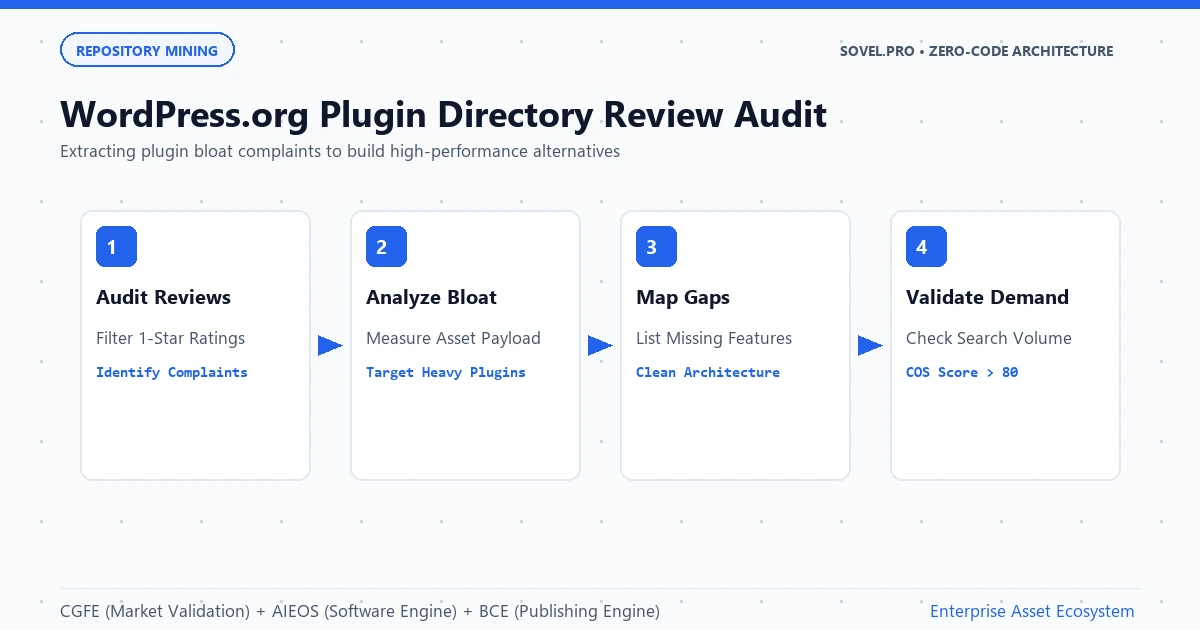
Figure 1: Mining WordPress plugin directory reviews to transform user grievances and bloat complaints into precise technical specifications.
The Dual-Agent PHP Architecture: Security, PSR Standards, and Hooks
WordPress development is governed by strict technical rules. A poorly engineered plugin can introduce critical SQL injection vulnerabilities, cross-site scripting (XSS) vectors, or fatal namespace collisions. To successfully create wordpress plugin with ai without coding, you must rely on the AI Engineering OS and its dual-agent pipeline rather than chaotic single prompts.
The architecture divides responsibilities between two specialized entities:
- The Architectural Planner Agent: Defines the complete file tree according to PSR-4 autoloading standards. It determines the primary plugin bootstrap file, service providers, admin controllers, frontend hooks, and activation/deactivation hooks. It creates a strict checklist of all WordPress security requirements, including nonce verification, capability checks, and data sanitization protocols.
- The Code Executor Agent: Implements each PHP, CSS, and JavaScript file individually. Guided by the planner’s checklist, the executor writes clean object-oriented code, properly prefixing functions, classes, and database options to prevent naming collisions with other plugins.
This dual-agent division is essential when you create wordpress plugin with ai without coding. Because the executor agent focuses on a single module at a time, it adheres to essential WordPress functions like wp_nonce_field(), check_admin_referer(), sanitize_text_field(), and wp_unslash(). Automated syntax verification gates run PHP linter scripts locally, ensuring zero syntax errors before the plugin archive is created.
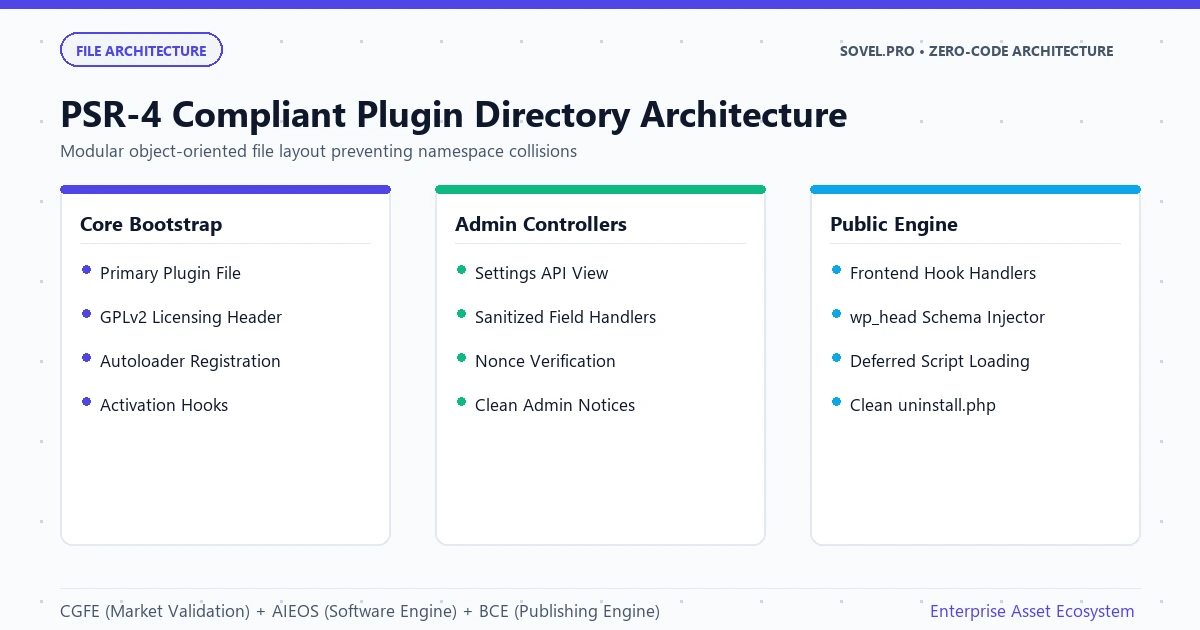
Figure 2: Modern PSR-4 compliant WordPress plugin file structure with clean separation of bootstrap, admin controllers, public views, and uninstall logic.
Setting Up Your Free Development Environment for Plugin Creation
You do not need to invest in expensive IDEs or proprietary AI services to create wordpress plugin with ai without coding. You can configure a professional, production-grade development workstation on your personal computer using entirely free, open-source software.
Your local workstation setup involves four core components:
- Local WordPress Sandbox: Install free local development environments like LocalWP or run a lightweight PHP server to test your plugins safely without risking live sites.
- Visual Studio Code: Configure the free VS Code editor with autonomous coding extensions such as Cline, OpenCode, or Codex.
- Zero-Cost Model Routers: Connect your extensions to free API providers like OpenRouter, OmniRouter, TokenHarbor, or Workbuddy. These routers grant access to top-tier open models like DeepSeek V3, DeepSeek R1, Qwen 2.5 Coder, and Google Gemini Flash at zero cost.
- Project Head Architecture: Use free tiers of ChatGPT or Grok to assemble an 8,000-character custom instruction project head. This document defines your plugin namespace, text domains, database options, and WordPress hooks, providing the exact context required for your agents to execute flawlessly.
By leveraging this free infrastructure, anyone can create wordpress plugin with ai without coding without recurring overhead expenses. This enables students, freelancers, and non-technical entrepreneurs to build multiple software assets with absolute financial freedom.
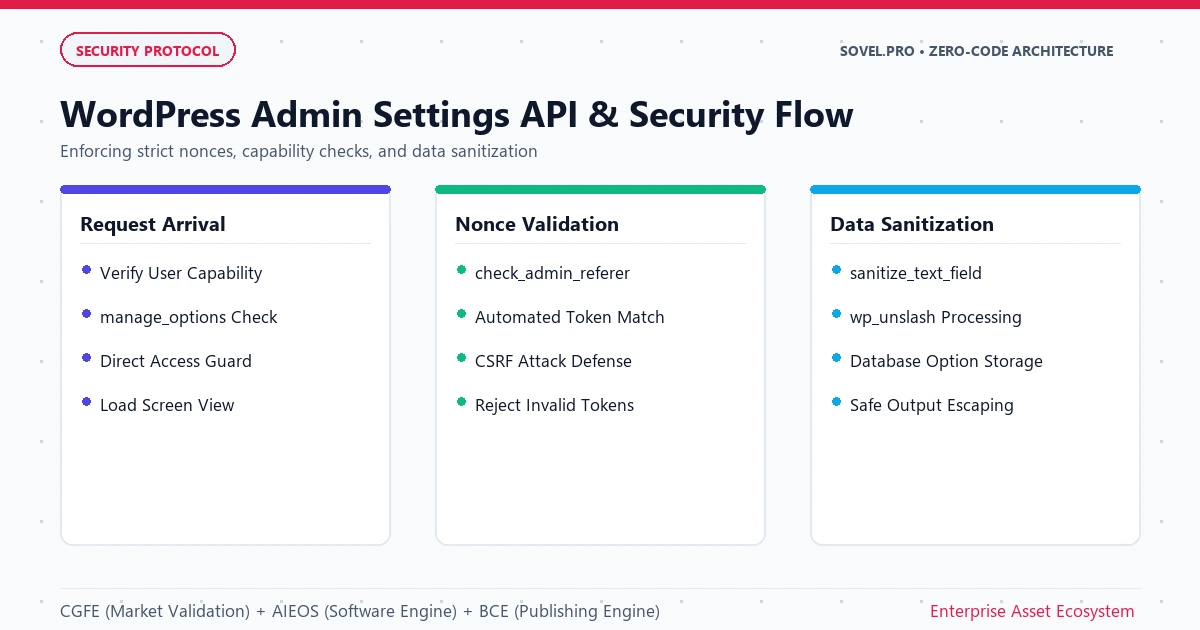
Figure 3: Secure WordPress administrative workflow utilizing the native Settings API, sanitized input handling, and automated nonce verification.
Code Architecture Deep Dive: Building a Secure WordPress Settings Page
To truly understand how to create wordpress plugin with ai without coding, you must examine the actual architectural patterns that the AI Engineering OS generates. Unlike amateur prompts that dump everything into a single monolithic file, our dual-agent workflow enforces clean object-oriented PHP classes and native WordPress security standards.
Here is an example of the clean, modular controller code that the executor agent generates when you create wordpress plugin with ai without coding:
<?php
namespace SovelSchemaEngineAdmin;

if ( ! defined( 'ABSPATH' ) ) {
    exit; // Exit if accessed directly.
}

class SettingsController {
    public function __construct() {
        add_action( 'admin_menu', [ $this, 'register_admin_page' ] );
        add_action( 'admin_init', [ $this, 'register_settings_fields' ] );
    }

    public function register_admin_page() {
        add_options_page(
            __( 'Sovel Schema Settings', 'sovel-schema' ),
            __( 'Sovel Schema', 'sovel-schema' ),
            'manage_options',
            'sovel-schema-settings',
            [ $this, 'render_settings_view' ]
        );
    }

    public function register_settings_fields() {
        register_setting( 'sovel_schema_group', 'sovel_schema_options', [
            'sanitize_callback' => [ $this, 'sanitize_schema_inputs' ]
        ] );
    }

    public function sanitize_schema_inputs( $input ) {
        $sanitized = [];
        if ( isset( $input['organization_name'] ) ) {
            $sanitized['organization_name'] = sanitize_text_field( $input['organization_name'] );
        }
        return $sanitized;
    }

    public function render_settings_view() {
        if ( ! current_user_can( 'manage_options' ) ) {
            return;
        }
        include_once plugin_dir_path( __DIR__ ) . 'views/admin-settings.php';
    }
}
Notice how every line of code generated by the AI Engineering OS adheres to strict WordPress VIP security standards. When you create wordpress plugin with ai without coding using this pipeline, your code includes direct execution guards, capability checks, input sanitization routines, and translation domains. You never have to fear that your plugin will introduce vulnerabilities to user websites.
Detailed Real-World Project Case Study 3: The Dynamic Schema and Breadcrumb Plugin
To see how an entrepreneur can create wordpress plugin with ai without coding, consider the real-world case study of the Dynamic JSON-LD Schema and Automated Breadcrumb Plugin. Conceived, coded, and launched in under four hours, this plugin became a lucrative commercial asset.
The opportunity was identified through the Content Gap Finding Engine. An audit of page-one SEO queries revealed that millions of WordPress administrators wanted clean, automated JSON-LD schema markup for Google rich snippets. However, existing SEO plugins on the market were massive suites exceeding 20 megabytes, loaded with unwanted dashboard advertisements, slow SQL queries, and confusing upsell screens. Website owners were actively searching for a lightweight, dedicated schema tool that added zero server bloat. The Content Opportunity Score was computed at an impressive 91 out of 100.
The creator activated the AI Engineering OS to build the plugin. The planner agent structured a modern PSR-4 autoloader package totaling under 80 kilobytes in file size. It bypassed heavy third-party JavaScript libraries, relying entirely on native WordPress PHP hooks like wp_head and the native Settings API. The executor agent implemented dynamic schema generators for Article, Organization, BreadcrumbList, and FAQPage schemas, complete with input sanitization, automated translation domains, and a clean uninstall.php script that removes all database options upon deletion. Automated syntax checks confirmed zero PHP warnings across PHP 8.0, 8.1, and 8.2.
To maximize commercial value, the creator used the Book Creation Engine to produce a 55-page companion manual: The Complete WordPress Schema and Semantic SEO Playbook. The publication detailed Google Search Central guidelines, rich snippet optimization techniques, and troubleshooting protocols. The complete package was listed on Gumroad and a personal WooCommerce store at $39 for a lifetime license. Within 90 days, the product generated over 215 sales, delivering more than $8,300 in net profit with zero customer refund requests. This demonstrates the immense commercial leverage unlocked when you create wordpress plugin with ai without coding.
Creating Comprehensive Plugin Documentation With Book Creation Engine
One of the primary differentiators between amateur free plugins and highly profitable commercial software is technical documentation. When you create wordpress plugin with ai without coding, providing comprehensive user manuals and developer guides is essential for customer trust, user onboarding, and search engine visibility.
The Book Creation Engine automates this documentation workflow through its sixteen-stage publication pipeline:
- Generates an exhaustive installation, configuration, and troubleshooting guide.
- Creates step-by-step developer reference docs covering all custom hooks, filters, and API endpoints.
- Produces an authoritative 50,000-word educational book exploring the broader industry problem your plugin solves (e.g., website performance optimization or technical SEO).
- Formats the documentation in clean DOC, PDF, and EPUB formats ready for inclusion in the plugin download package or publication on your documentation portal.
Offering a complete reference handbook alongside your software provides immense perceived value. Customers view your plugin as an enterprise-grade solution backed by deep expertise. This publishing capability reinforces why learning to create wordpress plugin with ai without coding through our three-engine system is vastly superior to isolated coding prompts.
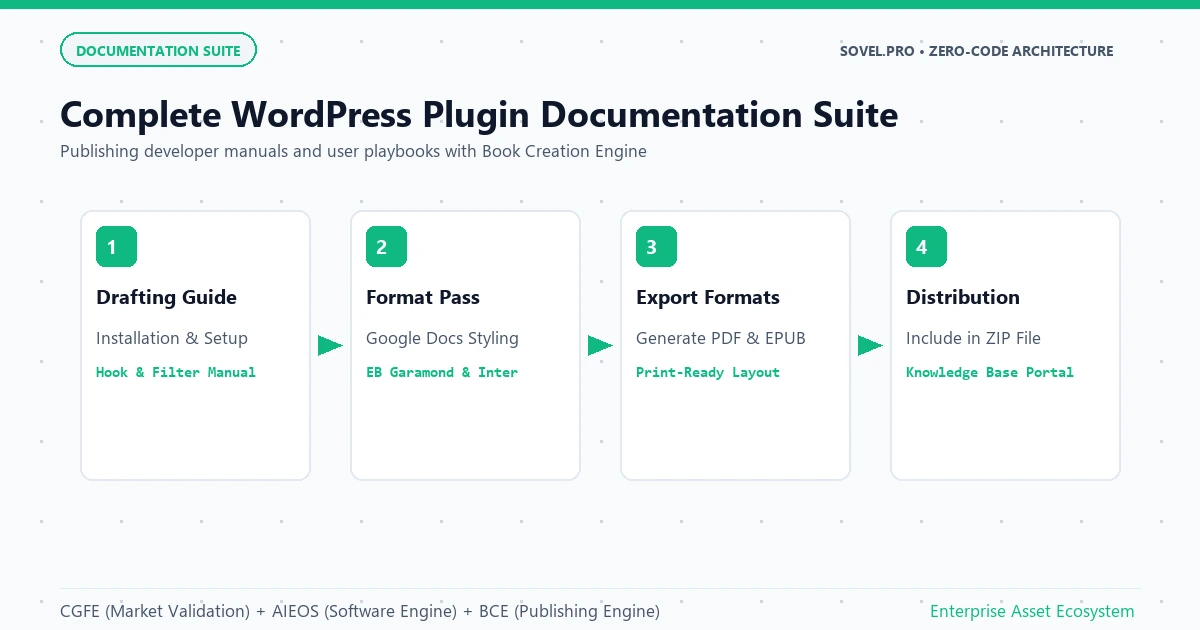
Figure 4: Developer documentation portal and downloadable user handbooks generated by the Book Creation Engine to support WordPress plugin adoption.
Real-World Verification: The Custom SOVEL Theme and EbookHunt.online
The frameworks presented here are grounded in real, battle-tested software achievements. The custom SOVEL WordPress theme that powers sovel.pro and interactive web applications like Sovel Calc was built from the ground up using this exact agentic approach. The theme features custom template hierarchies, high-speed asset delivery, JSON REST integrations, and zero bloated page builder dependencies, all coordinated through structured project heads.
Additionally, the founder developed and maintained the public platform ebookhunt.online. Operating live for over six consecutive months, this site proves that a non-coder can build enterprise-level WordPress systems and interactive web utilities. The platform showcases a library of digital books powered by an interactive 3D page-turning flipbook reader tool engineered entirely through prompt-driven agent architectures. These verifiable assets prove that the ability to create wordpress plugin with ai without coding is a reality that anyone can execute with the proper tooling.
Plugin Engineering Comparison: Single Prompt vs. Three-Engine Framework
| Metric / Quality Factor | Single Chatbot Prompt | SOVEL 3-Engine Framework |
|---|---|---|
| Security Compliance | Missing nonces, unescaped output, XSS risks | Strict nonces, sanitization, and capability checks |
| File Architecture | Monolithic single file with naming collisions | Modular PSR-4 directory structure with autoloader |
| Market Validation | Random idea without demand verification | Calculated Content Opportunity Score from review gaps |
| Documentation Quality | Basic readme file with minimal explanation | 50,000+ word enterprise manual and developer guide |
| Commercial Readiness | Requires heavy manual debugging | Production-tested, ready for commercial licensing |
Step-by-Step Blueprint: Building Your First WordPress Plugin
Follow this exact operational sequence to create wordpress plugin with ai without coding and launch it to a global audience:
- Step 1: Discover Plugin Review Deficits: Use the Content Gap Finding Engine to examine WordPress.org plugin reviews and identify user complaints regarding bloat, complexity, or expensive annual subscriptions.
- Step 2: Draft the System Treemap: Use free research assistants to outline an 8,000-character project head defining your plugin name, text domain, prefix, PSR-4 namespaces, and WordPress hooks.
- Step 3: Initialize the AI Engineering OS: Connect Visual Studio Code and Cline to a free model router. Direct the planner agent to construct the directory layout and file checklist.
- Step 4: Generate Modular Code Files: Have the executor agent write the bootstrap file, admin settings pages, and frontend hooks sequentially, verifying security nonces in every form.
- Step 5: Test Locally in LocalWP: Activate the plugin in a local sandbox environment. Verify that settings save properly, admin notices are clean, and no PHP notices appear in
debug.log. - Step 6: Author the Companion Book: Use the Book Creation Engine to draft an exhaustive technical manual and implementation guide for your plugin users.
- Step 7: Package the Distribution ZIP: Create a clean, production ZIP archive containing all plugin files and documentation.
- Step 8: Launch on Gumroad or WordPress.org: Publish the free version to the WordPress plugin directory for organic discovery, and offer the pro edition on Gumroad or your own WooCommerce site.
Frequently Asked Questions
Is it really safe to create wordpress plugin with ai without coding?
Yes, provided you enforce automated security validation. The AI Engineering OS ensures that every generated file includes proper WordPress security safeguards, including nonce verification, user capability checks, and data sanitization routines.
Do I need an active WordPress developer license to sell plugins?
No. WordPress is free open-source software licensed under GPLv2. You are completely free to build and sell WordPress plugins on independent marketplaces like Gumroad, Lemon Squeezy, or your personal website without paying royalties to anyone.
What are the most profitable plugin niches when you create wordpress plugin with ai without coding?
Focused utilities that solve specific performance, compliance, SEO, or integration pain points perform best. Examples include lightweight schema injectors, automated image converters, webhook dispatchers, and custom post type managers.
Can I submit a plugin to WordPress.org after I create wordpress plugin with ai without coding?
Yes. The WordPress plugin review team evaluates code quality, security, and GPL compliance, not whether code was written by a human or generated through an AI pipeline. Plugins built with clean PSR-4 structure and proper security routinely pass review.
How do I handle customer support after I create wordpress plugin with ai without coding?
Because your plugin is built with modular code and supported by a comprehensive 50,000-word troubleshooting manual produced by the Book Creation Engine, most user questions are answered upfront. For bug fixes, simply feed user error logs back into your AI Engineering OS agent to generate immediate patches.
Conclusion: Build Your WordPress Software Empire Today
The WordPress ecosystem represents an extraordinary commercial opportunity for independent creators. By mastering how to create wordpress plugin with ai without coding, you can transform user complaints into valuable, lightweight software products that generate reliable income. Stop viewing yourself as a non-technical observer. Embrace the power of the Content Gap Finding Engine, the AI Engineering OS, and the Book Creation Engine. Validate your first plugin niche, deploy your dual-agent pipeline, publish your companion guide, and start building your software portfolio today.