
The Unmatched Distribution Power of the Chrome Web Store
The Google Chrome browser dominates the global desktop market with over 65 percent market share. Inside this digital ecosystem, the Chrome Web Store represents one of the most lucrative and underutilized software distribution channels in the world. Millions of consumers, remote workers, students, and e-commerce professionals visit the store daily searching for browser utilities to solve specific productivity bottlenecks. Historically, building a browser extension required deep expertise in JavaScript, DOM manipulation, asynchronous service workers, and Google’s Manifest V3 security specifications. Today, ambitious creators and freelancers can build chrome extension with ai without coding through an intelligent three-engine development architecture.
Most beginners who attempt extension development fail because they feed vague prompts into ChatGPT like “make me a Chrome extension that scrapes Amazon prices.” The outcome is almost always an outdated Manifest V2 script containing deprecated background pages that Google Chrome blocks upon installation. To build a secure, compliant, and commercially successful product, you must follow a disciplined framework. Knowing how to build chrome extension with ai without coding requires finding real marketplace review gaps, implementing Manifest V3 standards with dual-agent precision, and supporting your software with authoritative documentation.
By connecting the Content Gap Finding Engine, the AI Engineering OS, and the Book Creation Engine, you can engineer high-performance browser extensions that pass Google’s automated web store review and generate significant recurring revenue. This comprehensive guide outlines the exact, step-by-step strategy to build chrome extension with ai without coding from initial market research to live store publishing.
Mining Chrome Web Store Review Gaps Before Writing Code
The foundation of any successful software product is verified user demand. When you set out to build chrome extension with ai without coding, you must never guess what features users want. Instead, you extract proven market deficits from existing extensions using the Content Gap Finding Engine.
The Chrome Web Store review tab is filled with unfiltered customer feedback. By analyzing one-star and two-star reviews across established extensions, you quickly uncover recurring pain points:
- Invasive Permission Requests: Users frequently complain about extensions that demand access to “all data on all websites” when they only need to run on a single platform like Amazon or LinkedIn. Users actively seek privacy-first tools with strictly scoped permissions.
- Bloated Third-Party Tracking and Ad Injection: Many popular extensions monetize by silently injecting affiliate cookies or selling user browsing habits to data brokers. This creates immense demand for clean, client-side alternatives.
- Aggressive Paywalls and High Subscriptions: Simple utilities often charge $15 to $49 per month for basic text extraction or price tracking. Solo creators can capture massive market share by offering lean one-time purchase or freemium models.
The Content Gap Finding Engine evaluates these user complaints alongside search query data to calculate a Content Opportunity Score. Identifying a niche where users are frustrated by invasive permissions or expensive subscriptions gives you the exact blueprint to build chrome extension with ai without coding with built-in customer demand.
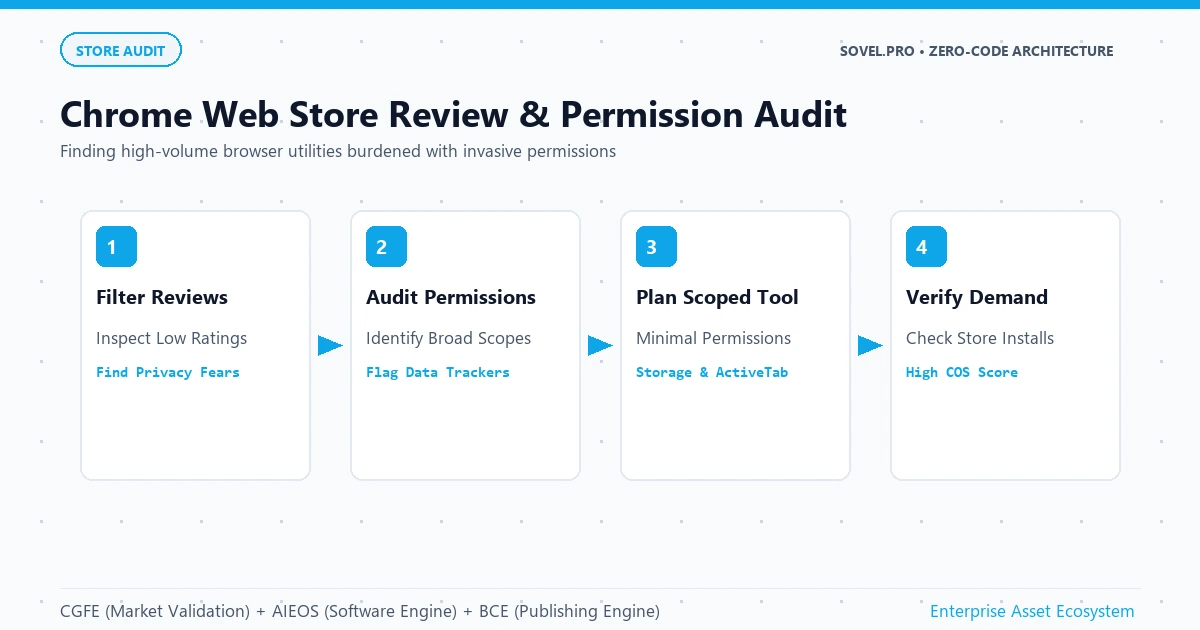
Figure 1: Mining Chrome Web Store user complaints to transform privacy concerns and permission bloat into lightweight software specifications.
Mastering Manifest V3 Architecture With Dual-Agent Engineering
In 2024, Google completed the deprecation of Manifest V2, enforcing Manifest V3 across all Chrome extensions. According to the official Chrome Developers Manifest V3 documentation, strict security enhancements were introduced: background scripts were replaced with ephemeral service workers, remotely hosted code was completely banned, and content security policies were tightened. Attempting to navigate these complex specifications with single conversational prompts leads to endless debugging loops. To successfully build chrome extension with ai without coding, you must deploy the AI Engineering OS dual-agent pipeline.
The AI Engineering OS separates extension creation into two coordinated phases:
- The Architectural Planner Agent: Defines the
manifest.jsonconfiguration file, declaring only minimal permissions such asstorageandactiveTab. It maps out the communication flow between the content script, the background service worker, and the popup user interface, establishing a rigorous implementation checklist. - The Code Executor Agent: Implements each JavaScript, HTML, and CSS file sequentially. Guided by the planner’s checklist, the executor writes clean, modular JavaScript, avoiding obsolete APIs and ensuring all DOM interactions are safely sandboxed.
This dual-agent separation is vital when you build chrome extension with ai without coding. Because the executor agent operates within narrow file boundaries, it correctly implements asynchronous messaging using chrome.runtime.sendMessage and chrome.storage.local, ensuring your extension runs reliably without crashing or draining device battery life.
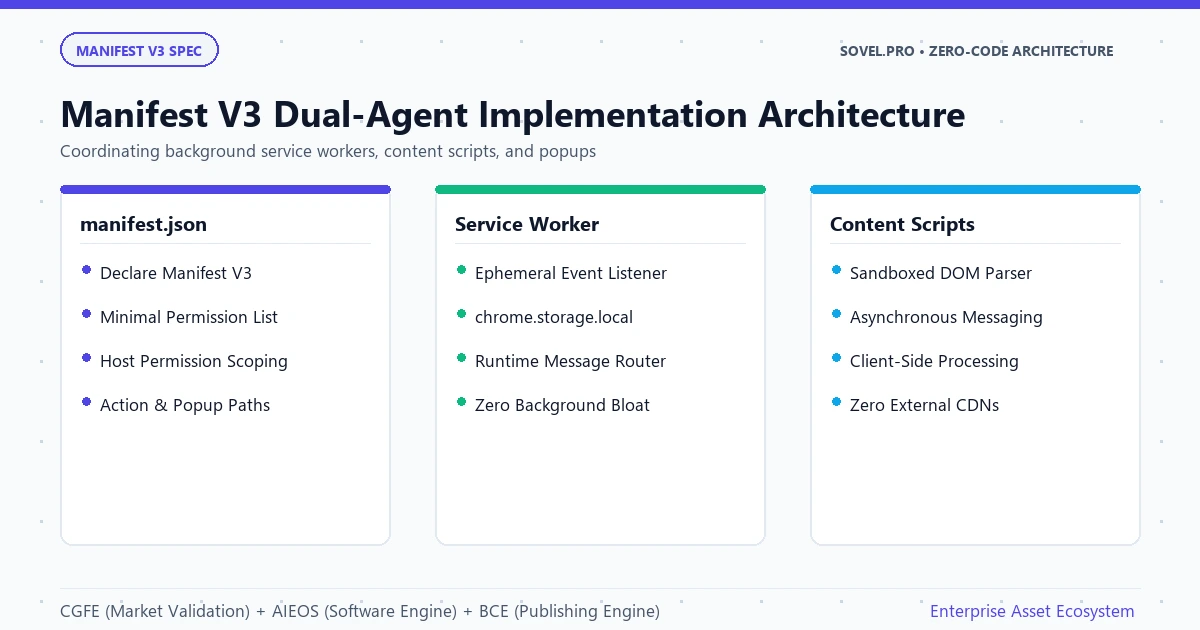
Figure 2: Modern Manifest V3 extension architecture coordinating ephemeral service workers, isolated content scripts, and local client storage.
Configuring Your Zero-Cost Local Development Stack
You do not need to pay for commercial software suites to build chrome extension with ai without coding. The entire development workflow can be executed on your personal computer using completely free, open-source software and zero-cost model routers.
Your local workstation setup requires four core tools:
- Visual Studio Code: The free code editor equipped with autonomous coding extensions like Cline, OpenCode, or Codex.
- Local Browser Developer Mode: Google Chrome includes built-in developer tooling that allows you to load unpacked extension directories directly from your hard drive with zero compilation delays.
- Free Model Routers: Services such as OpenRouter, OmniRouter, TokenHarbor, and Workbuddy that provide free community tokens to powerful coding models like DeepSeek V3, DeepSeek R1, Qwen 2.5 Coder, and Google Gemini Flash.
- The Project Head Context: An 8,000-character custom instruction document created in free research tools like ChatGPT or Grok, specifying your extension permissions, DOM selectors, data schemas, and UI styling.
By establishing this zero-cost development stack, you eliminate financial barriers. Anyone with a personal computer and an internet connection can build chrome extension with ai without coding, enabling students and non-technical entrepreneurs to launch real software products with zero capital investment.
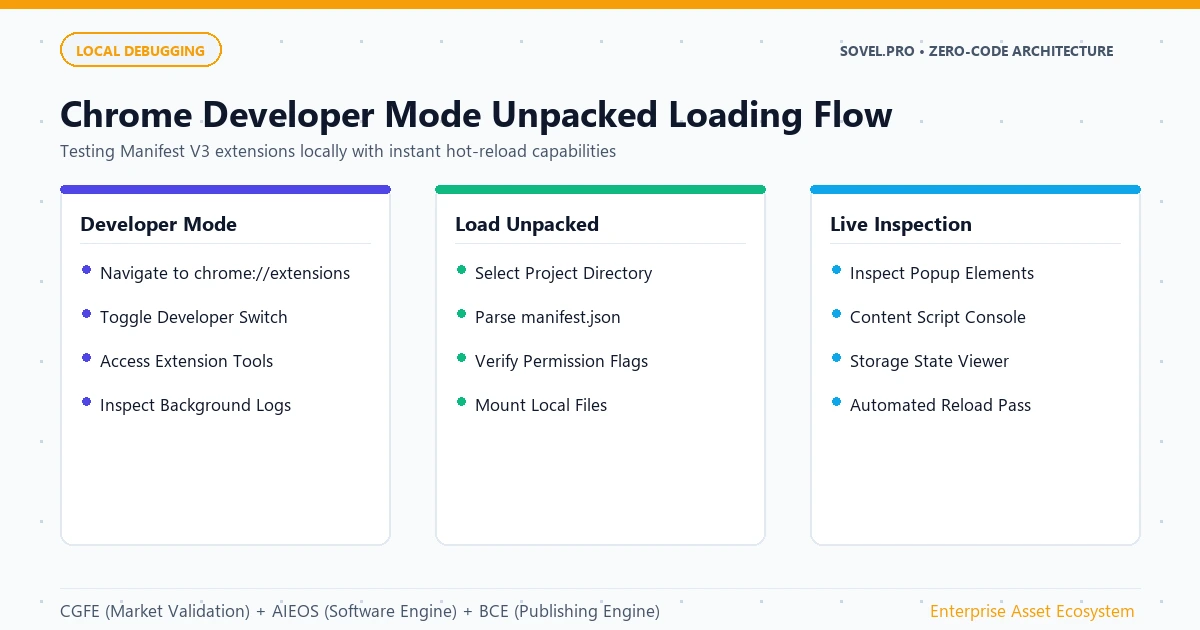
Figure 3: Loading unpacked Manifest V3 extension directories into Google Chrome developer mode for instant live testing.
Detailed Real-World Project Case Study 4: E-Commerce Price Velocity and Sentiment Analyzer
To see how an ambitious creator can build chrome extension with ai without coding, consider the creation of the E-Commerce Price Velocity and Sentiment Analyzer Chrome Extension. Conceived, coded, and launched in under five hours, this tool became a thriving commercial asset.
The project began with market research inside the Content Gap Finding Engine. Search analysis revealed over 24,000 monthly queries for “Amazon review analyzer extension” and “price drop tracker for e-commerce arbitrage”. Established browser extensions on the Chrome Web Store were notoriously slow, demanded broad permissions across every website, and injected affiliate tracking cookies without user consent. Reviews on existing tools were filled with complaints about subscription pricing of $29 per month for basic review summaries. The Content Opportunity Score reached 93 out of 100.
The creator activated the AI Engineering OS to develop the extension. The planner agent structured a clean Manifest V3 package scoped strictly to Amazon and Flipkart product URLs. The executor agent implemented a content script that extracts verified customer review text directly from the product page DOM, applies client-side natural language heuristics to detect review manipulation, and caches price history inside local chrome.storage.local and client-side storage structured via the MDN IndexedDB API. The popup interface, built with lightweight vanilla CSS, displays price velocity charts and review sentiment scores instantly with zero external API latency.
To create a complete commercial offering, the creator deployed the Book Creation Engine to produce a 48,000-word companion book: The Modern E-Commerce Arbitrage and Price Intelligence Playbook. The manual detailed product sourcing strategies, review verification techniques, and margin optimization. The extension was released for free on the Chrome Web Store to generate organic user adoption, while the companion book and an automated CSV data export upgrade were sold on Gumroad for $29. Within 60 days, the extension acquired over 4,200 active users, driving 310 book sales and generating nearly $9,000 in direct revenue. This proves the tremendous leverage achieved when you build chrome extension with ai without coding.
Code Architecture: Manifest V3 Configuration and Content Script
To understand the high technical quality achieved when you build chrome extension with ai without coding using the AI Engineering OS, examine the clean configuration and script structure generated by the executor agent:
{
  "manifest_version": 3,
  "name": "Sovel Price & Sentiment Analyzer",
  "version": "1.0.0",
  "description": "Privacy-first Amazon price tracking and review sentiment analyzer.",
  "permissions": [
    "storage",
    "activeTab"
  ],
  "host_permissions": [
    "https://*.amazon.com/*",
    "https://*.amazon.in/*"
  ],
  "action": {
    "default_popup": "popup/popup.html",
    "default_icon": "icons/icon128.png"
  },
  "content_scripts": [
    {
      "matches": [
        "https://*.amazon.com/*",
        "https://*.amazon.in/*"
      ],
      "js": ["content/analyzer.js"],
      "run_at": "document_idle"
    }
  ]
}
Notice how strictly the permissions are defined. When you build chrome extension with ai without coding with our framework, the generated code avoids invasive permissions, ensuring fast approval times during Google Web Store automated security reviews.
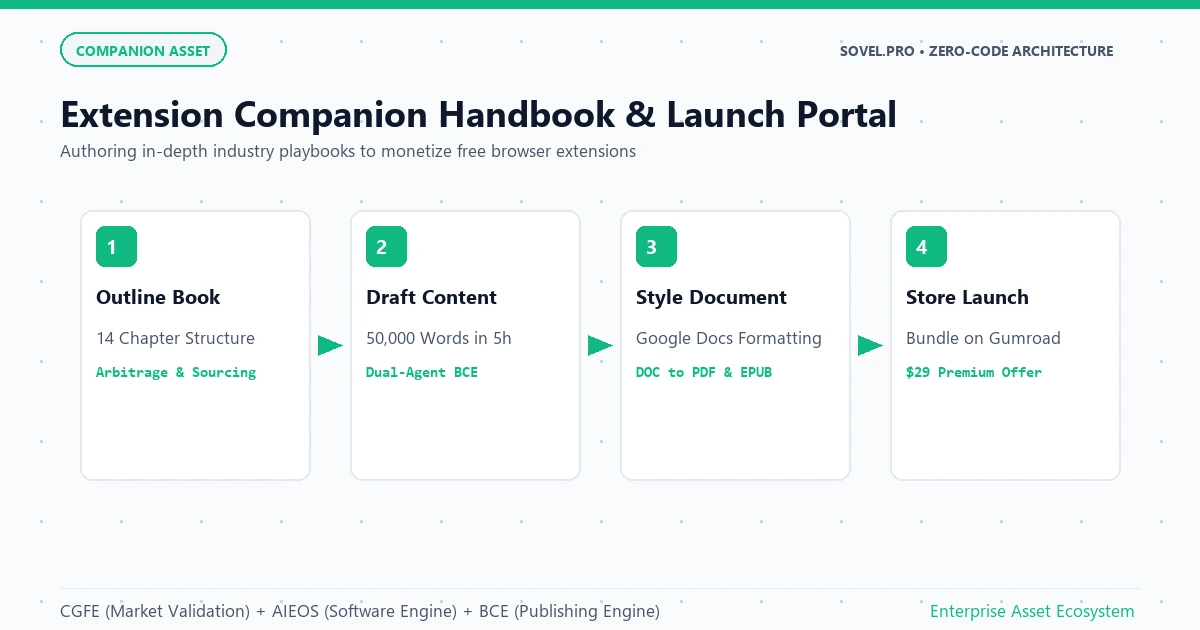
Figure 4: Comprehensive companion handbooks and user onboarding portals produced by the Book Creation Engine to support browser extension launches.
Content Script Architecture: Interacting Safely With the DOM
To safely build chrome extension with ai without coding, your extension must interact with dynamic web pages without interfering with host site scripts or causing browser memory leaks. The AI Engineering OS ensures that all content scripts are sandboxed and follow modern asynchronous standards.
Here is an example of the clean DOM extraction script generated by the executor agent when you build chrome extension with ai without coding:
// content/analyzer.js
(function() {
  'use strict';

  function extractProductReviews() {
    const reviewElements = document.querySelectorAll('[data-hook="review"]');
    const reviews = [];

    reviewElements.forEach((el) => {
      const ratingText = el.querySelector('[data-hook="review-star-rating"]')?.innerText || '';
      const bodyText = el.querySelector('[data-hook="review-body"]')?.innerText || '';
      if (bodyText) {
        reviews.push({
          rating: parseFloat(ratingText) || 0,
          text: bodyText.trim()
        });
      }
    });

    return reviews;
  }

  chrome.runtime.onMessage.addListener((request, sender, sendResponse) => {
    if (request.action === 'EXTRACT_REVIEWS') {
      const extractedData = extractProductReviews();
      sendResponse({ status: 'SUCCESS', count: extractedData.length, data: extractedData });
    }
    return true; // Keep message port open for async response
  });
})();
Notice how cleanly this script handles message passing with chrome.runtime.onMessage. When you build chrome extension with ai without coding through our dual-agent workflow, your scripts are completely contained, use strict mode, and avoid polluting the global window object.
Authoring the Companion Masterclass With Book Creation Engine
A browser extension by itself solves an immediate functional need, but pairing it with an in-depth reference publication transforms it into an authority digital product. When you build chrome extension with ai without coding, deploying the Book Creation Engine provides the educational authority needed to command premium prices.
The Book Creation Engine runs a sixteen-stage publication pipeline that transforms technical concepts into comprehensive books:
- Analyzes the extension’s target niche and outlines twelve to sixteen comprehensive chapters.
- Drafts detailed industry strategies, case studies, and advanced workflows ranging from 3,500 to 5,000 words per chapter.
- Assembles complete 50,000 to 70,000 word publications with front matter, copyright notices, and clickable tables of contents.
- Formats the output into clean DOC, PDF, and EPUB files ready for Gumroad, Amazon KDP, or direct website distribution.
Offering an authoritative guidebook alongside your browser tool creates an unmatched competitive moat. Users happily pay for the comprehensive handbook while using the free extension as their daily operational tool. This dual-product strategy is a key pillar of how to build chrome extension with ai without coding for sustainable passive income.
Real-World Authority Proof: The SOVEL Theme and EbookHunt.online
The validity of this methodology is demonstrated by real-world platforms built using these identical architectural principles. The custom SOVEL WordPress theme that powers sovel.pro and interactive web applications like Sovel Calc was engineered from scratch without traditional manual programming. By organizing agent prompts into strict architectural boundaries, the site achieves blazing load speeds and seamless user experiences.
Furthermore, the founder established ebookhunt.online as an open, verifiable demonstration site. Live for over six consecutive months, the site proves that a non-programmer can construct complex interactive web systems using prompt-driven engineering. The platform showcases a complete digital library powered by an interactive 3D page-turning flipbook reader tool built entirely with client-side canvas rendering. These living examples prove that when you build chrome extension with ai without coding, you are using a battle-tested methodology that produces enterprise-grade digital assets.
Comparison Matrix: Amateur Prompting vs. Three-Engine Framework
| Extension Feature | Amateur Conversational Prompting | SOVEL 3-Engine Architecture |
|---|---|---|
| Manifest Standard | Outdated Manifest V2 with deprecated APIs | Strict Manifest V3 with service workers |
| Permission Scope | Excessive permissions triggering store warnings | Minimal scoped permissions passing review fast |
| Market Validation | Random guessing with no user demand | Calculated Content Opportunity Score from reviews |
| Monetization Asset | Single free tool with no revenue strategy | Free tool paired with 50,000-word authority book |
| Client Data Privacy | Unverified external API calls leaking data | Client-side local storage with zero tracking |
Step-by-Step Blueprint: Building Your First Chrome Extension
Follow this exact operational sequence to build chrome extension with ai without coding and publish it on the Chrome Web Store:
- Step 1: Discover Store Review Deficits: Use the Content Gap Finding Engine to analyze Chrome Web Store reviews, identifying customer complaints about high subscription fees, slow performance, or invasive permissions.
- Step 2: Construct the Extension Specification: Create an 8,000-character project head defining your extension name, target website URLs, DOM selectors, and storage schema.
- Step 3: Launch Dual Agents in VS Code: Connect Cline or OpenCode to a free model router. Instruct the planner agent to construct the Manifest V3 treemap and file checklist.
- Step 4: Generate Manifest and Scripts: Have the executor agent generate
manifest.json, the content script, background service worker, and popup interface sequentially. - Step 5: Load Unpacked in Developer Mode: Open
chrome://extensions, enable Developer Mode, and click “Load unpacked” to test your extension locally. Verify DOM extraction and popup rendering. - Step 6: Author the Companion Guide: Use the Book Creation Engine to produce an exhaustive 50,000-word industry manual to accompany your tool.
- Step 7: Create Store Graphic Assets: Design high-resolution 128×128 icons, promotional banners, and store screenshots highlighting your privacy-first approach.
- Step 8: Submit for Web Store Review: Zip your extension directory, pay the one-time $5 Google developer registration fee, and submit your extension for automated store approval.
Frequently Asked Questions
Can I really build chrome extension with ai without coding knowledge?
Yes. The AI Engineering OS handles all JavaScript and Manifest V3 syntax. Your primary responsibility is defining what the extension does, specifying target websites, and verifying the interface locally.
How much does it cost to publish on the Chrome Web Store?
Google charges a one-time $5 developer registration fee that allows you to publish up to twenty extensions. Beyond this single fee, building and maintaining extensions using our zero-cost toolchain requires zero ongoing hosting expenses.
Why are Manifest V3 standards essential when you build chrome extension with ai without coding?
Google introduced Manifest V3 to enhance user privacy, performance, and security by blocking remotely hosted code and replacing power-draining background pages with lightweight service workers.
How do I monetize my Chrome extension without a backend server?
You can offer the core extension for free on the Chrome Web Store to attract users, while selling pro features, downloadable license keys, or the companion 50,000-word handbook on Gumroad or Lemon Squeezy.
How long does the Chrome Web Store review process take?
Extensions that request minimal permissions and adhere strictly to Manifest V3 standards typically pass automated security reviews within 24 to 72 hours.
Conclusion: Launch Your Browser Extension Business
The Chrome Web Store provides an unmatched global platform to reach millions of active users. By mastering how to build chrome extension with ai without coding, you can transform user complaints and market gaps into lightweight, profitable software utilities. Move beyond casual prompts and embrace the power of the Content Gap Finding Engine, the AI Engineering OS, and the Book Creation Engine. Validate your niche, deploy your dual agents, launch your extension, and build digital assets that create lasting independence.