
Why Serious Engineering Requires a Local Enterprise AI Software Development Workflow
Generative artificial intelligence has democratized the ability to conceptualize software, but browser-based chat playgrounds remain inadequate for professional production. Attempting to build scalable applications inside isolated web interfaces leads to broken dependencies, missing runtime environments, and untracked code regressions. To achieve true commercial reliability, modern developers and solo entrepreneurs must transition to a disciplined enterprise ai software development workflow running directly on their local machines.
A professional workstation setup bridges the gap between high-level artificial intelligence reasoning and concrete file system execution. By connecting frontier language models directly to local terminals, package managers, and testing sandboxes, you eliminate manual copy-pasting and empower autonomous agents to build, verify, and package complete software solutions. When governed by an enterprise ai software development workflow, even non-coders can orchestrate complex full-stack builds with zero technical debt.
This exact architecture is codified in the Sovel AI Engineering OS, a comprehensive operating system available for ₹999 that has powered more than 40 commercial WordPress plugins, custom themes, and scalable SaaS platforms. In this deep dive, we reveal the six local setup secrets that transform ordinary computers into autonomous software development powerhouses.
The Limitations of Browser-Based AI Sandboxes
Many aspiring founders begin their journey using cloud-hosted artificial intelligence playgrounds. While convenient for trivial scripts, these sandboxes quickly present insurmountable bottlenecks when applied to real commercial applications.
Cloud sandboxes suffer from four fundamental constraints that make an enterprise ai software development workflow essential:
- Ephemeral Storage and Lock-In: Online sandboxes store code on remote third-party servers. If the service experiences downtime, changes pricing tiers, or updates its environment, your project files and configurations can vanish overnight.
- Inability to Access Local Hardware: Cloud environments cannot interface with your local development databases, local web servers like XAMPP, or specialized hardware peripherals required for hardware testing.
- Restricted Terminal Privileges: Sandboxed environments frequently restrict arbitrary command execution, preventing agents from installing custom system libraries, configuring local reverse proxies, or running multi-container Docker pods.
- Fragile Version Control: Managing Git branches, performing granular diff comparisons, and executing rollbacks is awkward and slow inside cloud web editors compared to local IDE workflows.
By moving to a local enterprise ai software development workflow, you maintain complete data sovereignty, enjoy unrestricted computing power, and ensure that every byte of source code remains under your direct ownership.
Secret 1: Assembling the High-Throughput Local Toolstack
The foundation of autonomous engineering is a synchronized collection of lightweight, open-source development tools installed on your local computer. This environment can be configured in less than half an hour on Windows, macOS, or Linux.
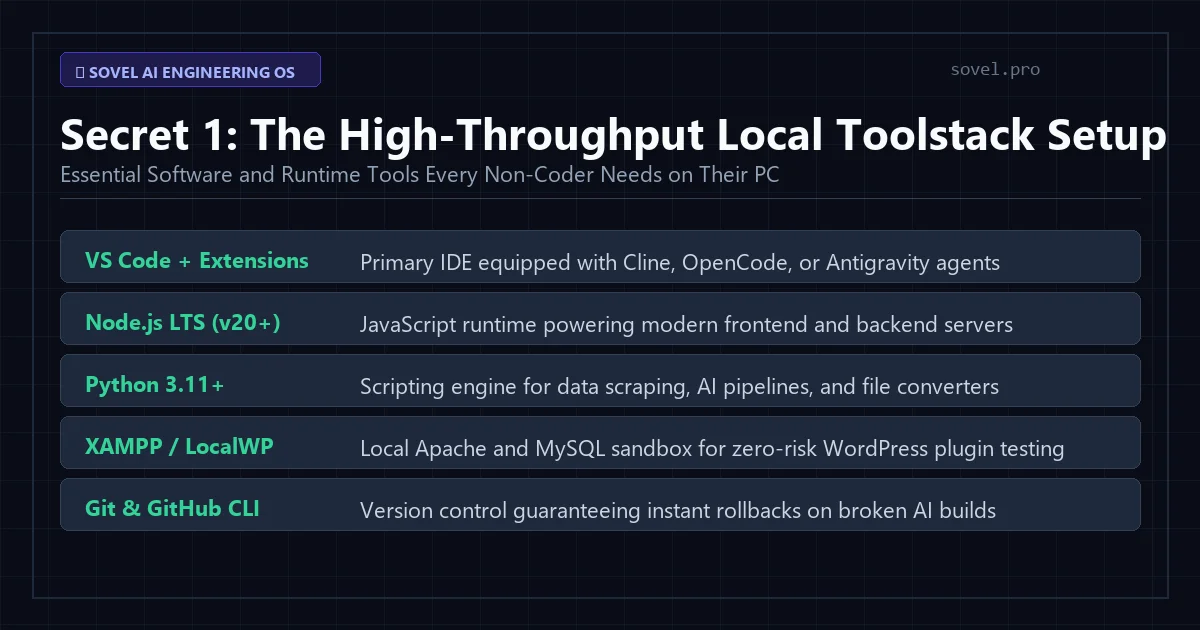
Figure 1: High-throughput local workstations combine Node.js, Python, and modern CLI extensions for autonomous code generation.
Your local enterprise ai software development workflow requires five core components:
- Visual Studio Code: The world’s most versatile developer IDE, available from Visual Studio Code. VS Code serves as the central command console where autonomous agents read directories, execute terminal commands, and perform surgical file edits.
- Node.js LTS (Version 20+): The JavaScript runtime engine downloaded from Node.js. Node powers modern web frontend frameworks like React and Next.js, as well as backend API servers built on Express and Fastify.
- Python 3.12: An essential runtime for artificial intelligence scripting, data analysis, web scrapers, and background automation daemons.
- Git Version Control: The distributed version management tool that tracks every file modification, enabling instantaneous rollbacks whenever an autonomous agent encounters a regression.
- Local Testing Servers (XAMPP or LocalWP): Provides Apache, MySQL, and PHP stacks directly on your PC, enabling risk-free local testing for WordPress plugins and database applications.
Integrating these runtimes creates a resilient foundation that allows autonomous agents to interact with real operating system processes smoothly.
Secret 2: Rigid Directory Hierarchy and Workspace Isolation
Unstructured project roots cause severe confusion for artificial intelligence agents. When source files, temporary test outputs, documentation, and external research are jumbled into a single folder, agents waste valuable context tokens searching for dependencies.
An enterprise ai software development workflow solves this problem by enforcing a standardized workspace folder structure across every project:
sources/: Holds raw competitor teardowns, third-party API documentation, and JSON data schemas. This serves as the static truth anchor that prevents model hallucinations.checklists/: Stores the 42 enterprise quality checklists covering architecture, security, performance, and user experience standards.treemaps/: Contains phase-by-phase implementation plans (such as01_database.md,02_api.md, and03_ui.md) mapping every file deliverable before execution begins.src/: Houses the actual application source code, neatly divided into controllers, models, views, and utility modules.dist/: Contains compiled, production-ready release archives ready for zero-downtime deployment.
This clear isolation ensures that coding agents proceed straight to their assigned workspace area without corrupting unrelated configuration files.
Secret 3: Intelligent Model Routing via OpenRouter
Relying on a single artificial intelligence model for every phase of development is both inefficient and expensive. Complex architectural reasoning requires frontier models with massive analytical capacity, whereas repetitive code scaffolding and file writing are handled more cost-effectively by fast code-specialized models.
An enterprise ai software development workflow integrates OpenRouter to route specific development tasks to the optimal engine:
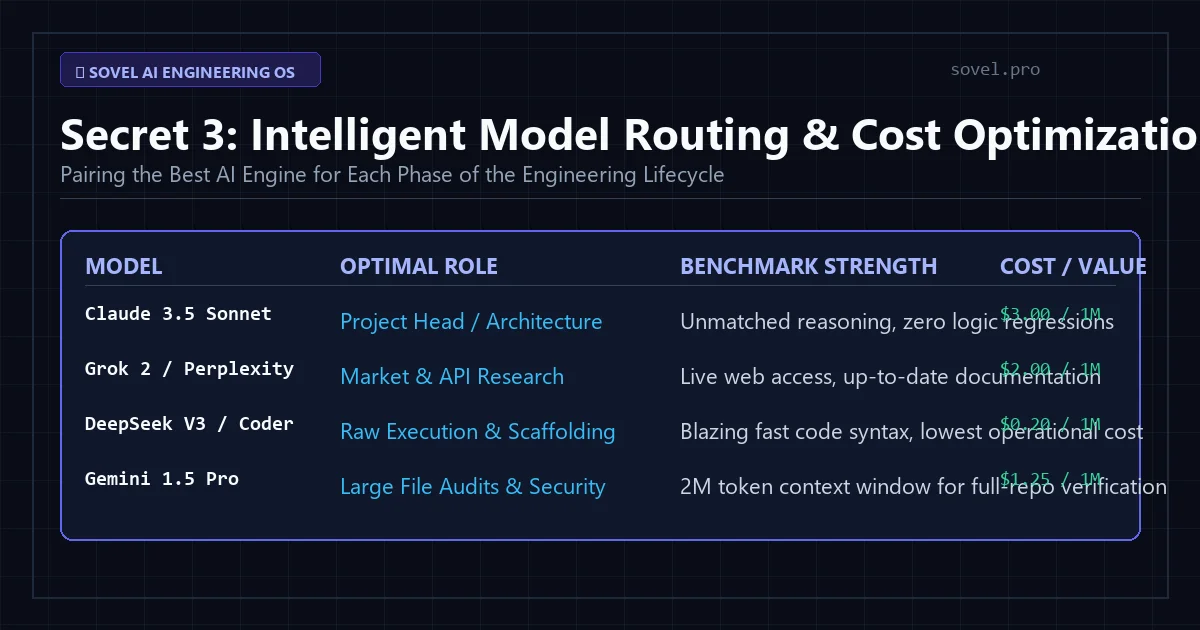
Figure 2: Dynamic routing directs complex architecture planning to frontier models while routing repetitive coding to fast execution engines.
The optimal model allocation matrix includes:
- Strategic Architecture and Auditing: Claude 3.5 Sonnet is unmatched for creating treemaps, synthesizing research, and auditing code against the 42 quality checklists.
- High-Speed Code Generation: DeepSeek V3 and specialized coder models deliver lightning-fast syntax generation for standard boilerplate, API routes, and unit tests at a fraction of the token cost.
- Real-Time Research and API Verification: Grok 2 and Perplexity provide live internet access to verify up-to-date third-party API documentation and library deprecations.
- Massive Repository Audits: Gemini 1.5 Pro, with its 2-million-token context window, allows you to feed entire codebases into a single prompt for comprehensive security and regression analysis.
Dynamic model routing slashes API operational costs by over 70% while maximizing overall development speed within your enterprise ai software development workflow.
Secret 4: Governing Autonomous Code with 42 Quality Checklists
The hallmark of enterprise engineering is deterministic verification. Amateur developers rely on hope, assuming that because an artificial intelligence generated code without crashing, it is safe to ship. An enterprise ai software development workflow rejects this assumption entirely, subjecting every file to 42 rigorous quality checklists.
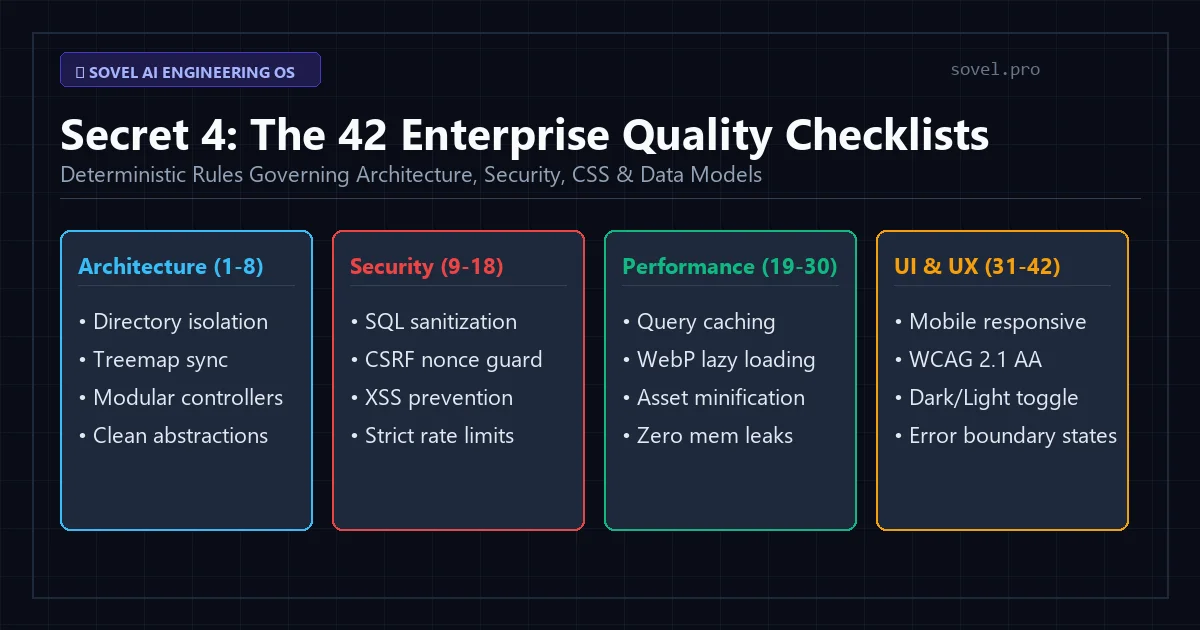
Figure 3: Structured checklists govern database normalization, security headers, input sanitization, and responsive CSS.
These 42 quality gates are divided into four essential engineering categories:
- Architecture Gates (1 to 8): Enforces clean modular directory layouts, eliminates circular imports, verifies relational database schema normalization, and mandates single-responsibility controller functions.
- Security Gates (9 to 18): Blocks SQL injections via mandatory parameterized queries, ensures Cross-Site Scripting (XSS) escaping, mandates Cross-Site Request Forgery (CSRF) tokens, sets strict CORS headers, and verifies robust password hashing.
- Performance Gates (19 to 30): Demands database indexing on foreign keys, implements WebP image asset standards, mandates asynchronous I/O handling, and enforces browser cache headers.
- UI and Accessibility Gates (31 to 42): Verifies complete mobile responsiveness across standard viewport breakpoints, enforces WCAG 2.1 AA color contrast compliance, ensures keyboard tab navigation, and provides explicit visual feedback for user loading and error states.
Enforcing these checklists within your enterprise ai software development workflow guarantees that your finished software assets achieve bank-grade reliability before they reach production servers.
Secret 5: Surgical File Modification and Git State Management
One of the most destructive habits of casual artificial intelligence coding is the full-file rewrite. When you ask a generic model to adjust a minor bug in a 400-line script, it frequently regenerates the entire file, quietly deleting crucial imports, custom fixes, and edge-case handling.
An enterprise ai software development workflow strictly enforces surgical, diff-based file modifications. Coding agents inside VS Code utilize search-and-replace blocks that pinpoint the exact lines requiring adjustment while preserving the remainder of the file intact.
Furthermore, every phase of development is tied directly to Git version control. Before an autonomous agent begins a new sprint, the local workspace commits the current state with an atomic commit message. If an agent introduces an unintended regression, a single terminal command restores the repository to a clean, working baseline. This eliminates the fear of broken builds and empowers fearless experimentation.
Secret 6: The Independent Zero-Drift Final Acceptance Audit
Before any software application is packaged for distribution or deployed to cloud servers, it must undergo an independent acceptance audit. Code drift occurs when an application gradually diverges from its original architectural specifications over multiple iterations.
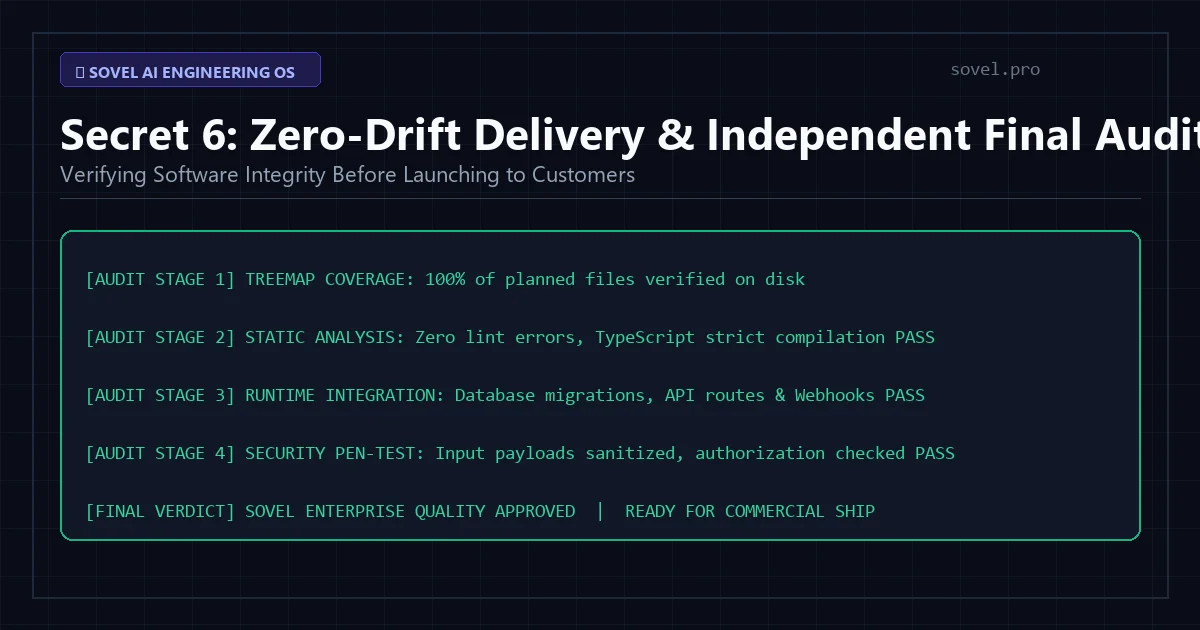
Figure 4: Independent verification guarantees that 100% of functional requirements match the initial treemap blueprint.
The zero-drift audit process evaluates five non-negotiable criteria:
- Treemap Completeness: Confirms that every file, route, and data model specified in the initial architectural treemap exists on disk and is fully implemented.
- Static Code Analysis: Runs automated linters and type checkers to guarantee zero syntax warnings, undeclared variables, or broken module imports.
- Runtime Sandbox Verification: Boots local test servers in Node.js or XAMPP, simulating user registration, database writes, and external API calls.
- Security Boundary Pen-Testing: Submits malicious payloads (such as SQL injection strings and script tags) to verify that defensive sanitization filters function correctly.
- Distribution Packaging: Verifies that production build artifacts, minified CSS/JS bundles, and installation manifests are compiled cleanly without development dependencies.
Passing the zero-drift acceptance audit guarantees that your enterprise ai software development workflow has produced a hardened, commercially viable product ready for immediate customer acquisition.
Local Developer Environment vs. Cloud AI Sandboxes
To highlight why serious builders invest in a local setup, consider this direct comparison:
| Operational Feature | Browser AI Sandboxes | Local Enterprise AI Workflow |
|---|---|---|
| Source Code Ownership | Hosted on third-party servers | 100% Local Sovereign Control |
| Terminal Capabilities | Restricted sandboxed shell | Full OS Terminal (PowerShell, Bash, Zsh) |
| Database Integration | Mock in-memory data only | Real PostgreSQL, MySQL, SQLite, XAMPP |
| File Modification Safety | Risky full-file regeneration | Surgical Diff-Based Patching + Git |
| Model Routing Flexibility | Locked to single platform provider | Multi-Model via OpenRouter (Claude, DeepSeek, Grok) |
| Verification Methodology | Visual preview only | 42 Strict Quality Gates + Automated Tests |
The advantages are undeniable. By establishing an enterprise ai software development workflow on your personal machine, you achieve institutional-grade software capabilities with zero recurring platform dependencies.
Frequently Asked Questions
Do I need a high-end gaming PC to run this workflow?
No. You do not need expensive graphics processing units or massive RAM. The artificial intelligence models run on cloud infrastructure via API calls through OpenRouter. Your local computer only runs standard development software (Visual Studio Code, Node.js, Python, and Git), which operates smoothly on any standard modern laptop or desktop.
How does this workflow integrate with autonomous coding agents like OpenCode or Cline?
OpenCode, Cline, and Antigravity install directly as extensions inside VS Code. You configure them with your OpenRouter API key. When given an implementation prompt from your Strategic Planner, the agent autonomously navigates your local folders, creates files, runs terminal commands, and applies surgical code edits.
How do I prevent autonomous agents from running dangerous terminal commands?
Modern agent extensions include permission safeguards that prompt you before executing sensitive terminal commands. Furthermore, because your project is tracked with Git version control, any unintended change can be instantly reverted in seconds.
Can this workflow be used to build SaaS platforms without coding?
Yes. Non-technical founders use this exact setup to orchestrate full-stack applications. For a detailed breakdown of the end-to-end commercial steps, read our guide on how to Build SaaS With AI Without Coding.
Where can I get the complete OS blueprints and quality checklists?
The complete Sovel AI Engineering OS package, including all 42 quality checklists, treemap templates, prompt architectures, and local configuration guides, is available for a one-time fee of ₹999 Indian Rupees.
Upgrade Your Software Engineering Today
Moving from casual artificial intelligence prompting to an enterprise ai software development workflow is the single most valuable transition a modern software creator can make. By taking full ownership of your local toolstack, governing agents with deterministic checklists, and routing tasks to the most cost-effective models, you unlock unprecedented development speed and sovereign software ownership.
Discover our full range of developer utilities at Sovel Web Tools, explore our free online calculator at Sovel Calc, and dive deeper into multi-agent governance in our article on the AI Agent Development Framework.
Ready to configure your high-throughput autonomous workstation? Get lifetime commercial access to the Sovel AI Engineering OS for just ₹999 and build professional software with zero technical debt. Download AI Engineering OS Now.