
A free AI book generator can take you from a blank page to a manuscript file in a month. The catch is that no single free tool does the whole job. The workable path is a chain of free tools, one file per stage, with a human check between each stage.
A common failure is treating a chatbot as a book factory. Authors paste a prompt, get 40,000 words, and then spend three weeks fixing contradictions, invented citations, and chapters that repeat the same point. The draft exists. The book does not.
This guide lays out the zero-budget version I would hand to a first-time author. It covers what a free AI book generator actually does, which free tools cover research, drafting, editing, formatting, and upload, and where the free path stops being the cheaper choice. Every step produces a file you can inspect.
What a free AI book generator actually does
A free AI book generator is software that turns a prompt, outline, or set of notes into book-length text at no cost. Most free options are general chatbots with a book template, not dedicated publishing software. They can produce chapter drafts, summaries, titles, and rewrites. They cannot verify a claim, clear image rights, or guarantee that Amazon will accept the file.
That distinction sets the whole process. The generator writes sentences. You supply the judgment. A useful free AI book generator session has four inputs: a named reader, a promise, a source pack, and a chapter outline. Without those, the model fills gaps with generic advice and plausible-sounding facts.
Free plans also come with limits that matter for a book. Context windows truncate long manuscripts, daily message caps interrupt work, and export options vary. Some free plans use your inputs to improve their models unless you change a setting. Check the data controls before you paste interview notes or unpublished research.
The practical rule: use the free AI book generator for prose, not for truth. Treat every number, name, date, quote, and citation as unverified until you check it against a primary source. That one habit prevents most of the quality problems that make an AI-assisted book unreadable. A free AI book generator is a drafting tool, and drafting is the middle of the work.
What a free AI book generator should not do
A free AI book generator should not write your table of contents from a generic prompt and call it structure. It should not invent interviews, studies, or quotes. It should not paraphrase a competitor’s book and call it original. And it should not be the only tool you use for a topic that carries legal, medical, or financial risk.
The reason is simple: the model predicts text, and text can be wrong in ways that sound right. A fabricated citation is more dangerous than a blank page because it looks finished. A copied structure is harder to detect than copied sentences, and it can still get you rejected or sued.
Use the free AI book generator for:
- turning your notes into a first draft;
- rewriting a paragraph in a simpler voice;
- generating 10 title options you will edit;
- summarizing sources you have already read;
- checking whether a chapter answers its promise.
Keep the thinking, the examples, and the final judgment. Those are the parts a reader pays for, and the parts that make the book yours.
The free tool stack that covers the whole job
A book needs seven jobs done: demand research, source research, outlining, drafting, editing, formatting, and publishing. You can cover all seven with free tools. The stack below is what I would use today, with the caveat that free tiers change without notice. Confirm the current limits before you build a deadline around one product.
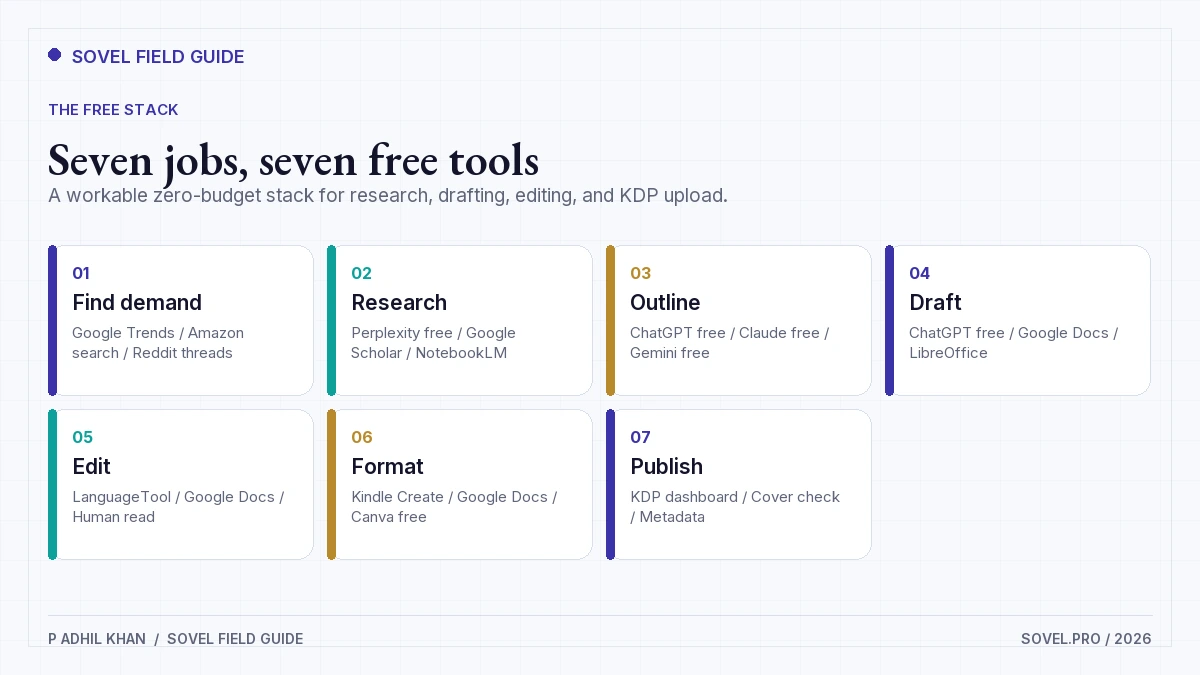
| Job | Free tool options | What you keep |
|---|---|---|
| Find demand | Google Trends, Amazon search, Reddit threads | A list of reader questions and competing titles |
| Research | Perplexity free, Google Scholar, NotebookLM | A source file with links and quoted passages |
| Outline | ChatGPT free, Claude free, Gemini free | A chapter list with word budgets |
| Draft | ChatGPT free, Google Docs, LibreOffice | One chapter file per session |
| Edit | LanguageTool, Google Docs, a printed read-through | A style sheet and a fact-check log |
| Format | Kindle Create, Google Docs, Canva free | A DOCX or EPUB plus a cover file |
| Publish | KDP dashboard, KDP previewer | A proofed file and disclosure answers |
Two non-obvious choices matter here. First, write in Google Docs or LibreOffice, not inside the chatbot. You need version history, comments, and a clean export. Second, keep a separate source file. A free AI book generator will forget your sources before the book is done, and you will not remember which claim came from where.
The tools are free, but the process costs time. A 30,000-word book with a real edit pass is a 25 to 40 hour project for a first-time author. If your time is worth more than a $20 monthly subscription, the free path may be the expensive one.
The 7-step path from a free AI book generator to upload
The sequence below is deliberate. Each step reduces uncertainty before the next one starts. Skipping the early steps is how authors end up with a polished draft that has no market.
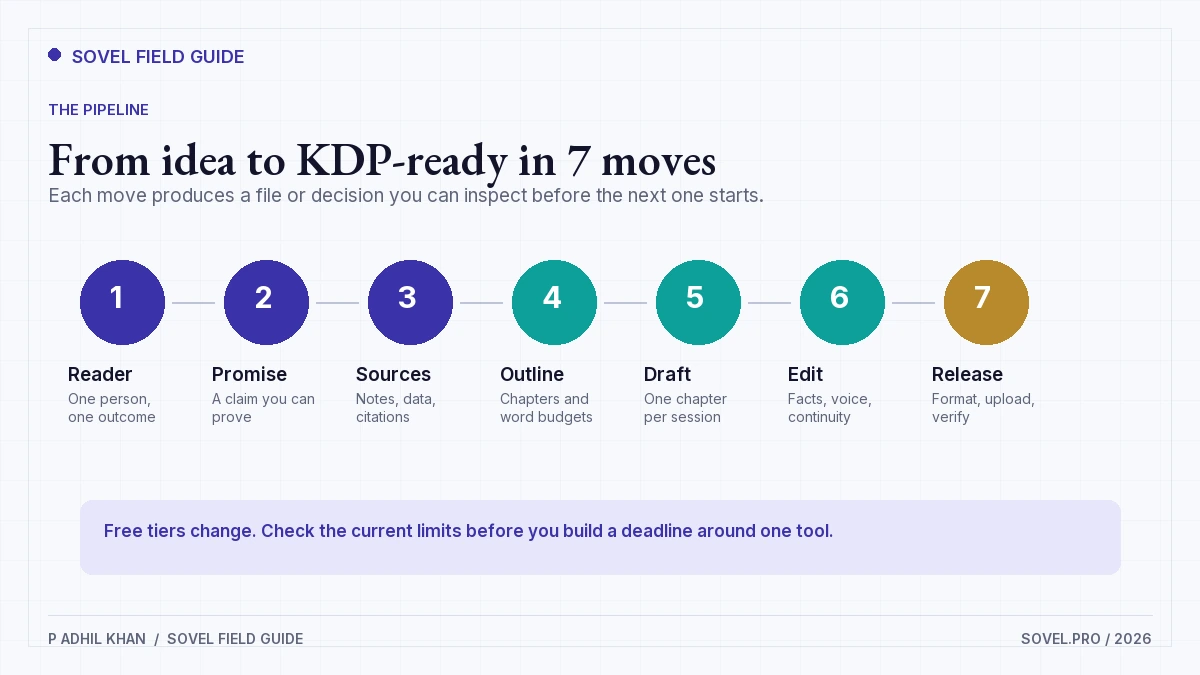
Step 1: Name one reader and one promise
Write a single sentence: “This book helps [specific reader] do [specific outcome] in [specific situation].” A book for “anyone who wants to write” is not a book. A book for “freelance designers who want to turn client questions into a paid guide” is a book.
Then write the promise as a testable claim. “Readers will be able to run a 30-minute content gap interview and produce a one-page brief” is testable. “Readers will master content strategy” is not. The promise decides the chapters, the examples, and the proof you need.
Keep this sentence at the top of every drafting session. It is the cheapest quality control you have.
Step 2: Validate demand with free signals
You do not need a paid keyword tool to know whether a topic has readers. Start with Amazon. Search your topic, open the top 10 results, and record the publication dates, page counts, prices, and review counts. A category with books published in the last 18 months and a steady review count has active buyers. A category where every top title is 6 years old may be dead or underserved. You cannot tell which without more evidence.
Next, check Google Trends for a 5-year view. Look for seasonal patterns and a flat or rising line. Then read Reddit and Quora threads where people describe the problem in their own words. Copy the exact phrases into a demand file. Those phrases become chapter titles and FAQ questions.
Finally, check autocomplete. Type your topic into Google and record the suggestions. The presence of long-tail questions is a signal that people are searching for a specific answer. A free AI book generator can help you group these questions, but it should not invent them.
Step 3: Build a source pack and an outline
Create a document with three sections: claims you intend to make, sources that support each claim, and open questions. For a nonfiction book, aim for 20 to 40 sources. For memoir or fiction, replace sources with a timeline, character notes, and setting details.
Use NotebookLM or a similar free research tool to query your source pack. Ask for contradictions, missing evidence, and sections where the sources disagree. This is where a free AI book generator earns its place: it can summarize 20 documents in minutes. It cannot tell you whether the documents are trustworthy.
Then build the outline. Give every chapter a working title, a one-sentence promise, three to five key points, and a word budget. A 30,000-word book with 12 chapters gives you 2,500 words per chapter. That is a realistic target for a first draft.
A free AI book generator can propose a 12-chapter structure in seconds, but it tends to give every chapter the same weight. Your book may need 4 chapters on the core method and 1 on tools. Adjust the word budgets before you draft.
Step 4: Draft one chapter per session
Open a fresh chat for each chapter. Paste the reader sentence, the chapter promise, the relevant source notes, and the style rules. Ask for a draft in sections, not the whole chapter at once. A 2,500-word chapter generated in one response tends to repeat the introduction and lose the thread.
Ask for 600 to 900 words at a time. After each section, check it against the chapter promise. If the section drifts, correct it before continuing. Save the output to your chapter file and label the prompt version. When a later draft contradicts an earlier one, you need to know which prompt produced which text.
Here is a prompt shape that works for a chapter section: reader and promise, chapter contract, the 3 to 5 source notes for this section, the voice rules, and a word limit. The free AI book generator gets the contract, the sources, and the style. It does not get permission to add new claims. If it needs a fact that is not in the packet, it should mark the gap instead of filling it.
Do not edit sentences while drafting. Collect the draft, then edit. Mixing generation and line editing is slow and produces inconsistent voice.
Step 5: Edit for facts, voice, and continuity
Run three separate passes. The first pass checks facts. Every number, name, date, quote, and citation gets a source link or gets cut. The second pass checks voice. Read the chapter aloud and mark sentences that sound like a press release, a LinkedIn post, or a different author. The third pass checks continuity. Character names, timelines, chapter references, and repeated anecdotes must agree.
This is the stage where most free AI book projects fail. The draft reads well enough to skip the work, and the errors are subtle. A model will happily invent a study, misattribute a quote, or change a percentage between chapters. You need a fact-check log with one row per claim.
Build a style sheet as you edit. Record the spelling of names, the capitalization of product names, the tense, the point of view, and the words you refuse to use. A free AI book generator will drift toward its default voice over 12 chapters. The style sheet gives you a fixed target for the next prompt and a quick way to spot a chapter that was written on a different day.
If you want a deeper process for this stage, the AI book writing pipeline breaks the same work into six stages with explicit gates. It is the next step when free tools start to lose context.
Step 6: Format for Kindle and print
Formatting is a separate job from writing. Export your edited manuscript to DOCX with consistent heading styles. Use Heading 1 for chapters and Heading 2 for sections. Do not use blank lines to create spacing. Do not use tabs to indent paragraphs. Those habits break when the file converts to EPUB.
Kindle Create is free and handles reflowable eBooks well. For print, check your trim size, margins, gutter, and bleed before you export a PDF. A 6 x 9 inch trim with 0.75 inch margins is a common starting point for nonfiction. If your book has images, check them at 300 DPI at the printed size.
Then proof the actual files. Use the KDP previewer and read every page. Look for widows, orphans, blank pages, broken tables, and images that lost resolution. A clean DOCX can still produce a bad eBook.
Step 7: Disclose AI use and upload to KDP
Amazon KDP requires you to disclose AI-generated text, images, and translations when you publish. AI-assisted content, where you wrote the work and used AI to edit, refine, or check it, follows a different path. The distinction is explained in Amazon’s Content Guidelines. Read the current version before you answer the publishing questions.
Disclosure is a declaration. KDP says AI-generated content remains your responsibility and must follow its content guidelines. That means the book still needs to be accurate, lawful, and free of infringing material.
For the full disclosure workflow, read how to publish an AI-written book on Amazon KDP. It covers the questions that appear during publishing and the checks that prevent a rejection.
Your metadata is part of the product. The title must match the promise, the subtitle must name the reader, and the description must say what changes after reading. Do not let a free AI book generator write the final description without editing it. The model will produce generic claims like “a must-read guide” that tell a buyer nothing.
Before you upload, run a preflight check. Confirm that you own or licensed every image, that your metadata matches the book, that your cover is the right size, and that your description is honest. The KDP preflight checklist covers the file-level checks in more detail.
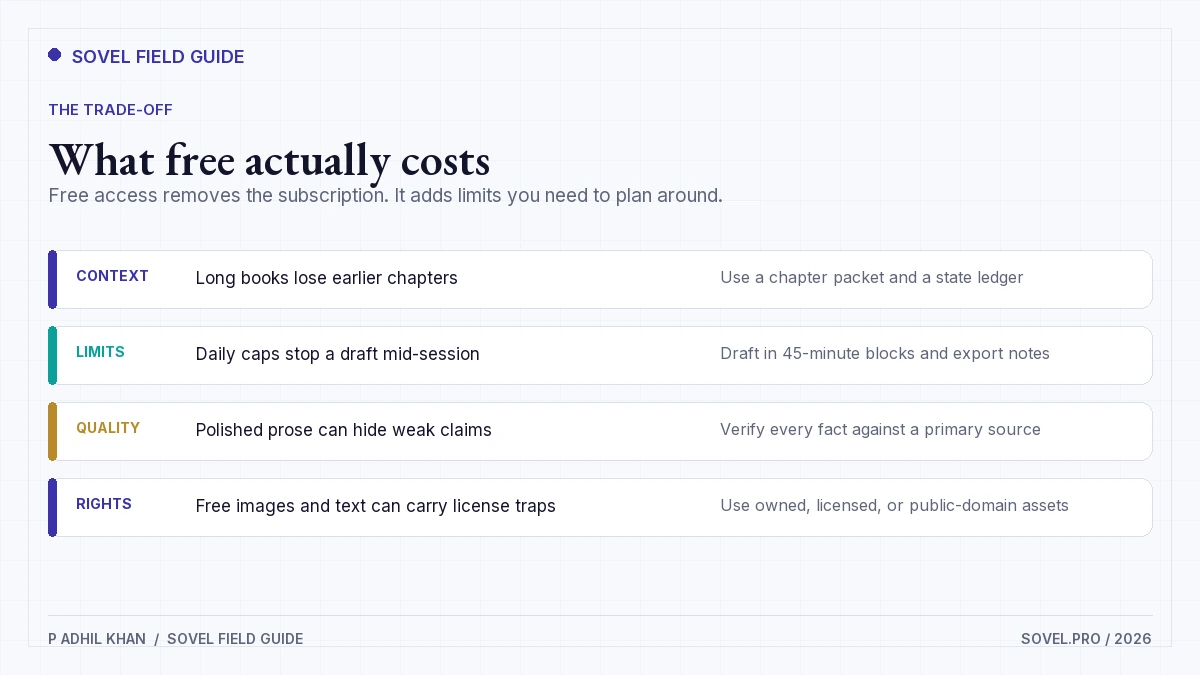
Where free tools stop being the cheaper choice
A free AI book generator hits four limits. The first is context. A free AI book generator may forget earlier chapters, which leads to repeated stories and contradicted claims. The second is usage. Daily caps can stop a draft mid-chapter, and the cost of waiting is often higher than a subscription. The third is rights. Free image tools and free fonts sometimes carry licenses that do not allow commercial book use. The fourth is support. When a file breaks at 11 p.m., a free plan rarely gives you a person to ask.
There is also a quality ceiling. Free models can produce clean prose, but they are more likely to flatten your voice and default to generic examples. Paid plans usually give you longer context, better instruction-following, and more control over style. That does not make them necessary. It makes them a reasonable purchase when the book has a deadline or a revenue target.
A free AI book generator is also a data processor. Export a local copy every week in case a plan changes or an account locks.
My rule: start free, finish the first book, then pay for the bottleneck you actually hit. If you want the same stages with automation, the SOVEL Book Creation Engine is the product path. If you run out of context, pay for context. If you run out of editing time, pay for an editor. Do not buy a stack of subscriptions before you know which stage is slow.
A 30-day schedule for a 30,000-word book
This schedule assumes 2 hours on weekdays and 4 hours on weekends. It produces a clean draft, not a bestseller.
| Days | Work | Output |
|---|---|---|
| 1 to 3 | Reader sentence, promise, demand file | One-page book brief |
| 4 to 6 | Source pack and outline | 12 chapter contracts |
| 7 to 12 | Draft chapters 1 to 6 | 15,000 words |
| 13 to 18 | Draft chapters 7 to 12 | 15,000 words |
| 19 to 22 | Fact, voice, and continuity passes | Edited manuscript |
| 23 to 25 | Format eBook and print files | DOCX, EPUB, PDF |
| 26 to 27 | Cover, metadata, description | KDP listing assets |
| 28 to 29 | Proof and fix | Final files |
| 30 | Disclose AI use and upload | KDP submission |
Two rules keep the schedule honest. First, do not draft and edit on the same day. The edit pass needs fresh eyes. Second, leave the last two days for upload problems. The schedule assumes the free AI book generator is available when you are. If a daily cap blocks a session, move that session to the next day and protect the edit days.
What to do before you publish
Run the checklist below.
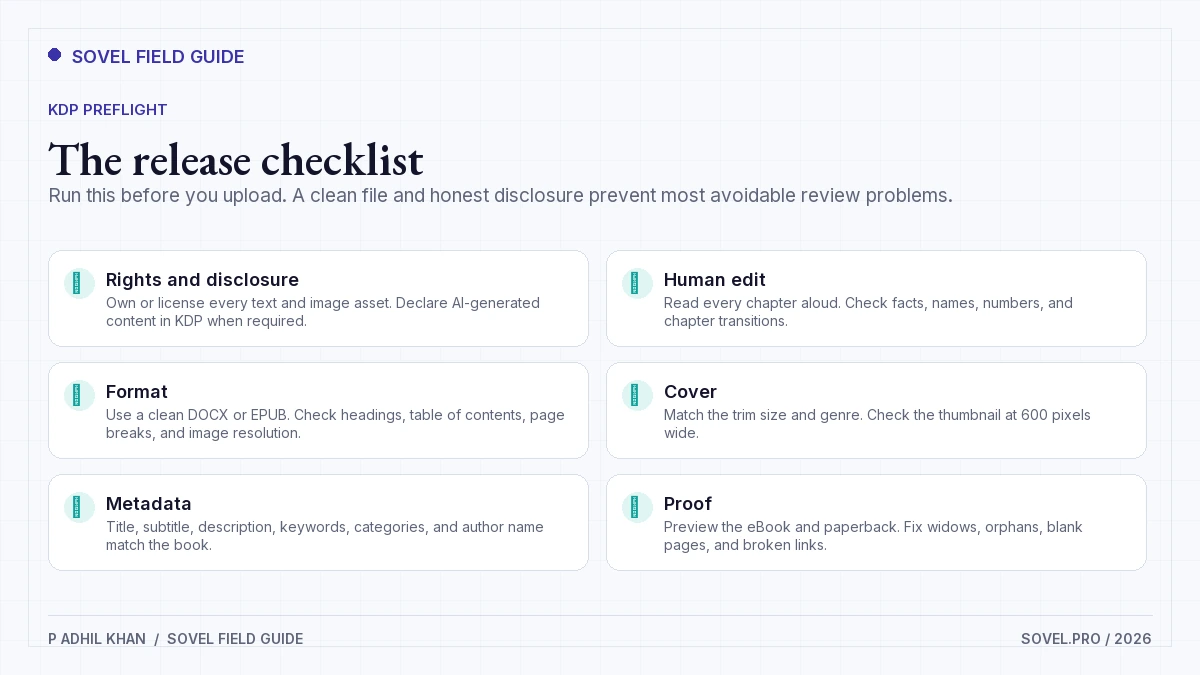
- Every chapter has a promise and keeps it.
- Every fact has a source or has been cut.
- The voice is consistent from chapter 1 to the last page.
- Every image is owned, licensed, or public domain.
- The cover matches the trim size and reads at thumbnail size.
- The title, subtitle, description, and keywords describe the actual book.
- The eBook and print files pass the KDP previewer.
- The AI disclosure answer matches what you actually did.
If you are new to the publishing side, read the beginner guide to AI book writing before you upload. It covers the decisions that come before formatting, including category choice and pricing.
One more thing: do not publish the first draft because it is finished. Publish when the checks pass. A free AI book generator can get you to a draft in a weekend. The month after that is what makes it a book.
FAQ
Is a free AI book generator good enough to publish a book?
It can be, if you treat the output as a draft. A free AI book generator can produce the prose, but you still need fact-checking, a voice edit, continuity checks, formatting, and a legal review of every asset. The author is responsible for the book.
Can I sell an AI-generated book on Amazon KDP?
Yes, with conditions. KDP allows AI-generated content when you disclose it and follow the content guidelines. The book must not infringe rights, mislead readers, or violate Amazon’s other policies. Read the current KDP guidelines before you publish, because the rules and the disclosure flow can change.
Do I have to tell KDP that I used AI?
You must disclose AI-generated text, images, and translations. If you wrote the book yourself and used AI only to edit, refine, or check it, the AI-assisted path applies. The exact questions appear during the publishing workflow. Answer them honestly and keep a record of what the tool did.
Who owns the copyright in an AI-generated book?
Copyright protection requires human authorship. In the United States, purely AI-generated material may not be protected, while human-authored selection, arrangement, and edits can be. The U.S. Copyright Office explains the current position on its AI page. This is general information, not legal advice.
What is the best free AI book generator?
There is no single best tool. Use a free chatbot for drafting, NotebookLM or Perplexity for research, Google Docs for editing, Kindle Create for formatting, and KDP for publishing. The best free AI book generator is the one whose limits you understand and whose data settings you have checked.
How long should my first AI-assisted book be?
For nonfiction, 25,000 to 40,000 words is a realistic first book. That length is long enough to deliver a useful promise and short enough to edit properly. A 60,000-word first draft is harder to fact-check and more likely to repeat itself.
Can I use free images in a book I sell?
Only if the license allows commercial use and book distribution. Check the terms for each image, keep a copy of the license, and credit the creator if required. Public domain images are safer, but you still need to confirm the source and the resolution.
Can a free AI book generator write fiction?
It can draft scenes, dialogue, and outlines. It struggles with a 90,000-word continuity, a consistent character voice, and a plot that pays off. Use it for scene-level drafting and keep a story bible. For a first fiction book, plan on a heavier edit than nonfiction.
What happens when the free tier runs out mid-book?
Export everything you have, including prompts, source notes, and chapter drafts. Move the manuscript to a new tool or wait for the limit to reset. This is why the process keeps one file per chapter. A free AI book generator is replaceable. Your source pack and edited chapters are the assets that matter.