
Prospect data quality is the least visible part of outreach and the part that decides whether the rest works. A list with a dead domain, three rows for the same company and a contact who left in March will absorb a week of effort and return nothing. The send looks fine. The data was wrong before the send.
The short answer: prospect data quality means checking five things before you write to anyone. Does the email domain accept mail? Does the mailbox look real? Are there duplicate records? Are the signals still current? Does every field have a source? Each check takes minutes, and together they decide whether a list is an asset or a liability.
This guide covers the five checks, the confidence score that summarises them, and the repair loop that keeps a list usable after the first month. The examples use SOVEL CLIENT RADAR, the engine this site sells, because its report shows where each check lands. The research records themselves are covered in the prospect research checklist.
Why do prospect lists rot so fast?
A prospect list is a photograph of a market, and markets move. People change roles, companies rename, domains lapse, pages get rebuilt, and a contact address that worked in January is a bounce in July. That is the first lesson of prospect data quality.
The rot starts before the list is built. A guessed address, a pasted row with no source, a directory entry from an old scrape: each one enters the sheet as a fact and leaves as a problem. Prospect data quality is mostly the discipline of stopping those rows at the door.
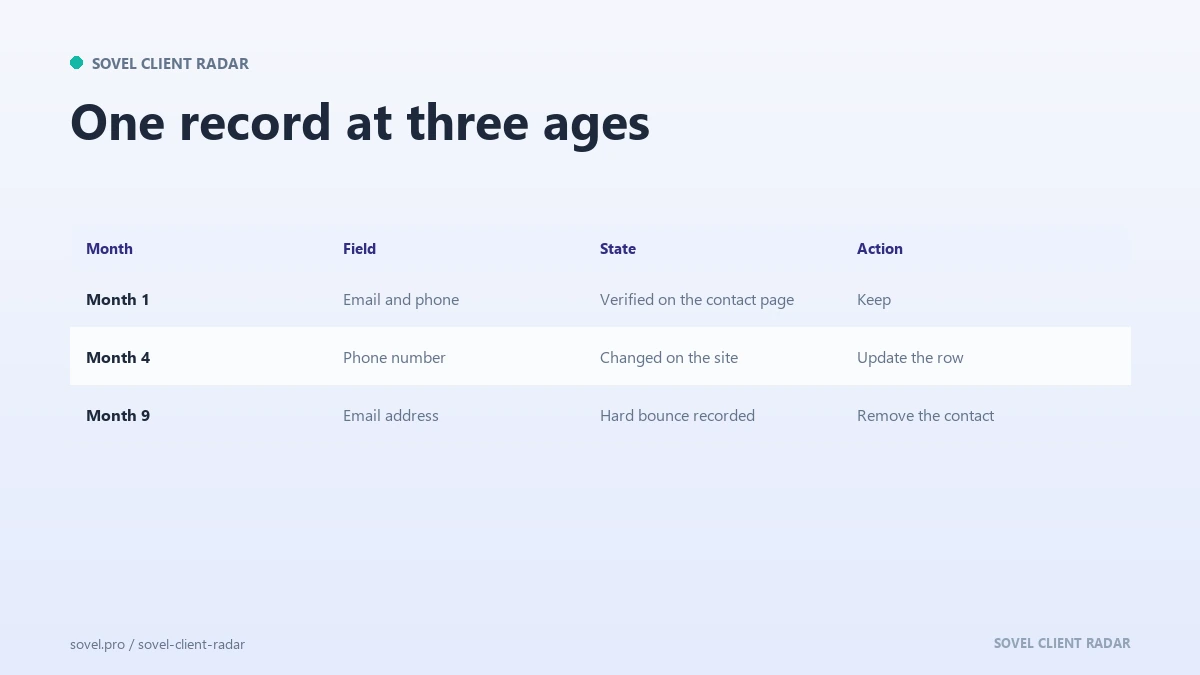
Two kinds of decay matter. Contact decay is the person leaving, the mailbox closing or the address changing. Signal decay is the reason to write going out of date, such as a vacancy that was filled or a launch that already happened. The first makes a message bounce. The second makes a message irrelevant.
Neither shows up in a row count. A list of five hundred looks healthy until you check it, which is why the checks below are worth running before the list grows rather than after. Prospect data quality is measured by what a row can prove, and a count proves very little.
Check 1: does the email domain accept mail?
The email domain check is the fastest way to find rows that cannot work. Take the part after the @ symbol, normalize it, and ask the domain whether it can receive mail.
Normalizing means lowercasing, stripping “www”, removing trailing dots and ignoring any path. Then look up the mail exchanger records for that domain. A domain with no MX record cannot accept email, so every address on it will fail, no matter how correct the spelling looks.
Do not stop at the website when you run an email domain check. A domain can serve a perfect homepage while its mail is handled elsewhere, and an old brand domain can redirect to a new site while the mailbox is gone. The MX lookup asks the mail question directly.
Watch for domain mismatch as well. An address at a free provider is not wrong, especially for a sole trader, but it is weak evidence that the person works at the company on the row. An address at a different company domain may belong to a parent, an agency or a franchise group, and that changes how you write.
SOVEL CLIENT RADAR runs this check by default. A contact whose domain has no MX record is marked unreachable rather than deleted, so the evidence stays in the report and nobody wonders where the row went.

Check 2: does the mailbox look real?
The second check is about the left side of the @ symbol. A valid domain tells you the mail can arrive somewhere. It does not tell you that a human reads it.
Live mailbox probing is unreliable. Many servers refuse the conversation, others accept every address to avoid revealing which ones exist, and a probe can look like abuse. Treat a successful probe as weak evidence and a failed one as no evidence at all. Prospect data quality work should not depend on it.
Pattern guessing is worse. Building “firstname@domain” from a name on a team page produces addresses that sometimes work and fail often enough to damage a sending domain. If the page does not publish the address, the honest value is empty, with a note that says so.
Role inboxes sit in the middle. “info@”, “hello@” and “sales@” are real addresses that a person or a shared inbox reads, so they are usable. They are also weaker than a named contact, because the message has one extra step before it reaches a decision maker. Hiring, support and legal inboxes rank lower again.
Prospect data quality improves when the mailbox type sits beside the address. A named person on the company domain with a contact page as the source is a different asset from a generic inbox found in a footer.
Check 3: are there duplicate records?
Duplicate records are the quiet drain on any list. The same company appears twice under two domains, the same person appears with two addresses, and both rows get an email in the same week. Prospect data quality drops fastest where duplicates live.
Start with a domain merge, then a person merge. Two domains belong together when one redirects to the other, when they share a mail exchanger, or when the pages name the same company and address. A country domain and an apex domain are usually one business.
Person merges need a lighter touch. The same name at the same domain is one person. The same name at two domains might be a job change or two different people, and the source date is what tells them apart.
When you merge, keep the strongest evidence rather than the newest row. A contact page with a named person outranks a footer address, and a dated source outranks an undated one. Keep the older row’s history in a notes field so the merge does not erase what happened.
One primary contact per company is enough for most teams, which does more for prospect data quality than a cleaning script. Store the others as alternates, so a second approach is possible without a second row and without a duplicate send.

Check 4: are the signals still current?
A buying signal has a shelf life, and the shelf is shorter than most lists assume. A vacancy posted this week is a reason to write. The same vacancy, filled two months ago, is a reason to look foolish.
Date every signal at the moment you record it. The date belongs to the evidence, not to the row, because a row can contain three signals from three different months. A sitemap date, a feed date and a job post date are separate facts and should stay separate. Undated signals are the most common hole in prospect data quality.
Then decide a shelf life per signal type. A job ad is useful for a few weeks. A publication gap grows more interesting with time. A site change is useful until the next change. Recency changes the weight and the order you work the list.
Stale contacts and stale signals are different problems with different fixes. A stale contact needs a new address or an archive. A stale signal needs a new reason to write.
Before a send, reread the top signal on each row and ask whether it still points at something happening now. If it does not, find a fresh one or move the row down. That reread is the cheapest check in prospect data quality.
Check 5: does every field have a source?
A field without a source is an opinion. Prospect data quality depends on being able to answer where a value came from, when it was read, and which page proved it. That rule carries most of the work.
Every contact value in a serious record carries three things: the value, the source URL and the retrieval date. That trio is what makes a row defensible when a colleague asks why a company received a message, and it is what makes a correction possible when the value turns out to be wrong.
Address fields deserve the same treatment, with a little more structure. A postal address has parts, and mixing them into one line makes the record hard to check. The schema.org PostalAddress definition sets out the usual parts: street address, locality, region, postal code and country. Splitting them means a city can be verified against a page instead of guessed from a comma.
The source traceability habit used for editorial work applies here without change. A number without a URL is a claim someone made once.
Here are the five checks in one table.
| Check | What it catches | How to run it |
|---|---|---|
| Email domain | Addresses that cannot receive mail | Look up the domain’s MX record |
| Mailbox | Guessed or generic addresses | Read the source, record the type |
| Duplicates | Two sends to one company | Merge by domain, then by person |
| Signals | A reason that expired | Date it, recheck before sending |
| Sources | Values nobody can defend | A URL and a date per field |
How do you verify prospect data from a directory?
Directories are where the phrase how to verify prospect data gets tested, and where the answer is usually settled. The listing is a copy of a copy. The directory may have scraped the company site, the company may have changed since, and nobody has checked the row in years.
The method is to walk back to the source, which is the core habit in prospect data quality work. Open the company’s own site, find the contact page, and compare it with the directory entry. If the phone number, address and website agree, the row is probably current. If the website does not resolve, the directory entry is a historical record, and reformatting will not make it a contact.
Then check the date. Some directories print a last-updated line, others show nothing. A listing with no date is unverified by default, which is a status rather than a reason to delete it. Prospect data quality depends on that distinction, because unverified rows can be checked and wrong rows cannot be trusted.
How to verify prospect data also means checking the domain path. A directory profile often carries its own redirect URL, and copying that into a list gives you a link to the directory rather than the company. Take the destination domain, not the tracking link. That single step protects more rows than any cleaning script in prospect data quality.
Patience decides more rows than any script at this stage. Two minutes per row on the first pass saves the hour you would spend later wondering why a third of the list bounced. A directory is a fine place for prospect data quality work to start, as long as the company site is where it ends.
What does a confidence score measure?
A confidence score is a summary of how well a contact is supported by evidence. Prospect data quality asks the same question in reverse. The score is not a prediction that the person will reply, and treating it as one leads to disappointed teams and overconfident sends.
The score is built from a few honest inputs. The mailbox type: named person, role inbox, or a hiring and support address. The domain match: does the address sit on the company’s own domain. The evidence: was the address published on a contact or team page. The link status: does the profile or page still resolve.
Each input is checkable, which is the point. A score that cannot be explained is a magic number, and a magic number gets ignored after the first month. Prospect data quality work should always be able to show the arithmetic.
Use the score to order work. Filtering on it alone throws away contacts who deserve a phone call. A contact at seventy percent deserves the first email. A contact at thirty percent belongs in the second wave, or on a call.
How do you repair a list without starting over?
Repair beats replacement. Most lists contain a good core surrounded by rows that need one of four actions: fix, merge, recheck or archive. Prospect data quality is a repair habit before it is a tool.
Run the repair in a fixed order. First, the domain check, because it removes rows that cannot work. Second, the duplicate merge, because it stops double sends. Third, the signal recheck on rows you plan to use this month. Fourth, the source fill on rows that are missing a URL or a date. Fifth, the archive for anything that fails twice.
Twenty minutes a week keeps it manageable. The alternative is a full rebuild every quarter, which nobody does, so lists quietly stop being used.
Keep repair notes with the list. When a row is archived, write why. When a value is corrected, write what it was. That history is what makes the next repair faster, and it is the part that turns lead data accuracy from a slogan into a habit.
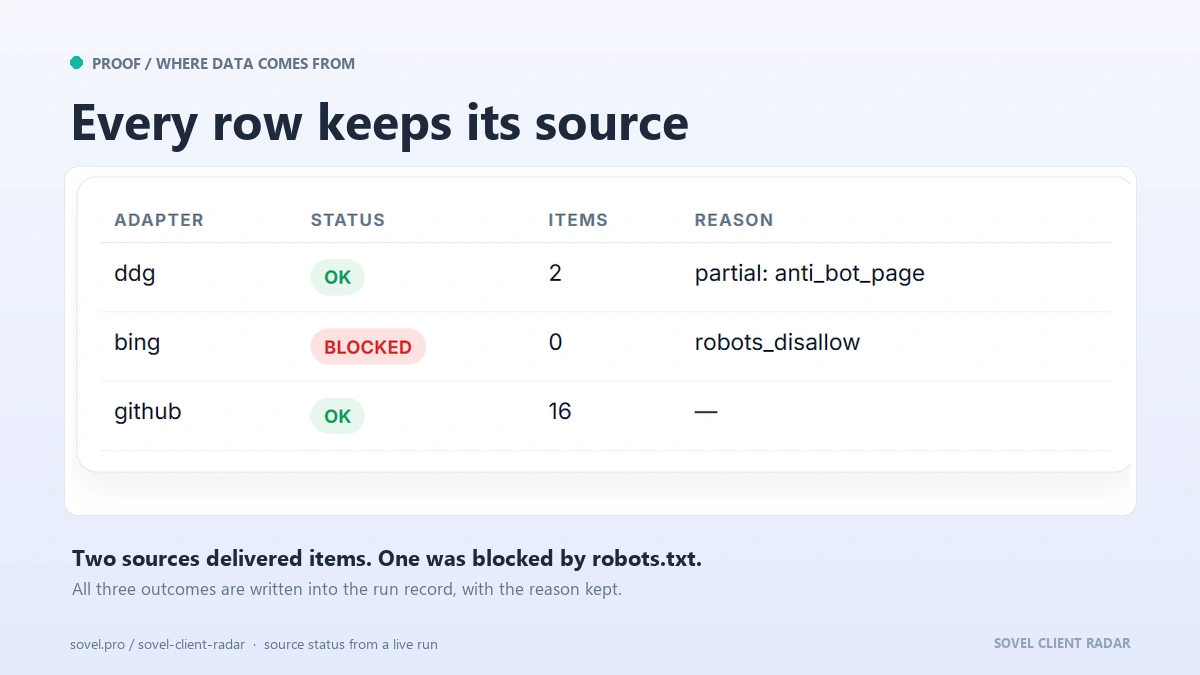
For the column structure behind each record, the lead list export formats guide explains what each field should hold. The engine’s own report folder keeps verification notes that name every blocked source and every check that did not finish, which is the same idea applied to a whole run.
Which edition fits your data work?
SOVEL CLIENT RADAR builds records that survive these five checks. Every contact keeps a source URL and a retrieval time, the email domain is checked by default, duplicates are handled by domain, and the report shows a confidence value with the reason beside it. Prospect data quality is built into the output. The licence is paid once, and the three editions are sized for a solo operator, a small team and an agency with five seats.
- Personal / Freelancer: one seat and 50 leads per run for ₹5,999. A solo operator keeping one list clean.
- Pro / Small Business: one seat and 200 leads per run for ₹12,999. A small team that needs more rows without losing the evidence trail.
- Agency / Enterprise: five seats and 500 leads per run for ₹39,999. Several lists maintained by different people, with the same standard.
Features do not change across tiers, and the tool never meters how often you run it. The output folder holds an 84-column lead sheet, a contacts file with a reason and confidence per contact, a signals file with dates, a six-sheet workbook and a report that opens in a browser. The product page lists the exports and the licence terms for each edition.
Two reads pair with this one. The prospect research checklist covers the fields to fill before a check can run, and the source traceability method explains why a URL and a date belong next to every claim.
FAQ
How do I verify an email address without sending to it?
Check the domain first: normalize it and look for a mail exchanger record. Then check the source, because an address published on a company page is stronger than one assembled from a pattern. Live mailbox probing is unreliable, so treat it as a weak extra signal rather than proof.
What if the domain has no MX record?
Then the address cannot receive mail, and the row should be marked unreachable rather than deleted. Keep the record with a note, because the contact may reappear on a working domain later. A missing MX record is a fact about the domain, not about the person.
How often should I recheck a record?
Recheck the rows you plan to use within ninety days, and recheck the whole list twice a year. Prospect data quality is a maintenance habit, and lead data accuracy depends on it. Rows that have not been touched in six months should be treated as unverified until someone opens the source again.
Is a role inbox like info@ worth using?
Yes, with a lower confidence value. A role inbox is a real address that someone reads, so it can receive a relevant message. A named person on the company domain is stronger, and hiring, support or legal inboxes should never be the first choice.
What is a good match rate for a prospect list?
No universal number exists. A working standard is a published address on the company’s own domain; a list that leans on free providers, guessed patterns or third-party domains needs repair before it needs more rows.
Can I automate prospect data quality checks?
Yes for the mechanical parts: domain lookups, duplicate merges and date filters run well as a script or a tool step. The judgement parts stay human, such as whether a signal is still relevant or whether a role inbox suits the message.
Is a directory listing enough to trust a row?
No. A directory is a starting point, and the company site is the test. Prospect data quality depends on checking the listing against the company’s own pages, then recording the date you checked. If the two disagree, the company site wins.
What is the fastest fix for a list I already have?
Run the domain check first and archive what fails, then merge duplicates by domain, then recheck the signals on the rows you intend to use this month. That sequence removes most of the waste in an afternoon, and it leaves a smaller list you can trust. It is the fastest prospect data quality gain available on a list you already own.