
Lead list export formats rarely get a second thought until a client cannot open the file you sent. A list trapped inside one tool dies when that tool changes, and the research has to be done again. The file decides who can read your work and how long it stays usable.
The short answer: six lead list export formats cover almost every handover. CSV goes to a CRM or a script. XLSX goes to a person. JSON goes to a program that needs structure. JSONL goes to the archive. Markdown or HTML goes to a reader. PDF or DOCX goes to a client who needs a document that cannot drift.
This guide compares those six lead list export formats on the three things that decide the choice: who opens the file, what breaks it, and how long it lasts. Every file described here is one SOVEL CLIENT RADAR writes from a single run, so the comparison is between real output instead of descriptions of output.
Why do lead list export formats decide who can use the list?
Lead list export formats are contracts with the next reader. Pick badly and the contract fails quietly: the client opens the file in a spreadsheet, the leading plus sign disappears from a phone number, and the first conversation is about a formatting accident. The first question is which lead list format the reader can actually open.
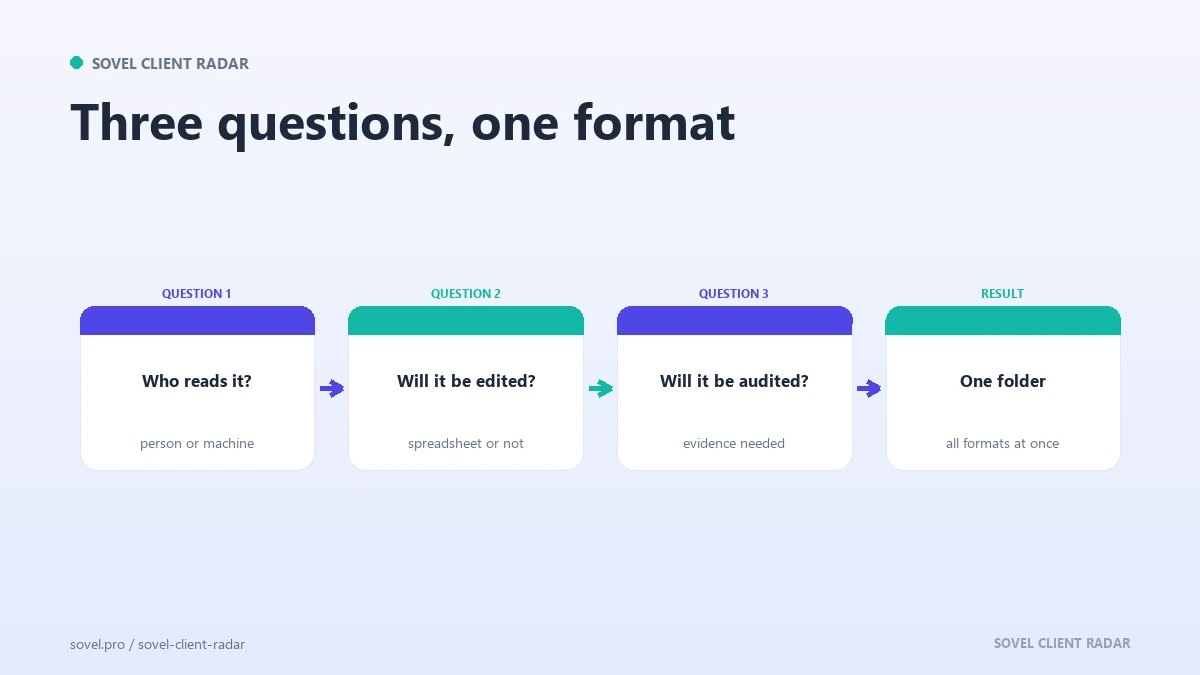
Three questions settle most decisions about lead list export formats. Who opens this file? What program reads it? How long does it need to survive? A format that answers all three is usually obvious. A file that answers none of them is why people zip a whole folder and hope.
There is a second cost that gets ignored when you keep several lead list export formats. Every extra format is a copy that drifts. Send a spreadsheet in March and a PDF in April, and the client may quote a number from the older file. One source of truth with several derived copies works. Three hand-edited copies do not.
CSV: the format every program already reads
CSV is the safest of the lead list export formats for anything that travels between programs. It is plain text, one row per record, one comma between fields, and nearly every tool imports it. A CRM, a script, a mailing platform and a spreadsheet all read the same file.
Among lead list export formats, CSV is also the one with a published specification. RFC 4180 sets the rules for quoting fields that contain commas, line breaks or double quotes, and a file that follows those rules opens correctly in more places. The CSV specification takes a few minutes to read and explains most of the strange import dialogs you have met.
The weakness of CSV against the structured options is that it carries values and nothing else. No column types, no formulas, no formatting. A phone number stored as text stays text, and a spreadsheet program may still decide it looks like a number and strip the leading sign.
CSV earns its place among lead list export formats because it compares cleanly. Two exports of the same topic, a month apart, can be read side by side to see which companies are new, which changed and which stopped appearing.
What belongs in the csv columns?
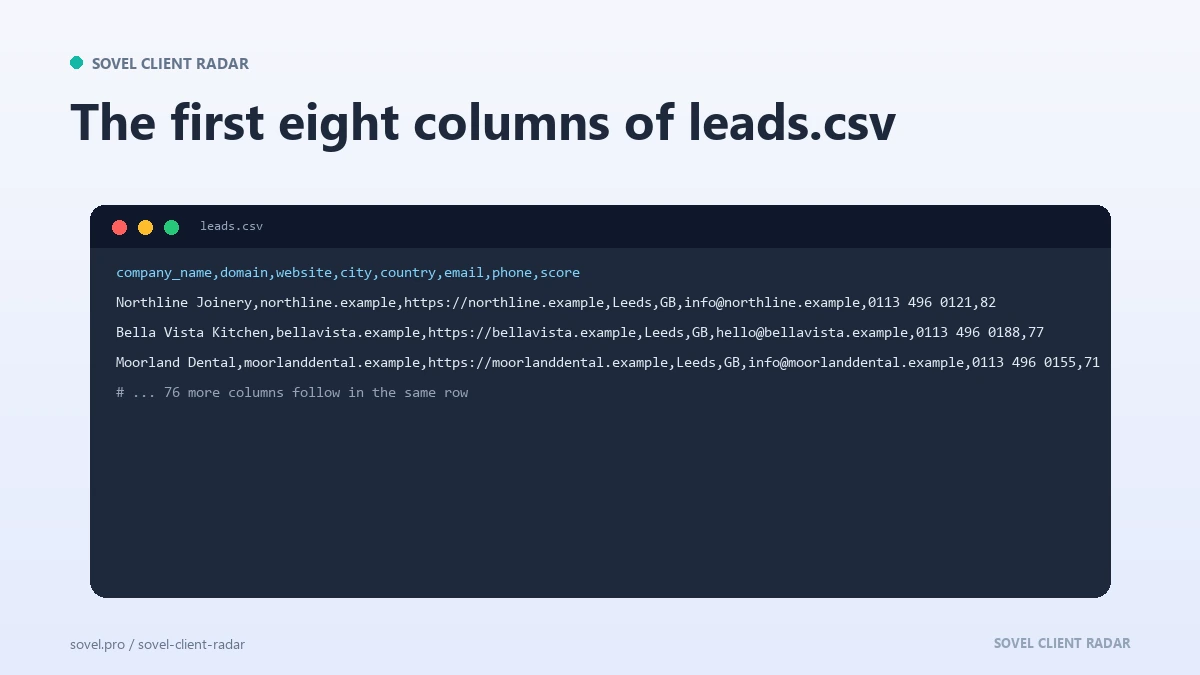
A useful set of csv columns answers what a reader asks in the first minute: who is this, where are they, how do I reach them, why now, and how sure are you. Everything else is extra.
SOVEL CLIENT RADAR writes 84 columns into leads.csv. That sounds like too many until you see what a run collects: three separate email fields, two phone fields, two WhatsApp fields, social profiles, four score components, a why-buy percentage, an approach plan and a signal summary. Splitting those into their own fields lets a filter act on each one instead of parsing a paragraph.
Three rules keep csv columns usable. Put the identifier first so the file sorts sensibly. Keep one field per fact, because a single contacts cell holding three addresses cannot be filtered. Keep the source URL and the retrieval date next to each claim, which is the habit that prospect data quality rests on.
XLSX: the workbook a person will actually open
When the reader is a human with a deadline, an XLSX workbook is the friendlier of the lead list export formats. It opens with tabs, keeps column formatting, keeps number types, and puts a filter one click away.
The engine writes a six-sheet xlsx workbook: Cover, Leads, Strategy, Evidence, Contacts and Signals. The cover explains the run, the leads sheet is the list, the strategy sheet holds the approach notes, and the evidence sheet shows where each fact came from.
Six sheets are also the risk. A workbook invites editing in place, and an edited workbook stops being a record. If a colleague deletes a column because it looks empty, the file no longer matches the run that produced it. Keep the original beside any working copy.
XLSX handles a normal research run and struggles with a decade of history, which is where a line-based archive earns its place.
Export leads to Excel when someone needs to filter, sort and annotate the list. Teams also export leads to Excel because the workbook opens without installing anything, and that familiarity matters more than any technical advantage.
JSON: the record a program can trust
JSON keeps structure. Of all the lead list export formats, it is the one built for another program to read: named fields, nested objects and explicit types mean a script reads a lead without guessing which comma meant what.
The engine writes leads.json with scores, signals, evidence and insights, and one record per evidence item in evidence/evidence.jsonl. The point is auditability. Every score line can be traced back to the facts that produced it.
The cost is readability, and it is the price JSON pays among lead list export formats. A file with 200 leads is a wall of braces in a text editor, and a client who receives one will ask for something else. Treat the JSON export as the machine copy and keep it away from what you send.
JSON is also brittle across schema changes. Adding a field is harmless, renaming one breaks every old reader. Publish the field names you promise to keep and let the rest change quietly.
JSONL: the archive that appends
JSONL stores one complete JSON object per line. That single change produces a format that appends cleanly, streams without loading the whole file, and survives a partial write.
Those properties matter when lead list export formats have to grow every week. A new run adds lines. A reader processes the file line by line and skips a broken line without losing the rest. A search across the archive finds every record mentioning a domain.
The engine writes leads.jsonl and evidence.csv into the exports folder when you ask for the JSONL variant. Evidence is the natural home for json lines, because evidence records only ever get added and never rewritten.

Use it for the copy you keep and export a summary for the copy you send. The archive is where a claim made in March can still be defended in November.
Markdown and HTML: the report someone reads
Two of the lead list export formats are built for reading: Markdown and HTML. Markdown is plain text with light structure, so it renders on a code host, pastes into a document and stays readable in a terminal. It is also the cheapest of the set to keep for years.
HTML suits the client. A self-contained HTML report opens in any browser, needs no software, keeps its styling and prints cleanly. The engine’s report.html is self-contained for that reason: one file, no broken images, no missing stylesheet.
These two lead list export formats look the most finished, and that is the weakness. A reader trusts a formatted page more than a spreadsheet, so a check that did not finish and sits quietly in the report becomes a promise you did not mean to make. That is why the verification notes live in the same folder, in plain Markdown, beside the polished report.
Markdown also survives version control, where a report produces a readable diff instead of a binary blob.
PDF and DOCX: the copy that leaves the building
PDF and DOCX are the two lead list export formats that leave the building. PDF is for a document that must look the same everywhere: a proposal attachment, a signed summary, a report forwarded to somebody you will never meet.
Its limits are practical. A PDF is hard to edit, hard to filter and hard to reuse, and a table crossing a page break can lose its header row. Searchability depends on whether the text was written or scanned, so a PDF built from a report is searchable while a PDF built from an image is not.
DOCX is for a document somebody else will edit. A client who wants to add notes or paste your findings into a template needs a Word file, and sending a PDF instead creates friction.
The engine renders a PDF only if a local Chromium browser is present. A run without one skips the file and records the skip, so a missing PDF shows up as a note instead of a silent gap.

How do the six lead list export formats compare?
| Format | Best for | Watch out for | Size |
|---|---|---|---|
| CSV | Importing into a CRM or a script | Spreadsheet type conversion | Compact |
| XLSX | A person filtering and annotating | Edits that break the record | Larger, six sheets |
| JSON | A program reading structure | Unreadable at length | Larger, field names repeat |
| JSONL | An archive that grows weekly | Needs a line-aware reader | Same as JSON, one line per record |
| Markdown | Diffs, docs, quick reading | No styling of its own | Smallest of the set |
| HTML | A self-contained client report | Looks finished too early | Larger, styling sits inside |
| A fixed document that travels | Hard to edit or filter | Heavy for text | |
| DOCX | A document someone will edit | Version drift between copies | Moderate |
Eight rows for six decisions, because PDF and DOCX solve one problem between them. If you keep one line about lead list export formats, keep this one: the reader decides.
What should every lead list export contain?
Six things matter in every one of the lead list export formats, whatever the container: the company name, the domain, the contact routes that were actually found, the score, the reason for the score, and the source with a date.
The last one is the one people drop. A list without a source URL and a retrieval date cannot be defended six weeks later, and a client who asks where a number came from deserves a better answer than a memory. The engine keeps that pattern in every file it writes, and a hand-built set deserves the same care.
Lead list export formats should also record what the run could not find. An empty email field is information. A field that says “not published” is better information, because it stops the next reader from assuming the check never ran.
How do you design a list people can read?
Design for the first screen, whichever of the lead list export formats you pick. A reader who opens a file and sees 84 columns will close it. Put the identifier, the contact route, the score and the signal in the first ten columns, and let the evidence trail to the right.
Name columns in plain words. email_1 is fine for a parser and poor for a client. A header row reading Company, Website, Best email, Score, Why now, Source can be understood without a legend.
Keep one row per company and put extra contacts in their own sheet or file. Two rows for the same company is the shortest route to sending the same message twice.
What does the client-facing report need?
A client report is a short document with five parts: the brief you were given, the method, the shortlist with reasons, the sources, and the limits of what you checked.
Put the method early. A client who understands that the list came from public pages and named directories will read a score as an opinion built on evidence. A client who assumes the list came from a database will ask why a competitor is missing.
Name the blocked sources. A short section that says which site could not be read, and why, is the most credible part of the report. It tells the reader that silence has a cause.
Then the shortlist. Five to ten companies with a paragraph each, the contact route, the reason to write this month, and the source link. A report is where lead list export formats stop being files and start being an argument, which is why a good client discovery workflow finishes with a handover instead of a spreadsheet.
Which copy do you keep for the archive?
Keep the raw export untouched and treat every other copy as derived, whichever of the lead list export formats you sent. The raw file is the one that matches the run: same columns, same rows, same date. Anything you edit afterwards is a view of that file.
Store the archive by topic and date rather than by client. A topic folder with dated runs answers the question about what you knew in March. The engine lays out its output the same way: a timestamped run folder, plus a fixed runs/latest/<topic>/ path so a bookmark keeps working.
Keep the manifest with the data. The engine writes a run-manifest.json holding the arguments, the version and the counts. Without it, an archived list becomes a set of numbers with no context, and that is where most lead list export formats quietly end up. A list you cannot reproduce is a one-time favour.
Which edition covers the exports you need?
Every edition produces the same set, so the lead list export formats do not change with price. The difference is how much list one run can produce and how many machines can run it.
| Edition | Machines | Leads per run | One-time price |
|---|---|---|---|
| Personal / Freelancer | 1 | 50 | ₹5,999 |
| Pro / Small Business | 1 | 200 | ₹12,999 |
| Agency / Enterprise | 5 | 500 | ₹39,999 |
A solo worker exporting one topic a week fits Personal at ₹5,999. A small team that wants the AI layer and a deeper list fits Pro at ₹12,999. A studio running several client niches at once fits Agency at ₹39,999, which covers five machines and 500 leads per run. All three are lifetime licences with no limit on how many runs you start in a day or a month, and the AI layer is included in every edition.
Full edition details live on the SOVEL Client Radar product page. If you want the command reference before you install anything, the engine documentation covers the export flags and their defaults.
FAQ
Which lead list format should I send a client?
Send XLSX if the client will work through the list, and PDF if the document needs a fixed shape. A workbook invites filtering and notes. A PDF survives forwarding. Send one, not both, and say which one is current.
Can I open a CSV export in Excel?
Yes, and it usually works, with two common faults. Excel may convert long numbers and phone numbers, and it may guess the wrong separator on a machine with regional settings. Import the file as text and set the column types yourself.
Is a PDF report searchable?
Only when the text was written rather than scanned. A PDF rendered from a report keeps its text and can be searched. A PDF made from a screenshot is an image, and zooming does not turn it into text.
Which format works best with a CRM?
CSV is still the safest import format for a CRM. Every major system accepts it and lets you map columns during the import. Keep your csv columns stable between runs so the same mapping works next month without attention.
What is the difference between JSON and JSONL?
JSON holds one array of records in a single file, while JSONL holds one record per line. JSON is easier to read as a whole, and json lines is easier to append to, stream and repair. For a weekly archive, the line-based version saves trouble.
Do I need all six lead list export formats every time?
No. Most weeks you need three: a working file for yourself, a workbook or PDF for the client, and an archive copy. The rest exist for the occasional reader who needs them.
How do I stop an exported list from going stale?
Date every file and recheck the source before each send. A list exported in March is evidence of what the web said in March. Keep the date visible in the file name and in the report itself.
Does the format change the score?
No. All six lead list export formats are written from the same run, and the score is calculated once per lead. If two files disagree about a score, one of them was edited, and the run folder holds the version that was not.