
Website redesign leads are businesses whose own site already shows the fault you fix. A menu that will not open on a phone, a certificate that ran out in March, a layout that jumps while it loads: each fault is public, dated and checkable from your desk.
Five signals carry most website redesign leads: mobile usability failure, an expired ssl certificate, a broken layout, an outdated website design and slow loading. Any one gives you a reason to write, and three together turn a name into a shortlist.
Finding website redesign leads is a reading habit before it is a research project. You open a site the way a customer would, on the cheapest phone you own, and you write down what happened. Most advice about how to find web design clients starts with a portfolio and a pitch deck, and both can wait until you have a page to talk about.
Why do design sellers need different signals?
Most prospecting advice assumes the buyer already knows they have a problem. A company that posted a job or opened a second branch is a visible event you can point at, and the guide to buying signals for prospecting covers that layer. Design work rarely announces itself the same way, so website redesign leads have to be built from what a browser can show.
An owner looks at their own site every day and stops seeing it. The header still loads, the phone number is still there, the contact form still sends mail. What changed is everything around them: customers moved to a phone, competitors load in a second, the certificate quietly lapsed.
That is why website redesign leads need evidence a browser can produce. A hunch about taste is not evidence. A screenshot of a dead menu at 375 pixels wide is, and the owner cannot argue with it.
A website audit before pitching has to survive a reply, because the first email can land as an insult when the subject is somebody’s work. Signals reduce that risk, since the sentence becomes a fact about a page instead of an opinion about the business. Most website redesign leads are lost at that first sentence, which is why the opening gets its own section further down.
Signal 1: mobile usability fails on a real phone
Open the site at 375 pixels wide on a phone. Mobile usability problems show up in the first ten seconds: text you have to pinch to read, a menu button that does nothing, a hero image that pushes the headline off screen, a form that scrolls sideways.
Use a real device rather than a desktop browser with a narrow window, because emulated viewports hide touch targets that are too small and hover states that never fire. An old Android phone in a drawer works well.
Google publishes a plain explanation of responsive layout in its responsive web design basics guide: one layout should serve every screen width. A site built for a 1024 pixel desktop fails that test on a phone, and that failure is where most website redesign leads begin.
Record three things on every page: the viewport width, the page, and what broke. A note like “menu icon does nothing at 375 px on the pricing page, 12 February 2026” beats “not mobile friendly”. One is a fact you can show, the other a verdict the owner can dismiss.
Findings cluster. A site that fails the menu test usually fails the form test on the same page, because both come from the same old template. One careful check gives you two sentences for the email, and two sentences is enough to separate real website redesign leads from a list of names.

A menu or form repair is also easy to scope, so it can be the first paid job with a cautious client, and the repair proves you deliver what you describe.
Signal 2: an expired ssl certificate
A lapsed certificate is the most objective signal in this list, because the browser makes the decision for you. If the address bar shows a warning page, the certificate lapsed, the chain is broken, or the hostname does not match.
The warning costs the business money every hour it stays up. Visitors meet a full-page message that says the connection is not private. For a shop, that is the checkout gone. For a clinic, the booking form gone.
You can read the dates without developer tools. Click the padlock, read the expiry, note the issuer. If the certificate lapsed weeks ago, the owner either has nobody watching the site or has stopped paying for hosting, and both facts make a first line for website redesign leads.
A lapsed certificate also tells you the site has no maintenance agreement behind it. That is the opening for a care plan, and a care plan is a smaller decision than a rebuild.
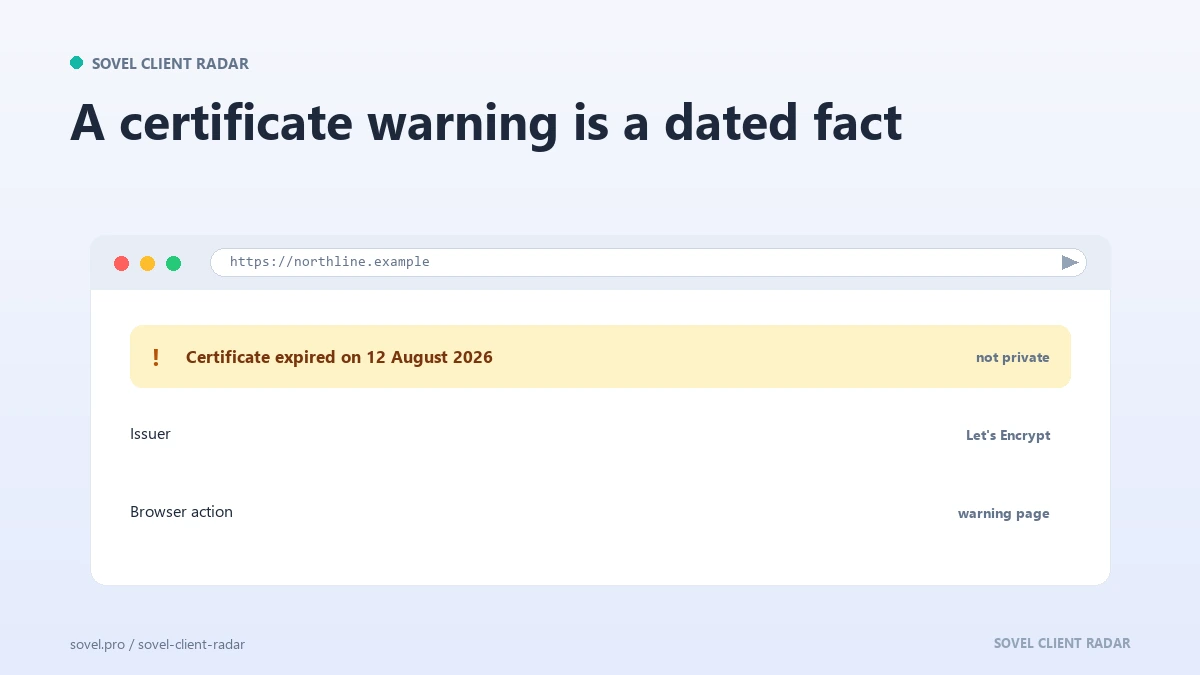
This is the quickest check on the list, and it sorts website redesign leads by urgency in one glance. A certificate with 40 days left is not a lead. One that lapsed in March is.
Write the expiry date in your notes and mention it without drama. Dates are hard to argue with, and a dated problem survives a reply.
Signal 3: broken layout and the missing next step
Broken layout is what people mean when they say a site looks off. Overlapping columns, a footer that floats mid-page, images at the wrong size, a cookie banner over the only button. Each one fits in a screenshot.
The layout failure that matters most for a redesign pitch is a missing next step. Load the homepage and ask where the page wants you to go. If the answer is anywhere, the site has no call to action, and new colours will not fix it. That is a business problem the owner can feel, because they already pay for traffic that leaves, and it is what turns website redesign leads into conversations.
Check three pages: the homepage, one service page and the contact page. On each, find the primary button and write down its label. If the three labels disagree, or one page has no button at all, you have a structural finding rather than a style opinion.
Layout evidence is the easiest kind to send. A picture of a form field half off the screen does the work of a paragraph, and the reply usually names the problem in the owner’s own words, which is more than most website redesign leads ever produce.
The same check works on a competitor’s site. Compare two businesses in one trade and the weaker layout is obvious in seconds.
Signal 4: an outdated website design
An old-looking site is a judgement call, which makes it the signal most likely to offend. Keep the judgement tied to dates and features: a copyright line stuck on 2019, a blog whose newest post is from 2021, a navigation built around a service the company no longer sells.
Structure is the part owners underestimate. A site with 40 pages and no clear hierarchy asks every visitor to guess, and a service buried three clicks deep loses the visitor who arrived with one question.
Compare the site to the company’s own advertising. If the brochure, the van and the shopfront use one name and the site uses another, the site sits behind the business. That gap is measurable, and it makes a clean first line for website redesign leads in any town.
Add one field to your notes here: the newest dated element on the page. A blog post, a news item, a copyright year, an event listing. When you later say the design feels dated, you have a date behind the word feels.
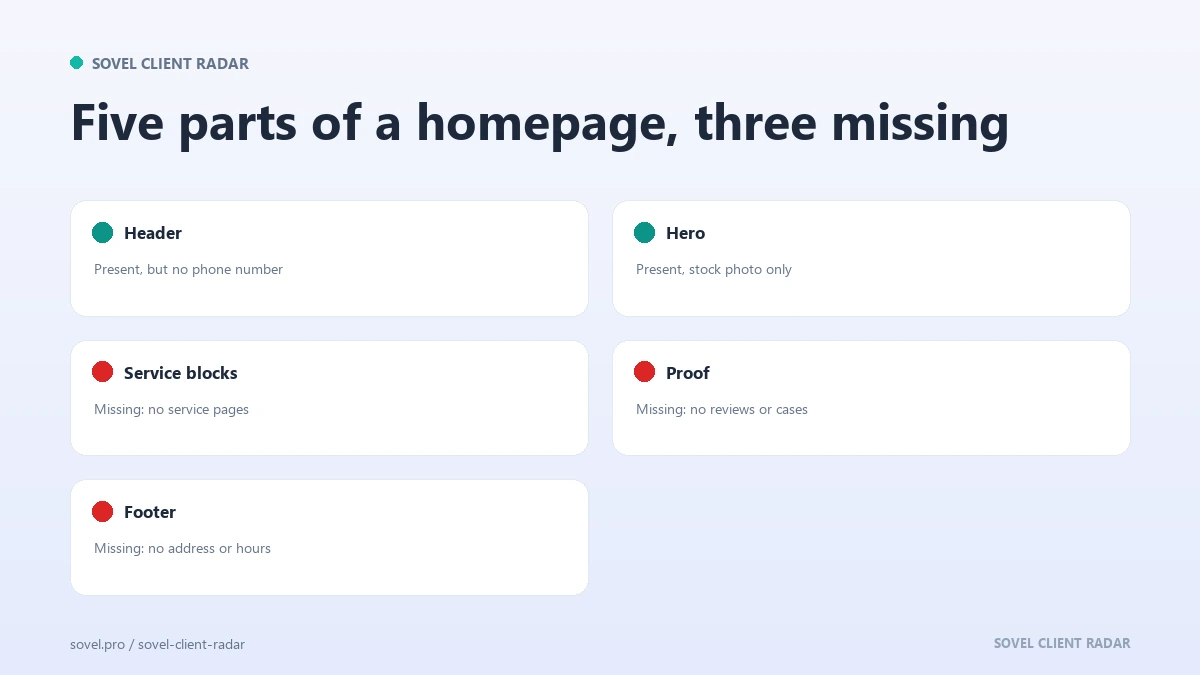
A site that has not changed in five years tends to have no measurement behind it either, which turns a design talk into a discussion about what the homepage is for. That discussion is where most website redesign leads turn into paid work. Keep the sentence about the date and the missing feature, and let the owner draw the conclusion about the look.
Signal 5: slow loading
Speed is the signal with the clearest evidence. A homepage that takes more than a few seconds on a normal connection loses visitors before the first image appears. Open the site on mobile data, away from office wifi, and you feel it.
Look at what loads first. A large uncompressed hero image, four font files, three tracking scripts and a slider that pulls six more images each add time. The fix for most of it is smaller images and fewer scripts, which is exactly the work a redesign covers. The image optimization guide on this site covers the weight question in more detail.
If you want a number rather than a feeling, open the browser network panel and read the total transfer size and the load time. A page that ships 6 MB to show one headline has a fixable problem, and the number is proof.
Speed connects to the phone problem, because the slowest device is usually a phone on a weak signal. One finding often proves the other, and a brief that starts with page weight and layout survives the first meeting. Website redesign leads with a number attached get quoted faster than leads with an opinion attached.
Measure the same page twice, once on wifi and once on mobile data, and keep the slower figure. The gap between the two numbers is often the most persuasive fact in the file, and it is what turns website redesign leads into booked calls.
Which of the five signals should you check first?
| Signal | How to check it | Severity | Opener it supports |
|---|---|---|---|
| Mobile usability | Load the page at 375 px on a phone | High when a core action fails | “Your booking form does not open on a phone” |
| Expired ssl certificate | Click the padlock, read the expiry date | High, the browser shows a warning | “Your certificate expired in March” |
| Broken layout | Screenshot the homepage and one service page | Medium to high | “The quote button sits under the chat widget” |
| Outdated website design | Find the newest dated element | Medium | “Your newest post is from 2021” |
| Slow loading | Network panel: transfer size and load time | Medium to high | “The homepage ships 6 MB before the headline” |
The severity column is a guide for ordering the week. A broken booking form outranks a dated copyright line every time, because one costs bookings and the other costs nothing visible.
Two signals on one site make a stronger message than five. A certificate warning plus a dead menu says nobody is looking after the site. A slow page plus a missing call to action says it loses visitors twice. Website redesign leads with a stated severity sort themselves, so the high rows get worked first.
Keep the table in the same file as the evidence sheet, so the rating and the screenshot sit together. That pairing is the difference between website redesign leads you can defend and a list you have to apologise for.
How do you record a signal so it holds up?
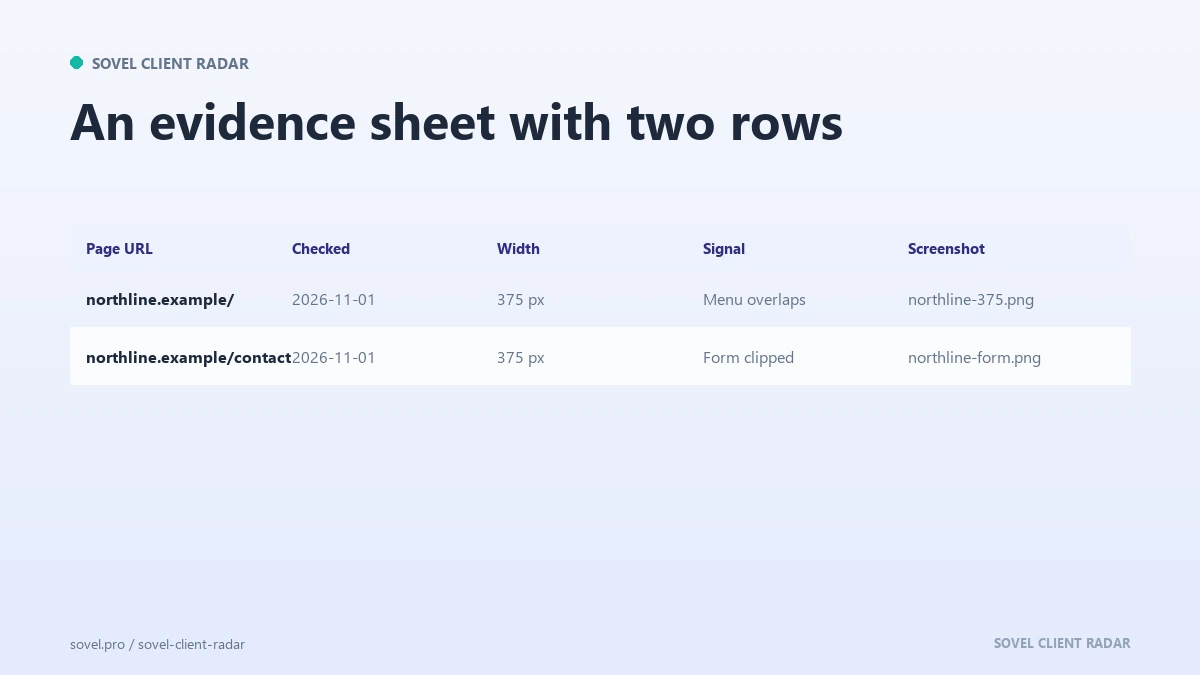
The record is what separates website redesign leads from a pile of opinions. For each company keep five fields: the page URL you checked, the date and time of the check, the viewport or connection you used, what you saw, and the screenshot file name.
Screenshots matter because pages change. An owner who fixes the menu on Tuesday will tell you the problem never existed. A dated screenshot ends that conversation politely and keeps the relationship intact.
Name the files so you can find them later: domain, page, signal, date. A name like acme-home-mobile-2026-02-12.png is enough. One folder per month gives you a record of the market rather than a list of names.
A website audit before pitching takes about six minutes per company with this method: two on the phone view, one on the certificate, two on layout and speed, one to write the note. At that rate an afternoon produces twenty checked companies, which is more than most people contact in a month.
Recheck before you send. A week-old screenshot is still good evidence, a month-old one may not be, and a page you checked last quarter is not evidence at all. Website redesign leads decay at the same speed as the sites they came from, which is why the date sits in the file name.
How do you open the conversation without insulting anyone?
The first line decides whether the rest gets read. Lead with the observation, keep it specific, and leave the judgement out. “Chrome warned me about your certificate before the homepage loaded” is an observation. “Your site is outdated” is a verdict on somebody’s work, and it earns a defensive reply.
Then connect the observation to a cost the owner already understands: a lost booking, a form that never arrives, a customer who cannot find the address. You do not need to estimate the loss. Naming the mechanism is enough.
Offer the screenshot. It costs nothing, it proves you looked, and it gives the owner something concrete to answer. If they reply “we know, the developer left”, you have a conversation. If they reply “send it”, you have a reason for a second email.
Keep the ask small. A 15 minute call about one page is easier to accept than a proposal, and the proposal comes after they have seen the problem on their own screen. That order tells you whether they want the work or only want the complaint fixed, and the answer decides how you spend the next hour on website redesign leads.
Local businesses give this a second route, because you can walk past the shop and check the same page while standing outside it. The local SEO prospecting guide covers the profile and listing signals that sit beside the design ones, and that walk is also the plain answer to how to find web design clients in a town you already know.
If you sell to a trade where every competitor has a similar site, the observation is the entire pitch. Send the screenshot, name the mechanism, ask for 15 minutes. Most website redesign leads are lost before that sentence lands, so a plain sentence that names a real page is already ahead.
Where does the engine fit this work?
If you would rather start with a list than with a blank browser tab, SOVEL CLIENT RADAR reads public pages and keeps the evidence behind every name. It walks the pages a business publishes, honours the rules those pages set for crawlers, and puts a dated source behind every value it reports. It never logs in anywhere, and a missing field stays empty.
The five checks above still need your eyes. What the engine adds is a queue of website redesign leads with a source behind each field, so the checking starts on page one instead of on a search result.
Three lifetime licences exist, separated only by seats and by the lead cap on a single run. The one machine Personal licence is ₹5,999 and caps a run at 50 leads. Pro raises the cap to 200 for ₹12,999 on one machine. The five machine Agency licence is ₹39,999 with a 500 lead cap. Feature sets are identical across all three, the optional AI second opinion ships in every edition, and none of the three limits runs by day or month. The SOVEL Client Radar overview puts the comparison in one table.
FAQ
How do I find website redesign leads without a paid tool?
Use a phone, a browser and a spreadsheet. Load the site at 375 pixels, check the certificate, look for a missing button, find the newest dated element and read the network panel. Five checks, about six minutes, and the evidence is a screenshot rather than a subscription.
What if the site looks fine to me?
Look at it on a phone on mobile data, then open the contact page. Sites that look fine on a desktop monitor often fail the form test on a small screen. A clean site is not a lead, and most website redesign leads fail at least one of the five checks.
Is an old design a real reason to pitch?
An old design on its own is weak. An old design with a dated copyright line, a blog that stopped and a form that breaks on mobile is a pattern the owner can act on. Tie the age to a dated element and you have an argument instead of a preference.
Can I send screenshots in a first email?
Yes, and one small screenshot works better than five. Crop it to the page area, keep the file size down, and describe in one sentence what it shows. People open images when the image is about their own site.
Does this method work for WordPress sites?
Yes. A WordPress site carries the same five signals, and its REST API often reveals the last post date, which supports the dated element check. A website audit before pitching does not need a plugin for this part.
How many sites should I check in a day?
Ten is a comfortable target for one person, about an hour of checking. Beyond twenty the notes get thin. If you are still deciding how to find web design clients, work ten a week for a month before you judge the method.