
Search for “how many schema types are there” and you will land on a page that lists forty names, defines none of them, and tells you to add all of them. That advice is wrong, and it is expensive. Adding a schema type that does not match the page it sits on can cause Google to ignore every block of markup on that page, not just the mismatched one.
This article does the opposite. It gives you the verified 35-name list from a real WordPress theme source registry, then narrows it to the seven types that actually change what a search result looks like. The difference between those two lists is the entire point.
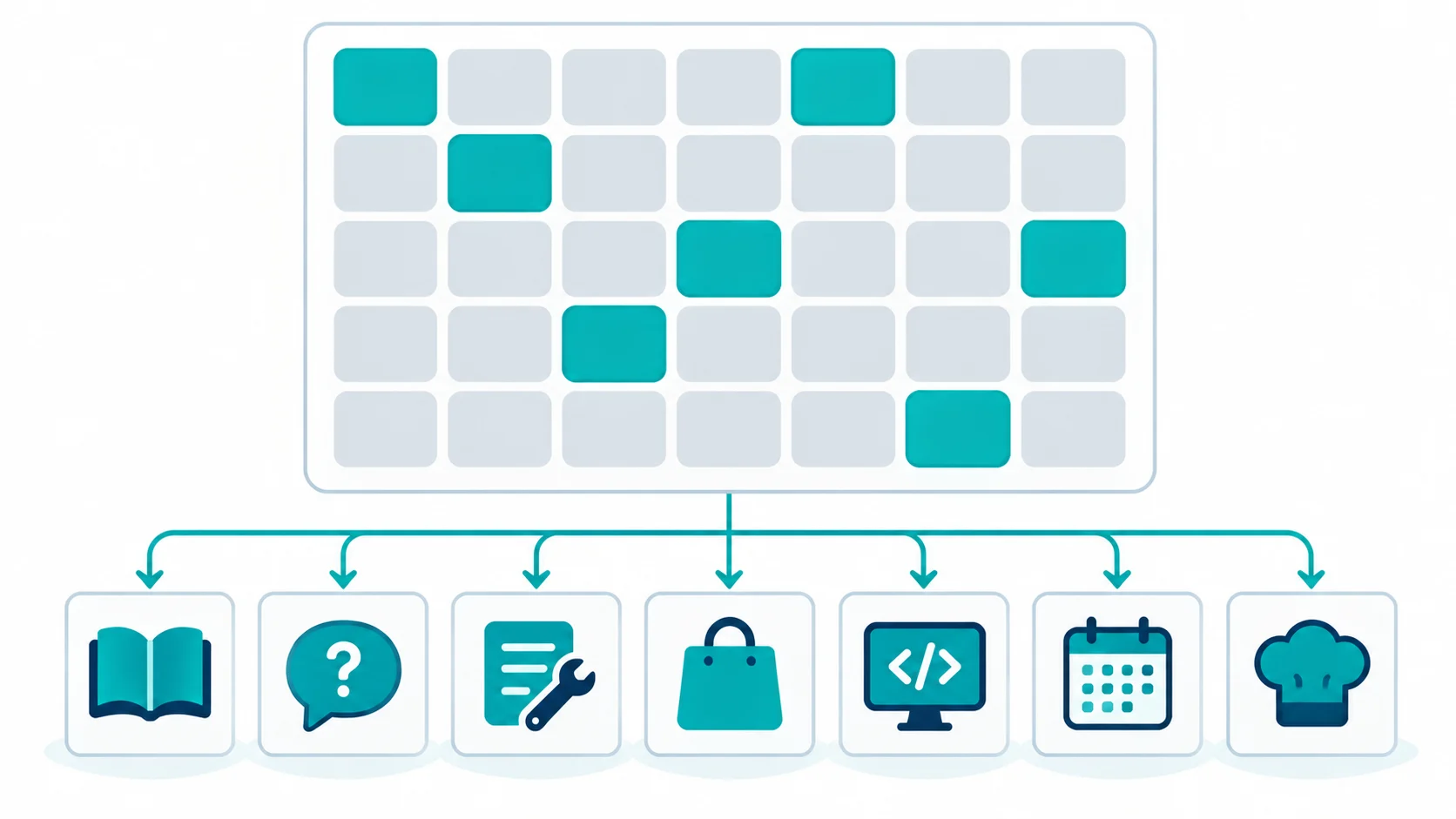
Why Most Schema Type Lists Fail
The problem with schema listicles is that they optimise for length. A page that says “there are 35 schema types” and then explains four of them reads as incomplete, so the author pads it by naming every type with one sentence each. The reader finishes the article knowing thirty-five words and no decisions.
A schema type is not a badge you collect. It is a claim about what the page contains. A page that carries Recipe schema but holds no recipe is lying to Google. A page that carries Product schema but sells nothing is the same. The cost of that lie is not a penalty on the individual block, it is that Google stops trusting the structured data on your domain as a whole.
So the useful version of this article answers a narrower question: of the 35 types available, which ones should a tools, ebook or digital-product site actually deploy, and what does each one earn you?
The Full 35-Type List (Verified in Source)
This list comes from the schema types registry shipped inside SOVEL Studio, counted directly in the source file rather than copied from a vendor page. The 35 registrations are:
Article, BlogPosting, Book, BreadcrumbList, CollectionPage, Course, CustomSchema, Dataset, DiscussionForumPosting, Ebook, Event, FAQPage, HowTo, ImageObject, JobPosting, LocalBusiness, MobileApplication, NewsArticle, Organization, PDF, Person, Product, QAPage, Rating, Recipe, Review, SearchAction, Service, SoftwareApplication, TechArticle, Tool, VideoObject, WebApplication, WebPage, WebSite.
Thirty-five total registrations. The number is real, and it was counted, not estimated. What the number does not tell you is which of those thirty-five deserve to be switched on.
If you are running a site that sells ebooks, ships free tools, or publishes a resource library, most of that list is irrelevant to you. JobPosting does nothing for an ebook store. Recipe does nothing for a tools directory. LocalBusiness only matters if you have a physical location. The count is impressive and mostly inapplicable.
How the types are grouped
The thirty-five fall into five rough groups, and knowing the groups is more useful than memorising the names.
The first group is content types: Article, BlogPosting, NewsArticle, TechArticle, Book, Ebook, Course, VideoObject, ImageObject, PDF. These describe a piece of content. Every content site needs at least one of them.
The second group is commerce types: Product, Rating, Review, Service, SoftwareApplication, MobileApplication, WebApplication. These describe something with a value or a price.
The third group is navigation and identity types: BreadcrumbList, SearchAction, WebSite, WebPage, CollectionPage, Organization, Person. These describe the structure of the site and who publishes it.
The fourth group is interaction types: FAQPage, QAPage, HowTo, DiscussionForumPosting. These describe pages built around questions and answers.
The fifth group is the specialist types: Event, JobPosting, LocalBusiness, Recipe, Dataset, Tool, CustomSchema. These apply to specific industries and are irrelevant to most sites.
Most sites need two or three types from the first three groups and one from the fourth. Almost none need anything from the fifth.
The 7 Types That Actually Win Rich Results
A rich result is the visual upgrade Google sometimes adds to a search listing: star ratings, a price range, an expandable FAQ, a recipe card, a step list. Not every schema type is eligible for one, and eligibility changes over time as Google adjusts which features it shows.
Based on what a tools-and-ebook site publishes, these seven types carry the most practical value:
1. Book and Ebook — for book detail pages. These describe a written work with an author, a publication date and sometimes an ISBN. On a book site, this is the type you will use most, and it is the type that most generic schema advice ignores.
2. SoftwareApplication — for a tool, an app or a piece of software. This type describes the product itself: what it does, who it is for, what platform it runs on. A tools directory lives on this type.
3. Product — for anything with a price and a purchase action. If the page exists to sell something, Product schema describes it. It supports price, availability, condition and review data.
4. FAQPage — for a page that genuinely contains questions and answers. When Google shows the FAQ rich result, it expands two or three questions directly in the search listing, which takes up more vertical space than a normal result.
5. HowTo — for a page that walks through a sequence of steps. A guide that says “here is how to do X in five steps” is a HowTo page. A page that merely mentions a process is not.
6. Review and Rating — for a page that carries a genuine review with a score. The star rating in search results comes from this type, and it is one of the most visible rich results that exists. It must reflect a real review, not a manufactured one.
7. Organization — for the entity that publishes the site. This is the block that tells Google who you are, what your logo is, and what your official profiles are. It usually runs sitewide rather than on a single page.
Seven types. For most tools-and-ebook sites, that is the whole list. Everything else on the 35-name list is either a variant of one of these or a specialist type that does not apply.

Why four types chosen well beat thirty-five deployed at random
The instinct when you see a list of thirty-five is to switch on as many as possible. That instinct is backwards. Each schema type makes a claim about the page, and Google evaluates each claim. A page carrying four accurate claims builds trust. A page carrying twelve claims, four of which are wrong, teaches Google that your structured data is unreliable.
The practical rule is to deploy a type only when the page genuinely matches it, and to deploy no more than two or three types per page.
How the Type Picker Actually Works
This is where a registry stops being a list and becomes a tool. In SOVEL Studio the 35 registrations are surfaced as 29 buyer-selectable options, grouped so you are choosing from a category rather than scrolling an alphabetical dump.
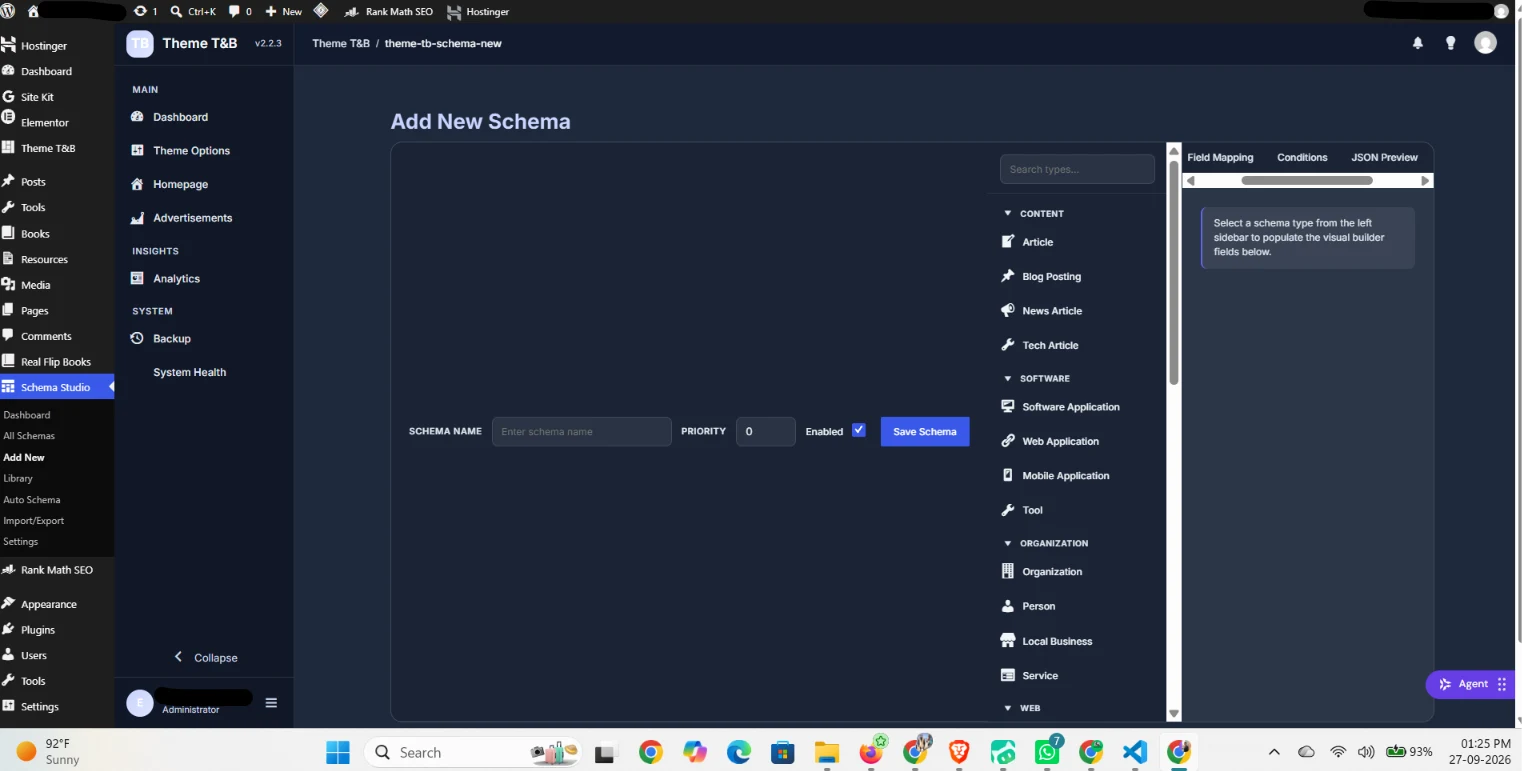
The grouping on screen is deliberately close to the five families above, reduced to four practical buckets: CONTENT (Article, Blog Posting, News Article, Tech Article), SOFTWARE (Software Application, Web Application, Mobile Application, Tool), ORGANIZATION (Organization, Person, Local Business, Service) and WEB (the structural types below the fold).
Choosing a type then opens three tabs on the right: Field Mapping, Conditions and JSON Preview. Field Mapping is where the type’s properties get bound to your content. Conditions is where you decide which pages are allowed to emit it. JSON Preview is where you read the output before it goes live.
That last tab is the one people underrate. Being able to read the JSON before saving is the difference between configuring structured data and gambling on it. If the preview shows an empty author or a missing price, you find out in the admin rather than in a Search Console report three weeks later.
Book vs Product Schema for an Ebook
This is the single most common decision an ebook site has to make, and most guides skip it entirely.
Book schema and Product schema describe different things. Book and Ebook describe the creative work: the title, the author, the ISBN, the number of pages, the publication date, the format. Product schema describes the offer to sell: the price, the currency, the availability, the condition, the seller.
The correct answer for most ebook sites is that both exist, on different pages. The book detail page, which describes the work itself, carries Book or Ebook schema. The checkout page, or a dedicated sales page, carries Product schema. They are not competing, because they are describing different objects.
Where sites get this wrong is putting Product schema on the book detail page and nothing on the sales page, or putting both on the same page and creating a duplicate-entity conflict. The rule is one entity per page.
There is one more consideration. If the ebook is sold as a downloadable file rather than a physical book, Product schema with the digital-delivery property is the accurate choice for the sales page, while Book schema remains correct on the detail page. The two are complementary, not alternatives.

When More Types Hurt
The cost of a wrong schema type is not always obvious, which is why so many sites carry them. Here is what actually happens.
First, Google may ignore the incorrect block. The type is present in the HTML, but it contributes nothing to how the page is understood. You have written code that does nothing.
Second, Google may flag it in the Search Console structured data report as a manual action or a validation error. That is the visible version, and it is the better outcome because you find out.
Third, and this is the one that matters, repeated inaccuracies across a site can cause Google to discount the structured data from that domain generally. When a search engine learns that your markup is unreliable, it starts treating all of it as unreliable. The site that adds Recipe schema to blog posts for a year and then adds accurate Product schema to its shop does not get credit for the accurate one.
The discipline is simple. Add a type when the page matches it. Remove a type when it does not. Do not add a type because it appears on a list.
How to audit what you already have
Before adding anything, check what is already on the page. Open the page, view the source, and search for the JSON-LD script blocks. Or use Google’s Rich Results Test, which reads a URL and reports every structured data block it finds, along with any errors.
If you find types that do not match their pages, remove them before adding new ones. A clean starting point is worth more than an expanded list.
How This Maps to a Real Theme
The reason this list matters is that a theme with a built-in schema system can deploy these types from the content model rather than from a manual block. SOVEL Studio registers three content types, Tools at /tools/, Books at /books/ and Resources at /resources/, and generates the matching schema from what each one is. A Book post gets Book schema because the theme knows it is a book. A Tool post gets SoftwareApplication or Tool schema because the theme knows it is a tool.
That is the structural difference between schema that comes from the theme and schema that comes from a plugin. A plugin has no idea what your content model is, so it either applies one generic type to everything or asks you to configure each page by hand. A theme that built the content types can map them to schema automatically.
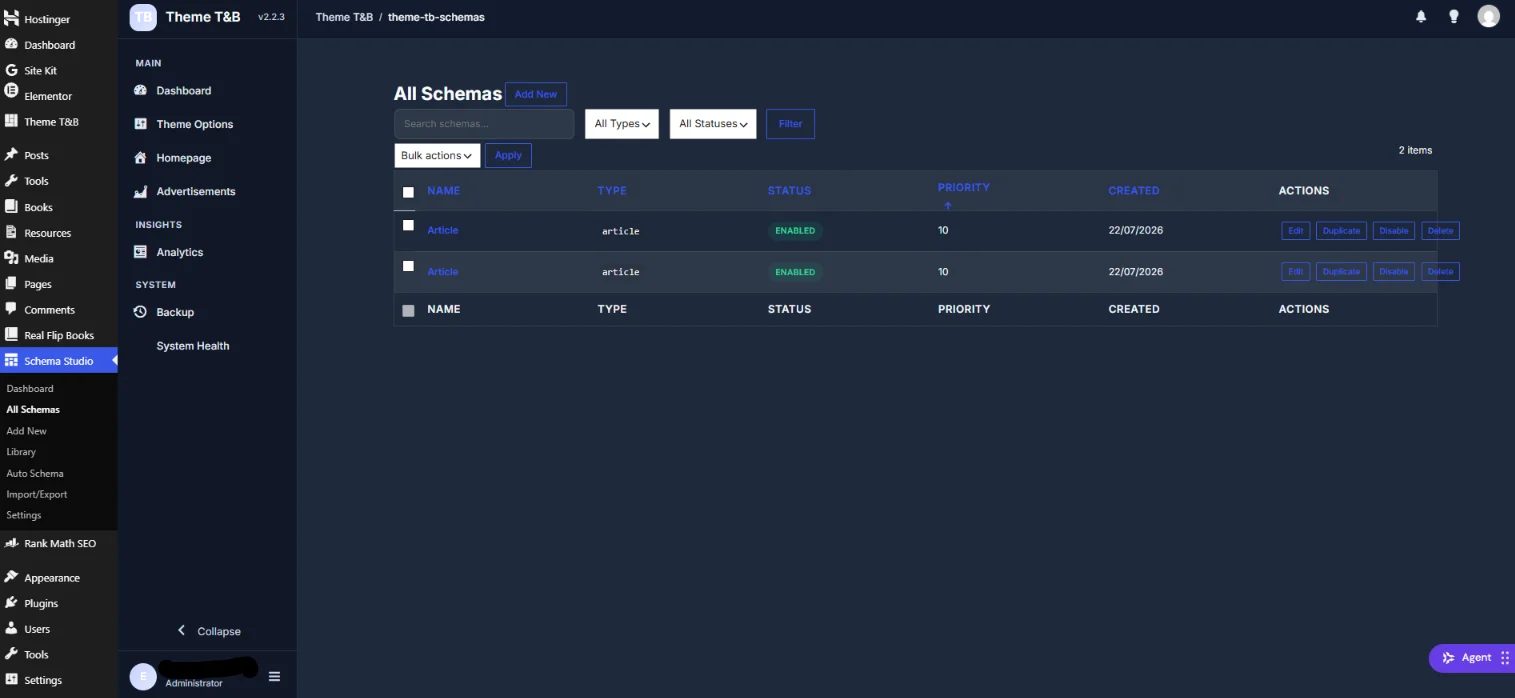
The list above is what that mapping looks like once it is live: every schema with its type, status and priority, and a per-row action to edit, duplicate, disable or delete. The theme supports 29 of the 35 registrations as buyer-selectable types, and 14 ready-to-use schema templates cover the most common page shapes. Those templates are starting points; the conditions decide where each one is allowed to fire.
Frequently Asked Questions
How many schema types does WordPress support?
WordPress itself does not limit schema types. Any JSON-LD block can be added to any page through a theme or plugin. The practical limit is which types Google recognises and which ones match your actual content. The verified registry in SOVEL Studio carries 35 registrations, of which 29 are buyer-selectable options.
Which schema types actually earn rich results?
FAQPage, HowTo, Product, Book, Recipe, Event, SoftwareApplication, Review and Rating are among the most commonly eligible types. Eligibility changes as Google adjusts its search features, so the current list should always be checked against Google Search Central rather than assumed from any article, including this one.
Is FAQ schema still worth using?
Yes, when the page genuinely contains questions and answers. The value of FAQ schema is that it can expand questions directly in the search listing, which increases how much space your result occupies. What does not work is forcing FAQ schema onto a page that has no real Q&A, because Google evaluates whether the marked-up content is actually present.
What is the difference between Book and Product schema for an ebook?
Book and Ebook schema describe the creative work: title, author, ISBN, format, publication date. Product schema describes the offer to sell: price, availability, seller. Use Book or Ebook on the book detail page and Product on the sales or checkout page. Do not put both on the same page, because that creates two entities claiming the same URL.
Can I create a custom schema type?
You can extend schema.org types and you can register a custom type, but Google will not recognise a custom type for rich results. The CustomSchema registration exists in the registry, and it is useful for internal consistency and for future compatibility, not for winning a search feature today.
Do more schema types help rankings?
No. Structured data helps search engines understand what a page contains, and understanding can support how the page is displayed, but it is not a direct ranking factor. Using a type that does not match the page can reduce visibility by making your structured data unreliable, which is the opposite of help.
Which types should a new ebook site start with?
Start with Book or Ebook for the book pages, Organization for the site as a whole, FAQPage for any page that genuinely answers questions, and Product for the sales page if you sell directly. That is four types, and it covers the full journey of a reader arriving, understanding the book, and buying it.
Where to Read Next
This article sits inside a five-article cluster about structured data on a WordPress site. The flagship piece covers the cost and ownership case for a WordPress theme with schema markup. The technical depth piece covers conditional schema markup in WordPress and the 15 conditions that stop wrong JSON output. The problem-solving piece covers the Rank Math and Yoast schema conflict. The site-type piece covers the theme for a tools and ebook website.
If you want the primary sources rather than a summary, Schema.org publishes the full vocabulary at schema.org, and Google Search Central documents which types are eligible for rich results in its structured data documentation.
Word count: 2,532