
SOVEL Client Radar is a client discovery engine you install on your own machine. It reads public business pages, records where every detail came from, scores each company, and writes a report you can hand to a client or a sales team. It needs no account, no subscription and no API key to start.
The short answer for a buyer: SOVEL Client Radar comes in three lifetime editions. Personal is ₹5,999 for one machine and 50 leads per run. Pro is ₹12,999 for one machine and 200 leads per run. Agency is ₹39,999 for five machines and 500 leads per run. Every edition contains the full feature set, including the optional AI layer and the complete export suite. The only differences are seats and the leads-per-run cap.
This page explains what the product does, how the three editions differ, what a run produces, what your machine needs, and where the engine refuses to go. The facts come from version 0.6.3 and its published documentation. If a number is not in the documentation, it is not on this page.

What is SOVEL Client Radar?
SOVEL Client Radar is client discovery software for people who sell to businesses and need a better list than a social feed can provide. It answers four questions about each company it finds: is this a real business, does it match your offer, can you reach a person there, and is there a reason to write this month.
The product is built as a local-first research tool. Your database is a SQLite file on your disk. Your reports stay in a folder you choose. Your optional provider key is stored owner-only and shown as a hash. Nothing is uploaded to a SOVEL server, because there is no SOVEL server holding your prospect data.
That design decision has a cost. SOVEL Client Radar cannot show you a live dashboard from any computer, and it cannot pool data across customers. It also cannot lose your list in a vendor outage. For a freelancer or a small agency, the trade is usually worth it.
The engine ships with adapters for public search pages, seed pages, referral links, GitHub organisations, npm packages, independent web directories, Hacker News and RSS feeds. It can also read WordPress REST endpoints, RDAP records and sitemaps. Two optional search providers, Brave and Google Programmable Search, work with a key you own.
SOVEL Client Radar does not log in anywhere. It does not rotate proxies, spoof a browser, or retry a blocked request with a different identity. It reads the robots rules first and honours them. That boundary is a feature of the product, not a missing integration.
See it run before you buy
The video below is one uncut screen recording of a live session. A brief is typed, the sources answer or refuse, the run finishes and the report opens. There is no music and no jump cut between the input and the result.
Prefer YouTube? Open the uncut demo in a new tab.
Watch four moments: how the brief is written, which sources answer, how a blocked source is reported, and what the report looks like before anyone edits it. Those four moments tell you more about fit than a feature list.
Which SOVEL Client Radar edition fits your work?
Three editions, one engine. Each card carries the audience, the exact price, the seat count, the lead cap and the support tier. Use Buy to open checkout with that edition in the cart, or View overview to read the edition notes below.
Personal Edition
₹5,999 / lifetime
For solo consultants, freelance designers and one-person studios running a topic or two each week.
- 1 machine, 50 leads per run
- Every discovery adapter
- Every report and export format
- Optional AI layer with your own key
- Lifetime updates for the edition
Support: community portal
Pro Edition
₹12,999 / lifetime
For small teams that research several niches in the same week and share one research standard.
- 1 machine, 200 leads per run
- Everything in Personal
- Same adapters, same reports
- Priority email support, 2 business days
- Lifetime updates for the edition
Support: priority email
Agency Edition
₹39,999 / lifetime
For agencies and internal teams that split topics across researchers and serve several clients.
- 5 machines, 500 leads per run
- Everything in Pro
- Team features included
- Priority support and 60-minute onboarding
- Lifetime updates for the edition
Support: priority support with onboarding
| Edition | Machines | Leads per run | One-time price |
|---|---|---|---|
| Personal | 1 | 50 | ₹5,999 |
| Pro | 1 | 200 | ₹12,999 |
| Agency | 5 | 500 | ₹39,999 |
SOVEL Client Radar editions differ in two numbers only: how many machines may run the software, and how many leads one run may return. Every adapter, every export, the scoring engine, the optional AI layer and the documentation are identical across the three. Support follows the edition: community portal on Personal, priority email on Pro, and priority support with onboarding on Agency.
The SOVEL Client Radar price is one-time. There is no monthly fee, no annual renewal and no per-lead charge from SOVEL. The licence does not expire. Updates for the edition are included for life.
Personal / Freelancer edition
The Personal edition costs ₹5,999 and covers one machine. It returns up to 50 leads per run, which is enough for one person running one or two topics a week.
This is the edition for a solo consultant, a freelance designer, a copywriter or a one-person studio. The weekly routine is simple: write a brief, run the engine on one topic, verify the top ten, write to five. Fifty leads per run leaves room to run several topics without hitting a ceiling.
The Personal licence is tied to one machine. If you replace the computer, the licence moves with you through the activation process described in the documentation. The licence terms explain the details, and the refund policy explains the window and the conditions.
Personal includes the optional AI layer. It stays off until you add a provider key you own. SOVEL never supplies the key and never bills the provider usage.
Pro / Small Business edition
The Pro edition costs ₹12,999 and covers one machine. It returns up to 200 leads per run. It is the most popular SOVEL Client Radar edition because it fits a small team that researches several niches in the same week.
The seat count stays at one, so the software runs on one workstation. A team can still share the exported reports, which is how most small businesses use the product. One person owns the research, and the account manager, the founder and the sales lead read the same folder.
The Pro cap of 200 leads per run matters when a topic is broad. A local service niche in a large city can produce more qualified names than 50. The higher cap means fewer runs to cover the same market, which saves time on reading and deduplication.
Pro includes the full client discovery software feature set, all export formats, all 12 AI host integrations and the optional AI layer. The only upgrade over Personal is the lead cap and the support tier.
Agency / Enterprise edition
The Agency edition costs ₹39,999 and covers five machines. It returns up to 500 leads per run. It exists for agencies and internal teams that research several client niches in parallel.
Five seats means five researchers or five workstations can run the engine under one licence. A team can split topics, keep separate databases, and still use the same edition and the same documentation. Team features are included, not sold as a separate add-on.
The 500-lead cap suits market mapping work: a niche study, a territory study or a partner scan where the first pass needs breadth before the shortlist. It also suits an agency that wants one shared research standard across its account teams.
Agency is not a requirement for a large company. If one person does all the research, Personal or Pro is the honest choice. The edition should match the work, not the logo on the door.
What does every SOVEL Client Radar edition include?
Every edition carries the same engine, so the feature list below is not a tier table. It is the product.
- Twelve AI host integrations, with setup commands for Claude Code, Claude Desktop, Cline, Cursor, VS Code with Copilot, OpenCode, Codex CLI, Antigravity, WorkBuddy and a generic prompt for Grok, OpenRouter and OmniRouter.
- Six MCP tools for research, run reports, run history, environment checks, AI status and AI setup.
- The full discovery adapter set: public search, seed pages, referral links, GitHub, npm, independent directories, Hacker News, RSS and Atom feeds, WordPress REST, RDAP and sitemaps.
- The scoring engine with separate fit, pain, reachability and timing components, plus a 0 to 10 signal strength.
- The report export suite: an 84-column lead spreadsheet, contacts, signals, a six-sheet workbook, JSON, JSONL evidence, a self-contained HTML report, Markdown, Word and PDF.
- A verification notes file that names every blocked source and every check that did not finish.
- A local SQLite database with a documented delete command.
- The optional AI layer, off until you add your own provider key.
The client discovery software runs on Python 3.10 or newer with no pip install. The bundled certificate authority means a fresh machine can make HTTPS requests without a separate setup step.
No edition imposes a daily or monthly run limit. You can run as often as your machine and the sources allow.
How do you run your first search?
You do not need to configure every adapter before the first run. Start with one topic you already understand, because you can judge the output.
- Write the brief in plain language. Name the service, the buyer and the place. “Web design for dental clinics in Pune” is a brief. “Marketing” is not.
- Choose the source mix. Leave the keyless sources on for the first run. Add a search key only when you have checked that the free path is too thin for your niche.
- Set the cap below your edition limit. A first run of 20 to 30 leads is easier to read than 200, and it shows you how the scoring behaves.
- Read the report from the top. Start with the summary counts, then the source status, then the highest-scoring companies. Do not open the spreadsheet first.
- Verify before you write. Open the company page, check the contact, and read the signal that earned the score. If the signal is stale, drop the lead.
A first run with SOVEL Client Radar usually takes a minute or two, depending on the sources and the cap. A second run on the same topic is faster because the engine remembers which sites it has already examined.
What does a real run look like?
On 31 October 2026, SOVEL Client Radar ran the topic “AI agents for agencies” on a standard laptop. The run returned 4 qualified leads, 24 contacts and an average buy-fit of 58. The average total score was 51.9. Two sources answered: DuckDuckGo returned partial results and GitHub returned 16 organisations. Bing was blocked by robots.txt, and the report recorded the rule instead of hiding the gap.
A four-lead run is small on purpose. Every name can be checked in a few minutes, and every score can be traced to a page. The screenshot below is the report header from that run, with the counters and the export buttons a buyer sees first.
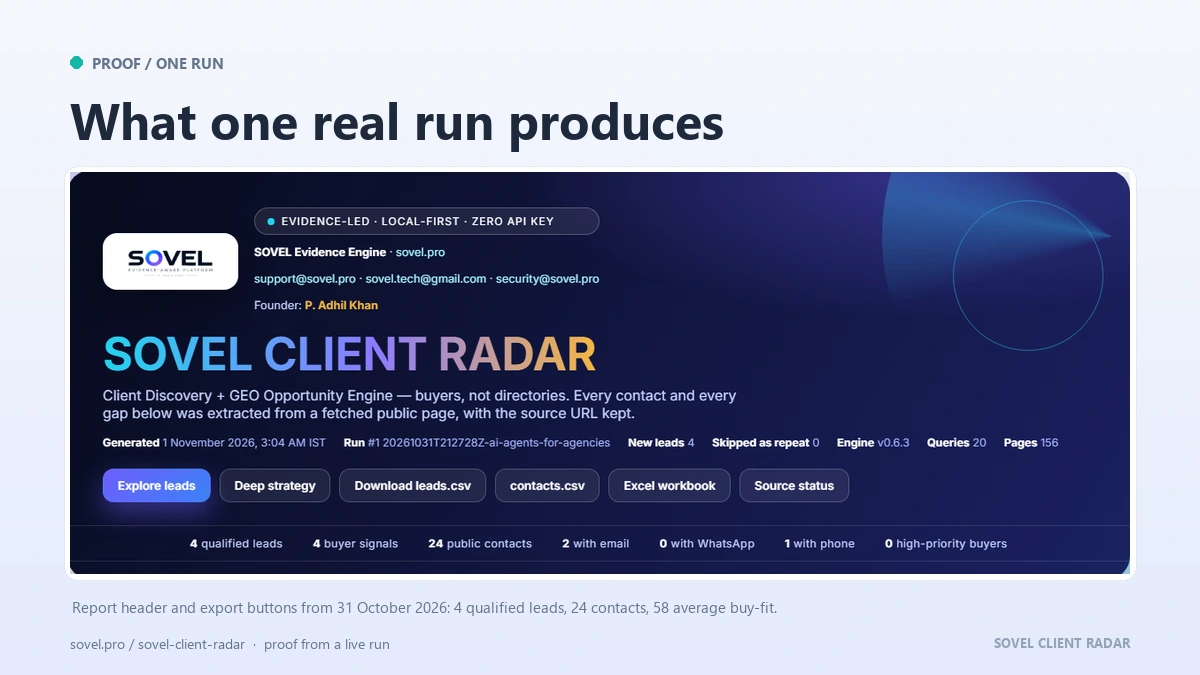
What does a SOVEL Client Radar run produce?
One run writes one folder. The folder is the product, not a dashboard you have to log into.
Inside it you get leads.csv with 84 columns, including separate email, phone, WhatsApp and social fields, the four score components, the why-buy percentage, approach steps and a signal summary. You also get contacts.csv with one row per contact, signals.csv with one row per buying signal, and leads.xlsx with six sheets.
The same folder holds leads.json for developers, evidence.jsonl for audit work, report.html for a client-ready report, report.md for editing, report.docx for proposals and report.pdf when a Chromium browser is available. verification-notes.md lists the sources that answered and the ones that refused.
That output is why SOVEL Client Radar is described as a report export suite as much as a discovery tool. The list is only useful if you can read it, check it and pass it on. A CSV alone is not a deliverable. A report with sources is.
The HTML report is self-contained. It opens on a laptop without a server, keeps its styling, and shows the evidence behind each lead. The PDF is generated only when a browser is present, and the run says so when it is not.

What are the requirements?
SOVEL Client Radar runs on Windows, macOS and Linux. It needs Python 3.10 or newer, which is available from python.org. It needs no pip packages, no database server and no Docker.
The first run needs a network connection to read public pages. It does not need an account with any social network or search engine. The optional search tier needs a provider key you own, and the optional AI layer needs an AI provider key you own.
A Chromium-based browser is optional. Add it if you want PDF reports. Without it, every other export still works.
Disk use is small. A run with a few hundred leads and their evidence stays in the megabytes, not gigabytes. That is the practical side of local-first research: the dataset sits in one folder you control. The cache is pruned on a fixed schedule and can be cleared with one command.
The documentation covers installation, the doctor command, the first run, the AI setup and the troubleshooting steps. The security page explains the local storage model, the key handling and the network guard.
Where does SOVEL Client Radar stop?
SOVEL Client Radar reads the Robots Exclusion Protocol before it reads a page. When a site says no, the run records the rule and moves on. When a site returns a 403 or a 429, the engine honours the first response and does not retry with a different identity.
Login-walled networks are out of scope. Google, LinkedIn, Facebook, Instagram, X, Quora and Reddit require a session or forbid the query path. SOVEL Client Radar has no workaround for that, and it says so in the report instead of reporting an empty market.
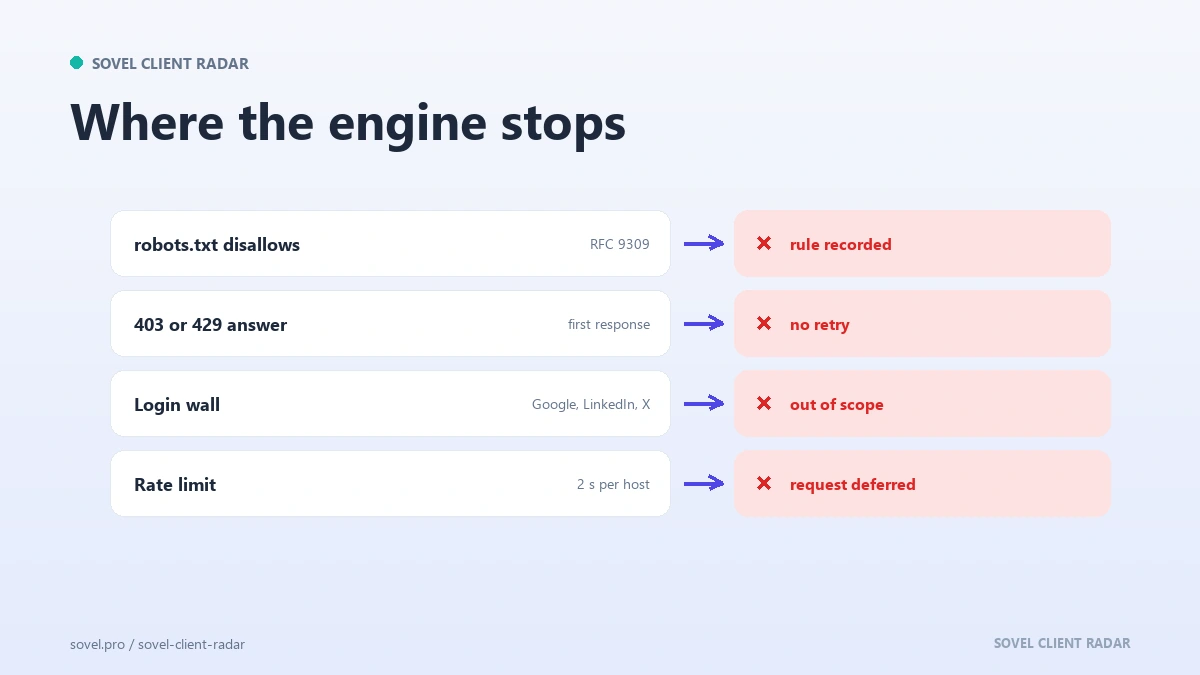
The engine never invents a contact. If a page does not publish an email, the field stays empty. If a feed check times out, the report says the check did not finish instead of claiming the blog is dead. If a social link looks like a share button, it is rejected before it reaches the report.
The score is a ranking aid, not a prediction. It helps you choose the first ten names from a hundred. It does not promise a reply, a meeting or a sale. The report states that limit in plain language.
The optional AI layer is grounded. Every quoted phrase the model produces is checked against the page before it appears. The key is stored owner-only, shown as a hash, and sent only to the provider you chose.
How does SOVEL Client Radar fit with the rest of SOVEL?
SOVEL Client Radar finds the buyer. The rest of the SOVEL engines help you serve that buyer well.
SOVEL GAP BRAIN finds the pages a competitor ranks for that your site misses. The content workflow engine turns a gap into a brief, a draft and a published article. The image and publishing tools handle the rest. For an agency, that means one system for finding the client and one system for doing the work.
The engine also fits a content-led sales motion. A prospect’s missing blog, absent schema or stale sitemap is a real observation, not an insult. The client discovery engine guide explains how to turn that observation into a first line that earns a reply.
If you care about the ethics of public data collection, the ethical lead generation rules are the long version of the boundary described above. They are worth reading before your first run.
What does SOVEL Client Radar cost?
The SOVEL Client Radar price is one-time for each edition. Personal is ₹5,999, Pro is ₹12,999 and Agency is ₹39,999. There is no monthly plan, no per-seat subscription and no renewal.
The price includes the engine, all adapters, all exports, the AI layer, the 12 host integrations, the documentation and support through the published channels. Provider costs are separate only when you choose to add a search key or an AI key, and those are billed by the provider you pick.
A refund is available under the published policy. Read the refund policy before you buy, and use the contact page if anything about the licence is unclear.
The three client radar editions exist because buyers differ in seats and volume, not in the work they need to do. Pick the smallest edition that covers your weekly volume. You can read the full comparison on the products page and the release notes in the documentation.
What support comes with a licence?
Support follows the edition. Personal includes the community portal, where setup questions and source notes are answered. Pro adds priority email with a two-business-day target. Agency adds priority support and a 60-minute onboarding call for the team.
Every edition gets lifetime updates for its edition and the same documentation. When you write to support, include the run folder’s verification-notes.md and the report.html file. Those two files answer most questions about a blocked source or a missing export without a screen-share.
Support does not include writing your outreach, choosing your niche or cleaning a list by hand. The engine does the research; the judgement stays with you.
Who should skip it?
The product is not a fit for every buyer, and saying so saves both sides time.
Skip it if you need ten thousand email addresses by tomorrow. The engine returns a capped list of companies it can verify, not a bulk dump.
Skip it if you refuse to install Python. There is no hosted version and no browser-only mode.
Skip it if your growth plan depends on LinkedIn or Instagram automation. Those networks are out of scope, and the report will say so.
Skip it if you want a shared online dashboard with seats and roles. The database is local; sharing happens through exported reports.
Why this page shows a run, not a quote wall
Most software pages fill this space with customer quotes. This one does not, because a quote you cannot verify is weaker evidence than a report you can open. The screenshots above come from one real run: the same 4 leads, the same 24 contacts, the same blocked source. If you want proof before paying, run the engine on a topic you already know and compare its names with your own list.
FAQ
What is SOVEL Client Radar used for?
It builds a source-backed prospect list from public business pages. You give it a topic, a niche and a location, and it returns companies, contacts, signals, scores and a report. It is used by freelancers, agencies and small sales teams.
Does SOVEL Client Radar need an API key?
No. The keyless adapters cover seed pages, referral links, developer registries, independent directories, discussion sites and feeds. A search key and an AI key are optional and owned by you.
How is SOVEL Client Radar different from a scraping tool?
It reads a small number of public pages, checks the robots rules first, waits between requests, caches what it read and stops when a site says no. It refuses login-walled networks and never invents a contact.
Can I install SOVEL Client Radar on more than one computer?
Personal and Pro cover one machine. Agency covers five. Additional machines need the matching edition. The licence terms explain transfers and replacements.
Does every edition include the AI layer?
Yes. The optional AI layer is part of every edition and stays off until you add your own provider key. The editions differ in seats, leads per run and support, not in features.
What happens if a source is blocked during a run?
The run records the source, the status code and the reason in the verification notes. It does not retry with evasion and does not fill the gap with invented data. Other sources continue.
How long does a first run take?
A first run on a new topic usually takes two to six minutes, depending on the number of sources and the lead cap. A repeat run is faster because the local cache answers most requests.
Is there a monthly fee?
No. SOVEL Client Radar is a one-time lifetime licence. Provider bills, if you add a key, are separate and paid to that provider.
Licence and support
The licence is per machine, as listed on each edition. The software can be used for client work. The reports belong to you. The engine does not phone home with prospect data.
Support runs through the published contact channels. Security reports go to the address on the security page. Documentation, changelog and setup guides live under docs.
SOVEL Client Radar is built and maintained by SOVEL. The brand is SOVEL Client Radar, the product class is ENGINE, and the current release is 0.6.3.