
Outreach list building is where good intentions go to die. Someone exports a thousand rows, buys a template, sends a batch, watches the replies fail to arrive, and concludes that cold email is broken. The list was broken before the first send, and nobody checked.
The short answer: outreach list building means keeping one list per offer, adding only fields you can defend, removing duplicates by domain, suppressing anyone who asked to be left alone, and verifying an address before you use it. A small clean list sends better than a large dirty one, and the difference shows up in the first week.
This guide sets out six rules, the table that shows what each rule prevents, and the weekly clean that keeps a list usable for months. The examples come from SOVEL CLIENT RADAR, the engine this site sells, because list hygiene is easier to trust when you can see where each checkbox lives. If you want the research step that produces the rows, the prospect data quality guide covers it in detail.
How do you build an outreach list that survives a month?
Most advice about how to build an outreach list starts with a data source. Start with the offer instead, because the offer decides which rows belong and which fields you need.
The order that works in outreach list building is short. Write the offer in one sentence. Name the source pages where those buyers appear. Build the twelve fields before you add a single row. Collect twenty rows by hand from one source, dedupe by domain, verify the domains, then send five messages.
Starting small is the part people resist. A first list of twenty rows teaches you which fields are awkward, which source pages are stale and which first line falls flat. How to build an outreach list at scale is the same procedure repeated, with the cleanup rules in this guide applied between batches.
List hygiene begins on day one of outreach list building. If the first rows carry a source URL and a date, the habit holds. If the first rows are pasted in without either, every later cleanup turns into a forensic exercise.
The reward shows up in the second month. Outreach list building in this order can be extended without rework, and the rows you retire teach you which sources to stop reading. The method is short: decide, collect small, clean often, then grow.
Rule 1: one list per offer
Outreach list building begins with a decision about what you are selling. One list, one offer, one reason to write. The moment two offers share a list, every message has to be general enough to cover both, and general messages get deleted.
Agencies break this rule constantly, and outreach list building suffers first. A single sheet holds web design leads, SEO leads and retainer leads, and the same email goes to all three. The recipient cannot tell what is being sold, because the sender has not decided.
Split the list by the problem the buyer has. Industry is a weaker divider. “Shopify stores with slow mobile pages” and “Shopify stores with no product feed” are two lists even when the company appears in both. Each list gets its own first line, its own proof and its own follow-up sequence.
The split also makes measurement possible. When a list contains one offer, a reply tells you something about that offer. When it contains four, a reply tells you a person replied and nothing more.
The practical version is one master table with an offer column, filtered into a working view for each campaign. That keeps the domain dedupe intact while the messages stay specific.
Rule 2: the minimum fields, and no more
Outreach list building fails when the sheet has too few fields, and it stalls when the sheet has too many. The minimum set is short enough to fill in by hand and complete enough to answer a question six weeks later.
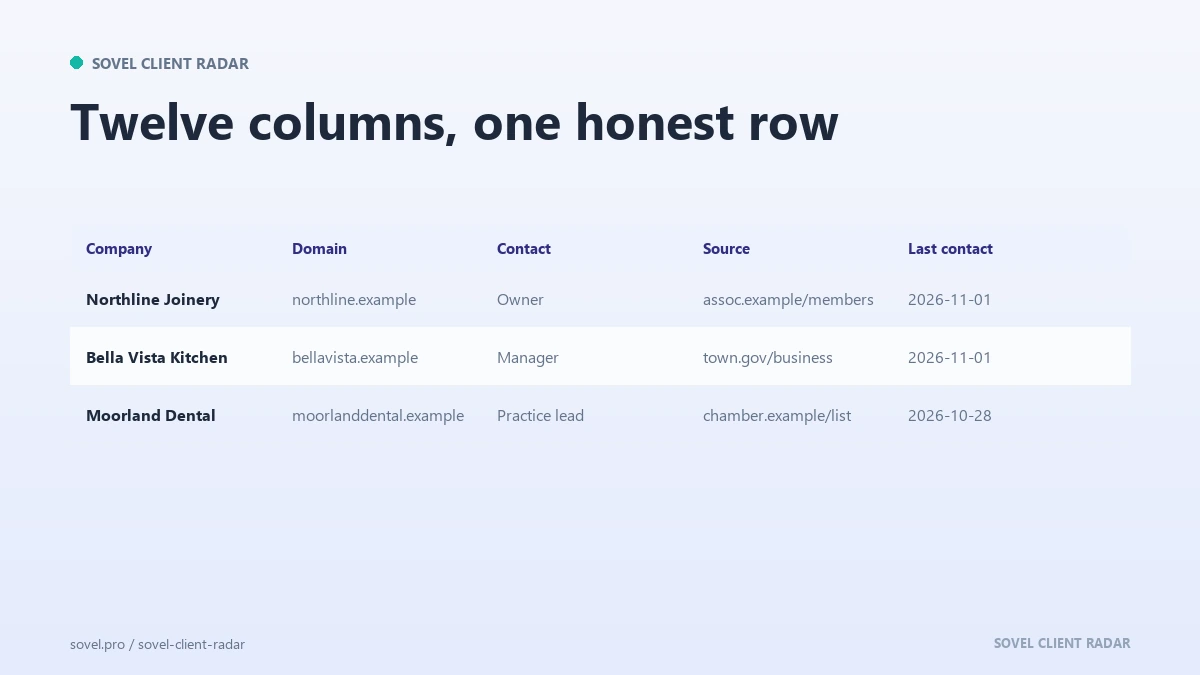
Company name, domain, contact name, role, email, source URL, date read, permission note, offer, owner, stage, last contact date. Twelve fields. Anything else is optional, and anything missing from those twelve becomes a question you cannot answer when a colleague asks why this company received that email.
The source URL is the field people skip, and it is the one that matters most. An address without a source is an address you cannot defend, and a list of those is a liability the first time someone asks to be removed. Every row should point at the page where the contact detail was published.
The date read matters almost as much in outreach list building. A list built in March is a different asset in September, because people change roles, companies rename, and domains expire. A date column tells you which rows to recheck before the next send.
Rule 3: dedupe by domain, not by row
Duplicate rows are the most common form of waste in outreach list building. Two people at the same company receive the same email on the same morning, and the second one reads as spam even when the first one was welcome.
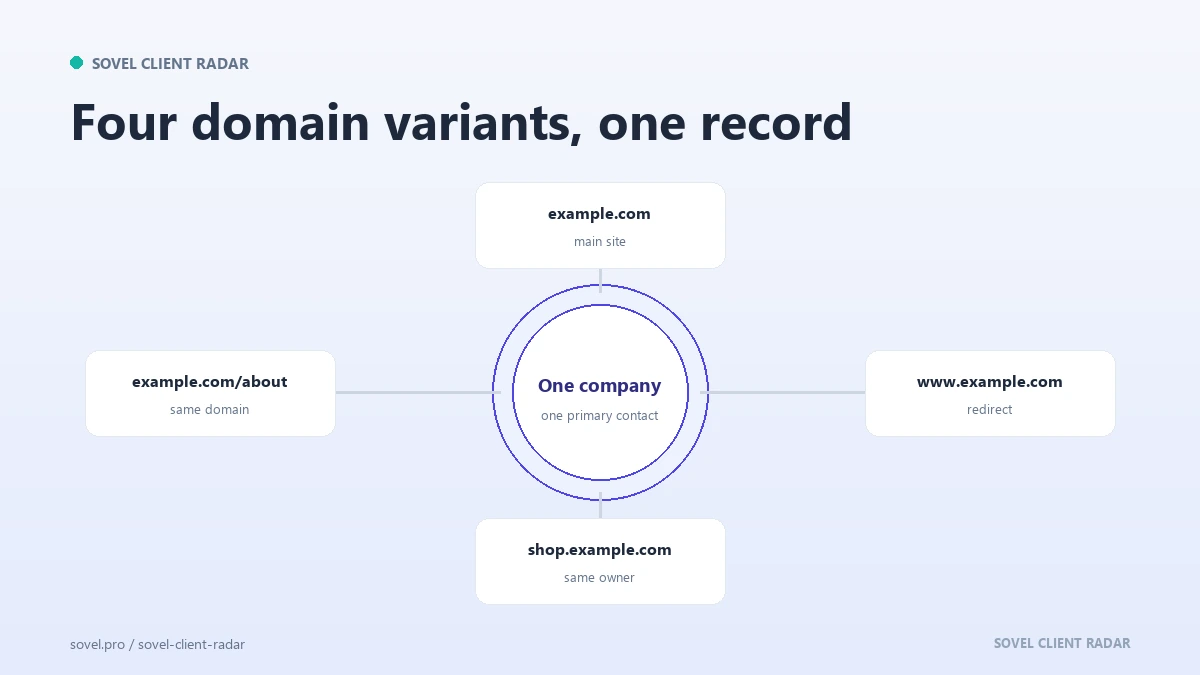
Start with domain normalization. Strip the protocol, the “www”, the trailing slash and any tracking parameters. Lowercase the result. Then treat every match as one company, regardless of how the name is spelled in the directory.
The harder question is which contact to keep. For most small teams the answer is one primary contact per company, chosen by role: the person who owns the budget, then the person who owns the work, then a general inbox. Hiring, support and legal inboxes rank last, and many tools will rank them for you if the data is labelled.
Keep the other contacts in a notes field rather than separate rows. When the first contact does not reply, you have a second route without sending a duplicate to the same company in the same week. That habit is what keeps outreach list building from turning into a numbers game.
Rule 4: the suppression list comes first
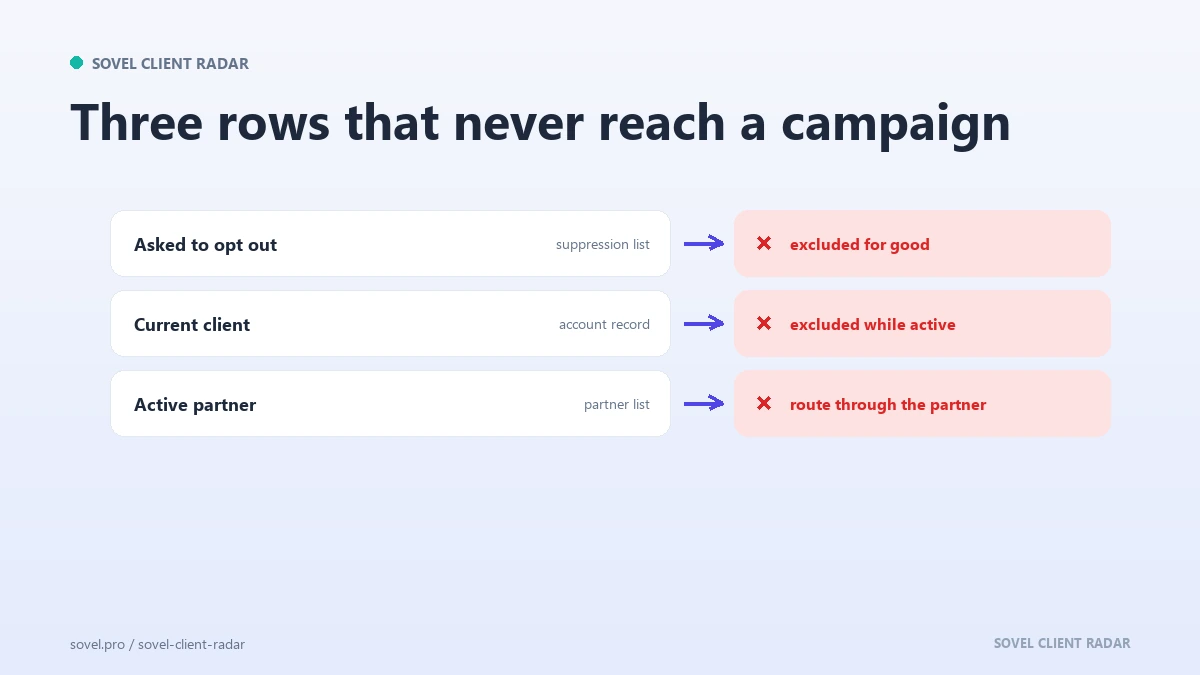
A suppression list is the record of people and companies who must never receive an email from you. It is the first thing you check before a send and the last thing you update after one. Outreach list building without one is a countdown to a complaint.
The list should hold more than opt-outs. Add current clients, past clients who left badly, competitors, partners with an agreement, and anyone who asked a question you never answered. A domain-level entry is usually enough, because a company that says no once rarely wants a second approach from a different person.
Run the file check before anything else in the campaign. Most teams suppress at the end, when the campaign is built and someone remembers the awkward conversation. That order produces at least one email to a person who already said no, which is the fastest way to lose a referral.
The engine ships a suppress command that accepts a domain, a URL or an email address, and every run skips matching rows. That is the right shape: the check lives in the tool, so it cannot be forgotten during a busy week.
Rule 5: verify before the first send
Verification is the step that separates a list from a wish. An address can look perfect and still be undeliverable, and a bounced send costs more than the minute it would have taken to check. It is also the part of outreach list building that people skip when they are in a hurry.
Run three checks. First, the format: a syntactically valid address per RFC 5322 can still be wrong, so format is a floor rather than proof. Second, the domain: does it resolve, and does it accept mail? Third, the source: did the address appear on a page you read, or was it assembled from a pattern?
A domain with no mail exchanger will bounce every message sent to it. That check takes a second and prevents a whole class of failure. The engine runs it by default and marks an unreachable contact instead of deleting it, so the row keeps its history.
Pattern guessing is the habit to break. “firstname@domain” works often enough to feel clever and fails often enough to damage a domain’s reputation. If the page does not publish an address, leave the field empty and write “not published” in the notes.
Address-level verification services exist and are useful at volume. At the size most teams work, the domain check plus a source check catches most of the problem, and it costs nothing.
Rule 6: one bounce rule, applied every time
A bounce rate is a measure of how many sends failed, and it is the number most likely to be ignored until a provider throttles the account. Decide the rule before the campaign, then apply it without debate.
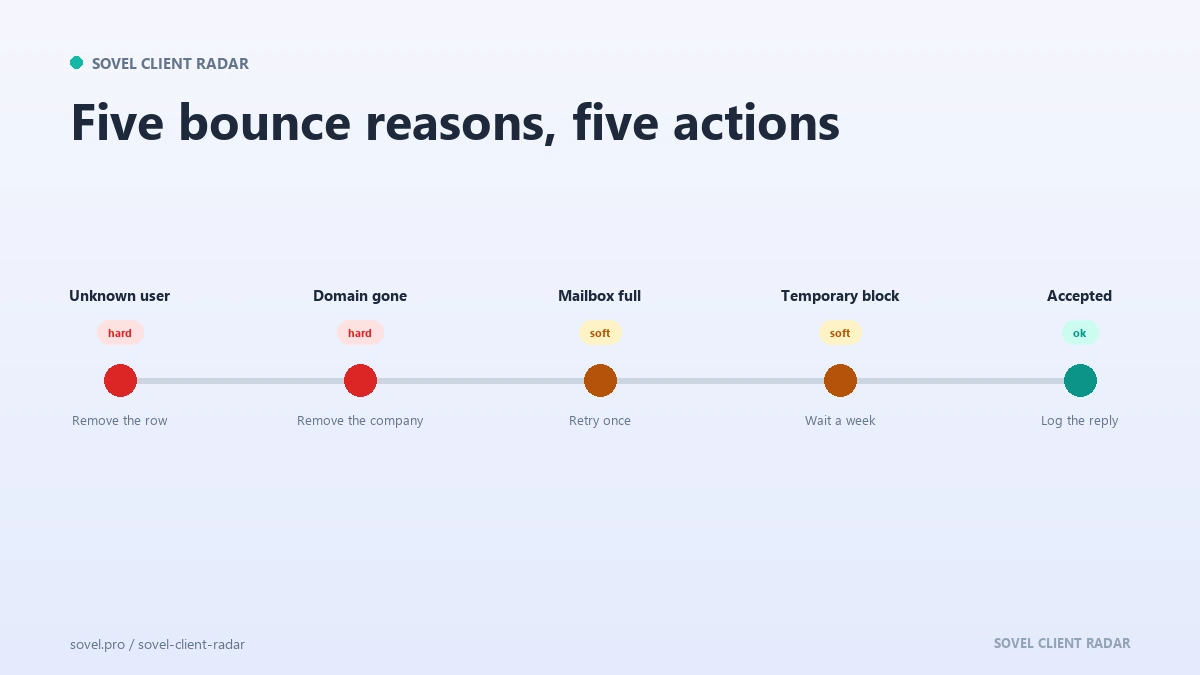
The rule I use is short. A hard bounce removes the row immediately, permanently, and nobody argues about it. A soft bounce gets one retry on a different day. Two soft bounces in a row and the row goes to a review queue rather than back into the send.
Watch the rate per batch. A yearly average hides the bad week, while a list that fails on more than two addresses in a hundred needs attention before the next batch, because the cause is usually a stale source or a guessed pattern, and both get worse with volume. Outreach list building fails in batches, so the batch is the unit that matters.
Keep the bounce reason in the row. “Mailbox does not exist” and “domain expired” lead to different fixes, and a list without reasons cannot be repaired.
Do you need permission to send?
The permission question is where outreach list building becomes a judgement call. Rules differ by country, and this article is not legal advice, so treat the following as a working standard rather than a legal opinion.
A business address published on a company site for enquiries is a reasonable basis for one relevant, identified message. A personal address scraped from a profile and used for a mass send is not. The difference is partly legal, and it is also about whether the recipient would recognise your reason for writing.
Three habits keep outreach list building defensible. Say who you are and why you are writing in the first two lines. Make opting out as easy as replying “no”. Keep a record of the source and the date for every address, so a question can be answered with a URL.
If you sell into a regulated industry or a region with strict consent rules, get advice rather than relying on a blog post. The ethical lead generation guide goes deeper on the boundary, and the do-not-contact record is where the policy becomes real.
When should you retire a row?
Outreach list building has a shelf life, and every list has rows that stopped being true. A contact who changed jobs, a company that was acquired, a domain that now redirects to a holding page: all of these are reasons to retire a row rather than send to it.
Use the date read column as the trigger. Rows older than ninety days get rechecked before a send: open the source, confirm the company still exists, confirm the person still appears on the page. That is two minutes per row, and it is cheaper than a complaint.
Retire means archive, with a reason attached. Move the row to an archive view and write down why it left the send. If the same company becomes a fit again in six months, the history tells you what happened last time and who spoke to them. A retired row is still useful evidence in outreach list building, which is why it stays.
Stale rows also distort your numbers. A list with forty percent dead contacts makes a good campaign look average, and the fix is email list cleaning rather than a new offer.
Outreach list building is mostly maintenance, and the maintenance is what makes a list worth opening. A row that cannot answer who, where, when and why will cost you an hour later. The twelve fields take four minutes each to fill and save that hour every time.
What does the weekly clean look like?
The weekly clean is fifteen minutes with the same four filters: duplicates by domain, rows with no source URL, rows matched by the do-not-contact file, and rows older than ninety days. Fix or archive what each filter returns, then close the file.
This is the least exciting part of outreach list building and the one that compounds fastest. A list cleaned every week stays usable for a year. A list cleaned once a quarter becomes a project nobody wants to start.
Here is the full rule set in one table, with the failure each rule prevents.
| Rule | What it prevents |
|---|---|
| One list per offer | A message too general to answer |
| Twelve minimum fields | Rows nobody can defend or trace |
| Dedupe by domain | Two emails to one company in a week |
| Do-not-contact check first | Contacting someone who already said no |
| Verify before send | Bounces from guessed or dead addresses |
| One bounce rule | A slow decline in sender reputation |
Six rules, one page, no software required. The table is also a useful onboarding document, because a new researcher can read it in two minutes and follow it on day one.
Which edition fits your list work?
SOVEL CLIENT RADAR produces the rows this guide keeps clean. It reads public pages under the rules they publish, stores a source and a retrieval time for every contact, checks the email domain by default, and skips anything on your do-not-contact record. Three lifetime licences cover the range, sized by seats and by how many leads one run may return.
- Personal / Freelancer, ₹5,999: one seat, 50 leads per run. A solo operator who sends a small batch each week.
- Pro / Small Business, ₹12,999: one seat, 200 leads per run. A small team that needs a deeper list without hiring a researcher.
- Agency / Enterprise, ₹39,999: five seats, 500 leads per run. Several client lists maintained by different people.
All three carry the same features, and none of them caps how often you run the tool. Contacts arrive with a confidence value and a reason, so the verification step starts from a ranked shortlist rather than a blank column. Outreach list building is easier when the rows arrive with a source attached. The product page lists the exports, the AI layer and the licence terms for each edition.
Two related reads: the prospect data quality checks that keep a row honest, and the ethical lead generation boundary that decides what belongs on a list at all. If you are still choosing who to put on the list, the keyword research without paid tools method helps you describe the buyer in words they use.
FAQ
How big should an outreach list be?
A working list is as big as the messages you can personalise this month. For one person sending five emails a week, sixty to a hundred verified rows is enough. Outreach list building rewards depth, and a hundred clean rows will outperform a thousand rows nobody has read.
Can I buy an outreach list?
You can buy a file, but you cannot buy the source, the date or the permission. Purchased lists go stale before they arrive and often contain addresses assembled from patterns. If a vendor cannot show you the page each contact came from, the list is a liability.
How often should I clean the list?
Once a week, with the same four filters, and a full recheck every ninety days. Email list cleaning is part of outreach list building as a habit rather than a project. The weekly pass takes fifteen minutes and prevents the quarterly session that nobody schedules.
What bounce rate is normal?
Treat more than two failures in a hundred sends as a signal to stop and check the source. A low bounce rate only proves the message arrived, and a delivered message can still be irrelevant. Watch the reasons behind the failures, not only the count.
Do I need consent to email a business?
Consent rules vary by country and by industry, so check the law that applies to you. A published business address used for one relevant, identified message is a different case from a mass send to a scraped personal address. Always offer an easy way to opt out.
What is a suppression list?
A suppression list is the permanent record of contacts who must never be emailed, including opt-outs, current clients, competitors and partners. Check it before every campaign, and keep domain-level entries so a new contact at the same company is also covered.
How do I start with no data at all?
Start with one directory and one offer. Twenty rows built by hand teach you the fields, the sources and the first line, and outreach list building at that size costs an afternoon. Grow the list only after those twenty rows produce a reply or a clear reason why not.
Do I need a CRM for this?
No. A single table with the twelve fields in this guide covers the work for most small teams, and a shared sheet is better than a CRM nobody updates. Move to a CRM when two people need to work the same list at once.