
Why Modern Founders Choose to Build SaaS With AI Without Coding
The barrier to creating commercial software has fundamentally shifted. For decades, launching a software as a service platform required either deep computer science training or tens of thousands of dollars paid to external agencies. Today, ambitious founders can build saas with ai without coding by adopting systematic engineering frameworks that govern modern artificial intelligence models.
Writing software manually is no longer the primary bottleneck for digital businesses. The real challenge lies in architecture, state management, security boundaries, and continuous verification. When you attempt to generate an entire software application using generic chat prompts, the model quickly loses context, invents invalid functions, and creates severe regressions. To reliably build saas with ai without coding, you must replace unstructured conversation with an organized operating system that treats artificial intelligence as an execution engine rather than a magic wand.
The Sovel AI Engineering OS provides the exact blueprints, checklists, and dual-agent protocols needed to turn abstract product concepts into stable, production-ready web applications. Whether you want to create niche micro-SaaS utilities, WordPress plugins, browser extensions, or full-stack database platforms, this guide breaks down the exact seven-stage lifecycle used to ship enterprise-grade tools without touching raw syntax yourself.
The Hidden Failure Mode of Single-Prompt AI Coding
Most beginners make the mistake of pasting a single massive prompt into an artificial intelligence chat window, expecting a complete web application in return. Within two or three iterations, this approach breaks down completely. The model runs out of output tokens, truncates critical functions, and forgets earlier architectural decisions.
When you attempt to build saas with ai without coding through casual prompting, you encounter three fatal obstacles:
- Context Window Saturation: Large language models maintain a limited working memory during active conversations. Feeding thousands of lines of code into a single prompt causes catastrophic forgetting, resulting in broken dependencies and missing imports.
- Silent Hallucinations: When forced to write large files without strict schemas, models invent non-existent third-party packages or call outdated application programming interfaces.
- Absence of Local Verification: Web chat interfaces cannot run compilers, cannot execute unit tests, and cannot check database tables. Without local runtime feedback, syntax errors remain invisible until deployment fails.
Professional engineering solves these problems by splitting architecture planning from code generation. By combining strategic reasoning models with autonomous local execution agents, founders can systematically build saas with ai without coding while maintaining institutional software quality.
Stage 1: Deep Research and Competitor Gap Discovery
Every successful commercial software product begins with rigorous market discovery. Before generating a single configuration file, you must identify high-intent commercial problems that existing tools fail to solve cleanly.
To start your journey to create cloud software without coding, conduct multi-engine research across tools like Perplexity, Grok, and Claude. Rather than asking generic questions, feed targeted prompts designed to extract competitor weaknesses, negative customer reviews, and missing workflow integrations from platforms such as Reddit, G2, and Product Hunt.
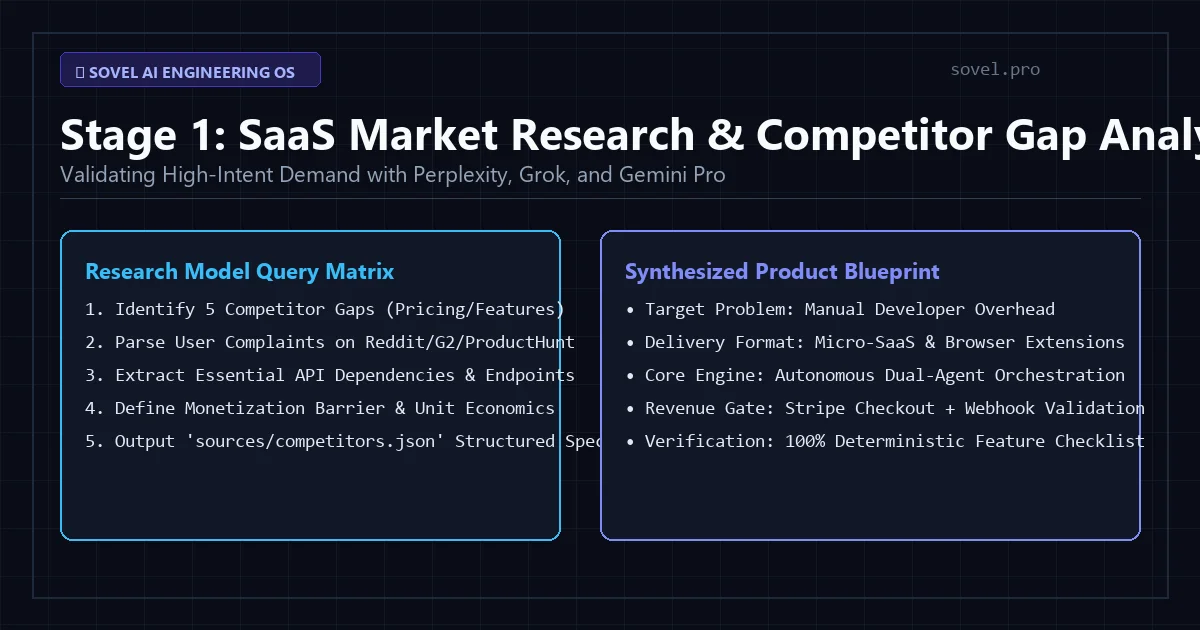
Figure 1: Deep market research across Perplexity, Grok, and Claude uncovers high-intent customer problems.
During this stage, create a dedicated directory on your local workstation named sources/. Store raw competitor pricing teardowns, user complaint summaries, and official documentation for any external APIs your product will consume. This structured research acts as the permanent knowledge anchor for your upcoming development sprints.
By validating customer willingness to pay before writing specifications, you ensure that every product you construct has immediate commercial viability in the open market.
Stage 2: Translating Ideas into Hierarchical Treemaps and Specs
The secret to eliminating artificial intelligence hallucinations is radical specification clarity. Once your market gap is confirmed, you must translate the concept into a rigid hierarchical treemap before writing code.
A treemap is a structured markdown document that maps every folder, file, database migration, and interface component in your application. When you prepare to develop software applications with AI, your treemap establishes non-negotiable boundaries that keep execution agents confined to specific, manageable tasks.
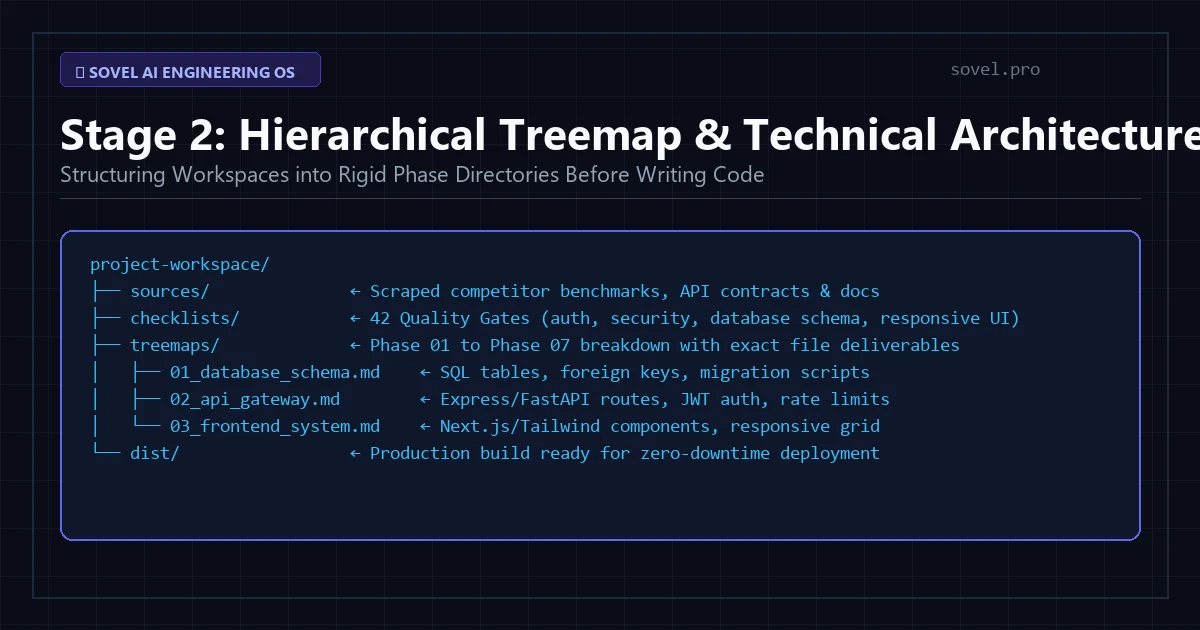
Figure 2: Hierarchical treemaps translate abstract ideas into rigid phase-by-phase execution checklists.
A standard SaaS technical treemap includes several distinct operational layers:
- Data Modeling Spec: Defines relational database tables, column types, foreign key constraints, and indexing strategies in PostgreSQL, MySQL, or SQLite.
- API Route Contracts: Documents every REST or GraphQL endpoint, including HTTP methods, authentication headers, request payload formats, and status response schemas according to Mozilla Web Standards.
- Authentication Protocol: Establishes secure JSON Web Token storage, session expiration policies, and password hashing standards.
- UI Component Tree: Breaks user interfaces into reusable layout components, buttons, modals, input forms, and data visualization cards.
When you provide an execution agent with a single isolated branch of your treemap, the model operates with complete precision. This modular structure makes it practical for any solo entrepreneur to build saas with ai without coding while matching the architectural discipline of seasoned engineering teams.
Stage 3: Setting Up Your Local Autonomous Workstation
Professional software development cannot happen inside browser text fields. You need a dedicated, high-performance local development environment on your personal computer. Setting up your machine takes under thirty minutes and equips you with the exact runtime engines needed to execute agentic workflows.
To successfully build saas with ai without coding, install the following foundational tools on Windows, macOS, or Linux:
- Visual Studio Code: The industry standard code editor, available freely from Visual Studio Code. You will use VS Code primarily to view files and run terminal commands, not to type manual code.
- Node.js LTS: The server-side JavaScript runtime engine, downloadable from Node.js Official Website. This powers modern frontend frameworks and backend API servers.
- Python 3.12: A versatile programming runtime used for data scrapers, artificial intelligence scripts, and local automation utilities.
- Git Version Control: A version management tool that tracks every file change and allows instantaneous rollback if an autonomous agent introduces an error.
- XAMPP or LocalWP: Essential if your target product is a WordPress plugin, theme, or PHP-based web utility.
Once your core runtimes are active, install an agentic coding extension inside VS Code. Leading options include OpenCode, Cline, Antigravity, and Cursor. Connect your chosen extension to an OpenRouter account, which provides unified API access to frontier models including Claude 3.5 Sonnet, DeepSeek V3, and Gemini 1.5 Pro. With these tools in place, your workstation is fully armed to build saas with ai without coding.
Stage 4: Running the Dual-Agent Planner-Executor Engine
The core innovation behind the Sovel framework is the dual-agent architecture. Instead of relying on a single artificial intelligence model to handle both strategic design and line-by-line coding, the system decouples these responsibilities into two distinct entities: the Strategic Planner and the Local Executor.
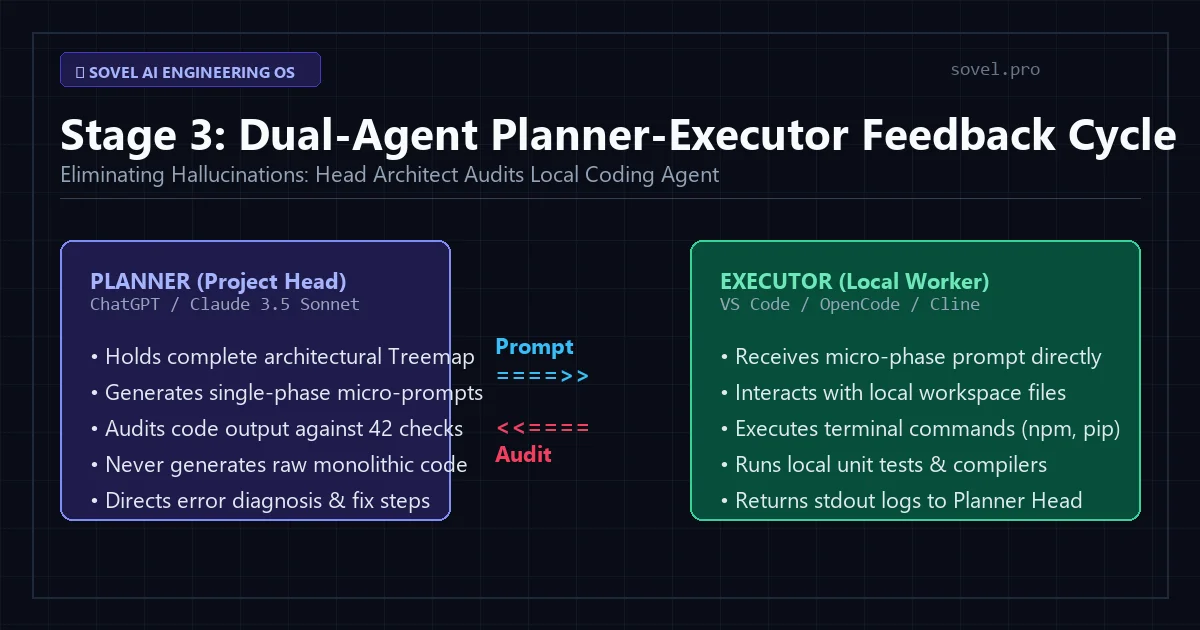
Figure 3: The planner agent audits output while the executor agent writes code inside local workspace directories.
Here is how the dual-agent cycle works when you build saas with ai without coding:
- The Strategic Planner (Project Head): Run inside an advanced reasoning model like ChatGPT or Claude 3.5 Sonnet. The planner holds your comprehensive treemap, sources, and quality checklists. It never writes raw production code directly. Instead, it generates a concise, phase-specific execution prompt for one file or module at a time.
- The Local Executor (Worker Agent): Run inside VS Code via OpenCode, Cline, or Antigravity. The executor receives the micro-prompt from the planner, creates the necessary files on your local drive, runs terminal commands (such as
npm installor database migrations), and executes the code. - The Feedback Loop: Once the executor finishes its task, you copy the terminal output, compiler logs, and status messages back to the Strategic Planner. The planner audits the output against your acceptance criteria. If a test fails, the planner provides a targeted repair prompt. If the task passes, the planner unlocks the next phase.
By enforcing this structured feedback loop, you completely eliminate context drift and hallucination. This dual-agent methodology empowers founders to build saas with ai without coding with predictable, deterministic velocity.
Stage 5: Enforcing the 42 Enterprise Quality Checklists
Speed is meaningless if your software crashes during user onboarding or exposes customer payment data. To ensure commercial durability, every module must pass rigorous quality gates before moving to the next stage.
The Sovel framework embeds 42 mandatory quality checklists across four critical operational domains. When you build saas with ai without coding, your Strategic Planner evaluates generated code against these exact benchmarks:
- Architecture and Modularity (Checks 1 to 8): Enforces strict separation of concerns. Controllers handle request validation, services contain business logic, and data models manage database transactions. No monolithic script files are permitted.
- Security and Defensive Design (Checks 9 to 18): Guarantees parameterized SQL queries to prevent injection attacks, implements Cross-Site Request Forgery tokens, sanitizes HTML inputs to block XSS vulnerabilities, and sets rate limits on public endpoints.
- Performance and Asset Optimization (Checks 19 to 30): Mandates modern WebP image formats, lazy loading on non-critical assets, gzip or brotli server compression, and efficient database query indexing.
- User Experience and Accessibility (Checks 31 to 42): Verifies mobile responsiveness across smartphone, tablet, and desktop breakpoints, enforces WCAG 2.1 AA color contrast standards, and provides explicit error states for failed form submissions.
Passing these checklists ensures that your finished platform matches the stability and security of venture-backed software. It proves that you can build saas with ai without coding without sacrificing enterprise performance.
Stage 6: Local Sandbox Testing and Database Verification
Never deploy untested code to a live production server. The sixth stage of the workflow focuses on running comprehensive runtime verifications inside your local development environment.
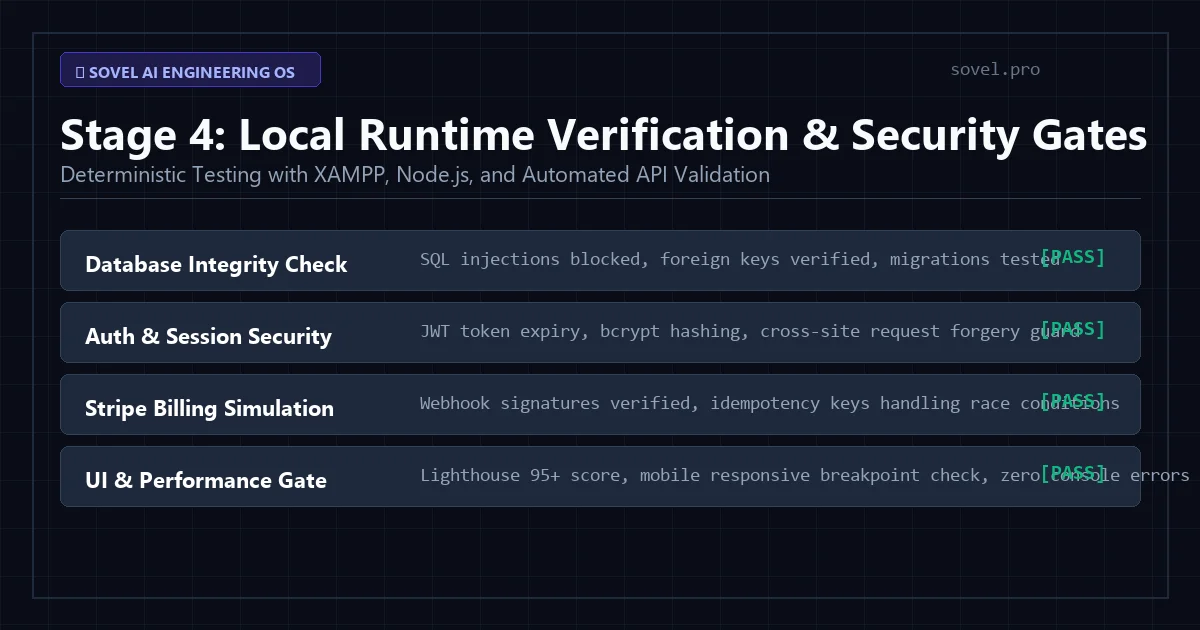
Figure 4: Rigorous local testing in Node.js and XAMPP verifies database integrity before production deployment.
During this stage, your local execution agent runs automated test suites and simulates end-user workflows. When you build saas with ai without coding, local verification includes:
- Database Schema Migration Verification: Verifying that relational tables instantiate correctly without syntax errors or broken foreign keys.
- Authentication Flow Simulation: Registering test accounts, confirming password reset email triggers, and checking token persistence across browser refreshes.
- Payment Gateway Webhook Testing: Utilizing the Stripe CLI to send simulated checkout events to your local API listener, ensuring that user subscription statuses update automatically.
- Cross-Browser Rendering Checks: Testing interface rendering across Chrome, Firefox, Safari, and mobile viewports to prevent layout shifts.
Because your local workstation has full access to terminal logs and developer tools, any runtime exception is caught and repaired instantly. This disciplined approach guarantees that you build saas with ai without coding with total operational confidence.
Stage 7: Production Deployment and Commercial Monetization
With local verification complete, your application is ready for production deployment. Moving from a local workstation to a high-availability cloud server is straightforward when your project follows standard container and web configurations.
Deploy your frontend and backend services to scalable cloud providers such as Vercel, Railway, DigitalOcean, or AWS Lightsail. Configure custom domain routing, automated SSL encryption through Let’s Encrypt, and secure environment variables for your database credentials and payment secret keys. If you are deploying WordPress plugins or themes, package the build into a clean distribution archive ready for installation across client sites.
When you build saas with ai without coding, you retain complete sovereign ownership of your source code, customer database, and revenue streams. You are not locked into proprietary no-code platforms that charge steep monthly subscription fees as your traffic expands.
Traditional Software Development vs. AI Engineering OS
To understand the strategic advantage of this workflow, examine how the AI Engineering OS compares to conventional agency outsourcing and standard no-code builders:
| Evaluation Criteria | Traditional Agency | Proprietary No-Code | Sovel AI Engineering OS |
|---|---|---|---|
| Development Cost | $15,000 to $50,000+ | $50 to $400 / month | ₹999 One-Time Lifetime |
| Time to Initial Launch | 3 to 6 Months | 2 to 4 Weeks | 2 to 5 Days |
| Full Code Ownership | Yes (with extra fees) | No (Platform Lock-in) | 100% Sovereign Code Ownership |
| Custom Architecture | High | Severely Limited | Unlimited Custom Stacks |
| Hallucination Prevention | Manual Human Review | N/A (Visual UI Only) | Dual-Agent 42 Checklists |
| Scaling Overhead | Steep Retainer Contracts | Exponential Tier Pricing | Standard Low-Cost Cloud Hosting |
As the table demonstrates, adopting a disciplined system allows non-technical creators to ship commercial software without coding while capturing the cost efficiency of modern artificial intelligence and the architectural freedom of custom software engineering.
Frequently Asked Questions
Can I really build saas with ai without coding if I have zero technical background?
Yes. The entire workflow is designed so that non-technical founders never write programming code manually. Your role is that of a product manager and quality auditor. The Strategic Planner generates precise implementation prompts, while local agents like OpenCode or Cline execute the coding and terminal operations on your computer.
What specific software do I need to install on my PC?
You only need free, open-source developer tools: Visual Studio Code, Node.js LTS, Python 3.12, Git, and optionally XAMPP if building WordPress tools. You will also need an API key from OpenRouter to connect your coding agents to top-tier models like Claude 3.5 Sonnet.
How does this prevent AI from generating broken or buggy code?
The system prevents errors through the dual-agent feedback loop and the 42 quality checklists. Code is written in small, phased increments mapped to a technical treemap. After each phase, terminal output and unit tests are audited by the planner agent before the next phase is unlocked.
How much does it cost to use the AI Engineering OS?
The complete Sovel AI Engineering OS is available for a one-time commercial license of just ₹999 Indian Rupees. This grants you lifetime access to all 42 checklists, the 7-stage software development lifecycle, treemap templates, prompt architectures, and free future updates.
Can I build WordPress plugins and themes using this framework?
Absolutely. The author of Sovel has used this exact system to build more than 40 commercial WordPress plugins, custom high-performance themes, and complete web utilities like Sovel Calc that operate smoothly in production without human code rewrites.
Start Building Your Commercial SaaS Today
There has never been a more empowering moment to launch digital products. By mastering the dual-agent workflow, structuring your workspace into hierarchical treemaps, and enforcing strict quality gates, you can reliably build saas with ai without coding and launch enterprise-grade software in days rather than months.
Explore our complete suite of developer resources and free online utilities at Sovel Web Tools, or learn more about multi-agent governance in our deep dive on the AI Agent Development Framework and local workstation setup in the Enterprise AI Software Development Workflow.
Ready to turn your software ideas into profitable reality? Get instant lifetime access to the Sovel AI Engineering OS for just ₹999 and build your first enterprise SaaS this week. Download AI Engineering OS Now.