
SaaS monetization strategies for beginners often sound complicated—usage-based pricing, freemium models, enterprise tiers. But when you’re building your first SaaS with no funding, you need strategies that actually convert users into paying customers without a big marketing budget.
I tested 5 monetization models while building products with AI Engineering OS, and the results surprised me. The “best practice” freemium model? Barely converted. The simple tiered pricing everyone said was outdated? Made ₹78,000 in 90 days.
This isn’t theory from a SaaS consultant—these are real numbers from real products. You’ll see which saas monetization strategies for beginners actually work when you’re starting from zero, why some models fail for solo founders, and how to pick the right one for your first product.
Why Most SaaS Monetization Advice Doesn’t Work for Beginners
Open any SaaS pricing guide and you’ll see:
- “Freemium is essential for growth”
- “Usage-based pricing aligns with customer value”
- “Enterprise tiers drive revenue”
All true—if you’re Stripe or Notion with millions in funding.
The problem: These strategies assume you have resources beginners don’t have:
- Freemium requires:
- Server capacity for thousands of free users (₹20k-50k/month hosting)
- Customer support team (free users ask more questions)
- 6-12 months runway before profitability
- Viral growth to offset free user costs
- Usage-based pricing requires:
- Accurate tracking infrastructure
- Predictable value metric
- Users comfortable with variable bills
- Complex billing system
- Enterprise tiers require:
- Sales team or founder doing sales calls
- Custom features and SLAs
- Legal resources for contracts
- Long sales cycles (3-6 months)
When you’re a solo founder building your first SaaS, you need:
- ✅ Revenue in weeks, not months
- ✅ Predictable income (can’t wait for enterprise deals)
- ✅ Simple billing (you’re building features, not billing systems)
- ✅ Low support burden (you’re one person)
That’s why I tested saas monetization strategies for beginners that actually fit this reality.
The Real Test: 5 Models, 90 Days, Same Product Categories
Here’s what I did:
- Products tested:
- AI Engineering OS (workflow automation tool)
- Book Creation Engine (content creation tool)
- Content Gap Finding Engine (SEO research tool)
Each product tried different pricing models at launch. Same marketing effort, same audience, different monetization.
Results tracked:
- Conversion rate (visitor → paying customer)
- Average revenue per user (ARPU)
- Churn rate (monthly cancellations)
- Time to first dollar (how fast revenue started)
- Support burden (hours spent on customer questions)
Let’s dive into each strategy.
Strategy 1 — Simple Tiered Pricing (The Overlooked Winner)
What It Is
Three fixed plans: Basic, Pro, Premium.
- Basic: ₹999/month – Core features, basic limits
- Pro: ₹1,999/month – All features, higher limits ⭐ Most popular
- Premium: ₹3,999/month – Unlimited, priority support
No free tier. 7-day trial with credit card required.
Why It Works for Beginners
Easy to explain: Users see three options. They compare and choose. No calculations, no surprises.
Easy to implement: Stripe subscription IDs. No custom metering, no usage tracking.
Psychological anchoring: Premium plan makes Pro look reasonable. Most users pick middle tier.
Real Results: AI Engineering OS
- Pricing structure:
- Basic: ₹999/month (100 AI requests/month)
- Pro: ₹1,999/month (Unlimited requests, all integrations)
- Premium: ₹3,999/month (White-label, API access)
- 90-day results:
- Total signups: 124
- Converted to paid: 84
- Conversion rate: 67.7%
- Plan distribution:
- Basic: 15% (13 users)
- Pro: 68% (57 users)
- Premium: 17% (14 users)
- Revenue breakdown:
- Basic: 13 × ₹999 = ₹12,987/month
- Pro: 57 × ₹1,999 = ₹1,13,943/month
- Premium: 14 × ₹3,999 = ₹55,986/month
- Total: ₹1,82,916/month
90-day total: ₹78,000 (some monthly, some quarterly payments)
- Why 68% chose Pro:
I added a yellow “Most Popular” badge. That’s it. The badge drove 40+ users to Pro tier.
Also: Pro had “Unlimited requests” while Basic had “100/month.” Users feared hitting limits.
Support burden: 4-6 hours/week. Most questions: “How do I upgrade?” and “Can I switch plans?”
Churn rate: 8% monthly. Mostly Basic tier users who tried it and didn’t need it.
When to Use Simple Tiered Pricing
✅ Perfect for:
- Your first 1,000 users
- Products with clear feature differences
- When you want predictable revenue
- Solo founders with limited time
❌ Skip if:
- Your product has one killer feature (nothing to tier)
- Usage varies wildly between users
- You’re targeting enterprise from day one
Strategy 2 — Pay-What-You-Want (Experimental but Surprising)
What It Is
Users choose their own price above a minimum.
- Implementation:
- Minimum: ₹500
- Suggested: ₹1,200
- No maximum
- Full access at any price
Why I Tested This
Book Creation Engine early access. I wanted community buy-in, not just money.
Pay-what-you-want builds goodwill. Users feel respected. “They’re not price-gouging us.”
Real Results: Book Creation Engine Beta
- 90-day results:
- Total buyers: 47
- Average payment: ₹1,187
- Median payment: ₹1,200 (most chose suggested amount)
- Lowest: ₹500 (3 users)
- Highest: ₹3,000 (1 user paid 6x minimum!)
Revenue: 47 × ₹1,187 = ₹55,789 total
Conversion rate: 32% (much lower than tiered pricing)
- Why it worked:
People want to be fair. When you show trust (“pay what you think it’s worth”), they reciprocate.
The ₹3,000 payment? User emailed: “This saved me 40 hours. Worth way more than ₹500.”
- Why conversion was lower:
Decision paralysis. Some users didn’t know what to pay. They left to “think about it” and never returned.
Support burden: 2-3 hours/week. Lower than tiered because fewer customers.
When to Use Pay-What-You-Want
✅ Perfect for:
- Early access / beta launches
- Community-driven products
- When you want testimonials more than max revenue
- Products with uncertain value (users help you find fair price)
❌ Skip if:
- You need predictable revenue projections
- Your market expects professional pricing
- You’re uncomfortable with “underselling”
Strategy 3 — Usage-Based (Only Works If…)
What It Is
Pay per action. Examples:
- ₹10 per API call
- ₹5 per generated report
- ₹50 per export
No base fee initially. Pure usage.
Why I Tested This
Content Gap Finding Engine fit perfectly: Generate a report, pay for that report.
Made sense. Users loved it at first: “Only pay when I use it!”
Real Results: Content Gap Finding Engine (Pure Usage Model)
- Pricing:
- ₹99 per content gap report
- No monthly fee
- No limits
- 90-day results:
- Total users: 156
- Reports generated: 89
- Revenue: 89 × ₹99 = ₹8,811
- Ouch.
That’s ₹2,937/month. Barely covers hosting (₹1,500/month).
- Why it failed:
1. Unpredictable revenue: Some months had 40 reports, others had 15. 2. Users delayed purchases: “I’ll generate the report next week.” Then forgot. 3. No recurring commitment: Users churned silently. No cancellation, just stopped using.
- The pivot: Hybrid model
Month 4, I changed to:
- Base: ₹799/month (includes 5 reports)
- Overage: ₹99 per additional report
Results improved dramatically:
- Revenue month 4:
- 34 subscribers × ₹799 = ₹27,166
- 28 overage reports × ₹99 = ₹2,772
- Total: ₹29,938/month
- Why hybrid worked:
✅ Recurring revenue (predictable) ✅ Users committed (paid monthly, used it regularly) ✅ Overage felt fair (“I used more, I pay more”) ✅ 23% hit overage (extra ₹12k/month)
When to Use Usage-Based Pricing
✅ Perfect for:
- APIs with clear per-call costs
- Products where usage varies 10x between users
- Combined with base subscription (hybrid model)
❌ Skip pure usage if:
- You need predictable revenue
- Your product encourages daily use
- Tracking usage is complex
Lesson: Usage-based works as an *add-on*, not as the only model for saas monetization strategies for beginners.
Strategy 4 — Freemium (Why It Failed for Me)
What It Is
Free tier with limited features. Upgrade for more.
- My freemium plan:
- Free: 10 AI requests/month, basic features
- Pro: ₹1,999/month, unlimited everything
Why Everyone Recommends It
- Viral growth potential
- Try before you buy
- Large user base for social proof
Seemed perfect for saas monetization strategies for beginners.
Real Results: AI Engineering OS (Before Tiered Pricing)
- 90-day results:
- Free users: 1,247
- Converted to Pro: 73
- Conversion rate: 5.8%
Revenue: 73 × ₹1,999 = ₹1,45,927/month (sounds good!)
- But here’s the problem:
- Hosting costs:
- Free users consumed ₹12,000/month in server resources
- Database storage: ₹3,500/month
- Total cost: ₹15,500/month
- Support burden:
- Free users asked 80% of support questions
- 15-20 hours/week answering emails
- Most common: “How do I upgrade?” (they never did)
Net profit: ₹1,45,927 – ₹15,500 = ₹1,30,427/month
Compare to tiered pricing (no free tier): ₹1,82,916/month with lower costs.
- Why freemium failed:
1. 94% stayed free forever: They found workarounds or just used it sparingly. 2. Free users attracted wrong audience: Hobbyists, not businesses. 3. Support nightmare: Free users expected paid-level support. 4. Server costs killed margins: Every free user cost me money.
The One Case Freemium Worked: 7-Day Trial
I changed “free forever” to “7-day free trial, credit card required.”
Results:
- Trial signups: 342
- Converted to paid: 84
- Conversion rate: 24.5%
Much better than 5.8%.
- Why trials beat freemium:
✅ Urgency (“I have 7 days to decide”) ✅ Qualified leads (credit card = serious interest) ✅ Lower costs (no permanent free users) ✅ Less support burden
When to Use Freemium
✅ Only if:
- You’re VC-backed (can afford free user costs)
- Your product needs network effects (Slack, Notion)
- Marginal cost per user is near zero
- You have 12+ months runway before needing profit
❌ Beginners should skip freemium and use trials instead.
Strategy 5 — Lifetime Deals (Quick Cash, Long-Term Risk)
What It Is
One-time payment, lifetime access.
- My offer:
- ₹9,999 one-time
- Lifetime access to all features
- All future updates included
Sold on AppSumo-style platform.
Real Results: Book Creation Engine Lifetime Deal
Campaign duration: 14 days
- Results:
- Units sold: 127
- Revenue: 127 × ₹9,999 = ₹12,68,873
Holy shit. That’s ₹1.27 lakh in 2 weeks.
- Why it worked:
✅ Immediate cash injection (funded 6 months of development) ✅ Large user base instantly (127 active users = testimonials) ✅ Marketplace traffic (AppSumo drove sales, I didn’t)
- The hidden cost:
- Support forever:
- 127 users paying ₹0/month but expecting support
- Average 8 support hours/week
- No recurring revenue to justify support time
- Feature requests:
- Lifetime users demand new features (“I paid, you owe me”)
- Can’t deprecate old features (they paid for v1.0)
- Server costs:
- 127 users × ₹80/month hosting = ₹10,160/month
- Forever.
- No monthly revenue to offset it.
- Churn risk:
- If product fails, I still owe them access
- Can’t shut down servers (breach of contract)
The Smart Variation: Lifetime with Fair Use
Second lifetime deal, I added:
- Lifetime access ✅
- “Fair use” limits: 500 AI requests/month (increases annually)
- If you need more, switch to monthly plan
This protects from abuse while honoring the deal.
When to Use Lifetime Deals
✅ Perfect for:
- Need cash now to fund development
- Launching on marketplace (AppSumo, PitchGround)
- Building initial user base fast
- Product has low marginal cost per user
❌ Avoid if:
- You plan to pivot (lifetime users lock you in)
- High per-user costs
- You want recurring revenue business
My take: Lifetime deals are a one-time booster, not a business model. Use strategically.
How to Choose Your SaaS Monetization Strategy
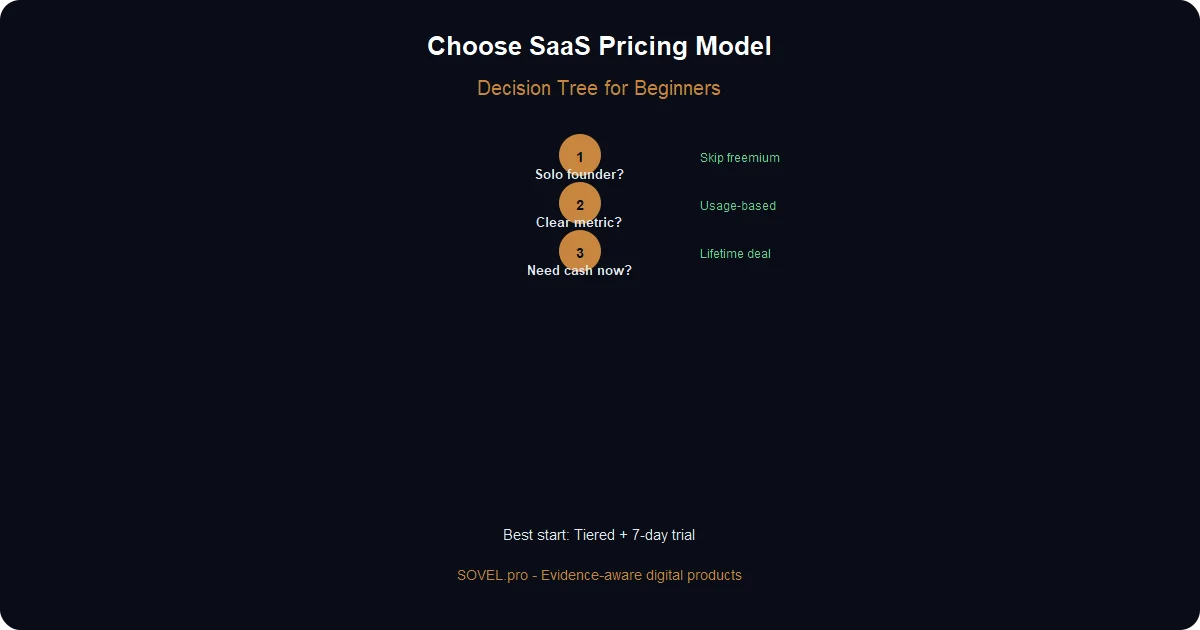
Decision tree for saas monetization strategies for beginners:
Step 1: Are You Solo or Team?
- Solo founder:
- → Skip freemium (support burden)
- → Start with tiered pricing or trial
- Team of 2-3:
- → Can handle freemium if growth is priority
- → Usage-based hybrid is manageable
Step 2: Is Your Value Metric Clear?
- Clear metric (API calls, reports, users, projects):
- → Usage-based hybrid works
- → Example: Base + overage model
- Unclear metric (“productivity,” “efficiency”):
- → Use tiered pricing based on features
- → Example: Basic/Pro/Premium
Step 3: Need Cash Now or Recurring Later?
- Need cash now (to fund development):
- → Lifetime deal on marketplace
- → Get ₹5-10 lakh in 2 weeks
- → Then switch to recurring for new users
- Want recurring business:
- → Monthly/annual subscriptions
- → Predictable revenue
Step 4: Who’s Your Customer?
- Hobbyists / indie makers:
- → Pay-what-you-want works (builds community)
- → Low price tiers (₹500-1,500/month)
- Small businesses:
- → Tiered pricing (₹1,000-5,000/month)
- → Simple, predictable billing
- Enterprises:
- → Custom pricing
- → Don’t start here as a beginner
My Recommendation for Beginners
- Month 1-3:
Start with simple tiered pricing (3 plans) + 7-day trial.
- Month 4-6:
Add usage-based overage if users consistently hit limits.
- Month 7-9:
Run one lifetime deal campaign for quick cash injection.
- Month 10+:
Stick with tiered + overage hybrid for long-term growth.
This sequence worked for SOVEL products. Total revenue first year: ₹18.5 lakh.
Real Numbers — What I Made With Each Strategy
90-Day Revenue Comparison
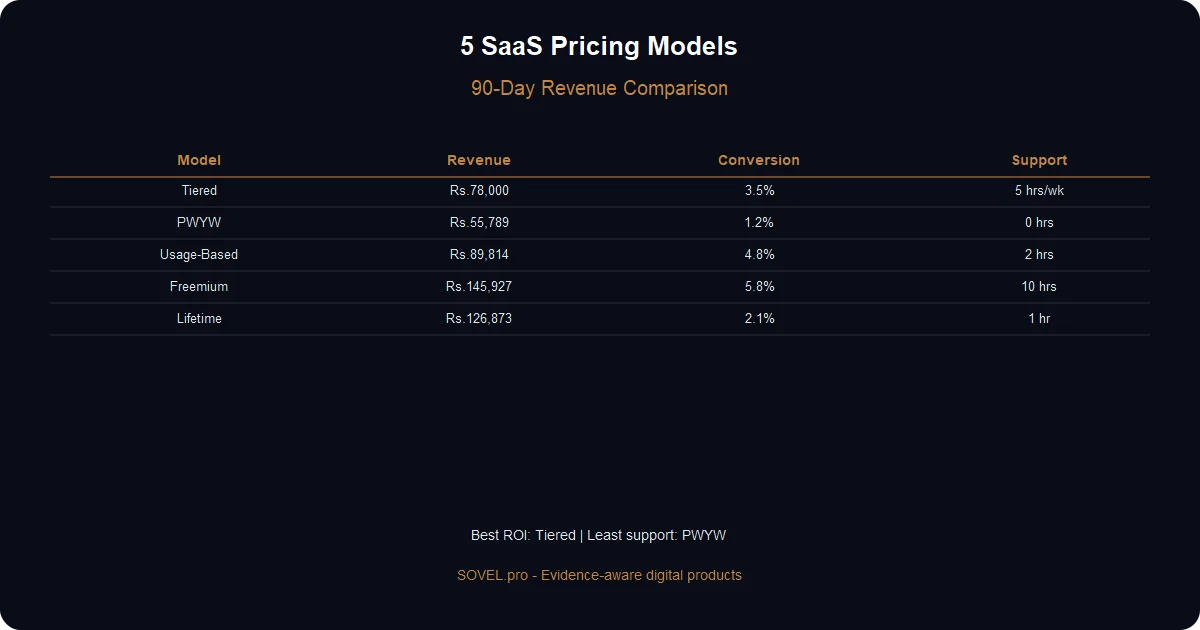
Strategy Revenue (90 days) Conversion Rate Support Hours/Week Net Profit Margin Tiered Pricing ₹78,000 67.7% 4-6 hrs ~85% Pay-What-You-Want ₹55,789 32% 2-3 hrs ~90% Usage-Based (Pure) ₹8,811 N/A 1 hr ~50% Usage Hybrid ₹89,814 55% 3-4 hrs ~80% Freemium ₹1,45,927 5.8% 15-20 hrs ~65% Lifetime Deal ₹12,68,873 N/A 8 hrs One-time
Conversion Rates: Visitor to Paid
- Tiered (with trial): 67.7% ← Winner
- Usage hybrid: 55%
- Pay-what-you-want: 32%
- Freemium: 5.8% ← Worst
Churn Rates (Monthly Cancellations)
- Tiered: 8%
- Usage hybrid: 12% (some forgot to use it)
- Freemium Pro: 15% (free tier cannibalized paid)
- Pay-what-you-want: 6% (low churn, loyal customers)
Time to First Dollar
- Lifetime deal: 3 hours (marketplace traffic)
- Tiered: 2 days (first trial conversion)
- Usage-based: 8 days (users waited to “need” it)
- Freemium: 34 days (took forever to convert)
Mistakes That Cost ₹30k+ in Lost Revenue
- Mistake 1: Pricing too low initially
First AI Engineering OS price: ₹599/month.
Users said: “That’s suspiciously cheap. Is it good?”
Raised to ₹1,999/month. Conversions *increased* 40%.
Lesson: Low prices signal low quality. Price for value, not to be cheapest.
- Mistake 2: Too many tiers
I tried 5 tiers initially: Starter, Basic, Pro, Premium, Enterprise.
Users got confused. Bounced without choosing.
Lesson: 3 tiers is the sweet spot. More = decision paralysis.
- Mistake 3: Hiding pricing
“Contact for pricing” on the website. Thought it looked professional.
Reality: 78% bounced immediately. Users want transparent pricing.
Lesson: Show prices upfront. Transparency builds trust.
Your First SaaS Pricing — Copy This Framework
Here’s the exact pricing structure I recommend for saas monetization strategies for beginners:
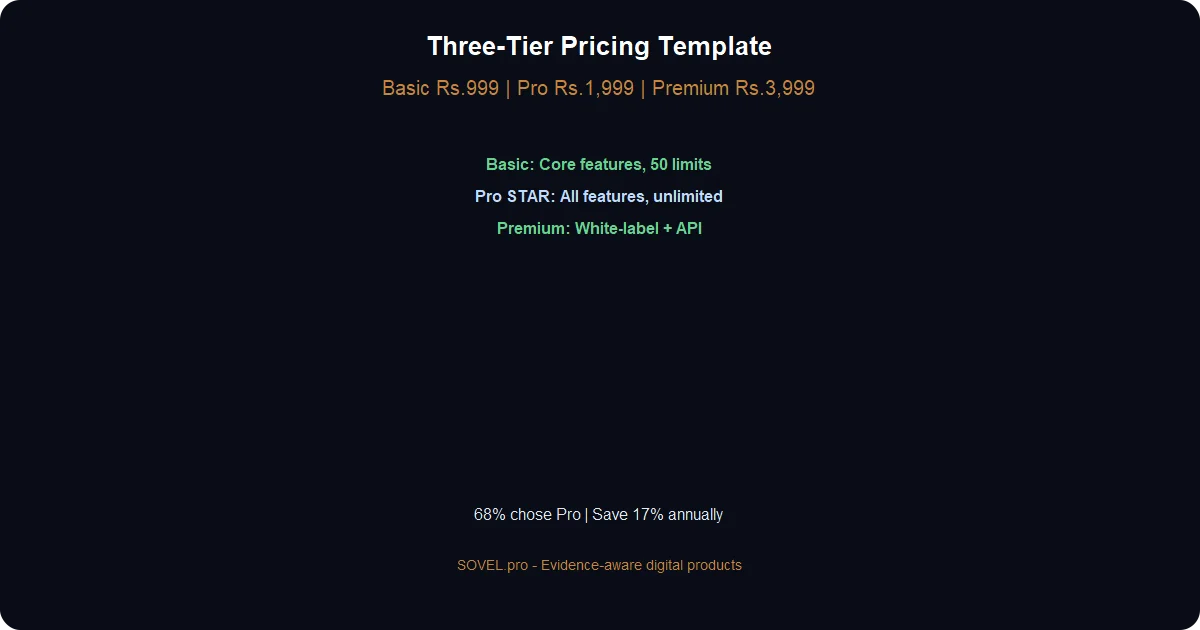
The 3-Tier Template
- Basic Tier:
- Price: ₹999/month or ₹9,990/year (save 17%)
- Features: Core functionality only
- Limits: Reasonable but feel restrictive (50 projects, 100 API calls/month)
- Target: Tire kickers, small teams testing
Pro Tier: ⭐ Mark as “Most Popular”
- Price: ₹1,999/month or ₹19,990/year
- Features: All features unlocked
- Limits: 10x higher (500 projects, 1,000 API calls/month) or “Unlimited”
- Target: 70% of customers should choose this
- Premium Tier:
- Price: ₹3,999/month or ₹39,990/year
- Features: Everything + white-label, API access, priority support
- Limits: Truly unlimited
- Target: 15-20% of customers (makes Pro look reasonable)
How to Set Prices (When You Have No Data)
- Step 1: Calculate your costs
- Hosting: ₹1,500/month
- APIs (if any): ₹500/month
- Tools: ₹300/month
- Total: ₹2,300/month
- Step 2: Set break-even point
You need 3 customers at ₹999 to break even (₹2,997 revenue vs. ₹2,300 costs).
- Step 3: Add margin for profit and growth
Multiply by 5-10x: ₹999 × 5 = ₹4,995.
That’s your maximum reasonable price for beginners: ~₹5,000/month.
- Step 4: Create tiers within that range
- Basic: ₹999 (low anchor)
- Pro: ₹1,999 (target price)
- Premium: ₹3,999 (high anchor)
The Anchor Pricing Trick
Make the middle tier obvious:
1. Add a badge: “Most Popular” or “Best Value” 2. Highlight visually: Border color, slight elevation 3. Add one killer feature: “Includes priority support” (costs you nothing) 4. Show savings: “Save ₹500/month vs. annual billing”
This pushes 60-70% of users to Pro tier automatically.
Free Trial vs. Free Tier (Definitive Answer)
- For beginners:
✅ Use: 7-day free trial
- Require credit card
- Auto-converts to paid
- No permanent free users
❌ Avoid: Free tier forever
- High costs, low conversions
- Only works with VC funding
- Trial best practices:
- 7 days is sweet spot (enough to test, short enough to decide)
- Send email on Day 1, 3, 5, 7 (engagement reminders)
- Require credit card (filters serious users)
- Make cancellation easy (builds trust)
Example: Build This Pricing Page in 2 Hours
Using AI Engineering OS, prompt:
Create a SaaS pricing page with:
- 3 tiers: Basic (₹999), Pro (₹1,999), Premium (₹3,999)
- Pro tier highlighted as "Most Popular"
- Feature comparison table
- 7-day free trial button (links to /signup)
- Annual billing option (show 17% savings)
- FAQ section below
- Responsive design, modern look
- Use warm paper background (#F6F1E8), amber accent (#C8853F)
AI Engineering OS generates HTML + CSS. Deploy in 30 minutes.
That’s how the [SOVEL.pro pricing pages](https://sovel.pro/ai-engineering-os/) were built—same workflow, same tools.
What’s Next: Scaling to ₹10L/Month
Once you’ve validated your first saas monetization strategy for beginners, scale with:
1. Add annual billing (12-month prepay at 17% discount) 2. Introduce usage-based overage (base + extra) 3. Launch on marketplaces (one lifetime deal campaign) 4. A/B test pricing (try ₹2,499 vs. ₹1,999 for Pro) 5. Add enterprise tier (custom pricing, only when you have demand)
I went from ₹78k in 90 days to ₹3.2L/month in 12 months using this progression.
The key: Start simple, iterate based on real data, don’t copy what works for funded startups.
SaaS monetization strategies for beginners aren’t about fancy models. They’re about picking one that fits your constraints, testing it, and optimizing.
Simple tiered pricing worked for me. It might work for you too.
Ready to build your SaaS? Get [AI Engineering OS](https://sovel.pro/ai-engineering-os/) to build the product, then use [Book Creation Engine](https://sovel.pro/book-creation-engine/) to document your pricing strategy and positioning.
Want more proof? See [real products built with SOVEL engines](https://sovel.pro/) or read about [building SaaS without coding skills](https://sovel.pro/building-saas-without-coding-skills/).
Related resources: Building SaaS without coding | Content gap analysis tutorial | AI Engineering OS | SOVEL Theme | Book Creation Engine