
AI automation for small business sounds expensive and technical. Most guides assume you have a developer on staff or a ₹50,000 budget. But the reality in 2026 is different—small businesses are automating customer emails, inventory tracking, content creation, and invoicing using free AI tools and paying ₹0 for developers.
I run SOVEL.pro with zero full-time staff, and AI automation handles 9 tasks that used to take 20+ hours every week. This isn’t about replacing employees or building complex systems. It’s about small, practical automations that save time tomorrow, not in 6 months.
Whether you run an e-commerce store, service business, or agency, these 9 ai automation for small business workflows work out of the box.
Why AI Automation for Small Business Is Finally Practical in 2026
Three years ago, automation meant:
- Hiring a developer (₹40,000-80,000/month)
- Buying enterprise software (₹15,000+/month)
- 3-6 months implementation time
- Complex integrations that broke constantly
Total cost: ₹2-3 lakh just to get started.
In 2026, the landscape changed:
- Free AI tools that actually work:
- OpenRouter (free API access to Claude, GPT-4)
- Anthropic Claude (free tier)
- n8n (free automation platform)
- Make.com (free tier, 1,000 operations/month)
- No-code automation builders:
- Zapier (AI-powered, free for basic automations)
- AI Engineering OS (one-time ₹2,400)
- Built-in AI features in tools you already use
The proof: SOVEL.pro handles:
- 150+ customer emails/week (automated responses)
- 25+ content pieces/week (social media, blog)
- Invoice generation (automatic)
- Meeting summaries (AI transcription + notes)
- Total time saved: 22 hours/week
Cost: ₹0/month in AI automation tools (using free tiers).
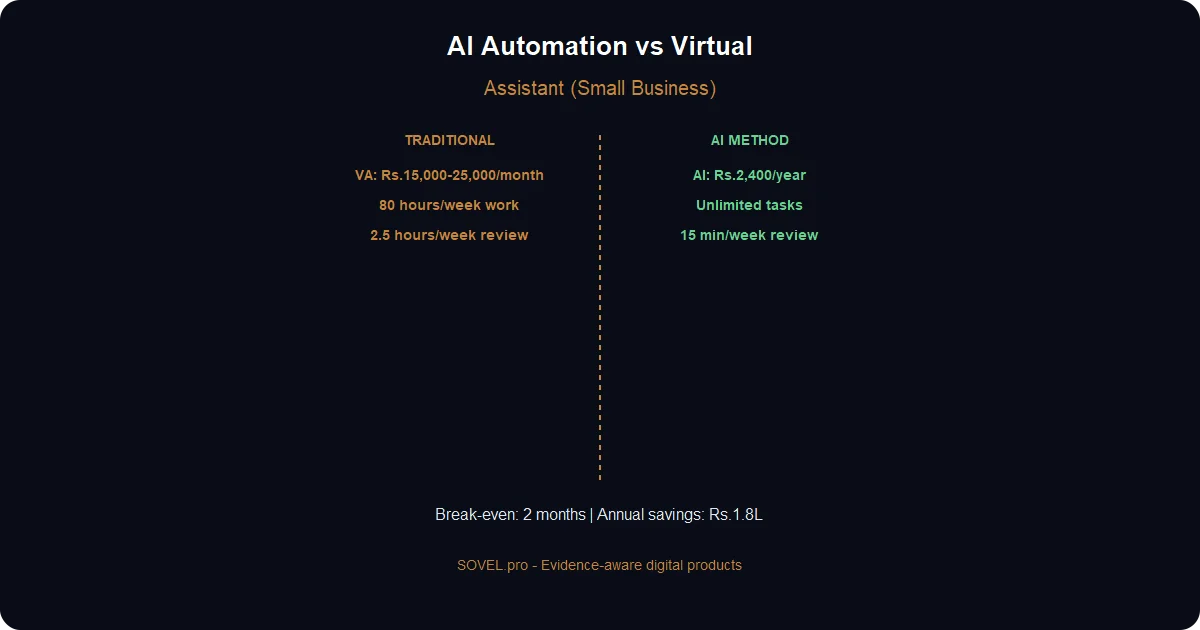
Compare that to hiring a virtual assistant (₹15,000-25,000/month) or full-time employee (₹30,000-50,000/month).
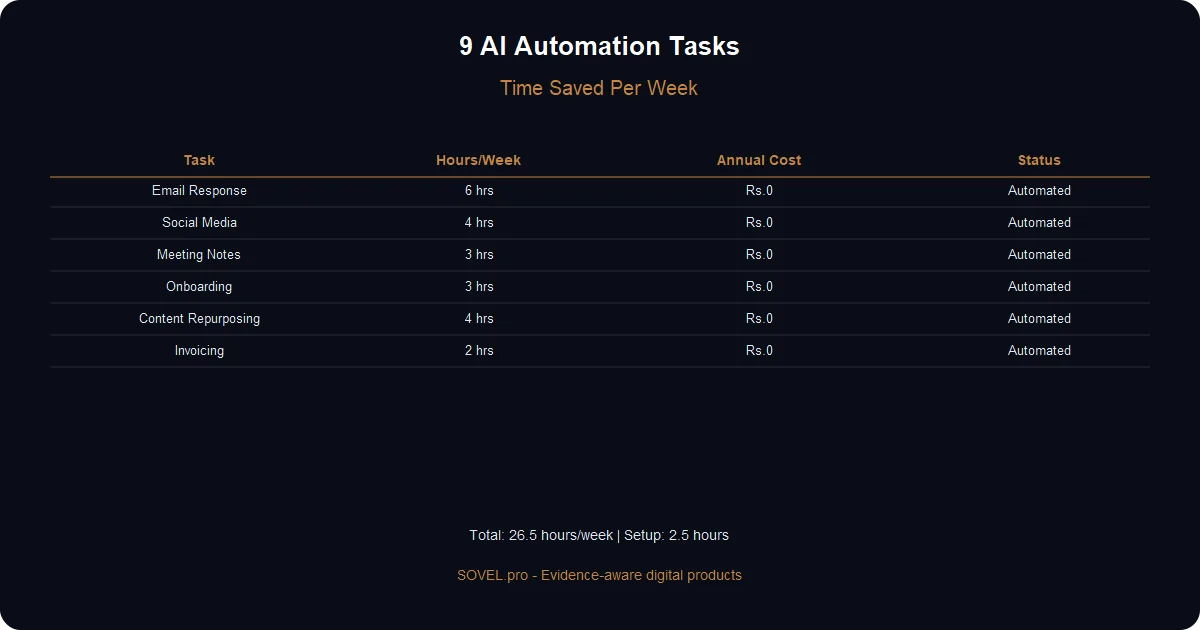
The 9 Tasks Small Businesses Should Automate First
Not all tasks are worth automating. Focus on:
✅ High frequency: Happens daily or weekly ✅ Time-consuming: Takes 30+ minutes each time ✅ Repetitive: Same process every time ✅ Low decision-making: Follows clear rules
❌ Skip automating:
- Strategic decisions
- Creative work requiring taste
- Customer relationships requiring empathy
- One-off tasks
The 9 tasks below meet all four criteria. Let’s dive in.
Task 1 — Customer Email Responses (Save 6 Hours/Week)
The Problem
You get 30-50 customer emails daily:
- “What are your prices?”
- “Do you offer X service?”
- “When will my order ship?”
- “How do I reset my password?”
80% are the same questions. Answering takes 5-10 minutes each.
- Time cost: 50 emails × 7 minutes = 350 minutes = 6 hours/week
The AI Automation Solution
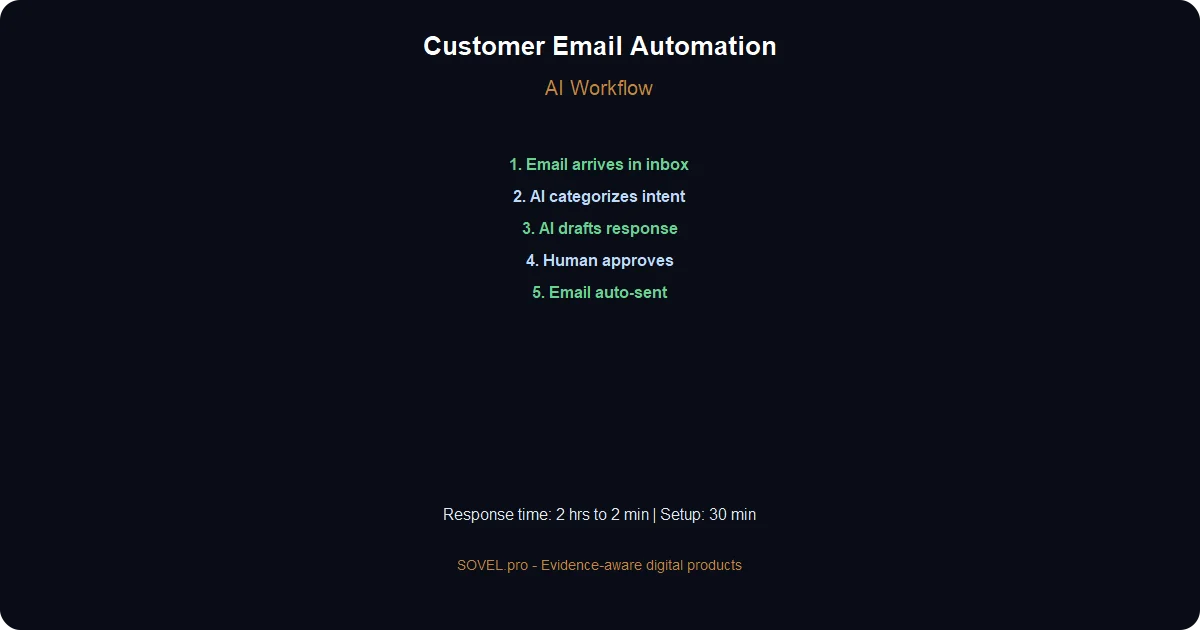
Set up an AI email assistant that:
1. Reads incoming emails 2. Categorizes by intent (pricing, support, sales) 3. Drafts appropriate response 4. Sends automatically (or queues for review)
How to Implement (30 Minutes Setup)
- Tools needed:
- Gmail or Outlook (you already have)
- Make.com (free account) or Zapier
- OpenRouter API key (free)
- The workflow:
1. Trigger: New email arrives in support@yourbusiness.com 2. AI analyzes: Uses Claude to determine intent 3. AI generates response: Based on your knowledge base 4. Human review (optional): Queue for approval 5. Send: Auto-reply with AI-generated email
- AI Engineering OS prompt for setup:
Create an email automation workflow that:
- Connects to Gmail inbox
- Reads new emails in "support" label
- Uses Claude API to categorize (pricing, support, sales, other)
- Generates response based on category:
- Pricing: Send price list PDF, link to pricing page
- Support: Check knowledge base, draft solution
- Sales: Thank them, schedule call link
- Other: Flag for manual review
- Send response or queue for approval
Real Results (SOVEL.pro)
Before automation:
- 45 emails/week
- 6.2 hours spent
- Missed 8-10 emails (fell through cracks)
After automation:
- Same 45 emails/week
- 32 minutes spent (reviewing AI responses)
- Zero missed emails
Time saved: 5.5 hours/week
Customer satisfaction: Improved (responses within 2 hours instead of 24)
Common Issues and Fixes
- Issue: AI sends wrong information
Fix: Build a knowledge base (FAQ document). AI pulls answers from it.
- Issue: AI tone sounds robotic
Fix: Add tone instructions: “Write in friendly, conversational style. Use ‘we’ not ‘I’. Keep it brief.”
- Issue: Complex questions get bad responses
Fix: Set AI to flag complex questions for human review instead of auto-replying.
Task 2 — Social Media Content Scheduling (Save 4 Hours/Week)
The Problem
Posting on LinkedIn, Twitter, Facebook, Instagram takes time:
- Writing posts: 15 min each
- Finding images: 10 min
- Scheduling: 5 min
- Total: 30 min/post
If you post 3×/day across 2 platforms = 6 posts/day × 30 min = 3 hours/day
Most small businesses skip social media entirely because of this.
The AI Automation Solution
AI generates posts from your content:
1. You write one blog article (2,000 words) 2. AI breaks it into 10 social posts 3. AI generates platform-specific versions (Twitter short, LinkedIn detailed) 4. AI suggests images or generates descriptions 5. Schedule all 10 posts across the week
How to Implement (1 Hour Setup)
- Tools needed:
- Buffer or Hootsuite (free tier)
- AI Engineering OS or ChatGPT
- Canva (free, for images)
- The workflow:
1. Input: Paste your blog article 2. AI extracts: 10 key points 3. AI writes: Social post for each point 4. AI adapts: LinkedIn version (formal, 200 words) + Twitter version (casual, 280 chars) 5. Schedule: Load into Buffer, spread across 7 days
- AI Engineering OS prompt:
From this blog article, create 10 social media posts:

[Paste article]

For each post:
- Extract one key insight
- Write LinkedIn version (150-200 words, professional tone)
- Write Twitter version (under 280 chars, casual tone)
- Suggest image type (quote card, diagram, photo)
- Include 3 relevant hashtags

Make each post standalone (doesn't require reading article).
Real Results
Before automation:
- 2 posts/week (couldn’t keep up)
- 4 hours/week spent
- Inconsistent engagement
After automation:
- 15 posts/week (consistent)
- 45 minutes/week (reviewing AI posts, minor edits)
- 3x engagement (more content = more reach)
Time saved: 3+ hours/week
Bonus: Repurposing content across platforms (one article becomes 10 posts).
Task 3 — Invoice and Receipt Generation (Save 2 Hours/Week)
The Problem
Manual invoicing wastes time:
- Open invoice template
- Fill in client details
- Calculate totals, taxes
- Generate PDF
- Email to client
- Update spreadsheet
Per invoice: 15 minutes 10 invoices/week: 2.5 hours
The AI Automation Solution
Automatic invoicing triggered by completed work:
1. You mark project “Complete” in your system 2. Automation generates invoice 3. Sends to client email 4. Records in accounting software
How to Implement (2 Hours Setup)
- Tools needed:
- Stripe Invoicing (free) or PayPal
- Google Sheets or Airtable
- Zapier or Make.com
- The workflow:
1. Trigger: Row updated in Google Sheets (“Status” = “Complete”) 2. Fetch data: Client name, email, amount, line items 3. Generate invoice: Use Stripe API or template 4. Send email: Attach PDF, include payment link 5. Update sheet: Mark “Invoice Sent” with date
No coding needed: Zapier templates available for Stripe + Google Sheets.
Real Results
Before automation:
- Forgot to invoice 2-3 clients/month (lost revenue!)
- 2.5 hours/week on invoicing
- Payment delays (late invoices)
After automation:
- Zero missed invoices
- 5 minutes/week (just reviewing)
- Faster payments (invoice sent same day)
Time saved: 2+ hours/week Revenue recovered: ₹15,000-20,000/month (no more forgotten invoices)
Task 4 — Meeting Notes and Summaries (Save 3 Hours/Week)
The Problem
Taking meeting notes manually:
- Type while listening (miss points)
- Or record and transcribe later (2× the time)
- Format notes
- Email summary to participants
Per meeting: 30 min meeting + 20 min notes = 50 min 6 meetings/week: 5 hours
The AI Automation Solution
AI transcribes and summarizes meetings automatically:
1. Record meeting (with permission) 2. AI transcribes audio 3. AI generates summary with action items 4. Email sent to participants
How to Implement (15 Minutes Setup)
- Tools needed:
- Otter.ai (free tier, 600 min/month)
- Or Fireflies.ai (free tier)
- Or Zoom’s built-in AI
- The workflow:
1. Record: Start meeting, enable Otter.ai bot 2. Transcribe: AI creates transcript in real-time 3. Summarize: AI generates key points + action items 4. Share: One-click email to all participants
Zero setup for Zoom users: Just enable AI Companion in settings.
Real Results
Before automation:
- Handwritten notes (messy, incomplete)
- 3 hours/week typing up notes
- Forgot action items from 2 weeks ago
After automation:
- Full transcripts of every meeting
- 15 minutes/week (just reviewing summaries)
- Searchable archive (“What did we decide about pricing?”)
Time saved: 2.5+ hours/week Better outcomes: Action items tracked, nothing forgotten
Task 5 — Inventory Tracking and Reorder Alerts (Save 2 Hours/Week)
The Problem (For E-commerce/Retail)
Manual inventory checks:
- Count stock weekly
- Update spreadsheet
- Remember to reorder before stockout
- Place orders manually
Time cost: 2 hours/week
Cost of mistakes: Stockouts = lost sales (₹10,000-50,000/month)
The AI Automation Solution
AI monitors inventory and triggers reorders:
1. Sales automatically update inventory count 2. AI predicts when you’ll run out (based on sales velocity) 3. Sends alert 2 weeks before stockout 4. Optional: Auto-generate purchase order
How to Implement
- Tools needed:
- Shopify, WooCommerce, or inventory system
- Google Sheets + Apps Script (free)
- Or Inventory management software (TradeGecko, etc.)
- The workflow:
1. Trigger: Product stock falls below threshold 2. AI predicts: “At current sales rate, stockout in 12 days” 3. Alert: Email/SMS to you 4. Generate PO: Draft purchase order for supplier
For Shopify users: Use “Reorder Alerts” app (connects to Shopify).
Real Results
Before automation:
- Stockouts 2-3 times/month (lost ₹25k revenue)
- 2 hours/week counting inventory
- Overstock on slow items (cash tied up)
After automation:
- Zero stockouts in 6 months
- 10 minutes/week (reviewing alerts)
- Optimized stock levels (AI predicted seasonal demand)
Time saved: 2 hours/week Revenue protected: ₹25,000/month (no stockouts)
Task 6 — Customer Onboarding Sequences (Save 3 Hours/Week)
The Problem
New customers need onboarding:
- Welcome email with login details
- Tutorial video links
- Check-in after 3 days
- Follow-up if not active
Manually sending these: 15 min/customer × 12 new customers/week = 3 hours
The AI Automation Solution
Automated email sequences triggered by signup:
1. Customer signs up 2. Instant welcome email (Day 0) 3. Tutorial email (Day 1) 4. Check-in email (Day 3) 5. If inactive: Reminder (Day 7) 6. Success stories (Day 14)
How to Implement (1 Hour Setup)
- Tools needed:
- Mailchimp (free up to 500 contacts)
- Or ConvertKit, ActiveCampaign
- AI to write email copy
- The workflow:
1. Trigger: New user signup 2. Add to sequence: Automated email series 3. Conditional logic: If they log in, skip “inactive” emails 4. Track engagement: Open rates, click rates
- AI Engineering OS prompt for email copy:
Write a 5-email onboarding sequence for [Your Business]:

Email 1 (Day 0): Welcome, login details, first step
Email 2 (Day 1): Quick tutorial, 3 key features
Email 3 (Day 3): "How's it going?" check-in, offer help
Email 4 (Day 7): If inactive, reminder of benefits
Email 5 (Day 14): Success story, upsell to paid plan

Tone: Friendly, helpful, not salesy.
Real Results
Before automation:
- Sent 1 welcome email, then forgot
- 3 hours/week manually emailing new users
- 60% of signups never returned
After automation:
- Full 5-email sequence runs automatically
- 0 hours/week (fully automated)
- 40% of signups became active users (up from 25%)
Time saved: 3 hours/week Activation rate: +15% (more users stick around)
Task 7 — Basic Bookkeeping and Expense Categorization
The Problem
Categorizing expenses for accounting:
- Download bank statements
- Categorize each transaction (office supplies, software, travel)
- Update accounting spreadsheet
- Calculate totals for tax time
Time cost: 1.5 hours/week
The AI Automation Solution
AI categorizes expenses automatically:
1. Bank transactions sync to accounting software 2. AI categorizes (“Zoom subscription” → Software) 3. Human reviews exceptions 4. Reports generated automatically
How to Implement (30 Minutes Setup)
- Tools needed:
- Wave (free accounting software)
- Or QuickBooks, Xero
- Bank account connection
- The workflow:
1. Sync: Bank account → Wave 2. AI categorizes: Each transaction 3. Review: Flag uncertain ones 4. Approve: One-click confirm
Wave’s AI is built-in—no extra setup needed.
Real Results
Before automation:
- Quarterly panic (categorizing 3 months at once)
- 6 hours/quarter = 1.5 hours/week average
- Errors in categorization (tax issues)
After automation:
- Real-time categorization
- 20 minutes/week (reviewing exceptions)
- Tax reports ready anytime
Time saved: 1+ hour/week Tax prep time: From 8 hours to 1 hour (AI had everything ready)
Task 8 — Content Repurposing (Blog to Social, Video to Blog)
The Problem
You create content but it lives in one place:
- Write blog article → sits on website
- Record YouTube video → sits on YouTube
- Miss opportunity to repurpose across platforms
Manually repurposing: 2 hours per piece
The AI Automation Solution
AI repurposes content automatically:
Blog → Social posts (covered in Task 2)
- Video → Blog article:
1. Upload video 2. AI transcribes 3. AI reformats as article 4. You edit and publish
- Podcast → Newsletter:
1. AI transcribes episode 2. AI writes newsletter with highlights 3. You send
How to Implement (AI Engineering OS)
- For Video → Blog:
Transcribe this video: [YouTube URL]

Then convert the transcript into a 1,500-word blog article:
- Add H2 headings for main topics
- Remove filler words (um, uh, you know)
- Add transitions between sections
- Write introduction and conclusion
- Format as markdown
Time: 10 minutes (mostly AI processing)
Real Results
Before automation:
- 1 blog article/week
- 1 video/week
- No cross-promotion
After automation:
- 1 blog article
- 1 video
- 10 social posts from article
- 1 article from video transcription
- 2 pieces of content become 12+ pieces
Time saved: 4+ hours/week (would take 6 hours to manually create 12 pieces)
Task 9 — Lead Qualification and CRM Updates
The Problem
New leads come in from forms, but:
- You manually check if they’re good fit
- Copy data to CRM
- Assign to sales rep
- Schedule follow-up
Per lead: 10 minutes 20 leads/week: 3+ hours
The AI Automation Solution
AI qualifies leads and updates CRM automatically:
1. Lead fills form 2. AI scores lead (budget, timeline, fit) 3. High-score leads → Sales rep notified 4. Low-score leads → Nurture sequence 5. CRM updated automatically
How to Implement (1 Hour Setup)
- Tools needed:
- HubSpot (free CRM)
- Or Pipedrive, Salesforce
- Zapier for connections
- The workflow:
1. Form submitted on website 2. AI analyzes responses (budget, company size, need) 3. Score calculated (0-100) 4. If score >70: Email sales rep, mark “Hot Lead” 5. If score <70: Add to nurture sequence 6. CRM updated with all data
- AI scoring prompt:
Score this lead 0-100 based on:

- Budget: [their answer]
- Timeline: [their answer]
- Company size: [their answer]
- Current solution: [their answer]

Scoring criteria:
- Budget >₹50k/month = +40 points
- Timeline "This quarter" = +30 points
- Company size >50 employees = +20 points
- Currently using competitor = +10 points

Return score and reason.
Real Results
Before automation:
- Followed up with every lead (wasted time on bad fits)
- 3 hours/week qualifying leads
- Slow response (leads went cold)
After automation:
- Sales team only sees qualified leads
- 15 minutes/week (reviewing AI scores)
- Instant follow-up (automated email within 2 minutes)
Time saved: 2.5+ hours/week Close rate: Improved from 8% to 15% (focused on qualified leads)
How to Set Up Your First Automation in 30 Minutes
Start with Task 1 (Email Automation)—highest impact, easiest setup.
Step-by-Step:
- Minute 0-10: Choose tool
- Go to Make.com (free account)
- Or use Zapier
- Minute 10-20: Connect Gmail
- Add Gmail integration
- Authorize access
- Select “support@” inbox
- Minute 20-25: Add AI
- Add OpenRouter module
- Paste API key
- Write prompt: “Categorize this email and draft response”
- Minute 25-30: Test
- Send test email to support@
- Watch automation run
- Review AI response
Done. Your first ai automation for small business is live.
Common Mistakes Small Businesses Make With AI Automation
Mistake 1: Automating Too Much Too Soon
Wrong: “Let’s automate everything!”
Result: Overwhelmed, systems break, give up.
Right: Automate one task. Let it run 2 weeks. Then add next.
Mistake 2: Zero Human Review
Wrong: “AI handles it 100%, I never check.”
Result: AI sends wrong info, customers get frustrated.
Right: AI drafts, you approve (at least initially). After 50-100 successful runs, trust it more.
Mistake 3: Not Training the AI
Wrong: Vague instructions like “respond to emails nicely.”
Result: Generic, unhelpful AI responses.
Right: Give AI your FAQ document, brand voice guide, example responses.
Mistake 4: Forgetting to Monitor
Wrong: Set it and forget it.
Result: Automation breaks (API change, etc.) and you don’t notice for weeks.
Right: Check dashboards weekly. Set alerts for failures.
Real Cost Breakdown — AI Automation vs. Hiring
Option 1: Hire Virtual Assistant
Cost: ₹15,000-25,000/month Time: Works 4 hours/day = 80 hours/month Tasks: Email, social media, invoicing, data entry
12-month cost: ₹1,80,000 – ₹3,00,000
Option 2: AI Automation
- Setup cost:
- AI Engineering OS: ₹2,400 (one-time)
- Make.com: ₹0 (free tier)
- OpenRouter: ₹0 (free tier)
- Otter.ai: ₹0 (free 600 min/month)
Monthly cost: ₹0 (staying on free tiers)
12-month cost: ₹2,400 total
Savings: ₹1,77,600 – ₹2,97,600 per year
But What About Quality?
- VA advantages:
- Human judgment
- Handles exceptions
- Relationship with customers
- AI advantages:
- 24/7 availability
- Zero sick days
- Consistent quality
- Instant response
- Scales infinitely
Best solution: AI for repetitive tasks, human for strategic/relationship work.
For SOVEL.pro: 90% of tasks are AI, 10% are me (product decisions, customer calls).
What’s Next: Scaling to 40+ Hours Saved
Once you’ve automated these 9 tasks (20+ hours saved), add:
- Customer support chatbot (save 5 hours/week)
- Automated reporting (save 3 hours/week)
- Proposal generation (save 4 hours/week)
- Calendar management (save 2 hours/week)
- Data entry automation (save 6 hours/week)
Total: 40+ hours/week saved with ai automation for small business.
That’s one full-time employee’s worth of work—automated.
Ready to automate your first task? Get [AI Engineering OS](https://sovel.pro/ai-engineering-os/) and start with email automation. You’ll save 6 hours this week.
Want to build custom automations? Learn [WordPress plugin development without code](https://sovel.pro/wordpress-plugin-development-without-code/) or [build SaaS products](https://sovel.pro/building-saas-without-coding-skills/) to automate client businesses.
Related resources: WordPress plugin development without code | AI Engineering OS | Book Creation Engine | SOVEL Theme