
People arguing about agent performance talk past each other constantly, and the reason is usually the same: one person is talking about the context window and the other is talking about memory, while both say “memory.” The context vs memory distinction sounds like jargon splitting, but it decides what your agent knows at 11 pm, what it costs per hour, and why a model upgrade sometimes makes your workflow worse instead of better.
Here is the short version. Context is what the model can see right now. Memory is what survives after the session ends. They live in different places, they cost different amounts, and they fail in different ways. An agent with a huge context window and no memory is a goldfish with a bigger bowl. An agent with memory and a tiny window is a librarian reading through a keyhole. Most teams need to fix the second problem and stop throwing money at the first.
This article separates the two ideas cleanly, shows the three differences that actually matter, explains the research on why bigger windows keep disappointing people, and ends with a simple decision rule for what your workflow needs. If you have ever lost an afternoon to an agent that forgot what it decided that morning, the context vs memory distinction is where the fix starts.

Context vs memory: the direct answer
Direct answer: context is the text an AI model can attend to during the current request, including your prompt, the conversation so far and any tool output. Memory is a separate storage layer that persists information across requests and sessions, and feeds selected facts back into context when they are needed. Context evaporates; memory persists. The context vs memory question is really a question about where knowledge lives and for how long.
A useful way to hold the two ideas is to picture a desk and a filing cabinet. The context window is the desk. Whatever fits on the desk is what the model can work with in this moment, and the desk gets cleared after every exchange. Memory is the filing cabinet in the corner. It keeps the project decisions, the failed attempts, the preferences you stated once, and it hands a folder back to the desk when the work calls for it. Nearly every confused conversation about context vs memory is two people arguing about different furniture.
Both are measured in tokens, the small chunks of text that models read and write and bill you for. That shared unit is exactly why the two get confused. They are measured the same way but they behave nothing alike. The context vs memory confusion survives because the vocabulary overlaps while the behaviour does not.
Difference 1: lifespan
The first difference is lifespan, and it is the one that bites hardest in real work. Context is disposable by design. When your session ends, or when the window overflows and older material gets trimmed, what was in context is gone unless something wrote it down. Memory exists to be the something that writes it down. This is why agents feel brilliant at minute five and estranged at hour three: the early understanding was living on the desk, and the desk gets cleared.
The practical symptom shows up across days. You explain on Monday that the project uses the old parser for legacy routes. On Wednesday the agent cheerfully rewrites a legacy route with the new parser, because the Monday explanation lived in a session that no longer exists. Nothing about the model got worse. The knowledge just never left the desk.
Difference 2: cost behaviour
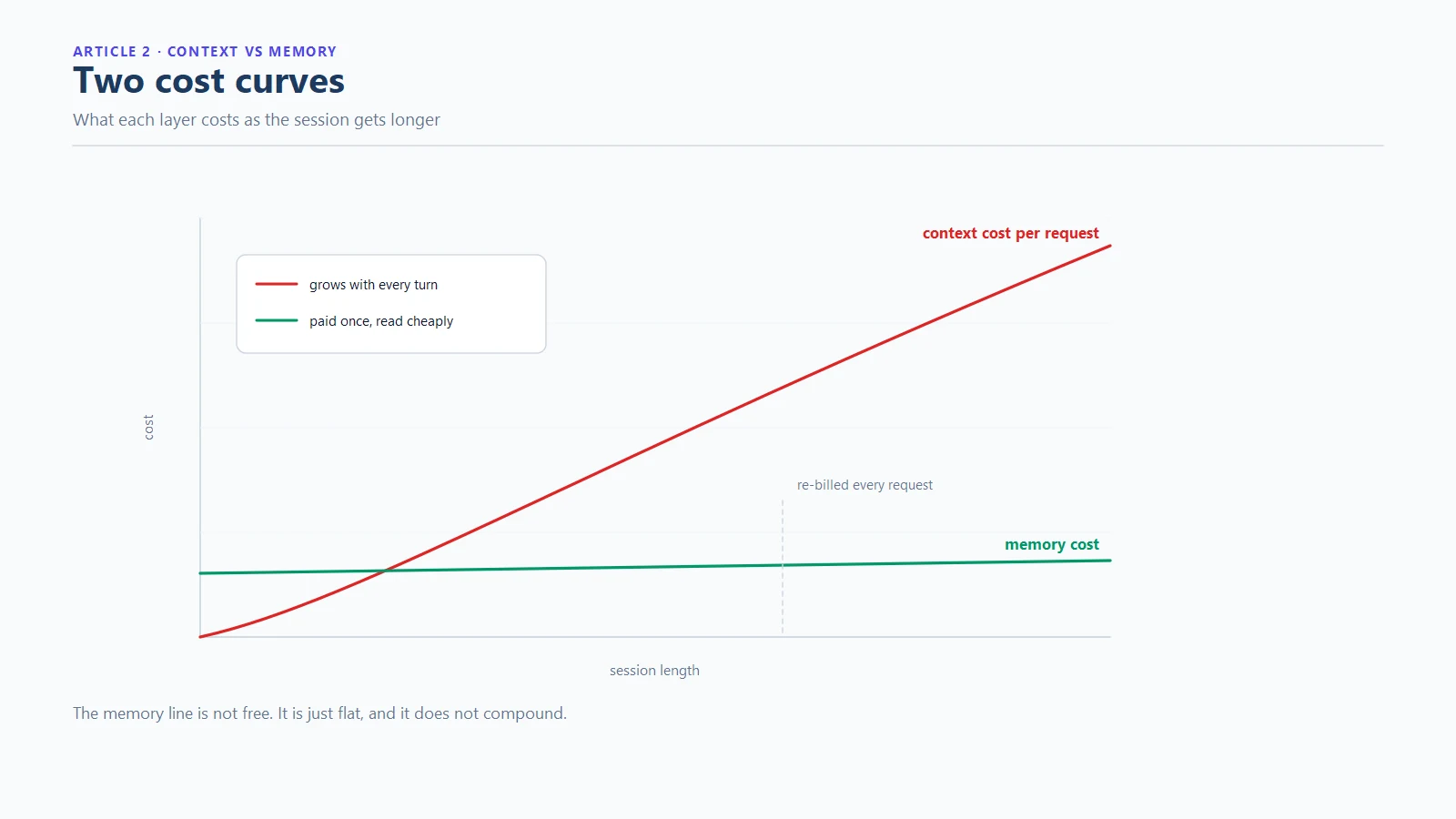
The second context vs memory difference is how each one charges you. Context has a per-request cost that scales with its size. Every time you send a message, the entire conversation window goes back to the model, and you pay for all of it again. A long session does not cost more once; it costs more on every single step. Memory, done properly, costs storage, which is measured in kilobytes and priced like nothing, plus the small retrieval cost of injecting a summary when needed.
This asymmetry is the whole economics of the context vs memory debate in one sentence: context re-bills you for everything every time, memory bills you once to remember. Teams that hit surprising API bills at the end of the month are usually paying for context bloat, a window stuffed with old tool output that nobody trimmed, rather than for the work itself.
Difference 3: failure mode
The third context vs memory difference is how each one breaks. Context fails by degradation. Research on long contexts has repeatedly found that models use the middle of a long window worse than the start and end, and performance on complex tasks falls as the window fills. Research groups measuring long-context behaviour have recorded task accuracy falling by more than half as input complexity grows, and the 2026 literature on context rot keeps confirming the trend, which is the kind of finding that rearranges your assumptions about bigger windows.
Memory fails differently: by absence or staleness. If nothing was stored, the agent repeats work it already did, which is how an AI coding agent doom loop gets its fuel. If something stale was stored, the agent confidently uses yesterday’s decision on today’s problem. Both failures are fixable with storage discipline, which is a fundamentally better position than fighting degradation with more tokens.

Context vs memory at a glance
Before the deeper sections, here is the whole context vs memory comparison in one table. It is the cheat sheet version of everything this article argues, and it is worth bookmarking for the next time a tool vendor uses the word memory loosely.
| Context window | Memory layer | |
|---|---|---|
| What it is | What the model can attend to right now | What persists across requests and sessions |
| Lifespan | One request, then cleared or trimmed | Until deleted; survives restarts |
| Lives in | The model provider’s request payload | Your disk or your chosen store |
| Cost shape | Re-billed in full on every request | Paid once to store, cheap to retrieve |
| Fails by | Degradation as it fills | Absence or staleness |
| Fix for failure | Trim, summarise, or accept the rot | Write the right facts, refresh them |
| Who controls it | The tool and the provider | You, with the right tooling |
Why a bigger context window is not the fix
The reflexive response to agent forgetfulness is to buy a bigger window. It is an understandable reflex and, in most workflows, an expensive mistake, because it answers the wrong half of the context vs memory question. Three things go wrong when you scale the desk instead of adding the cabinet.
First, degradation does not reverse with size. The research above is not about small windows failing; it is about what happens as inputs grow, and the trend is unkind at every size. A million-token window gives you room to lose more, not a reason to lose less.
Second, cost compounds. Because the full window is re-billed on every request, doubling your working window roughly doubles the token bill of every step in a long session. The bigger desk makes every letter on it more expensive to keep looking at.
Third, relevance does not scale. An agent staring at 400,000 tokens of history has a needle-finding problem on every step. What it needs at decision time is the 200 tokens that matter, not the 400,000 that once happened. That selection is exactly what a memory layer with dense summaries provides, which is why the context vs memory choice ends the same way for almost every long-running workflow: the window is a budget to protect, and memory is the tool that protects it.
There is also a quieter point underneath the pricing. A bigger window changes what you pay a vendor every month. A memory layer changes what your agent knows forever. One is rent, the other is an asset, and the asset appreciates as the project accumulates decisions worth keeping.

What belongs in memory, and what belongs in context
Once the two layers are separate, allocation becomes a design question instead of a complaint. The context vs memory split below is the one that has held up across the projects we have watched succeed. A workable split looks like this:
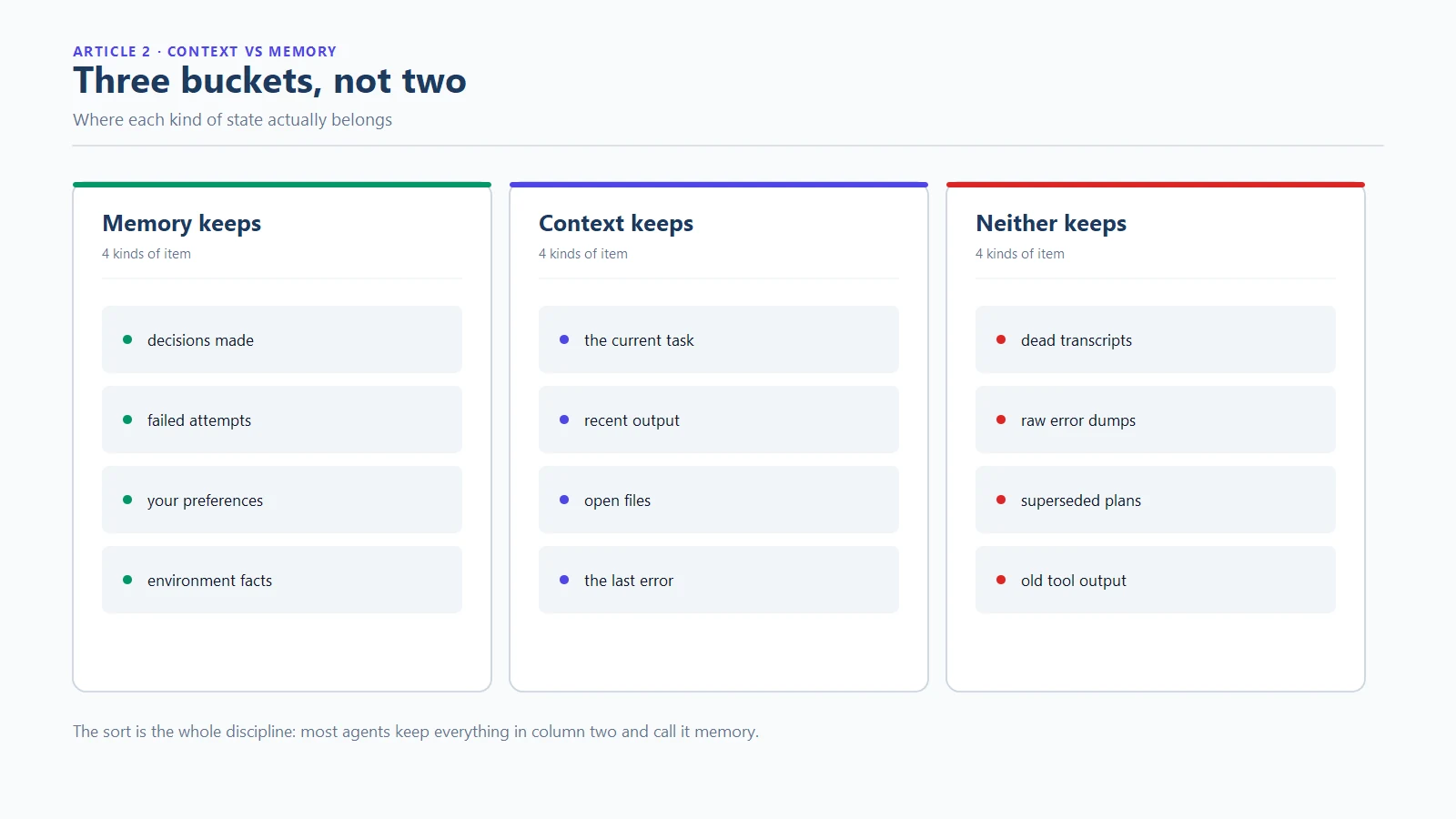
- Memory keeps: project decisions and their reasons, the record of failed attempts, user preferences stated once, environment facts such as build commands and test entry points, and anything a new session would need to avoid re-deriving it
- Context keeps: the current task, the files being edited right now, the last few exchanges, current tool output, and the compact memory summary injected at turn start
- Neither keeps: full transcripts of old sessions, dead-end explorations, and error dumps from solved problems. This is the material that bloats context and helps nobody
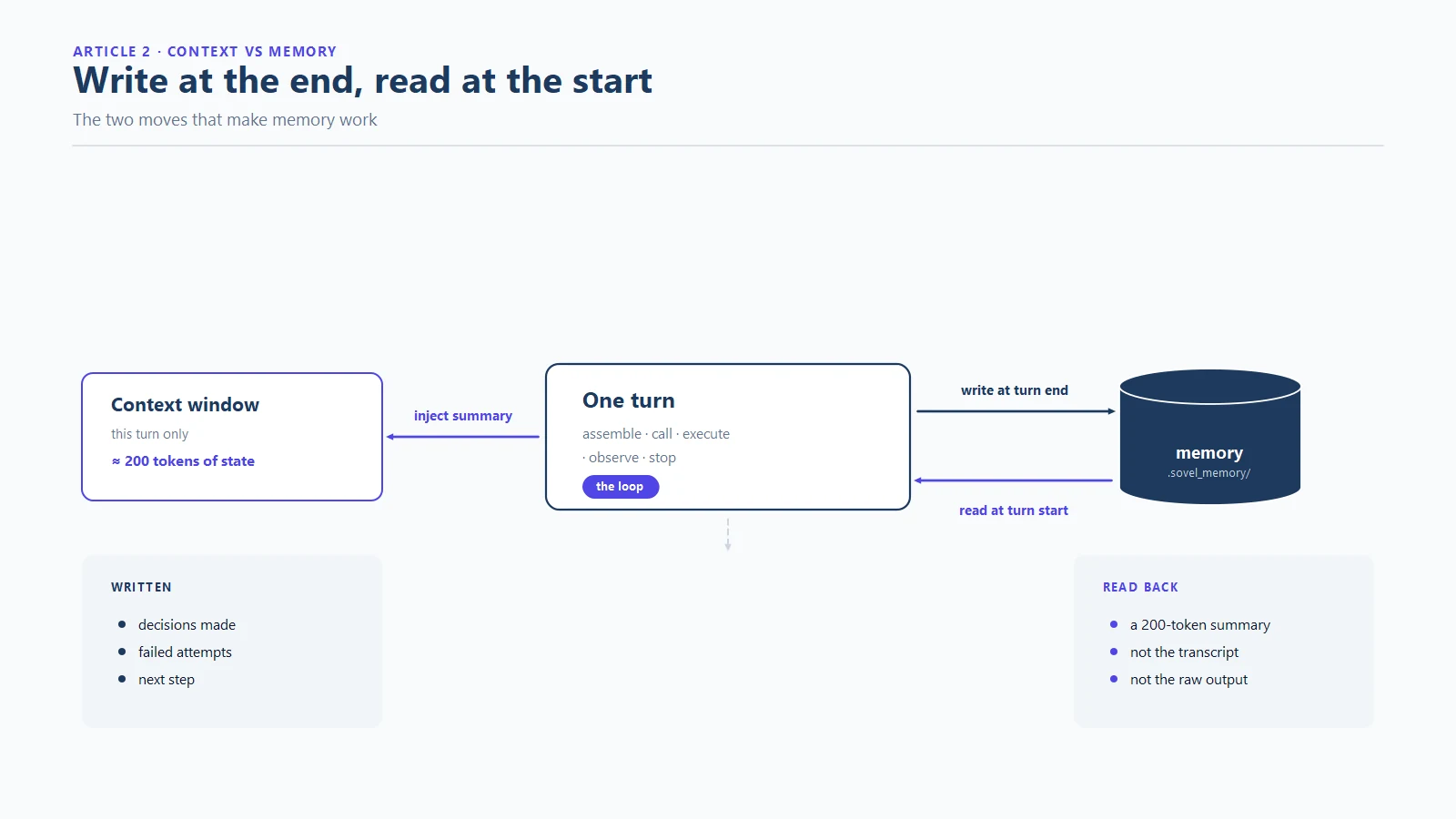
Teams that write this split down tend to converge on the same insight: the memory layer is small and dense, and its density is the feature. A 200-token summary of what happened before beats 40,000 tokens of transcript on price, and it beats it on the model’s ability to actually use what it is reading.
How the two layers connect in practice
Understanding context vs memory as separate layers is only useful once they are wired together. The connection is a read-and-write cycle. At the end of a turn, the memory layer records what changed: decisions made, attempts failed, facts learned. At the start of the next turn, it hands back a dense summary. The agent experiences this as continuity, the same way you experience walking into a kitchen and remembering where the cups are without re-inventing the kitchen.
Implemented seriously, the cycle needs durable storage, and the boring choice is the right one. A local SQLite database, the open embedded database format, survives restarts, opens with standard tools, and keeps the whole memory layer on your own disk. The context vs memory question then resolves into an architecture you can inspect: a window you budget, a cabinet you own, and a small, fast bridge between them.
Choosing what your workflow actually needs
Every context vs memory debate ends at the same place: what does your specific workflow need? A short decision rule saves more money than any model upgrade:
- Forgetting within one session? That is a context management problem. Trim old tool output, summarise completed subtasks, and keep the window working on the current step.
- Forgetting between sessions? That is a memory problem, full stop. No window size fixes it, because the session ended. You need persistent storage with a retrieval path.
- Repeating the same failed fix? That is both at once: no memory of the attempt and a polluted window pushing the retry. The doom loop article covers the mechanics and the fixes.
- Bills growing faster than output? Audit the window. Most surprise invoices are context bloat wearing a work costume.
That is the whole context vs memory decision in four lines. If your answers point at memory, the next article in this series is the practical one: persistent memory for AI coding agents, which walks through five architecture patterns and where each one breaks. For the engine that implements the whole stack locally, the SOVEL Net-Routed Agentic OS product page has the details, and our piece on zero-search-volume keywords explains why we write the topics forums argue about and tools ignore.
Frequently asked questions
What is the difference between context and memory in AI agents?
Context is what the model can attend to during the current request; it is cleared or trimmed when the session moves on. Memory is a storage layer that persists across requests and sessions and feeds a dense summary back into context when needed. The context vs memory distinction is about lifespan and control: context evaporates, memory persists, and you own only one of them by default. Every other difference in this article follows from that one.
Does a bigger context window replace memory?
No. A larger window delays degradation and raises cost on every request, but it cannot survive a session ending. Memory is a different layer with a different job, and in the context vs memory pairing the two work together rather than substituting for each other.
What is context rot?
Context rot is the measured decline in model performance as inputs grow longer or more complex. A 2026 study recorded task accuracy falling from 73 percent to 33 percent as complexity increased. The practical lesson is that more input is not more capability, and stuffed windows actively hurt output quality. It is also the strongest argument in the context vs memory debate: degradation is a property of the window, not of the memory layer.
Where should agent memory be stored?
The storage question is where context vs memory stops being theoretical, because memory is the layer you actually own. For coding agents working on private code, local storage is the defensible default: a SQLite database in the project folder keeps memory on your disk, survives restarts, and never sends project context to a third party. Hosted memory services exist and suit hosted applications, but they hold your context on someone else’s servers and bill monthly.
How much does context cost compared with memory?
Context re-bills in full on every request, so a long window multiplies the cost of every step in a session. Memory costs a one-time write and a small retrieval, typically a few hundred tokens per turn for a dense summary. Over a month of agent work, the difference is usually the largest line item you can remove.
Can an agent have memory without a big context window?
Yes, and it is the better shape. A small window plus a dense memory summary keeps every request cheap and focused, because the agent reads the 200 tokens that matter instead of re-reading everything that ever happened.
The desk gets cleared. The cabinet should be yours.
The context vs memory distinction is small vocabulary and large consequences. Context is the desk: fast, expensive, cleared after every exchange. Memory is the cabinet: slow in a good way, cheap to keep, and the only reason Wednesday’s agent knows what Monday’s agent decided. Teams that stop confusing the two stop paying for the confusion, and their overnight runs come back with continuity instead of amnesia.