
Directory prospecting starts with a page you did not build and do not own. A trade association publishes its members, a chamber lists local employers, a supplier names the businesses that resell its product, and an editor rounds up the best shops in a city. Each page is a shortlist somebody else assembled, and each one is free to read.
The short answer: directory prospecting is the practice of reading a public page that lists businesses, following each business to its own site, and recording a source URL for every field. You start from the list page, treat the company site as the primary source, and remove duplicate domains before anything reaches your outreach list.
The method suits anyone who sells to businesses that join things. Every trade has a body that publishes a list, and most of those lists open without an account. That is the whole opportunity: a page of names, published on purpose.
What are the five steps of directory prospecting?
- Pick a directory whose members are your buyers.
- Read its rules and its robots file before you read the list.
- Fetch the list page and open the profiles it links to.
- Take the external links as the real businesses.
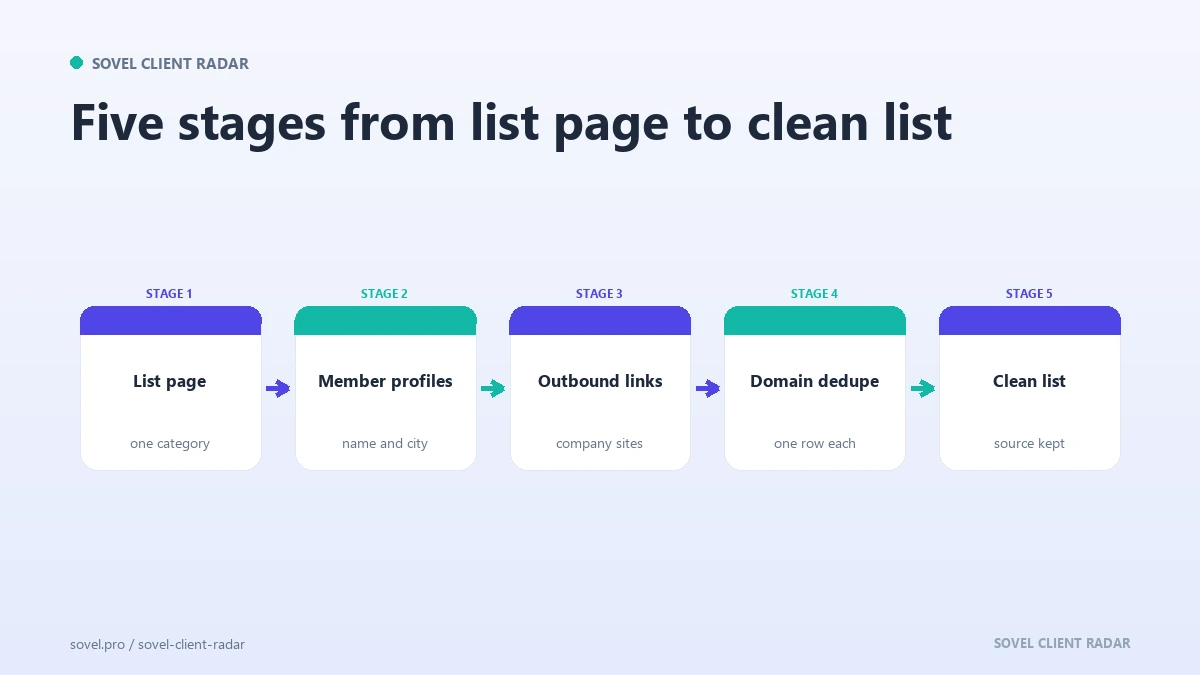
- Dedupe domains, then build the list with a source on every row.
The fourth step is where most people go wrong. The directory’s own profile is a summary written to keep you on the site. The business’s website is the evidence, and directory prospecting only starts to work when you get there.
Step 1: pick the right directory
Four types cover almost every market in directory prospecting, and each one carries a different bias.
| Directory type | Who appears on it | Coverage | Best for | Watch out for |
|---|---|---|---|---|
| Trade association member list | Businesses that hold a licence, a certification or a paid membership | National, sometimes regional | Trades, clinics, studios, professional services | Membership skews to established firms |
| Chamber list | Local employers with a paid membership | One town or district | Service businesses with a physical presence | Small towns may list the same firm twice |
| Supplier or partner page | Businesses that resell, implement or distribute a product | Global, uneven by region | Agencies, integrators, resellers | A logo does not prove a current relationship |
| Curated roundup | Businesses an editor chose to feature | One city or one niche | Retail, hospitality, local services | The page may be an advertisement |
A trade association member list is the strongest starting point for most sellers, because membership is a paid decision and someone has an interest in keeping the entries current. A curated roundup is the fastest way into a city you do not know and the weakest on completeness.
The first decision in how to prospect from a directory is not the town or the offer. It is which page has already done the filtering for you. Pick one type and one page. Five directories for the same town mostly produce the same businesses under different layouts, which is a duplication problem you create before you start. Directory prospecting rewards depth on one page more than coverage across ten.
What does a directory add that a search engine does not?
Curation, and a date. That curation is the part of directory prospecting a search engine cannot give you. A search engine returns pages that match a phrase. A directory returns businesses that someone decided to include, often after a payment, a certification or an editorial choice.
That decision carries information. A member directory tells you the business invests in being found. A supplier page tells you it has a commercial relationship. A roundup tells you an editor thought it was worth naming. None of that guarantees a buyer, and all of it gives you a better opening sentence than a search result ever will.
The date matters just as much. A page updated this year is a live map of a market. A page updated four years ago is history, and directory prospecting on stale data wastes the one resource you cannot recover, which is attention.
Step 2: read the rules before you read the list
In directory prospecting, two documents decide what you may do: the robots file and the terms page.
The robots file tells automated clients which paths they may read. Google’s introduction to the Robots Exclusion Protocol explains the syntax and the reasoning. If the member list sits on a disallowed path, that is the end of the discussion for an automated run. Open the page by hand or choose a different source.
The terms page answers a different question: what you may do with the data. Reading a public list to find businesses is ordinary research. Copying the database, republishing entries on your own site or reselling the list is a different act, and most directories forbid it in plain language.
Speed is the other rule. A directory that serves twenty pages to a careful reader can serve the same twenty to a careless one. Two seconds between requests to the same host is enough, and a cache means a recheck in the same week costs the site nothing.
Three habits keep the work defensible. Read one page at a time, wait between requests, and say who you are if the site asks. Directory prospecting that skips those habits produces a source you cannot use twice.
Step 3: fetch the list page
The list page is the entry point for any directory prospecting session. Read it as a person would: find the section that matches your buyer, note whether it paginates, and check whether each row carries a website link.
Three shapes appear most often. A plain HTML table is the easiest and the most common. A paginated list spreads the members over twenty pages, and each page has to be fetched in order. A PDF member list is a snapshot that may be a year old, so the date on the document is the first thing to check.
Directory prospecting gets harder when the rows are built by JavaScript after the page loads. A plain fetch sees an empty container. Open the page in a browser, confirm whether the content is there, and if it is not, move on.
If you run the route through SOVEL CLIENT RADAR, the list page URL goes on the command line. The engine reads that page under the same rules as everything else, follows up to twelve same-host profiles, and takes the external links as candidate businesses. Rows that point back at the directory are dropped, because a link to the directory is not a business.
Step 4: read every profile page
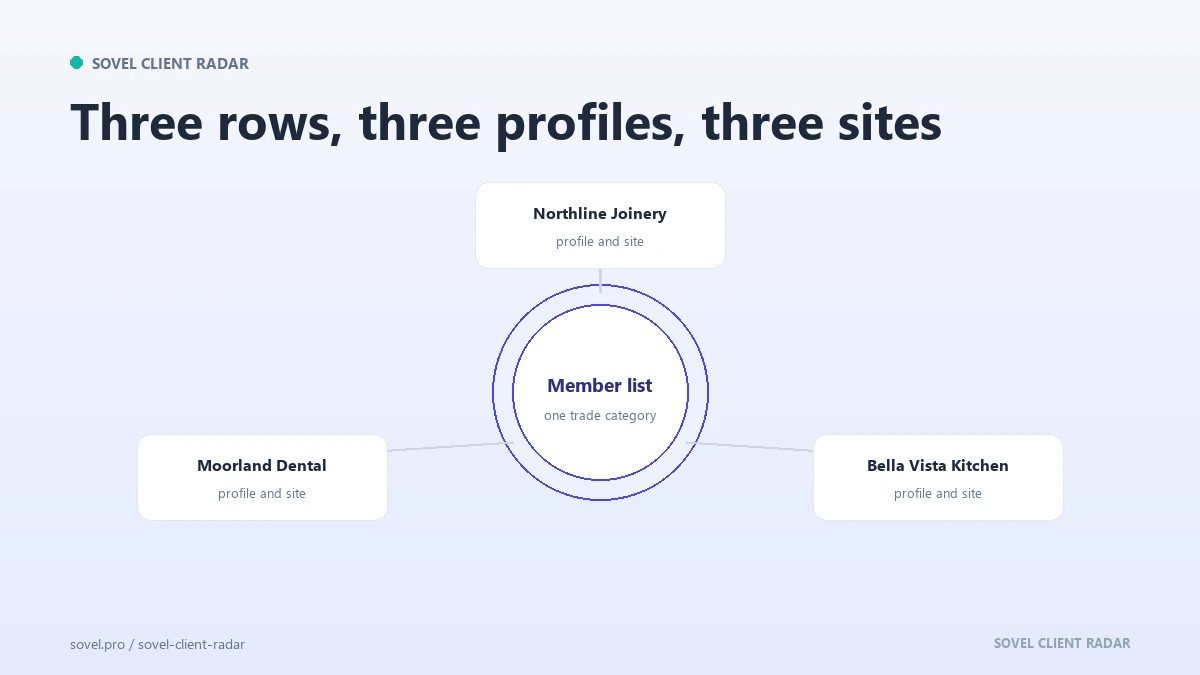
A profile page is where the directory keeps its own copy of a business: name, category, address, phone, website, hours and sometimes a description. It is also the part of directory prospecting that people mistake for the finish line.
Read it for the fields, then check those fields against the company site. The profile is a claim made by the directory. The site is a claim made by the business. When they disagree, the business is usually right about its own phone number and the directory is usually right about nothing at all.
Record four fields before you leave: the business name as written, the category the directory chose, the profile URL and the town. The category matters because it names the service the business wants to be known for. That detail is what lets directory prospecting produce a first line instead of a form letter.
The most useful field is often the link list. Some directories let members add a second website, a booking page or a social profile. Those extras show how the business sells, and they sometimes reveal a second brand under the same owner.
Do not let the list end at the directory. Directory prospecting goes wrong when every row points at the same host, because you end up with a spreadsheet of entries and no way to write anything specific.
Step 5: take the external links
In directory prospecting, the outbound links are the businesses. Take every link that leaves the directory’s host and points at a company site.
Three kinds of link to drop. Links back to the directory, which are navigation. Links to social platforms, which are profiles rather than websites. Links to advertisers or tracking redirects, which are not businesses at all.
Read the anchor text as you go. A link labelled “visit website” tells you nothing, while one labelled with the company name and town tells you the directory has already matched the name to the place. A row with a blank anchor and a redirect in the middle is one you will check by hand later.
The rest are candidates, and each one arrives with context: the URL of the page that named it, which becomes the source field in your row. That is the difference between a name you remember finding and a name you can defend in a meeting.
External links also give a second degree of discovery. A company site often links to a partner, a client or a supplier. Those links are candidates too, and they carry a reason to mention the connection. Directory prospecting that starts from one page can produce thirty businesses this way, provided the chain of sources stays intact.
Why does domain deduplication matter?
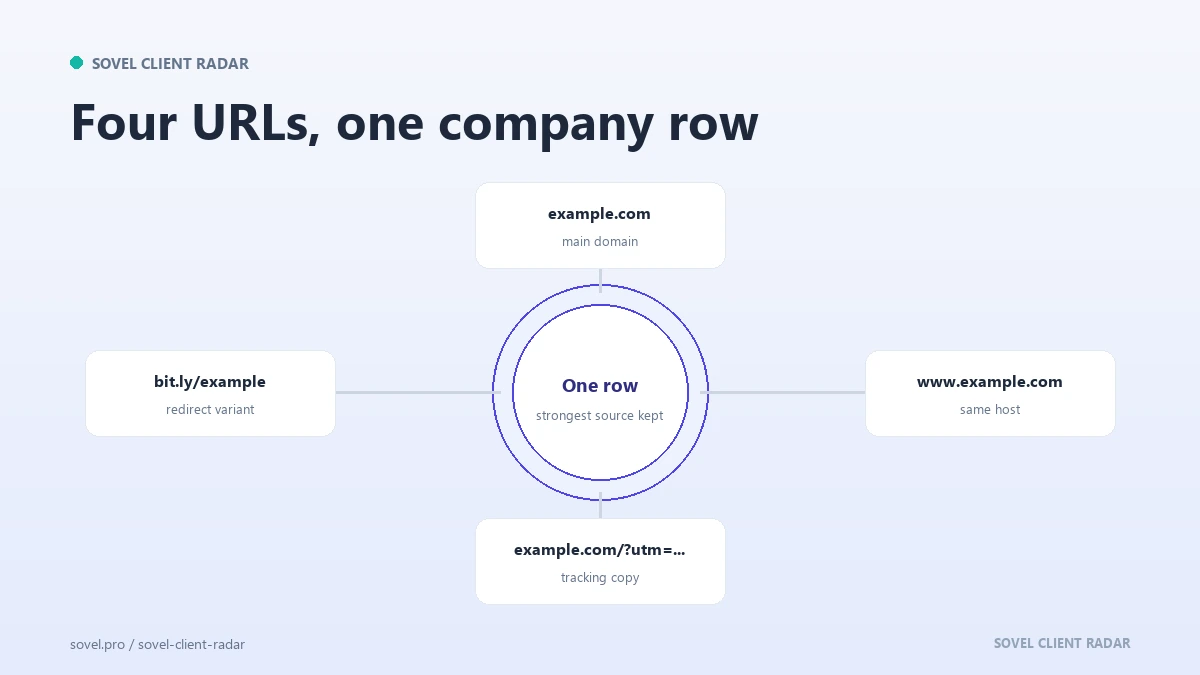
Domain deduplication is the step that decides whether your list is a list or a pile, and it is the step directory prospecting sessions skip when they run late. One business can appear as example.com, www.example.com, example.co.uk and a booking subdomain, and a directory will happily carry all four if the business changed hands twice.
Normalise before you count. Strip www, strip tracking parameters, and compare the registrable domain rather than the full URL. Two paths on the same domain are one business.
Then look for the harder duplicates. A rebrand leaves an old domain redirecting to a new one, and both may sit on the same page. A group with four trading names may publish four sites from one office. A franchise may list one brand at six addresses. The second pass is where directory prospecting earns its keep.
Dedupe before you verify, not after. If you check phone numbers first, you will check the same number three times under three URLs. Domain deduplication first turns a hundred and twenty rows into eighty.
Three rules cover most cases. One row per registrable domain. One note per alias. One status per business, not per listing. Get those right and directory prospecting produces a file you can sort, filter and hand to a colleague. The work is boring, and it is the difference between twenty real prospects and sixty rows that produce the same email.
How many profiles should you read from one directory?
Twelve to twenty is a working session in directory prospecting, and the cap matters more than the total.
Reading twenty profile pages properly takes about an hour. Reading two hundred produces a list you will not finish, and the quality drop shows in the first email. A directory with five hundred members is not a five-hundred-lead opportunity. It is a twenty-lead session you can repeat next month.
A live run on 30 October 2026 shows the shape of a real result. One directory page produced 11 candidate businesses, 8 leads, 7 buyers, 19 contacts and 5 leads with an email address, in 144 seconds. The receipt sits in the project’s source decisions record, including the checks that did not finish.
That ratio is normal. Not every member is a buyer, and not every buyer publishes a contact route. The number you can defend is the only number worth reporting. A directory lead list built from twenty profiles is a week of conversations, not a campaign.
What do you do when a page blocks you?
You stop, note it, and move to the next source. A block is information, not an obstacle to work around.
Three blocks appear in practice. A robots rule that disallows the list path, which means the source is out of scope. A 403 or a 429, which means the server answered and does not want the request. An anti-bot page that returns a challenge instead of content, which means the same thing with better typography.
The response is the same in all three cases. Record the URL, the status and the time, then leave it alone.
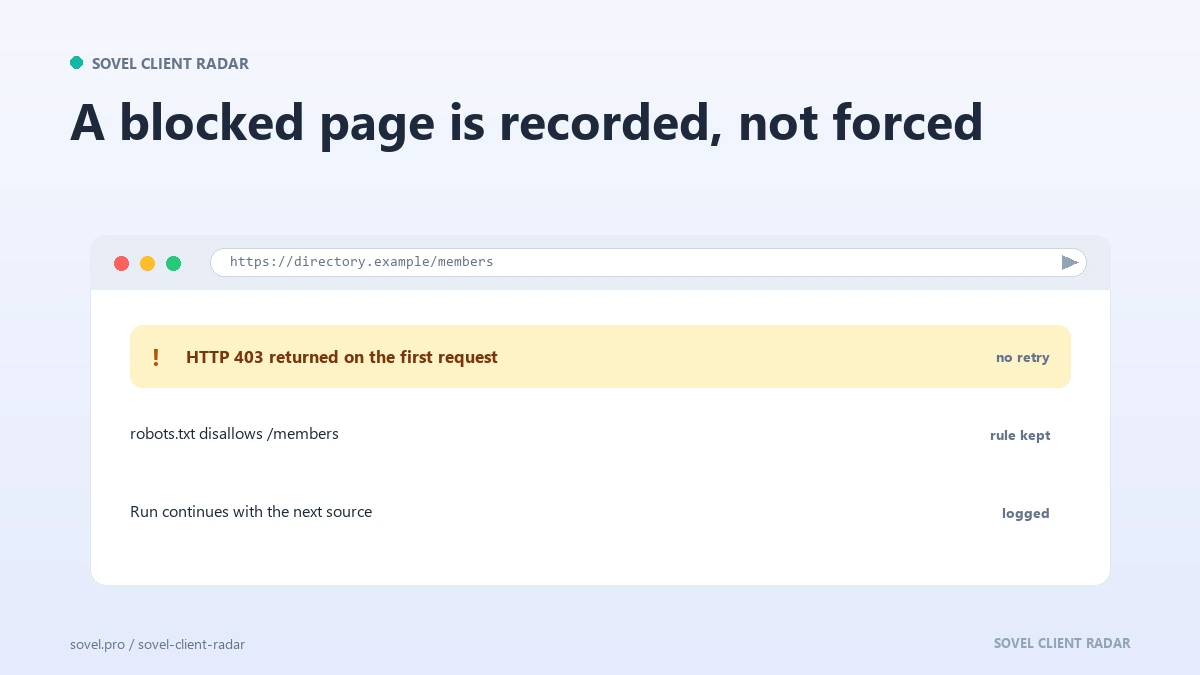
No retrying with a different user agent, no proxy rotation, no attempt to look like a browser. Directory prospecting that needs evasion has stopped being research.
Honest reports beat full ones in directory prospecting, because the report is the only part a client can check. A run that names three blocked sources and delivers twelve real leads is worth more than a run that claims forty and cannot show where any of them came from.
How do you keep the list clean?
A directory lead list ages faster than a website list, because directories change slowly and businesses change quickly.
Put the retrieval date in every row, because directory prospecting produces rows that look current long after they stop being true. When you open the file in six weeks, the date tells you which rows to recheck first. Rows older than a quarter get a second look before they get an email.
Keep the source URL in the row as well, not in a notes column at the end. The source is the first thing a colleague asks for and the first thing you need when a reply says you have the wrong business.
Then remove the rows that stop making sense. A member who left the association, a website that now redirects to a holding page, a phone number that belongs to another company. A directory lead list with a hundred rows and no dates is a liability with a filter on top.
Which edition fits your work?
The directory route is where most people start, and the tooling question is how much of it you want to do by hand.
SOVEL CLIENT RADAR takes a seed page, reads the profiles behind it, follows the external links, drops rows that point back at the directory, and writes a lead spreadsheet with 84 columns and a source beside every contact. That is the five steps of directory prospecting in one pass. Personal at ₹5,999 covers 50 leads per run on one machine, which suits a weekly session on one page. Pro at ₹12,999 raises the cap to 200 for a small team working several lists. Agency at ₹39,999 adds five machines and 500 leads per run for a team researching client niches in parallel.
All three are lifetime licences with the full feature set, and none of them caps how often you run. The SOVEL Client Radar product page lists the details, and the guide to finding clients without LinkedIn covers the keyless routes that sit beside this one. Before the first run, read the ethical lead generation rules for the boundary that keeps a directory run defensible, and the keyword research without paid tools method if you need help finding the page itself.
FAQ
Is directory prospecting allowed?
Yes, when you read public pages for research and respect the site’s rules. Do not log in, do not copy the database and do not republish member details. If a directory blocks the list page, use another source or open it manually.
What happens if robots blocks the list page?
Treat the source as out of scope and move on. A disallowed path means the site has said no to automated reading. You can still visit the page in a browser as a person, but a tool that ignores the rule is not doing research any more.
How many profiles should I work through at once?
Twelve to twenty per session is enough for a week of outreach, and that is the honest pace for directory prospecting by hand. The limit is attention, not availability. A list you have read properly beats a list you collected and never opened.
How do I dedupe a directory list?
Normalise the URL first: drop www, drop tracking parameters and compare the registrable domain. Then merge rows that redirect to the same site and note the aliases. One row per business, one status per business.
What if a listed business has no website?
Keep the row and mark it. A business with a phone number and no site is still a prospect, and often a good one. It belongs to a different offer, so tag it rather than deleting it.
How fresh must a member directory be?
Fresh enough that the page still shows the business and the phone number still works. Check the date on the page itself, then verify each row against the company site before you write to anyone.
How to prospect from a directory without paid tools?
Use a browser, a spreadsheet and one list page. Open each profile, follow the link to the company site, and type the source URL into the row. Paid databases save time on large lists, but they hide the source, and the source is what makes the email credible.
Can I use a directory list for a cold email campaign?
Use it for research first. The list tells you who exists, not who wants to hear from you. Read the site, find one specific reason to write, and keep the first message short enough that a busy owner can answer it.