
Selling a PDF on WordPress usually means assembling four plugins: a store plugin to take the money, a membership plugin to gate the content, a download manager to deliver the file, and a viewer to display it. Four plugins means four update cycles, four settings screens, and four places where a conflict can break the checkout.
There is a shorter path. A PDF flipbook plugin with built-in payment and gating carries the reader, the access gate and the payment in one place, which removes three of the four moving parts. This article walks through the nine steps, using SOVEL RealFlip as the worked example, and states plainly where the limits are.
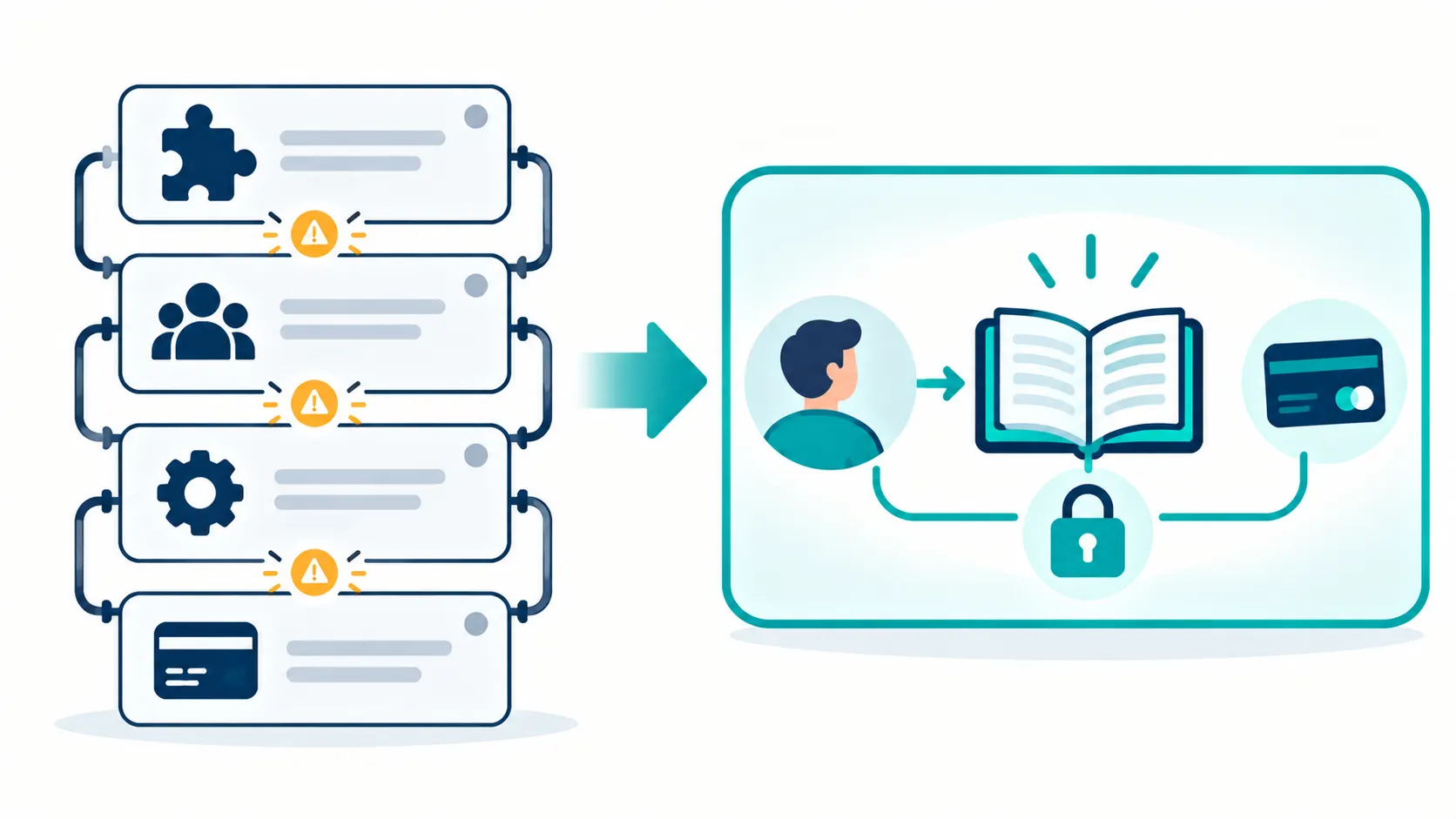
Why Selling a PDF Usually Takes Four Plugins
The four-plugin stack exists because each job is separate in a standard WordPress setup. WooCommerce takes the payment. A membership plugin decides who is allowed in. A download manager handles the file delivery. A PDF viewer displays the document.
Each plugin is competent at its job. The problem is the seams between them. The membership plugin needs to know when the store plugin completed a purchase. The download manager needs to know who the membership plugin allowed in. The viewer needs to know whether the download manager delivered the file. Each seam is a place where a version update can break the chain.
The alternative is a plugin that owns the whole path: it shows the book, it gates the access, it takes the payment, and it tracks the reading. That is what a monetization-focused flipbook does, and it removes the seams by removing the plugins.
The 9 Steps to Selling a PDF
Step 1: Upload the PDF as a book
The first step is uploading the PDF and creating a book instance. The plugin renders the PDF through PDF.js, so there is no conversion step. The file stays a PDF, which means your existing production process does not change.
Step 2: Choose how readers unlock the book
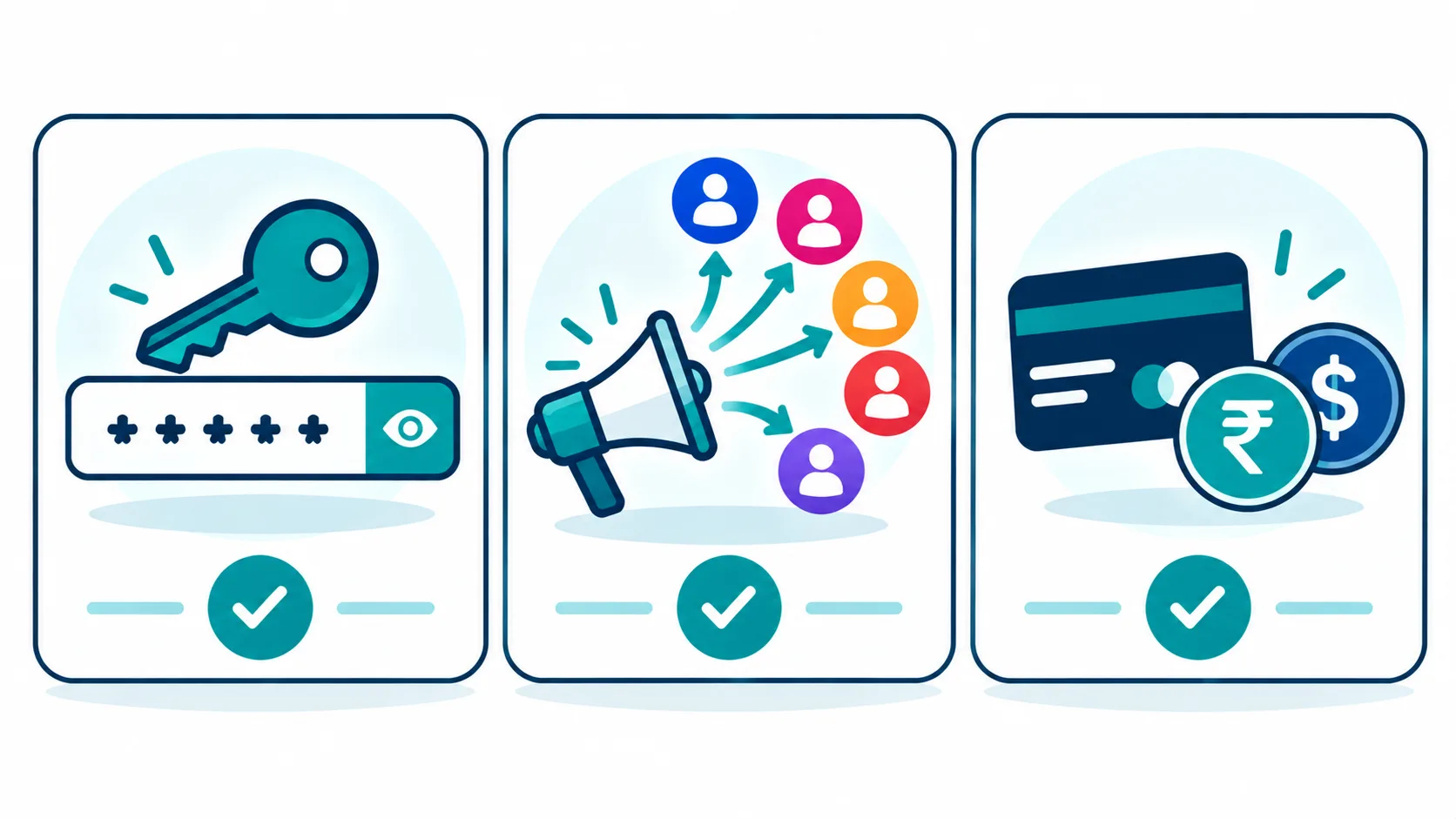
The plugin offers three unlock methods, and they can be used in combination.
Password entry. The reader types a password to open the book. This is the simplest gate and the one to use when you have already collected payment elsewhere.
Social follow. The reader unlocks the book by following you on a social platform. The plugin supports social unlock across 10 platforms. This is the method to use when your goal is audience growth rather than revenue.
Payment. The reader pays directly in the flipbook and receives access. This is the method to use when the book is the product.
Step 3: Set up generated passwords for group access
The plugin generates nine 8-character passwords per book, plus one master password. The nine generated passwords are designed for a specific use case: selling the same book to several readers without sharing one password across all of them.
If you sell a single copy to each buyer, you can use one password. If you sell a licence to a team of nine, the generated passwords give each reader their own entry without any of them sharing a credential. The plugin also supports an optional password hint, which helps a reader who has forgotten the password without revealing it.
Step 4: Connect a payment gateway
The plugin supports seven payment gateways: Razorpay, PayPal, Stripe, PhonePe, Google Pay, custom UPI, and Buy Me A Coffee.
The mix matters depending on where your readers are. Razorpay, PhonePe, Google Pay and custom UPI cover Indian readers well, which is often the gap in a plugin built for a US market. PayPal and Stripe cover international readers. Buy Me A Coffee covers the pay-what-you-want case, where the reader decides the price.
Step 5: Decide whether to require a WooCommerce purchase
The plugin does not require WooCommerce. A reader can pay through one of the seven gateways directly in the flipbook, without a cart or a checkout page.
If you already run WooCommerce, the plugin also works alongside it, and a WooCommerce purchase can be one of the unlock paths. The choice is yours, and the point is that WooCommerce is an option rather than a requirement.
Step 6: Understand how access tokens work
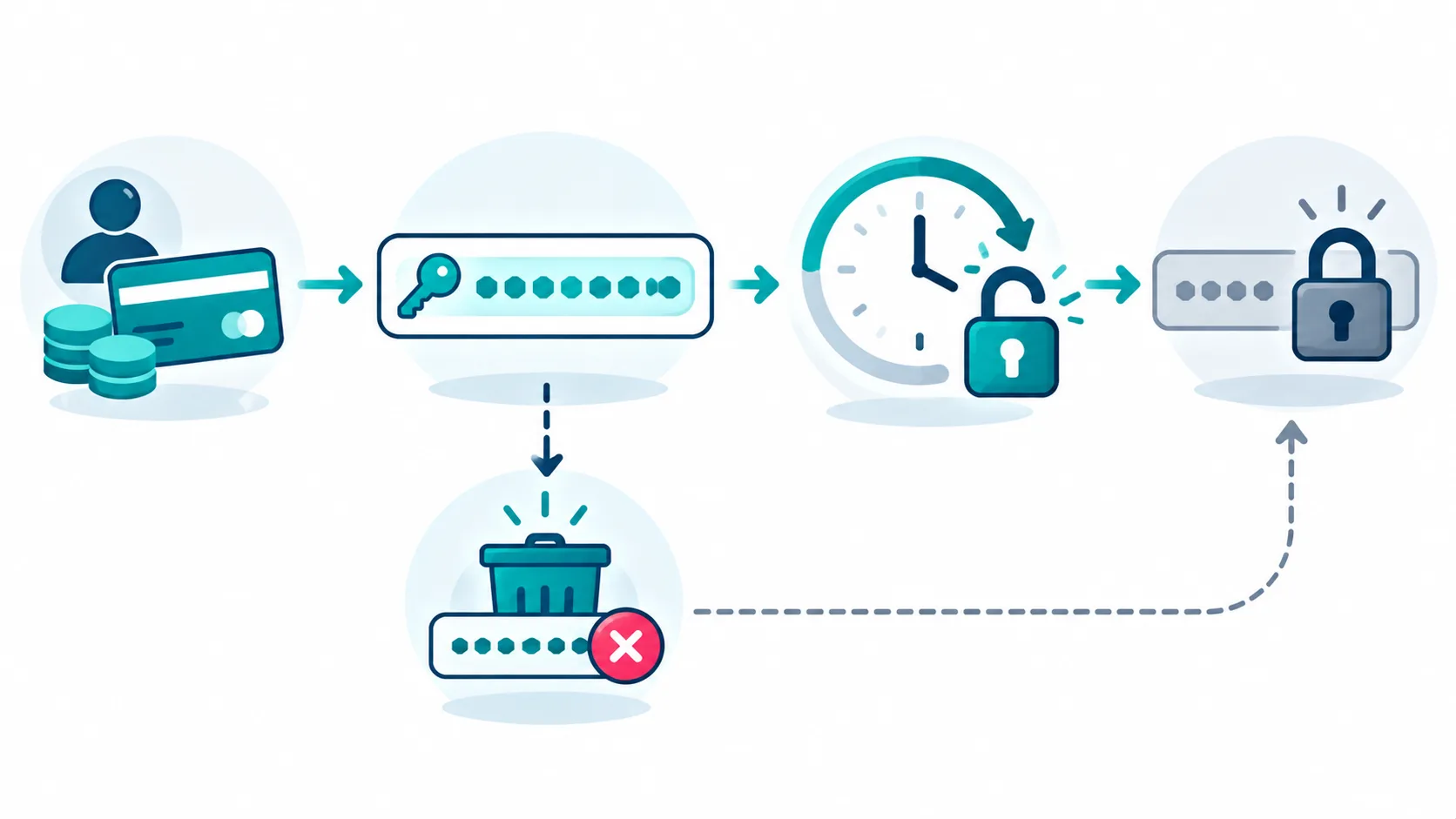
When a reader unlocks a book, the plugin issues an access token. The token is a 64-character hexadecimal string with a 24-hour expiry.
Two things follow from that. First, the token is long and hex-encoded, which makes it impractical to guess. Second, the token expires after 24 hours, which means a shared token stops working the next day. That expiry is what prevents a single buyer from sharing a link that works forever.
Step 7: Set up immediate revocation if you need it
If you need to revoke a reader’s access immediately, before the token expires, the revocation point is the realflip_password_access table. Clearing the relevant row removes the access.
This is worth knowing because it is the honest answer to “how do I cut off access right now”. The token expiry handles the automatic case; the table handles the manual case. There is no separate “revoke” button that hides the mechanism, and stating where the mechanism lives is more useful than pretending it does not exist.
Step 8: Turn on reading analytics
The plugin tracks reading sessions, detects the device, and records pages read. That data answers a question sales figures cannot: did the buyer actually read the book.
This matters for a specific business decision. If readers buy and do not read, the problem is downstream of the sale, and no amount of marketing fixes it. If readers read to the end and buy the next book, the reading data tells you what to publish next. Sales tell you what sold; reading tells you what worked.
Step 9: Publish and let the gate do its job
With the book uploaded, the unlock method chosen, the gateway connected and the analytics on, the last step is publishing. The gate sits in front of the book, the reader unlocks it through one of the three methods, and the token carries their access for 24 hours.

The Three Unlock Paths Compared
| Unlock method | Best for | What the reader does |
|---|---|---|
| Password entry | Books sold elsewhere, or team licences | Types a password to open the book |
| Social follow | Growing an audience | Follows you on a social platform |
| Payment | The book is the product | Pays through one of seven gateways |
| WooCommerce purchase | Sites already running a store | Buys through the existing checkout |
| QR payment with transaction ID | In-person or print distribution | Pays by QR, enters the transaction ID |
Five paths, three primary methods, and the choice depends on where the money and the audience already are.
What This Replaces, and What It Does Not
Being honest about scope is more useful than a longer feature list.
What it replaces. A store plugin for simple PDF sales, a membership plugin for the gate, and a download manager for delivery. For a site whose only product is a PDF or a small set of PDFs, the plugin covers the whole path.
What it does not replace. A full ecommerce platform. If you sell physical products, subscriptions, or a catalogue of hundreds of SKUs, you need WooCommerce or a similar platform, and the flipbook becomes one component inside it rather than the whole store.
What it is not. It is not a digital rights management system. A reader with the raw file URL can still reach the file. The plugin gates the reading experience, not the file’s existence on your server. If your requirement is that the file itself cannot be reached, that is a different problem, and it needs server-level access control rather than a plugin.
The Reading Analytics Question
Most ebook sellers can answer “how many copies did I sell” and cannot answer “how many were read”. Those are different numbers, and the second one is the more useful.
The plugin records session data, device type, and pages read. Three practical uses follow.
First, it tells you whether your pricing matches your delivery. A book that sells well and is read to page 3 has a delivery problem, not a pricing problem.
Second, it tells you which devices your readers use. If most reading happens on phones, your document’s type size and layout should be tested on a phone before it is finalised.
Third, it tells you where readers stop. If most readers stop at the same page, that page is where the document loses them, and it is the page to revise.
None of this is possible with a sales figure alone, which is the argument for tracking reading rather than only tracking purchases.

Pricing a PDF: three models to compare
How you price a PDF changes how readers behave, and the three common models each send a different signal.
The first model is a single fixed price. The reader pays once and keeps the file. This is the simplest model and the easiest to explain, and it suits a finished work such as a guide, a report, or a book that a reader will return to. Its weakness is that it caps the revenue from any one reader at that price, so a reader who would have paid more pays the same as one who would not.
The second model is a tiered price. The reader chooses between a basic file and an enhanced version, such as one that adds a workbook, a template pack, or a companion format. Tiers let a reader self-select, and the higher tier often carries most of the margin because it costs little extra to produce once the base file exists. The risk is that a tier which adds little perceived value looks like an upsell, which erodes trust.
The third model is a subscription or a bundle. The reader pays for access to a library of documents rather than a single file. This suits an ongoing publisher with a growing catalogue, and it produces recurring revenue rather than one-off sales. It also demands that the catalogue keeps growing, because a subscriber who sees no new material will not renew.
Two practical points sit across all three. The first is that a flipbook changes the reader’s experience without changing the price, so the pricing model is a separate decision from the delivery method. A single fixed price delivered as a flipbook is a perfectly reasonable combination, and it is often the best one for a first product. The second is that the unlock method and the price interact. A reader who has to create an account before paying faces more friction, and friction at the payment step costs conversions regardless of the price.
The honest starting point for most first-time sellers is the single fixed price, delivered as a flipbook, with the payment handled by a gateway your audience already trusts. Add tiers or a subscription only once you have a catalogue and evidence that readers want more than one file.
Frequently Asked Questions
Can I sell PDFs without WooCommerce?
Yes. The plugin supports direct payment through seven gateways without a WooCommerce installation. Razorpay, PayPal, Stripe, PhonePe, Google Pay, custom UPI and Buy Me A Coffee are all available as direct unlock paths. WooCommerce is supported as an option, not required.
Which payment gateways are supported?
Seven: Razorpay, PayPal, Stripe, PhonePe, Google Pay, custom UPI, and Buy Me A Coffee. The mix covers both Indian and international readers, and Buy Me A Coffee covers the pay-what-you-want case.
Can I offer social unlock instead of payment?
Yes. Social unlock works across 10 platforms, and it can be the only unlock method or one of several. Use it when audience growth matters more than immediate revenue.
How long does buyer access last?
Access tokens are 64-character hexadecimal strings with a 24-hour expiry. The expiry prevents a shared token from working indefinitely. If you need to revoke access before the token expires, the revocation point is the realflip_password_access table.
Can I see how much of my book people read?
Yes. The plugin tracks sessions, detects the device, and records pages read. That data tells you whether buyers are actually reading, which is a different question from whether they bought.
Do I need a separate membership plugin?
For a simple PDF sale, no. The plugin’s own gate handles access, so a membership plugin is not required. For a site with memberships, subscriptions or tiered access across many products, a dedicated membership system may still be the right choice, and the flipbook becomes one component inside it.
Where to Read Next
This article is the monetization piece in a five-article cluster about PDF reading and selling on WordPress. The flagship piece covers the features that make readers finish a flipbook. The comparison piece covers the 3D flipbook WordPress plugin differences you can test. The security piece covers the WordPress plugin to password protect PDF files. The budget piece covers WordPress flipbook plugin cost.
If your site publishes books and resources, the SOVEL Studio theme ships the content model a book store needs. The SOVEL Software family page lists every product in the family.
Word count: 2,195