
YouTube autocomplete keyword research reads a different demand surface than Google. The same seed returns longer phrasing, more verbs, and more beginner language, because people type into a video search box when they want to be shown something rather than told about it.
That difference is the entire value of youtube autocomplete keyword research. A phrase that appears in both places is confirmed, and a phrase that appears only here usually describes a task rather than a topic. Task phrasing is also easier for a large language model to place, because a task names the reader’s situation instead of the category. A phrase that appears only in YouTube is a task, and tasks make better article sections than lookups do. This guide covers the five signals worth extracting, the task filter that removes entertainment demand, and the three-platform check that decides whether a phrase deserves a page.
Why does YouTube suggest hear different words?
Because youtube autocomplete keyword research reads a search box built for a different intent. Someone typing into Google is often looking for a fact. Someone typing into YouTube is usually looking for a demonstration, a walkthrough, or permission to try something.
That shifts the vocabulary in predictable ways. Video searches carry more verbs, more sequence words, and more self-deprecating qualifiers. “How do I actually start” is a video search. “Content gap analysis” is a Google search. They describe the same journey from opposite ends.
There is a mechanical reason as well. YouTube’s suggestions are drawn from what people type into YouTube, which includes a large volume of queries typed by people who are not sure what they want yet. Uncertainty produces longer phrasing, and longer phrasing is more useful for headings because it carries the reader’s context inside it.

The four differences that matter
Most comparisons stop at “YouTube phrasing is longer”. Four differences change what you do with the output.
| Dimension | Google autocomplete | YouTube autocomplete |
|---|---|---|
| Phrasing length | Short, noun heavy | Longer, verb heavy |
| Job to be done | A lookup | A task |
| Common markers | Definitions, brands, prices | Step by step, for beginners, explained |
| Reader state | Knows the category | Knows the symptom |
The fourth row is the one that matters most when you write from youtube autocomplete keyword research. A Google suggestion assumes the reader knows what the category is called. A YouTube suggestion often assumes they do not. That is why a video search says “how to find what people are searching for” while the Google search says “keyword research tool”.
When you write for the YouTube phrasing, you write for the reader who has not learned the vocabulary yet. That reader is larger than most content teams assume, and almost nobody writes for them because the vocabulary gap makes the topic feel less serious.
Reading the tail instead of the head
The first suggestion under a seed is usually the most obvious one, and the obvious one is already covered by everyone. The useful material sits at the end of the list, where the phrasing gets specific.
The method behind youtube autocomplete keyword research is simple. Take a seed, add a question modifier, then read the last three suggestions rather than the first three. Repeat across five or six modifiers.
Why the tail matters in youtube autocomplete keyword research. Suggestions are ordered by predicted likelihood, so the tail contains lower-likelihood completions. Lower likelihood often means narrower context, and narrower context is what produces a heading a reader recognises as their own situation.
A practical example from a real youtube autocomplete keyword research session. Under a content research seed, the head of the list returns broad phrases about tools. The tail returns “how to find content gaps without a paid tool” and “how to research a topic you know nothing about”. The second phrase is a better article than anything in the head, because it names a state the reader is embarrassed about and rarely sees written down.

Four phrase markers and the section each earns
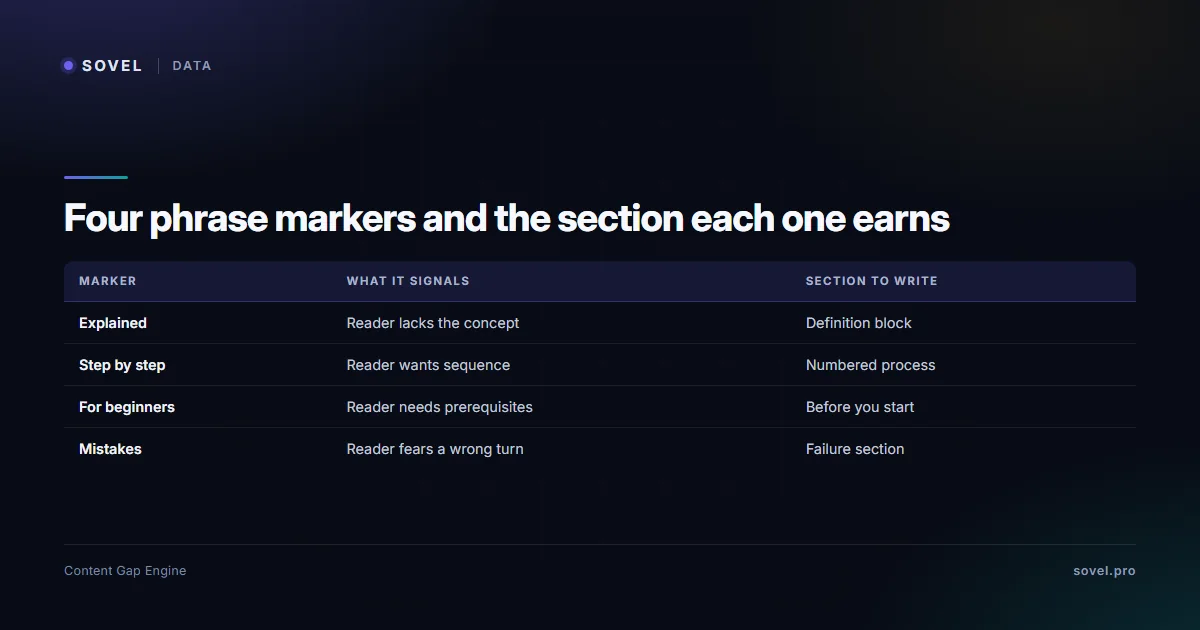
YouTube autocomplete keyword research becomes useful at the moment you stop collecting phrases and start assigning sections. Four markers do most of that work.
| Marker | What it signals | Section it earns |
|---|---|---|
| Explained | The reader lacks the concept | Definition block near the top |
| Step by step | The reader wants sequence | Numbered process section |
| For beginners | The reader needs prerequisites | Before you start section |
| Mistakes | The reader fears a wrong turn | Failure section |
The “for beginners” marker is the most commercially useful and the most frequently ignored. It tells you the reader needs permission and orientation before they need detail. An article that opens with a prerequisites section converts better than one that opens with a definition, because it answers the question the reader is actually holding: can I do this at all.
The “mistakes” marker produces the section that earns trust. Every reader arrives with a suspicion that they are about to do something wrong. A short section naming the three common wrong turns costs 250 words and removes the suspicion.
Why the same seed returns different lists on different days
Suggestions are predictions, so they move. A phrase that appeared last month can drop out, and a new one can appear after a news cycle or a product launch.
This is a feature for content planning. A phrase that persists across three captures taken a month apart is stable demand, and it deserves a page. A phrase that appears once and disappears is a spike, and a spike is a news post rather than an evergreen article.
Keep the capture date next to every phrase. That single column turns youtube autocomplete keyword research from a snapshot into a time series, and a time series is what lets you tell the difference between a trend and a Tuesday.
The task filter
Not everything returned by youtube autocomplete keyword research is content demand. A large share of it is entertainment, and entertainment demand does not convert into article readers.
The task filter in youtube autocomplete keyword research is one question: does the phrase imply a task the reader wants to complete? “Best laptop for video editing under 50000” implies a task. “Best laptop fails compilation” does not, because the person typing it wants to watch, not to do.
Three signals separate task from entertainment.
- A possessive or a constraint. “for my”, “under”, “without”, “on a budget”. Constraints imply a real decision.
- A sequence word. “step by step”, “first”, “after”, “before”. Sequence implies a process the reader will run.
- A competence marker. “for beginners”, “explained simply”, “I don’t know where to start”. Competence markers imply the reader intends to act.
Drop anything without at least one signal before it reaches the brief, because youtube autocomplete keyword research rewards a small clean list over a large noisy one. The remaining list is smaller and much more useful, and it usually maps to six or seven sections rather than forty.
The three-platform check
A phrase that appears in Google autocomplete, YouTube autocomplete and Amazon autocomplete has three kinds of demand attached, and youtube autocomplete keyword research is the middle step that confirms task intent. That is the strongest free signal available, and it takes about ninety seconds to check.
The reading in youtube autocomplete keyword research is straightforward. Google confirms the phrase exists as a search. YouTube confirms people want to be shown how. Amazon confirms the phrase sits near a purchase decision. When all three agree, the phrase deserves a page rather than a section.
When only one agrees, the phrase still has value, but the page type changes. A YouTube-only phrase is a tutorial. An Amazon-only phrase is a buying guide. A Google-only phrase is a definition or a comparison, and it probably needs more research before you commit.

What YouTube suggest cannot tell you
The limits of youtube autocomplete keyword research are numeric. It cannot tell you volume, competition, or whether the video results are any good. It has no numbers at all, which puts it in the same category as every other free suggestion source.
It also cannot tell you whether a phrase belongs in an article or a video. A phrase can have strong video demand and weak reading demand, and writing a 2,500 word article for a reader who wanted a four minute demonstration is a waste of both.
The third limit is regional variation. YouTube suggestions differ by market and by language setting, sometimes more sharply than Google’s do. A phrase that dominates in one country can be absent in another, so capture per market if you publish for several.
The engine labels this honestly. Suggestions come back as evidence records with a source attached, and a phrase seen on one platform is marked differently from a phrase confirmed on three. Missing volume stays UNKNOWN rather than being estimated from suggestion position.
Where the engine fits
Manual YouTube autocomplete keyword research covers one seed in about four minutes. The engine runs the same expansion across Google autocomplete, Bing, YouTube suggest, Amazon autocomplete and four other public sources in one pass, then merges the results.
In a live run on 7 November 2026, the engine returned YouTube suggest and YouTube search as available, with Google Trends rate limited and Reddit blocked. That run scored 52 keywords and produced 54 gap records. The point is not the count. The point is that a blocked source does not stop the run, and the report names what failed.
Two outputs are specific to the cross-platform approach.
- Cross-platform demand signal. A phrase present on two or more platforms is flagged as stronger than a phrase present on one. That is the three-platform check, automated.
- Coverage verdicts. Each phrase is checked against your sitemap and returned as NEW, REFRESH, EXPAND, MERGE, REDIRECT or DO NOT CREATE, which prevents a tutorial page from competing with an existing guide.
The full method sits on the Content Gap Finding Engine page, and the product layer is at SOVEL Gap Brain for anyone who wants the follow-up questions answered.
Two neighbouring methods complete the picture. The Google autocomplete guide covers prefix expansion and the Amazon autocomplete guide covers buyer qualifiers. Together with this one, they cover lookup, task and purchase intent from three free sources.
A worked example from seed to six sections
Take a seed a beginner would type: how to find content gaps. Run the question loop and read the tails.
The list returns phrases about doing it without a paid tool, doing it for a client, doing it when you already have fifty posts, doing it in a niche you do not know, and doing it in an afternoon. Five phrases, five different reader states, one seed.
Now assign markers. The “without a paid tool” phrase carries a constraint, so it becomes a section about free sources. The “fifty posts” phrase carries a sequence marker, so it becomes a process section about auditing what exists. The “niche you do not know” phrase carries a competence marker, so it becomes a prerequisites section. The “afternoon” phrase carries a constraint on time, so it becomes a scoping section.
Six sections from one seed, none of them a definition. The practical difference between youtube autocomplete keyword research and a keyword tool export shows up right here. The tool gives you one phrase with a number. The suggestion box gives you six reader states with no numbers at all.
The brief then writes itself in reader order: can I do this, what do I need, how long does it take, what do I do with what I already have, how do I do it free, what goes wrong. That is a page a beginner finishes, because it answers the questions in the order they arrive.
Language and region settings
Suggestions returned by youtube autocomplete keyword research change with the language and region set on the account. A phrase that dominates in one market can be absent in another, and the difference is larger on YouTube than on Google because video consumption patterns vary more by country.
Set the market before you capture during youtube autocomplete keyword research, and record it in your notes. If you publish for one country, this is a two-minute step. If you publish for several, capture each market separately and compare, because the overlap is usually smaller than expected.
There is a second setting worth checking. Signed-in suggestions reflect watch history, so a fresh browser profile returns a cleaner list. This matters for youtube autocomplete keyword research because watch history pushes entertainment phrasing harder than search history does, and entertainment phrasing is exactly what the task filter exists to remove.
Two habits that separate a useful list from a noisy one
The first is to write the phrase exactly as it appears. Not a cleaned-up version, not a version with the grammar fixed. The exact wording carries the reader’s register, and a tidied phrase loses the thing that made it useful. You can tidy it later, in the heading, once you know what the section is for.
The second is to note which phrases imply a time cost. A phrase with “in a day” or “in an hour” attached tells you the reader is budgeting, and budgeting readers want scope before detail. That single note changes the section order more often than any other signal on the list.
There is a third habit worth adopting if you publish often. Keep a running list of phrases that appear across unrelated seeds. When the same phrase shows up under three different topics, it is describing a recurring problem rather than a single query, and that is the kind of phrase worth building a page around.
None of this needs software. Youtube autocomplete keyword research needs a column for the exact phrase, a column for the time signal, and the discipline to stop collecting once the clusters repeat. Three columns and one rule will outlast most subscriptions, and they cost nothing to keep.
Turning phrases into a brief
The output of youtube autocomplete keyword research should be a brief rather than a list. Five steps get there.
- Collect forty to sixty phrases across six modifiers, reading the tail.
- Apply the task filter and drop entertainment phrasing.
- Assign each surviving phrase one of the four markers.
- Group by marker. Each group becomes one section.
- Order the sections as a reader would need them: prerequisites, definition, process, failure, comparison.
Ordering is where most youtube autocomplete keyword research gets wasted. Sections ordered by research convenience produce a page that answers questions in the order you found them. Sections ordered by reader need produce a page that reads like a conversation.
If the phrase is about voice or spoken queries specifically, the voice search content optimisation guide covers the overlap. For how the phrasing feeds semantic coverage across a whole cluster, see semantic SEO strategy.
FAQ
Is YouTube autocomplete keyword research different from Google?
Yes. The suggestions come from a different search box with a different intent, so the phrasing is longer and more task oriented. Treat it as a separate source rather than a supplement, because the words it returns rarely appear in Google suggestions.
How many suggestions does YouTube autocomplete return?
About ten per prefix, in the same way Google does. The gain comes from expanding prefixes with question words and reading the tail of each list, not from retyping the seed.
Can I use the YouTube API for this?
YouTube publishes a Data API with a search endpoint, documented at the YouTube Data API reference, and it requires a project and a quota. For a handful of seeds, reading the suggestions manually is faster than setting up API access. The platform’s own overview at How YouTube Works explains how recommendations and search fit together, which helps when you are judging whether a phrase is task demand or viewing demand.
Why do I see entertainment phrases in the suggestions?
Because YouTube serves both task demand and entertainment demand from one box. Apply the task filter: keep phrases with a constraint, a sequence word or a competence marker, and drop the rest.
Does a phrase need to appear on all three platforms?
No. Two of three is a reasonable threshold for writing after youtube autocomplete keyword research. One of three still has value, but it changes the page type, and it usually means more research before you commit a full article.
Should I write an article for a phrase that only works as video?
Usually not. A reader who wanted a four minute demonstration will not finish 2,500 words. Either produce the video or find the article-shaped question sitting next to it, which is often the prerequisites or the failure section.
How does YouTube autocomplete keyword research fit the wider cluster?
Youtube autocomplete keyword research supplies task phrasing. Autocomplete supplies lookup phrasing. Question research supplies structure. Running all three on one seed is what produces a brief with sections instead of a list of phrases.