
This password intelligence case study walks one WordPress plugin from scope to live page, with seven proof points you can check yourself. One of them is a tool you can open right now on this site.
Case studies beat feature lists because they show the seams. What got built, what got tested, what stayed unverified, and what a buyer should know before trusting it. Every claim below is dated and labeled, reported where I could not re-verify personally.
Summary
This password intelligence case study follows one WordPress plugin through seven proof points, from a live deployment to a documented process trail. Every claim is dated, and the tool itself is openable on this site right now. Read it as an engineering record you can re-verify in under an hour.
The problem the plugin solved
Password advice online is either a strength meter with no explanation or a checker that uploads your input to somewhere you cannot see. The scope here was narrower and stricter: analysis entirely in the browser, a generator with real randomness, breach checking that sends only an anonymous prefix, and exports that never contain the secret itself.
Scope discipline mattered more than features. Newsletter flows, history storage, and analytics each had explicit defaults: opt-in, local, and off. That decision set, written before implementation, is why the finished plugin stays small enough to reason about (source: SOVEL Password Intelligence release and continuity report, dated 17 Oct 2026, reported). It is also the first lesson this password intelligence case study records: decide what the plugin will not do before deciding what it will.
Proof 1: the tool runs live right now
The first proof in this password intelligence case study is not a screenshot. The plugin is deployed and openable: the tools page on this site hosts it, and browser-side analysis runs without sending your input anywhere, which you can verify with your own network tab while typing.
That is the standard I want every claim on this site to meet: checkable by a stranger in under a minute. Marketing copy cannot survive that test; working software can.
the password intelligence tool
Proof 2: strength analysis explains itself
The analyzer does not just paint a green bar. It reports entropy in bits, length, character classes, and pattern findings like repeated dictionary words, then explains the estimate with named assumptions. Very Strong scores come with the math visible.
Strength claims without visible math are decoration, and that distinction carries through the whole password intelligence case study. Anyone can color a bar; showing the model assumptions behind the guess-time table is what makes the result usable by someone making a real security decision.
Proof 3: generator uses real randomness
The generator draws from a large word list with crypto-grade randomness in the browser, producing passphrases you can actually type. Word count and separators are adjustable, and the output never touches a server.
A small detail worth noting: entropy of the generated phrase is shown with the same honesty as analyzed phrases, so the generator and analyzer speak one language. Users can test their own generator output against the analyzer, which is a loop few tools close. That shared language is why this password intelligence case study counts the generator as a proof point of its own.
Proof 4: breach check without upload
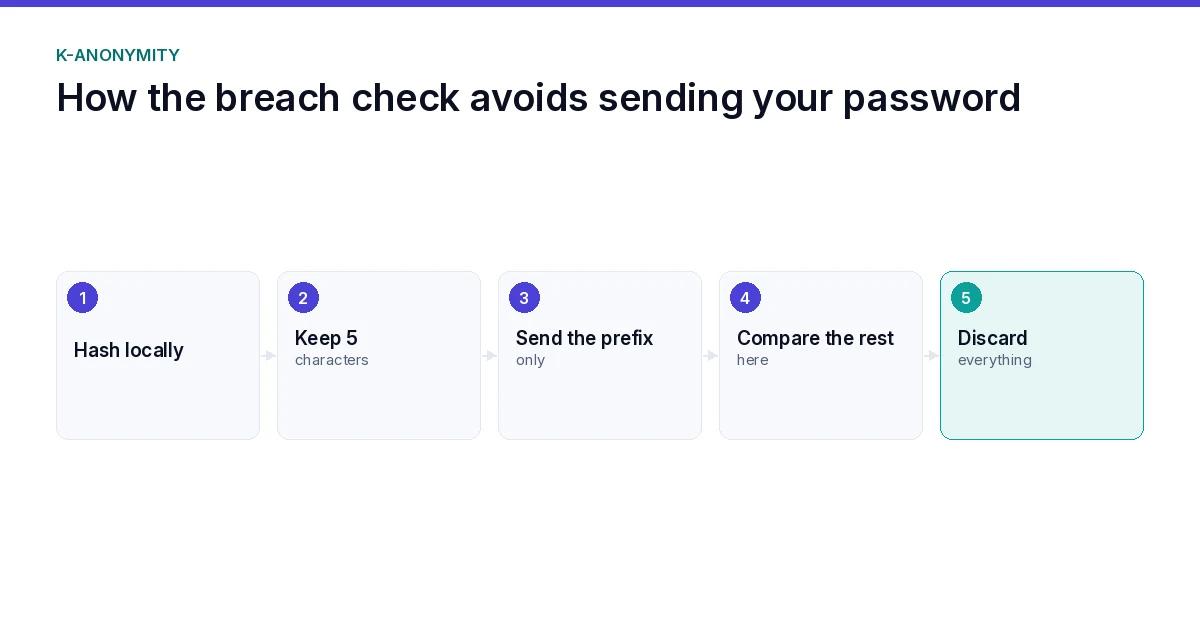
Breach verification in this password intelligence case study uses the k-anonymity model: only a short hash prefix leaves the browser, the full value never does. The UI states the limitation in plain words, a clean result means not found in the checked dataset, never a guarantee of safety.
That limitation line took a drafting argument of its own. The temptation to write “your password is safe” is enormous, and it would have been a lie in one specific way: absence from one dataset is not absence from every threat model. The shipped wording says exactly what the check proves.
Proof 5: exports exclude secrets
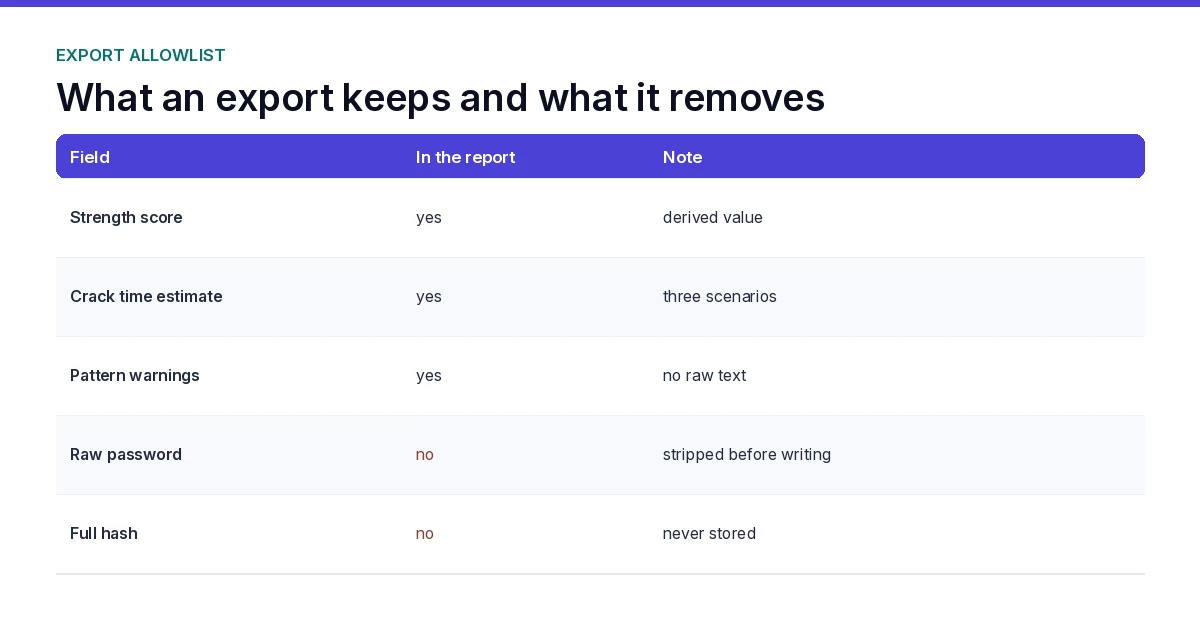
Report exports in several formats carry scores, patterns, and advice, with an invariant that the raw password and full hash are never written into any export file. The release report lists that invariant as a hard requirement, and the export code paths were reviewed against it.
This is the kind of proof that does not look impressive in a demo and matters enormously in production. A report that once leaked a secret into a downloaded file becomes a support incident you never forget. Reviews against the invariant keep it from happening.
Plugging the plugin into your own build
The plugin’s proof points work because each one has a repeatable equivalent you can copy. Scope first: decide what your plugin does not do before writing features. Analysis in the browser, generation client-side, breach checks prefix-only, exports secret-free. Write those defaults as rules, not afterthoughts.
Second, test against real input. The live tool accepts anything you type; your plugin’s tests should too. Empty string, twenty characters, symbols, unicode, pastes from clipboard. Tests that never see real input certify nothing.
Third, label unreviewed behavior. If mail transport, scheduled jobs, or third-party calls exist but were not configured in your environment, say so in plain words before launch. Unlabeled behavior becomes support tickets later. The repeatable steps are what this password intelligence case study can hand to another builder.
A working hour on the plugin
Minutes 0 to 10: read the release report and project plan. Confirm which test counts are reported versus live-verified. Minutes 10 to 25: open the live tool in a new tab, type three passwords of different strengths, watch the entropy and guess-time outputs change. Minutes 25 to 40: run your own export, open the file, confirm no raw value appears. Minutes 40 to 50: grep the export for your own test strings; none should survive. Minutes 50 to 60: write the one-line verdict for your notes. That hour is this password intelligence case study in miniature.
Common review questions answered
Does the breach check protect against every threat model? No. Absence from one dataset is not absence from all. The UI says so, and this password intelligence case study says so twice. Can I store history locally? Only if opted in, limited to non-secret metrics, and never synced to WordPress or a third party per the project plan. Can I change the word list? Yes, but re-run entropy and guess-time numbers against the new list before claiming strength numbers. How often should I re-test? After any dependency change, any WordPress update touching the plugin hooks, or any new export format. Treat re-verification like the release gate it is.
Proof 6: tests and honest status labels
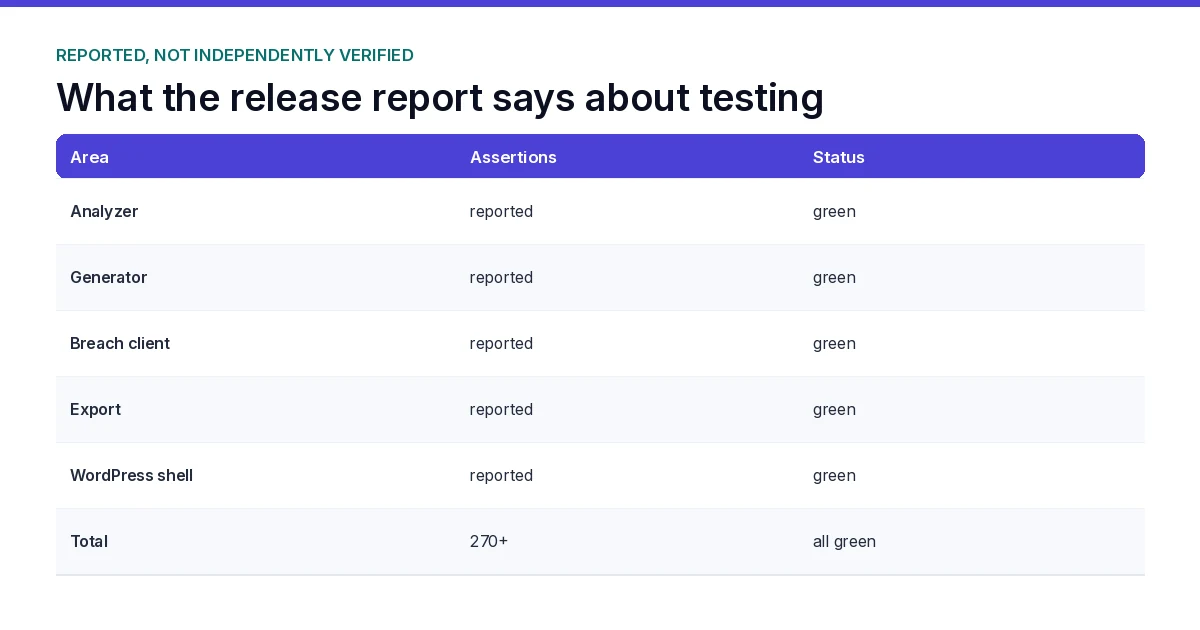
The release documentation reports 270+ assertions across JavaScript and PHP, spanning analysis, generation, export, and WordPress integration, with run records attached to the release report. Treat those counts as reported evidence in this password intelligence case study; use the live tool for direct behavioral verification.
Status labels mark what was not verified in the final environment: mail transport for the optional newsletter needs target-server configuration, and analytics stays off by default. Writing those down before launch is part of the proof set, not a footnote.
Proof 7: the process left a trail
The seventh proof is documentation. A consolidated project plan, an implementation checklist with stable task ids, a continuity report, and dated release notes. Anyone inheriting this plugin can reconstruct why each decision exists.
That trail is also why this password intelligence case study can stay specific. When claims need dates, the dates exist in the record instead of memory. Process artifacts are proof too, and cheap ones at that.
What this password intelligence case study proves and what it does not
One plugin working proves one plugin works. It does not prove every AI-assisted build ships clean, and it is not a claim that the workflow replaces review. The honest reading: a strict scope, a written plan, real tests, and live deployment produced a tool a stranger can check in one minute.
If you want the generic how-to path for building commercial plugins, the site already covers that ground in depth. This piece stayed on the seams of one real build, because that is what a case study owes its reader.
building commercial WordPress plugins with AI
Buyer’s verification checklist
Before trusting any plugin claiming password security, run this five-minute check yourself. Open the live tool in an incognito window. Type a test password and watch your network tab: no request should leave your browser for analysis or generation. Run an export and open the downloaded file: no raw value, no full hash. Check the UI for a stated limitation on breach results. Type five passwords of different lengths and confirm the analyzer’s entropy and guess-time numbers move with each input, with the assumptions staying visible. If a vendor cannot pass all five checks, do not deploy it on user data. Five checks take five minutes, and they hand you the same evidence this password intelligence case study is built on.
Limitations chronology
Honest products publish what they cannot do, not just what they can. For this plugin, the chronology reads: newsletter mail transport unverified in the release environment (needs target-server configuration); analytics disabled by default and intentionally so; breach results scoped to one dataset with explicit prefix-only transmission; history optional, local, non-secret metrics only. Each limitation is written where a reader meets the feature, not buried in a footnote, and each one is dated. That dating habit is part of what this password intelligence case study is testing: limits published at publish time stay honest later.
Process artifact inventory
Case studies die without their paper trail. The artifacts for this build: consolidated project plan with scope and non-goals; implementation checklist with stable task ids and pass status; release and continuity report with test counts and run dates; dated release notes with limitations; live URL for direct verification. Keep them together. Without its artifacts a case study is marketing; with them, this password intelligence case study is evidence you can re-run yourself.
Version-forward policy
Plugins accrue debt if every update is unprincipled. This build’s version-forward rule: any new feature must pass the same seven proof questions before shipping; any dependency change re-runs entropy and breach checks; any export format addition re-runs the secret-free invariant review. Limitations are revisited each version: mail transport moves from unverified to configured or removed; analytics stays off unless explicitly opted in. Version-forward means this password intelligence case study ages into a record a reader can trust, not a fossil.
Stack and tooling summary
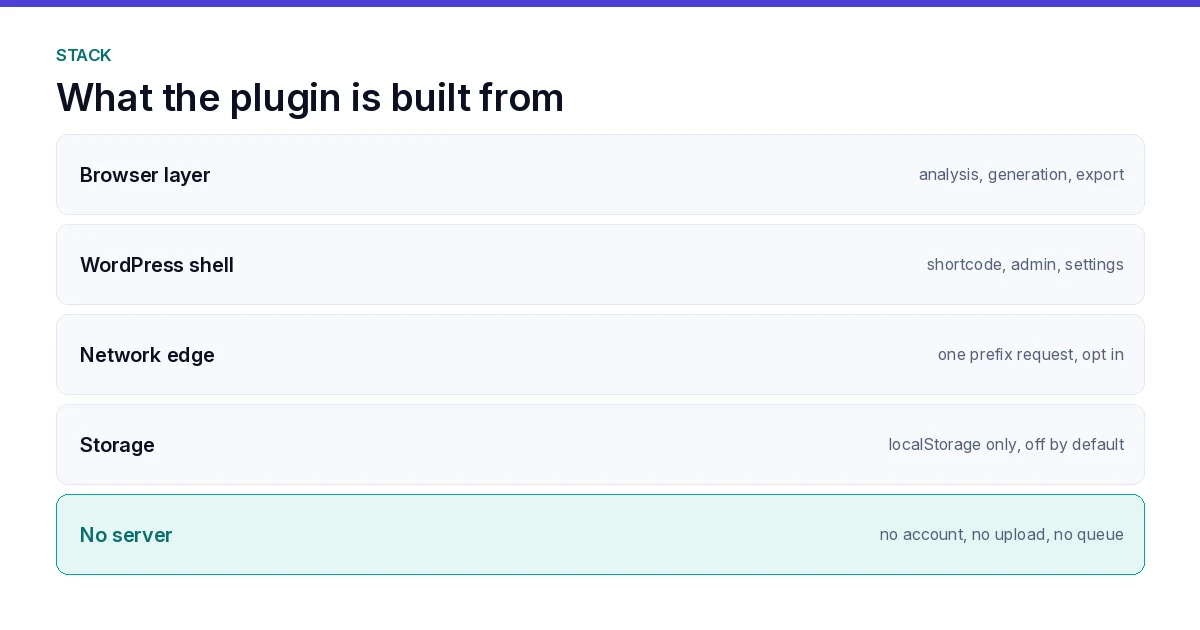
The plugin runs entirely in the browser: HTML, CSS, vanilla JavaScript, WordPress shortcode registration, client-side crypto APIs. No build step required for deployment, no server component for analysis or generation, no database writes for secrets. That narrow stack is itself a security property: less surface to audit, fewer update channels to monitor, no backend credentials to rotate. The downside is capability ceiling: heavy features like scheduled breach monitoring need an external service with its own trust boundary, deliberately out of scope here. Naming the stack is part of the password intelligence case study record too: a reviewer should see at a glance what they are auditing.
Common generic plugin mistakes this build avoided
Generic WordPress plugin advice pushes features first: add settings pages, hooks, admin notices, upsells. This build did the opposite. No settings page for analysis (nothing to configure), no admin upsell (nothing to sell inside the tool), no data collection hook (nothing to leak). Each omission is a reviewed decision, not an oversight, and each reduces the surface a reviewer must check.
Another common mistake: shipping breach checks with “safe/unsafe” binary wording. This build ships estimates with assumptions visible, because binary wording overclaims what one dataset can prove. A third mistake: treating export as free-form output. Here exports pass the secret-free invariant or they do not ship. Each avoided mistake cost development time and bought audit surface, and this password intelligence case study records all three.
Working hour recap applied
The working hour from section 3 is not fiction; it is how the release was verified live. Ten minutes reading reports, twenty-five minutes typing through the analyzer, fifteen minutes exporting and grepping, ten minutes writing the verdict. A buyer repeating that hour arrives at the same evidence this password intelligence case study cites. That repeatability is the point: case studies should be checkable, not just believable.
FAQ
What is the password intelligence case study?
It is a seven-proof walkthrough of the SOVEL Password Intelligence WordPress plugin: live deployment, clear analysis, real generation, anonymous breach checks, secret-free exports, tested release, and a documented process trail.
Can I check the tool myself?
Yes. The tools page on this site hosts the live plugin. Analysis runs in your browser, and your network tab shows no upload while you type. That openability is the first proof this password intelligence case study leans on.
What does the breach check actually prove?
It proves the password’s hash prefix was not found in the checked dataset at check time. It cannot prove a password was never exposed anywhere or is safe in every threat model, and the UI says so. The same boundary runs through this password intelligence case study because dataset scoping is the most misread limit in this feature class.
Where do the test numbers come from?
The release and continuity report dated 17 Oct 2026 reports 270+ assertions across JavaScript and PHP, with run records attached. Treat those numbers as reported evidence, and use the live tool for direct behavioral verification.
Does the plugin store passwords?
No. Raw passwords never leave the browser, exports exclude secrets, and optional history is local, off by default, and stores non-secret metrics only per the project plan.
Is this a template for my own plugin?
Treat this password intelligence case study as a working example of scope discipline and evidence labeling, not a copy-paste kit. The generic build guide on this site covers the transferable how-to; this page covers one implementation’s seams.
What stayed unverified at release?
Mail transport for the optional newsletter needs configuration on the target host, and live-provider behaviors in the companion engine are labeled separately. Both are documented rather than glossed.
How does the generator avoid weak words?
It draws from a curated word list and combines multiple unrelated words rather than single dictionary words, as the UI states. Strength is shown as entropy and guess-time with named assumptions, so you can verify the math yourself.
What if a breach dataset updates?
The check reflects the dataset at check time. Re-run the breach check periodically against updated datasets; a clean result today does not immunize a password forever. That re-run habit is a rule this password intelligence case study applies to its own claims too.
Seven proofs, one live tool, zero unverifiable claims. That is the shape this password intelligence case study will keep as the plugin versions forward, and the engine page on this site shows the same evidence habits at workflow scale.
AI WordPress plugin development
the MDN reference for getRandomValues
