
An ai workflow for wordpress plugin development is a fixed sequence of stages. It turns a fuzzy idea into a plugin you can hand to a stranger without flinching. Nine stages, in order: idea file, WordPress specific research, analysis, plan, plan lock, implementation, tests on a clean stack, audit and repair, then release gate and publish. If you have been searching for how to build a WordPress plugin with AI and keep landing on prompt tutorials, this page covers the whole lifecycle. Prompts were never the hard part.
I used this sequence on the plugin that now runs in this site’s tools section. The ai workflow for wordpress plugin development earned its stages the hard way. It worked, and it failed loudly whenever I skipped one. I now call that a feature.
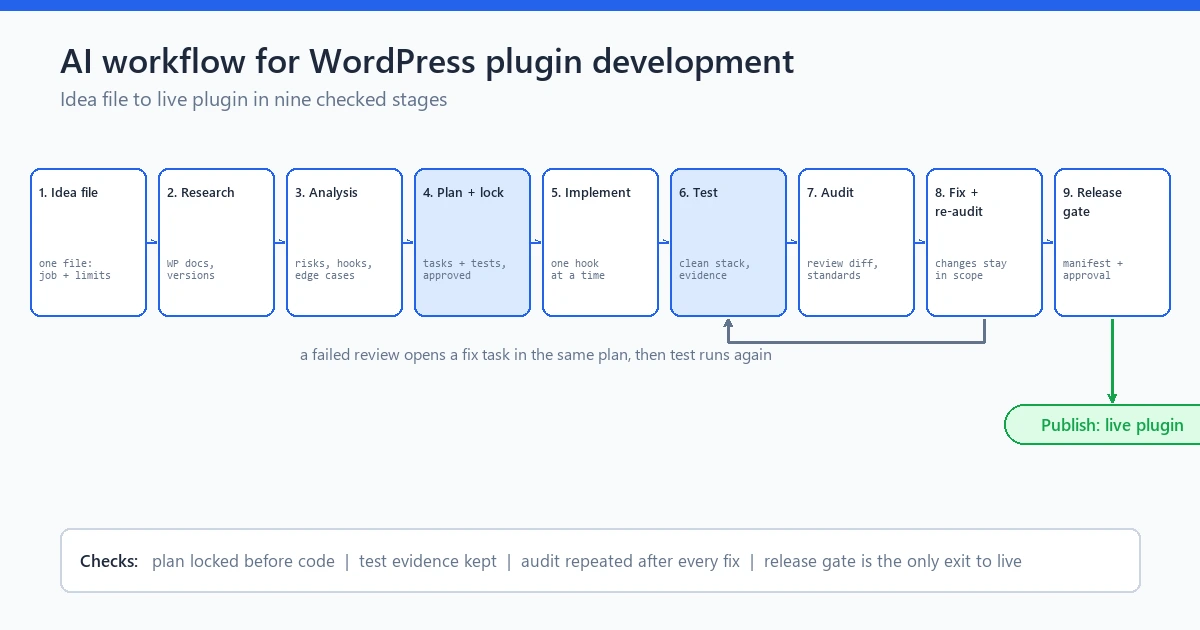
caption: The nine stages of the ai workflow for wordpress plugin development, from idea file through release gate and publish.
Summary
An ai workflow for wordpress plugin development replaces guesswork: every stage hands an artifact to the next, idea file through release gate. The result is a governed workflow you can repeat, not generated code you have to babysit.
Why WordPress punishes vibe coding
Vibe coding survives a hobby site. WordPress is a shared runtime: your plugin executes beside the theme, two dozen other plugins, core itself, and a PHP version your host quietly changed last week. The model has no picture of what plugin 22 does in the same request.
This is why an ai workflow for wordpress plugin development must be stricter than a generic AI coding spree. Four runtime realities do most of the damage.
Themes and plugins collide through hooks. Your code runs before or after theirs depending on load order, and generated code writes hooks as if the world is empty. The world is not empty.
User input arrives everywhere: AJAX handlers, shortcode attributes, GET and POST arrays, option writes. Every point needs sanitization on the way in, escaping on the way out, and the handbook dedicates pages to both. Generated code habitually gets one of the two right.
Privilege checks are load bearing. A data rendering shortcode must check who can see it, an admin screen must verify the capability, and an AJAX endpoint must check the current user and the nonce. A miss is not a style issue, it is a bug a scraper can find.
Legacy PHP breadth is real. Your plugin may run from PHP 7.4 upward beside plugins written a decade ago, and register_activation_hook and register_deactivation_hook are where your database promises live. Generated code happily writes syntax an old host will refuse to parse.
Why do AI projects stall on WordPress specifically? The runtime, always. It is the first thing an ai workflow for wordpress plugin development has to respect.
Stages 1 to 3: idea file, WordPress specific research, analysis
Stage 1 of any serious build wordpress plugin step by step with ai sequence is the idea file. It is the cheapest insurance you will ever write. One short document: what the plugin does, refuses to do, who uses it, what data it touches. Those four sentences force scope decisions you would otherwise make at midnight in a chat thread. Scope first, then code.
When I started the password tool that later shipped here, its idea file said browser side analysis only, no stored passwords, no newsletter unless opt-in, and analytics off by default. Four sentences that settled three arguments for free.
Stage 2 is where the ai workflow for wordpress plugin development gets its WordPress accent. Research produces concrete answers to concrete runtime questions.
Which hooks the plugin connects to, actions and filters, where in the sequence they fire.
How input is sanitized on the way in (sanitize_text_field for plain text, sanitize_key for option names, absint for numbers). How output is escaped on the way out (esc_html, esc_attr, wp_kses_post where limited HTML is allowed).
What capability each entry point requires, and what the nonce pair protects: wp_create_nonce on the form side, wp_verify_nonce or check_ajax_referer on the handler side.
What happens on activation and deactivation, whether the plugin creates options or tables, how uninstall.php cleans them up.
Asked as research questions, the model answers well. Asked mid implementation, silently, with nobody checking.
Stage 3 is analysis: read it as an engineer, not as a fan, and the ai workflow for wordpress plugin development depends on that read. Mark every research claim confirmed, doubtful, or needs a test. This is where you find the model assumed your AJAX handler needs no capability check, or that its shortcode would echo raw attributes into markup. Doubtful claims become test cases; unmarked doubtful claims become vulnerability reports, and the second kind costs more.
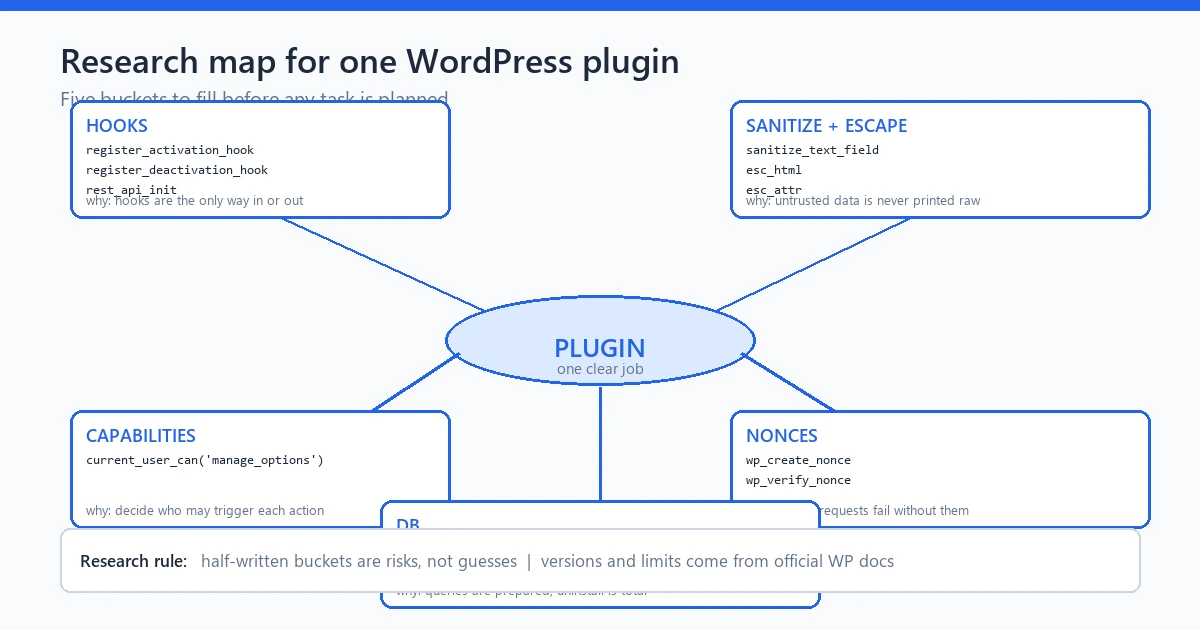
caption: Stage 2 research map for one plugin: hooks, sanitization and escaping paths, capability checks, nonces, and activation behavior.
Stages 4 and 5: plan and lock before any code
Stage 4 of the ai workflow for wordpress plugin development turns research into a plan. The plan is a task list, not prose. Each task names the hook or file it touches, the function it adds, the capability it checks, and the test that proves it.
The plan also freezes the non-goals. Whatever the idea file excluded stays excluded, now with the weight of writing instead of a mood. In my password tool build, the plan carried the no-settings-page decision forward. Analysis had nothing to configure, so there was nothing to configure, and that cut a real slice of the audit surface.
Stage 5 is the lock, and it is the stage people skip first. You close the plan after writing it: no new features mid build, no confident suggestions tacked on in the chat, no renaming tasks because the model found something more interesting. If a real discovery demands a plan change, reopen the plan explicitly, add a task, and relock. Not ceremony: this makes drift a recorded event instead of a feeling you cannot name two weeks later. Drift needs a paper trail.
I keep the locked plan in the same repo as the plugin code.
An accountable tool earns its keep. In the workflow engine I built, plan lock writes a state change to a hash chained event ledger, so the history answers what was agreed the same way every time. A pinned plain text plan does the same with less traceability. Either way, the lock in the ai workflow for wordpress plugin development is what makes drift visible.

caption: A locked plugin plan: tasks mapped to hooks and tests, non goals frozen, changes only by reopening the plan.
Stages 6 and 7: one hook at a time, then tests on a clean WP stack
Stage 6 in the ai workflow for wordpress plugin development is implementation, and one rule separates surviving plugins from broken ones. One hook at a time. Implement the activation hook, run it once, then the shortcode. Then the AJAX handler with its capability check and nonce verification in the same task, because those two belong together. Then the admin screen.
Why one at a time? Each hook is a seam in the shared runtime: if the plugin worked before a hook landed and breaks after, the seam tells you which task swallowed the bug. Bulk generating five hooks turns one misbehaving plugin into a thousand line diff exercise.
I hit this during the password tool build. Analysis logic was done, and the first rendered page broke on one host. The culprit: one escaping call on a rendered attribute, guessing at its context instead of using esc_attr. One hook, one seam, one test away from being caught. That afternoon is why this ai workflow for wordpress plugin development preaches small tasks.
Stage 7 is testing on a clean WordPress stack, and the heavy word is clean. Your own blog grades like a teacher who liked your answer in advance. A clean stack tells the truth. The clean stack is a throwaway install: default theme, the oldest PHP you claim to support, no other plugins, activation watched first for a crash. Then the real checks: deactivation unregisters what activation registered, uninstall.php leaves no orphaned options, every AJAX path returns a proper response, including the wp_verify_nonce failure path. And the shortcode survives empty, hostile, and very long attributes.
Test the guards on purpose: a stale nonce, an admin screen opened by a user who lacks the capability. Negative paths are where generated code assumes kindness, and the internet is not kind. Kindness is not a test. Skipping this stage leaves the ai workflow for wordpress plugin development with no evidence to gate on later.
I still run the password tool on a throwaway install before every release.
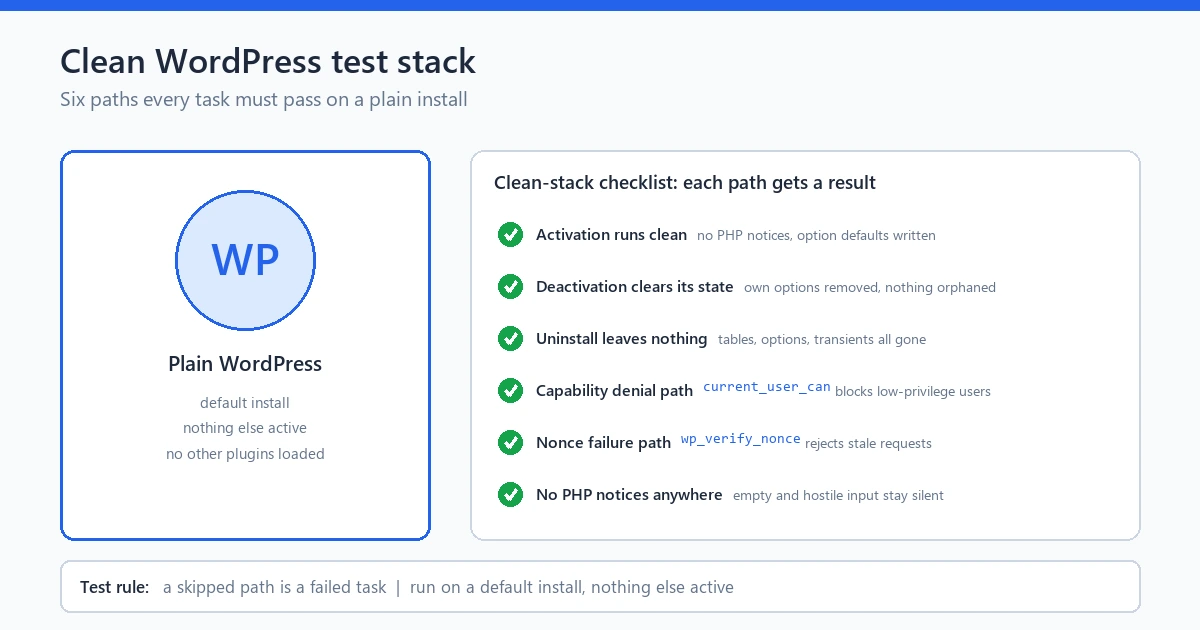
caption: Stage 7 checklist: activation, deactivation, uninstall, capability and nonce failure paths, tested on a default install with nothing alongside.
Stages 8 and 9: audit, repair, release gate, publish
Stage 8 of the ai workflow for wordpress plugin development is the audit, and its discipline is independence. A separate pass with a separate goal: find what violated the plan, the handbook, or the runtime, without the builder’s confidence rubbing off. Sanitization on every entry point, escaping on every exit point, capability and nonce checks on every privileged path, no deprecated calls, no debug leftovers.
When the audit finds problems, repair must be bounded. Fix the named findings, re-audit, stop. No new features during repair. An unbounded improvement loop is how a safe plugin sprouts an unplanned feature and its bugs. On the password tool, the audit checked every export path against one invariant: no report file ever contains the raw password or its full hash. Every later export review runs against it since.
Stage 9 is the release gate and publish, and this is where an ai workflow for wordpress plugin development either earns its meaning or loses it. The gate rule is precise. A green report is not proof. The gate evaluates the evidence behind the report: test runs with dates, audit findings with resolutions, labeled items never verified in your environment, and an explicit human verdict. In my engine, the gate reads the recorded evidence and stops the release if a required artifact is missing, because a mocked pass proves design, not behavior.
Then publish. Zip the plugin, install it on a real site where strangers can reach it. Publishing is not a screenshot in a private chat. It is a live URL: the release stage of the ai workflow for wordpress plugin development.
the twelve check release checklist
What changes between plugin types: tool, workflow, theme
The nine stages hold for every build, but their weight shifts by plugin type, and the ai workflow for wordpress plugin development flexes accordingly.
Self contained tool plugins, like a client side analyzer, concentrate risk in research and tests. The surface is small and must be exact on input and output. In the ai workflow for wordpress plugin development, that puts the security work in stage 2 and most of the test count in stage 7, where my password tool put almost all of its risk.
A workflow or integration plugin, one that talks to mail transport, external APIs, WordPress cron, or other plugins, moves its risk to plan and audit. The plan must name every boundary and failure mode for when the external side is unreachable. The audit has to check behavior you cannot fully reproduce locally, which is why honest status labels matter most. If scheduled jobs never fired in your environment, say so at release.
Presentation heavy plugins shift risk toward escaping: output surfaces multiply and generated markup picks up injection paths that easy demos never show.
One sequence, shifting weights. That is the design of this ai workflow for wordpress plugin development: the stages stay named and ordered, the gates move to where your plugin type takes its damage.
The password intelligence build, seen through these stages
The proof that an ai workflow for wordpress plugin development produces real software is a case study on this site: one plugin followed from idea to release.
That plugin maps cleanly onto the nine stages. The idea file and locked plan carried the scope defaults the case study analyzes. Implementation went hook by hook: shortcode registration, activation and deactivation registration, and input handling with sanitization on the way in. The tests ran across JavaScript and PHP, and the release documentation reports 270 plus assertions with dated run records. The audit checked the export invariant and the release gate read evidence, not a green summary. I wrote the case study from the run records, not from memory.
Two links finish the job: read the case study for the process trail, then open the live tool, type three passwords, and watch your network tab. One reports the history, the other lets you re-run the hour, re-verifiable in under an hour. That is the strongest evidence that this ai plugin development workflow survives a real build.
the Password Intelligence case study
the Password Intelligence tool
Limits, stated plainly
No ai workflow for wordpress plugin development guarantees a secure plugin. It raises the floor and catches the failure classes vibe coding produces; it does not turn a model into a security engineer.
The engine that runs this process for me is a workflow controller with provider adapters for your own API keys, not a model. It records state, audits independently, and evaluates release evidence. It does not waive costs, live runs need credentials, and demo mode is labeled simulation, because it is one.
A human verdict is still required at the gate. Sanitization, capability checks, activation behavior, and update testing remain your responsibility, no matter which tool wrote the diff. Ownership stays with you. Any ai workflow for wordpress plugin development that pretends otherwise is selling you something the runtime will eventually invoice.
This page covers the process. The checklist linked here covers what you tick before you ship.
the AI software development checklist
FAQ
How do I build a WordPress plugin with AI?
Follow the nine stages: idea file, WordPress specific research, analysis, a locked plan, implementation one hook at a time. Then tests on a clean WordPress stack, bounded audit and repair, and a release gate that reads evidence. The ai workflow for wordpress plugin development is the sequence around the model, not the prompt you paste.
Is vibe coding safe for WordPress development?
Not on a production site. Your plugin runs beside unknown plugins in the same request. Unsanitized input, a missing capability check, or a carelessly registered hook collides in ways the chat window cannot see. It is fine for a scratch page and expensive where other people depend on the site.
What does testing on a clean WordPress stack mean?
A throwaway install: default theme, PHP at the oldest version you claim to support, no other plugins, testing activation first. Then deactivation, uninstall, capability and nonce failure paths, and edge case inputs. Your own blog grades a plugin kindly; a clean stack gives the real grade.
Which WordPress functions must exist in AI generated plugin code?
Check for sanitize_text_field and sanitize_key on every input path. Check esc_html and esc_attr on every output path. Check wp_verify_nonce or check_ajax_referer on forms and AJAX handlers. Check current_user_can on privileged actions. Check register_activation_hook and register_deactivation_hook with a matching uninstall path. If one is missing, stop and fix first.
Can I run this ai workflow for wordpress plugin development without any tooling?
Yes. Write the plan as checkboxes, pin it where your future self cannot casually edit. Implement one task at a time, and log test runs with dates. My workflow engine automates the ledger and lock, but the discipline does not need software.
What is an ai plugin development workflow in one line?
The ai workflow for wordpress plugin development is a governed sequence of stages and artifacts: idea file, research, analysis, locked plan, hook by hook implementation, clean stack tests, independent audit, evidence based release gate. The model does the typing. The workflow makes the result accountable.
Final word
Nine stages, idea file to publish, every one existing because WordPress shares its runtime with everyone else’s code. AI writes faster than you ever will, so the gates matter more than the generation. Run this ai workflow for wordpress plugin development once on a small tool plugin, all the way through release. The evidence will teach you more than ten tutorials. One tool on this site went through it. Make yours.