
A 12-check AI software release checklist turns release day into a repeatable preflight. You verify the canonical source, trace requirements to tests, scan for secrets, package cleanly, and write a rollback plan. Nothing ships without the checklist.
Most AI failures happen on release day. The code passed on the machine. The release broke the account. The ai software release checklist exists to catch those differences before launch.
Pick one module or service for your first release. A single endpoint, a small widget, or a plugin block. Small scope keeps the checklist readable and the rollback plan honest.
the seven step AI coding workflow
Why the ai software release checklist gates release day
AI writes code that works on the developer’s machine. It assumes the environment, the keys, the dependency versions, and the network behave the same way in production. Those assumptions are the gap between a green build and a failed release.
Three failure shapes appear again and again. First, the canonical source is unclear. The team thinks they are shipping v1.2 but the artifact is v1.1. Second, secrets leak into the artifact or the config. Third, there is no rollback plan, so a bad release stays up until someone manually reverts it.
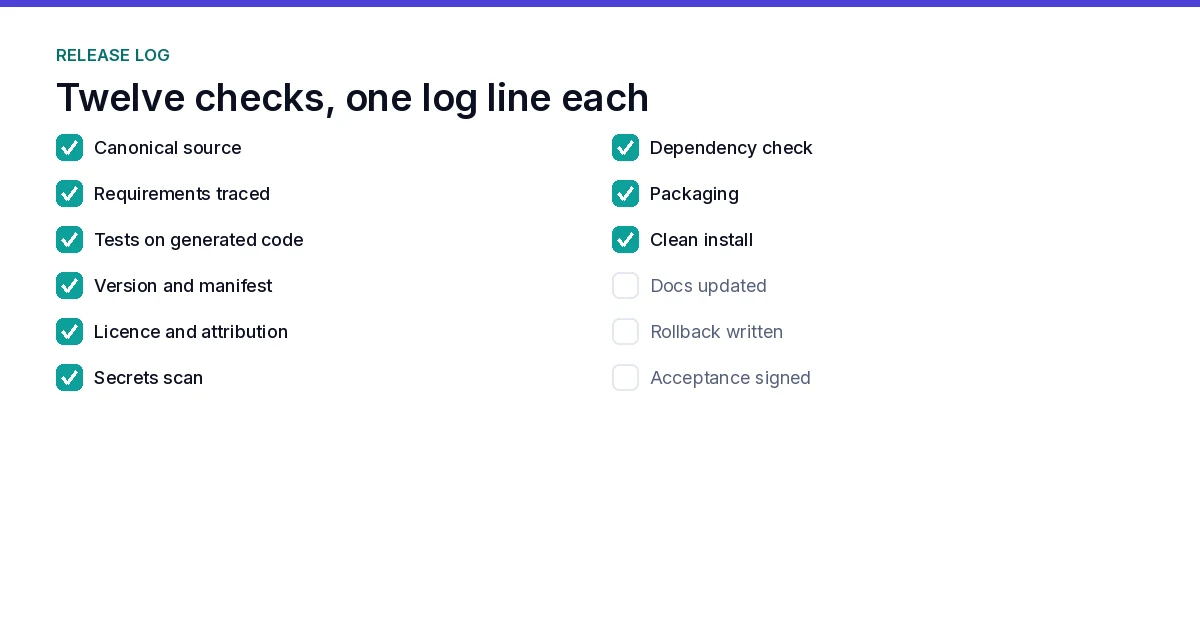
The 12 checks in the ai software release checklist replace hope with evidence. Each check has a pass condition, a command, and a place in the release log.
Check 1: Verify the canonical source
The first check in the ai software release checklist is the canonical source. Which tag, branch, or commit is shipping? Record the full commit hash, the tag, the date, and who released it. Run the command that prints the current version.
If two developers ship different versions to the same environment, the release is broken. The canonical source check is not optional. It is the first thing an incident bring-back returns to. Compare the printed version against the tag in the repository, not against what the release notes claim, because the repository is the only witness that holds.
Check 2: Trace requirements to tests
A requirement without a test is a wish. Trace each user story to at least one automated test. In the ai software release checklist, the test matrix becomes the acceptance record.

When a team builds without a requirement trace, they discover gaps too late. The trace is read at the start of the release gate, not after the outage. The test matrix is the map of the gap. Every empty cell in the test matrix shows a requirement that has not been written yet.
The trace also forces the team to define the requirement precisely. A vague requirement produces a vague test. A vague test passes on bad code. The trace breaks this cycle by making the requirement visible before code exists.
Write the requirement, find the test that covers it, and verify the test passes. If a requirement has no test, close the release and write one. Keep the trace in the repository next to the code. A trace in the same pull request as the code survives refactors, because a commit that changes a requirement touches the trace too.
Check 3: Check test coverage on generated code
The coverage check in the ai software release checklist treats coverage as a signal, never as a verdict. Run coverage and record the line and branch percentages. If the generated module drops below the team’s minimum, the release fails.
Ninety percent coverage sounds high, but it can hide the critical paths. A module can have 90% line coverage and still miss the authorization branch. The coverage report must be read alongside the acceptance criteria. The critical paths defined in the criteria always need full branch coverage.
Branch coverage is more meaningful than line coverage. A single line can have multiple branches. One untested branch means one path that has never run. In a security context, an untested branch can be an authorization bypass. The checklist records both line and branch percentages.
The coverage gate is a floor, not a ceiling. The team runs coverage at the start of the release day, and if it is below the minimum, the release is blocked. The gate exists to prevent the team from shipping code that has never been executed.
Report both numbers in the release log. A release that shows 92% line coverage and 61% branch coverage is telling the truth about its edge cases, and that truth is worth more than a single flattering number. Coverage traps the untested paths. A module can have 90% coverage and still miss the important edge cases. Read the coverage report alongside the acceptance criteria.
Check 4: Verify version and manifest
The version manifest check in the ai software release checklist records what changed, what did not, and who approved it. Run the command that prints the version manifest. Compare it against the canonical source from Check 1.
A release without a manifest is a release without a record. When a customer reports a bug, the manifest tells you what they are running and what they should be running.
Adopt semantic versioning before the manifest exists, so the version number itself carries meaning. A breaking change bumps the major, a new feature bumps the minor, and a fix bumps the patch.
the Semantic Versioning specification

The manifest also records the dependencies at the version level. A dependency upgrade can break the release. The checklist captures the exact version of every third-party package, so the team knows which dependency is different between the latest and the shipped version.
When a customer reports a bug, the manifest is the first document the support team reads. It answers the question: what did they have behind them? Without a manifest, support cannot reproduce the issue. With a manifest, they can.
Check 5: Scan for license and attribution
The license check in the ai software release checklist focuses on the engine license line. Verify it is present, correct, and matches the license file. Record the license text and the version of the engine.
An attribution error is a legal exposure with a customer-facing cost. The license line often lives in a UI element or a footer. Verify it renders in the shipped artifact.
The license line is the engine’s commitment to the customer. It names the license, the version, and the effective date. A missing or incorrect license line breaks the customer’s compliance and the team’s standing.
The checklist verifies the license line in two places: the license file in the repository and the UI element in the shipped artifact. The file may be correct while the UI element is missing. The UI element is what the customer sees. The checklist checks both.
The license line includes the engine version and the license tier. A Personal license says Personal. A Pro license says Pro. An Agency license says Agency. The checklist verifies the tier matches the order. A mismatch between the license file and the UI element is a customer-facing error.
Run the license check as part of the build. A build step that fails when the license line is missing cannot be forgotten, while a manual reading can be skipped on a rushed afternoon.
Check 6: Secrets scan
The secrets scan is the check most likely to block an ai software release checklist run. Run a secrets scanner over the repository, the config files, and the built artifact. Record the output and the scanner version.
If the scanner finds an AWS key, a payment token, or a model credential, the release is blocked. Expire, rotate, and re-ship. Never ship a leaked secret.
A leaked secret is the most expensive bug in the release. An AWS key can drain a budget. A payment token can touch customer data. A model credential can expose the AI provider’s infrastructure. The checklist treats any secret finding as a hard stop.
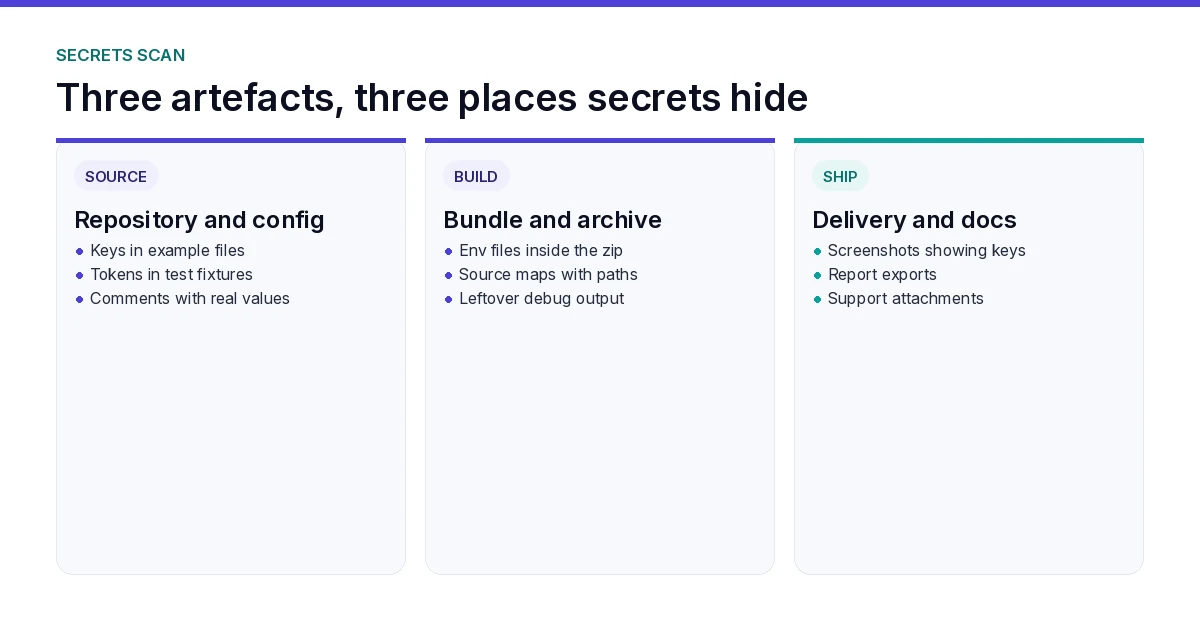
When the scanner finds a secret, the release is blocked. The team expires and rotates the secret. The checklist records the incident. The team re-runs the scanner on the fixed version. The release proceeds only when the scanner reports clean.
Scan the artifacts again after packaging. A secret that was removed from the source can still sit in the build cache, in a compiled resource, or in a test fixture that ships by accident.
Check 7: Dependency security scan
Dependencies drift. A library you trusted six months ago may now have a known vulnerability. The dependency scan in the ai software release checklist runs an audit and records the advisory IDs.
The scan must cover the lock file, the installed packages, and the build output. Mark any advisory as accepted or fixed. A release ships only when every advisory is resolved or explicitly accepted.
Record each advisory ID and its fix decision in the release log. An advisory accepted without a name and a date is a hidden risk, so every accepted advisory gets an owner and a review date.
Check 8: Package and clean-install test
Clean-install the package on a fresh machine. No node_modules, no cached versions, no developer shortcuts. Build it, install it, and run the smoke test.
If the package does not install cleanly, the ai software release checklist blocks the release. The clean-install test is the gate that catches dependency drift that the local machine hides.
Time the install from a cold cache. An install that works in 40 seconds from a warm cache but fails in a clean container is a release-time problem, and the clean-install step is the only honest way to see it.
the release verification checks
Check 9: Documentation and rollback notes
The documentation check in the ai software release checklist treats docs as an operational artifact: one paragraph on what changed, why, how to use it, and how to roll back.
The rollback note is the most important line in the documentation. If the release has a problem, the rollback note tells the on-call engineer exactly what command to run and what to verify.
Keep the rollback note short enough to follow under pressure. One command, one verification step, one owner. A rollback note that needs three screens of context will not be followed at two in the morning.
Check 10: Delivery and acceptance
The delivery and acceptance step closes the ai software release checklist. The delivery is what the user receives. Verify the feature carries the functionality described in the acceptance criteria. Open the artifact, click the feature, and confirm it works.
The acceptance is the owner’s sign-off. The owner reads the checklist, the evidence log, and the rollback note. If all checks pass, the owner approves the release. If any check fails, the release is blocked.
Demo chunk
The demo shows the 12-check pipeline: canonical source, requirement trace, coverage report, version manifest, license scan, secret scan, dependency audit, clean-install, documentation, delivery, and acceptance. Every screen is MOCK until the owner verifies it against a staging environment, and the demo label appears on the plan-lock and checkpoint screens.
Limits honest
Live provider runs need credentials and carry charges. Demo runs need no key and are labeled NON_PRODUCTION_DEMO. Rate limits and quota apply. A checklist that mocks everything cannot prove production behaviour; it proves the workflow is ready for production.
Worked preflight: text-tool v2.1.0
Here is the ai software release checklist applied to one small release, a text-manipulation module shipped as v2.1.0. The module is a single endpoint behind a plugin block, and the whole run took about half a day.
Check 1 found the shipping commit at a1b2c3d, printed by git describe, and matched the tag v2.1.0 exactly. Check 2 mapped nine user stories to eleven automated tests, with two stories sharing one integration test. Check 3 reported 88% line coverage and 74% branch coverage, above the 85/70 floor, with the authorization branch fully covered. Check 4 printed the manifest and confirmed the only dependency change was a patch bump of the date library, approved by the owner. Check 5 verified the engine license line in both the license file and the UI footer. Check 6 scanned the repository, the config, and the built package, and reported clean after a stale API key from a past session was rotated and removed. Check 7 resolved one advisory by upgrading a transitive package by one patch version. Check 8 installed the package in a clean container in 42 seconds and passed the smoke test. Check 9 wrote the rollback note, naming the previous tag and git revert 21a2b3c. Check 10 delivered the artifact, and the owner opened the feature once and approved it.
Most of the elapsed time was waiting on the container install. Same 12 checks, one small release, one signed log, and the next release starts from this log instead of from memory.
Idea-to-income example
A solo builder ships a text tool in three releases, and the ai software release checklist runs the same way at that size. The first release is the core module: canonical source, requirements trace, coverage, version manifest, license, secrets scan, dependency audit, and clean-install. The second release adds the UI and documentation with a rollback note. The third release is the payment integration, which triggers a secrets scan, dependency audit, and acceptance check with a documented rollback.
the password intelligence case study
FAQ
What is an ai software release checklist?
An ai software release checklist is a 12-point preflight that verifies a release before launch. It covers the canonical source, trace to tests, coverage, version manifest, license, secrets, dependencies, packaging, documentation, delivery, and acceptance.
How do I verify the canonical source before release?
The canonical source check is the first entry in the ai software release checklist. Record the full commit hash, tag, date, and releaser. Run the command that prints the current version. Compare it against the shipping artifact. If they do not match, the release is blocked.
What should a release version manifest include?
The manifest records the version, commit hash, tag, date, changelog, dependencies, and approver. It is the single source of truth for what shipped and who approved it.
How do I scan for secrets in generated code?
Run a secrets scanner over the repository, config files, and build artifact. Record the output. The ai software release checklist blocks on any credential: rotate the secret, re-run the scanner, and re-ship only when the scan is clean.
What is a clean-install test?
Clean-install is a fresh install with no cached modules or developer shortcuts. It is the packaging check in the ai software release checklist. Build from the clean state, run the smoke test, and verify the feature works. If it fails, the release is not shippable.
How do I prepare a rollback plan?
The rollback plan is the last line of defense in the ai software release checklist. Write one paragraph that names the previous working version, the exact rollback command, and what to verify after rollback. Distribute it to the on-call engineer before release day.
Summary
The ai software release checklist is a promise that nothing ships by accident. Verify the source, trace the tests, scan the secrets, package cleanly, write the rollback, and get the owner’s sign-off. The model writes the code. You keep the gate.
Start with one module and run the full checklist. The rollback note is your safety net, and the next release is easier because the system is already built.
Evidence snapshot (MOCK)
## RELEASE CHECKLIST EVIDENCE LOG
Date: 2026-10-18
Module: text-tool
Canonical source: commit-a1b2c3d (v2.1.0)
Test coverage: 88%
License: engine-license.txt (v2.1.0)
Secrets scan: clean
Dependency audit: all resolved
Clean-install: passed
Rollback: git revert 21a2b3c
Release verdict: APPROVED (owner: A. Khan)
(demo label: NON_PRODUCTION_DEMO)