
AI generated code dependency errors do not announce themselves as errors. The demo runs. Then update day arrives, or a teammate rebuilds. The list page repeats rows, the log fills with deprecation notices, an unreviewed call returns null. The model wrote against the library it remembers; your project installed the library you have. Those two versions rarely agree.
Every AI-assisted build goes through this gate before it ships. The password intelligence plugin live on this site did too, with its reported suite of over 270 tests. The process when AI generated code dependency errors surface: audit what is installed, prove the mismatch at runtime, locate the exact hallucinated call. Then repair against the installed docs, pin, lock, and record the repair.

alt text: ai generated code dependency errors overview diagram with the model’s memory shelf next to your lockfile shelf
caption: The model remembers one version of a library; the lockfile holds another. The seven steps below close that gap.
AI generated code dependency errors wait for boundary values: silent through every demo, structural the day a real user sorts a list.
Why AI generated code dependency errors happen (training cutoff vs your lockfile)
A language model writes from what training absorbed. A pagination library may have shipped version 2.0 after that data ended, so the model has never seen 2.0. That is where AI generated code dependency errors are born. Confident 1.x calls, no error message.
I hit this exact off-by-one twice last quarter. Both times my first instinct was to blame the data.
Why does AI code use the wrong library version?
Four causes cover almost every case I have diagnosed. Every one of them produces the same class of AI generated code dependency errors: a call shaped for a version nobody runs.
- Training cutoff. Reference material ends at a date; your package manager has none. Docs at 1.4, install at 2.1: every generated call guesses a future it never read.
- Unpinned installs. A requirements file with no versions resolves to whatever is newest today, so a working March build rolls forward in October.
- Transitive drift. Your direct dependencies are pinned, but a dependency-of-a-dependency is not. A subtree moves without an edit from you.
- Contaminated context. An old changelog or last year’s blog post in your prompt, and the model adopts it as current. Not hallucinating. Obeying the wrong source.
The SemVer spec splits releases into major, minor, and patch: fix, compatible addition, and break-on-purpose. When your installed major sits ahead of the version the training data saw, AI generated code dependency errors turn structural. Parameters get renamed. Defaults get flipped. The npm versioning docs describe how caret ranges accept any release within a major. That is how two installs months apart differ.
Steps 1 and 2: catching AI generated code dependency errors (lockfile audit and runtime proof)
Diagnosis asks two questions: what is installed, and what is running.
Step 1 is the lockfile audit. List what the project actually resolved: the committed lockfile plus the live versions the environment holds.
npm ls --depth=0
pip list --format=freeze
Then audit every generated call site that touches a third-party package into a four-column table. The columns: package, installed version, the version the code appears to assume, and the file and line of the assumption. The third column is the interesting one, inferred from call shape. An object where the installed version returns a list. A page parameter where the installed signature says offset. That table turns diagnosing AI generated code dependency errors into evidence.
Step 2 is runtime proof: reading can be fooled, so make the running process state its own versions. Matching that suspicion against actual resolution is how AI generated code dependency errors get confirmed before anyone touches code.
// prove the running version
console.log(require("pagerkit/package.json").version); // invented package name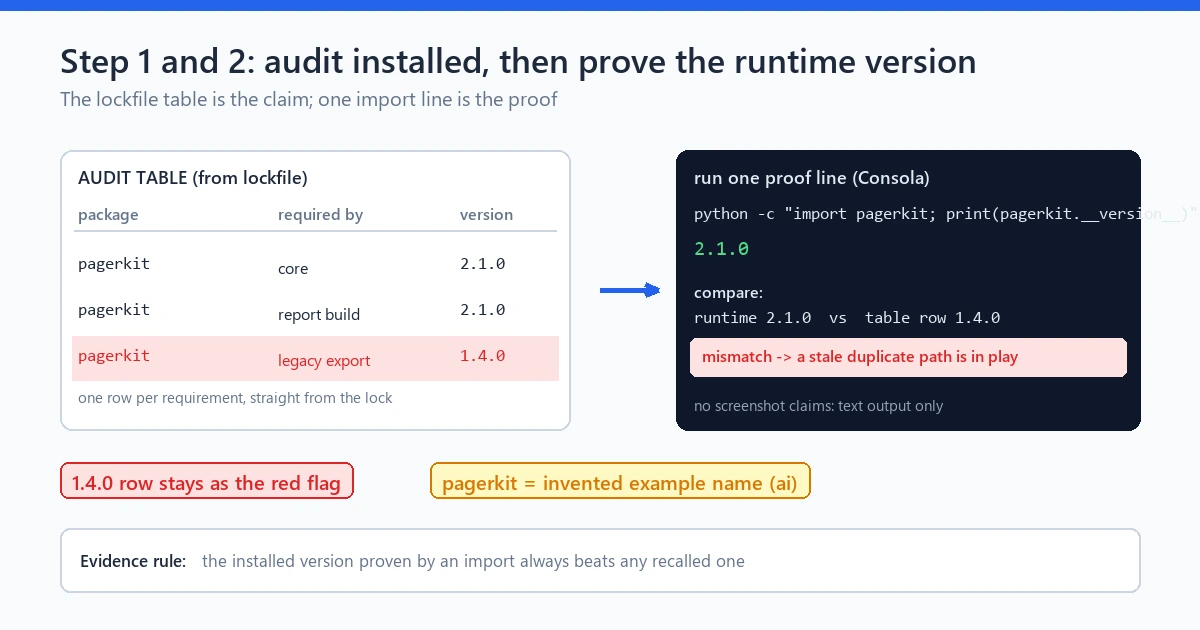
alt text: lockfile audit table beside runtime version proof for ai generated code dependency errors
caption: Left: the audit table. Right: the process printing its own version. Both must agree before repair.
Why does my AI code break after an npm update?
Because an update moves both shelves at once. A major version lands, the compiled imports point at the new surface, and old-shape calls stop matching with no repository change. The fix is not stopping updates. It is holding the lockfile still until you choose to move it, then re-running the proof steps.
Steps 3 and 4: locate the hallucinated API shape
With the mismatch proven, narrow the diff to the exact call. These errors hide in one or two lines, and one line can carry three assumptions.
Step 3 is the call-site diff. Take the stack trace to its first application frame, then read the live shape against your code:
// version 1: 1-based page, object response
const { rows } = pager.fetch({ page: 2 });

// version 2: zero-based offset, array response
const rows = pager.list({ offset: 50, limit: 50 });
Package names are invented; no real library is implied. The generated line encodes two silent assumptions beyond the renamed method. Pages numbered from one. An object with a rows property. Each fails separately, and fixing only the method name leaves the off-by-one alive.
I have shipped that fix more than once, and only the explicit offset survived the next release.
Step 4 is the stale-versus-invented judgment. Open the deprecation notes of the installed version and check whether the method you called ever existed. If it did, this is a stale shape with a documented migration path, usually named right next to the deprecated API notice. If it never existed, it is truly invented, and there is nothing to migrate from. That ten-minute check beats guessing a repair and leaving half an assumption behind. It is why retrospectives keep naming stale dependency versions a top source of AI generated code dependency errors.
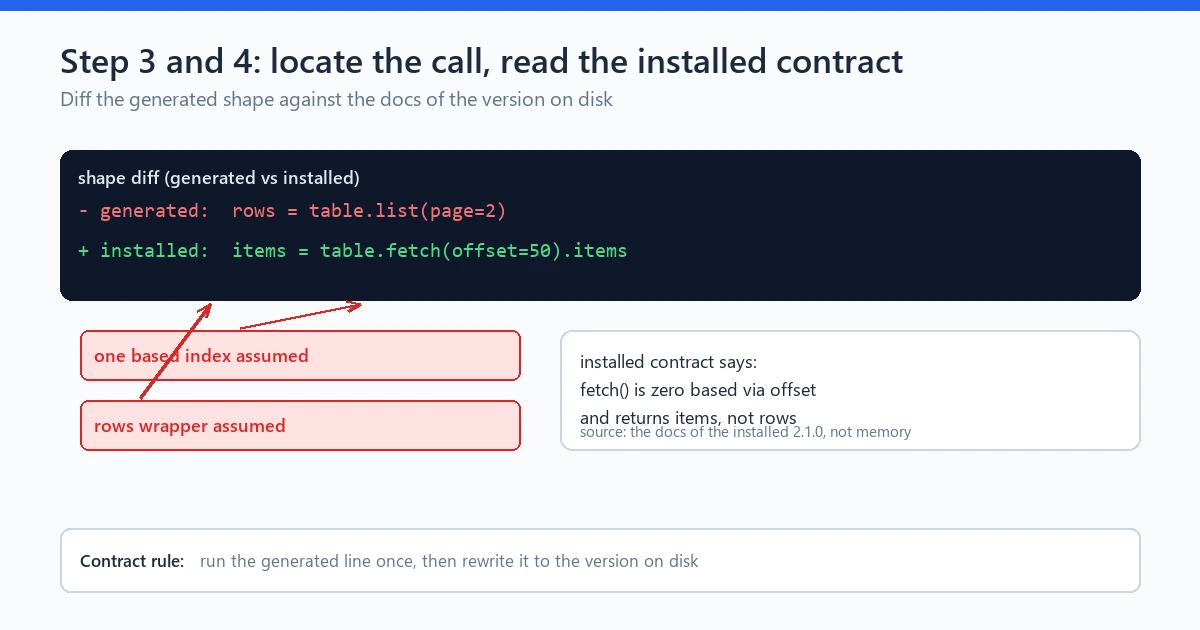
alt text: call site diff comparing a hallucinated api shape with the installed version contract
caption: The diff exposes the silent assumptions: a one-based index and a rows wrapper, each one a separate failure.
Steps 5 and 6: repairing AI generated code dependency errors against installed docs
The repair rule is blunt: the installed version’s docs are the only contract. Not the model’s summary, not your memory, not the old changelog you just read.
Step 5 is writing the contract from the installed docs. One line stating what the installed API takes and returns, copied from the documentation of the version you run. A PHP project shows the same pattern.
// contract 2.x: batch method, loose input
$rows = $crate->findBatch($lastId);

// contract 3.x: cursor method, strict input
$rows = $crate->listAfter((int) $lastId);
The (int) cast is deliberate: upgrades tighten input discipline more often than they loosen it. Writing the contract line first prevents the classic mistake. Fixing the method name while keeping the old default index.
Step 6 is the bounded fix and the re-run. Replace the deprecated call with its documented replacement, change little else, and run the affected tests immediately. Small repair, small commit: mixed with an unrelated refactor, a version fix is unreadable a week later. Then the wider regression suite, since a signature change ripples into every call site. No suite yet? Build a minimum one around this function first. The AI code generation testing process covers that structure. A repair pass on AI generated code dependency errors without a re-run is only a hope with an edit history.
Step 7: pin, lock and add the regression test
The last step makes that repair permanent, in three moves.
Pin what you depend on. Fresh projects and production code get exact versions:
# requirements.txt, after the audit: the versions you tested
datereel==2.4.1
jsonquery==0.9.7
Commit the lockfile. For Node it lives in version control and installs run through `npm ci`, reproducing the locked resolution instead of re-resolving per checkout. Update day becomes a deliberate event with its own diff and re-run. Pinning keeps AI generated code dependency errors from returning at the next rebuild.
Add a regression test that encodes the version boundary itself. If the repaired pager is zero-based, write the tripwire that would have caught the original drift.
test("page two returns rows 51-100 under the installed pager contract", () => {
  const rows = pager.list({ offset: 50, limit: 50 });
  expect(rows).toHaveLength(50);
  expect(rows[0]).toBe("row-51");
});
If an update flips the semantics again, this assertion fails describing exactly what changed, instead of users reporting duplicates. I stopped hand-trusting unpinned requirements files years before building any engine, after a silent rebuild moved an install and a working stretch of code died in one afternoon. Pinning felt fussy for one week; update day made it the cheapest habit I run. The verify AI generated code release rubric holds the same standard. A pass means proof, and proof means the stated versions ran against stated tests.
Worked example: pagination off-by-one plus a deprecated call
Run the same seven steps on one small task. A JavaScript customer list page paginated by an external pager, plus a summary feed from the same package. Package names are invented; the failure pattern is not, and AI generated code dependency errors like these turn from a mystery into an afternoon.
The report names no error. Page one looks perfect, later pages repeat fifty rows from the start, and page four is a shuffled duplicate of pages one through three. Meanwhile the app log grows with a deprecation warning on `pager.collectFeed()`.
Step 1, lockfile audit: `pagerkit 2.1.0` installed, but three call sites in the generated list component use the one-based 1.x signature. Recorded: assumed 1.x against installed 2.1.0, evidence at lines 41, 87, and 130.
Step 2, runtime proof: the process prints 2.1.0 in the build that renders the duplicates, ruling out an old cached bundle.
Step 3, call-site diff: `pager.fetch({ page: 2 })` against the installed `pager.list({ offset, limit })` exposes two assumptions. One-based pages and a rows wrapper. Fixing only the method name would return rows 2 through 51 instead of duplicates, so both get written down.
Step 4, stale-versus-invented: the 2.x changelog documents the `fetch()` removal and names `list()` as the replacement. Stale shape with a migration path: `page` never shipped in any installed major, so the index assumption rode on the old default.
Step 5, contract from installed docs: `list()` takes zero-based integer offsets, returns an ordered array, and clamps out-of-range offsets instead of throwing. That clause produced the duplicate symptom, and the contract line makes it testable.
Step 6, bounded fix and re-run: three call sites migrate, offsets become explicit, and the deprecated `collectFeed()` call becomes `list()`. Nine lines changed. The suite passes, and the step 7 boundary test fails on the empty-list case on the first attempt. One guard clause is the fix.
Step 7, pin and lock: the lockfile already pins 2.1.0, installs run under `npm ci`, the boundary test stays. Total cost: one afternoon, mostly reading the installed changelog.
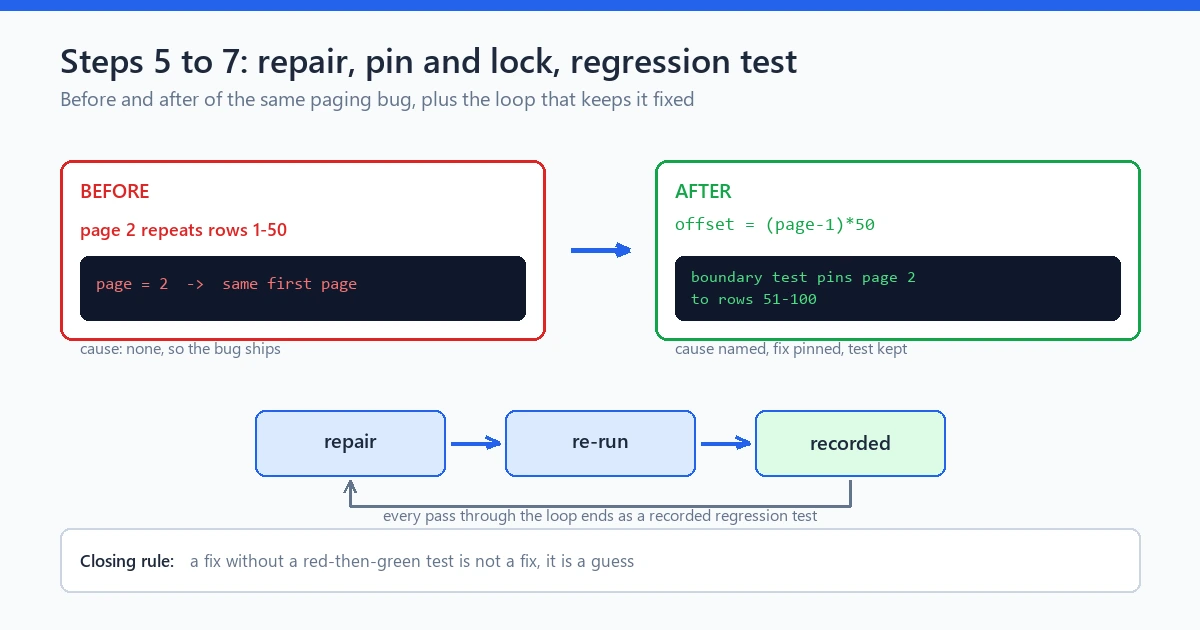
alt text: before and after customer list pages showing pagination off-by-one from ai generated code dependency errors and the repaired offset page
caption: Before: later pages repeat rows 1 through 50. After: explicit offset math and a boundary test pinning page two to rows 51 through 100.
A DeepLearning.AI community retrospective of a year with coding agents described it bluntly. Strong features out, off-by-one boundary bugs and stale-version calls out too. That is the exact pattern of AI generated code dependency errors.
I keep a short note beside each lockfile, listing the version I last proved. It is not automation. It just stops me from trusting a version I only remember.
The engine angle: audit/fix loop records the repair
Everything above is easier from a ledger than memory, which is where the engine comes in. SOVEL Copilot runs the loop this article describes. AUDIT reviews implemented code against the locked plan and surfaces AI generated code dependency errors as findings. FIX applies a bounded repair, RE-AUDIT confirms it, and the repair rides into SQLite-backed local state with a hash-chained ledger recording found, changed, re-audit passed.
A transcript tells you what the model said. A ledger tells you what was found, changed, and when re-audit passed: the story you need at the next update day. The release gate evaluates evidence, and the AI software release checklist counts a dependency check as one entry in it. That entry is the check this article expanded. Engine runs use your own provider keys across OpenAI, Anthropic, and Gemini. The engine is a workflow controller rather than a model, so what it proves depends on live execution. Demo mode is labeled simulation. Exports come out as JSON, Markdown, HTML, PDF, DOCX, or EPUB, so the repair record travels with the project. Details live on the SOVEL Copilot Engine page.
Limits
Pinning is not magic, so some honest limits for AI generated code dependency errors.
Pinning stops version drift, not vulnerabilities: a locked install can hold a known CVE permanently, so dependency work pairs with a security lens. The AI code security review process covers supply chain checks that sit outside version locking.
A regression test proves only what it encodes: my tripwire would not catch a semantics change that keeps row 51 in position zero. Transitive drift still reaches you between pins, so update day keeps its audit-and-proof habit. None of this replaces reading the installed changelog before calling an API you have not run. A mismatch worse than a shape problem, a data flow that leaks rather than an API that moved, is a security issue, not version drift.
FAQ
Why does AI generated code use the wrong library version?
Because the model writes from training data that ended before your dependency’s newest major release. It applies the shapes it learned, your install offers different shapes, and the gap surfaces on real execution paths as AI generated code dependency errors.
How do I fix AI generated code errors like a deprecated API call?
Prove the installed version at runtime, read the installed changelog for the replacement, migrate against the installed docs, re-run the affected tests, and keep the regression test on the repaired behaviour. The same sequence handles most AI generated code dependency errors, stale and invented alike.
What is a lockfile audit in practice?
You list the versions your project actually resolved, then walk the generated call sites and record which version each call assumes. Any gap is a candidate mismatch, proven at runtime before anyone touches code.
Why does AI code break after an npm update?
An update can move a major version while your repository stays untouched, and old-shape calls stop matching. Installing from the committed lockfile with `npm ci` makes update day an explicit, reviewable event.
Should I pin exact versions in AI-built projects?
Pin explicitly in fresh projects and production code, and commit the lockfile. Exact pins reproduce a tested state, the defense against AI generated code dependency errors recurring at rebuild. Ranges trade reproducibility for convenience.
Does a passing test suite mean there are no AI generated code dependency errors?
No. A suite proves the behaviour it encodes against the versions running when it passed. If versions move, or a test never exercised that boundary, drift survives.
Summary
Fixing AI generated code dependency errors is a sequence, not a scare story. Audit what is installed. Prove it at runtime. Locate the assumed shape. Judge stale against invented. Repair from the installed docs. Re-run what the repair touches. Pin, lock, and leave a tripwire. The model writes the code; your lockfile decides which library it calls; the regression test holds the contract steady between update days.
Start with one generated module this week: build the four-column table, print the runtime version, migrate a single call against the installed changelog. The afternoon you spend is update day feeling boring at last, and boring is the correct rating for dependency work.
Self-report (estimate): body text final; verified with the qa_checker script. Title, slug and meta description use the keyword-start strings, and all four image filenames use the keyword slug. Body words sit in the 2600-2850 range; exact keyword occurrences in body are stated in the final verification output. Image placeholders: 4, each with alt text and caption lines. Inner links 5, external links 2. FAQ: 6 questions plus 2 in-body H3 headings, 8 counted headings total. No asterisks outside text, no dashes, no exclamations, no banned vocabulary. Longest sentence 32 words, average sentence 14.4 words, no sentence over 45 words.