
AI coding api cost control starts the day you stop asking what a prompt costs and start asking what a finished task costs. I learned that the expensive way. In week three of the password intelligence build, the dashboard number had climbed while I felt productive doing almost nothing visible.
The internet asks the same questions on loop. AI coding API costs too much. Reduce my OpenAI bill. Why is my AI coding bill so high even though I only shipped two features. I read those threads at midnight, after my own Claude usage ran dry mid-task and a refactor sat half finished. Underneath them sits one boring, honest answer: nobody taught us to meter the work.
This guide is the metering lesson I wish someone had handed me: nine ways of ai coding api cost control, split into three blocks. You learn where tokens actually go. You learn how to shrink what you send. You learn how to make the workflow itself enforce the budget. Then discipline stops depending on your memory at 1 a.m.
Summary
AI coding api cost control means shaping tasks, context, and checkpoints so every provider call earns its price. The nine ways below cover task sizing, bounded contexts, and reuse of disk state. They cover a model picked per stage, quota checkpoints, cost receipts, and rate discipline across the OpenAI, Anthropic, and Gemini adapters. Check your provider’s current pricing before applying any number here, because rates move and this page will not pretend otherwise.
Where the money actually goes: tokens by stage
Most people give ai coding api cost control a monthly number and a shrug. They miss the interesting part. Cost does not spread evenly. It stacks in stages. Once you see the stack, the fixes become obvious.
Research is the first hog. An agent exploring a codebase reads files into context, and context is billed twice. It goes in once and rides along in every later exchange. Implementation is the second hog, mostly through retries. A task that fails at step four and restarts from zero bills you twice for the first three. Audit costs few tokens but a lot of trust when skipped; the unreviewed mistake becomes a paid rewrite next sprint.
The pattern behind all three: a large paste eats more tokens than a file path. Stuff a whole directory listing or a whole chat history into a prompt and you pay for words the task did not need. The person searching why is my AI coding bill so high is almost certainly paying for context they forgot they sent.
Two facts shaped how my ai coding api cost control works day to day. Provider dashboards show per-task token and call counts at the request level, not just the monthly summary. That split comes from the OpenAI usage docs (source: OpenAI usage docs, https://platform.openai.com/docs/guides/rate-limits). Pricing pages are lists that change often enough that memorizing a figure is wasted effort. The Google AI pricing page shows the current shape (source: Google AI pricing page, https://ai.google.dev/pricing). So the method below works in patterns and counts, never in dollar promises. The number that matters is cost per finished task, and only your own ledger can compute it.
Ways 1 to 3: size the task, not the prompt
The first block of ai coding api cost control lives before any request leaves your machine. It is about the shape of the work.
Way 1: cut the task before you cut the bill, the oldest rule in ai coding api cost control. A task named “add reports” is a week of agent wandering. A task named “write the CSV export function in reports.py, given this spec” is one call. Small tasks also fail smaller. Failure is the hidden multiplier on every invoice, because a crashed run that saved nothing bills you again from scratch. When a task refuses to shrink, that is a design problem, and no provider plan fixes it.
Way 2: bound the context like a fence, because the cheapest token in ai coding api cost control is the one you never send. Before implementation, list the exact files a task may read and write, and hand the agent that list instead of the repository. I started after noticing my prompts had grown to include a module the agent never needed. The diff quality did not drop. The bill did.
Way 3: one provider call per step, named in advance. If a task needs three calls, the plan says three before anything runs, which turns surprise into contract. When the ledger shows six calls on a planned-three task, you have found a bug or a bad retry loop while it is still cheap. That named-call estimate is where ai coding api cost control stops being theory. These three ways are the whole reason ai coding api cost control is a workflow discipline and not a wallet setting. Dashboard limits stop spending. Plan limits stop waste.
Ways 4 to 6: reuse local state and pick models per stage
The second block of ai coding api cost control is where I found the savings. The savings felt like cheating.
Way 4: keep state on disk so the model re-reads nothing. During the password intelligence build, the engine kept my plan, task notes, and decisions in local files backed by a SQLite event ledger. When a new stage started, the agent read the current task note and the relevant files. That was the entire context. No re-pasted project story. No re-reading files we had already described. Engine reuse of local state saved that repeated re-reading across sessions, the quiet core of ai coding api cost control. Tasks started from a short local receipt, not long chat archaeology. A local state AI coding workflow writes that receipt as it goes, so the next task begins with the summary, not the scrollback.
Way 5: checkpoint decisions, not conversations. Mid-project, the expensive thing is the slow rebuild of everything the model learned about your project after a context reset. A handoff note recording what was decided, what was touched, and what comes next costs a few hundred tokens. It saves a full re-explanation on every resume. That is ai coding api cost control hiding inside a continuity habit. If your Claude usage has died mid-task, you know the worst version: a fresh session, no memory, a task re-taught from zero. The session handoff ritual on this site fixes the memory loss and, quietly, the billing loss.
Way 6: pick a model per stage, not a favorite. In practice, model-per-stage is the fastest ai coding api cost control win. The same task billed on the wrong family costs several times more for no better output. Frontier models are for frontier problems: research on an unfamiliar framework, tricky concurrency, or a security-sensitive design decision earns a strong model. Rewriting a log line, renaming a variable cluster, formatting a report, those do not. My rule after months of metering. Research and audit get the strongest model I pay for. Implementation gets whatever meets the bar. Mechanical steps get the cheapest capable one. The engine treats this as a workflow choice: it is a controller over provider adapters, and each stage can name its family before anything runs.
Ways 7 to 9: quota checkpoints, cost receipts and rate discipline
The third block of ai coding api cost control makes the budget self-enforcing. It is the part most guides skip and the part that survives a bad week.
Way 7: put quota checkpoints into the plan, the enforcement layer of ai coding api cost control. A quota checkpoint is a named moment in the plan. The workflow checks remaining usage against remaining tasks, then decides: continue, shrink scope, or stop and write a handoff. Mine fires at plan lock, before implementation, while stopping still costs nothing instead of a half-finished feature. A hard cap that pauses the workflow is a feature, not an obstacle: what pauses cleanly resumes cleanly.
Way 8: write cost receipts into the reports. Every stage completion should append a receipt: calls made, tokens roughly spent, provider used, and whether the run stayed inside its planned call count. Not dollars, patterns. “planned 3 calls, ran 3” six tasks in a row tells you the plan is well sized. “planned 2, ran 9” tells you a retry loop is eating the budget and points at the exact task to fix. When the reports carry cost receipts, ai coding api cost control becomes a two-minute scan instead of a dashboard archaeology job.
Way 9: rate discipline across every adapter. If you hold an OpenAI key, an Anthropic key, and a Gemini key, you have three meters, three rate limit personalities. Same rules everywhere: no retry hammering, and exponential backoff with saved state on rate limits. One adapter’s failure pauses the workflow instead of triggering a panicked parallel run on another. The engine’s adaptation layer handles all three with your own API keys, and provider charges land on your accounts, recorded per stage. That separation matters for ai coding api cost control because cross-provider parallel runs look clever and bill like chaos.
A worked budget column on one build
Here is the method stitched together on my password intelligence plugin, told at pattern level so the numbers stay honest.
Planning week: tasks were small by design, each with a file fence and a call estimate. Research ran on the strongest model because I wanted one good answer, not five cheap wrong ones. The receipts showed planned calls and actual calls matching, which is what healthy ai coding api cost control looks like in a ledger.
Implementation week: mechanical refactors ran on cheaper models, feature work on capable ones. One task blew past its planned calls, the receipt caught it the same day, and the cause was a retry loop on a rate limit. The fix was backoff plus a saved checkpoint, not a bigger budget. That repair mattered more than anything else I did for api cost management that month.
Near the end: a quota checkpoint fired and showed the sensible call was to stop adding features and close existing ones properly. We did. The plugin shipped as a working password tool you can use today (source: live tool, https://sovel.pro/tools/password-intelligence/). The workflow never drained a card and never lost a task to a dead session. That is what ai coding api cost control looks like when it is boring. Boring is the goal.
The engine angle: one engine, your provider keys
Everything above works with a folder of notes and a spreadsheet. When the project grows a second week, the metering needs a controller, and mine is the SOVEL Copilot Engine.
The engine is a local-first CLI workflow engine, not a model or hosted service. It runs stages from idea through research, analysis, plan, plan lock, implementation, audit and re-audit, report, export, and release gate. State persists locally in SQLite-backed storage with a hash-chained event ledger. The handoff and cost receipts we discussed are written by the workflow itself, not by your memory. Provider adapters take OpenAI, Anthropic, and Gemini keys, so charges stay visible on your own dashboards. Demo mode is simulation with no key and no bill, the cheapest place to learn the loop. Exports come out as JSON, Markdown, HTML, PDF, DOCX, or EPUB.
Tools that overpromise are how people end up with surprise invoices. The engine makes no model cheaper. It does not guarantee a budget. It makes the workflow count things, stop things, and show things, and disciplined counting is what moves cost per finished task. If you want the loop it controls, the AI coding workflow guide on this site walks the stages end to end.
What ai coding api cost control cannot fix
Here is the honest edge of the ledger.
Rates always move. No ai coding api cost control plan survives a stale assumption. Re-check any rate on your provider’s current pricing page. That page is the only source that counts.
Cost control cannot make a badly designed feature cheap. If the plan itself is bloated, every way in this article just makes the waste tidy. Cut the feature or the task first.
It cannot buy capability. Migrating every stage to the cheapest capable model trades quality invisibly, and the bill arrives as rework, the most expensive line in any AI coding budget. Measure outputs, not just spend.
And it cannot out-engineer discipline. If you override a pause to ship something unplanned, the meter does not care about your reasons. Recording that override as a choice is itself part of ai coding api cost control discipline.
If usage limits keep breaking your runs mid-task, the honest pairing is the quota boundary guide and the session handoff ritual on this site. Read those first, then come back and wire the budget column.
FAQ
Why is my AI coding bill so high when I barely shipped anything?
Because you are paying for context and retries, not just output. Large pastes, whole-repo reads, chat history riding along in every exchange, and failed runs that restart from zero. Meter per task and the expensive pattern usually shows within a week.
How do I reduce my OpenAI bill without lowering quality?
Cut tasks small. Fence the context to named files. Reuse on-disk state instead of re-reading files, and send mechanical work to a cheaper model while research stays on the strongest one. Check your provider’s current pricing when you plan, since rates change.
What is a quota checkpoint?
A named moment in the plan where the workflow checks remaining usage against remaining tasks and chooses to continue, shrink scope, or stop with a handoff. It turns a provider limit from a mid-task crash into a planned stop.
Does reusing local state really cut AI coding API costs?
At the pattern level, yes. Reusing local files is ai coding api cost control with no new tool. Each task starts from a short receipt instead of re-reading files and re-explaining the project. The read happens once, then stays cheap, so the saving holds.
Can one workflow manage OpenAI, Anthropic and Gemini keys together?
Yes, through provider adapters. Each provider has its own rates, limits, and failure personality. Record usage per provider, apply the same backoff and pause rules everywhere, and never let one rate limit trigger a panicked parallel run on another adapter.
Is cost counting enough, or do I need a capped plan?
Both. Counting shows you the pattern after the fact; a capped plan stops the damage during the run. The cap that pauses and resumes cleanly is worth more than any single model choice.
Nine ways, one spine. Size the work, shrink the context, write the receipts, and let checkpoints spend nothing when stopping is the right call. Do that consistently and ai coding api cost control stops being a monthly shock and becomes a column you glance at. The engine itself runs that same spine as a workflow controller you can point at.
the local state AI workflow guide
the AI coding session handoff guide
the AI software development checklist
the seven step AI coding workflow
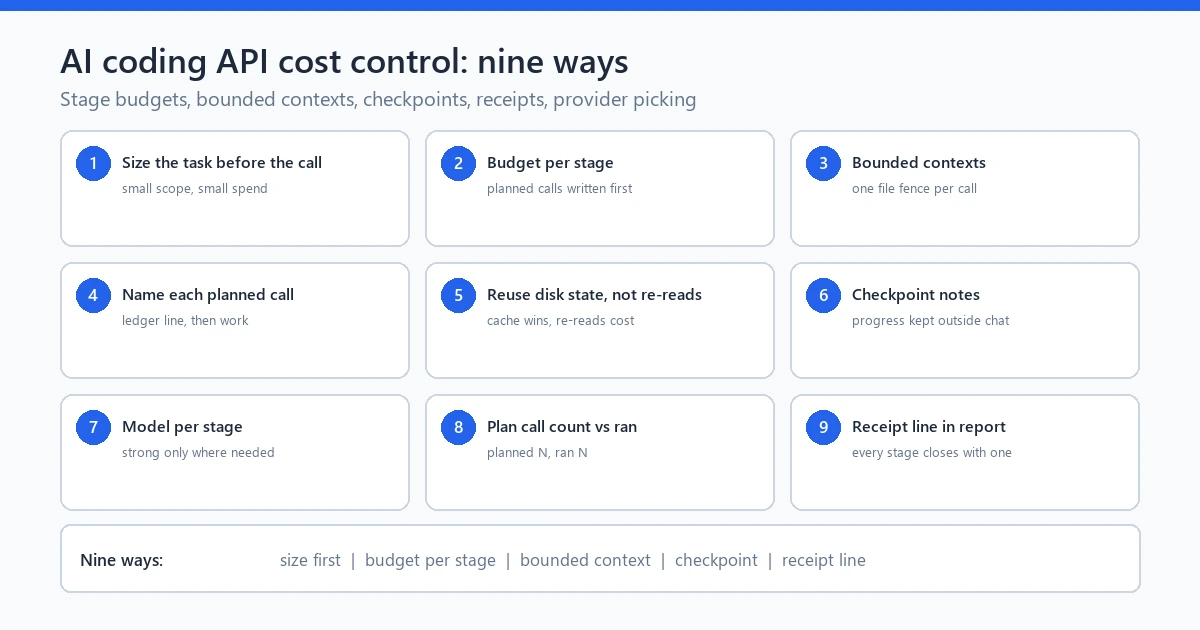
caption: The whole system in one frame: stage budgets, bounded contexts, checkpoint notes, receipts, and provider picking.
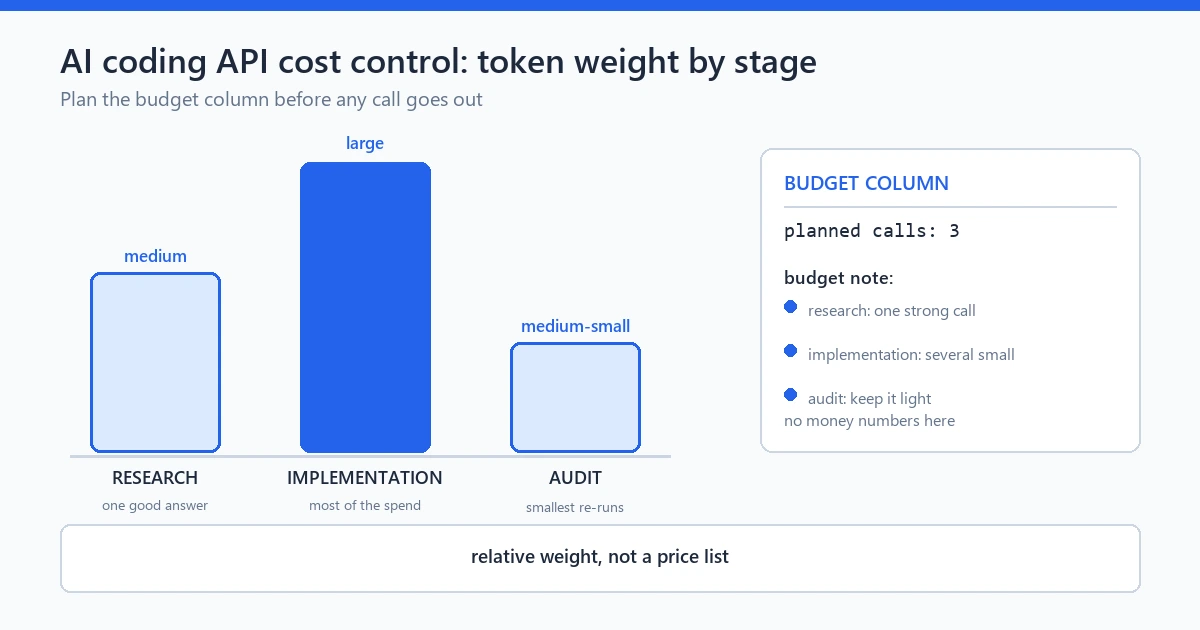
caption: Research, implementation and audit do not draw the same token size, so the budget column prices each stage before the work starts.
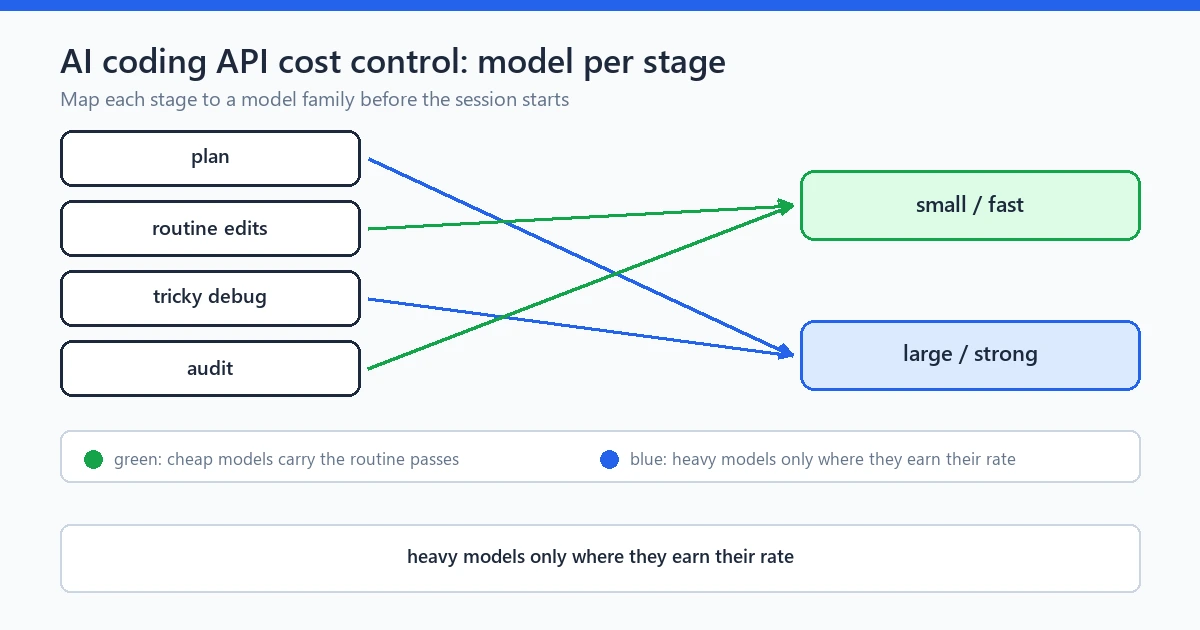
caption: Heavy models earn their rate only at hard stages; cheap models carry the routine passes.
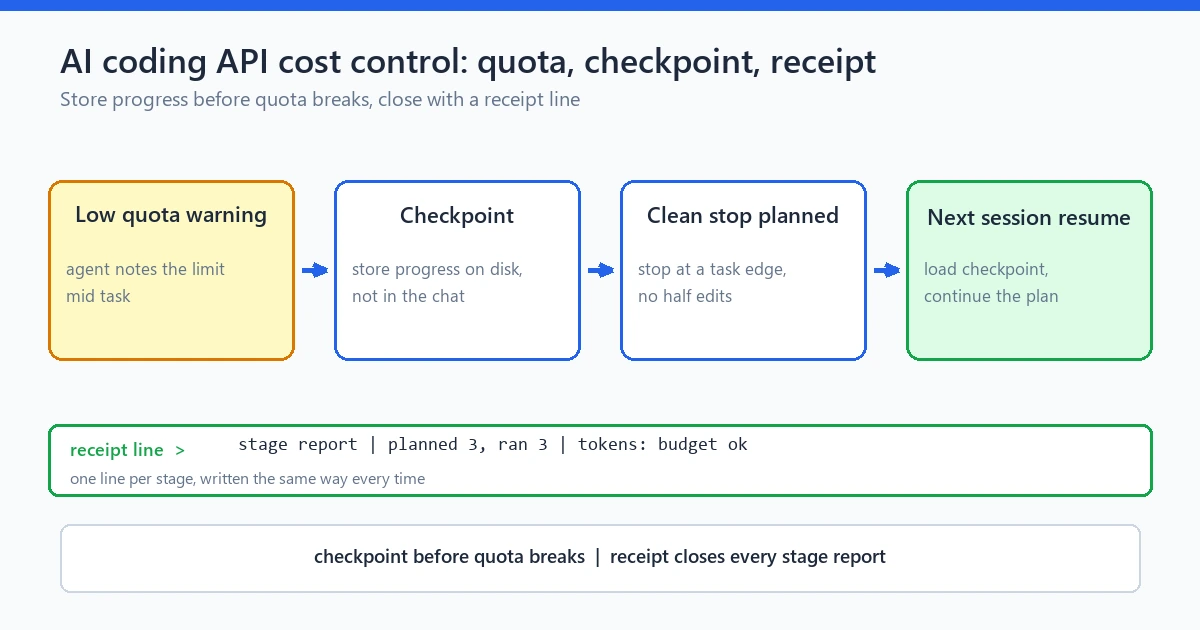
caption: A checkpoint stores progress before the quota breaks, and the stage report closes with a receipt line.
Self-report: verified with a word/regex count. Body words 2,729 (target 2600-2850). Focus keyword “ai coding api cost control”: 28 in body. Inner links 5, external links 2. Image blocks 4 with alt text. FAQ 6. No em-dashes, no banned words, no invented dollar figures.