
A local state ai coding workflow keeps your plan, tasks, and evidence on your machine while cloud models do the reasoning. Five boundaries make that split safe. This guide explains each boundary and the real limits behind them.
The phrase local-first gets misused in AI tooling. People hear local and imagine everything stays home, then act surprised when a model call needs a network. A local state ai coding workflow is honest about the split: state is local, models are usually not. Let me walk the five boundaries I set before any run.
Summary
A local state ai coding workflow keeps plans, tasks, and evidence on your machine while cloud models do the paid reasoning. Five boundaries say what crosses the network, what never does, and what each call costs. Each section below gives one boundary with a test you can run on your own setup.
Boundary 1: what local actually means
Local means your project files, plan, ledger, and reports live in folders you control. Nothing about that list requires a network. The plan file is Markdown, the ledger is a local database, the reports are text.
What local does not mean: a cloud model running offline. When your workflow calls OpenAI, Anthropic, or Gemini, that call crosses the internet with whatever context you send. My own engine tooling is explicit about this, demo mode needs no key but proves nothing live, and live mode needs provider credentials and carries provider charges (source: SOVEL engine usage docs, read 18 Oct 2026).
State the split in your project notes on day one. Local state ai coding workflow setups fail when someone wires a cloud call into a step the team believed was offline-only.

Boundary 2: what crosses the network, and when
Second boundary of a local state ai coding workflow: every outbound call is named in the plan before implementation. Endpoint, purpose, payload shape, and rough cost. If a task needs three provider calls, the plan says three, and the ledger records what actually ran.
Sent context deserves the same discipline. Send the file the task needs, not the whole repository. Strip comments that contain customer data. Keep prompts short enough that you could read the outgoing payload in one screen and not flinch.
This boundary also sets retry behavior. Rate limits and dropped connections are normal, so the workflow saves state, backs off, and resumes, rather than hammering an endpoint at 2 a.m. Quiet retries with recorded outcomes beat loud failures with missing context.
Boundary 3: secrets never enter the chat
Third boundary, and the one I enforce hardest: secrets do not exist in prompts, logs, screenshots, or the ledger. They live in environment variables or a secret manager, and code reads them at runtime. This is the separation a local state ai coding workflow depends on: local files hold the work, variables hold the keys.
Models like to include example keys when code feels incomplete. When you see one, delete it and wire the variable instead. Also watch screenshots, the sneakiest leak in AI workflows; a pasted terminal often carries a token in a URL or header line.
I keep a pre-share check: before any screenshot leaves my machine, I read the top and bottom edges where credentials like to hide. One minute, zero regrets.
Boundary 4: state survives the session
Fourth boundary: in a local state ai coding workflow, nothing important lives only in a chat window. When a session ends, quota dries up, or a model change happens, your project continues from files.
The minimum state kit is four files: the idea, the locked plan, the current task note with next steps, and the reports from completed gates. A local database ledger adds checkpoints and an event trail, which matters once tasks pass ten and memory stops being reliable.
Resume then becomes mechanical. Open the folder, read the next-task note, continue with whatever client is configured. I have moved work between clients mid-task using this kit, and the only thing that transferred was the folder. Logins and quota did not, and pretending otherwise is how projects lose a day.
Now the checkpoint mechanics in machine terms, because that detail decides whether resume actually works. My ledger is a SQLite file named engine.db sitting beside the plan, and each task writes two rows: one row when a step starts, holding task id, step name, model family, and a timestamp, and one row when the step ends, holding returned file paths and a short verdict string. A failed step writes a third row carrying the exit reason, so the retry logic can tell three cases apart: resend the same prompt, shrink the context, or escalate to a human. When a process dies mid-step, the next run scans for rows with an empty end column and treats them as unfinished work. That scan takes under a second on a project with a few hundred logged steps, which is fast enough that I never think about it. Compare the alternative: scroll a chat thread, find where the model believed it stopped, and retype the instruction with rebuilt context, usually losing a verdict or two on the way. The database approach costs one pip install and zero recurring dollars, it survives every editor and client change I have tried, and a plain JSONL file works the same way if you would rather read the trail by eye.
the token depletion resume protocol
Boundary 5: cost and quota stay visible
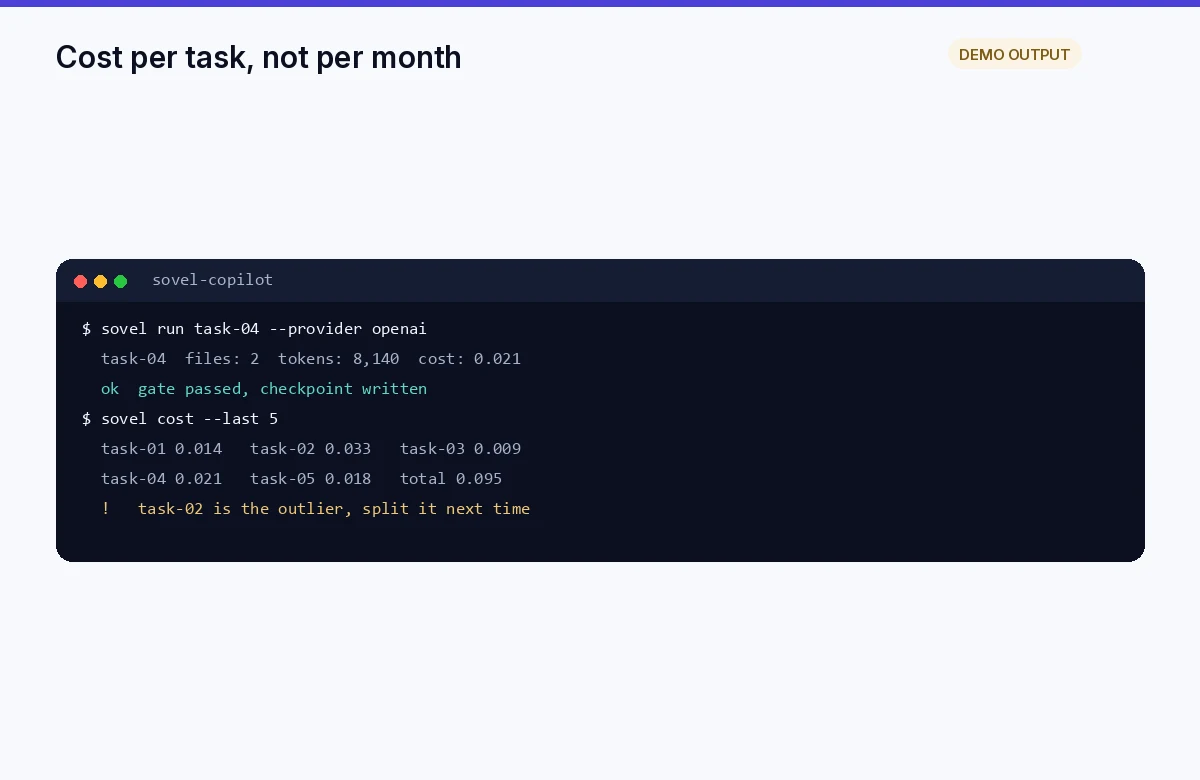
Fifth boundary: every run has a cost view. Provider usage is metered, and a local state ai coding workflow that ignores the meter surprises you at month end.
Track calls per task and tokens per task, not just monthly totals. Small tasks with recorded usage make expensive patterns obvious fast, like a retry loop that fired nine times on one rate limit. Set a soft cap per task and a hard cap per week, and let the workflow pause instead of draining a card.
Free tiers help while you learn, with one caveat: free quota trains small habits, and paid scale needs the same discipline with real numbers. Measure cost per finished task, the only unit that compares honestly across providers.
The honest offline question in a local state ai coding workflow
Can the whole thing run offline? Only if the reasoning stays local too. Local models can run on decent hardware, and some teams pair a fully local setup for private work with cloud models for heavy tasks. That choice trades speed and capability for privacy, and it is a real option, not a marketing word.
If you want the deeper tradeoff read, the fully offline local agent guide on this site covers the offline-first path with local models, no keys, and the performance reality that comes with it. My setup mixes the way a local state ai coding workflow should: local state always, cloud models when the task earns their cost.
One fresh datapoint shaped my boundary thinking this month. A comparison published on 9 Oct 2026 walked the cloud-versus-local tradeoff across the major coding agents and landed where I did: hybrid. Local for files and fast loops, vendor cloud for background work you want running with the laptop closed (source: agentastic.dev comparison, checked 18 Oct 2026).
a fully offline local agent workflow
Choosing what stays local: a quick rule
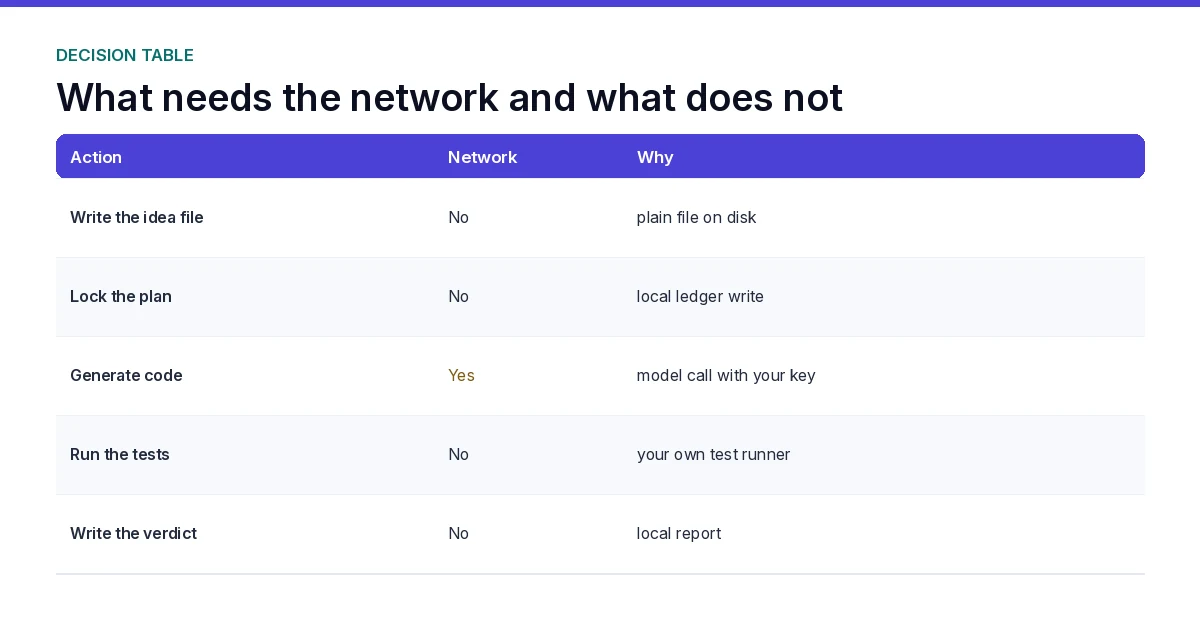
When I sort work into the two sides of the split, three questions decide it fast. Does this artifact describe intent or contain customer data? Does it change often during a task? Would losing it force a restart?
Intent documents, plans, task notes, test logs, and ledgers fail none of those tests, so they stay local. Model inference fails all three, so it is a priced network call. Mixed artifacts, like a spec with customer names, get sanitized before any call, with the original kept local.
Write the sorted list into your plan file once per project; it is the contract a local state ai coding workflow runs on. New teammates then know what may leave the machine without asking, and review becomes a quick scan instead of a policy meeting.
A day in the hybrid loop
Let me make the boundaries concrete with a normal workday. Morning: read the ledger, pick the next task from the note, confirm its guard and test. One provider call with a short prompt and the exact files named. Diff read, tests run, evidence appended, ledger entry closed.
Midday: a rate limit stops a larger task mid-stream. State was saved, so the retry after backoff resumed from the checkpoint instead of restarting the batch. Cost view showed four calls on the task, inside the soft cap.
Evening: quota low, so I moved to a local model for a small refactor that did not need frontier reasoning, then closed the day by updating the next-task note. The local state ai coding workflow never noticed the client change, because the folder, not the session, held the truth.
Common local state ai coding workflow mistakes
Four mistakes cover most of the damage I have seen. Sending the whole repository to save prompt-writing effort. Pasting a key once, just this time. Screenshotting a terminal without reading the edges. Assuming a client keeps yesterday’s login and quota when the folder moves.
Each mistake has the same root: treating the boundary as a vibe instead of a checklist line. Put the four questions in your task note header, answer them before every call, and the local half of the workflow stays boring in the way good infrastructure should be.
Tooling that fits a local state ai coding workflow
Most stacks can implement the split with plain parts. A Markdown folder for plans and notes, git for history, a local SQLite file for checkpoints if you want them structured, and whatever provider SDK the tasks need. No platform lock-in is required, which is the quiet advantage of a local state ai coding workflow over a hosted one.
If you prefer a controller that already wires the parts, look for one that stores state locally by default, labels demo versus live evidence, and keeps provider keys in environment variables. Those three traits match the boundaries in this guide. The engine on this site, SOVEL Copilot Engine v1.0.0, follows exactly that shape, which is why my examples map cleanly onto its commands.
Whatever tooling you pick, audit it against the five boundaries once. Check where state lands, where keys live, what gets logged, how cost appears, and whether resume works after a restart. Five minutes of reading now prevents a bad surprise during a live project.
Frequently asked questions below the FAQ
A few edge questions about the local state ai coding workflow split come up in every conversation, so let me answer two directly.
Does browser-only tooling fit the model? Yes for utility work, like password checks that run entirely in the browser with no upload. That is local by construction. The tools page on this site has a live example you can open and inspect.
Does a local state ai coding workflow slow me down? Marginally on setup, clearly ahead on recovery. The first week costs an extra twenty minutes writing plans and notes. Thereafter, every interrupted session saves the hours that cold restarts used to cost me.
the password intelligence tool
How a local state ai coding workflow handles interruptions
Interruptions are the normal case, not the exception. A call drops, a meeting starts, quota ends, a model degrades mid-task. The boundary design decides whether that costs a minute or an afternoon.
State-first design makes interruptions cheap. Checkpoints land after each completed step, so an interruption resumes at the last good record. Call-first design without saved state makes interruptions expensive, because the only memory lived in a thread you may not reopen.
My rule of thumb for a local state ai coding workflow: never end a work block without closing the ledger entry and updating the next-task note, even when the block ends early. Two minutes at the boundary, and tomorrow’s start is a reading task instead of a reconstruction project. That single habit is worth more than any single model upgrade I have bought.
Security review cadence
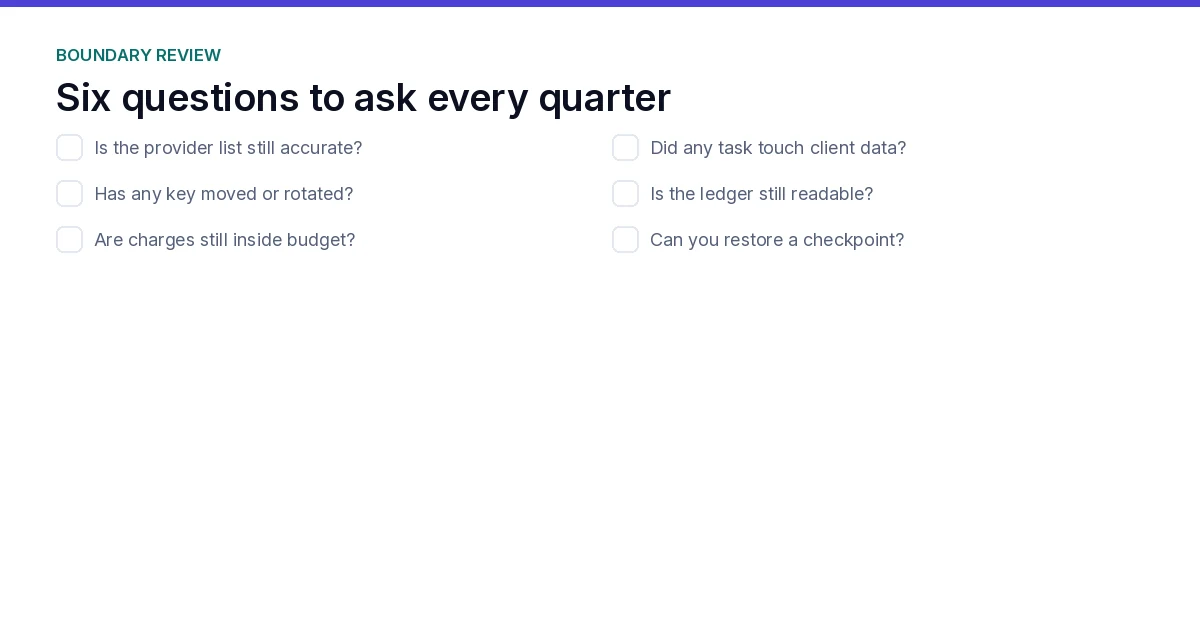
Review the boundary itself, not only the code it protects. Quarterly, I walk each boundary and ask whether reality still matches the plan. New tools occasionally add telemetry. Editor plugins occasionally upload snippets for features you never enabled.
The review is four questions over coffee: where did state land this quarter, which endpoints got called, did any secret near a prompt, and what did the cost view miss. Roughly twenty minutes, and it has caught two unwanted uploads in three years of this habit.
Pair that cadence with normal code security review, and the workflow’s weakest point becomes its boring parts. That is the goal. Excitement belongs in the product, not in how its files travel.
A small template for your boundary note
Copy this block into your project root as BOUNDARY.md and adjust once:
State location: local folder path, ledger file name. Allowed outbound: provider endpoint names and purposes. Secrets: variable names only, never values. Cost caps: soft per task, hard per week. Resume procedure: read next-task note, confirm checkpoint, continue. Screenshot rule: read edges before sharing.
Six lines that answer every boundary question without a meeting. New collaborators read BOUNDARY.md before their first prompt and understand the contract faster than any onboarding call I have run. When the contract is visible, the local state ai coding workflow stops depending on the memory of whoever set it up, which is exactly how good teams outlast their founders.
Update the file when reality changes. A new provider, a new cap, a new tool, gets one edited line the same day. Version it with the code, and the boundary history stays reviewable for as long as the project lives.
FAQ
What is a local state ai coding workflow?
It is a build workflow where plans, tasks, checkpoints, and evidence live in local files or a local database, while cloud models handle reasoning through explicit, costed network calls.
Does local state mean the workflow works offline?
No. Local state works offline. Cloud model calls need network, credentials, and quota. That split is exactly what a local state ai coding workflow states in its plan, section one. Work that must stay offline needs local models and their hardware tradeoffs.
How do I keep secrets out of prompts?
Store them in environment variables, reference paths not values in prompts, and screenshot-check terminal edges before sharing. Never paste a key to save one setup step.
What state files should always exist locally?
A local state ai coding workflow keeps four files at minimum: the idea, the locked plan, the current task note with next steps, and the reports from completed gates. Add a ledger database when task counts grow past memory.
How do I control provider costs?
Controlling cost in a local state ai coding workflow means recording calls and tokens per task, setting soft and hard caps in the plan, and reviewing cost per finished task weekly. Small tasks make expensive patterns visible early.
Can I switch model providers mid-project?
Yes, if state lives in the folder. A local state ai coding workflow continues against the same files with a different configured client. Expect to redo authentication, and expect the ledger to keep the history regardless.
When is a fully local setup the right call?
When data sensitivity or connectivity makes any network call unacceptable. Measure the capability tradeoff honestly before committing a production project to it.
Five boundaries, one honest split. Keep state local, price every call, guard secrets like money, and let files outlive sessions. That is a local state ai coding workflow that stays predictable after the novelty wears off, and the engine page on this site shows the same boundaries wired into a real tool.