
An ai coding session handoff is the small ritual that moves live work out of a dying chat and into a fresh one without losing the thread. You checkpoint the state to disk, write a one page receipt, open a clean session, reload from that receipt, then diff what comes back. I run these seven steps on real builds, and they have turned interruptions into short pauses.
The trigger is rarely dramatic. One half is loud: the quota stopped my agent mid-task and the session just ends. The other half is quiet: context rot has set in and every answer gets vaguer than the last. Both halves end at the same question, and both are solved by the same move: an ai coding session handoff.
The seven steps below turn that move into a checklist. Detect pressure early, checkpoint cleanly, write a receipt, reload fresh, verify the receipt stuck, then hold the resumed work to the original standard. An ai coding session handoff needs no bigger model or budget, just a folder and ten minutes of discipline at the right moment. One folder is enough.
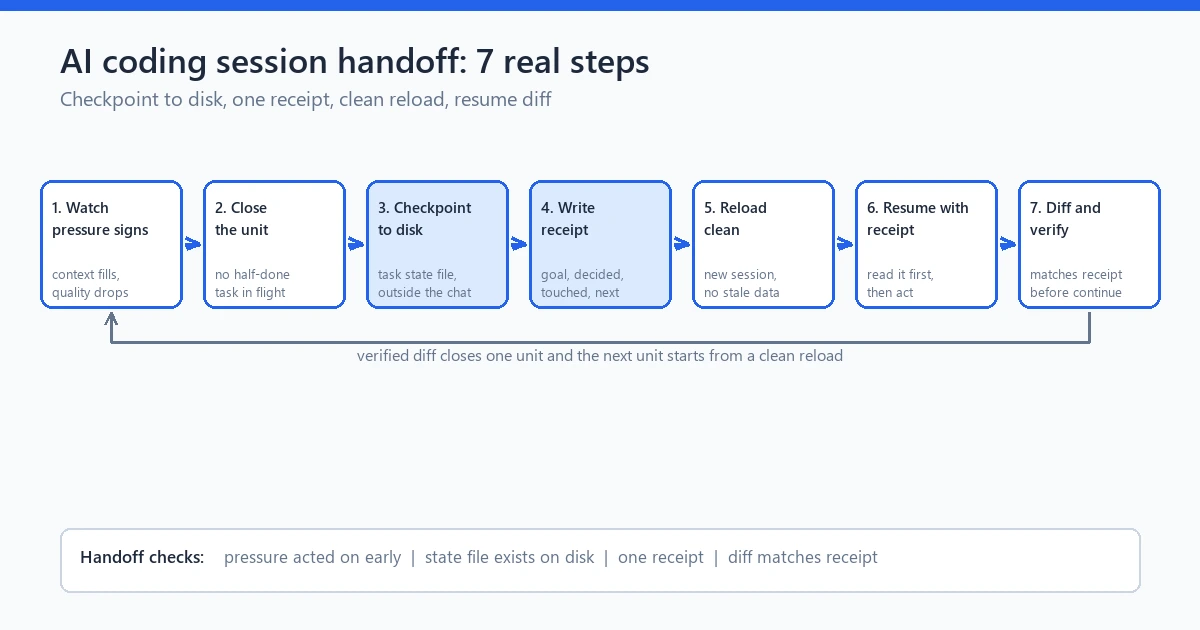
caption: Figure 1. The seven step ai coding session handoff ritual, from pressure check to resume diff.
Why context dies mid-task (quota, window, crash)
Three different kills produce the same corpse, so name them apart.
First, quota. Providers meter usage by model and by day, and none of them care that you were four lines from done. Rate limit replies arrive mid-command and the run halts wherever it stood.
Second, the window. Every model carries a finite context window, and quality drops long before the hard stop arrives (source: Google AI developer docs on model context limits, read 20 Oct 2026). Developers call the slow version context rot: the session still responds, but it re-explains decisions you settled an hour ago. People asking “AI coding session ended, what do I do” usually mean this softer death.
Third, plain runtime endings: the laptop sleeps, the client crashes, the terminal closes with no warning and no summary.
Each of these is the moment an ai coding session handoff becomes necessary, and all three fold under one defense. Whatever lives only in the session dies with the session; whatever lives on disk survives the quota reset, the ceiling, and the crash. That asymmetry is why the ai coding session handoff exists at all. A developer built a small open source tool, cli-continues, out of losing sessions between clients (source: cli-continues on GitHub, README, 20 Oct 2026).
The recovery matters more than the kill, and recovery is exactly what an ai coding session handoff standardizes. For the full loop this ritual plugs into, see the seven step ai coding workflow guide on this site.
the seven step AI coding workflow
Step 1: Detect context pressure early
An ai coding session handoff works when it starts early, and detection is not mysterious.
Answers turn broader, hedging where they used to commit. The model forgets a constraint you set explicitly, like a version pin, and violates it with confidence.
So I use a blunt readout instead: ask the model, mid-session, to state the current task and files touched in its own words. If the answer matches the truth, keep going. If it paraphrases badly or invents a missing file, the window is degrading. Do not feed it a correction and hope. Assume the window is closing. Start the ai coding session handoff now.
My trigger rule is simpler than any gauge: save progress before context feels full, not after it announces itself. The moment a task completes, I checkpoint, because a completed task is the cheapest state to preserve. The quota stopped me one evening while I was still deciding between two approaches. The deciding was the expensive part. A completed task leaves a clean wall, a half decided one leaves a cliff.
Steps 2 and 3: Checkpoint task state to disk (files beat memory)
These two steps run as one motion. An ai coding session handoff is only as good as the state it carries.
Step 2 closes the current unit cleanly before you checkpoint it. Do not checkpoint mid-edit and walk away: a half written function plus a missing brace is the state a fresh session stumbles on. Finish the edit far enough to parse, run the cheapest test that proves the unit holds. If the test fails and time runs out, checkpoint anyway and write what failed in the note.
Step 3 writes the state down, and files beat memory without contest. Disk does not forget. My checkpoint lives in the project folder, beside the code, with five lines at minimum. First the task in progress, then the files it touched, then the exact last command or test with its result. Add the decision state if two options were on the table, and end with the next physical action in imperative form. “Continue the refactor” is a wish. “Rename strengthScore to computedEntropy in scoring.js, then rerun the unit test” is a task anyone can pick up cold.
I learned the cost of skipping this during the password intelligence plugin build. A session I trusted too much died mid-refactor of the password strength scorer, and I knew roughly, not exactly, where it stopped. Roughly cost me an evening. The next time, a five line checkpoint note sat in the folder and the fresh session picked the refactor up in one read. Whether that state crossed to disk is what decides how an ai coding session handoff goes: a reading task or an archaeology project. The full story is in the plugin case study.
the Password Intelligence case study
What never enters that state is its own discipline, covered by the local state guide on this site.
the local state AI workflow guide
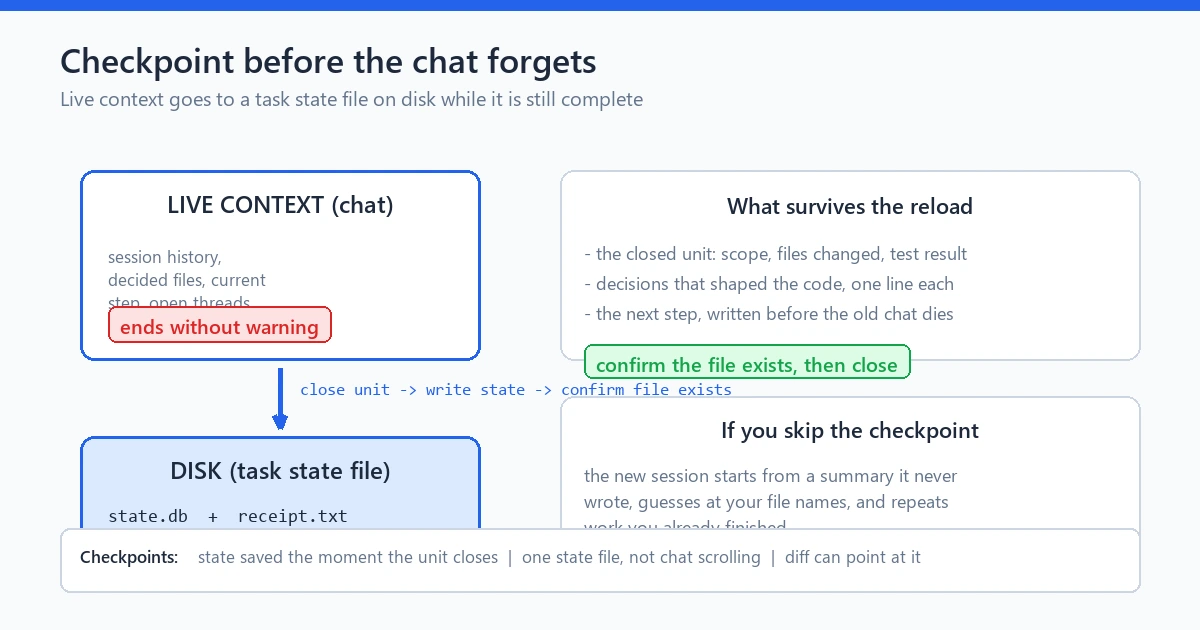
caption: Figure 2. Closing the unit, then writing task state to disk before the session ends.
Step 4: Write the handoff receipt (goal, decided, touched, next)
The checkpoint is raw material. The receipt is the readable version a fresh session gets first, and an ai coding session handoff lives or dies on this one page. I keep mine to four headed lines. Four lines, no fifth.
Goal. One sentence, the mission of the whole session, not the last exchange. “Build the password rule details page for the plugin” beats “continue yesterday’s work”.
Decided. The choices that are now fixed, because a fresh session wrongly reopens them. Plain statements: which library, which file layout, which behaviors are in and out. This line kills the most expensive resume mistake, the polite re-litigation of what you already settled.
Touched. The files the session changed, one phrase each on what happened there. Exact paths, no vibes.
Next. The single next action, copied from the checkpoint, still imperative. If two actions remain, pick the first and leave the second here. A receipt that says “do A and B” produces a session that does neither well.
A few habits keep receipts useful. Date it and name the tool that was running. Keep secrets out with paths only and never values. Resist pasting code into the receipt, because the code already sits on disk. The receipt describes, the repository proves.
A real shaped example, small enough to copy:
Goal: Add password length and repetition rules to the plugin’s strength scorer.
Decided: Rules live in scoring.js as pure functions; no UI changes this task; minimum length is 8.
Touched: scoring.js (two rule functions added), tests added under tests/, UI untouched.
Next: Run the scoring test suite, then wire the repetition rule into the page template.
That receipt rebuilt a dead session in under a minute; without it, the rebuild is guesswork.
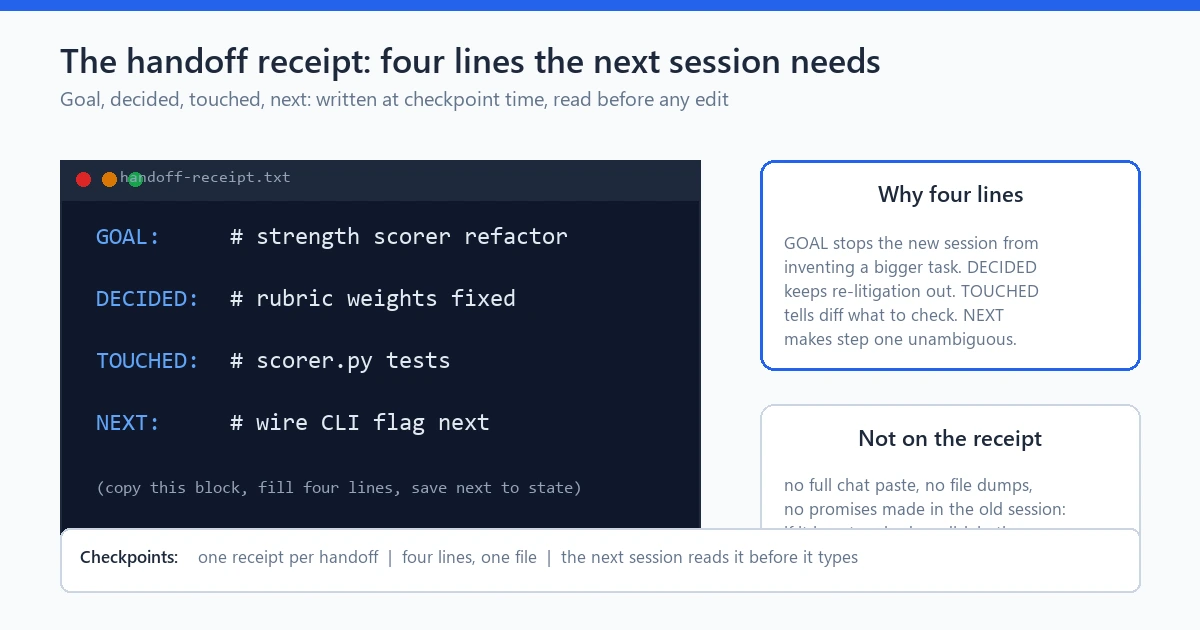
caption: Figure 3. The four line receipt that carries context to the next session.
Steps 5 and 6: Clean reload and verify the receipt load
Step 5 opens fresh, and fresh means fresh. New session, new chat, no scrollback from the dead thread. This feels wasteful the first time, but the old context is gone or rotten, and dragging half of it forward poisons the clean start. The receipt plus the named files is the entire payload. That clean slate is what separates an ai coding session handoff from a hopeful resume.
Switch executors here if the old one cannot run: the same folder plus the same receipt resumes on whatever client is configured against it. Logins and quota do not transfer, and that file based portability is a core payoff of an ai coding session handoff. Same work, new client.
Step 6 verifies the receipt actually loaded, and skipping this is how people discover a failed handoff forty minutes later. Three checks, under two minutes. First, ask the fresh session to restate the goal, the decisions, and the next action in its own words. Second, confirm every file in the Touched and Next lines exists where the receipt says it does. Third, run the last known test from the checkpoint and watch it behave the way the handoff claims.
If the restatement drifts, do not push a correction and move on, because a session that misread four lines will misread the code. Fix the receipt and reload again; a real ambiguity usually hid in it. Verification is where an ai coding session handoff stops being a note and becomes a contract: the new session proves it understood before it acts.
Step 7: Diff the resumed work against the receipt
The last step closes the loop, and most people skip it once the session runs again. Read the diff anyway. Verification of the resumed work is still yours. Every line the fresh session produces should trace back to the receipt’s Next line. This check is where the ai coding session handoff proves it carried everything across.
Read a resumed session’s first diff with slightly more suspicion than a normal one. Fresh sessions want to be useful. Some resolve their uncertainty by adding helpful extras: an extra validation branch, a refactor of a corner you never mentioned. When I audit a resumed diff, I sort it into three buckets: lines the receipt asked for, lines the checkpoint explains, and everything else. Bucket three gets read like code from a stranger.
A build on this site gave me the sharpest example. A session writing one of the case study pages was handed off cleanly. The resumed session produced a first diff carrying a whole extra sidebar block that no receipt line mentioned. It looked plausible and was not asked for. One diff against one receipt caught it in ninety seconds.
Resumed lines need provenance, and the receipt is that trail; the project audit guide on this site applies the same standard to all agent output.
Gate the resumed work on the same test the checkpoint recorded. Whether that first post-resume run passes or fails, the result goes back into the project’s record, so the next ai coding session handoff inherits a fact.
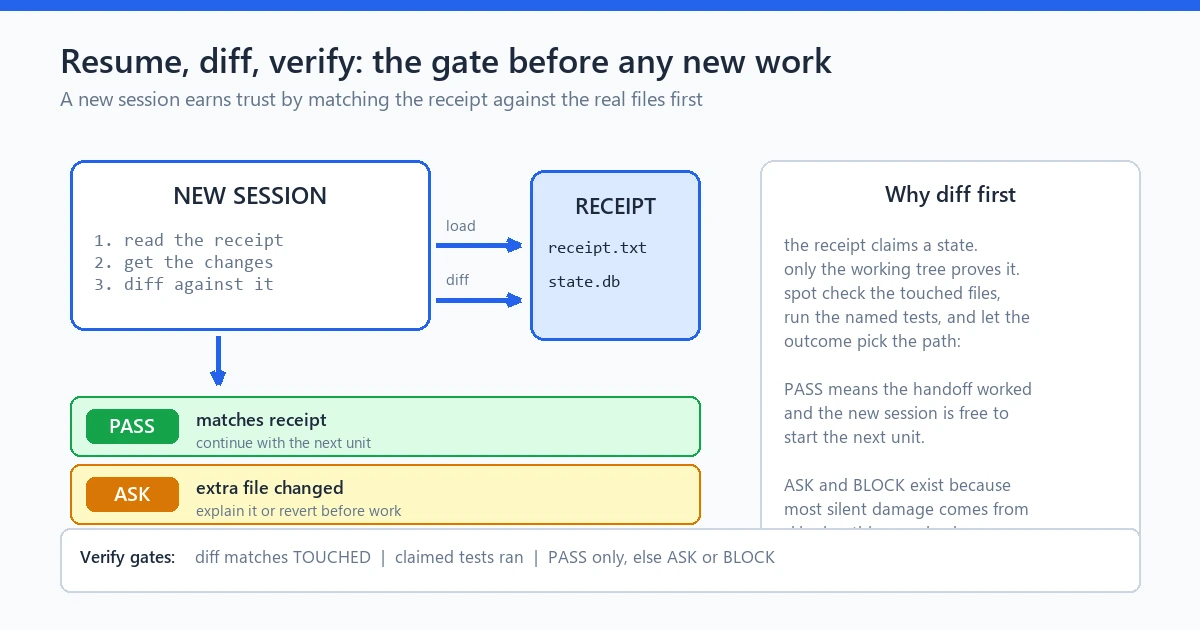
caption: Figure 4. Every resumed line should map to a receipt line before work continues.
The engine angle: SQLite state and a hash-chained ledger as a handoff that never forgets
The seven steps work with plain tooling. But I wanted the handoff to stop depending on my discipline at 6 p.m., so the engine I run builds through keeps state on disk by construction.
Two public design facts make that work. First, state is SQLite-backed and local. The plan, stage progress, and run records persist in a database file inside your project, not in a chat thread that dies with the session. Second, a hash-chained event ledger: each recorded event links to the one before it, so the history stays intact. Stages from IDEA through RESEARCH, ANALYSIS, PLAN, PLAN LOCK, IMPLEMENTATION, AUDIT, the FIX and RE-AUDIT loop, FINAL REPORT, and EXPORT all land as recorded events. When a run stops mid-way, resume is a read against the last recorded state. A read, not a rerun.
That hardens my seven steps into a system. An ai coding session handoff is not typed by hand at the worst moment, because it was being written continuously by design. The step 4 receipt is still worth writing for humans, and reports go out as JSON, Markdown, HTML, PDF, DOCX, or EPUB to keep the exports portable.
Two honest notes. The engine is a workflow controller, not an AI model, and the reasoning still comes from whichever provider you wire in, on your keys and your quota. Demo mode is simulation, labeled as such. What changes is where the truth lives. Session continuity becomes a property of the system, and the ai coding session handoff becomes a read operation instead of a rescue.
The product page walks the stage rail and the license tiers.
Limits: what a session handoff cannot fix
An ai coding session handoff rescues state. It does not rescue everything, and pretending otherwise sets you up for the next surprise.
It cannot fix a bad task plan. If the goal line was already confused, the resumed session inherits confusion with perfect fidelity. It cannot stretch anyone’s quota; when the meter runs dry, the wait is the wait, made harmless rather than shorter. It cannot repair context rot retroactively, which is why steps 5 and 6 insist on a clean reload. It cannot replace the diff review in step 7, because a receipt proves what was decided, not that the fresh code is correct.
Where work may cross the network, and which data must stay local, is a boundaries question this ritual leaves to the local state guide. An ai coding session handoff answers the continuity question; the boundaries guide answers the traffic one.
FAQ
What is an ai coding session handoff?
It is a repeatable ritual for moving live AI coding work between sessions. Checkpoint task state to disk, write a short handoff receipt with the goal, decisions, touched files, and next action, open a clean session, then verify.
My AI coding session ended, what do I do first?
Open your project folder before you open any chat. Check for a checkpoint note or receipt from your past self; if either is missing, write it down now.
How do I resume AI coding after a limit stops my session?
Do not scroll the dead thread for answers. Open a fresh session, feed it only the receipt and the named files, and ask it to restate the goal, decisions, and next action. Then run the last recorded test before it writes new code. That is steps 5 and 6 of an ai coding session handoff.
What is context rot, exactly?
It is the gradual quality fade in a long AI session as the context window fills. The model re-explains settled decisions, forgets constraints it obeyed earlier, and summarizes history inaccurately, before any hard limit message appears.
How do I save progress before context fills up?
End the current unit cleanly, run the cheapest passing test, and read the diff. Then write five checkpoint lines into the project folder: task, files touched, last command, decision state, next action. Then start the receipt, and the next ai coding session handoff becomes a ten minute job.
Can one handoff receipt work across different AI tools?
Yes, and that is the point of writing it as a file. The receipt describes the project, not the client, so any tool configured against the same folder resumes from the same four lines. Expect to redo authentication, not the work.
Seven steps, one habit, and every future interruption becomes a pause instead of a rebuild. Checkpoint early, write the receipt, reload clean, verify, and diff what comes back. Your next ai coding session handoff will take ten minutes, and it will feel like nothing ever happened. Start with step one.