
Coding agents look like magic from the outside: you describe a feature, and files change. From the inside, there is no magic at all. There is a program that runs a loop, and understanding how AI coding agents work is mostly understanding that loop and the five parts that make it run. Once you can see the parts, every agent behaviour that mystifies people, the forgetfulness, the repeated mistakes, the occasional brilliance, becomes legible. Understanding how AI coding agents work is the difference between using an agent and operating one.
This article is the mechanics explainer for the rest of this series. We will build the mental model piece by piece: the harness that runs the loop, the tools the model calls, the context that gets assembled on every turn, the model call itself, and the stop condition that decides when the loop ends. No jargon without explanation, and by the end you can look at any agent product and name which part is doing what. That is the practical goal: how AI coding agents work, explained well enough that you can predict behaviour before you see it.

The one-sentence answer
Direct answer: AI coding agents work by running a loop: the harness assembles context, sends it to the language model, receives a request to use a tool, executes that tool against your system, appends the result to the conversation, and repeats until a goal is met or a limit stops it. The model proposes; the harness executes; the loop continues. That is how AI coding agents work, and every feature an agent product advertises is an addition to one of those five parts.
Worth saying plainly, because it anchors everything else: the model never touches your files. It emits text asking for a tool call, and the harness performs the actual reading and writing. This separation is why agents can be governed, and why the harness, not the model, is where reliability engineering happens. Hold onto it; it is the fact that makes sense of how AI coding agents work in production.
Part 1: the harness, the program that runs the loop
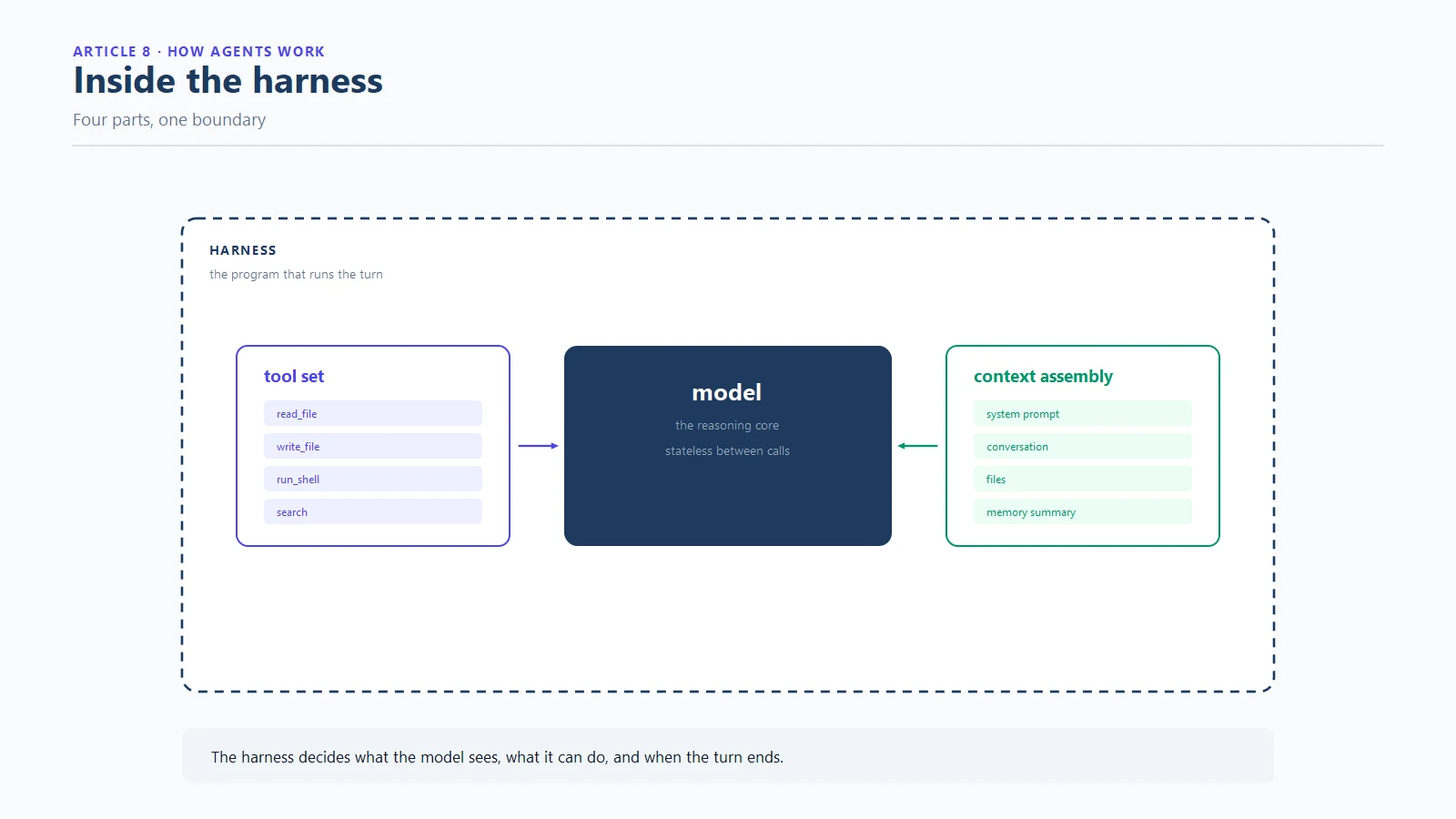
The harness is the software around the model: the CLI or desktop app or editor extension that owns the while-statement. It decides when a turn starts, what gets sent, what gets executed and when the loop stops. When people say an agent “did” something, the honest sentence is that the model requested it and the harness did it. Two harnesses wrapping the same model can behave completely differently, which is why the harness is the first place to look when behaviour differs between products. Any honest account of how AI coding agents work starts here, at the program that owns the loop.
The harness also owns the system prompt, the standing instructions that tell the model what it is, what it may do and how it should behave. The system prompt is the model’s job description, and it shapes every turn without ever appearing in your chat window. Most first explanations skip it, and most misreadings of agent behaviour come from that skip. Product differences that look like model differences are very often system prompt differences, a distinction that becomes obvious once you know how AI coding agents work under the hood.
Part 2: the tools, what the model can ask for
Tools are the capabilities the harness exposes: read a file, write a file, run a command, search the codebase. Each tool has a name, a description and a schema, and all of that is announced to the model so it knows what it can request. Tool calling is the model emitting a structured request, and the harness validating it and executing it. This is the second pillar of how AI coding agents work: capability is not built into the model, it is granted by the tool set.
The design of the tool set shapes the agent’s behaviour more than most people expect. Narrow tools with clear purposes produce predictable requests. Broad tools with vague descriptions produce improvisation. And every tool announced costs context tokens on every turn, which is the reason tool sets are a cost decision as much as a capability decision. The protocol that standardises these announcements, the Model Context Protocol, is why one server config can serve many clients. The economics of that announcement layer are covered separately in the MCP memory server article, because memory servers are the heaviest announcements in most stacks.
The five parts at a glance
| Part | Owned by | Job | When it breaks |
|---|---|---|---|
| Harness | The product | Runs the loop, executes tools, enforces rules | Unpredictable behaviour, weak guardrails |
| Tools | The harness + servers | Grant capabilities, announce themselves | Improvisation, token bloat |
| Context assembly | The harness | Decide what the model sees each turn | Amnesia, cost blowups |
| Model call | The model | Propose the next step | Inconsistency, confident errors |
| Stop condition | The harness | End the loop deliberately | Runaway sessions, doom loops |
Keep this table in reach for the rest of the article. Every section below is one row of it, expanded.
Part 3: the context assembly, what the model sees each turn
On every turn, the harness assembles a payload: the system prompt, the conversation so far, the files and outputs relevant to the current step, and anything injected from memory. This assembly is the part of how AI coding agents work that decides both cost and quality, because it is rebuilt and re-billed on every single turn. A bloated assembly means you pay for dead weight on every request and the model wades through it. A starved assembly means the model guesses about things it cannot see.
As the loop turns, the conversation grows, and old material gets trimmed or compressed when the window fills. What survives that pressure, and in what form, is a design choice. The dense-summary approach, where a memory layer compresses prior state into a few hundred tokens, exists precisely because the assembly is rebuilt every turn. Teams that understand this stop asking why the model forgot and start asking what the assembly actually contained.
Part 4: the model call, the turn’s decision
The call itself is one request to the language model: here is the context, here are the available tools, produce the next step. In the mechanics of how AI coding agents work, this is the only step where the model is involved at all. The model returns text, which is either an answer or a tool request, and the harness either shows it to you or executes it. One turn is one call; a task is many turns; the loop is the sequence. When you watch an agent work for ten minutes, you are watching dozens of these calls, each billed, each carrying the full assembly. The billing shape alone explains most of how AI coding agents work as a business proposition, and most of where the waste hides.
Two properties of the model shape the loop’s character. Models are stateless, meaning nothing survives between calls except what the harness re-sends, which is why memory is an external component rather than a built-in. And models are probabilistic, meaning the same context can yield different next steps, which is why deterministic guards around the loop matter more than cleverer prompts.

Part 5: the stop condition, what ends the loop
Every loop needs an exit. The stop condition is the harness’s rule for ending: the goal is met, the model says it is done, the human interrupts, or a limit fires, a turn budget, a token cap, a wall-clock timeout. Most surprises in agent work are stop-condition surprises: loops that ran too long because nothing counted failures, or sessions that quit early because a budget was tighter than the task deserved.
A well-designed stop condition is layered, and it is the part of how AI coding agents work that separates products that behave overnight from products that gamble overnight. Goal checks decide success, failure counters decide when a path is dead, and budgets decide when the whole loop must stop regardless. When you evaluate any agent product, asking what stops the loop is the sharpest question available, because the answer tells you how the product behaves at 3 am when nobody is watching. That is the practical payoff of understanding how AI coding agents work: you know which knob governs the behaviour that matters.

Why loops misbehave: three classic failure patterns
With the five parts in view, the famous failure patterns stop being mysterious, and this is where knowing how AI coding agents work starts saving money:
- The doom loop is a loop whose stop condition never fires on repeated failure: the model retries the same broken fix, the assembly fills with error output, and nothing intervenes. The mechanics and fixes are covered in the doom loop article.
- Session amnesia is a context problem: the assembly is rebuilt each turn, and nothing persists across sessions unless a memory layer exists outside the loop.
- Tool sprawl is an assembly problem: too many announced tools crowd every turn, raising cost and diluting attention.
Each pattern has a mechanical fix, which is the running theme of this series and the reason understanding how AI coding agents work pays for itself: agents misbehave at the loop level, so that is where the engineering belongs. The four-phase discipline for it is laid out in the loop engineering guide.
A worked example: one task through the loop
Let us run a small task through all five parts so the model is concrete. The request: add a rate limit to a function and prove it works.
Turn 1. The harness assembles the system prompt, your request, and the target file. The model requests a read tool on the file. The harness reads it and appends the contents to the conversation.
Turn 2. The assembly now includes the file. The model requests an edit tool with the new code. The harness writes the change and reports success.
Turn 3. The model requests a command tool to run the tests. The harness executes; one test fails. The failure text enters the assembly.
Turn 4. The model proposes a fix and requests a re-run. The test fails again, identically. A governed harness intercepts here, on the second strike, and hands the model the fallback path. An ungoverned harness turns the page to turn 5, 6, 7, and the meter keeps running.
Turn 5. With a different approach on the table, the fix lands, the tests pass, and the model reports completion. The harness checks the goal condition, sees it met, and ends the loop.
Five turns, five model calls, one full assembly each. That is the ground-level view of how AI coding agents work. The task cost is the sum of the assemblies, not the size of the answer, which is why loop literacy is also budget literacy.

Five questions to ask about any agent product
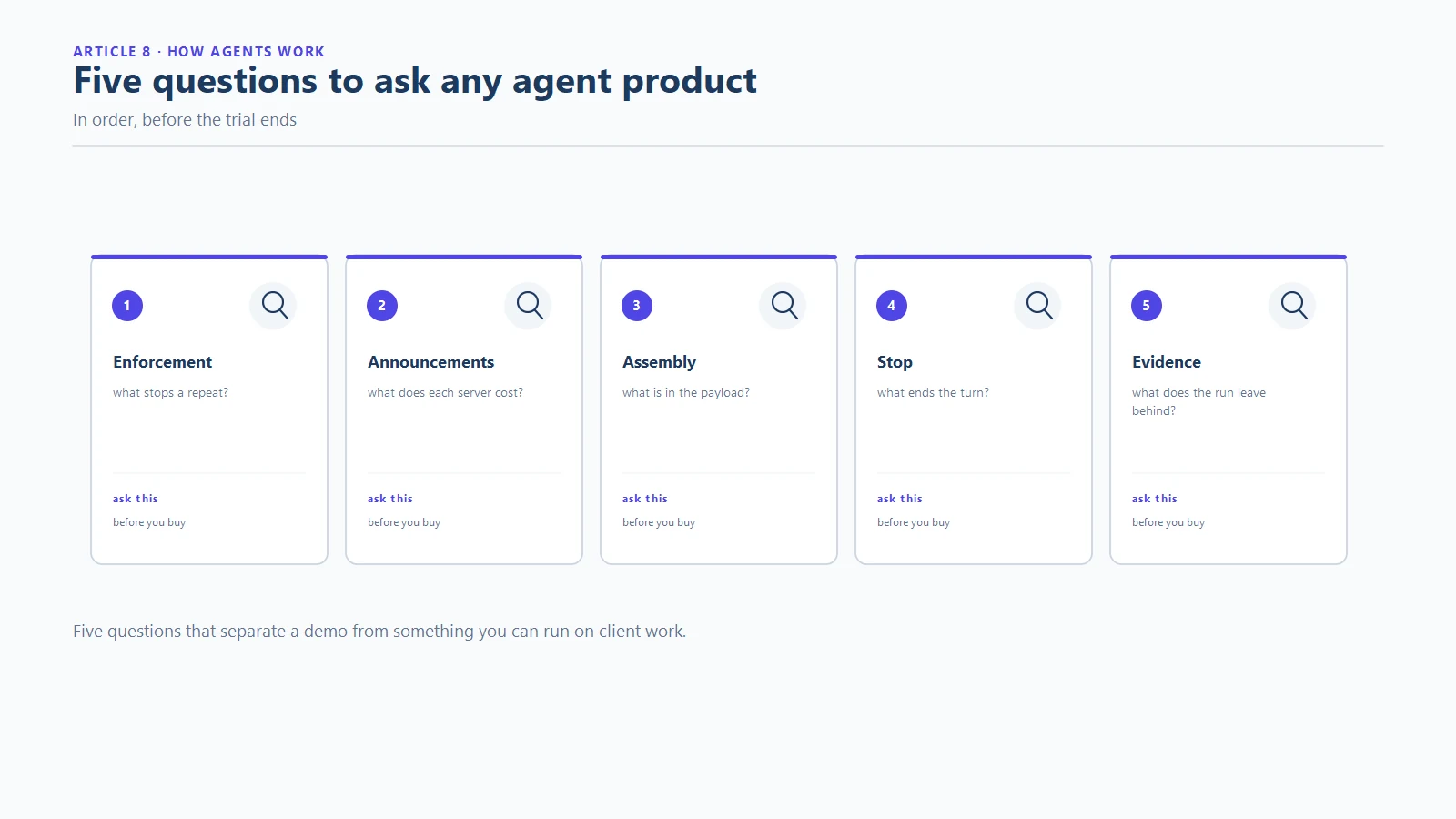
The five-part model turns product evaluation into five questions:
- What does the harness enforce? Ask what happens on repeated failure, not what the demo shows on the happy path.
- What is announced, and what does it cost? Count the standing token cost of the tool set before you count the features.
- What enters the assembly each turn? Ask for a sample. Density beats volume, and dead weight is billed forever.
- What stops the loop? Look for layered stop conditions: goals, failure counters, budgets.
- What evidence does it produce? A product that cannot show you what it did is asking for trust it has not earned.
Products with good answers to all five are rare, and they are worth finding, because the five questions are not marketing questions. They are the operational truth of how AI coding agents work, asked in the order that money and risk arrive.
Frequently asked questions
How do AI coding agents work in one sentence?
They run a loop: the harness assembles context, the model requests a tool call, the harness executes it, the result is appended, and the loop repeats until a goal is met or a limit stops it. That is how AI coding agents work, and every product feature maps onto one of the five parts.
Does the AI model edit my files directly?
No. The model emits a request to use a tool, and the harness performs the actual read or write. The separation is what makes agents governable, because the harness can validate, supervise or refuse what the model requests.
What is an agent harness?
It is the program that owns the loop: the CLI, desktop app or editor extension that assembles context, executes tool calls and enforces stop conditions. Two harnesses around the same model behave differently, which is why the harness is the first place to look when agent behaviour differs.
Why do agents forget things between sessions?
Because models are stateless: nothing survives between calls except what the harness re-sends, and sessions end. Memory is an external layer that persists facts and feeds a summary back into the assembly. The context versus memory article covers the distinction in depth.
What stops an agent from running forever?
The stop condition: a goal check, a done signal from the model, a human interrupt, or hard limits such as turn budgets, token caps and timeouts. Weak stop conditions are the root of runaway sessions, and asking how a product stops its loop is the sharpest evaluation question available.
Why does the same agent sometimes behave differently on the same task?
Models are probabilistic, so identical context can yield different next steps, and small differences early in a loop compound. This is precisely why deterministic guardrails around the loop matter more than hoping for consistent model behaviour.
See the loop, and the mystery ends
Every agent product in 2026 is a variation on the same five parts: harness, tools, context assembly, model call, stop condition. Once you know how AI coding agents work, product comparisons get easier, failure reports get readable, and the fix for any misbehaviour becomes a question about which part is misconfigured. The reliability engine built around that understanding is documented on the SOVEL Net-Routed Agentic OS product page, and if you want the economics of the loop, our token cost analysis shows where the budget actually goes.