
SOVEL Studio is a WordPress theme with schema markup built into the theme itself instead of bolted on through a separate yearly subscription. It registers 35 schema types, of which 29 are buyer-selectable, alongside 22 REST endpoints, 15 condition types, 14 ready-to-use schema templates, 13 homepage sections and three content types for tools, books and resources. The short answer to whether that still matters in 2026 is yes, for one cost reason and one structural reason. The cost reason is that a single payment of Rs 5,574 replaces a schema tool that bills again every year. The structural reason is ownership: one system decides which page receives which JSON-LD instead of two systems guessing at the same time. Stated plainly so nobody buys the wrong thing, this is a classic theme and not a block theme, it ships five WooCommerce template overrides rather than a rebuilt storefront, and no performance score appears on this page because none has been measured.
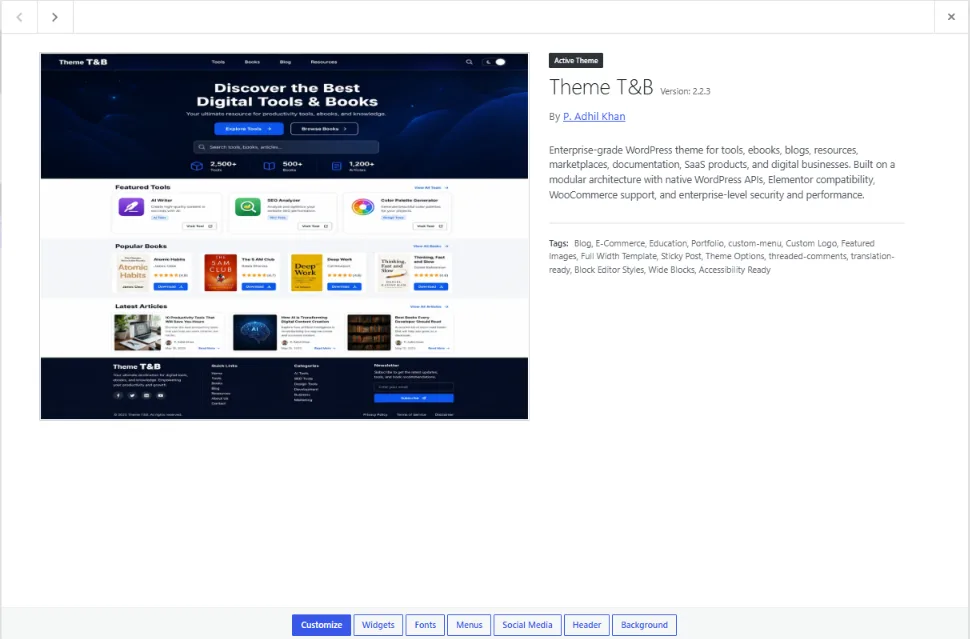
That paragraph is the whole article in miniature. What follows is the reasoning, the evidence behind each number, and the honest limits, so you can decide without a salesperson in the room.
Reason 1: One Payment Replaces a Yearly Schema Subscription
Schema plugins are priced as subscriptions. The common pattern in the category is an annual licence that renews, or a lifetime tier priced high enough that it functions as a multi-year commitment. Either way, the money leaves your account more than once for a feature that does not change much year to year.
Structured data is not a moving target the way, say, a payment gateway is. The schema.org vocabulary gets additions, Google adjusts which types earn rich results, and the core work of emitting valid JSON-LD on the right pages is stable. You are paying annually for a small amount of maintenance wrapped around a large amount of stability.
SOVEL Studio inverts the model. The theme costs Rs 5,574 once, with lifetime updates. The schema system is inside that price. If you were already paying an annual schema licence, the theme does not add a cost, it replaces one and hands you a complete theme in the same transaction.
To put that number against what the market actually charges right now: Schema Pro, which is a plugin only and ships no theme, bills $69 per year or $229 for a lifetime licence covering roughly 22 schema types. Premium general-purpose themes like GeneratePress and Astra charge $59 to $249 for lifetime access, and neither includes any structured-data system at all. Buying both separately — a premium theme plus a schema plugin — costs between $288 and $478 as a one-time outlay. SOVEL Studio delivers 35 schema types, three custom post types, 13 homepage sections and the entire theme for a single payment that sits below the annual renewal of most schema-only plugins. That arithmetic is not a sales pitch; it is the published pricing of every product named here, verified in September 2026.
The counter-argument is fair and worth stating: a subscription funds ongoing development, and a one-time purchase does not. The honest answer is that the theme’s updates are funded by new sales rather than renewals, which is why the licence is one-time and the code is GPL. If you need a vendor with a funded roadmap and a support SLA, a subscription is the safer structure. If you need the capability once and want to stop paying for it, the one-time model wins on arithmetic alone.
Reason 2: The Theme Knows What Each Page Is
This is the structural argument, and it matters more than the pricing one.
A schema plugin is blind to your content model. It sees a URL, a post type, maybe a category, and it applies rules you wrote by hand. It does not know that the page it is marking up is a tool listing versus an ebook detail page, because your content types were not built by the plugin.
A theme that ships its own content types knows. SOVEL Studio registers three custom post types with their own archives and single templates:
- Tools at
/tools/ - Books at
/books/ - Resources at
/resources/
A post in Books is a book, so the theme can generate Book or Ebook schema from the content model rather than from a manual rule. A post in Tools is a tool, so SoftwareApplication or Tool schema applies. The mapping is structural, not configured.
This is the difference between schema that is derived from what the page is and schema that is assigned to what the page looks like. The first survives a redesign. The second breaks the moment you change a template, because the rule was pointing at a shape, not a thing.
Reason 3: 35 Schema Types From One Registry
The count matters less than the source of the count, so here is the source. The theme’s schema registry contains 35 registered type names, counted directly in the source file rather than copied from a marketing page. The published product presents 29 of those as buyer-selectable options.
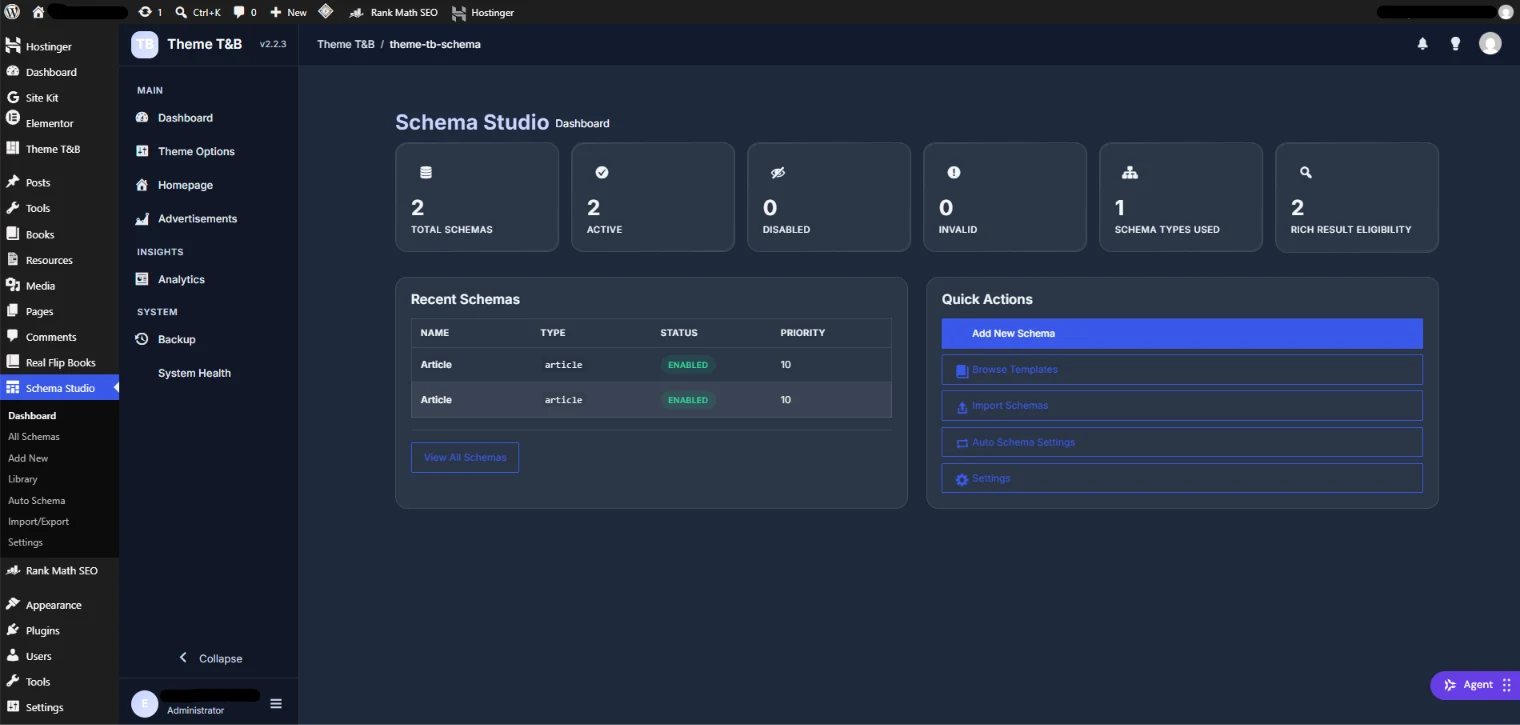
The dashboard above reports the state of your structured data in one view: total schemas, active, disabled, invalid, types used, and rich-result eligibility. That last tile is the useful one. It answers the question a schema plugin usually leaves you to guess at, which is whether the markup you just wrote is eligible for a search feature or is simply valid JSON that does nothing.
Thirty-five types is more than most sites will ever need. That is fine, and it is not the selling point. The selling point is that the selection happens in one place, with a type picker grouped by category, rather than across a settings maze.
Reason 4: 15 Conditions Decide Where Schema Is Allowed to Fire
If you have ever found your Organization schema sitting on a search results page, you already understand why this is the least-documented feature in the category.
Conditions are the rules that decide whether a schema block is output on a given page. SOVEL Studio ships 15 condition types: Post Type, Singular View, Archive View, Taxonomy Archive, Homepage, Search Results, Author Archive, Logged In, Logged Out, Mobile Devices, Specific Posts, Specific Categories, Specific Tags, WooCommerce Pages and URL Pattern.
Most schema tools stop at “display rules” and leave it there. Fifteen named conditions is a different level of control, and the URL Pattern condition is the one that solves the messy cases, because it lets you target or exclude a path without touching code.
Article 3 in this cluster walks through all 15 conditions with three worked examples. The point here is simpler: conditions are what separate a schema system that behaves from one that leaks markup onto pages it should never touch.
Reason 5: Three Ownership Modes Stop the Plugin Conflict
The most common structured-data problem is not a missing type. It is two systems both emitting JSON-LD for the same entity, which search tools then report as a duplicate or a conflict.
SOVEL Studio is built to coexist with an SEO plugin rather than fight it, using three explicit ownership modes:
- Complement — the theme adds schema the SEO plugin does not produce, and stays out of what it does.
- Defer — the theme suppresses its own output and lets the SEO plugin own the markup.
- Override — the theme takes ownership of the markup and the SEO plugin’s schema is stood down.
Naming the mode is the fix. When you can say out loud which system owns the Organization block, the duplicate warning stops being mysterious. Article 4 covers this in full, including the honest warning that switching to Override without checking existing markup can remove schema that was working.
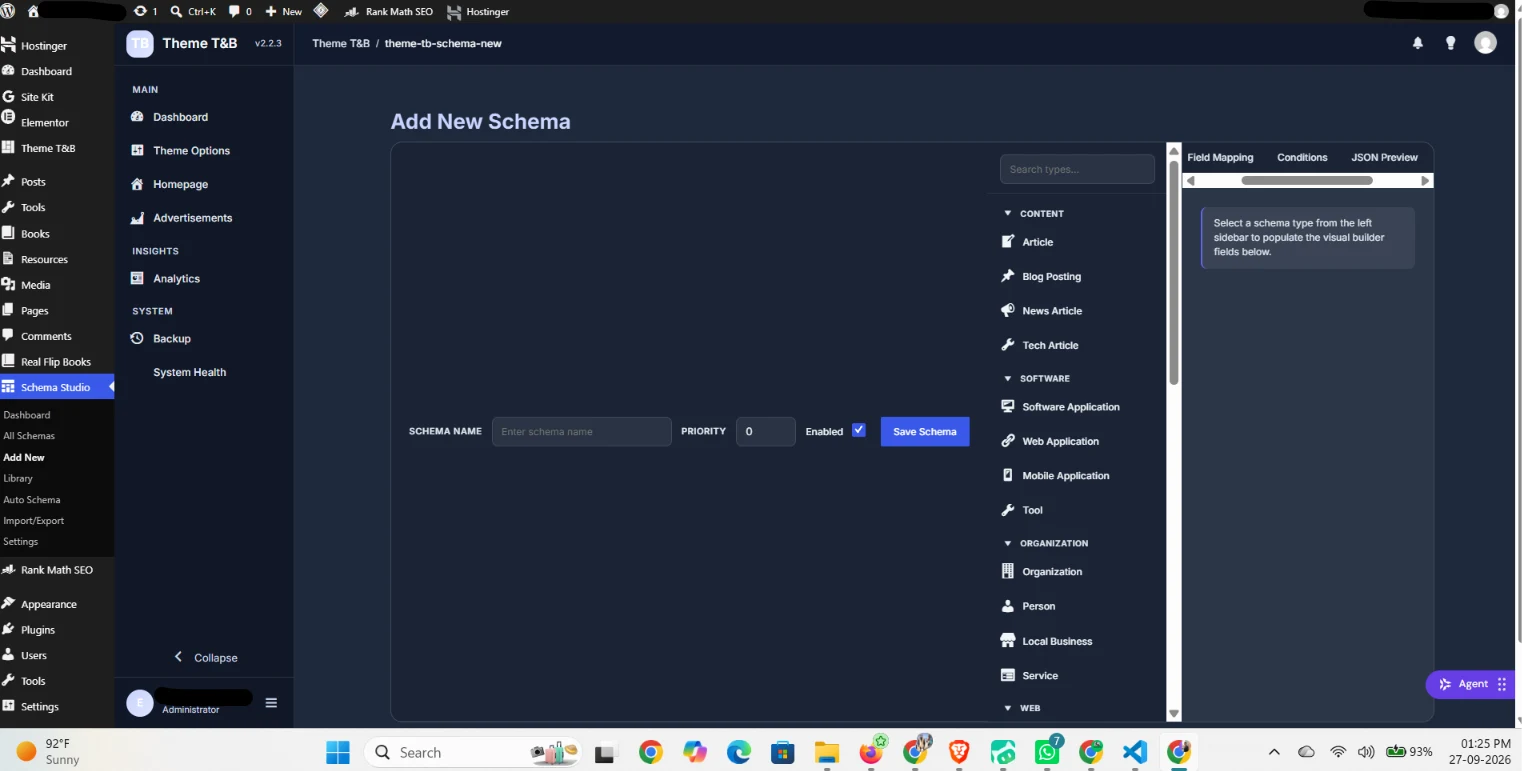
The screen above shows the working surface: a type picker on the left grouped into CONTENT, SOFTWARE, ORGANIZATION and WEB, and a right-hand panel with Field Mapping, Conditions and JSON Preview tabs. You can see the JSON before you save it, which is the difference between configuring markup and hoping.
Reason 6: The Content Types Ship With the Theme
Building three custom post types, their archives, their single templates, their card partials and their schema mapping is roughly a month of work for a competent developer, and more if you want it done properly with accessibility and pagination handled.
SOVEL Studio ships that model. Tools, Books and Resources each arrive with an archive at a real URL, a single template, and a card template part used by the homepage sections. The blog archive and single template are included as well, with reading-time indicators on cards.
If your site is a tools directory, an ebook library, a resource hub, or any combination of the three, this is the part that saves the most time, because it is the part that is most tedious to build and least interesting to maintain.
Reason 7: 13 Homepage Sections You Configure, Not Build
A homepage for this kind of site has a predictable shape: hero, search, featured items, categories, latest items, articles, a newsletter block, maybe testimonials and stats. Building each of those as a bespoke template is another week.
The theme ships 13 configurable homepage sections: Hero Banner, Search Box, Featured Tools, Tool Categories, Latest Tools, Featured Books, Latest Articles, Featured Resources, Statistics, Testimonials, Newsletter, Call To Action and Donation.
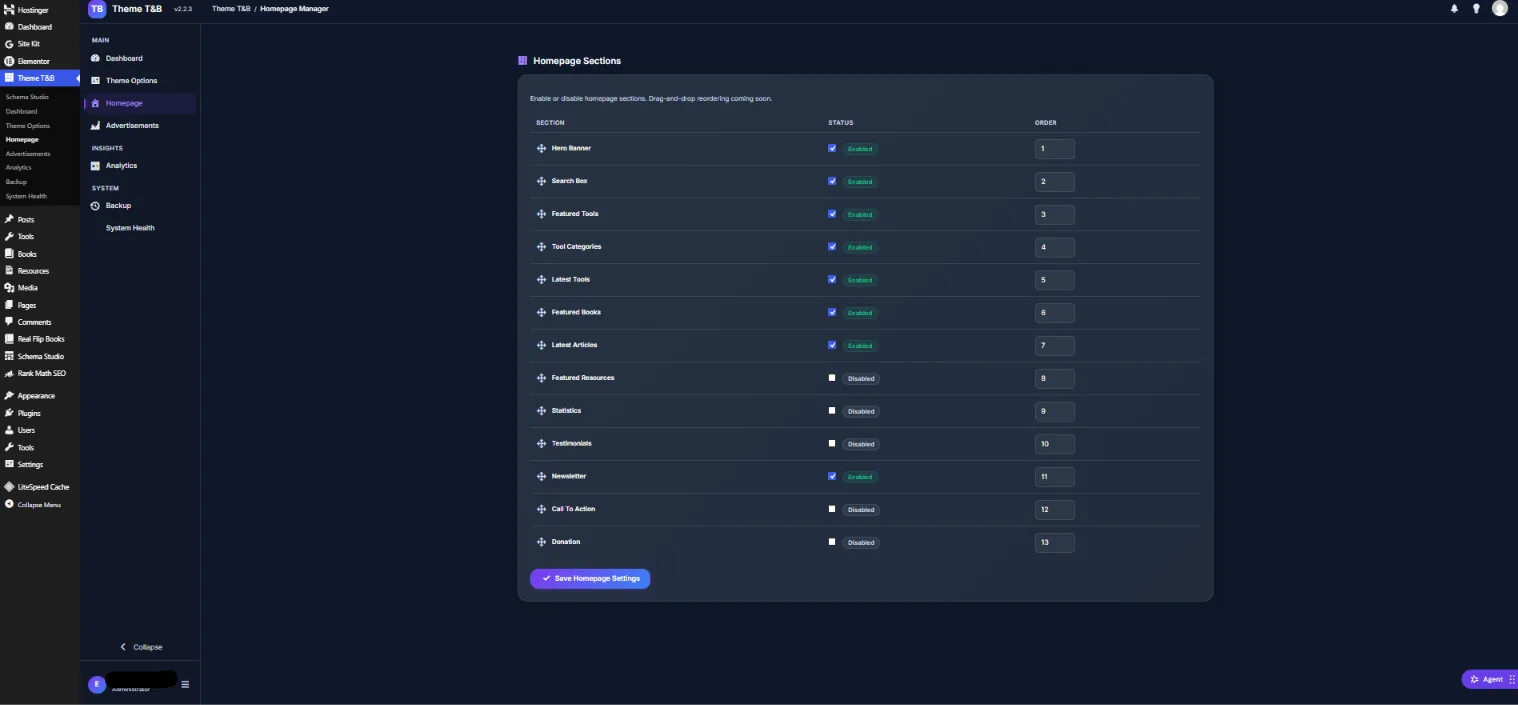
Each has an enable toggle and an order number. Eight are on by default and five are off, which is a sensible starting state: the content sections are visible and the marketing sections wait until you have something to say. One honest note visible in the interface itself: reordering is by number, and drag-and-drop reordering is listed as coming soon. The section still works, it just is not the interaction you might assume from a modern page builder.
Reason 8: The Admin Is Built for This Content
Open the theme’s dashboard and you are not looking at a generic WordPress admin. You see counts for published tools, published books, blog posts and resources, plus quick actions to add each type, manage the homepage, or open the Customizer.
There is also a System Information panel that reports the theme version, WordPress version, PHP version, active theme and the state of Elementor, WooCommerce and Rank Math. That panel is a small thing that saves a real amount of time when you are trying to work out why something is behaving differently on staging than in production.
Alongside the dashboard, the theme includes an advertisement manager, analytics for views and events, and a backup and restore screen. None of those are schema features. They are the difference between a theme and a theme plus five plugins.
Reason 9: No Required Plugin for Core Function
Many themes in this category assume a stack: a page builder, a schema plugin, a CPT plugin, a forms plugin. Each assumption is a dependency, and each dependency is something that can break an update.
SOVEL Studio requires no plugin for core function. Elementor, WooCommerce, Rank Math, Yoast, AIOSEO, SEOPress and The SEO Framework are all supported as optional integrations, and the schema system’s three ownership modes exist precisely so those integrations are cooperative rather than conflicting.
That is not a claim that the theme does everything. It is a claim that the theme does not hand you a list of things to install before it works.
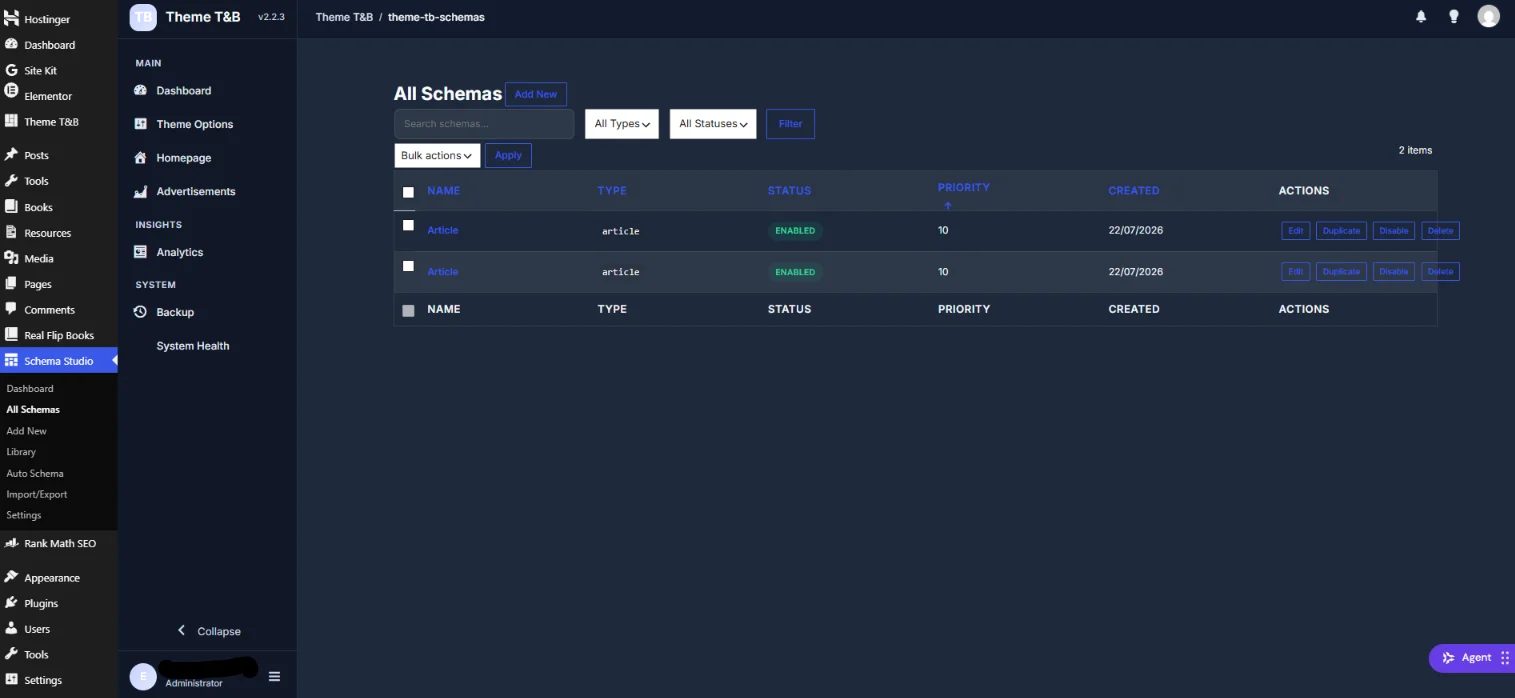
The list above is where ownership becomes concrete. Each schema shows its type, status, priority and created date, with per-row actions to edit, duplicate, disable or delete. When a conflict appears, you do not have to guess which block is responsible, because you can see every block and switch any one of them off without touching code.
The Honest Limits
A page that lists only advantages is an advertisement. These are the limits, and they are the reason this theme is not for everyone.
It is a classic theme, not a block theme. If your workflow depends on full site editing and block templates, this is not that, and you should know before you buy.
It is WooCommerce-ready, not WooCommerce-rebuilt. Five template overrides ship: shop, product, cart, checkout and account, plus a WooCommerce stylesheet. That is competent styling. It is not a purpose-built storefront. WooCommerce publishes its full template structure at woocommerce.com/document/template-structure/ if you want to understand what those five overrides are replacing.
There is no completed translation file. The package contains a .pot file with 553 translatable strings. If you need a translated site today, you are doing that work yourself.
The custom admin applies to this theme’s screens only. It is not a full WordPress admin reskin.
No performance figure exists. No PageSpeed, Lighthouse or Core Web Vitals number is published on this page, because none has been measured. Any article that gives you a number for a theme it has not tested is guessing.
The flipbook reader is a separate product. The page-turn reading experience belongs to SOVEL RealFlip, a plugin, not to this theme. The theme ships an optional UI sound asset and no reader engine. If you need a flipbook, you are buying two products, and you should plan for that.
It is built for a specific site type. Tools, ebooks, resources, digital products. Not restaurants, not photography portfolios, not general business brochure sites. A theme that claims to fit everything fits nothing well.
How to Decide
Three questions settle it.
Do you sell or publish tools, ebooks, resources or digital products? If yes, the content model is already built for you and the theme is a head start. If no, stop here.
Are you currently paying annually for schema? If yes, compare the renewal total over three years against Rs 5,574 once. If no, the cost argument is weaker and the structural argument carries the decision.
Do you run an SEO plugin you trust? If yes, the three ownership modes let you keep it and hand it a clear job. If no, the theme can own schema outright.
If two of the three answers point the same way, the decision is made. If they split, the structural argument should win, because the cost of a duplicate-entity conflict is paid in lost rich results rather than in licence fees.
Frequently Asked Questions
Does a theme with schema markup replace a schema plugin?
For most tools, ebook and resource sites, yes. The theme emits the JSON-LD itself. If you also run an SEO plugin, the three ownership modes decide who owns which block, so you are choosing a division of labour rather than running two systems against each other.
How many schema types should a theme support?
More than you will use, and the number matters less than the selection. SOVEL Studio registers 35 types and offers 29 as buyer-selectable options. For a typical tools-and-books site, four to seven of those will carry the actual work.
Will my existing SEO plugin conflict?
It does not have to. Complement, Defer and Override exist so one system owns each entity. The conflict only appears when both systems assume ownership by default, which is the situation Article 4 addresses.
Do I still need Rank Math or Yoast?
Only if you want them for the other things they do: titles, meta descriptions, sitemaps, redirects, content analysis. For structured data specifically, you have a choice, and the theme is designed to let you keep the plugin and still control schema.
What happens to my schemas when the theme updates?
Schema definitions live in the theme’s own storage rather than in template files, so a theme update does not overwrite them. The theme also ships a backup and restore screen, which is the right place to take a snapshot before any update you are unsure about.
Does schema markup actually change Google results?
Structured data helps search engines understand what a page contains, and that understanding can change how the page is displayed when a rich result is eligible. It is not a direct ranking factor. Its value is in eligibility and accuracy, and inaccurate markup subtracts rather than adds.
Does this theme include a flipbook reader?
No. The page-turn reader is SOVEL RealFlip, a separate plugin. The theme ships an optional UI sound asset and no reader engine, so a flipbook site is a two-product stack.
Where to Read Next
This article opens a five-part cluster about structured data on a WordPress site. The next piece explains the 35 WordPress schema types and which 7 actually win rich results. The technical depth piece covers conditional schema markup in WordPress and the 15 rules that stop wrong JSON output. The problem-solving piece covers the Rank Math and Yoast schema conflict. The site-type piece covers the WordPress theme for a tools and ebook website.
If you want the primary sources rather than a summary, the schema.org vocabulary is published at schema.org, Google Search Central documents which types are eligible for rich results in its structured data documentation, and the WordPress Theme Handbook explains classic theme structure and template hierarchy.
Word count: 2,683