
Find clients without LinkedIn and the first thing you notice is the silence. No feed, no notifications, no suggested connections. Just a browser, a notebook and a decision about where to look. That silence is the point. It forces you to work from pages a business publishes on purpose, which is a better foundation than a profile someone updated in 2019.
The short answer: you can find clients without LinkedIn by reading the directories, supplier pages, member lists and partner pages that businesses already publish. Each of those pages is a public statement about who a company works with and what it sells. Collect enough of them and a shortlist appears, with a source for every name.
This guide covers six routes that work without a login, the comparison between them, the verification step most people skip, and a weekly routine you can keep. Every route here works from public business pages. None of them requires a fake account, a scraping script, or a message that pretends to be personal.
Why is the login wall a dead end?
LinkedIn asks for a session before it shows you a profile, a company page or a search result. That is a private network with terms of its own, and it is out of scope for any tool that refuses to log in. The wall is not a technical accident. It is the product.
That leaves two choices. You can break the rules and hope nobody notices, or you can build a research habit from pages that were published for public reading. The second option is slower on day one and far more durable on day ninety, because a directory entry does not disappear when an account is suspended.
Search engines themselves depend on the public web. Google publishes guidance on its common crawlers and what they can read without a login, and the pattern is the same everywhere: public pages, public feeds, public registries. That is the layer where a person who wants to find clients without LinkedIn can work all day.
The routes below are ordered by how quickly a beginner can find clients without LinkedIn, not by how clever they sound.
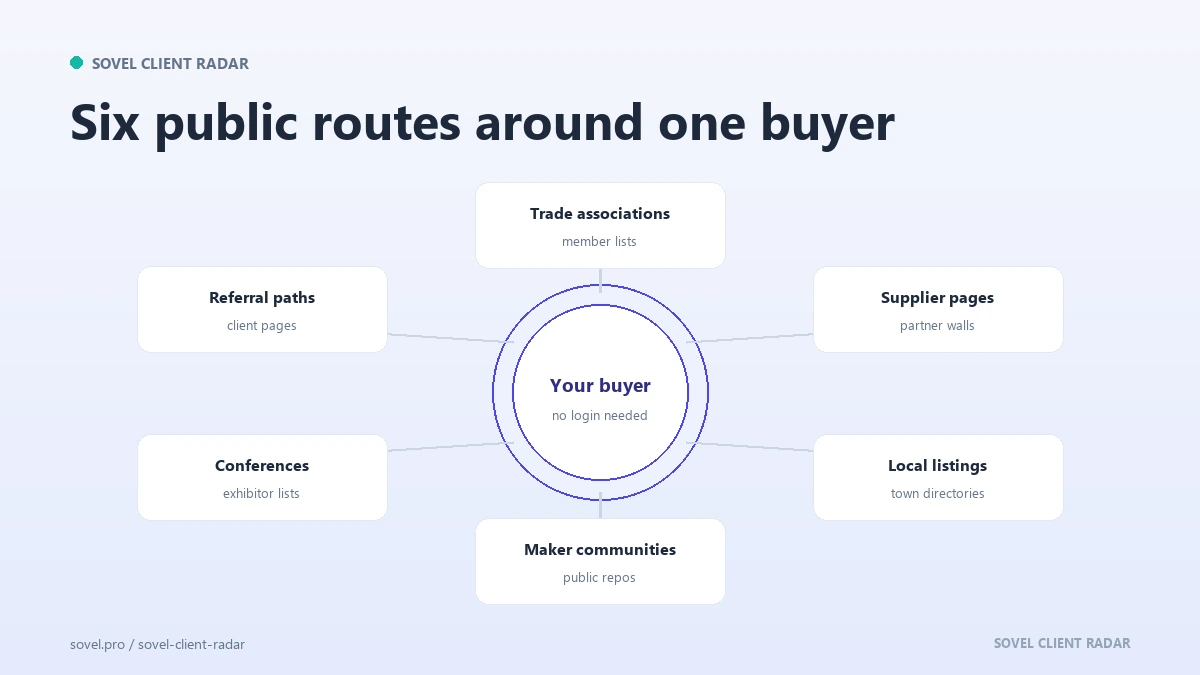
Route 1: trade and association directories
A trade association directory lists its members, usually with a website link, a phone number and a city. A chamber of commerce does the same for local businesses. A guild, a federation or a professional body often publishes a searchable member list behind a plain HTML page.
This is the strongest first route for finding clients without LinkedIn because the list is curated. Someone paid a membership fee, which means the business is active enough to invest in its own visibility. The directory has already done a rough qualification pass for you.
To find clients without LinkedIn, start with one body that matches the service you sell. If you build websites for restaurants, find the restaurant association for your region. If you handle bookkeeping for clinics, find the clinic or healthcare management body. Read the member list page, sort by city if the page allows it, and open a dozen member sites in tabs.
Record four things: the name, the directory page, the company website and the city. When you later ask where a name came from, the answer is a URL, not a memory.
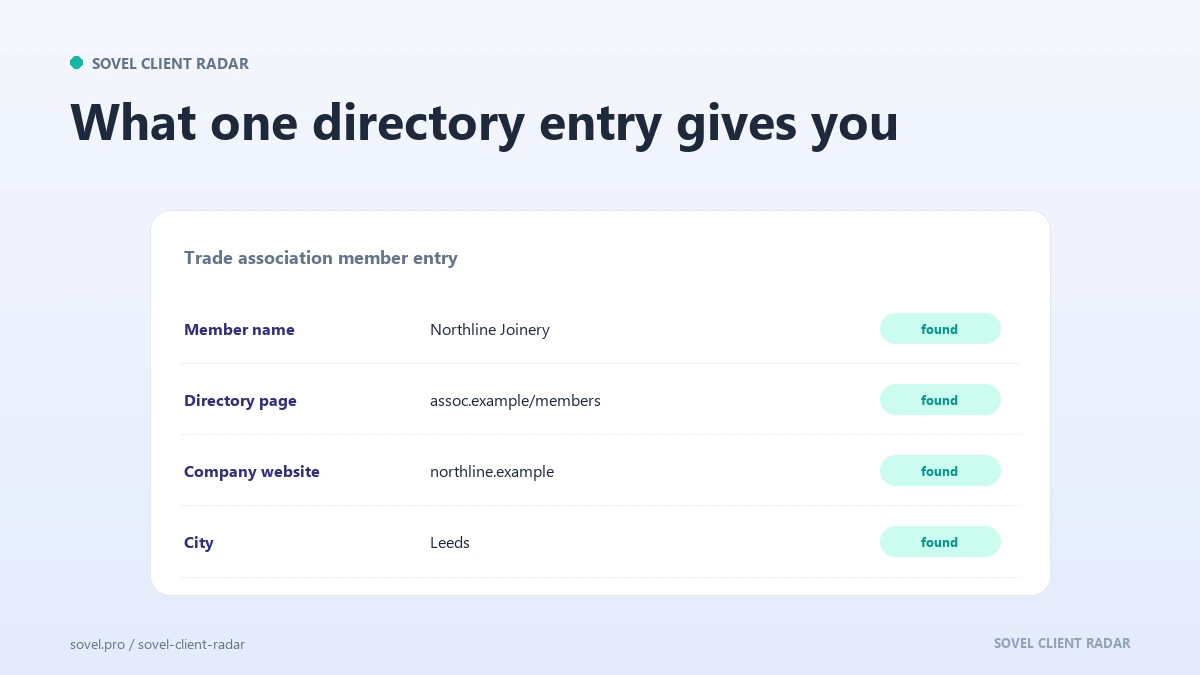
The first question is where to find business directories your buyers join. A trade association directory has limits. Membership skews toward established businesses, so very new companies may be missing. Some associations hide the list behind a member login, which puts them out of scope. Others publish a PDF that was last updated three years ago. Check the date on the page before you trust the list.
The reward is a set of names that a competitor browsing social feeds will never see, which is how you find clients without LinkedIn without joining a feed at all.
Route 2: supplier and partner pages
Every established business has suppliers, and many publish a partner or client page, which makes this a quiet way to find clients without LinkedIn. A software company lists the agencies that implement its product. A manufacturer lists the distributors that carry its line. A hosting company lists the agencies that build on its platform.
These pages map working relationships. If a business appears on three partner pages in one industry, it is embedded in that market. That is stronger than a job title, because somebody chose to publish the relationship.
Read the supplier page carefully. Some partner pages are logo walls with no links. Others link each partner to a profile with a city and a contact route. Follow those links and keep the partner page as the source.
The logic works in the other direction too. If you sell to agencies, read the partner directories of the platforms they build on. If you sell to manufacturers, read the trade suppliers that serve them. The page does the market mapping for you.
A logo on a partner page does not prove a current relationship. Treat it as a lead, not a fact, and check the company’s own site before you use it in an opening line.
It also answers how to find clients without cold calling, because the partner page gives you a reason to write that has nothing to do with a sales script.
Route 3: local business listings
Local listings are the least glamorous route and the most reliable way to find clients without LinkedIn for service businesses. A town business directory, a local newspaper’s business index, a tourism board page, a shopping district map and a regional development agency list all publish names, addresses and websites.
Pick a page that covers your service area and read it like a list, not a search engine. Open businesses in a category that matches your offer. Check whether the website is live, whether the phone number matches the company site, and whether the address looks like a real trading location.
The comparison between a listing and the company site is where the value sits, and it is how you find clients without LinkedIn without trusting a stale list. A listing may show an old name, a closed branch or a phone number that now belongs to somebody else. That mismatch is a data quality signal, and it is also a reason to look closer before you add the name to a list.
Local listings also surface businesses that never invest in content. A plumber with a one-page site and a full diary is a good prospect for a booking system or a review process. The listing says the business exists. The site shows what is missing.
Route 4: maker and developer communities
If you sell to software teams, the public developer world is a directory of its own, and a natural place to find clients without LinkedIn. GitHub organisations expose a company name, a website and sometimes a blog. Package registries list maintainers. Public product directories list tools, their makers and their links.
This route is not for every niche. A corner shop does not have a GitHub organisation. A software studio usually does. Use the route only where it fits, and do not force it.
The useful pattern is the small team that ships in public. A public repository, a changelog and a documentation site tell you what the company values and where it is investing. That is enough for a specific first line.
Maker communities also produce member lists and showcase pages. A hardware accelerator, a startup studio or a local hack space often lists its current cohort. Those lists are small, dated and public, which makes them a good source of warm openings when you find clients without LinkedIn in a startup market.
Route 5: conferences and member lists
A conference website publishes speakers, sponsors and exhibitors, and each listing is a chance to find clients without LinkedIn. Each of those is a business with a public page and a reason to be visible. A sponsor list is effectively a budget signal: the company paid to be there.
Read the exhibitor list for an event your buyers attend. Note the company, the person, the city and the booth topic, then follow the link to the contact page.
The date matters. A list from this year is a live map. A list from four years ago is history, so put the event year in your record.
Member lists from clubs, cooperatives and industry groups work the same way for people who want to find clients without LinkedIn through a local network. They are smaller, often regional, and frequently overlooked. A regional manufacturers’ group or a cooperative of independent retailers can be a better source than a national directory because the members already share a market.
Route 6: referral paths
Referral paths are the warmest route and the slowest to build. A business that already serves your buyer probably knows other businesses like it. An accountant knows other accountants, and a web designer knows other designers.
Find the businesses that sit next to yours in the market, not your direct competitors, because that is how you find clients without LinkedIn through people who already trust you. Read their client or case study pages. Note the companies they name. Those named companies are candidates, and the mention gives you a legitimate reason to start a conversation.
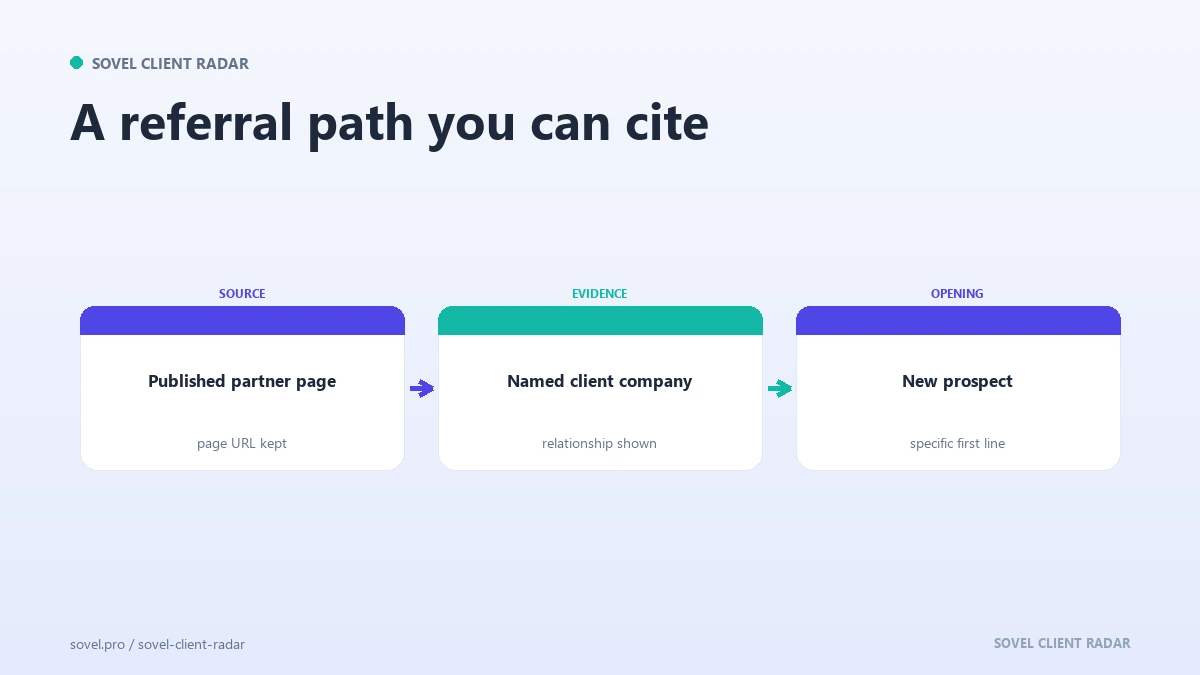
The evidence is a page that connects two businesses. Keep the URL, the project name and the year.
A referral request is also a useful test of the work you delivered. If the client hesitates, the project may not have landed as well as you thought. If the client names two companies without pausing, you have a route for next month and a practical answer to how to find clients without LinkedIn.
How do the six routes compare?
| Route | Effort to start | Cost | Warmth | Best for |
|---|---|---|---|---|
| Trade and association directories | Low | Free to low | Medium | Established local and trade businesses |
| Supplier and partner pages | Medium | Free | Medium | Agencies, distributors, software teams |
| Local business listings | Low | Free | Low | Service businesses in one area |
| Maker and developer communities | Medium | Free | Medium | Software and product teams |
| Conferences and member lists | Medium | Free | Medium | Businesses with a marketing budget |
| Referral paths | High | Free | High | Anyone with one happy client |
The table is not a ranking, and no single row is the right way to find clients without LinkedIn for every reader. A solo consultant with one good client should start with referral paths. A new freelancer with no network should start with directories and local listings. A studio selling to software companies should start with partner pages and developer communities.
The comparison that matters most is not effort or cost. It is whether the route gives you a reason to write. The same public-page logic drives semantic SEO: you group businesses by meaning, not by a keyword list. A name with no context produces a generic email. A name with a directory, a partner page or a referral produces a sentence that could only be written to that company.
How do you verify a name before you write?
Verification is the step that makes the difference between research and a list of guesses, and it is the part most people skip when they try to find clients without LinkedIn. It takes about three minutes per company and it saves hours of wasted outreach.
Open the company website. Confirm the business still operates. Check the contact page for a real address, a phone number or a form. Confirm the city matches the listing. If the site redirects to a parked domain or a holding page, drop the name.
Then check the source page again. Does it still list the company? A directory entry from 2021 may be stale. A partner page may have removed the logo. The source has to be current enough to defend.
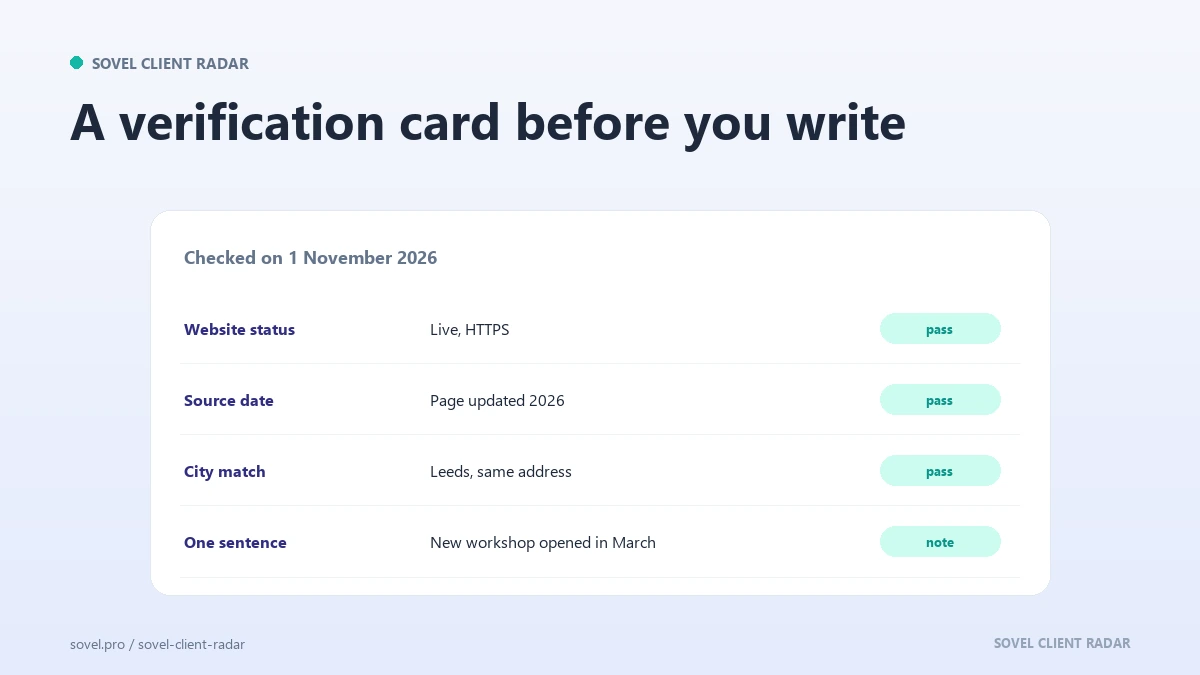
Finally, write one sentence about the company in your own words. Not a summary of its services. Something specific: a new location, a service page that was added, a blog that stopped, a team page with three open roles. That sentence is the seed of your first line, and it proves you actually read the site.
Record the evidence class for each field, because that is how you find clients without LinkedIn without guessing. A phone number copied from the company’s own contact page is stronger than a number copied from a directory. An email published on a team page is stronger than an address guessed from a pattern. The hierarchy matters when a colleague asks why one lead outranks another.
If you want to find clients without LinkedIn at scale, this is the step that scales. A verified list of thirty names beats an unverified list of three hundred every week of the year, and that is the only scale that matters when you find clients without LinkedIn by hand.
What does a weekly routine look like?
The routine below is built for someone who wants to find clients without LinkedIn while running a business. Monday, pick one route and one area. Tuesday, collect twenty names from that route and record the source. Wednesday, verify ten of them and drop the failures. Thursday, write to five with a specific first line. Friday, log replies and add the rest to next week’s queue.
That routine produces about five real conversations a month without a single login, a single connection request or a single automated message. It also produces a record you can review. After a month you can see which route produced replies and which produced silence.
The routine is deliberately small. A list of twenty verified names is enough to send five thoughtful emails. A list of two hundred unverified names is enough to send nothing, because you will never finish reading them.
Keep one file per route and one column for the source. At the end of the month, count how many names came from each route and how many replies each route produced. That count is the only honest basis for deciding where to spend next month’s effort.
If the directory route produces nothing after two months, change the directory, not the whole strategy. If referrals produce two conversations from three asks, protect that habit and give it more time.
Where to find business directories is rarely the hard question, and neither is how to find clients without cold calling. The hard question is which directory your buyers actually join, and that answer comes from reading the member list rather than from a list of directory websites.
Which edition fits your work?
SOVEL CLIENT RADAR is the engine behind this method. It reads seed pages, referral links, developer registries and independent directories, records the source for every field, and writes a report you can defend. It does not log in anywhere, so the routes above are exactly the routes it can use to find clients without LinkedIn.
Personal at ₹5,999 suits one person running a weekly routine. The Pro edition at ₹12,999 raises the lead cap to 200 per run for a small team. The Agency edition at ₹39,999 covers five machines and 500 leads per run. The optional AI layer ships in every edition and stays off until you add a key.
Every edition is a one-time licence. The SOVEL Client Radar product page lists the full comparison, and the directory prospecting guide walks through the page-to-pipeline mechanics in more detail. If you sell to local businesses, the find local business leads playbook is the natural next read.
FAQ
Can I really find clients without LinkedIn?
Yes. The six routes in this guide all work from public pages that businesses publish themselves or that a trade body publishes on their behalf. You do not need an account, a connection or a paid seat. You do need to verify what you find.
Are directories enough on their own?
If you want to find clients without LinkedIn quickly, one good directory can carry the first month. For a steady pipeline, mix two routes. Directories give volume, referral paths give warmth, partner pages give context.
Is this legal and allowed?
You are reading public pages meant to be read, for research rather than republishing. The same rules apply when you find clients without LinkedIn from a directory. Respect the site’s robots rules, do not log in anywhere, and do not copy the directory database. If a page blocks you, move on and find clients without LinkedIn somewhere public.
How many prospects should I aim for each week?
Twenty names collected, ten verified, five contacted. That is a realistic week for one person. A hundred unread names produce no emails, which is the opposite of finding clients without LinkedIn.
What about Instagram, Facebook and X?
Those networks sit behind login walls or forbid automated access, so they are out of scope. You can use them manually, but not as part of a routine that respects the rules.
How long before I see results?
The first replies usually come in the second or third week, because the first week is spent building the habit. Finding clients without LinkedIn is a reading practice before it is a numbers game. Referral paths can produce a conversation faster, but they depend on work you have already delivered.
How do I keep the list from going stale?
Recheck the source before every send. If the directory no longer lists the company, or the site no longer loads, remove the row. A list checked weekly stays useful.