
An MCP server marketing workflow is what happens when an AI agent can drive production tools directly instead of pasting text between windows. MCP, the Model Context Protocol, is an open standard for connecting AI applications to local tools, and marketing teams are adopting it because it turns the agent from a writing assistant into a production operator: the agent briefs the tool, the tool runs a governed pipeline, and the files land where the rest of the work already lives. The short answer: an MCP server marketing workflow does five jobs better than any chat window, briefing in plain language, running production inside the agent host, keeping output repeatable, keeping a human in the review loop, and chaining runs into larger workflows, and the SOVEL LEAD MAGNET ENGINE product page documents an engine built to do exactly those five.
This guide explains what the protocol actually is without jargon abuse, then walks the five jobs one at a time with the evidence a technical marketer can check. The honest-limits section at the end covers what the MCP route does not change, because an agent driving a governed pipeline still produces drafts that need human review.
What an MCP server actually is
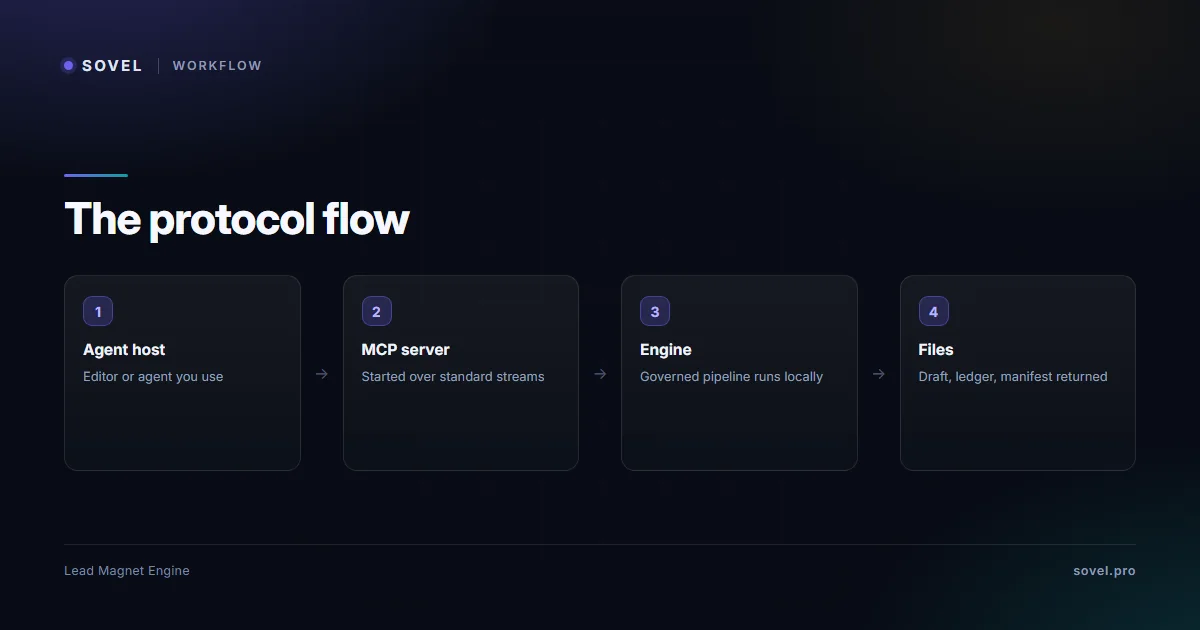
An MCP server is a small program that exposes a tool’s capabilities in the protocol’s standard shape, so any MCP-capable agent or editor can discover and call them. The plumbing underneath is JSON-RPC over standard streams, which is a deliberately boring choice: the host application starts the server process, exchanges structured messages with it, and receives structured results back. Nothing about that requires cloud accounts, telemetry or a subscription, because the conversation happens between your agent and your tool on your machine. The protocol’s job is interoperability: one server implementation works with every host that speaks the protocol, instead of a vendor writing a plugin for each editor separately. For a marketing team, an MCP server marketing workflow is the practical shape that adoption takes.
Discovery is the part that makes this useful in practice. When a host connects to an MCP server, it asks what tools exist and what inputs each tool takes, and the agent can then decide when to call them. A marketing agent that discovers a lead-magnet tool sees a discoverable, documented capability with defined inputs and outputs, which is a different relationship from a prompt the agent can only imitate. Discovery is what makes an MCP server marketing workflow possible at all, because an agent cannot call a tool it cannot see; the protocol’s own site, modelcontextprotocol.io, documents the protocol itself, and the rest of this guide documents what the connection is for.
Why marketing teams care about this protocol
Marketing work has always been a chain of small tool jobs: brief, draft, check, format, export, publish. The chat window compressed the middle of that chain but left the edges manual, because a chatbot cannot write files, run checks or record provenance. An MCP server marketing workflow closes the edges: the agent calls the production tool, the tool returns governed output, and the agent continues with files rather than with pasted text. That is the practical difference between marketing automation that drafts and marketing automation that produces, and it is the first thing the workflow changes.
The second reason is accountability. When an agent drives a governed tool, every run writes its own record: what was requested, which rules applied, what the quality gates found, and which claims carry evidence labels. An MCP server marketing workflow therefore gives a team something chat transcripts never could, an audit trail of production decisions that survives after the conversation closes. The guide on local AI content generation covers the privacy half of that story; this guide covers the workflow half, and the two stack cleanly because a stdio server keeps execution on the same machine.
| Job | What the agent does | What stays human |
|---|---|---|
| Briefing | Translates the brief into run parameters | Writes the intent |
| Production | Calls the governed tool inside the host | Chooses the brief |
| Repeatability | Applies the same recorded rules every run | Reviews drift between runs |
| Review | Reports results and flags unverified sections | Reads, approves, decides |
| Chaining | Composes runs and collects artifacts | Sets the review load |

Job 1: briefing the engine in plain language
The first job an MCP server marketing workflow does best is translation: a marketer writes a brief in ordinary language, and the agent turns it into the structured call the engine needs. “Build a nine-point evidence checklist for AI engineering teams, awareness level solution-aware, tone direct” is a sentence a person writes; the agent converts it into the run parameters, the subject, the awareness stage, the voice mode, and calls the tool. The briefing stays human, the plumbing disappears, and nobody learns a command syntax to produce a governed draft.
This is also where the engine’s design shows its point. The engine records the format decision and its reasoning in the run report, so the brief-to-run translation is visible after the fact: a reviewer can see that the tool chose the checklist format because the promise contained a verify verb, and disagree with the reasoning in the next brief if needed. The walkthrough in how to create a lead magnet covers the six stages a run walks; the MCP layer sits in front of stage one and hands the same governed pipeline a brief it can act on, which is where the MCP server marketing workflow actually starts.

Job 2: running production inside the agent host
The second job of the MCP server marketing workflow is the one that kills the context-switching tax: production runs happen inside the host the team already works in, whether that is an editor, an agent environment or another MCP-capable surface. The engine ships as a stdio server with host snippets for the editors and agents that support the protocol, twelve snippet files in the package, each one validated by the build audit. A snippet is configuration: it tells the host how to start the engine’s server and when it is available, and after that the tool is simply there, discoverable next to the rest of the agent’s capabilities. Once the snippet is in place, the MCP server marketing workflow runs inside the host’s own window rather than in a parallel terminal, which is the whole point of the layer.
The honest version of this job is that snippets are configuration aids, not tested integrations: a snippet that was never launched in your host is a starting point, and the launch page keeps an honest verified-versus-provided list rather than implying every host combination was exercised. The test that matters is two minutes long: add the snippet, start the host, check that the engine’s tools appear in the agent’s tool list, and run one brief end to end. If the tools appear and the run completes, the MCP server marketing workflow is live on your machine; if something misbehaves, the guides cover the two or three usual causes, most of which are paths and permissions.

Job 3: repeatability, the part chat prompts never had
The third job of the MCP server marketing workflow is the quiet one that compounds: the same rules drive every run, so output structure is stable across briefs and across months. A chat prompt produces whatever the model feels like producing that day; a governed pipeline drafts against a format spec with required sections, a capped intro and exactly one call to action, and the quality gates measure the draft against that spec. The difference shows up in the deliverables a client sees twice: the checklist from March and the scorecard from October hold to the same structural discipline, because both were produced by the same recorded rules rather than by two separate conversations.
Consistency has a client-facing half too, and it is worth naming. When every asset a practice ships follows the same recorded spec, clients learn the shape of the work: sections in the same order, promises stated the same way, evidence presented in the same place. That recognizability is a brand asset built by machinery rather than by vigilance, and it survives staff changes, because the spec lives in the engine instead of in anyone’s habits.
Repeatability is also what makes the MCP server marketing workflow delegable. When the rules live in the engine rather than in a prompt library, a teammate can drive the same pipeline from their own host and produce structurally identical output; the format guide in lead magnet formats explains why the format spec, not the operator’s memory, is what enforces the discipline. Teams that scale production eventually discover that this is the whole game: the pipeline is the style guide, and the protocol is what lets any agent on any desk operate it. That is repeatability doing what chat prompts never could, and it is the reason the MCP server marketing workflow compounds with team size instead of fraying.
Job 4: keeping the human in the review loop
The fourth job of the MCP server marketing workflow is the one responsible teams care about most, and it is designed in rather than bolted on: the agent handles the machinery, and the human handles the judgment. Every output the engine produces carries DRAFT markers and a HUMAN_REVIEW_REQUIRED flag; the summary and the evidence ledger tell the reviewer where content came from and which sections were flagged as unverified. An MCP server marketing workflow therefore ends its production phase at the review boundary, and the review loop looks like this: the agent reports what the run produced and what the ledger flagged, the human reads the flagged sections against the promise, and the human decides what ships.

The review loop is also where the evidence labels earn their place in the workflow. A reviewer does not reread the whole draft; they read the flagged sections, check them against client material, and approve or rewrite. On the real test run recorded on the product page, run 20261107T161453Z, the ledger held ten evidence records and the draft passed all six stage gates, and the review that mattered was still a human reading five labeled sections rather than a human reconstructing provenance from memory. That is the realistic promise: the MCP server marketing workflow concentrates human attention where judgment is needed, instead of spreading it across everything.
Job 5: chaining runs into bigger workflows
The fifth job of the MCP server marketing workflow is composition: because the engine returns files and a machine-readable manifest, an agent can chain runs into larger workflows without human glue. A campaign prep sequence might brief a checklist for one audience, a mini course for another, and a scorecard for a third, then collect the run folders into a package with the manifests intact. A repurposing sequence might regenerate an asset for a new audience and diff the two drafts for the review pass. The MCP server marketing workflow is the connective layer for all of it: the agent calls the same governed tool with different parameters, and every call produces the same auditable artifacts.
The manifest is what makes chains trustworthy rather than merely possible. Each run’s manifest records its inputs, its version and its file hashes, so a package assembled from five runs can be checked file by file, and a reviewer can confirm that the scorecard in the campaign folder is exactly the file the third run produced. Chaining without records is a bigger version of the chat-window problem, more output and less traceability; chaining with manifests is the opposite, and that distinction is why the composition job belongs to governed tools rather than to any tool an agent can reach.

Composition is also where restraint matters, and the honest guidance is to chain less than seems possible. Every chained call still ends at a review boundary, so a sequence of five runs means five review passes, and a team that chains twenty runs has scheduled twenty reviews whether it meant to or not. The workflows that hold up are the ones where chaining removes real hand-work, file collection, parameter bookkeeping, manifest tracking, and leaves the judgment work at a size a person can actually review in one sitting.
What the MCP route does not change
The honest-limits section, because the protocol solves connection and nothing else. The MCP route does not change what the engine is: outputs are drafts with DRAFT markers, the review requirement stands, and the PDF writer’s language limits and the RTF-compatible DOC format are properties of the pipeline, not of the connection. It does not add design: the files that come back are governed drafts, and the design pass still belongs to a template or a designer. It does not change the privacy model by itself: a stdio server keeps execution on the local machine, which is the strong default, and the agent host around it is part of the privacy surface and should pass the same scrutiny as any other tool.
The MCP server marketing workflow is also a fit question, like everything else in this package. A marketer who produces one asset a month may be served fine by opening a terminal and running the CLI directly, and the protocol layer adds nothing they need. The fit is real where production is frequent, where more than one person drives the pipeline, or where agents are already part of the team’s toolchain, and the engine’s product page documents the MCP server alongside the CLI so both routes stay available. One practical note on the protocol itself: hosts and protocol versions move, so when an agent host updates, the two-minute test from job two is the cheapest way to confirm the connection still holds.
FAQ
What exactly is an MCP server marketing workflow?
A production loop in which an AI agent discovers and calls a governed tool through the Model Context Protocol instead of pasting text through a chat window. The agent briefs the tool, the tool runs its pipeline and returns files with records, and the agent continues from files rather than from chat output. The defining property is that production steps become callable, discoverable and recorded, which is what lets the rest of the workflow, chaining, review, archiving, attach to them.
Do I need to be a developer to run an MCP server marketing workflow?
No, but you need to be comfortable editing a configuration file once. The engine ships host snippets that tell a supported editor or agent how to start the server, and the two-minute test, tools visible in the host, one run end to end, confirms the connection. Everything after that is briefing in plain language; the agent handles the structured calls, and the guides cover the usual setup causes when the tools do not appear.
Which hosts support MCP?
The list grows, and it is best checked at the protocol’s own site rather than trusted from a blog post: any editor or agent environment that implements the Model Context Protocol can connect to a stdio server like the engine’s, and every one of them can run the same MCP server marketing workflow once the snippet is added. The engine ships twelve host snippet files covering the common MCP-capable surfaces, and the launch page distinguishes verified snippets from provided ones honestly. The practical test is always the same: start the host, check the tool list, run one brief.
How is this different from just prompting an agent directly?
Prompts produce text; an MCP server marketing workflow produces governed files with records. A prompted agent cannot enforce a format spec, run mechanical quality gates, write a manifest, or label where each claim came from, because none of those capabilities live in the prompt; they live in the tool being called. The visible difference is the artifacts: one route ends in a chat bubble you reformat by hand, the other ends in a run folder with a draft, an evidence ledger and a manifest you can verify.
Does the agent replace human review in an MCP server marketing workflow?
No, and a trustworthy workflow is designed around that fact. The engine marks every output DRAFT and HUMAN_REVIEW_REQUIRED, the evidence ledger flags unverified sections, and the production phase ends at the review boundary where a human reads the flagged material against the promise. The agent’s job is to concentrate that human attention where judgment is needed, not to eliminate it, and teams that treat the review boundary as optional eventually publish a claim nobody can trace.
Where should a team start with this workflow?
Start with one brief and one host: add the engine’s snippet to the host your team already uses, run a single governed brief end to end, and read the run report with a reviewer present. That single loop exercises every job in this guide, briefing, in-host production, repeatability, the review boundary and the artifacts that make chaining possible later, and it proves the MCP server marketing workflow on the smallest possible scale. Once the loop is routine for one person, the SOVEL LEAD MAGNET ENGINE product page documents the editions and seats for putting the same pipeline in more hands.
—
*Protocol behavior described in this guide reflects the Model Context Protocol documentation and the engine’s version 1.2.5 build as of November 2026; verify host support at the protocol site before relying on a snippet.*