
Lead magnet generator software promises the same thing everywhere: type in a topic, receive a finished asset you can gate behind a form. The promise is real, but the tools that sell it differ enormously in what they actually produce, where they run, and what happens to your material on the way through. Compared on features and positioning alone, the credible field of lead magnet generator software splits into hosted design editors, a quiz funnel platform, a one-time lifetime deal, the chatbot prompt route, and one local production engine. The short answer: if you need designed, capture-ready documents and want a vendor to handle hosting, pick a hosted editor; if you need governed, client-safe drafts whose structure you can verify, pick a local engine; the feature checklist in the middle of this guide tells you which side your work falls on.
Every claim below is about features and positioning as they stood in November 2026. Prices are deliberately excluded here, because numbers change monthly and deserve their own article; the pricing comparison for lead magnet generator software lives in the lead magnet software pricing guide, and each tool’s cost model is noted there in full.
What lead magnet generator software actually does
Strip away the marketing and every piece of lead magnet generator software does four things: it takes a brief, whether a topic line, a questionnaire or an existing document; it structures content into a gated asset; it renders that asset into one or more file formats; and it hands you something to attach to a signup form. The differences live in how much of that is automated, how much you finish by hand, and how much of the process you can verify afterward. A design editor automates rendering and leaves structure to you. A quiz builder automates scoring and leaves content to you. A production engine automates structure and governance and leaves design to you. No tool in this comparison does all three well, which is the most useful thing to know before reading a single feature grid.
That framing also explains why these tools feel similar in ads and behave completely differently in practice. The ad shows the output: a nice-looking PDF or a quiz page. The work you actually do sits elsewhere: briefing the tool, editing what comes back, checking facts, exporting, and attaching the result to your form stack. When you compare lead magnet generator software honestly, compare the work, because the output screenshot is the same rounded rectangle in every product demo.
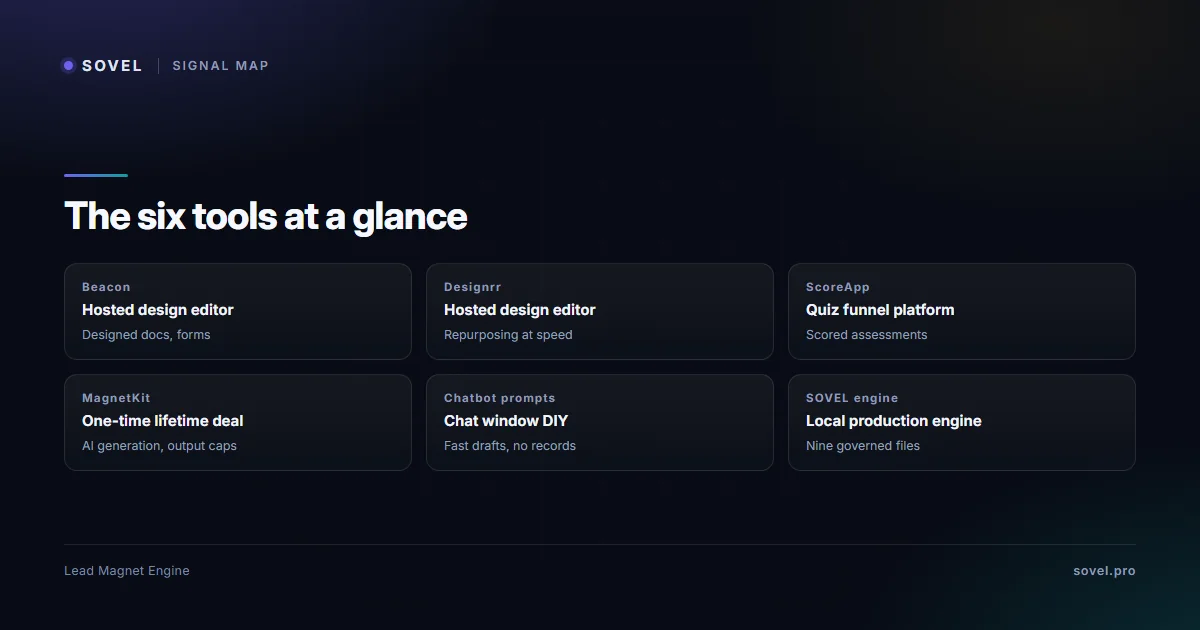
The six tools, one honest paragraph each
The six below are what a serious buyer of lead magnet generator software actually shortlists right now: two hosted editors with real template libraries, one quiz funnel platform, one one-time lifetime deal, the chatbot prompt route, and a local production engine. Free tiers exist across several of these, and they get their own treatment in the guide on free lead magnet generator options; this comparison is about the tools themselves.
| Tool | Type | Runs on | Core output | Best fit |
|---|---|---|---|---|
| Beacon | Hosted design editor | Vendor cloud | Designed PDFs and capture forms | Teams wanting designed documents fast |
| Designrr | Hosted design editor | Vendor cloud | Ebooks and PDFs from imported content | Content repurposing at speed |
| ScoreApp | Quiz funnel platform | Vendor cloud | Scored assessments and result pages | Service businesses selling self-diagnosis |
| MagnetKit | One-time lifetime deal | Vendor cloud | AI-generated magnets with output caps | Budget buyers testing AI generation |
| Chatbot prompts | Chat window DIY | Anywhere the chatbot runs | Unstructured text you rebuild by hand | Idea testing before any tool purchase |
| SOVEL LEAD MAGNET ENGINE | Local production engine | Your machine | Nine governed files per run | Consultants, agencies, technical marketers |
1. Beacon: the visual editor for capture-ready documents
Beacon, at beacon.by, is a hosted editor built around drag-and-drop templates and close integration with lead capture. Its strength is exactly what the name suggests: you get a designed document and a form attached to it without touching a design tool. Where it struggles: the structure of the content is still your job, the subscription cost recurs for as long as the assets stay live, and the material you paste into the editor leaves your machine for the vendor’s cloud. As lead magnet generator software, Beacon solves appearance and speed, and little else. Shortlist it when the priority is a designed document, and when nothing you feed it is client-confidential.
2. Designrr: fast ebooks and PDFs from existing content
Designrr, at designrr.io, takes existing content, a blog post URL, a document, a transcript, and repackages it into a designed ebook or PDF using its template library. Of the six, it is the lead magnet generator software closest to a repurposing machine, and its strength is speed: content you already have becomes a gated asset in an afternoon. Where it struggles: repackaging is not structuring, so the asset inherits the organization of the source rather than a format chosen for the promise, and the same cloud and subscription realities apply. Shortlist Designrr when you have strong existing material to repurpose and want a polished container for it.
3. ScoreApp: quizzes and scorecards as a funnel
ScoreApp, at scoreapp.com, sits adjacent to lead magnet generator software: it is a quiz funnel platform that builds scored assessments, result pages and the follow-up logic around them. Its strength is the funnel mechanics, scoring rules, segmentation by result and integration with email, which no document tool replicates. Where it struggles: content production is secondary; you write or supply the questions and the result copy, and the platform is a subscription service built for ongoing campaigns. Shortlist ScoreApp when your promise is self-diagnosis and you plan to run assessments as a recurring motion rather than produce one-off assets.
4. MagnetKit: the one-time lifetime deal
MagnetKit is an AI lead magnet generator sold as a one-time licence through deal marketplaces, with tiers differentiated by a monthly output allowance. Its strength is the billing model: no monthly bill, which is the same promise a local engine makes. As lead magnet generator software it is genuine, but the deal-marketplace origin shapes its limits: the licence is one-time while the service is still hosted, so your material and your assets live on the vendor’s infrastructure, and support and update continuity depend on the deal rather than on a product company you have a direct relationship with. There is also no governance layer: nothing records where the generated content came from or what was checked. Shortlist MagnetKit when the budget is the deciding constraint and the material going in is yours rather than a client’s.
5. The chatbot prompt route: free, flexible, unaccountable
A chat window with a good prompt is the zero-cost route, and it deserves honest treatment because many buyers try it first. Its strengths are flexibility and price: any chatbot will draft a checklist or a framework outline in seconds. Where it struggles is everything after the draft: no structure enforcement, no files, no records of where claims came from, and every asset rebuilt by hand in a document editor, with the output living in a chat history nobody can audit later. Lead magnet formats are exactly what this route lacks, which is why the prompt route’s results feel fluent and unfinished at the same time. Use it to test ideas; buy lead magnet generator software when a format needs enforcing.
6. SOVEL LEAD MAGNET ENGINE: the local production engine
The sixth candidate is lead magnet generator software built for governed production; the SOVEL LEAD MAGNET ENGINE product page documents it in depth, so the comparison-relevant summary is short: it runs entirely on your machine, takes a brief, and returns nine governed output files per run, with every claim labelled in an evidence ledger and every draft marked for human review. Its strengths are the things hosted tools structurally cannot offer: client-confidential input never leaves the computer, the format decision and its reasoning are recorded, and a failed quality gate stops the run rather than shipping a weak draft. Where it struggles: there is no drag-and-drop design editor and no form building; the engine produces governed drafts, and your existing form and email stack delivers them. Shortlist it when the work is client-facing, the volume is steady, and the priority is verifiable structure over visual polish.

How the six differ where it matters
Two differences decide most purchases of lead magnet generator software, and neither appears prominently in feature grids.
The first is where the tool runs. Hosted tools run on the vendor’s cloud, which means the text you paste in, the draft that comes back, and the finished asset all live on servers you do not control; that is convenient and, for client work, disqualifying. The guide on local AI content generation covers why consultants and agencies treat that as a hard boundary rather than a preference. A local engine keeps the entire loop, input, drafting, checking, export, on your own machine, and of the six candidates it is the only lead magnet generator software with that privacy model, which is a difference of architecture rather than a toggle. The chatbot route is the worst of both worlds here: your prompts and their answers sit in a hosted chat history indefinitely.
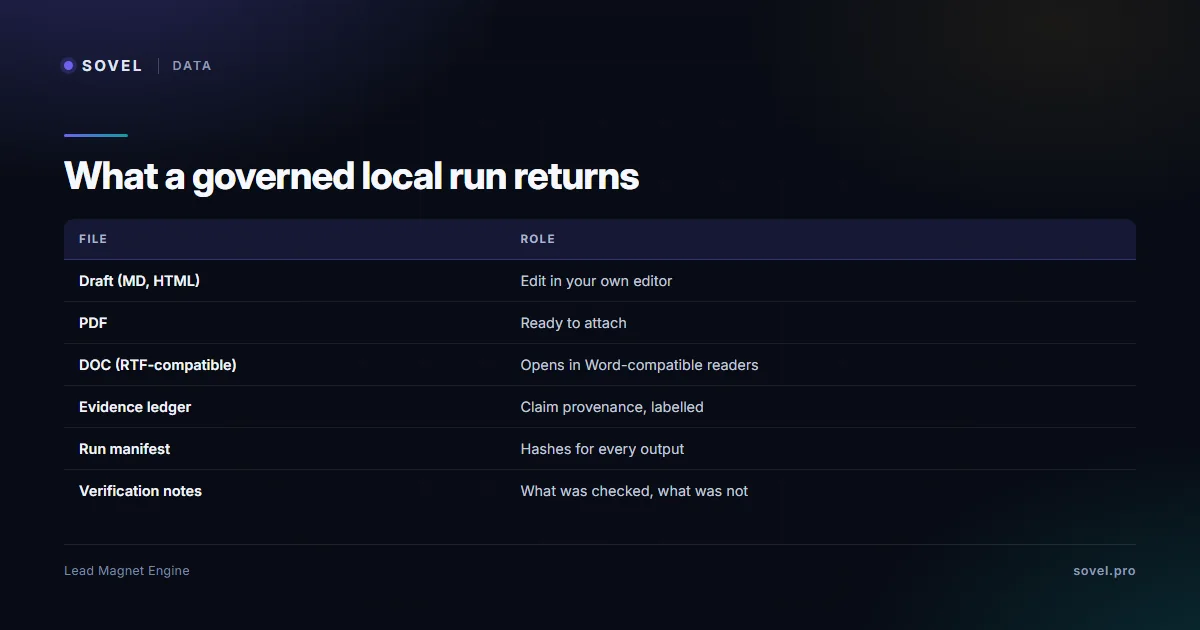
The second is what you actually receive. A hosted editor gives you a designed document and a form. A quiz platform gives you a live assessment page. A lifetime deal gives you generated text inside its own web app. A local production engine gives you files: in the engine’s case, nine per run, including editable Markdown and HTML, a PDF and a Word-compatible document, plus the evidence ledger, the run manifest and the verification notes. Files matter because they are portable: they open in your editor, attach to any form stack, and survive the vendor. Anything that lives only inside a web app dies with the subscription or the deal. That is the real fork in lead magnet generator software: containers versus files.

The feature checklist to run on any tool
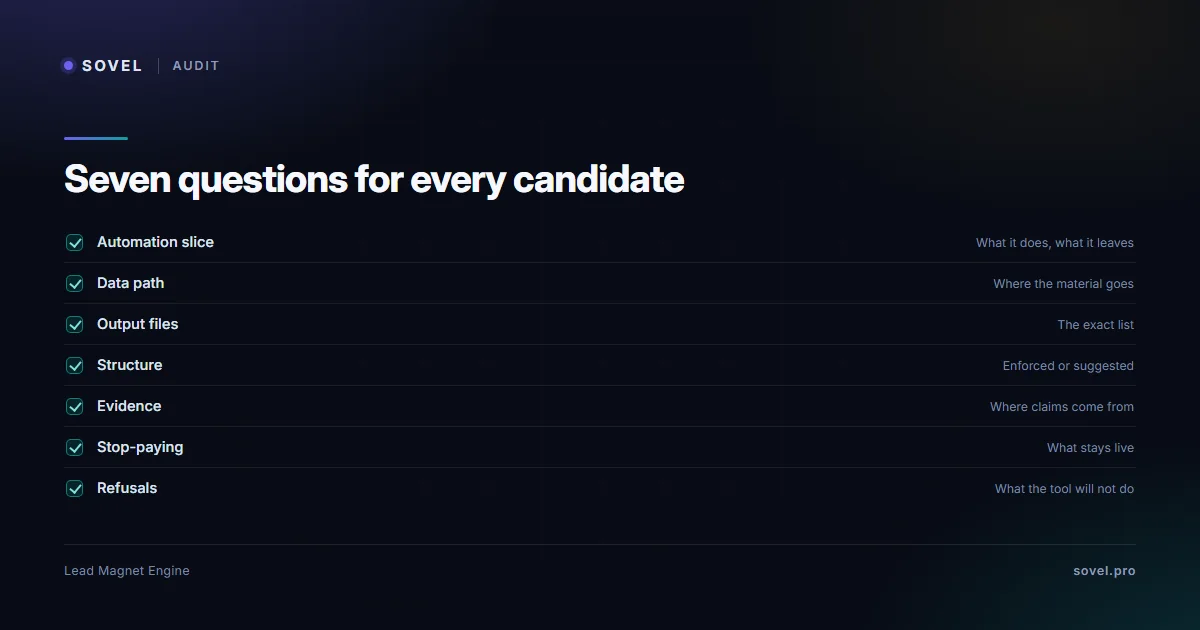
Whatever lead magnet generator software you shortlist, run the same seven checks against it. The point of a checklist is that it produces the same questions for every candidate, which makes the answers comparable instead of anecdotal.
- What does it automate, and what does it leave to you? Every tool automates one slice. Name the slice before buying, because a tool that automates rendering will not fix structure, and a tool that automates structure will not fix design.
- Where does my material go? Follow the data: if the input leaves your machine, that is a fact about the lead magnet generator software, not a setting.
- What files come out? Ask for the exact list. An editable file you own beats a beautiful asset locked in someone’s web app.
- Is the structure enforced or suggested? A template suggests; a format spec enforces. The difference shows up as rework.
- Where is the evidence? If the tool drafts content, can it tell you where each claim came from? If it cannot, every draft needs source-checking by hand.
- What happens if I stop paying? For subscriptions, ask what stays live. For lifetime deals, ask who fixes bugs in year two. For a local engine, nothing stops, because the software is on your machine.
- What does the tool refuse to do? A governed engine stops itself on a failed gate. A tool with no refusals is a tool with no checks, and the rework lands on you.
Run these seven against any lead magnet generator software candidate and the comparison fills in honestly. Most buyers skip question five and six, which is exactly where the unpleasant surprises live: content provenance and continuity are the two things demos never show.
| Check | What it exposes | Which tools pass cleanly |
|---|---|---|
| Where material goes | Privacy model | Local engine only |
| Exact output files | Portability | Local engine; hosted editors partly |
| Structure enforcement | Rework volume | Local engine; quiz platform for its format |
| Content evidence | Fact-checking burden | Local engine (evidence ledger) |
| Stop-paying scenario | Continuity | Local engine; lifetime deals partly |
Where the evidence lives: provenance and records
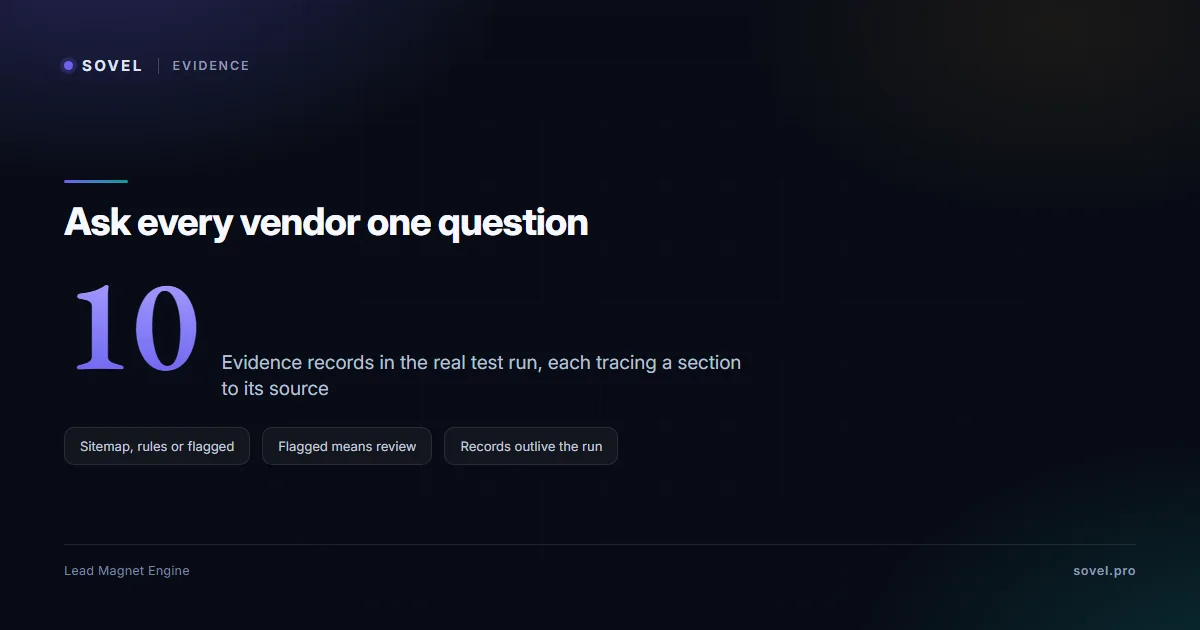
Feature lists describe what a tool claims to do; records describe what it actually did. The distinction sounds abstract until a client asks where a statistic in your lead magnet came from, or you reopen an asset six months later and cannot remember why a section reads the way it does. Hosted editors and quiz platforms keep no provenance record of the content at all: the draft is whatever you pasted or wrote, and the platform is a container. The lifetime deal generates content with no visible sourcing. The chatbot route at least shows its reasoning, but a chat history is not a record you can hand to a reviewer. Provenance is the quiet difference between lead magnet generator software that merely produces and software you can defend.
A governed production run writes its own record as it works. The evidence ledger labels where every section’s content came from: your sitemap, the bundled rulebooks, or material flagged for your review because nothing verified it. The run manifest records the version, the inputs and the file hashes, so the output can be checked for integrity later. The verification notes state what was verified and what was not, in the engine’s own words. This is the layer that makes lead magnet generator software auditable rather than merely productive, and it is also the layer a buyer can test: ask any vendor what record their lead magnet generator software keeps of a run, and grade the answer.
Which tool fits which team
Solo creators building assets for their own audience usually want appearance and speed, which points at the hosted editors. Consultants and freelancers delivering client work hit the privacy boundary first: their material cannot leave their machine, which makes a local engine the only clean fit among the six. Agencies producing for many clients add a second requirement, repeatability across briefs, and the governed pipeline’s recorded decisions are what make week-twenty output match week-two output; the consultant plays guide shows the production side of that. Technical marketers and AI-heavy teams care about the third axis: whether the tool fits an agent workflow, where the engine’s MCP server is a genuine differentiator.
The uncomfortable summary: two of the six candidates are built for documents that look finished, one is built for funnels, one for price, one is free and unaccountable, and one is built for governed production. None of them is the best lead magnet generator software in the abstract; each is the best lead magnet generator software for one of those four teams. The mistake to avoid is buying the demo that impressed you rather than the tool that matches your actual constraint, because the constraint, privacy, repeatability, price or polish, is what will decide whether the purchase gets used in month three.
FAQ
Which lead magnet generator software is best for agencies?
For agency work the deciding features are privacy and repeatability: client material must stay on agency machines, and output quality must hold across many briefs. Among the six compared here, a local production engine is the only candidate that satisfies both by design; hosted editors can be made to work with careful material choices, but the privacy model stays theirs. The full reasoning, including seat and support considerations, is on the SOVEL LEAD MAGNET ENGINE product page.
Is one-time pricing actually better than a subscription for these tools?
It depends on usage horizon more than ideology. A subscription suits ongoing campaigns with vendor-managed hosting; a one-time licence suits steady production on your own infrastructure, because the cost stops renewing while the software keeps working. The math for both models of lead magnet generator software, with the third-party numbers, is worked through in the lead magnet software pricing guide, which owns the price comparisons for this site.
Do any of these tools run fully offline?
Only the local engine runs the full pipeline offline, because it lives on your machine and needs no account or external API for its standard pipeline, which makes it the only lead magnet generator software in this comparison that works without a connection. Hosted editors, the quiz platform and the lifetime deal are cloud services by definition; the chatbot route runs wherever the chatbot runs, which is never offline. If offline operation matters for client confidentiality or travel, that constraint alone removes four of the six candidates.
Can I trust AI-generated lead magnets without editing them?
No, and a trustworthy tool will say so itself. Generated drafts need human review for factual fit, client specificity and advice quality; the honest products mark that requirement explicitly rather than promising publish-ready output. In a governed run, the evidence ledger tells you which sections came from verified rules and which came from unverified material, which concentrates your review time where it actually matters.
What should I test in a demo before buying lead magnet generator software?
Test the work, not the output: give the tool one real brief and time the full loop from brief to finished file. Check the exact files you receive, where the material went during the run, what record the tool kept, and what the draft looks like when you open it in your own editor. The seven-question checklist earlier in this guide is written to be run live in a demo; a vendor who cannot answer question five, where is the evidence, has answered it anyway.
Do I still need a designer if I use generator software?
Usually, some design help, yes. Generator software produces structure and content; a branded cover, a styled template or a themed quiz page is a separate craft. The exception is teams whose audience values substance over polish, where a clean default design is enough. The honest framing: buy the generator for the bottleneck it fixes, structure and production, and keep design where it belongs, either a template library or a designer’s one-time pass on the master file.
—
*Comparison based on product documentation and vendor pages as of November 2026. Price figures for every tool are maintained in the pricing guide rather than here, so this page never shows a stale number.*