
Lead magnet software for consultants has one job that most tools ignore: it must survive a client project. The draft has to be editable, the data has to stay under control and the licence has to allow client work. A pretty template that cannot clear those three points is a liability.
This guide covers five checks that matter before you buy. It also explains why a monthly design subscription and a one-time production engine solve different problems, and how to compare the real first-year cost without talking yourself into the wrong tool.
The short answer: buy for the client handoff, not the demo. A consultant needs a draft that can be reviewed, edited and delivered. The design layer is secondary.
Why is lead magnet software for consultants different?
A consultant writes for someone else. The brief comes from a client. The draft goes back to the client. The final asset carries the client’s brand. Every step adds a permission question.
A solo creator can publish a rough PDF and move on. A consultant cannot. The client expects a file that opens in Word, a title that does not name another customer and a process that can survive an audit question.
That is why lead magnet software for consultants needs more than a template library. It needs client-use rights, a clear data boundary, editable exports and a review record. Those four requirements shape the buying decision more than the number of fonts.

Check 1: Does the licence allow client work?
The first check is legal, not technical. Some low-cost licences cover personal use only. A consultant who uses that licence for a paid client project is outside the grant.
Look for a licence that names client and commercial use. Check the seat count. Check whether the licence covers one named user or one machine. Check what happens when a client asks for the source file.
Lead magnet software for consultants should state the client-use scope in plain language. If the licence page is vague, ask before you pay. A licence that saves ₹2,000 and creates a client dispute is not a saving.
The Pro and Agency editions of SOVEL Lead Magnet Engine are built around this distinction. Personal covers own-brand work. Pro covers client and commercial projects. Agency covers multi-client work and five seats. The difference is contractual, not a hidden feature lock.
Check 2: Where does the client data go?
The second check is the data map. A client brief can contain a customer name, a pricing plan, an internal process or a security detail. You need to know where that text travels.
Ask four questions:
- Does the tool run on your machine or on a server?
- Does it store the brief after the run?
- Does it send the brief to a third-party model?
- Can you delete the run and the memory?
Lead magnet software for consultants should answer those questions without a sales call. A local-first tool keeps the brief and draft on your machine. A cloud tool sends them to a server. Neither is automatically wrong. The buyer needs to know which one they are using.
SOVEL Lead Magnet Engine runs locally by default. The topic is redacted, the ICP filename is hashed and the subject is neutral. Optional external judgment is off. The report records when data was sent, even if the request later failed.

Check 3: Can the client edit the file?
A consultant rarely delivers a PDF and stops. The client wants to change a sentence, add a logo or send the file to a designer. The export format decides how painful that handoff becomes.
Markdown is easy to edit in a CMS. HTML is easy to review in a browser. PDF is easy to share but hard to edit. DOC is easy for Word users. JSON is useful for automation and audit.
Lead magnet software for consultants should produce at least three of those formats. A tool that only exports a PDF creates extra work at the end of every project. A tool that exports DOC and HTML gives the client options.
The DOC detail matters. Some tools call an RTF file a DOCX. A native .docx and an RTF-compatible .doc are different files. Ask which one you get. If the client’s brand team requires .docx, test the file before you promise it.
Check 4: What does the first year actually cost?
A monthly subscription looks cheap at $19. The first-year cost is not $19. It is $228, plus taxes, plus the months you forget to cancel. At $49 per month, the first year is $588.
Lead magnet software for consultants should be compared on a twelve-month basis. Use the same scope: one user, client work, the formats you actually deliver.
| Option | First-year cost | What you get |
|---|---|---|
| SOVEL Pro | ₹4,999 once | Draft engine, nine formats, client work, local runtime |
| Beacon Professional | About ₹55,224 per year | Visual builder, forms, landing pages |
| Designrr Pro | About ₹43,956 per year | Ebook templates, visual editor |
| Jasper | About ₹77,760 per year | AI copy generation |
The table is not a like-for-like feature comparison. Beacon and Designrr do jobs SOVEL does not do. The point is the cost shape. A one-time production tool can be cheaper than a year of a design subscription, but only if it covers the job you need.

Check 5: Who reviews the draft?
The fifth check is the review loop. A consultant needs a draft that someone can check. That means a clear status, a list of claims and a way to see what changed.
Lead magnet software for consultants should mark the output as a draft. It should label evidence. It should produce a summary a client can read without opening the JSON. It should make the review step obvious.
A tool that presents every output as publish-ready creates risk. The consultant trusts the label, sends the file and discovers a weak claim after the client publishes it. A draft label is not a legal shield, but it sets the expectation.
SOVEL Lead Magnet Engine writes DRAFT · HUMAN_REVIEW_REQUIRED into the output. The evidence ledger labels each section. The verification notes explain what the manifest checks. The review is still manual. The engine makes it easier to start.
How does lead magnet software for consultants fit a real project?
A typical project has six steps.
- Intake. The client explains the reader, the offer and the constraint.
- Format. You choose a checklist, framework, case study or scorecard.
- Draft. The engine produces the first version.
- Review. You check the claims, the structure and the tone.
- Client review. The client marks up the DOC or HTML.
- Delivery. You send the final PDF and the editable source.
The engine helps at steps 3 and 4. It does not replace the intake conversation or the client review. It reduces the blank-page time and gives the review a structure.
A consultant who writes two lead magnets a month can recover the Pro price on the first project if the draft saves four hours. The math is not the subscription. The math is the billable time.

Where does lead magnet software for consultants fit against design tools?
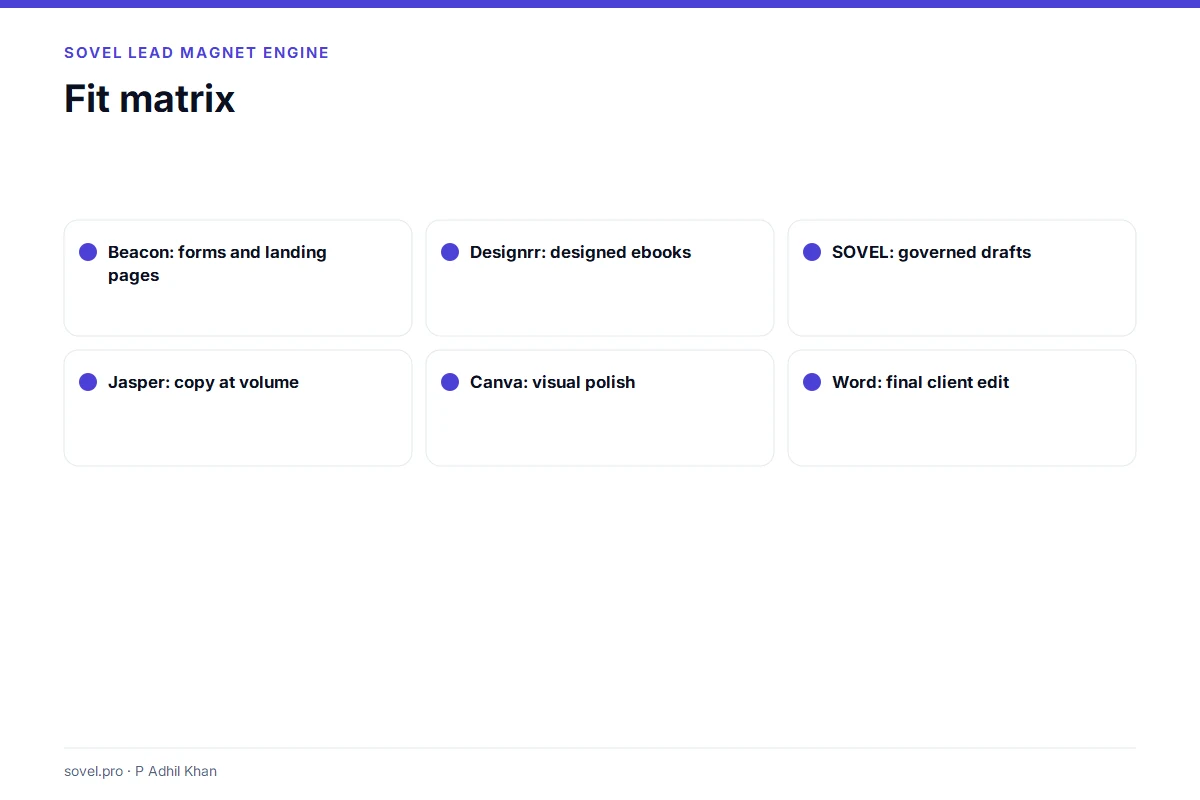
Beacon is better when the client needs a landing page, a form and a custom domain. Designrr is better when the client needs a designed ebook with templates. Canva is better when the client needs visual assets. Word is better when the client needs to edit the final text.
Lead magnet software for consultants is better when the hard part is the argument. It produces the draft that the design tool or the client’s editor can finish. The tools can work together. The mistake is buying one and expecting it to do all four jobs.
A practical stack for a consultant looks like this: SOVEL for the draft, Word for client edits, Canva or Designrr for the visual layer, and the client’s form tool for capture. The stack is honest about each layer.
What should a consultant ask before buying lead magnet software?
Ask for the licence in writing. Ask where the data goes. Ask which export formats are native. Ask what the review status means. Ask what happens when the client wants a refund.
A good vendor answers those questions without a demo. A vague answer is a signal. The consultant is buying a client-facing workflow, not a toy.
Lead magnet software for consultants should also be testable. Run one small draft before you put a client brief into it. Open the DOC in Word. Check the PDF. Read the ledger. If the test run is clean, the tool is ready for a real project.
How should a consultant test lead magnet software for consultants?
Do not start with a client brief. Start with a public topic that has the same shape as the client project. If the client needs an onboarding checklist, write a public onboarding checklist. If the client needs a scorecard, build a scorecard.
Run the draft twice. The first run shows you the default output. The second run shows you whether the tool is stable. A tool that produces a different structure every time is hard to review. A tool that produces the same structure with better content is easier to trust.
Open every file. The HTML should load without a server. The PDF should open in a browser and a reader. The DOC should open in Word and keep its headings. The Markdown should paste into a CMS without broken tables. The JSON should parse.
Read the evidence ledger. Look for claims that need a source. If the ledger labels everything as verified, ask how. If it labels everything as unverified, the tool is honest but the draft needs more work.
Then run one paid project with a small scope. Tell the client that the first draft is machine-assisted and that you will review every claim. Use the draft as a starting point, not as a finished deliverable. The test is not whether the tool writes like a human. The test is whether it saves review time.
A consultant who skips the test buys on the demo. A consultant who runs the test buys on the workflow. Lead magnet software for consultants should survive a real brief before it becomes part of the delivery stack.

What does a client-ready handoff include?
A client-ready handoff has five parts. The final PDF, the editable DOC, the source notes, the review status and the usage terms. The PDF is what the client shares. The DOC is what the client edits. The source notes explain where the claims came from. The review status tells the client what was checked. The usage terms explain what the client may do with the file.
Lead magnet software for consultants should make those five parts easy to assemble. The PDF and DOC come from the export. The source notes come from the evidence ledger. The review status comes from the report. The usage terms come from the licence.
A handoff that contains only a PDF is incomplete. The client cannot edit it, the reviewer cannot trace it and the next agency cannot reuse it. The consultant looks less professional, even if the PDF looks good.
A handoff that contains the raw task text is also wrong. The client does not need your internal brief. The client needs the finished files and the review record. Keep the internal brief in your project folder. Send the reviewed package.
This is where lead magnet software for consultants earns its price. It turns a writing job into a package with clear boundaries. The consultant can deliver faster and the client can see what was reviewed. The package is the product, not just the words.
For current competitor pricing, see Beacon pricing and Designrr pricing.
Frequently asked questions
What is lead magnet software for consultants?
Lead magnet software for consultants is a tool that turns a client brief into a structured lead-magnet draft, with client-use rights and editable exports. It is a production tool, not a lead-capture platform.
Can I use a personal licence for client work?
Usually no. A personal licence covers own-brand projects. Client work needs a commercial or client-use licence. Check the edition terms before you use the tool for a paid project.
Is one-time lead magnet software cheaper than a subscription?
It can be, if it covers the job. Compare the twelve-month cost and the features you actually use. A one-time tool that lacks forms and landing pages is not cheaper if you still have to buy those tools.
Does lead magnet software for consultants replace a designer?
No. It produces the draft. A designer handles layout, typography and brand assets. The consultant still needs a design layer for a client-ready PDF.
Can I edit the output in Microsoft Word?
It depends on the export. A DOC file opens in Word. A native .docx is not the same as an RTF-compatible .doc. Test the file before you promise a client.
How do I protect client data?
Use a local-first tool, keep the brief in a project folder, avoid optional cloud services and delete the run when the project ends. Read the privacy policy and the data map.
How many client projects can I run?
The licence limits seats and client-use scope, not the number of projects. Check the edition terms. SOVEL does not impose a per-run document cap.
What is the best first test?
Run a short checklist with a public topic. Open every output. Check the DOC in Word and the PDF in a browser. Then try a real client brief with the client’s permission.
Four more questions consultants ask
Is lead magnet software for consultants only for writing?
No. Lead magnet software for consultants covers the draft, the review record and the export package. The writing is one part of the job. The handoff is the other part.
Can lead magnet software for consultants help with proposals?
It can produce a checklist or scorecard that supports a proposal. Lead magnet software for consultants does not write the commercial proposal itself. It gives the client a useful asset that makes the proposal easier to understand.
Does lead magnet software for consultants need a monthly subscription?
Not always. A one-time licence can cover the production layer. Lead magnet software for consultants should be compared on the twelve-month cost, not the first month.
How do I explain the tool to a client?
Say that lead magnet software for consultants produces a reviewed first draft. The client still gets a human review, a final edit and a design pass. That explanation is accurate and sets the right expectation.
The buying decision
Lead magnet software for consultants is a client-work purchase. The licence, the data map, the export formats and the review status matter more than the template gallery. A tool that clears those four points is worth testing. A tool that avoids the questions is not.
Before you buy, run one small client-style brief through the tool and open every file. The SOVEL Lead Magnet Engine page lists the editions. For the step-by-step process, read the lead magnet creation workflow. For the data boundary, read lead magnet privacy. For the format choice, see the nine formats.